
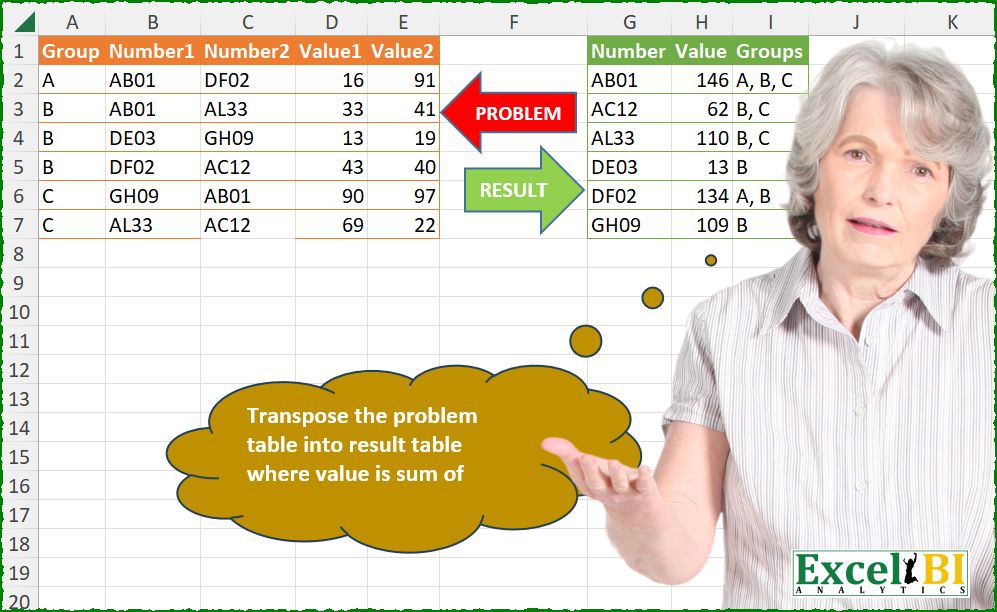
Transpose the problem table into result table where value is sum of Values from problem table.
📌 Challenge Details and Links
ExcelBI Power Query Challenge Number: 275
Challenge Difficulty: ⭐️
📥Download Sample File
📥Link to the solutions on LinkedIn
Solving the challenge of Transpose table, summing values from with Power Query
Power Query solution 1 for Transpose table, summing values from, proposed by Kris Jaganah:
let
  A = Excel.CurrentWorkbook(){[Name = "Table1"]}[Content],
  B = Table.Unpivot(A, {"Number1", "Number2"}, "Num", "Number"),
  C = Table.UnpivotOtherColumns(B, {"Group", "Num", "Number"}, "ValNo", "Val"),
  D = Table.AddColumn(
    C,
    "Uniq",
    each if Text.End([Num], 1) = Text.End([ValNo], 1) then [Num] else null
  ),
  E = Table.SelectRows(D, each ([Uniq] <> null)),
  F = Table.Group(
    E,
    "Number",
    {{"Sum", each List.Sum([Val])}, {"Group", each Text.Combine([Group], ",")}}
  ),
  G = Table.Sort(F, "Number")
in
  G
Power Query solution 2 for Transpose table, summing values from, proposed by Alejandro Simón 🇵🇦 🇪🇸:
let
  Origen = Excel.CurrentWorkbook(){[Name = "Tabla1"]}[Content],
  Grp = Table.AddColumn(
    Origen,
    "A",
    each
      let
        a = List.Skip(Record.ToList(_)),
        b = List.Zip(List.Split(a, 2)),
        c = Table.FromRows(b, {"Number", "Value"})
      in
        c
  )[[Group], [A]],
  Exp = Table.ExpandTableColumn(Grp, "A", Table.ColumnNames(Grp[A]{0})),
  Sol = Table.Sort(
    Table.Group(
      Exp,
      {"Number"},
      {{"Value", each List.Sum([Value])}, {"Group", each Text.Combine([Group], ", ")}}
    ),
    {"Number", 0}
  )
in
  Sol
Power Query solution 3 for Transpose table, summing values from, proposed by Luan Rodrigues:
let
  Fonte = List.Transform(
    {1 .. (Table.ColumnCount(Tabela1) - 1) / 2},
    (x) =>
      let
        a = Table.SelectColumns(
          Tabela1,
          List.Select(
            Table.ColumnNames(Tabela1),
            (y) => y = "Number" & Text.From(x) or y = "Value" & Text.From(x) or y = "Group"
          )
        ),
        b = Table.RenameColumns(a, List.Zip({Table.ColumnNames(a), {"Group", "Number", "Value"}}))
      in
        b
  ),
  cmb = Table.Combine(Fonte),
  grp = Table.Group(
    cmb,
    {"Number"},
    {{"Value", each List.Sum(_[Value])}, {"Groups", each Text.Combine(_[Group], ", ")}}
  ),
  res = Table.Sort(grp, {"Number"})
in
  res
Power Query solution 4 for Transpose table, summing values from, proposed by An Nguyen:
let
  S = Excel.CurrentWorkbook(){[Name = "Table1"]}[Content],
  Z = List.Zip({List.Repeat(S[Group], 2), S[Number1] & S[Number2], S[Value1] & S[Value2]}),
  T = Table.FromRows(Z, {"Group", "Number", "Value"}),
  R = Table.Sort(
    Table.Group(
      T,
      "Number",
      {{"Value", each List.Sum([Value])}, {"Group", each Text.Combine([Group], ", ")}}
    ),
    {"Number", Order.Ascending}
  )
in
  R
Power Query solution 5 for Transpose table, summing values from, proposed by Ramiro Ayala Chávez:
let
  S = Excel.CurrentWorkbook(){[Name = "Table1"]}[Content],
  a = Table.ToColumns(S),
  b = List.Repeat(a{0}, 2),
  c = a{1} & a{2},
  d = a{3} & a{4},
  e = Table.FromRows(List.Zip({c, d, b})),
  f = Table.Group(
    e,
    "Column1",
    {{"Value", each List.Sum([Column2])}, {"Groups", each Text.Combine(List.Sort([Column3]), ", ")}}
  ),
  Sol = Table.RenameColumns(Table.Sort(f, {"Column1", 0}), {"Column1", "Number"})
in
  Sol
Power Query solution 6 for Transpose table, summing values from, proposed by Eric Laforce:
let
  Source = Excel.CurrentWorkbook(){[Name = "tData275"]}[Content],
  N = (Table.ColumnCount(Source) - 1) / 2,
  Transform = List.Transform(
    Table.ToRows(Source),
    (r) => List.Transform(List.Zip({List.Range(r, 1, N), List.Range(r, N + 1, N)}), each {r{0}} & _)
  ),
  Combine = Table.FromRows(List.Combine(Transform), {"Group", "Number", "Value"}),
  Group = Table.Group(
    Combine,
    "Number",
    {{"Value", each List.Sum([Value])}, {"Group", each Text.Combine([Group], ", ")}}
  ),
  Sort = Table.Sort(Group, "Number")
in
  Sort
Power Query solution 7 for Transpose table, summing values from, proposed by Seokho MOON:
let
  Source = Excel.CurrentWorkbook(){[Name = "Table1"]}[Content],
  Cols = Table.ToColumns(Source),
  Lst = List.Transform(
    List.Split(List.Skip(Cols), 2) & {List.Repeat({Cols{0}}, 2)},
    each _{0} & _{1}
  ),
  Tbl = Table.FromColumns(Lst, {"Number", "Value", "Group"}),
  Res = Table.Sort(Table.Group(Tbl, "Number", Agg), "Number"),
  Agg = {{"Value", each List.Sum([Value])}, {"Groups", each Text.Combine(List.Sort([Group]), ", ")}}
in
  Res
Power Query solution 8 for Transpose table, summing values from, proposed by Seokho MOON:
let
  Source = Excel.CurrentWorkbook(){[Name = "Table1"]}[Content],
  Rows = List.TransformMany(Table.ToRows(Source), each {1, 2}, (x, y) => List.Alternate(x, 1, 1, y)),
  Res = Table.Group(
    Table.FromRows(List.Sort(Rows, each _{1}), {"Group", "Number", "Value"}),
    "Number",
    Agg
  ),
  Agg = {{"Value", each List.Sum([Value])}, {"Groups", each Text.Combine([Group], ", ")}}
in
  Res
Power Query solution 9 for Transpose table, summing values from, proposed by Meganathan Elumalai:
let
  Source = Excel.CurrentWorkbook(){[Name = "Table1"]}[Content],
  Tbl = Table.FromRows(
    List.TransformMany(
      Table.ToRows(Source),
      (f) => List.Zip(List.Split(List.Skip(f), 2)),
      (x, y) => {x{0}} & y
    ),
    {"Group", "Number", "V"}
  ),
  Result = Table.Sort(
    Table.Group(
      Tbl,
      "Number",
      {{"Value", each List.Sum([V])}, {"Groups", each Text.Combine([Group], ", ")}}
    ),
    "Number"
  )
in
  Result
Power Query solution 10 for Transpose table, summing values from, proposed by Antriksh Sharma:
let
  Source = Table1,
  A =
    let
      a = Table.ToColumns(Source),
      b = a{0},
      c = List.Skip(a),
      d = List.Alternate(c, 1, 1, 1),
      e = List.Alternate(c, 1, 1, 0),
      f = Table.FromColumns({b} & d, {"Groups", "Number", "Value"})
        & Table.FromColumns({b} & e, {"Groups", "Number", "Value"})
    in
      f,
  B = Table.Group(
    A,
    "Number",
    {{"Value", each List.Sum([Value])}, {"Groups", each Text.Combine(List.Sort([Groups]), ", ")}}
  ),
  C = Table.Sort(B, {{"Number", Order.Ascending}})
in
  C
Power Query solution 11 for Transpose table, summing values from, proposed by Peter Krkos:
let
  Transformed = Table.FromRows(
    List.TransformMany(
      Table.ToRows(Source),
      each List.Zip(List.Split(List.Skip(_), 2)),
      (x, y) => {x{0}} & y
    )
  ),
  Result = Table.Sort(
    Table.FromRows(
      Table.Group(
        Transformed,
        {"Column2"},
        {
          {
            "L",
            each {_{0}[Column2], List.Sum([Column3]), Text.Combine([Column1], ", ")},
            type table
          }
        }
      )[L],
      type table [Number = text, Value = Int64.Type, Groups = text]
    ),
    "Number"
  )
in
  Result
Power Query solution 12 for Transpose table, summing values from, proposed by Krzysztof Kominiak:
let
  Source = Excel.CurrentWorkbook(){[Name = "Table1"]}[Content],
  A = Table.AddColumn(
    Source,
    "tmp",
    each [
      a = Record.ToList(_),
      b = List.Skip(a, 1),
      c = List.Split(b, List.Count(b) / 2),
      d = Table.FromColumns({c{0}, c{1}})
    ][d]
  )[[Group], [tmp]],
  B = Table.ExpandTableColumn(A, "tmp", {"Column1", "Column2"}, {"Number", "Value"}),
  Result = Table.Sort(
    Table.Group(
      B,
      {"Number"},
      {
        {"Value", each List.Sum([Value]), type number},
        {"Groups", each Text.Combine([Group], ", "), type text}
      }
    ),
    "Number"
  )
in
  Result
Power Query solution 13 for Transpose table, summing values from, proposed by Maciej Kopczyński:
let
 source = Excel.CurrentWorkbook(){[Name = "tblStart"]}[Content],
 unpivotOtherCols1 = Table.UnpivotOtherColumns(
 source,
 {"Group", "Value1", "Value2"},
 "A",
 "Number"
 ),
 unpivotOtherCols2 = Table.SelectRows(
 Table.UnpivotOtherColumns(unpivotOtherCols1, {"Group", "A", "Number"}, "C", "D"),
 each Text.End([A], 1) = Text.End([C], 1)
 )[[Group], [Number], [D]],
 grouping = Table.Sort(
 Table.Group(
 unpivotOtherCols2,
 {"Number"},
 {
 {"Value", each List.Sum([D]), type number},
 {"Groups", each Text.Combine([Group], ", "), type text}
 }
 ),
 {"Number", Order.Ascending}
 )
in
 grouping

I also think that the last record in the given solution table lacks one group in the 'Groups' column - shouldn't it be B, C?  Awesome challenge!
Power Query solution 14 for Transpose table, summing values from, proposed by Fredson Alves Pinho:
let
  Fonte = Excel.CurrentWorkbook(){[Name = "Tabela1"]}[Content],
  fn = (id) =>
    Table.RenameColumns(
      Fonte,
      {{"Number" & id, "Number"}, {"Value" & id, "Value"}, {"Group", "Groups"}}
    )[[Number], [Value], [Groups]],
  upvt = Table.Sort(Table.Combine({fn("1"), fn("2")}), "Number"),
  grp = Table.Group(
    upvt,
    "Number",
    {{"Value", each List.Sum([Value])}, {"Groups", each Text.Combine([Groups], ", ")}}
  )
in
  grp
Power Query solution 15 for Transpose table, summing values from, proposed by Aleksandar Kovacevic:
let
  Source = Excel.CurrentWorkbook(){[Name = "Table1"]}[Content],
  Tbl = Table.RenameColumns(
    Table.SelectColumns(Source, {"Group", "Number1", "Value1"}),
    {{"Number1", "Number"}, {"Value1", "Value"}}
  )
    & Table.RenameColumns(
      Table.SelectColumns(Source, {"Group", "Number2", "Value2"}),
      {{"Number2", "Number"}, {"Value2", "Value"}}
    ),
  Res = Table.Sort(
    Table.Group(
      Tbl,
      "Number",
      {{"Value", each List.Sum(_[Value])}, {"Group", each Text.Combine(_[Group], ", ")}}
    ),
    "Number"
  )
in
  Res
Power Query solution 16 for Transpose table, summing values from, proposed by Sanket Doijode:
let
  Source = Excel.CurrentWorkbook(){[Name = "Table1"]}[Content],
  Group1 = Table.ExpandTableColumn(
    Table.Group(
      Source,
      {"Group"},
      {
        {
          "Count",
          each Table.FromColumns(
            List.Transform(
              List.Split(Table.ToColumns(Table.RemoveColumns(_, "Group")), 2),
              each List.Combine(_)
            ),
            {"Number", "Value"}
          )
        }
      }
    ),
    "Count",
    {"Number", "Value"}
  ),
  Group2 = Table.Group(
    Group1,
    {"Number"},
    {{"Value", each List.Sum([Value])}, {"Groups", each Text.Combine([Group], ", ")}}
  ),
  Sort = Table.Sort(Group2, {{"Number", Order.Ascending}})
in
  Sort
Solving the challenge of Transpose table, summing values from with Excel
Excel solution 1 for Transpose table, summing values from, proposed by Bo Rydobon 🇹🇭:
=DROP(GROUPBY(TOCOL(B2:C7),HSTACK(TOCOL(D2:E7),TOCOL(IF(D2:E7,A2:A7))),HSTACK(SUM,ARRAYTOTEXT),,0),1)Excel solution 2 for Transpose table, summing values from, proposed by Rick Rothstein:
=LET(
    t,
    TOCOL(
        B2:C7,
        ,
        1
    ),
    s,
    SORT(
        UNIQUE(
            t
        )
    ),
    HSTACK(
        s,
        MAP(
            s,
            LAMBDA(
                x,
                SUM(
                    IF(
                        x=B2:C7,
                        D2:E7
                    )
                )
            )
        ),
        MAP(
            s,
            LAMBDA(
                x,
                ARRAYTOTEXT(
                    SORT(
                        FILTER(
                            VSTACK(
                                A2:A7,
                                A2:A7
                            ),
                            x=t
                        )
                    )
                )
            )
        )
    )
)
Excel solution 3 for Transpose table, summing values from, proposed by Kris Jaganah:
=DROP(GROUPBY(TOCOL(B2:C7,,1),HSTACK(TOCOL(D2:E7,,1),VSTACK(A2:A7,A2:A7)),HSTACK(SUM,ARRAYTOTEXT),,0),1)Excel solution 4 for Transpose table, summing values from, proposed by Oscar Mendez Roca Farell:
=DROP(GROUPBY(TOCOL(B2:C7),HSTACK(TOCOL(D2:E7),TOCOL(IF({1,1},A2:A7))),HSTACK(SUM,ARRAYTOTEXT),,0),1)Excel solution 5 for Transpose table, summing values from, proposed by Duy Tùng:
=LET(
    a,
    D2:E7,
    f,
    LAMBDA(
        v,
        TOCOL(
            IFS(
                a,
                v
            )
        )
    ),
    DROP(
        GROUPBY(
            f(
                B2:C7
            ),
            HSTACK(
                f(
                    a
                ),
                f(
                    A2:A7
                )
            ),
            HSTACK(
                SUM,
                ARRAYTOTEXT
            ),
            ,
            0
        ),
        1
    )
)
Excel solution 6 for Transpose table, summing values from, proposed by Sunny Baggu:
=LET(

     _u,
     SORT(
         UNIQUE(
             TOCOL(
                 B2:C7
             )
         )
     ),

     _v,
     MAP(
         _u,
          LAMBDA(
              a,
               SUM(
                   IF(
                       B2:C7 = a,
                        D2:E7,
                        0
                   )
               )
          )
     ),

     _g,
     MAP(

          _u,

          LAMBDA(
              b,

               ARRAYTOTEXT(

                    FILTER(
                        A2:A7,
                         BYROW(
                             B2:C7 = b,
                              LAMBDA(
                                  a,
                                   OR(
                                       a
                                   )
                              )
                         )
                    )

               )

          )&

     ),

     HSTACK(
         _u,
          _v,
          _g
     )

)
Excel solution 7 for Transpose table, summing values from, proposed by Md. Zohurul Islam:
=LET(
    u,
    A2:A7,
    v,
    B2:C7,
    w,
    D2:E7,

    hdr,
    {"Number",
    "Value",
    "Groups"},

    n,
    SORT(
        UNIQUE(
            TOCOL(
                v
            )
        )
    ),

    a,
    MAP(
        n,
        LAMBDA(
            x,
            SUM(
                IF(
                    v=x,
                    w,
                    0
                )
            )
        )
    ),

    b,
    MAP(
        n,
        LAMBDA(
            x,
            TEXTJOIN(
                ", ",
                1,
                IF(
                    v=x,
                    u,
                    ""
                )
            )
        )
    ),

    VSTACK(
        hdr,
        HSTACK(
            n,
            a,
            b
        )
    )
)
Excel solution 8 for Transpose table, summing values from, proposed by Md. Zohurul Islam:
=LET(
    hdr,
    {"Number",
    "Value",
    "Groups"},

    n,
    SUM(
        ABS(
            LEFT(
                B1:E1
            )="N"
        )
    ),

    f,
    LAMBDA(
        x,
        y,
        z,
        FILTER(
            x,
            y=z
        )
    ),

    a,
    TOCOL(
        B2:C7
    ),
    b,
    TOCOL(
        D2:E7
    ),
    c,
    TOCOL(
        IFNA(
            A2:A7,
            SEQUENCE(
                ,
                n
            )
        )
    ),

    d,
    REDUCE(
        hdr,
        SORT(
            UNIQUE(
                a
            )
        ),
        LAMBDA(
            x,
            y,
            VSTACK(
                x,
                HSTACK(
                    y,
                    SUM(
                        f(
                            b,
                            a,
                            y
                        )
                    ),
                    ARRAYTOTEXT(
                        f(
                            c,
                            a,
                            y
                        )
                    )
                )
            )
        )
    ),

    d
)
Excel solution 9 for Transpose table, summing values from, proposed by Md. Zohurul Islam:
=LET(
    u,
    A2:A7,
    v,
    B2:C7,
    w,
    D2:E7,

    hdr,
    {"Number",
    "Value",
    "Groups"},

    a,
    GROUPBY(
        TOCOL(
            v
        ),
        HSTACK(
            TOCOL(
                w
            ),
            TOCOL(
                IFNA(
                    u,
                    SEQUENCE(
                        ,
                        COLUMNS(
            v
        )
                    )
                )
            )
        ),
        HSTACK(
            SUM,
            ARRAYTOTEXT
        ),
        0,
        0
    ),

    b,
    VSTACK(
        hdr,
        DROP(
            a,
            1
        )
    ),
    b
)
Excel solution 10 for Transpose table, summing values from, proposed by Pieter de B.:
=LET(
    h,
    HSTACK,
    c,
    TOCOL,
    DROP(
        GROUPBY(
            c(
                B2:C7
            ),
            h(
                c(
                    D2:E7
                ),
                c(
                    IF(
                        {1,
                        1},
                        A2:A7
                    )
                )
            ),
            h(
                SUM,
                ARRAYTOTEXT
            ),
            ,
            0
        ),
        1
    )
)
Excel solution 11 for Transpose table, summing values from, proposed by Hamidi Hamid:
=LET(
    x,
    TOCOL(
        B2:C7
    ),
    HSTACK(
        GROUPBY(
            x,
            TOCOL(
                D2:E7
            ),
            SUM,
            ,
            0
        ),
        DROP(
            GROUPBY(
                x,
                TOCOL(
                    IF(
                        D2:E7,
                        A2:A7,
                        0
                    )
                ),
                ARRAYTOTEXT,
                ,
                0
            ),
            ,
            1
        )
    )
)
Excel solution 12 for Transpose table, summing values from, proposed by Asheesh Pahwa:
=LET(
    h,
    HSTACK(
        A2:A7&"-"&B2:C7,
        D2:E7
    ),

    t,
    TOCOL(
        h,
        ,
        1
    ),
    d,
    DROP(
        t,
        12
    ),
    _t,
    TAKE(
        t,
        12
    ),
    l,
    LEFT(
        _t
    ),
    a,
    TEXTAFTER(
        _t,
        "-"
    ),
    REDUCE(
        G1:I1,
        SORT(
            UNIQUE(
                a
            )
        ),
        LAMBDA(
            x,
            y,
            VSTACK(
                x,
                LET(
                    f,
                    FILTER(
                        HSTACK(
                            d,
                            l
                        ),
                        a=y
                    ),
                    HSTACK(
                        y,
                        SUM(
                            TAKE(
                                f,
                                ,
                                1
                            )
                        ),
                        ARRAYTOTEXT(
                            SORT(
                                TAKE(
                                    f,
                                    ,
                                    -1
                                )
                            )
                        )
                    )
                )
            )
        )
    )
)
Excel solution 13 for Transpose table, summing values from, proposed by Dhaval Patel:
=SORT(
    UNIQUE(
        VSTACK(
            $B$2:$B$7,
            $C$2:$C$7
        )
    )
)

For cell H2
=SUMIFS(
    $D$2:$D$7,
    $B$2:$B$7,
    G2
) + SUMIFS(
    $E$2:$E$7,
    $C$2:$C$7,
    G2
)

For cell I2
=TEXTJOIN(", ",
    TRUE,
    SORT(UNIQUE(FILTER($A$2:$A$7,
    ($B$2:$B$7=G2)+($C$2:$C$7=G2)))))
Excel solution 14 for Transpose table, summing values from, proposed by Jaroslaw Kujawa:
=LET(
    g;
    SORT(
        VSTACK(
            HSTACK(
                C2:C7;
                E2:E7;
                A2:A7
            );
            HSTACK(
                B2:B7;
                D2:D7;
                A2:A7
            )
        );
        3
    );
    VSTACK(
        {"Number","Value","Groups"};
        DROP(
            GROUPBY(
                TAKE(
                    g;
                    ;
                    1
                );
                HSTACK(
                    CHOOSECOLS(
                        g;
                        2
                    );
                    TAKE(
                        g;
                        ;
                        -1
                    )
                );
                HSTACK(
                    SUM;
                    ARRAYTOTEXT
                );
                ;
                0
            );
            1
        )
    )
)
Excel solution 15 for Transpose table, summing values from, proposed by Meganathan Elumalai:
=LET(
    c,
    TOCOL,
    val,
    D2:E7,
    g,
    c(
        IF(
            val,
            A2:A7
        )
    ),
    DROP(
        GROUPBY(
            c(
                B2:C7
            ),
            HSTACK(
                c(
                    val
                ),
                g
            ),
            HSTACK(
                SUM,
                ARRAYTOTEXT
            ),
            0,
            0
        ),
        1
    )
)
Excel solution 16 for Transpose table, summing values from, proposed by Tolga Demirci, PMP, PMI-ACP, MOS-Expert:
=LET(
    y,
    B2:C7,
    LET(
        x,
        SORT(
            UNIQUE(
                TOCOL(
                    y
                )
            )
        ),
        HSTACK(
            x,
            MAP(
                x,
                LAMBDA(
                    x,
                    SUM(
                        IF(
                            x=y,
                            D2:E7,
                            0
                        )
                    )
                )
            ),
            MAP(
                x,
                LAMBDA(
                    w,
                    TEXTJOIN(
                        ",",
                        ,
                        FILTER(
                            A2:A7,
                            BYROW(
                                IF(
                                    w=y,
                                    1,
                                    0
                                ),
                                LAMBDA(
                                    q,
                                    SUM(
                                        q
                                    )
                                )
                            )>0
                        )
                    )
                )
            )
        )
    )
)
Excel solution 17 for Transpose table, summing values from, proposed by Imam Hambali:
=LET(

    g,
     A2:A7,

    n,
     B2:C7,

    v,
     D2:E7,

    gb,
     GROUPBY(
         TOCOL(
             n,
             ,
             1
         ),
         HSTACK(
             TOCOL(
                 v,
                 ,
                 1
             ),
              TOCOL(
                  IF(
                      n>0,
                      g
                  ),
                  ,
                  1
              )
         ),
         HSTACK(
             SUM,
             ARRAYTOTEXT
         ),
         0,
         0
     ),

    VSTACK(
        {"Number",
        "Value",
        "Groups"},
         DROP(
             gb,
             1
         )
    )

)
Excel solution 18 for Transpose table, summing values from, proposed by CA Raghunath Gundi:
=DROP(GROUPBY(TOCOL(B2:C7,0,TRUE),HSTACK(TOCOL(D2:E7,0,TRUE),VSTACK(A2:A7,A2:A7)),HSTACK(SUM,ARRAYTOTEXT),0,0),1)Excel solution 19 for Transpose table, summing values from, proposed by Eddy Wijaya:
=LET(

    t,
    A2:E7,

    a,
    TOCOL,

    b,
    LAMBDA(
        x,
        a(
            CHOOSECOLS(
                t,
                x,
                x+1
            )
        )
    ),

    f,
    TAKE(
        t,
        ,
        1
    ),

    r,
    a(
        HSTACK(
            f,
            f
        )
    ),

    VSTACK(
        G1:I1,

        DROP(
            GROUPBY(
                b(
                    2
                ),
                HSTACK(
                    b(
                        4
                    ),
                    r
                ),
                HSTACK(
                    SUM,
                    ARRAYTOTEXT
                ),
                0,
                0
            ),
            1
        )
    )
)
Excel solution 20 for Transpose table, summing values from, proposed by red craven:
=DROP(GROUPBY(TOCOL(B2:C7),HSTACK(TOCOL(D2:E7),TOCOL(REPT(A2:A7,{1,1}))),HSTACK(SUM,ARRAYTOTEXT),,0),1)Excel solution 21 for Transpose table, summing values from, proposed by CA Mohit Saxena:
=LET(
    a,
    VSTACK(
        A2:A7,
        A2:A7
    ),
    b,
    VSTACK(
        B2:B7,
        C2:C7
    ),
    c,
    VSTACK(
        D2:D7,
        E2:E7
    ),
    u,
    SORT(
        UNIQUE(
            b
        )
    ),
    HSTACK(
        u,
        MAP(
            u,
            LAMBDA(
                x,
                SUM(
                    FILTER(
                        c,
                        b=x
                    )
                )
            )
        ),
        MAP(
            u,
            LAMBDA(
                y,
                ARRAYTOTEXT(
                    SORT(
                        FILTER(
                            a,
                            b=y
                        )
                    )
                )
            )
        )
    )
)
Solving the challenge of Transpose table, summing values from with Python
Python solution 1 for Transpose table, summing values from, proposed by Luan Rodrigues:
import pandas as pd
file = r"PQ_Challenge_275.xlsx"
df = pd.read_excel(file,usecols="A:E")
lista = [str(i) for i in range(1, len(df.columns) // 2 + 1)]
df_select = {}
dfs = []
for i in lista:
 df_select[i] = [col for col in df.columns if col.endswith(i) or col == "Group" ]
 df_filtrado = df[df_select[i]]
 df_filtrado.columns = ['Group','Number','Value']
 dfs.append(df_filtrado)
df_final = pd.concat(dfs)
df_final = df_final.groupby('Number').agg({
 'Value': 'sum',
 'Group': lambda x: ', '.join(x)
}).reset_index()
print(df_final )
Solving the challenge of Transpose table, summing values from with Python in Excel
Python in Excel solution 1 for Transpose table, summing values from, proposed by Alejandro Campos:
df = xl("A1:E7", headers=True)
result = {}
for col in [("Number1", "Value1"), ("Number2", "Value2")]:
 for _, r in df.iterrows():
 n, v, g = r[col[0]], r[col[1]], r["Group"]
 result.setdefault(n, {"Value": 0, "Groups": set()})
 result[n]["Value"] += v
 result[n]["Groups"].add(g)
result_df = pd.DataFrame([{"Number": n, "Value": d["Value"], "Groups": ", ".join(sorted(d["Groups"]))} for n, d in result.items()]).sort_values("Number").reset_index(drop=True)
Python in Excel solution 2 for Transpose table, summing values from, proposed by Aditya Kumar Darak 🇮🇳:
df = xl("A1:E7", True)
df_long = pd.wide_to_long(
 df.reset_index(), ["Number", "Value"], "index", "Pair", "", "\d+"
).reset_index()
result = (
 df_long.groupby("Number")
 .agg(Value=("Value", "sum"), Groups=("Group", lambda x: ", ".join(sorted(set(x)))))
 .reset_index()
)
result
Python in Excel solution 3 for Transpose table, summing values from, proposed by Antriksh Sharma:
row, col = df.shape
a = df.iloc[:, [0] + list(range(1, col, 2))]
a.columns = ['Group', 'Number', 'Value']
b = df.iloc[:, [0] + list(range(2, col, 2))]
b.columns =  ['Group', 'Number', 'Value']
c = pd.concat([a, b])
d = (
 c.groupby('Number')
 .agg(
 Value = ('Value', 'sum'),
 Groups = ('Group', lambda x: ', '.join(sorted(set(x))))
 )
 .reset_index()
 .sort_values('Number')
)
d
Python in Excel solution 4 for Transpose table, summing values from, proposed by Francesco Bianchi 🇮🇹:
df=xl("A1:E7", headers=True)
for col in ['Number', 'Value']:
 df[col] = df.filter(like=col).values.tolist()
df = df.explode(['Number', 'Value'], ignore_index=True)
sol = df.groupby(['Number']).agg(Value=("Value", "sum"),
 Groups=("Group", lambda x: ", ".join(sorted(set(x))))).reset_index()
Solving the challenge of Transpose table, summing values from with R
R solution 1 for Transpose table, summing values from, proposed by Konrad Gryczan, PhD:
library(tidyverse)
library(readxl)
path = "Power Query/PQ_Challenge_275.xlsx"
input = read_excel(path, range = "A1:E7")
test  = read_excel(path, range = "G1:I7")
result = input %>%
 pivot_longer(
 cols = -Group,
 names_to = c(".value", "index"),
 names_pattern = "([A-Za-z]+)(\d)"
 ) %>%
 select(-index) %>%
 summarise(Value = sum(Value),
 Groups = paste0(Group, collapse = ", "), .by = Number) %>%
 arrange(Number)
&