
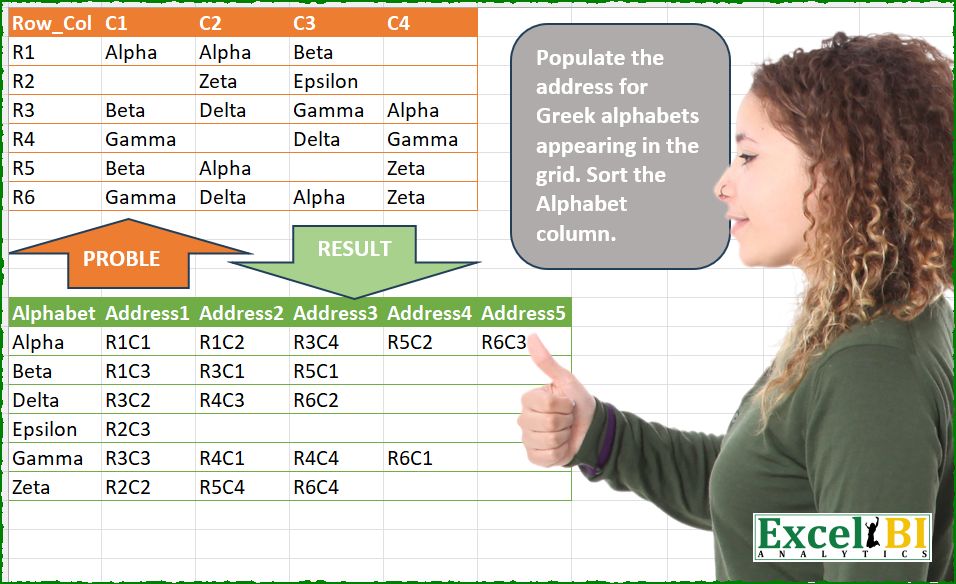
Populate the addresses for Greek alphabets appearing in the grid. Sort the Alphabet column.
📌 Challenge Details and Links
ExcelBI Power Query Challenge Number: 264
Challenge Difficulty: ⭐️
📥Download Sample File
📥Link to the solutions on LinkedIn
Solving the challenge of Populate the addresses for Greek with Power Query
Power Query solution 1 for Populate the addresses for Greek, proposed by Kris Jaganah:
let
  A = Excel.CurrentWorkbook(){[Name = "Table1"]}[Content],
  B = Table.UnpivotOtherColumns(A, {"Row_Col"}, "A", "Alphabet"),
  C = Table.CombineColumns(B, {"Row_Col", "A"}, (z) => Text.Combine(z), "M"),
  D = Table.Combine(
    Table.Group(
      C,
      "Alphabet",
      {
        "All",
        each Table.FromList(
          {{[Alphabet]{0}} & [M]},
          (v) => v,
          {"Alphabet"} & List.Transform({1 .. List.Count([M])}, (w) => "Address" & Text.From(w))
        )
      }
    )[All]
  ),
  E = Table.Sort(D, "Alphabet")
in
  E
Power Query solution 2 for Populate the addresses for Greek, proposed by Luan Rodrigues:
let
  Fonte = Table.UnpivotOtherColumns(Tabela1, {"Row_Col"}, "Atributo", "Valor"),
  Mesc = Table.CombineColumns(
    Fonte,
    {"Row_Col", "Atributo"},
    Combiner.CombineTextByDelimiter("", QuoteStyle.None),
    "Mesclado"
  ),
  grp = Table.Group(
    Mesc,
    {"Valor"},
    {
      {
        "tab",
        each
          let
            a = Table.AddIndexColumn(_, "Ind", 1),
            b = Table.TransformColumns(a, {"Ind", each "Address" & Text.From(_)}),
            c = Table.Pivot(b, List.Distinct(b[Ind]), "Ind", "Mesclado")
          in
            c
      }
    }
  )[tab],
  cmb = Table.Combine(grp),
  res = Table.Sort(cmb, {"Valor"})
in
  res
Power Query solution 3 for Populate the addresses for Greek, proposed by Hussein SATOUR:
let
  Source = Excel.CurrentWorkbook(){[Name = "Table1"]}[Content],
  UnpivotCols = Table.UnpivotOtherColumns(Source, {"Row_Col"}, "A", "V"),
  MergeCols = Table.CombineColumns(
    UnpivotCols,
    {"Row_Col", "A"},
    Combiner.CombineTextByDelimiter("", QuoteStyle.None),
    "Merged"
  ),
  Group = Table.Group(
    MergeCols,
    {"V"},
    {
      {
        "Count",
        each Table.TransformColumns(
          Table.AddIndexColumn(_, "I", 1),
          {{"I", each "Address" & Text.From(_)}}
        )
      }
    }
  ),
  Expand = Table.ExpandTableColumn(Group, "Count", {"Merged", "I"}, {"Merged", "I"}),
  Result = Table.Pivot(Expand, List.Distinct(Expand[I]), "I", "Merged")
in
  Result
Power Query solution 4 for Populate the addresses for Greek, proposed by Abdallah Ally:
let
  Source = Excel.CurrentWorkbook(){[Name = "Table1"]}[Content],
  Unpivot = Table.UnpivotOtherColumns(Source, {"Row_Col"}, "Attrib", "Alphabet"),
  AddCol = Table.AddColumn(Unpivot, "Data", each [Row_Col] & [Attrib]),
  Group = Table.Group(
    AddCol,
    "Alphabet",
    {
      "Data",
      each Table.TransformColumnNames(
        Table.FromRows({List.Sort([Data])}),
        (x) => Text.Replace(x, "Column", "Address")
      )
    },
    1,
    (x, y) => Value.Compare(x, y)
  ),
  Result = Table.ExpandTableColumn(Group, "Data", Table.ColumnNames(Table.Combine(Group[Data])))
in
  Result
Power Query solution 5 for Populate the addresses for Greek, proposed by Eric Laforce:
let
  Source = Excel.CurrentWorkbook(){[Name = "tData264"]}[Content],
  Unpivot = Table.UnpivotOtherColumns(Source, {"Row_Col"}, "A", "V"),
  Merge = Table.CombineColumns(Unpivot, {"Row_Col", "A"}, Text.Combine, "RC"),
  Group = Table.Group(
    Merge,
    "V",
    {
      "G",
      (t) =>
        let
          _Acc = List.Accumulate(
            {1 .. Table.RowCount(t)},
            [Alphabet = t[V]{0}],
            (s, c) => Record.AddField(s, "Address" & Text.From(c), t[RC]{c - 1})
          )
        in
          Table.FromRecords({_Acc})
    }
  ),
  Combine = Table.Combine(Group[G]),
  Sort = Table.Sort(Combine, {"Alphabet", 0})
in
  Sort
Power Query solution 6 for Populate the addresses for Greek, proposed by Seokho MOON:
let
  Source = Excel.CurrentWorkbook(){[Name = "Table1"]}[Content],
  Unpivot = Table.UnpivotOtherColumns(Source, {"Row_Col"}, "A", "V"),
  MergeCol = Table.CombineColumns(
    Unpivot,
    {"Row_Col", "A"},
    Combiner.CombineTextByDelimiter(""),
    "A"
  ),
  Rows = Table.Group(MergeCol, "V", {"Lst", each {[V]{0}} & [A]})[Lst],
  Cols = List.Zip(Rows),
  ColNames = {"Alphabet"}
    & List.Transform(List.Skip(List.Positions(Cols)), each "Address" & Text.From(_)),
  Res = Table.FromColumns(Cols, ColNames)
in
  Res
Power Query solution 7 for Populate the addresses for Greek, proposed by Meganathan Elumalai:
let
  Source = Excel.CurrentWorkbook(){[Name = "Table1"]}[Content],
  Alphabets = List.Skip(List.Sort(List.Distinct(List.Combine(List.Skip(Table.ToColumns(Source)))))),
  Lst = [
    L = List.Transform,
    lst = Table.ToRows(Source),
    fin = List.Zip(
      L(
        Alphabets,
        (c) =>
          List.Combine(
            L(
              List.Positions(lst),
              each L(
                List.PositionOf(lst{_}, c, Occurrence.All),
                (f) => "R" & Text.From(_ + 1) & "C" & Text.From(f)
              )
            )
          )
      )
    )
  ][fin],
  ColNames = {"Alphabet"} & List.Transform({1 .. List.Count(Lst)}, each "Address" & Text.From(_)),
  Result = Table.FromColumns({Alphabets} & Lst, ColNames)
in
  Result
Power Query solution 8 for Populate the addresses for Greek, proposed by Rafael González B.:
let
  Source = Question_Table,
  Unp = Table.UnpivotOtherColumns(Source, {"Row_Col"}, "Col", "Alphabet"),
  Comb = Table.CombineColumns(
    Unp,
    {"Row_Col", "Col"},
    Combiner.CombineTextByDelimiter(""),
    "Address"
  ),
  Sort = Table.Buffer(Table.Sort(Comb, {{"Alphabet", 0}, {"Address", 0}})),
  Group = Table.Group(Sort, {"Alphabet"}, {{"Address", each Text.Combine(_[Address], ",")}}),
  SplitCol = Table.SplitColumn(
    Group,
    "Address",
    Splitter.SplitTextByDelimiter(","),
    {"Address.1", "Address.2", "Address.3", "Address.4", "Address.5"}
  )
in
  SplitCol
Power Query solution 9 for Populate the addresses for Greek, proposed by Peter Krkos:
let
  RemovedColumns = Table.RemoveColumns(Source, {"Row_Col"}),
  H = [
    Rows     = List.Buffer(Table.ToRows(RemovedColumns)),
    ColCount = Table.ColumnCount(RemovedColumns)
  ],
  L = List.Sort(List.Distinct(List.RemoveNulls(List.Combine(H[Rows])))),
  Transformed = List.Transform(
    L,
    (x) =>
      [
        rowPos = List.PositionOf(
          List.Transform(H[Rows], (y) => List.Contains(y, x)),
          true,
          Occurrence.All
        ),
        result = {x}
          & List.Combine(
            List.Transform(
              rowPos,
              (y) =>
                List.Transform(
                  List.PositionOf(H[Rows]{y}, x, Occurrence.All),
                  (z) => Text.Combine({"R", Number.ToText(y + 1), "C", Number.ToText(z + 1)})
                )
            )
          )
      ][result]
  ),
  Tbl = Table.FromList(Transformed, (x) => x),
  Renamed = Table.RenameColumns(
    Tbl,
    let
      a = Table.ColumnNames(Tbl)
    in
      List.Zip(
        {
          a,
          {"Alphabet"} & List.Transform({1 .. List.Count(a) - 1}, each "Address" & Number.ToText(_))
        }
      )
  )
in
  Renamed
Power Query solution 10 for Populate the addresses for Greek, proposed by Peter Krkos:
let a = Table.ColumnNames(Transformed) in List.Zip({a, {"Alphabet"} & List.Transform({1..List.Count(a)-1}, each "Address" & Number.ToText(_))}))
in
 Renamed
Power Query solution 11 for Populate the addresses for Greek, proposed by Alexandre Garcia:
let
  H = Excel.CurrentWorkbook(){[Name = "Table1"]}[Content],
  P = {"Alphabet", "Address"},
  L = List.Transform,
  C = List.RemoveNulls(
    List.TransformMany(
      Table.ToRows(H),
      each List.Skip(List.Zip({_, Table.ColumnNames(H)})),
      (x, y) => y{0} meta [x = x{0} & y{1}]
    )
  ),
  M = Table.Group(
    Table.FromColumns({C}, {"x"}),
    "x",
    {
      "y",
      each Table.FromRows(
        {{[x]{0}} & L([x], each Value.Metadata(_)[x])},
        {P{0}} & L({1 .. Table.RowCount(_)}, each P{1} & Text.From(_))
      )
    }
  ),
  S = Table.Sort(Table.Combine(M[y]), {P{0}})
in
  S
Power Query solution 12 for Populate the addresses for Greek, proposed by Krzysztof Kominiak:
let
  Source = Excel.CurrentWorkbook(){[Name = "Table1"]}[Content],
  A = Table.UnpivotOtherColumns(Source, {"Row_Col"}, "A", "Alphabet"),
  B = Table.CombineColumns(
    A,
    {"Row_Col", "A"},
    Combiner.CombineTextByDelimiter("", QuoteStyle.None),
    "Merged"
  ),
  C = Table.Combine(
    Table.Group(B, {"Alphabet"}, {{"tmp", each Table.AddIndexColumn(_, "Id", 1)}})[tmp]
  ),
  D = Table.TransformColumns(C, {{"Id", each "Address" & Text.From(_)}}),
  Result = Table.Pivot(D, List.Distinct(D[Id]), "Id", "Merged")
in
  Result
Power Query solution 13 for Populate the addresses for Greek, proposed by Krupesh Bhansali:
let
  Source = Excel.CurrentWorkbook(){[Name = "Table1"]}[Content],
  #"Unpivoted Other Columns" = Table.UnpivotOtherColumns(Source, {"Row_Col"}, "Attribute", "Value"),
  #"Merged Columns" = Table.CombineColumns(
    #"Unpivoted Other Columns",
    {"Row_Col", "Attribute"},
    Combiner.CombineTextByDelimiter("", QuoteStyle.None),
    "Merged"
  ),
  #"Grouped Rows" = Table.Group(
    #"Merged Columns",
    {"Value"},
    {{"Count", each Table.Transpose(_[[Merged]])}}
  ),
  #"Expanded Count" = Table.ExpandTableColumn(
    #"Grouped Rows",
    "Count",
    {"Column1", "Column2", "Column3", "Column4", "Column5"},
    {"Address1", "Address2", "Address3", "Adress4", "Address5"}
  )
in
  #"Expanded Count"
Solving the challenge of Populate the addresses for Greek with Excel
Excel solution 1 for Populate the addresses for Greek, proposed by Bo Rydobon 🇹🇭:
=LET(z,
    B2:E7,
    REDUCE(HSTACK(
        "Alphabet",
        "Address"&SEQUENCE(
            ,
            MAX(
                COUNTIF(
                    z,
                    z
                )
            )
        )
    ),
    SORT(
        UNIQUE(
            TOCOL(
                z,
                3
            )
        )
    ),
    LAMBDA(
        a,
        v,
        IFNA(
            VSTACK(
                a,
                HSTACK(
                    v,
                    TOROW(
                        IFS(
                            z=v,
                            A2:A7&B1:E1
                        ),
                        3
                    )
                )
            ),
            ""
        )
    )
Excel solution 2 for Populate the addresses for Greek, proposed by Rick Rothstein:
=LET(
    a,
    SORT(
        UNIQUE(
            TOCOL(
                B2:E7,
                1
            )
        )
    ),
    m,
    MAX(
        COUNTIF(
            B2:E7,
            a
        )
    ),
    HSTACK(
        a,
        TEXTSPLIT(
            TEXTJOIN(
                "|",
                ,
                MAP(
                    a,
                    LAMBDA(
                        x,
                        TRIM(
                            CONCAT(
                                IF(
                                    B2:E7=x,
                                    A2:A7&B1:E1&" ",
                                    ""
                                )
                            )
                        )
                    )
                )
            ),
            " ",
            "|",
            ,
            ,
            ""
        )
    )
)

With the header...
=LET(
    a,
    SORT(
        UNIQUE(
            TOCOL(
                B2:E7,
                1
            )
        )
    ),
    VSTACK(
        HSTACK(
            "Alphabet",
            "Address"&SEQUENCE(
                ,
                MAX(
        COUNTIF(
            B2:E7,
            a
        )
    )
            )
        ),
        HSTACK(
            a,
            TEXTSPLIT(
                TEXTJOIN(
                    "|",
                    ,
                    MAP(
                        a,
                        LAMBDA(
                            x,
                            TRIM(
                                CONCAT(
                                    IF(
                                        B2:E7=x,
                                        A2:A7&B1:E1&" ",
                                        ""
                                    )
                                )
                            )
                        )
                    )
                ),
                " ",
                "|",
                ,
                ,
                ""
            )
        )
    )
)
Excel solution 3 for Populate the addresses for Greek, proposed by Kris Jaganah:
=LET(
    a,
    B2:E7,
    b,
    SORT(
        UNIQUE(
            TOCOL(
                a,
                3
            )
        )
    ),
    c,
    DROP(
        REDUCE(
            "",
            b,
            LAMBDA(
                x,
                y,
                IFNA(
                    VSTACK(
                        x,
                        TOROW(
                            IF(
                                a=y,
                                A2:A7&B1:E1,
                                z
                            ),
                            3
                        )
                    ),
                    ""
                )
            )
        ),
        1
    ),
    VSTACK(
        HSTACK(
            "Alphabet",
            "Address"&SEQUENCE(
                ,
                COLUMNS(
                    c
                )
            )
        ),
        HSTACK(
            b,
            c
        )
    )
)
Excel solution 4 for Populate the addresses for Greek, proposed by Oscar Mendez Roca Farell:
=LET(d,
    B2:E7,
    g,
    TOCOL(
        d,
        1
    ),
    s,
    SEQUENCE(
        ROWS(
            g
        )
    ),
     PIVOTBY(g,
    "Address"&BYROW((g=TOROW(
            g
        ))*(s>=TOROW(
            s
        )),
    SUM),
     TOCOL(
         IFS(
             d>0,
             A2:A7&B1:E1
         ),
         2
     ),
    SINGLE,
    ,
    0,
    ,
    0))
Excel solution 5 for Populate the addresses for Greek, proposed by Duy Tùng:
=LET(
    v,
    B2:E7,
    a,
    TOCOL(
        v,
        1
    ),
    REDUCE(
        HSTACK(
            "Alphabet",
            "Address"&SEQUENCE(
                ,
                MAX(
                    COUNTIF(
                        v,
                        a
                    )
                )
            )
        ),
        SORT(
            UNIQUE(
        &        a
            )
        ),
        LAMBDA(
            x,
            y,
            IFNA(
                VSTACK(
                    x,
                    HSTACK(
                        y,
                        TOROW(
                            FILTER(
                                TOCOL(
                                    IFS(
                                        v>0,
                                        A2:A7&B1:E1
                                    ),
                                    3
                                ),
                                a=y
                            )
                        )
                    )
                ),
                ""
            )
        )
    )
)
Excel solution 6 for Populate the addresses for Greek, proposed by Sunny Baggu:
=LET(

     _a,
     SORT(
         UNIQUE(
             TOCOL(
                 B2:E7,
                  3
             )
         )
     ),

     _b,
     IFNA(

          DROP(

               REDUCE(

                    "",

                    _a,

                    LAMBDA(
                        a,
                         v,

                         VSTACK(
                             a,
                              TOROW(
                                  IF(
                                      B2:E7 = v,
                                       A2:A7 & B1:E1,
                                       1 / x
                                  ),
                                   3
                              )
                         )

                    )

               ),

               1

          ),

          ""

     ),

     VSTACK(
         HSTACK(
             A11,
              "Address" & SEQUENCE(
                  ,
                   COLUMNS(
                       _b
                   )
              )
         ),
          HSTACK(
              _a,
               _b
          )
     )

)
Excel solution 7 for Populate the addresses for Greek, proposed by LEONARD OCHEA 🇷🇴:
=LET(d,
    B2:E7,
    F,
    LAMBDA(
        x,
        TOCOL(
            IFS(
                d>"",
                x
            ),
            3
        )
    ),
    a,
    F(
        d
    ),
    s,
    SEQUENCE(
        ROWS(
            a
        )
    ),
    PIVOTBY(a,
    "Address"&MMULT((a=TOROW(
            a
        ))*(s>=TOROW(
            s
        )),
    s^0),
    F(
        A2:A7&B1:E1
    ),
    SINGLE,
    ,
    0,
    ,
    0))
Excel solution 8 for Populate the addresses for Greek, proposed by Md. Zohurul Islam:
=LET(
    z,
    A1:E7,

    a,
    TOCOL(
        DROP(
            TAKE(
                z,
                ,
                1
            ),
            1
        )&DROP(
            TAKE(
                z,
                1
            ),
            ,
            1
        )
    ),

    b,
    TOCOL(
        DROP(
            z,
            1,
            1
        )
    ),

    c,
    DROP(
        SORT(
            UNIQUE(
                b
            )
        ),
        -1
    ),

    d,
    IFNA(
        DROP(
            REDUCE(
                "",
                c,
                LAMBDA(
                    x,
                    y,
                    VSTACK(
                        x,
                        TOROW(
                            SORT(
                                FILTER(
                                    a,
                                    b=y
                                )
                            )
                        )
                    )
                )
            ),
            1
        ),
        ""
    ),

    e,
    VSTACK(
        "Address"&SEQUENCE(
            ,
            COLUMNS(
                d
            )
        ),
        d
    ),

    f,
    HSTACK(
        VSTACK(
            "Alphabet",
            c
        ),
        e
    ),

    f
)
Excel solution 9 for Populate the addresses for Greek, proposed by Md. Zohurul Islam:
=LET(
    z,
    B2:E7,
    u,
    SORT(
        UNIQUE(
            TOCOL(
                z,
                3
            )
        )
    ),
    a,
    IFNA(
        DROP(
            REDUCE(
                "",
                u,
                LAMBDA(
                    x,
                    y,
                    LET(
                        p,
                        TOCOL(
                            IF(
                                z=y,
                                A2:A7&B1:E1,
                                ""
                            )
                        ),
                        q,
                        VSTACK(
                            x,
                            TOROW(
                                FILTER(
                                    p,
                                    p<>""
                                )
                            )
                        ),
                        q
                    )
                )
            ),
            1
        ),
        ""
    ),
    b,
    HSTACK(
        VSTACK(
            "Alphabet",
            u
        ),
        VSTACK(
            "Address"&SEQUENCE(
                ,
                COLUMNS(
                    a
                )
            ),
            a
        )
    ),
    b
)
Excel solution 10 for Populate the addresses for Greek, proposed by Pieter de B.:
=LET(
    L,
    LAMBDA(
        x,
        TOCOL(
            IFS(
                LEN(
                    B2:E7
                ),
                x
            ),
            2
        )
    ),
    a,
    L(
                    B2:E7
                ),
    s,
    SEQUENCE,
    p,
    PIVOTBY(
        L(
                    B2:E7
                ),
        "Address"&MAP(
            s(
                ROWS(
                    a
                )
            ),
            LAMBDA(
                m,
                SUM(
                    N(
                        TAKE(
                            a,
                            m
                        )=INDEX(
                            a,
                            m
                        )
                    )
                )
            )
        ),
        L(
            A2:A7&B1:E1
        ),
        SINGLE,
        0,
        0,
        ,
        0
    ),
    IF(
        s(
            ROWS(
                p
            )
        )-1,
        p,
        IF(
            p="",
            "Alphabet",
            p
        )
    )
)
Excel solution 11 for Populate the addresses for Greek, proposed by Hamidi Hamid:
=LET(
    b,
    B2:E7,
    bu,
    B1:E1,
    x,
    TOCOL(
        IF(
            b="",
            "",
            b
        )
    ),
    y,
    TOCOL(
        IF(
            b="",
            "",
            A2:A7&bu
        )
    )&"-",
    g,
    HSTACK(
        x,
        y
    ),
    h,
    DROP(
        GROUPBY(
            TAKE(
                g,
                ,
                1
            ),
            TAKE(
                g,
                ,
                -1
            ),
            CONCAT,
            ,
            0
        ),
        1
    ),
    f,
    HSTACK(
        TAKE(
            h,
            ,
            1
        ),
        DROP(
            IFERROR(
                REDUCE(
                    0,
                    TAKE(
                        h,
                        ,
                        -1
                    ),
                    LAMBDA(
                        a,
                        b,
                        VSTACK(
                            a,
                            TEXTSPLIT(
                                b,
                                "-",
                                ,

                            )
                        )
                    )
                ),
                ""
            ),
            1
        )
    ),
    k,
    HSTACK(
        "Alphabet",
        "Address"&SEQUENCE(
            ,
            COLUMNS(
                bu
            )+1
        )
    ),
    d,
    DROP(
        VSTACK(
            k,
            f
        ),
        ,
        -1
    ),
    d
)
Excel solution 12 for Populate the addresses for Greek, proposed by Asheesh Pahwa:
=LET(
    t,
    TOCOL(
        A2:A7&B1:E1&"-"&B2:E7
    ),
    s,
    SORT(
        UNIQUE(
            TOCOL(
                B2:E7,
                1
            )
        )
    ),
    IFNA(
        DROP(
            REDUCE(
                "",
                s,
                LAMBDA(
                    x,
                    y,
                    VSTACK(
                        x,
                        LET(
                            i,
                            ISNUMBER(
                                FIND(
                                    y,
                                    t
                                )
                            ),
                            f,
                            FILTER(
                                t,
                                i
                            ),
                            HSTACK(
                                y,
                                TOROW(
                                    SUBSTITUTE(
                                        f,
                                        "-"&y,
                                        ""
                                    )
                                )
                            )
                        )
                    )
                )
            ),
            1
        ),
        ""
    )
)
Excel solution 13 for Populate the addresses for Greek, proposed by ferhat CK:
=LET(
    a,
    B2:E7&"-"&A2:A7&B1:E1,
    b,
    TOCOL(
        IF(
            LEN(
                a
            )<6,
            1/0,
            a
        ),
        3
    ),
    c,
    TEXTBEFORE(
        b,
        "-"
    ),
    d,
    TEXTAFTER(
        b,
        "-"
    ),
    e,
    GROUPBY(
        c,
        d,
        ARRAYTOTEXT,
        ,
        0
    ),
    HSTACK(
        TAKE(
            e,
            ,
            1
        ),
        DROP(
            IFNA(
                REDUCE(
                    0,
                    TAKE(
                        e,
                        ,
                        -1
                    ),
                    LAMBDA(
                        x,
                        y,
                        VSTACK(
                            x,
                            TEXTSPLIT(
                                y,
                                "; "
                            )
                        )
                    )
                ),
                ""
            ),
            1
        )
    )
)
Excel solution 14 for Populate the addresses for Greek, proposed by Jaroslaw Kujawa:
=LET(
    z;
    B2:E7;
    zz;
    MAX(
        IF(
            z<>"";
            COLUMN(
                z
            )
        )
    );
    VSTACK(
        HSTACK(
            "Alphabet";
            "Address"&SEQUENCE(
                ;
                zz
            )
        );
        DROP(
            DROP(
                TEXTSPLIT(
                    REDUCE(
                        "";
                        FILTER(
                            UNIQUE(
                                TOCOL(
                z
            )
                            );
                            UNIQUE(
                                TOCOL(
                z
            )
                            )<>0
                        );
                        LAMBDA(
                            a;
                            x;
                            LET(
                                y;
                                LET(
                                    b;
                                    REDUCE(
                                        "";
                                        z;
                                        LAMBDA(
                                            a;
                                            x;
                                            LET(
                                                r;
                                                A2:A7;
                                                c;
                                                B1:E1;
                                                IF(
                                                    x<>"";
                                                    VSTACK(
                                                        a;
                                                        x&"|"&OFFSET(
                                                            x;
                                                            ;
                                                            COLUMN(
                                                                r
                                                            )-COLUMN(
                                                                x
                                                            )
                                                        )&OFFSET(
                                                            x;
                                                            ROW(
                                                                 c
                                                            )-ROW(
                                                                x
                                                            );

                                                        )
                                                    );
                                                    a
                                                )
                                            )
                                        )
                                    );
                                    SORT(
                                        TEXTSPLIT(
                                            ARRAYTOTEXT(
                                                DROP(
                                                    b;
                                                    1
                                                );

                                            );
                                            "|";
                                            "; "
                                        )
                                    )
                                );
                                c;
                                TAKE(
                                    FILTER(
                                        y;
                                        TAKE(
                                            y;
                                            ;
                                            1
                                        )=x
                                    );
                                    ;
                                    -1
                                );
                                TEXTJOIN(
                                    ";";
                                    ;
                                    a&"|";
                                    x;
                                    c;
                                    REPT(
                                        ";";
                                        zz-ROWS(
                                            c
                                        )
                                    )
                                )
                            )
                        )
                    );
                    ";";
                    "|"
                );
                1;
                1
            );
            ;
            -1
        )
    )
)
Excel solution 15 for Populate the addresses for Greek, proposed by Meganathan Elumalai:
=LET(
    x,
    B2:E7,
    y,
    TOCOL,
    r,
    y(
        IF(
            x>="",
            A2:A7
        )
    ),
    c,
    y(
        IF(
            x>="",
            B1:E1
        )
    ),
    IFNA(
        DROP(
            REDUCE(
                "",
                SORT(
                    UNIQUE(
                        y(
                            x,
                            1
                        )
                    )
                ),
                LAMBDA(
                    a,
                    v,
                    VSTACK(
                        a,
                        HSTACK(
                            v,
                            TOROW(
                                BYROW(
                                    FILTER(
                                        HSTACK(
                                            r,
                                            c
                                        ),
                                        y(
                                            x
                                        )=v
                                    ),
                                    CONCAT
                                )
                        &    )
                        )
                    )
                )
            ),
            1
        ),
        ""
    )
)
Excel solution 16 for Populate the addresses for Greek, proposed by Imam Hambali:
=LET(

    l,
     LAMBDA(
         x,
          TOCOL(
              IF(
                  B2:E7>0,
                  x,
                   NA()
              ),
              3
          )
     ),

    gb,
     GROUPBY(
         l(
             B2:E7
         ),
         l(
             A2:A7&B1:E1
         ),
         ARRAYTOTEXT,
         0,
         0
     ),

    tk,
     TAKE,

    d,
     HSTACK(
         tk(
             gb,
             ,
             1
         ),
          IFNA(
              TEXTSPLIT(
                  TEXTJOIN(
                      ";",
                      1,
                       tk(
                           gb,
                           ,
                           -1
                       )
                  ),
                  ", ",
                  ";"
              ),
              ""
          )
     ),

    h,
     HSTACK(
         "Alphabet",
          "Address"&SEQUENCE(
              ,
              COLUMNS(
                  DROP(
                      d,
                      ,
                      1
                  )
              )
          )
     ),

    VSTACK(
        h,
        d
    )

)
Excel solution 17 for Populate the addresses for Greek, proposed by Eddy Wijaya:
=LET(
    t,
    B2:E7,

    ro,
    ROWS(
        t
    ),

    co,
    COLUMNS(
        t
    ),

    d,
    MAKEARRAY(
        ro,
        co,
        LAMBDA(
            r,
            c,
            "R"&r&"C"&c
        )
    ),

    l,
    SORT(
        TOCOL(
            IF(
                ISBLANK(
        t
    ),
                _,
                t&"|"&d
            ),
            2
        )
    ),

    hlp,
    TEXTBEFORE(
        l,
        "|"
    ),

    ct,
    GROUPBY(
        hlp,
        ISTEXT(
            hlp
        ),
        COUNTA,
        ,
        ,
        -2
    ),

    IFNA(
        REDUCE(
            HSTACK(
                A11,
                "Address"&SEQUENCE(
                    ,
                    @TAKE(
                        ct,
                        ,
                        -1
                    )
                )
            ),
            UNIQUE(
            hlp
        ),
            LAMBDA(
                a,
                v,
                VSTACK(
                    a,
                    HSTACK(
                        v,
                        TEXTAFTER(
                            TOROW(
                                FILTER(
                                    l,
                                    ISNUMBER(
                                        SEARCH(
                                            v,
                                            l
                                        )
                                    )
                                )
                            ),
                            "|"
                        )
                    )
                )
            )
        ),
        ""
    )
)
Excel solution 18 for Populate the addresses for Greek, proposed by Philippe Brillault:
=LET(
    d,
    DROP(
        _T,
        ,
        1
    ),
    u,
    DROP(
        SORT(
            UNIQUE(
                TOCOL(
                    d
                )
            )
        ),
        -1
    ),
    pos,
    _T[Row_Col]&_T[[hashtag#Headers],
    [C1]:[C4]],
    IFNA(
        REDUCE(
            HSTACK(
                "Alphabet",
                "Addr"&SEQUENCE(
                    ,
                    MAX(
                        COUNTIF(
                            d,
                            d
                        )
                    )
                )
            ),
            u,
            LAMBDA(
                c,
                u,
                VSTACK(
                    c,
                    HSTACK(
                        u,
                        TOROW(
                            IF(
                                d=u,
                                pos,
                                NA()
                            ),
                            2
                        )
                    )
                )
            )
        ),
        ""
    )
)
Solving the challenge of Populate the addresses for Greek with Python
Python solution 1 for Populate the addresses for Greek, proposed by Konrad Gryczan, PhD:
import pandas as pd
path = "PQ_Challenge_264.xlsx"
input = pd.read_excel(path, usecols="A:E", nrows=7)
test = pd.read_excel(path,  usecols="A:F", skiprows=10, nrows=7)
input_long = input.melt(id_vars=input.columns[0], var_name="col", value_name="Alphabet").dropna()
input_long['Address'] = input_long[input.columns[0]].astype(str) + input_long['col']
input_long = input_long.sort_values(by=['Alphabet', 'Address'])
input_long['rn'] = input_long.groupby('Alphabet').cumcount() + 1
result = input_long.pivot(index='Alphabet', columns='rn', values='Address').reset_index()
result.columns = ['Alphabet'] + [f'Address{col}' for col in result.columns if col != 'Alphabet']
print(result.equals(test)) # True
Python solution 2 for Populate the addresses for Greek, proposed by Luan Rodrigues:
import pandas as pd
file = "PQ_Challenge_264.xlsx"
df = pd.read_excel(file,usecols="A:E",nrows=7)
df = pd.melt(df,id_vars=['Row_Col'],var_name='Atributo',value_name='Valor' ).dropna()
df['Row_Col'] = df['Row_Col'] + df['Atributo']
del df['Atributo']
def transform(x):
 x = x.copy()
 x['Ind'] = ["Address"+str(i) for i in range(1,len(x)+1)]
 pvt = pd.pivot(x,index='Valor',columns='Ind',values='Row_Col').reset_index()
 return pvt
grp = df.groupby('Valor', group_keys=False).apply(transform).reset_index(drop=True)
print(grp)
Python solution 3 for Populate the addresses for Greek, proposed by Abdallah Ally:
import pandas as pd
# Load data from Excel
file_path = 'PQ_Challenge_264.xlsx'
df = pd.read_excel(io=file_path, usecols='A:E', nrows=6)
# Perform data manipulation
df = (
 df
 .melt(id_vars='Row_Col', var_name='Attrib', value_name='Alphabets')
 .assign(Data = lambda df: df['Row_Col'] + df['Attrib'])
 .groupby('Alphabets')['Data'].agg(lambda x: ','.join(sorted(x)))
 .reset_index()
)
df = pd.concat([df[['Alphabets']], df['Data'].str.split(pat=',', expand=True).fillna('')], axis=1)
df.columns = [col if col == 'Alphabets' else f'Address{col + 1}' for col in df.columns]
df
Solving the challenge of Populate the addresses for Greek with Python in Excel
Python in Excel solution 1 for Populate the addresses for Greek, proposed by Alejandro Campos:
df = xl("A1:E7", headers=True)
results = {}
for row in df.itertuples(index=False):
 for col in df.columns[1:]:
 value = getattr(row, col)
 if value:
 results.setdefault(value, []).append(f'{row.Row_Col}{col}')
result_df = pd.DataFrame.from_dict(results, orient='index').reset_index()
result_df.columns = ['Alphabet'] + [f'Address{i+1}' for i in range(result_df.shape[1] - 1)]
result_df = result_df.sort_values(by='Alphabet').reset_index(drop=True).fillna('')
Solving the challenge of Populate the addresses for Greek with R
R solution 1 for Populate the addresses for Greek, proposed by Konrad Gryczan, PhD:
library(tidyverse)
library(readxl)
path = "Power Query/PQ_Challenge_264.xlsx"
input = read_excel(path, range = "A1:E7")
test = read_excel(path, range = "A11:F17")
result = input %>%
 pivot_longer(-c(1), names_to = "col", values_to = "Alphabet", values_drop_na = T) %>%
 unite("Address", Row_Col, col, sep = "") %>%
 arrange(Alphabet, Address) %>%
 mutate(rn = row_number(), .by = Alphabet) %>%
 pivot_wider(names_from = rn, names_glue = "Address{rn}", values_from = Address)
all.equal(result, test, check.attributes = F)
#> [1] TRUE
&