
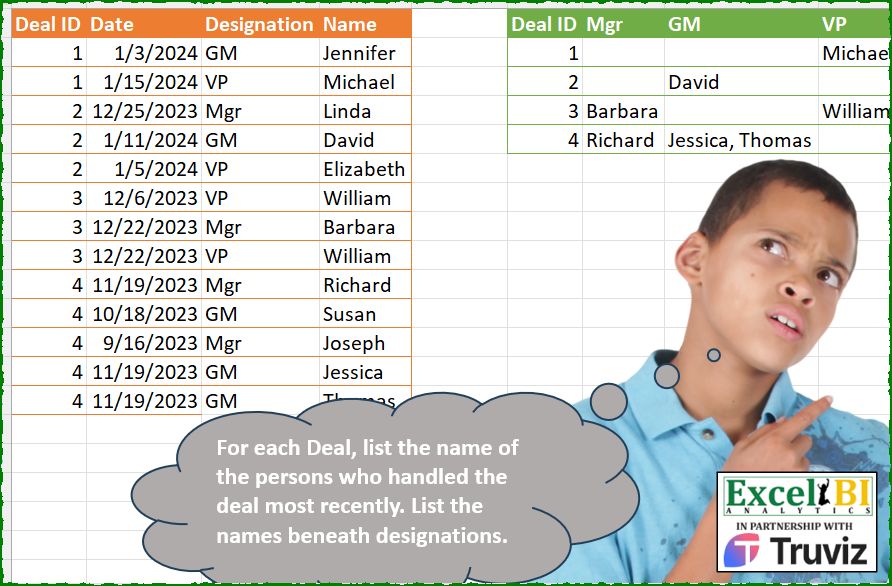
For each Deal, list the name of the persons who handled the deal most recently. List the names beneath designations.
📌 Challenge Details and Links
ExcelBI Power Query Challenge Number: 246
Challenge Difficulty: ⭐️⭐️
📥Download Sample File
📥Link to the solutions on LinkedIn
Solving the challenge of For each Deal, list the with Power Query
Power Query solution 1 for For each Deal, list the, proposed by Kris Jaganah:
let
  A = Excel.CurrentWorkbook(){[Name = "Table1"]}[Content],
  B = Table.SelectRows(
    A,
    each ([Date] = List.Max(Table.SelectRows(A, (x) => x[Deal ID] = [Deal ID])[Date]))
  ),
  C = Table.RemoveColumns(B, {"Date"}),
  D = Table.Pivot(
    C,
    List.Zip(List.Sort(List.Zip({List.Distinct(C[Designation]), {3, 2, 1}}), each _{1})){0},
    "Designation",
    "Name",
    each Text.Combine(_, ", ")
  )
in
  D
Power Query solution 2 for For each Deal, list the, proposed by Vida Vaitkunaite:
let
  Source = Excel.CurrentWorkbook(){[Name = "Table1"]}[Content],
  Group = Table.Group(
    Source,
    {"Deal ID"},
    {
      {
        "All",
        each
          let
            a = Table.SelectRows(_, (x) => x[Date] = List.Max([Date])),
            b = Table.Group(
              a,
              {"Deal ID", "Date", "Designation"},
              {"All", each Text.Combine([Name], ", ")}
            ),
            c = Table.RemoveColumns(b, {"Date"})
          in
            c
      }
    }
  ),
  Expand = Table.Combine(Group[All]),
  Pivot = Table.Pivot(Expand, List.Distinct(Expand[Designation]), "Designation", "All"),
  Reorder = Table.ReorderColumns(Pivot, {"Deal ID", "Mgr", "GM", "VP"})
in
  Reorder
Power Query solution 3 for For each Deal, list the, proposed by Alejandro Simón 🇵🇦 🇪🇸:
let
  Source = Excel.CurrentWorkbook(){[Name = "Table1"]}[Content],
  Group = Table.Group(
    Source,
    {"Deal ID"},
    {
      {
        "A",
        each
          let
            a = _,
            b = List.Last(List.Sort([Date])),
            c = Table.SelectRows(a, each [Date] = b)[[Designation], [Name]],
            d = Table.Group(c, "Designation", {"B", each Text.Combine([Name], ", ")}),
            e = Table.PromoteHeaders(Table.Transpose(d))
          in
            e
      }
    }
  ),
  Expand = Table.ExpandTableColumn(
    Group,
    "A",
    List.Sort(Table.ColumnNames(Table.Combine(Group[A])), each List.PositionOf(Lista, _))
  ),
  Lista = {"Mgr", "GM", "VP"}
in
  Expand
Power Query solution 4 for For each Deal, list the, proposed by Luan Rodrigues:
let
  Fonte = Tabela1,
  grp = Table.Group(
    Fonte,
    {"Deal ID"},
    {
      {
        "tab",
        (x) =>
          let
            a = Table.SelectRows(x, each [Date] = List.Max(x[Date])),
            b = Table.Group(
              a,
              {"Deal ID", "Designation"},
              {"Des", each Text.Combine(_[Name], ", ")}
            )
          in
            b
      }
    }
  )[tab],
  cmb = Table.Combine(grp),
  srt = Table.Sort(cmb, {each List.PositionOf({"Mgr", "GM", "VP"}, [Designation])}),
  pvt = Table.Pivot(srt, List.Distinct(srt[Designation]), "Designation", "Des")
in
  pvt
Power Query solution 5 for For each Deal, list the, proposed by Abdallah Ally:
let
  Source = Excel.CurrentWorkbook(){[Name = "Table1"]}[Content],
  Group = Table.Group(
    Source,
    "Deal ID",
    {"Data", each Table.SelectRows(_, (x) => x[Date] = List.Max([Date]))[[Designation], [Name]]}
  ),
  Expand = Table.ExpandTableColumn(Group, "Data", {"Designation", "Name"}),
  Result = Table.Pivot(
    Expand,
    {"Mgr", "GM", "VP"},
    "Designation",
    "Name",
    each Text.Combine(_, ", ")
  )
in
  Result
Power Query solution 6 for For each Deal, list the, proposed by Eric Laforce:
let
  Source = Excel.CurrentWorkbook(){[Name = "tData246"]}[Content],
  Group = Table.Group(
    Source,
    "Deal ID",
    {
      "G",
      (t) =>
        let
          _DMax = List.Max(t[Date])
        in
          Table.SelectRows(t, each ([Date] = _DMax))
    }
  ),
  Combine = Table.RemoveColumns(Table.Combine(Group[G]), {"Date"}),
  Pivot = Table.Pivot(
    Combine,
    {"Mgr", "GM", "VP"},
    "Designation",
    "Name",
    each Text.Combine(_, ", ")
  )
in
  Pivot
Power Query solution 7 for For each Deal, list the, proposed by Eric Laforce:
let
  Source = Excel.CurrentWorkbook(){[Name = "tData246"]}[Content],
  Group = Table.Group(
    Source,
    "Deal ID",
    {
      "G",
      (t) =>
        let
          _DMax = List.Max(t[Date]),
          _Filter = Table.SelectRows(t, each ([Date] = _DMax)),
          _Pivot = Table.Pivot(
            _Filter,
            List.Distinct(_Filter[Designation]),
            "Designation",
            "Name",
            each Text.Combine(_, ", ")
          )
        in
          Table.RemoveColumns(_Pivot, {"Date"})
    }
  ),
  Combine = Table.Combine(Group[G])
in
  Combine
Power Query solution 8 for For each Deal, list the, proposed by Seokho MOON:
let
  Source = Excel.CurrentWorkbook(){[Name = "Table1"]}[Content],
  Group = Table.Group(
    Source,
    {"Deal ID"},
    {"tbl", each Table.SelectRows(_, (x) => x[Date] = List.Max([Date]))}
  ),
  Combine = Table.RemoveColumns(Table.Combine(Group[tbl]), {"Date"}),
  Designation = {"Mgr", "GM", "VP"},
  Pivot = Table.Pivot(
    Combine,
    List.Sort(List.Distinct(Combine[Designation]), each List.PositionOf(Designation, _)),
    "Designation",
    "Name",
    each Text.Combine(_, ", ")
  )
in
  Pivot
Power Query solution 9 for For each Deal, list the, proposed by 🇮🇷 Navid Esmaeilzadeh اسماعیل زاده:
let
  S = Excel.CurrentWorkbook(){[Name = "Table1"]}[Content],
  A = Table.TransformColumnTypes(S, {{"Date", type date}}),
  B = Table.Group(A, {"Deal ID"}, {{"T", each _}}),
  C = Table.AddColumn(
    B,
    "T2",
    each Table.SelectRows(
      Table.AddRankColumn([T], "Rank", {"Date", Order.Descending}),
      each [Rank] = 1
    )
  ),
  D = Table.Combine(C[T2]),
  E = Table.SelectColumns(D, {"Deal ID", "Designation", "Name"}),
  G = Table.Pivot(
    E,
    List.Distinct(E[Designation]),
    "Designation",
    "Name",
    each Text.Combine(_, ",")
  ),
  I = Table.ReorderColumns(G, {"Deal ID", "Mgr", "GM", "VP"})
in
  I
Power Query solution 10 for For each Deal, list the, proposed by CA Raghunath Gundi:
let
  Source = Excel.CurrentWorkbook(){[Name = "Deal"]}[Content],
  Designations = List.Distinct(Source[Designation]),
  Grp = Table.Group(
    Source,
    {"Deal ID"},
    {
      {
        "Details",
        each _,
        type table [Deal ID = number, Date = date, Designation = text, Name = text]
      }
    }
  ),
  FxA = (t) =>
    let
      ChTy = Table.TransformColumnTypes(t, {{"Date", type date}}),
      MaxDate = Table.SelectRows(ChTy, each [Date] = List.Max(ChTy[Date])),
      RemCols = Table.RemoveColumns(MaxDate, {"Date"}),
      Pivot = Table.Pivot(
        RemCols,
        List.Distinct(RemCols[Designation]),
        "Designation",
        "Name",
        each Text.Combine(_, ", ")
      )
    in
      Pivot,
  Func = Table.TransformColumns(Grp, {"Details", each FxA(_)}),
  Combine = Table.Combine(Func[Details]),
  Result = Table.SelectColumns(Combine, {"Deal ID", "Mgr", "GM", "VP"})
in
  Result
Power Query solution 11 for For each Deal, list the, proposed by Krzysztof Kominiak:
let
  Source = Excel.CurrentWorkbook(){[Name = "Table1"]}[Content],
  PivotCol = Table.Pivot(
    Source,
    List.Distinct(Source[Designation]),
    "Designation",
    "Name",
    each Text.Combine(_, ", ")
  ),
  ToRec = Table.Group(PivotCol, {"Deal ID"}, {{"NT", each Table.Last(Table.Sort(_, "Date"))}}),
  Result = Table.ExpandRecordColumn(ToRec, "NT", {"Mgr", "GM", "VP"})
in
  Result
Power Query solution 12 for For each Deal, list the, proposed by Pedronell Coley:
let
  Origen = Excel.CurrentWorkbook(){[Name = "Tabla1"]}[Content],
  #"F1" = Table.Group(
    Origen,
    {"Deal ID"},
    {
      {
        "gr1",
        each Table.PromoteHeaders(
          Table.Transpose(
            Table.Group(
              Table.SelectRows(
                _,
                let
                  latest = List.Max(_[Date])
                in
                  each [Date] = latest
              )[[Designation], [Name]],
              {"Designation"},
              {{"gr2", each Text.Combine(List.Transform(_[Name], Text.From), ", ")}}
            )
          )
        )
      }
    }
  ),
  #"_gr1" = Table.ExpandTableColumn(#"F1", "gr1", {"Mgr", "GM", "VP"}, {"Mgr", "GM", "VP"})
in
  #"_gr1"
Solving the challenge of For each Deal, list the with Excel
Excel solution 1 for For each Deal, list the, proposed by Bo Rydobon 🇹🇭:
=LET(
    i,
    A1:A14,
    d,
    B1:B14,
    PIVOTBY(
        i,
        C1:C14,
        D1:D14,
        ARRAYTOTEXT,
        ,
        0,
        ,
        0,
        2,
        MAXIFS(
            d,
            i,
            i
        )=d
    )
)
Excel solution 2 for For each Deal, list the, proposed by 🇰🇷 Taeyong Shin:
=LET(
    i,
    A2:A14,
    d,
    B2:B14,
    e,
    C2:C14,
    DROP(
        PIVOTBY(
            i,
            HSTACK(
                XMATCH(
                    e,
                    G1:I1
                ),
                e
            ),
            D2:D14,
            ARRAYTOTEXT,
            ,
            0,
            ,
            0,
            ,
            i&d=i&MAXIFS(
                d,
                i,
                i
            )
        ),
        1
    )
)
Excel solution 3 for For each Deal, list the, proposed by Kris Jaganah:
=LET(a,
    A2:A14,
    b,
    B2:B14,
    c,
    C2:C14,
    d,
    DROP(
        PIVOTBY(
            a,
            HSTACK(
                VLOOKUP(
                    c,
                    {"Mgr",
                    1;"GM",
                    2;"VP",
                    3},
                    2,
                    0
                ),
                c
            ),
            D2:D14,
            ARRAYTOTEXT,
            ,
            0,
            ,
            0,
            ,
            b=MAXIFS(
                b,
                a,
                a
            )
        ),
        1
    ),
    IF((SEQUENCE(
        ROWS(
            d
        ),
        COLUMNS(
            d
        )
    )=1),
    "Deal ID",
    d))
Excel solution 4 for For each Deal, list the, proposed by Julian Poeltl:
=LET(T,
    A2:D14,
    D,
    TAKE(
        T,
        ,
        1
    ),
    Dt,
    CHOOSECOLS(
        T,
        2
    ),
    C,
    DROP(REDUCE(0,
    UNIQUE(
        D
    ),
    LAMBDA(A,
    B,
    VSTACK(A,
    FILTER(T,
    (D=B)*(Dt=MAX(
        FILTER(
            Dt,
            D=B
        )
    )))))),
    1),
    PIVOTBY(
        TAKE(
            C,
            ,
            1
        ),
        CHOOSECOLS(
            C,
            3
        ),
        TAKE(
            C,
            ,
            -1
        ),
        ARRAYTOTEXT,
        0,
        0,
        ,
        0,
        1
    ))
Excel solution 5 for For each Deal, list the, proposed by Oscar Mendez Roca Farell:
=LET(
    a,
    A2:A14,
    b,
    B2:B14,
    PIVOTBY(
        a,
        C2:C14,
        IF(
            ISNA(
                XMATCH(
                    b,
                    MAXIFS(
                        b,
                        a,
                        a
                    )
                )
            ),
            "",
            D2:D14
        ),
        LAMBDA(
            n,
            TEXTJOIN(
                ", ",
                ,
                n
            )
        ),
        ,
        0,
        ,
        0,
        2
    )
)
Excel solution 6 for For each Deal, list the, proposed by Oscar Mendez Roca Farell:
=LET(
    a,
    A2:A14,
    b,
    B2:B14,
    PIVOTBY(
        a,
        C2:C14,
        D2:D14,
        ARRAYTOTEXT,
        ,
        0,
        ,
        0,
        2,
        1-ISNA(
            XMATCH(
                b,
                MAXIFS(
                    b,
                    a,
                    a
                )
            )
        )
    )
)
Excel solution 7 for For each Deal, list the, proposed by Duy Tùng:
=LET(
    a,
    A2:A14,
    b,
    B2:B14,
    PIVOTBY(
        a,
        C2:C14,
        D2:D14,
        ARRAYTOTEXT,
        ,
        0,
        ,
        0,
        2,
        MAXIFS(
            b,
            a,
            a
        )=b
    )
)
Excel solution 8 for For each Deal, list the, proposed by Md. Zohurul Islam:
=LET(

    id,
    A2:A14,

    data,
    B2:D14,
    unq,
    UNIQUE(
        id
    ),

    p,
    DROP(
        REDUCE(
            "",
            unq,
            LAMBDA(
                x,
                y,
                LET(
                    a,
                    FILTER(
                        data,
                        id=y
                    ),
                    b,
                    TAKE(
                        a,
                        ,
                        1
                    ),
                    c,
                     FILTER(
                         a,
                         b=MAX(
                             b
                         )
                     ),
                    d,
                    IFNA(
                        HSTACK(
                            y,
                            c
                        ),
                        y
                    ),
                    e,
                    VSTACK(
                        x,
                        d
                    ),
                    e
                )
            )
        ),
        1
    ),

    q,
    CHOOSECOLS(
        p,
        1,
        3,
        4
    ),

    s,
    CHOOSECOLS(
        PIVOTBY(
            TAKE(
                q,
                ,
                1
            ),
            TAKE(
                DROP(
                q,
                ,
                1
            ),
                ,
                1
            ),
            TAKE(
                q,
                ,
                -1
            ),
            ARRAYTOTEXT,
            0,
            0,
            ,
            0
        ),
        1,
        3,
        2,
        4
    ),

    u,
    VSTACK(
        "Deal ID",
         DROP(
             TAKE(
                 s,
                 ,
                 1
          &   ),
             1
         )
    ),

    v,
    HSTACK(
        u,
        DROP(
                 s,
                 ,
                 1
             )
    ),

    v
)
Excel solution 9 for For each Deal, list the, proposed by Hamidi Hamid:
=LET(
    x,
    GROUPBY(
        A2:A14,
        B2:B14,
        MAX,
        ,
        0
    ),
    z,
    HSTACK(
        A2:D14,
        IF(
            IFERROR(
                VLOOKUP(
                    B2:B14,
                    TAKE(
                        x,
                        ,
                        -1
                    ),
                    1,
                    0
                ),
                ""
            )<>"",
            D2:D14,
            ""
        )
    ),
    q,
    PIVOTBY(
        TAKE(
            z,
            ,
            1
        ),
        CHOOSECOLS(
            z,
            3
        ),
        TAKE(
            z,
            ,
            -1
        ),
        LAMBDA(
            a,
            TEXTJOIN(
                ", ",
                ,
                a
            )
        ),
        ,
        0,
        ,
        0
    ),
    q
)
Excel solution 10 for For each Deal, list the, proposed by Asheesh Pahwa:
=LET(
    d,
    A2:A14,
    u,
    UNIQUE(
        d
    ),
    _u,
    UNIQUE(
        C2:C14
    ),
    c,
    u&TOROW(
        _u
    ),
    r,
    DROP(
        REDUCE(
            "",
            u,
            LAMBDA(
                x,
                y,
                VSTACK(
                    x,
                    LET(
                        f,
                        FILTER(
                            B2:D14,
                            d=y
                        ),
                        t,
                        TAKE(
                            f,
                            ,
                            1
                        ),
                        m,
                        MAX(
                            t
                        ),
                        IFNA(
                            HSTACK(
                                y,
                                FILTER(
                                    DROP(
                            f,
                            ,
                            1
                        ),
                                    t=m
                                )
                            ),
                            y
                        )
                    )
                )
            )
        ),
        1
    ),
    t,
    TAKE(
        r,
        ,
        1
    )&INDEX(
        r,
        ,
        2
    ),
    VSTACK(
        TOROW(
        _u
    ),
        IFERROR(
            MAP(
                c,
                LAMBDA(
                    x,
                    ARRAYTOTEXT(
                        FILTER(
                            TAKE(
                                r,
                                ,
                                -1
                            ),
                            t=x
                        )
                    )
                )
            ),
            ""
        )
    )
)
Excel solution 11 for For each Deal, list the, proposed by ferhat CK:
=PIVOTBY(A2:A14,C2:C14,D2:D14,ARRAYTOTEXT,,0,,0,2,ISNUMBER(XMATCH(B2:B14,TAKE(GROUPBY(A2:A14,B2:B14,MAX,,0),,-1))))Excel solution 12 for For each Deal, list the, proposed by Milan Shrimali:
=X),
    2,
    0),
    UNQDT,
    UNIQUE(
        CHOOSECOLS(
            DT,
            2
        )
    ),
    CHOOSEROWS(
        BYROW(
            UNQDT,
            LAMBDA(
                Y,
                JOIN(
                    ",",
                    X,
                    FILTER(
                        CHOOSECOLS(
                            DT,
                            3
                        ),
                        CHOOSECOLS(
            DT,
            2
        )=Y
                    )
                )
            )
        ),
        1
    )))),
    SPLT,
    ARRAYFORMULA(
        SPLIT(
            MAIN,
            ","
        )
    ),
    RNG,
    TOCOL(
        BYROW(
            SPLT,
            LAMBDA(
                X,
                ARRAYFORMULA(
                    CHOOSECOLS(
                        X,
                        1
                    )&"-"&X
                )
            )
        )
    ),
    RNNG2,
    ARRAYFORMULA(
        SPLIT(
            RNG,
            "-"
        )
    ),
    MAINTB,
    FILTER(
        RNNG2,
        CHOOSECOLS(
            RNNG2,
            3
        )<>""
    ),
    IFERROR(VSTACK(HSTACK(
        "DEAL ID",
        TOROW(
            UNIQUE(
                C2:C14
            )
        )
    ),
    HSTACK(UNIQUE(
        $A$2:$A$14
    ),
    BYROW(UNIQUE(
        $A$2:$A$14
    ),
    LAMBDA(X,
    BYCOL(TOROW(
        UNIQUE(
            $C$2:$C$14
        )
    ),
    LAMBDA(Y,
    JOIN(",",
    FILTER(CHOOSECOLS(
        MAINTB,
        3
    ),
    (CHOOSECOLS(
        MAINTB,
        1
    )=X)*(CHOOSECOLS(
        MAINTB,
        2
    )=Y))))))),
    ""))))
Excel solution 13 for For each Deal, list the, proposed by Stefan Alexandrov:
=LET(
    _table,
    A1:D14,

    _maxPerDeal,
    CHOOSECOLS(
        GROUPBY(
            CHOOSECOLS(
                _table,
                1
            ),
            CHOOSECOLS(
                _table,
                2
            ),
            MAX,
            ,
            0
        ),
        2
    ),

    _added,
    HSTACK(
        _table,
        IFERROR(
            MATCH(
                CHOOSECOLS(
                _table,
                2
            ),
                _maxPerDeal,
                0
            ),
            0
        )
    ),

    _filtered,
    FILTER(
        _added,
        CHOOSECOLS(
            _added,
            5
        )>0
    ),

    _pivot,
    PIVOTBY(
        CHOOSECOLS(
            _filtered,
            1
        ),
        CHOOSECOLS(
            _filtered,
            3
        ),
        CHOOSECOLS(
            _filtered,
            4
        ),
        ARRAYTOTEXT,
        0,
        0,
        ,
        0,
        1
    ),

    _pivotWoHeader,
    DROP(
        _pivot,
        1
    ),

    _header,
    HSTACK(
        A1,
        DROP(
            TAKE(
        _pivot,
        1
    ),
            0,
            1
        )
    ),

    VSTACK(
        _header,
        _pivotWoHeader
    )
)
Solving the challenge of For each Deal, list the with Python
Python solution 1 for For each Deal, list the, proposed by Konrad Gryczan, PhD:
import pandas as pd
path = "PQ_Challenge_246.xlsx"
input = pd.read_excel(path, usecols="A:D", nrows=14)
test = pd.read_excel(path, usecols="F:I", nrows=4).rename(columns=lambda x: x.split('.')[0])
result = input[input['Date'] == input.groupby('Deal ID')['Date'].transform('max')].pivot_table(
 index='Deal ID', columns='Designation', values='Name', aggfunc=', '.join).reset_index()[['Deal ID', 'Mgr', 'GM', 'VP']].rename_axis(None, axis=1)
print(result.equals(test)) # True
Python solution 2 for For each Deal, list the, proposed by Luan Rodrigues:
PY Solution!
import pandas as pd
file = "PQ_Challenge_246.xlsx"
df = pd.read_excel(file,usecols="A:D")
def tab(x):
 m = x['Date'].max()
 f = x[x['Date'] == m]
 return f
grp = df.groupby("Deal ID",).apply(tab).reset_index(drop=True)
pvt = pd.pivot_table(grp,
 index = ['Deal ID'],
 columns='Designation',
 values='Name',
 aggfunc=lambda x: ','.join(x)
 ).reindex(columns=["Mgr","GM","VP"]).reset_index()
pvt.columns.name = None
print(pvt)
Solving the challenge of For each Deal, list the with Python in Excel
Python in Excel solution 1 for For each Deal, list the, proposed by Alejandro Campos:
df = xl("A1:D14", headers=True)
df['Date'] = pd.to_datetime(df['Date'], format='%d/%m/%Y')
unq_deal_ids = df['Deal ID'].unique()
results = [
 [deal_id, designation, ', '.join(most_recent[most_recent['Designation'] == designation]['Name'])]
 for deal_id in unq_deal_ids
 for designation in ['Mgr', 'GM', 'VP']
 if (most_recent := df[df['Deal ID'] == deal_id].loc[df['Date'] == df[df['Deal ID'] == deal_id]['Date'].max()]).shape[0] > 0
 and not most_recent[most_recent['Designation'] == designation].empty
]
pivot_df = pd.DataFrame(results, columns=['Deal ID', 'Designation', 'Name']).pivot(index='Deal ID', columns='Designation', values='Name')
pivot_df = pivot_df.fillna(' ').reset_index()[['Deal ID', 'Mgr', 'GM', 'VP']].rename_axis(None, axis=1)
pivot_df
Solving the challenge of For each Deal, list the with R
R solution 1 for For each Deal, list the, proposed by Konrad Gryczan, PhD:
library(tidyverse)
library(readxl)
path = "Power Query/PQ_Challenge_246.xlsx"
input = read_excel(path, range = "A1:D14")
test = read_excel(path, range = "F1:I5")
result = input %>%
 filter(Date == max(Date), .by = `Deal ID`) %>%
 select(-Date) %>%
 pivot_wider(names_from = Designation, values_from = Name, values_fn = ~ str_c(.x, collapse = ", ")) %>%
 select(`Deal ID`, Mgr, GM, VP)
all.equal(result, test)
#> [1] TRUE
&&