
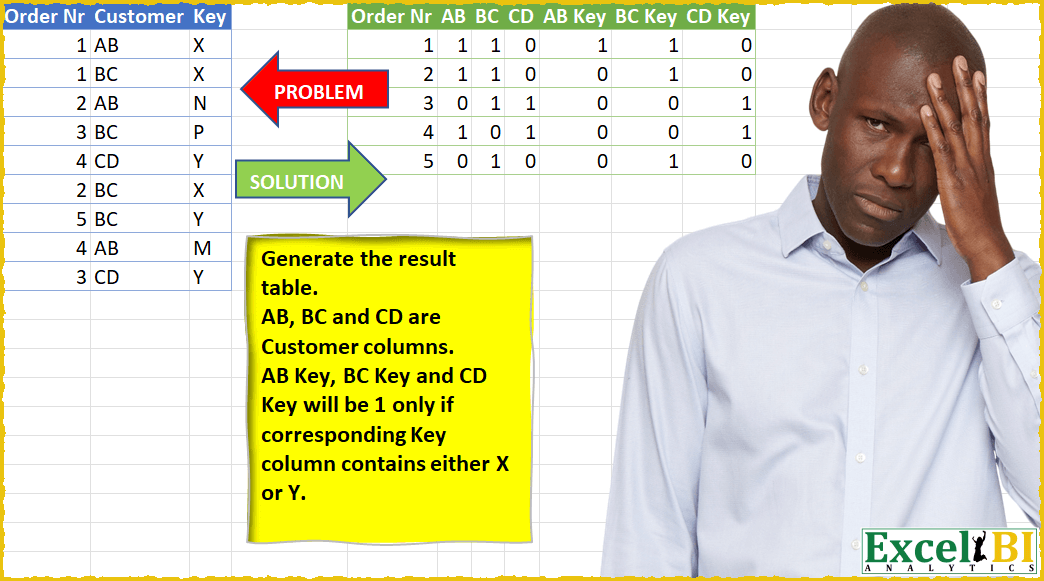
Generate the result table. AB, BC and CD are Customer columns. AB Key, BC Key and CD Key will be 1 only if corresponding Key column contains either X or Y.
📌 Challenge Details and Links
ExcelBI Power Query Challenge Number: 24
Challenge Difficulty: ⭐️⭐️⭐️⭐️
📥Download Sample File
📥Link to the solutions on LinkedIn
Solving the challenge of Flag Columns with Special Keys with Power Query
Power Query solution 1 for Flag Columns with Special Keys, proposed by Alejandro Simón 🇵🇦 🇪🇸:
let
  Source = Excel.CurrentWorkbook(){[Name = "Table1"]}[Content],
  Group = Table.Group(
    Source,
    {"Order Nr"},
    {
      {
        "All",
        each
          let
            a = List.Transform(Table.ToRows(_), List.Skip),
            b = List.Transform(a, each {_{0}} & {Text.Replace(_{1}, _{1}, "1")}),
            c = Table.PromoteHeaders(Table.FromColumns(b))
          in
            c
      }
    }
  ),
  Expand = Table.ExpandTableColumn(Group, "All", {"AB", "BC", "CD"}),
  ReplaceNulls = Table.ReplaceValue(Expand, null, "0", Replacer.ReplaceValue, {"AB", "BC", "CD"}),
  Type = Table.TransformColumnTypes(
    ReplaceNulls,
    {{"AB", Int64.Type}, {"BC", Int64.Type}, {"CD", Int64.Type}}
  ),
  Lista = List.Transform(
    {0 .. Table.RowCount(Source) - 1},
    each Text.Combine(List.Transform(Table.ToRows(Source){_}, Text.From))
  ),
  Sol = List.Accumulate(
    List.Skip(Table.ColumnNames(Type)),
    Type,
    (s, c) =>
      Table.AddColumn(
        s,
        c & " Key",
        each
          if List.Contains(Lista, Text.From([Order Nr]) & c & "X")
            or List.Contains(Lista, Text.From([Order Nr]) & c & "Y")
          then
            1
          else
            0
      )
  )
in
  Sol
Power Query solution 2 for Flag Columns with Special Keys, proposed by Pavel A.:
let
  prepTbl = Table.TransformColumnTypes(
    Excel.CurrentWorkbook(){[Name = "Table1"]}[Content],
    {{"Customer", type text}, {"Order Nr", Int64.Type}, {"Key", type text}}
  ),
  okKeyList = List.Buffer({"X", "Y"}),
  OutAllKeys = Table.Pivot(
    prepTbl,
    List.Distinct(prepTbl[Customer]),
    "Customer",
    "Key",
    (x) => Number.From(not List.IsEmpty(x)) ?? 0
  ),
  OutOKkeys = Table.Pivot(
    prepTbl,
    List.Transform(List.Distinct(prepTbl[Customer]), each _ & " key"),
    "Customer",
    "Key",
    (x) => if List.IsEmpty(x) then 0 else Number.From(List.Contains(okKeyList, x{0}))
  ),
  outOKKeysColumnNames = List.Buffer(List.Skip(Table.ColumnNames(OutOKkeys), 1)),
  MergeAll_and_OKonly_keys = Table.NestedJoin(
    OutAllKeys,
    {"Order Nr"},
    OutOKkeys,
    {"Order Nr"},
    "OutOKkeys",
    JoinKind.LeftOuter
  ),
  #"Expanded OutOKkeys" = Table.ExpandTableColumn(
    MergeAll_and_OKonly_keys,
    "OutOKkeys",
    outOKKeysColumnNames,
    outOKKeysColumnNames
  )
in
  #"Expanded OutOKkeys"
Power Query solution 3 for Flag Columns with Special Keys, proposed by Brian Julius:
let
  Source = OrderNrRaw,
  KeyBinary = Table.AddColumn(
    Source,
    "KeyBinary",
    each if Text.Contains([Key], "X") then 1 else if Text.Contains([Key], "Y") then 1 else null
  ),
  DupeCustCol = Table.DuplicateColumn(KeyBinary, "Customer", "Customer - Copy"),
  DupeCustCol2 = Table.DuplicateColumn(DupeCustCol, "Customer - Copy", "CustKey"),
  CustKey = Table.RemoveColumns(
    Table.AddColumn(DupeCustCol2, "CustKey2", each [CustKey] & " Key"),
    {"CustKey", "Key"}
  ),
  PivotCust = Table.Pivot(
    CustKey,
    List.Distinct(CustKey[Customer]),
    "Customer",
    "Customer - Copy",
    List.NonNullCount
  ),
  PivotABKey = Table.Pivot(
    PivotCust,
    List.Distinct(PivotCust[CustKey2]),
    "CustKey2",
    "KeyBinary",
    List.NonNullCount
  ),
  UnpivotOther = Table.UnpivotOtherColumns(PivotABKey, {"Order Nr"}, "Attribute", "Value"),
  GroupMax = Table.Group(
    UnpivotOther,
    {"Order Nr", "Attribute"},
    {{"MaxVal", each List.Max([Value]), type number}}
  ),
  PivotAttribute = Table.Pivot(GroupMax, List.Distinct(GroupMax[Attribute]), "Attribute", "MaxVal")
in
  PivotAttribute
Power Query solution 5 for Flag Columns with Special Keys, proposed by 🇮🇷 Navid Esmaeilzadeh اسماعیل زاده:
let
 Source = Excel.CurrentWorkbook(){[Name="Table1"]}[Content],
 #"Changed Type" = Table.TransformColumnTypes(Source,{{"Order Nr", Int64.Type}, {"Customer", type text}, {"Key", type text}}),
 #"Added Custom" = Table.AddColumn(#"Changed Type", "Keys", each if [Key]="X" or [Key]="Y" then 1 else null),
 #"Removed Columns" = Table.RemoveColumns(#"Added Custom",{"Key"}),
 #"Pivoted Column" = Table.Pivot(#"Removed Columns", List.Distinct(#"Removed Columns"[Customer]), "Customer", "Keys", List.Sum),
 Custom1 = #"Removed Columns",
 #"Added Custom1" = Table.AddColumn(Custom1, "Custom", each [Customer]&" Key"),
 #"Removed Columns1" = Table.RemoveColumns(#"Added Custom1",{"Customer"}),
 #"Pivoted Column1" = Table.Pivot(#"Removed Columns1", List.Distinct(#"Removed Columns1"[Custom]), "Custom", "Keys", List.Sum),
 Custom2 = Table.NestedJoin(#"Pivoted Column1",{"Order Nr"},#"Pivoted Column",{"Order Nr"},"Pivoted Column1",JoinKind.LeftOuter),
 #"Reordered Columns" = Table.ReorderColumns(Custom2,{"Order Nr", "Pivoted Column1", "AB Key", "BC Key", "CD Key"}),
 #"Expanded Pivoted Column1" = Table.ExpandTableColumn(#"Reordered Columns", "Pivoted Column1", {"AB", "BC", "CD"}, {"AB", "BC", "CD"}),

 #"Changed Type1" = Table.TransformColumnTypes(#"Expanded Pivoted Column1",{{"Order Nr", Int64.Type}, {"AB", Int64.Type}, {"BC", Int64.Type}, {"CD", Int64.Type}, {"AB Key", Int64.Type}, {"BC Key", Int64.Type}, {"CD Key", Int64.Type}}),
 #"Replaced Value" = Table.ReplaceValue(#"Changed Type1",null,0,Replacer.ReplaceValue,{"Order Nr", "AB", "BC", "CD", "AB Key", "BC Key", "CD Key"})
in
 #"Replaced Value"
Power Query solution 6 for Flag Columns with Special Keys, proposed by Owen Price:
Another good one.
https://gist.github.com/ncalm/f0fbd7197da741a39d81eee878d5bab7
Power Query solution 7 for Flag Columns with Special Keys, proposed by Victor Wang:
let
  Source = Excel.CurrentWorkbook(){[Name = "Table1"]}[Content],
  OrderNr = Table.Sort(Table.Distinct(Source[[Order Nr]]), "Order Nr"),
  Customers = List.Sort(List.Distinct(Source[Customer])),
  CountCustomers = List.Accumulate(
    Customers,
    OrderNr,
    (state, current) =>
      Table.AddColumn(
        state,
        current,
        (a) =>
          Table.RowCount(
            Table.SelectRows(Source, (b) => a[Order Nr] = b[Order Nr] and b[Customer] = current)
          )
      )
  ),
  CountKeys = List.Accumulate(
    Customers,
    CountCustomers,
    (state, current) =>
      Table.AddColumn(
        state,
        current & " Key",
        (a) =>
          if Table.RowCount(
            Table.SelectRows(
              Source,
              (b) =>
                b[Order Nr]
                  = a[Order Nr] and b[Customer]
                  = current and (b[Key] = "X" or b[Key] = "Y")
            )
          )
            > 0
          then
            1
          else
            0
      )
  )
in
  CountKeys
Power Query solution 8 for Flag Columns with Special Keys, proposed by Dominic Walsh:
let
  Source = Excel.CurrentWorkbook(){[Name = "Table1"]}[Content],
  Rem1 = Table.RemoveColumns(Source, {"Key"}),
  Dup = Table.DuplicateColumn(Rem1, "Order Nr", "Dup"),
  Pivot = Table.Pivot(Dup, List.Distinct(Dup[Customer]), "Customer", "Dup", List.Count),
  KeyValue = Table.AddColumn(
    Source,
    "Value",
    each if [Key] = "X" then 1 else if [Key] = "Y" then 1 else 0
  ),
  Rem2 = Table.RemoveColumns(KeyValue, {"Key"}),
  KeyAdd = Table.AddColumn(Rem2, "Key", each Text.Combine({[Customer], " Key"}), type text),
  Rem3 = Table.RemoveColumns(KeyAdd, {"Customer"}),
  Keys = List.Distinct(Rem3[Key]),
  Pivot1 = Table.Pivot(Rem3, List.Distinct(Rem3[Key]), "Key", "Value", List.Sum),
  Null = Table.ReplaceValue(Pivot1, null, 0, Replacer.ReplaceValue, Keys),
  Join = Table.NestedJoin(Pivot, "Order Nr", Null, "Order Nr", "Table"),
  Expand = Table.ExpandTableColumn(Join, "Table", Keys, Keys)
in
  Expand
Solving the challenge of Flag Columns with Special Keys with Excel
Excel solution 1 for Flag Columns with Special Keys, proposed by Rick Rothstein:
Excel solution 2 for Flag Columns with Special Keys, proposed by Rick Rothstein:
=LET(a,
    A2:A10,
    b,
    B2:B10,
    c,
    C2:C10,
    on,
    UNIQUE(
        a
    ),
    cu,
    TRANSPOSE(
        UNIQUE(
            b
        )
    ),
    VSTACK(HSTACK(
        "Order Nr",
        cu,
        cu&" Key"
    ),
    HSTACK(on,
    (COUNTIFS(
        a,
        on,
        b,
        cu
    )>0)+0,
    1-ISNA(
        XMATCH(
            on&cu&"x",
            a&b&IF(
                c="y",
                "x",
                c
            )
        )
    ))))
Excel solution 3 for Flag Columns with Special Keys, proposed by Rick Rothstein:
=LET(a,
    A2:A10,
    b,
    B2:B10,
    c,
    C2:C10,
    on,
    UNIQUE(
        a
    ),
    cu,
    TRANSPOSE(
        UNIQUE(
            b
        )
    ),
    VSTACK(HSTACK(
        "Order Nr",
        cu,
        cu&" Key"
    ),
    HSTACK(on,
    0+(COUNTIFS(
        a,
        on,
        b,
        cu
    )>0),
    (COUNTIFS(
        a,
        on,
        b,
        cu,
        c,
        "x"
    )>0)+(COUNTIFS(
        a,
        on,
        b,
        cu,
        c,
        "y"
    )>0))))

One part of this formula bothers me though. I have this in it...

(COUNTIFS(
    a,
    on,
    b,
    cu,
    c,
    "x"
)>0)+(COUNTIFS(
    a,
    on,
    b,
    cu,
    c,
    "y"
)>0)

Both COUNTIFS are identical except for their last argument ("y" instead of "x"). It just seems to me that they can be combined in some way,
     but I could not figure out how. I tried {"x",
    "y")
Excel solution 4 for Flag Columns with Special Keys, proposed by محمد حلمي:
=LET(

    v,
    A2:A10,

    c,
    B2:B10,

    n,
    C2:C10,

    a,
    UNIQUE(
        v
    ),

    b,
    TOROW(
        UNIQUE(
            c
        )
    ),

    m,
    ROW(
        v
    )^0,

    d,
    LAMBDA(
        a,
        [s],
        [n],
        XLOOKUP(
            a&b&s,
            v&c&n,
            m,
            0
        )
    ),

    VSTACK(
        HSTACK(
            "Order Nr",
             b,
             b&" Key"
        ),

        HSTACK(
            a,
            d(
                a
            ),

            d(
                a,
                "x",
                n
            )+d(
                a,
                "y",
                n
            )
        )
    )
)
Excel solution 5 for Flag Columns with Special Keys, proposed by محمد حلمي:
=LET(
v,
    A2:A10,

c,
    B2:B10,

n,
    C2:C10,

a,
    UNIQUE(
        v
    ),

b,
    TOROW(
        UNIQUE(
            c
        )
    ),

x,
    FILTER(v,
    (n="x")+(n="y")),

z,
    FILTER(c,
    (n="x")+(n="y")),

IFNA(

    VSTACK(
        HSTACK(
            "Order Nr",
             b,
             b&" Key"
        ),

        HSTACK(
            a,
            XLOOKUP(
                 a&b,
                 v&c,
                 ROW(
        v
    )^0
            ),

            XLOOKUP(
                a&b,
                x&z,
                SEQUENCE(
                    ROWS(
                        x
                    )
                )^0
            )
        )
    ),

))
Excel solution 6 for Flag Columns with Special Keys, proposed by 🇰🇷 Taeyong Shin:
=LET(
    num,
     A2:A10,
     Cus,
     B2:B10,

    Unum,
     UNIQUE(
         num
     ),
     UCus,
     TRANSPOSE(
         UNIQUE(
             Cus
         )
     ),

    Key,
     REDUCE(
         C2:C10,
          {"X",
         "Y"},
          LAMBDA(
              a,
              b,
               SUBSTITUTE(
                   a,
                    b,
                    "#"
               )
          )
     ),

    Val_1,
     COUNTIFS(
         num,
          Unum,
          Cus,
          UCus
     ),

    Val_2,
     XLOOKUP(
         Unum & UCus & "#",
          num & Cus & Key,
          N(
              +Cus
          )+1,
          0
     ),

    VSTACK(
         HSTACK(
             "Order Nr",
              UCus,
              UCus & " Key"
         ),
         HSTACK(
             Unum,
              Val_1,
              Val_2
         )
    )

)
Excel solution 7 for Flag Columns with Special Keys, proposed by Aditya Kumar Darak 🇮🇳:
= LET(

     _o,

     A2:A10,

     _c,

     B2:B10,

     _k,

     C2:C10,

     _uo,

     UNIQUE(
         _o
     ),

     _uc,

     TOROW(
         UNIQUE(
             _c
         )
     ),

     _b1,

     COUNTIFS(
         _o,
          _uo,
          _c,
          _uc
     ),

     _b2,

     MAKEARRAY(

          ROWS(
              _uo
          ),

          COLUMNS(
              _uc
          ),

          LAMBDA(

               r,

               c,

               SUM(
                   COUNTIFS(

                        A2:A10,

                        INDEX(
                            _uo,
                             r
                        ),

                        B2:B10,

                        INDEX(
                            _uc,
                             ,
                             c
                        ),

                        C2:C10,

                        {"X",
                       "Y"}
                   )
               )
          )
     ),

     _final,

     VSTACK(

          HSTACK(
              "OrderNr",
               _uc,
               _uc & " Key"
          ),

          HSTACK(
              _uo,
               _b1,
               _b2
          )
     ),

     _final
)
Excel solution 8 for Flag Columns with Special Keys, proposed by Aditya Kumar Darak 🇮🇳:
=LET(

     _o,
     A2:A10,

     _c,
     B2:B10,

     _k,
     C2:C10,

     _uo,
     UNIQUE(
         _o
     ),

     _uc,
     TOROW(
         UNIQUE(
             _c
         )
     ),

     _b1,
     COUNTIFS(
         _o,
          _uo,
          _c,
          _uc
     ),

     _b2,
     COUNTIFS(
         _o,
          _uo,
          _c,
          _uc,
          _k,
          "X"
     ) +
     COUNTIFS(
         _o,
          _uo,
          _c,
          _uc,
          _k,
          "Y"
     ),

     _final,
     VSTACK(

          HSTACK(
              "Order Nr",
               _uc,
               _uc & " Key"
          ),

          HSTACK(
              _uo,
               _b1,
               _b2
          )

     ),

     _final

)Excel solution 9 for Flag Columns with Special Keys, proposed by Duy Tùng:
=LET(
    a,
    DROP(
        PIVOTBY(
            A2:A10,
            B2:B10,
            BYROW(
                N(
                    C2:C10={"X",
                    "Y"}
                ),
                SUM
            ),
            HSTACK(
                ROWS,
                SUM
            ),
            ,
            0,
            ,
            0
        ),
        1
    ),
    b,
    DROP(
        a,
        1
    ),
    VSTACK(
        TOROW(
            VSTACK(
                "Order Nr",
                {"AB",
                "BC",
                "CD"}&{"";" Key"}
            ),
            3
        ),
        SORTBY(
            IF(
                b<>"",
                b,
                0
            ),
            TAKE(
        a,
        1
    )
        )
    )
)