
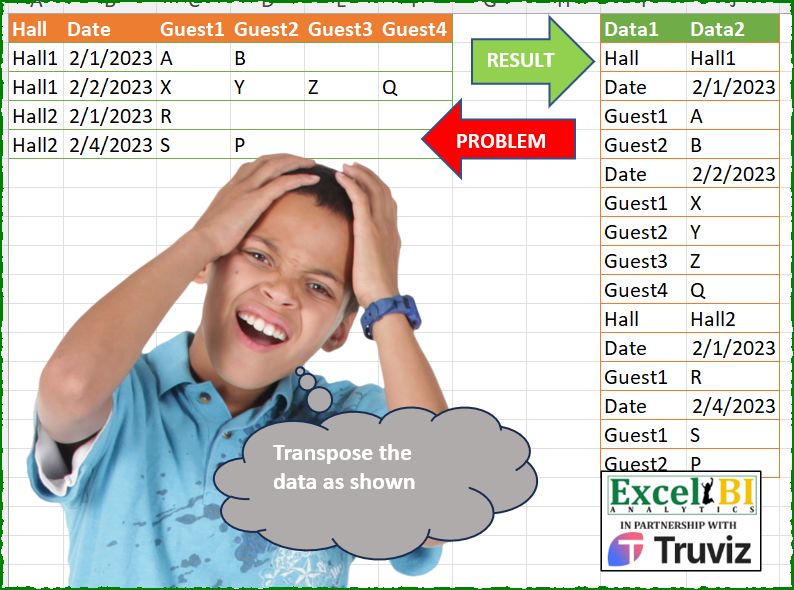
Transpose the data as shown.
📌 Challenge Details and Links
ExcelBI Power Query Challenge Number: 236
Challenge Difficulty: ⭐️⭐️⭐️⭐️
📥Download Sample File
📥Link to the solutions on LinkedIn
Solving the challenge of Align Nested Headers with Power Query
Power Query solution 1 for Align Nested Headers, proposed by Zoran Milokanović:
let
  Source = Table.AddIndexColumn(
    Table.UnpivotOtherColumns(
      Excel.CurrentWorkbook(){[Name = "Input"]}[Content],
      {},
      "Data1",
      "Data2"
    ),
    "P"
  ),
  S = Table.RemoveColumns(
    Table.SelectRows(
      Source,
      each [Data1] <> "Hall" or [P] = List.PositionOf(Source[Data2], [Data2])
    ),
    "P"
  )
in
  S
Power Query solution 2 for Align Nested Headers, proposed by Zoran Milokanović:
let
  Source = Excel.CurrentWorkbook(){[Name = "Input"]}[Content],
  S = Table.Combine(
    Table.Group(
      Source,
      "Hall",
      {"T", each Table.Distinct(Table.Buffer(Table.UnpivotOtherColumns(_, {}, "Data1", "Data2")))}
    )[T]
  )
in
  S
Power Query solution 3 for Align Nested Headers, proposed by Kris Jaganah:
let
  A = Excel.CurrentWorkbook(){[Name = "Table1"]}[Content],
  B = Table.Combine(
    Table.Group(
      A,
      {"Hall"},
      {
        "All",
        each
          let
            a = Table.ToRecords(_),
            b = List.TransformMany(
              a,
              each List.Zip({Record.FieldNames(_), Record.FieldValues(_)}),
              (x, y) => y
            ),
            c = Table.FromRows(b, {"Data1", "Data2"}),
            d = Table.Distinct(Table.SelectRows(c, each ([Data2] <> null)))
          in
            d
      }
    )[All]
  )
in
  B
Power Query solution 4 for Align Nested Headers, proposed by Alejandro Simón 🇵🇦 🇪🇸:
let
  Source = Excel.CurrentWorkbook(){[Name = "Table1"]}[Content],
  Sol = Table.Combine(
    Table.Group(
      Source,
      "Hall",
      {
        "A",
        each
          let
            a = _,
            b = Table.Unpivot(a, Table.ColumnNames(a), "Data1", "Data2"),
            c = Table.Distinct(b)
          in
            c
      }
    )[A]
  )
in
  Sol
Power Query solution 5 for Align Nested Headers, proposed by Luan Rodrigues:
let
  Fonte = Tabela1,
  din = Table.UnpivotOtherColumns(Fonte, {}, "Atributo", "Valor"),
  dist = Table.Distinct(din),
  res = Table.RenameColumns(
    dist,
    List.Zip(
      {
        Table.ColumnNames(dist),
        List.Transform({1 .. List.Count(Table.ColumnNames(dist))}, each "Data" & Text.From(_))
      }
    )
  )
in
  res
Power Query solution 6 for Align Nested Headers, proposed by Eric Laforce:
💕 Vijay's challenges for these kind of opportunitiesPower Query solution 7 for Align Nested Headers, proposed by Eric Laforce:
let
  Source = Excel.CurrentWorkbook(){[Name = "tData236"]}[Content],
  FormatDate = Table.TransformColumns(
    Source,
    {"Date", each Date.ToText(Date.From(_), "d", "Fr-fr")}
  ),
  Group = Table.Group(
    FormatDate,
    "Hall",
    {
      "G",
      each
        let
          _tHeader = Table.FromRecords({[Data1 = "Hall", Data2 = [Hall]{0}]}),
          _Unpivot = Table.UnpivotOtherColumns(Table.RemoveColumns(_, "Hall"), {}, "Data1", "Data2")
        in
          _tHeader & _Unpivot
    }
  ),
  Result = Table.Combine(Group[G])
in
  Result
Power Query solution 8 for Align Nested Headers, proposed by 🇮🇷 Navid Esmaeilzadeh اسماعیل زاده:
let
  S = Excel.CurrentWorkbook(){[Name = "Table1"]}[Content],
  A = Table.UnpivotOtherColumns(S, {"Hall"}, "Data1", "Data2"),
  B = Table.Group(A, {"Hall"}, {{"T", each _}}),
  C = Table.AddColumn(
    B,
    "T2",
    each Table.FromColumns({{"Hall"} & [T][Data1], {[Hall]} & [T][Data2]}, {"Data1", "Data2"})
  ),
  D = Table.Combine(C[T2])
in
  D
Power Query solution 9 for Align Nested Headers, proposed by Antriksh Sharma:
let
  Source = Table,
  Unpivot = Table.UnpivotOtherColumns(Source, {}, "A", "V"),
  Fill = Table.FillDown(
    Table.AddColumn(Unpivot, "G", each if [A] = "Hall" then [V] else null, type text),
    {"G"}
  ),
  Group = Table.Group(
    Fill,
    "G",
    {
      "T",
      (x) =>
        let
          a = x[[A], [V]],
          b = Table.FirstN(a, 1),
          c = Table.SelectRows(a, each [A] <> "Hall" and [V] <> "")
        in
          b & c
    }
  ),
  Combine = Table.Combine(Group[T])
in
  Combine
Power Query solution 10 for Align Nested Headers, proposed by Peter Krkos:
let
  Transformed = Table.Combine(
    Table.Group(
      Source,
      "Hall",
      {
        {
          "T",
          each [
            Unpivoted = Table.UnpivotOtherColumns(_, {"Hall"}, "Data1", "Data2"),
            InsertedRow = Table.InsertRows(
              Unpivoted,
              0,
              {
                Unpivoted{0}
                  & [
                    Data1 = Text.Select(Unpivoted{0}[Hall], {"a" .. "z", "A" .. "Z"}),
                    Data2 = Unpivoted{0}[Hall]
                  ]
              }
            )[[Data1], [Data2]]
          ][InsertedRow],
          type table
        }
      },
      0
    )[T]
  )
in
  Transformed
Power Query solution 11 for Align Nested Headers, proposed by Yaroslav Drohomyretskyi:
let
  Source = Excel.CurrentWorkbook(){[Name = "Table1"]}[Content],
  Result = Table.Combine(
    Table.Group(
      Source,
      {"Hall"},
      {{"x", each Table.Distinct(Table.UnpivotOtherColumns(_, {}, "Data1", "Data2"))}}
    )[x]
  )
in
  Result
Power Query solution 12 for Align Nested Headers, proposed by Francesco Bianchi 🇮🇹:
let
  Source = Excel.CurrentWorkbook(){[Name = "Table1"]}[Content],
  gr = Table.Group(
    Source,
    {"Hall"},
    {
      {
        "all",
        each
          let
            a = Table.ToRows(_),
            b = List.Distinct(
              List.Zip(
                {
                  List.Repeat(Table.ColumnNames(Source), List.Count(List.Distinct(Source[Hall]))),
                  a{0} & a{1}
                }
              )
            )
          in
            b
      }
    }
  )[all],
  tfr = Table.SelectRows(Table.FromRows(gr{0} & gr{1}, {"Data1", "Data2"}), each ([Data2] <> null))
in
  tfr
Power Query solution 13 for Align Nested Headers, proposed by Artur Pilipczuk:
let
  Source = Excel.CurrentWorkbook(){[Name = "Table1"]}[Content],
  Date = Table.TransformColumnTypes(Source, {{"Date", type date}}),
  DateText = Table.TransformColumnTypes(Date, {{"Date", type text}}),
  #"Grouped Rows" = Table.Group(DateText, {"Hall"}, {{"data", each _}}),
  Unpivot = Table.TransformColumns(
    #"Grouped Rows",
    {"data", each Table.UnpivotOtherColumns(Table.RemoveColumns(_, {"Hall"}), {}, "Data1", "Data2")}
  ),
  InsertHall = Table.FromRecords(
    Table.TransformRows(
      Unpivot,
      (r) =>
        Record.TransformFields(
          r,
          {{"data", each Table.InsertRows(_, 0, {[Data1 = "Hall", Data2 = r[Hall]]})}}
        )
    )
  ),
  Combine = Table.Combine(InsertHall[data])
in
  Combine
Power Query solution 15 for Align Nested Headers, proposed by Joevan Bedico:
let
  Source = Excel.CurrentWorkbook(){[Name = "Table2"]}[Content],
  Answer = Table.Combine(
    Table.Group(
      Source,
      {"Hall"},
      {
        {
          "Grp",
          each
            let
              x = Table.RemoveColumns(_, "Hall")
            in
              Table.FromRows(
                {{"Hall", [Hall]{0}}}
                  & List.Combine(
                    List.Transform(
                      Table.ToRows(x),
                      each List.Select(List.Zip({Table.ColumnNames(x), _}), each _{1} <> null)
                    )
                  ),
                {"Data1", "Data2"}
              )
        }
      }
    )[Grp]
  )
in
  Answer
Solving the challenge of Align Nested Headers with Excel
Excel solution 1 for Align Nested Headers, proposed by Rick Rothstein:
=LET(
    d,
    HSTACK(
        IF(
            A2:A5=A3:A6,
            A2:A4,
            1/0
        ),
        B2:F5
    ),
    HSTACK(
        TOCOL(
            IF(
                d="",
                1/0,
                A1:F1
            ),
            3
        ),
        TOCOL(
            d,
            3
        )
    )
)
Excel solution 2 for Align Nested Headers, proposed by 🇰🇷 Taeyong Shin:
=LET(
    d,
    MAP(
        A2:F5,
        LAMBDA(
            x,
            IF(
                COUNTIFS(
                    A2:x,
                    x,
                    A2:x,
                    "Ha*"
                )>1,
                y,
                x
            )
        )
    ),
    HSTACK(
        TOCOL(
            IFS(
                d>0,
                A1:F1
            ),
            2
        ),
        TOCOL(
            d,
            3
        )
    )
)

=LET(
    h,
    A2:A5,
    d,
    B2:F5,
    f,
    LAMBDA(
        x,
        UNIQUE(
            TOCOL(
                HSTACK(
                    h,
                    IFS(
                        d>0,
                        x&REPT(
                            " ",
                            ROW(
                                h
                            )
                        )
                    )
                ),
                2
            )
        )
    ),
    HSTACK(
        TRIM(
            REGEXREPLACE(
                f(
                    B1:F1
                ),
                "ld",
                "l"
            )
        ),
        TEXT(
            f(
                d
            ),
            "e-mm-dd"
        )
    )
)
Excel solution 3 for Align Nested Headers, proposed by Julian Poeltl:
=LET(
    T,
    A1:F5,
    TT,
    TRANSPOSE(
        T
    ),
    R,
    REDUCE(
        "Data"&SEQUENCE(
            ,
            2
        ),
        SEQUENCE(
            ROWS(
        T
    )-1,
            ,
            2
        ),
        LAMBDA(
            A,
            B,
            VSTACK(
                A,
                FILTER(
                    HSTACK(
                        TAKE(
                            TT,
                            ,
                            1
                        ),
                        CHOOSECOLS(
                            TT,
                            B
                        )
                    ),
                    CHOOSECOLS(
                            TT,
                            B
                        )<>0
                )
            )
        )
    ),
    D,
    IF(
        DROP(
            VSTACK(
                "",
                SCAN(
                    "",
                    IF(
                        TAKE(
                            R,
                            ,
                            1
                        )="Hall",
                        DROP(
                            R,
                            ,
                            1
                        ),
                        ""
                    ),
                    LAMBDA(
                        A,
                        B,
                        IF(
                            B="",
                            A,
                            B
                        )
                    )
                )
            ),
            -1
        )=DROP(
                            R,
                            ,
                            1
                        ),
        0,
        1
    ),
    FILTER(
        R,
        D
    )
)
Excel solution 4 for Align Nested Headers, proposed by Sunny Baggu:
=LET(

     _a,
     HSTACK(

          IF(

               SCAN(

                    0,

                    XMATCH(
                        A2:A5,
                         UNIQUE(
                             A2:A5
                         )
                    ),

                    LAMBDA(
                        a,
                         v,
                         IF(
                             a = v,
                              0,
                              v
                         )
                    )

               ),

               A2:A5,

               1 / 0

          ),

          IF(
              B2:F5 <> "",
               B2:F5,
               1 / 0
          )

     ),

     _b,
     TOCOL(
         IF(
             ISERROR(
                 _a
             ),
              1 / 0,
              A1:F1
         ),
          3
     ),

     HSTACK(
         _b,
          TOCOL(
              _a,
               3
          )
     )

)
Excel solution 5 for Align Nested Headers, proposed by Md. Zohurul Islam:
=LET(a,
    A3:A6,
    b,
    A2:A5,
    c,
    A1:F1,
    d,
    B2:F5,
    p,
    IF(
        a=b,
        b,
        ""
    ),
    q,
    HSTACK(
        p,
        d
    ),
    r,
    IF(
        q="",
        "",
        c
    ),
    s,
    TOCOL(
        q
    ),
    t,
    TOCOL(
        r
    ),
    rng,
    HSTACK(
        t,
        s
    ),
    u,
    FILTER(rng,
    (s>0)*(t<>"")),
    result,
    VSTACK(
        {"Data1",
        "Data2"},
        u
    ),
    result)
Excel solution 6 for Align Nested Headers, proposed by Jaroslaw Kujawa:
=DROP(
    REDUCE(
        "";
        A2:F5;
        LAMBDA(
            a;
            x;
            LET(
                head;
                A1:F1;
                IF(
                    LEN(
                        x
                    )*ISERROR(
                        FIND(
                            "Hall";
                            x
                        )*MATCH(
                            x;
                            TAKE(
                                a;
                                ;
                                -1
                            );
                            0
                        )
                    );
                    VSTACK(
                        a;
                        HSTACK(
                            OFFSET(
                                x;
                                ROW(
                                    head
                                )-ROW(
                        x
                    );
                                0
                            );
                            x
                        )
&                    );
                    a
                )
            )
        )
    );
    1
)
Excel solution 7 for Align Nested Headers, proposed by Antriksh Sharma:
=LET(
 Header,
     TOCOL(
         A1:F1
     ),

 Data,
     A2:F5,

 Acc,
     DROP(
         REDUCE(
             "",
              SEQUENCE(
                  ROWS(
                      Data
                  )
              ),
              LAMBDA(
                  state,
                   current,
                   VSTACK(
                       state,
                        HSTACK(
                            Header,
                             TOCOL(
                                 INDEX(
                                     Data,
                                      current,

                                 )
                             )
                        )
                   )
              )
         ),
          1
     ),

 FillDown,
     LET(N,
     SCAN(0,
     --(CHOOSECOLS(
         Acc,
          1
     ) = "Hall"),
     LAMBDA(
         s,
          c,
          s + c
     )),
     a,
     IF(
         CHOOSECOLS(
         Acc,
          1
     ) = "Hall",
          CHOOSECOLS(
              Acc,
               2
          ),
          ""
     ),
     b,
     MAP(
         a,
          N,
          LAMBDA(
              s,
               c,
               IF(
                   s = "",
                    XLOOKUP(
                        c,
                         N,
                         a
                    ),
                    s
               )
          )
     ),
     b),

 Group,
     REDUCE("",
     UNIQUE(
         FillDown
     ),
     LAMBDA(s,
     c,
     LET(Filt,
     FILTER(
         Acc,
          FillDown = c
     ),
     Hall,
     TAKE(
         Filt,
          1
     ),
     RemoveHalls,
     FILTER(Filt,
     (CHOOSECOLS(
         Filt,
          1
     ) <> "Hall") * (CHOOSECOLS(
         Filt,
          2
     ) <> 0)),
     VSTACK(
         s,
          Hall,
          RemoveHalls
     )))),

 Result,
     VSTACK(
         {"Data1",
          "Data2"},
          DROP(
              Group,
               1
          )
     ),

 Result
)
Excel solution 8 for Align Nested Headers, proposed by Tolga Demirci, PMP, PMI-ACP, MOS-Expert:
=LET(
    d,
    MAP(
        A2:A5,
        LAMBDA(
            j,
            IF(
                COUNTIF(
                    $A$2:j,
                    j
                )=1,
                j,
                ""
            )
        )
    ),
    c,
    TEXTSPLIT(
        TEXTJOIN(
            ",",
            ,
            BYROW(
                HSTACK(
                    d,
                    B2:F5
                ),
                LAMBDA(
                    b,
                    TEXTJOIN(
                        ",",
                        ,
                        LET(
                            a,
                            TOCOL(
                                b
                            ),
                            FILTER(
                                a,
                                a<>0
                            )
                        )
                    )
                )
            )
        ),
        ,
        ","
    ),
    HSTACK(
        IFERROR(
            MAP(
                c,
                LAMBDA(
                    i,
                    LET(
                        c,
                        TOCOL(
                            IF(
                                BYCOL(
                                    IF(
                                        i=HSTACK(
                    d,
                    B2:F5
                ),
                                        1,
                                        0
                                    ),
                                    LAMBDA(
                                        x,
                                        SUM(
                                            x
                                        )
                                    )
                                )>0,
                                A1:F1,
                                ""
                            )
                        ),
                        FILTER(
                            c,
                            c<>""
                        )
                    )
                )
            ),
            "Date"
        ),
        c
    )
)
Excel solution 9 for Align Nested Headers, proposed by Imam Hambali:
=LET(

    l,
     LAMBDA(
         x,
         TOCOL(
              IF(
                  A2:F5>0,
                  x,
                  NA()
              ),
             3
         )
     ),

    VSTACK(
        I1:J1,
         DROP(
             UNIQUE(
                 HSTACK(
                     l(
                         A2:A5
                     ),
                     l(
                         A1:F1
                     ),
                      l(
                          A2:F5
                      )
                 )
             ),
             ,
             1
         )
    )

)
Solving the challenge of Align Nested Headers with Python
Python solution 1 for Align Nested Headers, proposed by Konrad Gryczan, PhD:
import pandas as pd
path = "PQ_Challenge_236.xlsx"
input = pd.read_excel(path, usecols="A:F", nrows=4)
test = pd.read_excel(path, usecols="I:J", nrows=16)
result = input.T.values.tolist()
result = list(zip(*result))
result = [item for sublist in result for item in sublist]
result = pd.DataFrame(result, columns=["Data2"])
result["Data1"] = input.columns.tolist() * 4
result = result[["Data1", "Data2"]]
result = result.dropna()
result["Count"] = result.groupby("Data2").cumcount() + 1
result = result[~((result["Count"] == 2) & (result["Data1"] == "Hall"))]
result = result.drop(columns="Count").reset_index(drop=True)
print(result.equals(test))    # True
Python solution 2 for Align Nested Headers, proposed by Abdallah Ally:
import pandas as pd
file_path = 'PQ_Challenge_236.xlsx'
df = pd.read_excel(file_path, usecols='A:F', nrows=4)
# Perform data manipulation
df['Date'] = df['Date'].dt.strftime('%d/%m/%Y')
df = (
 df.melt(
 id_vars='Hall',
 value_vars=df.columns[1:],
 var_name='Data1',
 value_name='Data2',
 ignore_index=False
 )
 .reset_index()
 .sort_values(by=['index', 'Hall'])
 .reset_index(drop=True)
)
df = df[pd.notna(df['Data2'])].reset_index(drop=True)
for i in range(len(df) - 1, -1, -1):
 row = pd.DataFrame(data=[[0, '', 'Hall', df.iat[i, 1]]], columns=df.columns)
 if i == 0:
 df = pd.concat([df.iloc[:i], row, df.iloc[i:]]).reset_index(drop=True)
 elif df.iat[i, 1] != df.iat[i-1, 1]:
 df = pd.concat([df.iloc[:i], row, df.iloc[i:]]).reset_index(drop=True)
df = df.loc[:, 'Data1':]
df
Solving the challenge of Align Nested Headers with Python in Excel
Python in Excel solution 1 for Align Nested Headers, proposed by Alejandro Campos:
df = xl("A1:F5", headers=True).fillna('')
transposed_data = []
for hall in df['Hall'].unique():
 hall_data = df[df['Hall'] == hall]
 transposed_data.append({'Data1': 'Hall', 'Data2': hall})
 for _, row in hall_data.iterrows():
 transposed_data.append({'Data1': 'Date', 'Data2': row['Date']})
 for guest in ['Guest1', 'Guest2', 'Guest3', 'Guest4']:
 if row[guest]:
 transposed_data.append({'Data1': guest, 'Data2': row[guest]})
transposed_df = pd.DataFrame(transposed_data)
transposed_df
&&