
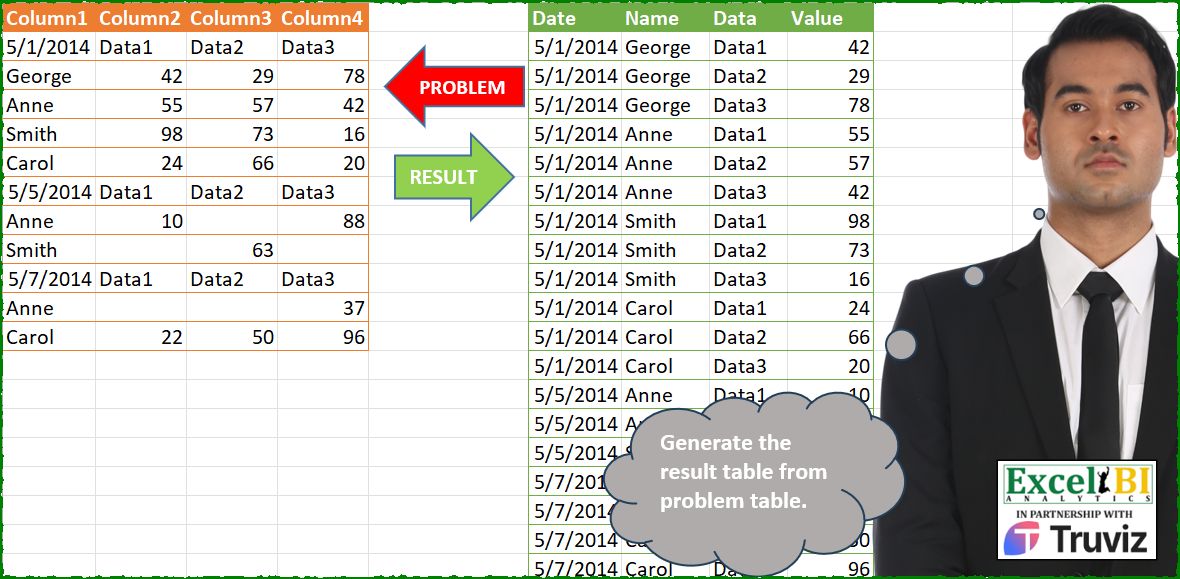
Transpose the problem table into result table.
📌 Challenge Details and Links
ExcelBI Power Query Challenge Number: 224
Challenge Difficulty: ⭐️⭐️⭐️
📥Download Sample File
📥Link to the solutions on LinkedIn
Solving the challenge of Reshape Wide Table Format with Power Query
Power Query solution 1 for Reshape Wide Table Format, proposed by Zoran Milokanović:
let
  Source = Excel.CurrentWorkbook(){[Name = "Input"]}[Content],
  F = each Byte.From(_ is datetime),
  S = Table.Combine(
    Table.Group(
      Source,
      "Column1",
      {
        "A",
        each
          let
            r = Table.ToRows(_)
          in
            Table.SelectRows(
              Table.FromRows(
                List.TransformMany(
                  List.Skip(r),
                  each List.Zip({List.Skip(r{0}), List.Skip(_)}),
                  (i, _) => {{DateTime.FromText(r{0}{0}, "en-US"), r{0}{0}}{F(r{0}{0})}, i{0}} & _
                ),
                {"Date", "Name", "Data", "Value"}
              ),
              each [Value] <> null
            )
      },
      0,
      (b, n) => F(n)
    )[A]
  )
in
  S
Power Query solution 2 for Reshape Wide Table Format, proposed by Kris Jaganah:
let
  A = Excel.CurrentWorkbook(){[Name = "Table1"]}[Content],
  B = Table.AddColumn(
    A,
    "Date",
    each try
      try Date.FromText([Column1], [Format = "M/d/yyyy"]) otherwise Date.From([Column1])
    otherwise
      null
  ),
  C = Table.FillDown(B, {"Date"}),
  D = Table.PromoteHeaders(C, [PromoteAllScalars = true]),
  E = Table.SelectRows(D, each ([Data1] <> "Data1")),
  F = Table.RenameColumns(E, {{"5/1/2014", "Name"}, {"1/05/2014", "Date"}}),
  G = Table.UnpivotOtherColumns(F, {"Name", "Date"}, "Data", "Value")[
    [Date],
    [Name],
    [Data],
    [Value]
  ]
in
  G
Power Query solution 3 for Reshape Wide Table Format, proposed by Alejandro Simón 🇵🇦 🇪🇸:
let
  Source = Excel.CurrentWorkbook(){[Name = "Table1"]}[Content],
  Group = Table.Group(
    Source,
    "Column1",
    {
      {
        "A",
        each
          let
            a = _,
            b = Table.PromoteHeaders(a),
            c = Table.RenameColumns(b, {"Column1", "Name"})
          in
            c
      }
    },
    0,
    (a, b) => Number.From(try Date.From(b) is date otherwise false)
  ),
  Expand = Table.ExpandTableColumn(Group, "A", Table.ColumnNames(Group[A]{0})),
  Sol = Table.RenameColumns(
    Table.UnpivotOtherColumns(Expand, {"Column1", "Name"}, "Data", "Value"),
    {"Column1", "Date"}
  )
in
  Sol
Power Query solution 4 for Reshape Wide Table Format, proposed by Luan Rodrigues:
let
  Fonte = Tabela1,
  grp = Table.Group(
    Fonte,
    {"Column1"},
    {
      "rec",
      each
        let
          cab = Record.ToList(_{0}),
          tab = Table.Combine(
            List.Transform(
              List.Skip(Table.ToRows(_)),
              (x) =>
                Table.Skip(
                  Table.FillDown(
                    Table.FromRows(List.Zip({cab, x, {x{0}}}), {"Data", "Value", "Name"}),
                    {"Name"}
                  )
                )
            )
          ),
          fil = Table.SelectRows(tab, each [Value] <> null)[[Name], [Data], [Value]]
        in
          fil
    },
    0,
    (a, b) => Number.From(Text.Contains(Text.From(b[Column1]), "/"))
  ),
  res = Table.ExpandTableColumn(grp, "rec", Table.ColumnNames(grp[rec]{0}))
in
  res
Power Query solution 5 for Reshape Wide Table Format, proposed by Hussein SATOUR:
let
  Source = Excel.CurrentWorkbook(){[Name = "Table1"]}[Content],
  AddDates = Table.FillDown(
    Table.AddColumn(Source, "Custom", each try Date.From([Column1]) otherwise null),
    {"Custom"}
  ),
  Headers = Table.PromoteHeaders(AddDates, [PromoteAllScalars = true]),
  Renameheaders =
    let
      a = Table.ColumnNames(Headers),
      b = List.Transform(
        List.Positions(a),
        each if _ = 0 then "Names" else if _ = List.Count(a) - 1 then "Date" else a{_}
      )
    in
      Table.RenameColumns(Headers, List.Zip({a, b})),
  KeepNames = Table.SelectRows(Renameheaders, each Value.Is([Names], Text.Type)),
  Unpivot = Table.UnpivotOtherColumns(KeepNames, {"Date", "Names"}, "Data", "Value")
in
  Unpivot
Power Query solution 6 for Reshape Wide Table Format, proposed by Abdallah Ally:
let
  Source = Excel.CurrentWorkbook(){[Name = "Table1"]}[Content],
  AddColumn = Table.AddColumn(
    Source,
    "Name",
    each if (try Date.From([Column1]))[HasError] then [Column1] else null
  ),
  Transform = Table.TransformColumns(
    AddColumn,
    {"Column1", each try Date.From(_) otherwise null, type date}
  ),
  FillDown = Table.FillDown(Transform, {"Column1"}),
  Promote = Table.PromoteHeaders(FillDown),
  Filter = Table.SelectRows(Promote, each [Data1] <> "Data1"),
  Rename = Table.RenameColumns(Filter, {{"Column1", "Date"}, {"Column5", "Name"}}),
  Result = Table.UnpivotOtherColumns(Rename, {"Date", "Name"}, "Data", "Value")
in
  Result
Power Query solution 7 for Reshape Wide Table Format, proposed by Eric Laforce:
let
  Source = Excel.CurrentWorkbook(){[Name = "tData224"]}[Content],
  _RenCols = List.Zip(
    {Table.ColumnNames(Source), {"Name"} & List.Skip(Record.FieldValues(Source{0}))}
  ),
  Group = Table.Group(
    Source,
    "Column1",
    {
      "G",
      each
        let
          _t = Table.RenameColumns(Table.Skip(_), _RenCols)
        in
          Table.UnpivotOtherColumns(_t, {"Name"}, "Data", "Value")
    },
    GroupKind.Local,
    (p, c) => Number.From(try Date.From(c) otherwise 0)
  ),
  Add_Date = Table.TransformRows(
    Group,
    each
      let
        _d = Date.From([Column1])
      in
        Table.AddColumn([G], "Date", each _d)
  ),
  Result = Table.ReorderColumns(Table.Combine(Add_Date), {"Date", "Name", "Data", "Value"})
in
  Result
Power Query solution 8 for Reshape Wide Table Format, proposed by 🇮🇷 Navid Esmaeilzadeh اسماعیل زاده:
let
  Source = Excel.CurrentWorkbook(){[Name = "Table1"]}[Content],
  A      = Table.DuplicateColumn(Source, "Column1", "Column1 - Copy"),
  B      = Table.TransformColumnTypes(A, {{"Column1 - Copy", type date}}),
  C      = Table.ReplaceErrorValues(B, {{"Column1 - Copy", null}}),
  E      = Table.FillDown(C, {"Column1 - Copy"}),
  F      = Table.PromoteHeaders(E, [PromoteAllScalars = true]),
  G      = Table.RenameColumns(F, {{"5/1/2014", "Name"}, {"5/1/2014_1", "Date"}}),
  H      = Table.SelectRows(G, each [Data1] <> "Data1"),
  I      = Table.UnpivotOtherColumns(H, {"Name", "Date"}, "Attribute", "Value")
in
  I
Power Query solution 9 for Reshape Wide Table Format, proposed by Yaroslav Drohomyretskyi:
let
  Source = Excel.CurrentWorkbook(){[Name = "Table1"]}[Content],
  Date = Table.AddColumn(Source, "Date", each try Date.From([Column1]) otherwise null),
  FillDown = Table.FillDown(Date, {"Date"}),
  Remove = Table.SelectRows(FillDown, each ([Column2] <> "Data1")),
  Rename = Table.RenameColumns(Remove, {{"Column1", "Name"}}),
  Unpivot = Table.UnpivotOtherColumns(Rename, {"Date", "Name"}, "Data", "Value"),
  Change = Table.TransformColumns(
    Unpivot,
    {{"Data", each "Data" & Text.From(Number.FromText(Text.Middle(_, 6)) - 1)}}
  )[[Date], [Name], [Data], [Value]]
in
  Change
Power Query solution 10 for Reshape Wide Table Format, proposed by Ahmed Ariem:
let
  f = (x) =>
    [
      a = Table.Skip(Table.AddColumn(x, "Date", each x[Column1]{0})),
      b = Table.RenameColumns(
        a,
        List.Zip({Table.ColumnNames(a), {"Name", "Data1", "Data2", "Data3", "Date"}})
      ),
      c = Table.UnpivotOtherColumns(b, {"Name", "Date"}, "Data", "Value")
    ][c],
  Source = Excel.CurrentWorkbook(){[Name = "Table1"]}[Content],
  Combine = Table.Combine(
    Table.Group(Source, "Column1", {"tmp", f}, 0, (a, b) => Number.From(b is datetime))[tmp]
  )
in
  Combine
Power Query solution 11 for Reshape Wide Table Format, proposed by Luke Jarych:
let
  Source = Excel.CurrentWorkbook(){[Name = "Table1"]}[Content],
  AddedDateColumn = Table.FillDown(
    Table.AddColumn(Source, "Date", each try Date.FromText([Column1]) otherwise null),
    {"Date"}
  ),
  Promoted = Table.PromoteHeaders(AddedDateColumn, [PromoteAllScalars = true]),
  Renamed = Table.RenameColumns(
    Promoted,
    {
      {Table.ColumnNames(Promoted){0}, "Name"},
      {Table.ColumnNames(Promoted){Table.ColumnCount(Promoted) - 1}, "Date"}
    }
  ),
  Filtered = Table.SelectRows(Renamed, each not (try Date.FromText([Name]) is date otherwise false)),
  UnpivotedOther = Table.UnpivotOtherColumns(Filtered, {"Date", "Name"}, "Data", "Value")[
    [Date],
    [Name],
    [Data],
    [Value]
  ]
in
  UnpivotedOther
Power Query solution 12 for Reshape Wide Table Format, proposed by Sandeep Marwal:
let
  Source = Excel.CurrentWorkbook(){[Name = "Table1"]}[Content],
  #"Grouped Rows" = Table.Group(
    Source,
    {"Column1"},
    {
      {
        "Count",
        each Table.UnpivotOtherColumns(Table.PromoteHeaders(_), {"Column1"}, "Attribute", "Value")
      }
    },
    0,
    (c, n) => Number.From(try Number.From(n[Column1]) is number otherwise false)
  ),
  #"Expanded Count" = Table.ExpandTableColumn(
    #"Grouped Rows",
    "Count",
    {"Column1", "Attribute", "Value"},
    {"Column1.1", "Attribute", "Value"}
  ),
  #"Changed Type" = Table.TransformColumnTypes(#"Expanded Count", {{"Column1", type date}}),
  #"Renamed Columns" = Table.RenameColumns(
    #"Changed Type",
    {{"Column1", "Date"}, {"Column1.1", "Name"}, {"Attribute", "Data"}}
  )
in
  #"Renamed Columns"
Power Query solution 13 for Reshape Wide Table Format, proposed by Francesco Bianchi 🇮🇹:
let
  Source = Excel.CurrentWorkbook(){[Name = "Table1"]}[Content],
  AddCol = Table.AddColumn(Source, "Date", each try Date.From([Column1]) otherwise null),
  FilledDown = Table.FillDown(AddCol, {"Date"}),
  GroupedRows = Table.Group(
    FilledDown,
    {"Date"},
    {
      {
        "All",
        each [
          a = Table.PromoteHeaders(_),
          b = Table.UnpivotOtherColumns(
            a,
            {List.First(Table.ColumnNames(a)), List.Last(Table.ColumnNames(a))},
            "Data",
            "Value"
          ),
          c = Table.RenameColumns(
            b,
            List.Zip({List.FirstN(Table.ColumnNames(b), 2), {"Name", "Date"}})
          ),
          d = Table.ReorderColumns(c, {"Date", "Name", "Data", "Value"})
        ][d]
      }
    }
  ),
  TblComb = Table.Combine(GroupedRows[All]),
  ChangedType = Table.TransformColumnTypes(
    TblComb,
    {{"Date", type date}, {"Name", type text}, {"Data", type text}, {"Value", Int64.Type}}
  )
in
  ChangedType
Power Query solution 14 for Reshape Wide Table Format, proposed by Gertjan Davies:
let
  Source = Problem,
  DesiredHeaders = {"Name"} & List.RemoveFirstN(Table.ColumnNames(Table.PromoteHeaders(Source)), 1),
  ChangeHeaders = Table.RenameColumns(Source, List.Zip({Table.ColumnNames(Source), DesiredHeaders})),
  // Different locale, didn't bother for 'just' an excercise, so any type
  isHeader = Table.AddColumn(
    ChangeHeaders,
    "Date",
    each if [Data1] = "Data1" then [Name] else null,
    type any
  ),
  Fill = Table.FillDown(isHeader, {"Date"}),
  Filter = Table.SelectRows(Fill, each ([Data1] <> "Data1")),
  Unpivot = Table.UnpivotOtherColumns(Filter, {"Date", "Name"}, "Data", "Value"),
  Reorder = Table.ReorderColumns(Unpivot, {"Date", "Name", "Data", "Value"})
in
  Reorder
Power Query solution 15 for Reshape Wide Table Format, proposed by Sanket Doijode:
let
  Source = Excel.CurrentWorkbook(){[Name = "Table1"]}[Content],
  Temp = Table.FillDown(
    Table.AddColumn(
      Source,
      "Custom",
      each if [Column2] = "Data1" then Table.PositionOf(Source, _) else null
    ),
    {"Custom"}
  ),
  Group = Table.TransformColumns(
    Table.RemoveColumns(
      Table.Group(
        Temp,
        {"Custom"},
        {{"Count", each Table.PromoteHeaders(Table.RemoveColumns(_, "Custom"))}}
      ),
      "Custom"
    ),
    {"Count", each Table.UnpivotOtherColumns(_, {Table.ColumnNames(_){0}}, "Data", "Value")}
  ),
  Add = Table.AddColumn(Group, "Date", each Table.ColumnNames([Count]){0}),
  Expand = Table.ExpandTableColumn(
    Table.ReorderColumns(
      Table.TransformColumns(
        Add,
        {"Count", each Table.RenameColumns(_, {Table.ColumnNames(_){0}, "Name"})}
      ),
      {"Date", "Count"}
    ),
    "Count",
    {"Name", "Data", "Value"},
    {"Name", "Data", "Value"}
  )
in
  Expand
Solving the challenge of Reshape Wide Table Format with Excel
Excel solution 1 for Reshape Wide Table Format, proposed by Bo Rydobon 🇹🇭:
=LET(
    z,
    A2:D12,
    c,
    1-COLUMNS(
        z
    ),
    e,
    SCAN(
        ,
        TAKE(
            z,
            ,
            1
        ),
        LAMBDA(
            a,
            v,
            IF(
                v<"a",
                v,
                a
            )
        )
    ),
    REDUCE(
        F1:I1,
        UNIQUE(
            e
        ),
        LAMBDA(
            a,
            v,
            LET(
                b,
                FILTER(
                    z,
                    e=v
                ),
                y,
                DROP(
                    b,
                    1,
                    1
                ),
                l,
                LAMBDA(
                    x,
                    TOCOL(
                        IFS(
                            y,
                            x
                        ),
                        3
                    )
                ),
                VSTACK(
                    a,
                    HSTACK(
                        l(
                            v
                        ),
                        l(
                            DROP(
                                b,
                                1,
                                c
                            )
                        ),
                        l(
                            TAKE(
                                b,
                                1,
                                c
                            )
                        ),
                        l(
                            y
                        )
                    )
                )
            )
        )
    )
)
Excel solution 2 for Reshape Wide Table Format, proposed by 🇰🇷 Taeyong Shin:
=LET(
    d,
    SCAN(
        ,
        A2:A12,
        LAMBDA(
            a,
            v,
            IF(
                v<"",
                v,
                a
            )
        )
    ),
    r,
    REDUCE(
        F1:I1,
        UNIQUE(
            d
        ),
        LAMBDA(
            a,
            v,
            LET(
                t,
                FILTER(
                    A2:D12,
                    d=v
                ),
                z,
                DROP(
                    t,
                    1,
                    1
                ),
                f,
                LAMBDA(
                    x,
             &       TOCOL(
                        x&T(
                            z
                        )
                    )
                ),
                VSTACK(
                    a,
                    HSTACK(
                        --f(
                            @t
                        ),
                        f(
                            DROP(
                                TAKE(
                                    t,
                                    ,
                                    1
                                ),
                                1
                            )
                        ),
                        f(
                            DROP(
                                TAKE(
                                    t,
                                    1
                                ),
                                ,
                                1
                            )
                        ),
                        TOCOL(
                            z
                        )
                    )
                )
            )
        )
    ),
    FILTER(
        r,
        TAKE(
            r,
            ,
            -1
        )>0
    )
)
Excel solution 3 for Reshape Wide Table Format, proposed by Julian Poeltl:
=LET(
    D,
    A2:D12,
    FR,
    ROW(
        TAKE(
            D,
            1
        )
    ),
    R,
    VSTACK(
        FILTER(
            ROW(
                D
            )-FR+1,
            ISNUMBER(
                TAKE(
                    D,
                    ,
                    1
                )
            )
        ),
        ROWS(
                D
            )+FR-1
    ),
    T,
    REDUCE(
        HSTACK(
            "Date",
            "Name",
            "Data",
            "Value"
        ),
        DROP(
            R&","&DROP(
                R,
                1
            )-1,
            -1
        ),
        LAMBDA(
            A,
            B,
            VSTACK(
                A,
                LET(
                    F,
                    --TEXTBEFORE(
                        B,
                        ","
                    ),
                    L,
                    --TEXTAFTER(
                        B,
                        ","
                    ),
                    C,
                    CHOOSEROWS(
                        D,
                        SEQUENCE(
                            L-F,
                            ,
                            F+1
                        )
                    ),
                    TEXTSPLIT(
                        TEXTJOIN(
                            "|",
                            ,
                            INDEX(
                                D,
                                F,
                                1
                            )&","&TAKE(
                                C,
                                ,
                                1
                            )&","&B2:D2&","&DROP(
                                C,
                                ,
                                1
                            )
                        ),
                        ",",
                        "|"
                    )
                )
            )
        )
    ),
    F,
    FILTER(
        T,
        TAKE(
            T,
            ,
            -1
        )<>""
    ),
    IFERROR(
        --F,
        F
    )
)
Excel solution 4 for Reshape Wide Table Format, proposed by Hussein SATOUR:
=LET(
    d,
    DROP(
        SCAN(
            ,
            A2:A12,
            LAMBDA(
                x,
                y,
                IF(
                    ISERR(
                        --y
                    ),
                    x,
                    y
                )
            )
        ),
        1
    ),
    a,
    CONCAT(
        d&"/"&A3:A12&"/"&B2:D2&"/"&B3:D12&"|"
    ),
    b,
    TEXTSPLIT(
        a,
        "/",
        "|"
    ),
    FILTER(
        b,
        ISNUMBER(
            --INDEX(
                b,
                ,
                4
            )
        )
    )
)
Excel solution 5 for Reshape Wide Table Format, proposed by Oscar Mendez Roca Farell:
=LET(s,
     SCAN(
         ,
          A2:A12,
          LAMBDA(
              i,
               x,
               IFERROR(
                   --x,
                    i
               )
          )
     ),
     REDUCE(F1:I1,
     UNIQUE(
         s
     ),
     LAMBDA(j,
     y,
     LET(m,
     FILTER(
         A2:D12,
          s=y
     ),
     d,
     DROP(
         m,
         1,
         1
     ),
     F,
     LAMBDA(
         a,
          b,
          TOCOL(
              IFS(
                  d,
                   DROP(
                       TAKE(
                           m,
                            a,
                            b
                       ),
                        b,
                        a
                   )
              ),
               2
          )
     ),
     VSTACK(j,
     IFNA(HSTACK(y,
     F(
         ,
         1
     ),
     F(
         1,

     ),
     TOCOL((1/d)^-1,
     2)),
     y))))))
Excel solution 6 for Reshape Wide Table Format, proposed by Duy Tùng:
=LET(a,
    A2:A12,
    b,
    B2:D12,
    f,
    LAMBDA(
        x,
        TOCOL(
            IFS(
                b<"",
                x
            ),
            3
        )
    ),
    HSTACK(f(
        SCAN(
            ,
            a,
            MAX
        )
    ),
    f((a)),
    f(
        B2:D2
    ),
    f(
        b
    )))
Excel solution 7 for Reshape Wide Table Format, proposed by LEONARD OCHEA 🇷🇴:
=LET(
    v,
    A2:A12,
    h,
    B2:D2,
    t,
    B2:D12,
    x,
    SCAN(
        ,
        v,
        LAMBDA(
            a,
            b,
            a+IFERROR(
                --b,
                0
            )
        )
    ),
    TEXTSPLIT(
        TEXTJOIN(
            "*",
            ,
            TOCOL(
                IF(
                    t,
                    x&"|"&v&"|"&h&"|"&t,
                    z
                ),
                3
            )
        ),
        "|",
        "*"
    )
)
Excel solution 8 for Reshape Wide Table Format, proposed by Md. Zohurul Islam:
=LET(

    X,
    LET(
        P,
        A3:A6,
        Q,
        B2:D2,
        R,
        B3:D6,
        S,
        A2,
        names,
        TOCOL(
            IFNA(
                P,
                Q
            )
        ),
        data,
        TOCOL(
            IFNA(
                Q,
                P
            )
        ),
        dates,
        SEQUENCE(
            COUNTA(
                names
            ),
            ,
            S,
            0
        ),
        values,
        TOCOL(
            R,
            0
        ),
        A,
        HSTACK(
            dates,
            names,
            data,
            values
        ),
        A
    ),

    Y,
    LET(
        P,
        A8:A9,
        Q,
        B7:D7,
        R,
        B8:D9,
        S,
        A7,
        names,
        TOCOL(
            IFNA(
                P,
                Q
            )
        ),
        data,
        TOCOL(
            IFNA(
                Q,
                P
            )
        ),
        dates,
        SEQUENCE(
            COUNTA(
                names
            ),
            ,
            S,
            0
        ),
        values,
        TOCOL(
            R,
            0
        ),
        A,
        HSTACK(
            dates,
            names,
            data,
            values
        ),
        B,
        FILTER(
            A,
            CHOOSECOLS(
                A,
                4
            )>0
        ),
        B
    ),

    Z,
    LET(
        P,
        A11:A12,
        Q,
        B10:D10,
        R,
        B11:D12,
        S,
        A10,
        names,
        TOCOL(
            IFNA(
                P,
                Q
            )
        ),
        data,
        TOCOL(
            IFNA(
                Q,
                P
            )
        ),
        dates,
        SEQUENCE(
            COUNTA(
                names
            ),
            ,
            S,
            0
        ),
        values,
        TOCOL(
            R,
            0
        ),
        A,
        HSTACK(
            dates,
            names,
            data,
            values
        ),
        B,
        FILTER(
            A,
            CHOOSECOLS(
                A,
                4
            )>0
        ),
        B
    ),

    header,
    {"Date",
    "Name",
    "Data",
    "Value"},

    Report,
    VSTACK(
        header,
        X,
        Y,
        Z
    ),

    Report
)
Excel solution 9 for Reshape Wide Table Format, proposed by Pieter de B.:
=LET(
    x,
    LAMBDA(
        y,
        TOCOL(
            IFS(
                B3:D12,
                y
            ),
            2
        )
    ),
    HSTACK(
        x(
            SCAN(
                "",
                A2:A11,
                LAMBDA(
                    a,
                    b,
                    IF(
                        N(
                            b
                        ),
                        b,
                        a
                    )
                )
            )
        ),
        x(
            A3:A12
        ),
        x(
            B2:D2
        ),
        x(
            B3:D12
        )
    )
)
Excel solution 10 for Reshape Wide Table Format, proposed by Hamidi Hamid:
=LET(
    x,
    IFERROR(
        A2:A12+0,
        0
    )*1,
    r,
    SCAN(
        ,
        x,
        LAMBDA(
            a,
            b,
            IF(
                b=0,
                a+b,
                b
            )
        )
    ),
    dt,
    TEXT(
        TOCOL(
            IFNA(
                r,
                B2:D2
            )*1
        ),
        "mm/dd/yyyy"
    ),
    v,
    IFERROR(
        TOCOL(
            B2:D12*1,

        ),
        0
    ),
    dta,
    TOCOL(
        IFNA(
            B2:D2,
            A2:A12*1
        )
    ),
    nm,
    TOCOL(
        IFNA(
            A2:A12,
            B2:D12
        )
    ),
    s,
    HSTACK(
        dt,
        nm,
        dta,
        v
    ),
    FILTER(
        s,
        TAKE(
            s,
            ,
            -1
        )>0,
        ""
    )
)
Excel solution 11 for Reshape Wide Table Format, proposed by Tolga Demirci, PMP, PMI-ACP, MOS-Expert:
=FILTER(
  TOCOL(
    B3:D12
  ),
  ISNUMBER(
    TOCOL(
    B3:D12
  )
  )
)
=HSTACK(
  LET(
    e,
    TEXTSPLIT(
      TEXTJOIN(
        ,
        ,
        REPT(
          DROP(
            LET(
              j,
              LET(
                a,
                IF(
                  ISNUMBER(
                    A2:A12
                  ),
                  ROW(
                    A2:A12
                  ),
                  ""
                ),
                FILTER(
                  a,
                  a<>""
                )
              ),
              IF(
                NOT(
                  ISNUMBER(
                    A2:A12
                  )
                ),
                VALUE(
                  DROP(
                    TEXTSPLIT(
                      TEXTJOIN(
                        ,
                        ,
                        MAP(
                          LET(
                            a,
                            IF(
                              ISNUMBER(
                    A2:A12
                  ),
                              A2:A12,
                              ""
                            ),
                            FILTER(
                              a,
                              a<>""
                            )
                          ),
                          j,
                          VSTACK(
                            DROP(
                              j,
                              1
                            )-1,
                            COUNTA(
                    A2:A12
                  )+1
                          ),
                          LAMBDA(
                            m,
                            n,
                            b,
                            TEXTJOIN(
                              ",",
                              ,
                              BYCOL(
                                TOROW(
                                  ROW(
                    A2:A12
                  )
                                ),
                                LAMBDA(
                                  a,
                                  IF(
                                    AND(
                                      a>=n,
                                      a<=b
                                    ),
                                    m,
                                    ""
                                  )
                                )
                              )
                            )&","
                          )
                        )
                      ),
                      ,
                      ","
                    ),
                    -1
                  )
                ),
                ""
              )
            ),
            1
          )&",",
          BYROW(
            B3:D12,
            LAMBDA(
              a,
              COUNTA(
                a
              )
            )
          )
        )
      ),
      ,
      ","
    ),
    --FILTER(
      e,
      ISNUMBER(
        --e
      )
    )
  ),
  DROP(
    FILTER(
      TEXTSPLIT(
        TEXTJOIN(
          ,
          ,
          REPT(
            A3:A12&",",
            BYROW(
            B3:D12,
            LAMBDA(
              a,
              COUNTA(
                a
              )
            )
          )
          )
        ),
        ,
        ","
      ),
      NOT(
        ISNUMBER(
          --TEXTSPLIT(
            TEXTJOIN(
              ,
              ,
              REPT(
                A3:A12&",",
                BYROW(
            B3:D12,
            LAMBDA(
              a,
              COUNTA(
                a
              )
            )
          )
              )
            ),
            ,
            ","
          )
        )
      )
    ),
    -1
  ),
  LET(
    v,
    TOCOL(
      B2:D12
    ),
    LET(
      x,
      FILTER(
        v,
        ISNUMBER(
          AB8#
        ),
        0
      ),
      LET(
        p,
        IF(
          x>0,
          DROP(
            TEXTSPLIT(
              REPT(
                TEXTJOIN(
                  ",",
                  ,
                  TOCOL(
                    B2:D2
                  )
                )&",",
                COUNTA(
                  x
                )/3
              ),
              ,
              ","
            ),
            -1
          ),
          ""
        ),
        FILTER(
          p,
          p<>""
        )
      )
    )
  ),
  LET(
    i,
    FILTER(
  TOCOL(
    B3:D12
  ),
  ISNUMBER(
    TOCOL(
    B3:D12
  )
  )
),
    FILTER(
      i,
      i<>0
    )
  )
)
Excel solution 12 for Reshape Wide Table Format, proposed by RIJESH T.:
=LET(
    a,
    A2:D12,

    Dates,
    FILTER(
        CHOOSECOLS(
            a,
            1
        ),
        ISNUMBER(
            CHOOSECOLS(
            a,
            1
        )
        )
    ),

    Names,
    FILTER(
        CHOOSECOLS(
            a,
            1
        ),
        NOT(
            ISNUMBER(
            CHOOSECOLS(
            a,
            1
        )
        )
        )
    ),

    Data,
    DROP(
        INDEX(
            a,
            1,

        ),
        ,
        1
    ),

    Values,
    TOCOL(
        IF(
            ISTEXT(
                CHOOSECOLS(
                    a,
                    2,
                    3,
                    4
                )
            ),
            NA(),
            CHOOSECOLS(
                    a,
                    2,
                    3,
                    4
                )
        ),
        2
    ),

    dt,
    TOCOL(
        IFNA(
            Dates,
            TRANSPOSE(
                Names
            )
        )
    ),

    nm,
    TOCOL(
        IFNA(
            Names,
            Data
        )
    ),

    da,
    TOCOL(
        IFNA(
            Data,
            Names
        )
    ),

    VSTACK(
        HSTACK(
            "Date",
            "Name",
            "Data",
            "Value"
        ),
        FILTER(
            HSTACK(
                dt,
                nm,
                da,
                Values
            ),
            Values>1
        )
    )

)
Solving the challenge of Reshape Wide Table Format with Python
Python solution 1 for Reshape Wide Table Format, proposed by Konrad Gryczan, PhD:
import pa&ndas as pd
import numpy as np
from datetime import datetime
path = "PQ_Challenge_224.xlsx"
input = pd.read_excel(path, usecols="A:D", nrows=11)
test = pd.read_excel(path, usecols="F:I", nrows=20)
input['date'] = np.where(input['Column1'].str.contains(r'd'), input['Column1'], np.nan)
input['date'] = input['date'].ffill()
input.columns = ['Name', 'Data1', 'Data2', 'Data3', "Date"]
input['has_letter'] = input['Data1'].str.contains(r'[a-zA-Z]', na=False)
input = input[~input['has_letter']]
input['Date'] = pd.to_datetime(input['Date'], format='%m/%d/%Y', errors='coerce')
input.loc[:, 'Data1':'Data3'] = input.loc[:, 'Data1':'Data3'].apply(pd.to_numeric, errors='coerce')
input = input.drop(columns='has_letter')
result = (input.melt(id_vars=['Date', 'Name'], var_name='Data', value_name='Value')
 .dropna()
 .sort_values(by=['Date', 'Name', 'Data'])
 .reset_index(drop=True))
result['Value'] = result['Value'].astype('int64')
test = test.sort_values(['Date', 'Name', 'Data']).reset_index(drop=True)
print(result.equals(test)) # True
Python solution 2 for Reshape Wide Table Format, proposed by Luke Jarych:
import pandas as pd
import xlwings as xw
import re
wb = xw.Book(r'PQ_Challenge_224.xlsx')
sh = wb.sheets[0]
table1 = sh.tables['Table1']
rng1 = sh.range(table1.range.address)
df = rng1.options(pd.DataFrame, header=True, index=False, numbers=float).value
df['Date'] = df['Column1'].apply(lambda x: pd.to_datetime(x, errors='coerce')).fillna(method='ffill')
df.columns = df.iloc[0]
df = df[1:]
df.columns = ['Name'] + list(df.columns[1:-1]) + ['Date']
df = df[pd.to_datetime(df['Name'], errors='coerce').isna()]
name_order = df['Name'].unique().tolist()
df['Name'] = pd.Categorical(df['Name'], categories=name_order, ordered=True)
df = df.melt(id_vars=['Date', 'Name'], var_name='Data', value_name='Value')
df = df.sort_values(by=['Name', 'Date', 'Data'])
Solving the challenge of Reshape Wide Table Format with Python in Excel
Python in Excel solution 1 for Reshape Wide Table Format, proposed by Alejandro Campos:
df = xl("A1:D12", headers=True)
result = []
current_date = None
for i, row in df.iterrows():
 if isinstance(row['Column2'], str) and 'Data' in row['Column2']:
 current_date = pd.to_datetime(row['Column1'], dayfirst=True)
 else:
 name = row['Column1']
 if pd.notna(row['Column2']):
 result.append([current_date, name, 'Data1', row['Column2']])
 if pd.notna(row['Column3']):
 result.append([current_date, name, 'Data2', row['Column3']])
 if pd.notna(row['Column4']):
 result.append([current_date, name, 'Data3', row['Column4']])
final_df = pd.DataFrame(result, columns=['Date', 'Name', 'Data', 'Value'])
final_df
Python in Excel solution 2 for Reshape Wide Table Format, proposed by Abdallah Ally:
# Create a function to extract Date and Name from Column1
def get_date_name(text):
 return (text, None) if '-' in text else (None, text)
df = xl("A1:D12", headers=True).astype(str)
# Perform data manipulation
df.columns = [f'Data{int(col[-1])-1}' for col in df.columns]
df[['Date', 'Name']] = df['Data0'].map(get_date_name).tolist()
df = df.ffill()[df['Data1'] != 'Data1'].reset_index()
df = pd.melt(
 df.assign(Index=df.index),
 id_vars=['Index', 'Date', 'Name'],
 value_vars=df.columns[2:5],
 var_name='Data',
 value_name='Value'
).sort_values(by=['Index', 'Data'])
df = df[df.columns[1:]][df['Value'] != 'None'].reset_index(drop=True)
df = df.assign(
 Date=pd.to_datetime(df['Date'], format='%Y-%m-%d', exact=False),
 Value=df.Value.astype(int)
)
df
Solving the challenge of Reshape Wide Table Format with R
R solution 1 for Reshape Wide Table Format, proposed by Konrad Gryczan, PhD:
library(tidyverse)
library(readxl)
library(janitor)
path = "Power Query/PQ_Challenge_224.xlsx"
input = read_excel(path, range = "A1:D12")
test = read_excel(path, range = "F1:I20")
result = input %>%
 mutate(date = ifelse(str_detect(Column1, "\d"), Column1, NA)) %>%
 fill(date) %>%
 set_names(.[1, ]) %>%
 rename("Name" = 1, "date" = 5) %>%
 filter(!str_detect(Name, "\d")) %>%
 mutate(date = coalesce(excel_numeric_to_date(as.numeric(date)), mdy(date))) %>%
 pivot_longer(-c(date, Name), names_to = "Data", values_to = "Value") %>%
 na.omit() %>%
 select(Date = date, Name, Data, Value) %>%
 mutate(Value = as.numeric(Value),
 Date = as.POSIXct(Date))
all.equal(result, test, check.attributes = FALSE)
#> [1] TRUE
&