
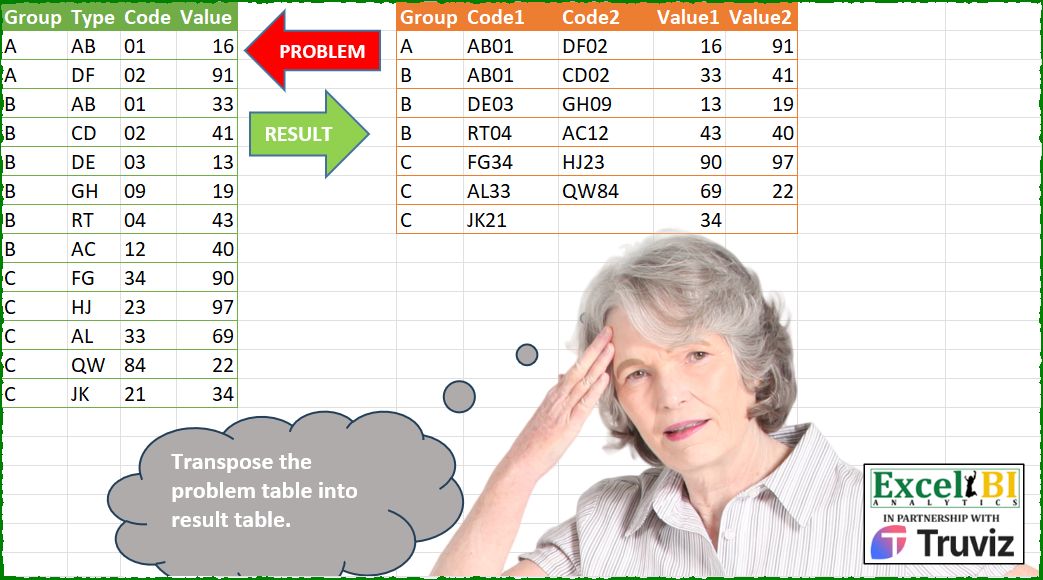
Transpose the problem table into result table.
📌 Challenge Details and Links
ExcelBI Power Query Challenge Number: 223
Challenge Difficulty: ⭐️
📥Download Sample File
📥Link to the solutions on LinkedIn
Solving the challenge of Subject Scores Transposition with Power Query
Power Query solution 1 for Subject Scores Transposition, proposed by Zoran Milokanović:
let
  Source = Excel.CurrentWorkbook(){[Name = "Input"]}[Content],
  S = Table.FromRows(
    List.TransformMany(
      List.Distinct(Source[Group]),
      each
        let
          r = List.Transform(
            Table.ToRows(Table.SelectRows(Source, (r) => r[Group] = _)),
            (r) => {r{1} & Text.From(r{2}), r{3}}
          )
        in
          List.Split(r & {{}, {{null, null}}}{Byte.From(Number.IsOdd(List.Count(r)))}, 2),
      (i, _) => {i} & List.Combine(List.Zip(_))
    ),
    {"Group", "Code1", "Code2", "Value1", "Value2"}
  )
in
  S
Power Query solution 2 for Subject Scores Transposition, proposed by Kris Jaganah:
let
  A = Excel.CurrentWorkbook(){[Name = "Table1"]}[Content],
  B = Table.AddColumn(A, "Cod", each [Type] & Text.From([Code]))[[Group], [Cod], [Value]],
  C = Table.AddIndexColumn(B, "Id", 1),
  D = Table.AddColumn(C, "Ix", each Number.RoundUp([Id] / 2, 0)),
  E = Table.TransformColumns(D, {"Id", each Text.From(Number.Mod(_ - 1, 2) + 1)}),
  F = Table.Combine(
    Table.Group(
      E,
      {"Id"},
      {
        "All",
        (x) => Table.RenameColumns(x, {{"Cod", "Code" & x[Id]{0}}, {"Value", "Value" & x[Id]{0}}})
      }
    )[All]
  ),
  G = Table.Sort(F, {"Ix", 0}),
  H = Table.FillUp(G, {"Code2", "Value2"}),
  I = Table.SelectRows(H, each ([Code1] <> null))[[Group], [Code1], [Code2], [Value1], [Value2]]
in
  I
Power Query solution 3 for Subject Scores Transposition, proposed by Alejandro Simón 🇵🇦 🇪🇸:
let
  Source = Excel.CurrentWorkbook(){[Name = "Table1"]}[Content],
  TblSplt = Table.Split(Source, 2),
  Sol = Table.Combine(
    List.Transform(
      TblSplt,
      each
        let
          a = _,
          b = Table.AddColumn(a, "A", each [Type] & Text.From([Code])),
          c = Table.FromRows({{b[Group]{0}} & b[A] & b[Value]}, f),
          d = Table.ColumnNames(a),
          e = List.Skip(d, 2),
          f = {d{0}}
            & List.Sort(
              List.TransformMany({1 .. List.Count(a[Code])}, (x) => e, (x, y) => y & Text.From(x))
            )
        in
          c
    )
  )
in
  Sol
Power Query solution 4 for Subject Scores Transposition, proposed by Luan Rodrigues:
let
  Fonte = Tabela1,
  tab =
    let
      a = List.Transform(Table.Split(Fonte, 2), each Table.AddIndexColumn(_, "Ind", 1, 1)),
      b = List.Transform(
        a,
        each
          let
            o = List.Combine(
              List.Zip(
                List.Transform(
                  Table.ToRows(_),
                  (x) => {Text.Combine(List.Range(x, 1, 2))} & {List.Range(x, 3, 1){0}}
                )
              )
            ),
            p = {"Group"}
              & List.Transform(_[Ind], (y) => "Code" & Text.From(y))
              & List.Transform(_[Ind], (y) => "Value" & Text.From(y)),
            q = {_[Group]{0}}
          in
            Table.FromRows({q & o}, p)
      )
    in
      b,
  res = Table.Combine(tab)
in
  res
Power Query solution 5 for Subject Scores Transposition, proposed by Hussein SATOUR:
let
  Source = Excel.CurrentWorkbook(){[Name = "Table1"]}[Content],
  CodetoTex = Table.TransformColumnTypes(Source, {{"Code", type text}}),
  MergeTypeCode = Table.CombineColumns(
    CodetoTex,
    {"Type", "Code"},
    Combiner.CombineTextByDelimiter(""),
    "Merged"
  ),
  AddIndex = Table.AddIndexColumn(MergeTypeCode, "Index", 1, 1),
  GroupCodes = Table.AddColumn(
    AddIndex,
    "Groups",
    each [Group] & Text.From(Number.RoundUp([Index] / 2))
  ),
  Codes = Table.SelectColumns(GroupCodes, {"Groups", "Merged", "Index"}),
  Codes2 = Table.TransformColumns(
    Codes,
    {{"Index", each "Code" & Text.From(if Number.Mod(_, 2) = 0 then 2 else 1)}}
  ),
  Values = Table.SelectColumns(GroupCodes, {"Groups", "Value", "Index"}),
  Values2 = Table.TransformColumns(
    Values,
    {{"Index", each "Value" & Text.From(if Number.Mod(_, 2) = 0 then 2 else 1)}}
  ),
  Values3 = Table.RenameColumns(Values2, {{"Value", "Merged"}}),
  Combi = Table.Combine({Codes2, Values3}),
  #"Pivoted Column" = Table.Pivot(Combi, List.Distinct(Combi[Index]), "Index", "Merged"),
  Final = Table.TransformColumns(#"Pivoted Column", {{"Groups", each Text.Start(_, 1)}})
in
  Final
Power Query solution 6 for Subject Scores Transposition, proposed by Abdallah Ally:
let
  Source = Excel.CurrentWorkbook(){[Name = "Table1"]}[Content],
  Transform1 = Table.TransformColumnTypes(Source, {{"Code", type text}, {"Value", type text}}),
  Merge = Table.CombineColumns(Transform1, {"Type", "Code"}, Text.Combine, "Code"),
  Transform2 = List.Transform(
    List.Distinct(Merge[Group]),
    each [
      a = Table.SelectRows(Merge, (x) => x[Group] = _),
      b = List.Transform(
        List.Split(a[Code], 2),
        (x) => if List.Count(x) = 1 then {_} & x & {null} else {_} & x
      ),
      c = List.Transform(
        List.Split(a[Value], 2),
        (x) => if List.Count(x) = 1 then x & {null} else x
      ),
      d = List.Transform({0 .. List.Count(b) - 1}, (x) => b{x} & c{x})
    ][d]
  ),
  Result = Table.FromRows(List.Combine(Transform2), {"Group", "Code1", "Code2", "Value1", "Value2"})
in
  Result
Power Query solution 7 for Subject Scores Transposition, proposed by Eric Laforce:
let
  CN = {"Code1", "Code2", "Value1", "Value2"},
  Source = Excel.CurrentWorkbook(){[Name = "tData223"]}[Content],
  ChgType = Table.TransformColumnTypes(Source, {{"Type", type text}, {"Code", type text}}),
  Group = Table.Group(
    ChgType,
    "Group",
    {
      "G",
      each
        let
          _CombineCode = Table.CombineColumns(
            _,
            {"Type", "Code"},
            Combiner.CombineTextByDelimiter(""),
            "Code"
          )[[Code], [Value]],
          _Split = List.Transform(
            List.Split(Table.ToRows(_CombineCode), 2),
            each List.Combine(List.Zip(if List.Count(_) = 2 then _ else _ & {{null, null}}))
          )
        in
          Table.FromRows(_Split, CN)
    }
  ),
  Expand = Table.ExpandTableColumn(Group, "G", CN)
in
  Expand
Power Query solution 8 for Subject Scores Transposition, proposed by 🇮🇷 Navid Esmaeilzadeh اسماعیل زاده:
let
  Source = Excel.CurrentWorkbook(){[Name = "Table1"]}[Content],
  A = Table.TransformColumnTypes(Source, {{"Code", type text}}),
  B = Table.CombineColumns(
    A,
    {"Type", "Code"},
    Combiner.CombineTextByDelimiter("", QuoteStyle.None),
    "Code"
  ),
  C = Table.FromColumns({Table.Split(B, 2)}, {"T"}),
  D = Table.AddColumn(
    C,
    "R",
    each
      if Table.RowCount([T]) = 2 then
        [
          Group  = [T][Group]{0},
          Code1  = [T][Code]{0},
          Code2  = [T][Code]{1},
          Value1 = [T][Value]{0},
          Value2 = [T][Value]{1}
        ]
      else
        [
          Group  = [T][Group]{0},
          Code1  = [T][Code]{0},
          Code2  = null,
          Value1 = [T][Value]{0},
          Value2 = null
        ]
  ),
  E = Table.SelectColumns(D, {"R"}),
  F = Table.ExpandRecordColumn(
    E,
    "R",
    {"Group", "Code1", "Code2", "Value1", "Value2"},
    {"Group", "Code1", "Code2", "Value1", "Value2"}
  )
in
  F
Power Query solution 9 for Subject Scores Transposition, proposed by Ahmed Ariem:
let
  f = (x) =>
    [
      fn = (x, y) =>
        Table.SplitColumn(x, y, (x) => x, List.Max(List.Transform(Table.Column(x, y), List.Count))),
      a = List.Transform(
        Table.Split(x, 2),
        (z) =>
          Table.CombineColumns(z, {"Type", "Code"}, Combiner.CombineTextByDelimiter(""), "Code")
      ),
      b = List.Transform(
        a,
        (x) => Table.Group(x, "Group", {{"Code", (x) => x[Code]}, {"Value", (x) => x[Value]}})
      ),
      c = List.Transform(b, (x) => List.Accumulate({"Code", "Value"}, x, fn))
    ][c],
  Source = Excel.CurrentWorkbook(){[Name = "Table1"]}[Content],
  Combine = Table.Combine(List.Combine(Table.Group(Source, "Group", {"tmp", f})[tmp]))
in
  Combine
Power Query solution 10 for Subject Scores Transposition, proposed by Alexandre Garcia:
let
  Source = Excel.CurrentWorkbook(){[Name = "Table1"]}[Content],
  cols = {"Code1", "Code2", "Value1", "Value2"},
  A = Table.Group(
    Source,
    {"Group"},
    {
      {
        "x",
        each [
          a = Table.AddColumn(_, "x", each [Type] & Text.From([Code])),
          b = Table.SelectColumns(a, {"x", "Value"}),
          c = List.Transform(
            Table.ToColumns(b),
            each List.Split(
              if Number.Mod(List.Count(_), 2) = 1 then
                List.InsertRange(_, List.Count(_), {null})
              else
                _,
              2
            )
          ),
          d = List.Transform(List.Zip(c), each List.Combine(_))
        ][d]
      }
    }
  ),
  B = Table.TransformColumns(Table.ExpandListColumn(A, "x"), {"x", each Table.FromRows({_}, cols)}),
  C = Table.ExpandTableColumn(B, "x", cols)
in
  C
Power Query solution 11 for Subject Scores Transposition, proposed by Sandeep Marwal:
let
  Source = Excel.CurrentWorkbook(){[Name = "Table1"]}[Content],
  #"Merged Columns" = Table.CombineColumns(
    Table.TransformColumnTypes(Source, {{"Code", type text}}, "en-IN"),
    {"Type", "Code"},
    Combiner.CombineTextByDelimiter("", QuoteStyle.None),
    "Merged"
  ),
  Custom1 = Table.ToColumns(Table.AlternateRows(#"Merged Columns", 1, 1, 1)),
  Custom2 = Table.ToColumns(Table.AlternateRows(#"Merged Columns", 0, 1, 1)[[Merged], [Value]]),
  Custom3 = Table.FromColumns(Custom1 & Custom2, {"Group", "Code1", "Value1", "Code2", "Value2"}),
  #"Reordered Columns" = Table.ReorderColumns(
    Custom3,
    {"Group", "Code1", "Code2", "Value1", "Value2"}
  )
in
  #"Reordered Columns"
Power Query solution 12 for Subject Scores Transposition, proposed by Glyn Willis:
let
  Source = Excel.CurrentWorkbook(){[Name = "Table1"]}[Content],
  #"Changed Type" = Table.TransformColumnTypes(
    Source,
    {{"Group", type text}, {"Type", type text}, {"Code", type text}}
  ),
  Custom1 = Table.ToColumns(Table.AlternateRows(#"Changed Type", 0, 1, 1)),
  Custom2 = Table.ToColumns(Table.AlternateRows(#"Changed Type", 1, 1, 1)),
  Custom3 = Table.FromColumns(
    Custom2 & Custom1,
    let
      cn = Table.ColumnNames(#"Changed Type")
    in
      cn & List.Transform(cn, each _ & "2")
  ),
  #"Merged Columns" = Table.CombineColumns(
    Custom3,
    {"Type", "Code", "Type2", "Code2"},
    each [Code1 = _{0}? & _{1}?, Code2 = _{2}? & _{3}?],
    "Output"
  )[[Group], [Output], [Value], [Value2]],
  #"Expanded Output" = Table.ExpandRecordColumn(
    #"Merged Columns",
    "Output",
    {"Code1", "Code2"},
    {"Code1", "Code2"}
  )
in
  #"Expanded Output"
Power Query solution 13 for Subject Scores Transposition, proposed by Sanket Doijode:
let
  Source = Table.TransformColumnTypes(
    Excel.CurrentWorkbook(){[Name = "Table1"]}[Content],
    {{"Code", type text}, {"Value", type text}}
  ),
  #"Added Custom" = Table.AddColumn(Source, "Custom", each [Type] & [Code] & "," & [Value]),
  #"Expanded Count" = Table.ExpandTableColumn(
    Table.Group(
      #"Added Custom",
      {"Group"},
      {{"Count", each Table.FromColumns(List.Zip(List.Split(_[Custom], 2)), {"Code1", "Code2"})}}
    ),
    "Count",
    {"Code1", "Code2"},
    {"Code1", "Code2"}
  ),
  #"Split Column by Delimiter" = Table.SplitColumn(
    #"Expanded Count",
    "Code1",
    Splitter.SplitTextByDelimiter(",", QuoteStyle.Csv),
    {"Code1", "Value1"}
  ),
  #"Split Column by Delimiter1" = Table.SplitColumn(
    #"Split Column by Delimiter",
    "Code2",
    Splitter.SplitTextByDelimiter(",", QuoteStyle.Csv),
    {"Code2", "Value2"}
  ),
  #"Reordered Columns" = Table.ReorderColumns(
    #"Split Column by Delimiter1",
    {"Group", "Code1", "Code2", "Value1", "Value2"}
  )
in
  #"Reordered Columns"
Power Query solution 14 for Subject Scores Transposition, proposed by Pisit Kmolwattananisa:
let
  Source = Excel.CurrentWorkbook(){[Name = "Table1"]}[Content],
  Merged_Columns = Table.CombineColumns(
    Table.TransformColumnTypes(Source, {{"Code", type text}}, "th-TH"),
    {"Type", "Code"},
    Combiner.CombineTextByDelimiter("", QuoteStyle.None),
    "Code1"
  ),
  Table_withIndex = Table.AddIndexColumn(Merged_Columns, "Index", 1, 1, Int64.Type),
  Odd_Records = Table.SelectRows(Table_withIndex, each Number.IsOdd([Index])),
  EvenCols = Table.AddColumn(
    Table.AddColumn(
      Table_withIndex,
      "Code2",
      each if Number.Mod([Index], 2) = 0 then [Code1] else null,
      type nullable text
    ),
    "Value2",
    each if Number.Mod([Index], 2) = 0 then [Value] else null,
    type nullable number
  ),
  Filled_Up = Table.FillUp(EvenCols, {"Code2", "Value2"}),
  Odd_Rows = Table.SelectRows(Filled_Up, each Number.IsOdd([Index])),
  Result_Columns = Table.RenameColumns(Odd_Rows, {{"Value", "Value1"}}),
  Selected_Result = Table.SelectColumns(
    Result_Columns,
    {"Group", "Code1", "Code2", "Value1", "Value2"}
  )
in
  Selected_Result
Solving the challenge of Subject Scores Transposition with Excel
Excel solution 1 for Subject Scores Transposition, proposed by Bo Rydobon 🇹🇭:
=LET(
    w,
    WRAPROWS,
    HSTACK(
        TAKE(
            w(
                A2:A14,
                2
            ),
            ,
            1
        ),
        w(
            B2:B14&C2:C14,
            2,
            ""
        ),
        w(
            D2:D14,
            2,
            ""
        )
    )
)

=LET(
    z,
    A2:A13,
    REDUCE(
        F1:J1,
        UNIQUE(
            z
        ),
        LAMBDA(
            a,
            v,
            VSTACK(
                a,
                IFNA(
                    HSTACK(
                        v,
                        WRAPROWS(
                            TOCOL(
                                FILTER(
                                    IF(
                                        {1,
                                        0},
                                        B2:B13&C2:C13,
                                        D2:D13
                                    ),
                                    z=v
                                )
                            ),
                            4,
                            ""
                        )
                    ),
                    v
                )
            )
        )
    )
)
Excel solution 2 for Subject Scores Transposition, proposed by Rick Rothstein:
=CHOOSECOLS(WRAPROWS(TOCOL(HSTACK(A2:A14,B2:B14&C2:C14,D2:D14)),6,""),1,2,5,3,6)Excel solution 3 for Subject Scores Transposition, proposed by 🇰🇷 Taeyong Shin:
=LET(
    f,
    LAMBDA(
        x,
        WRAPROWS(
            x,
            2,
            ""
        )
    ),
    HSTACK(
    &    TAKE(
            f(
                A2:A14
            ),
            ,
            1
        ),
        f(
            B2:B14&C2:C14
        ),
        f(
            D2:D14
        )
    )
)
Excel solution 4 for Subject Scores Transposition, proposed by Kris Jaganah:
=LET(
    a,
    DROP(
        WRAPROWS(
            A2:A14,
            2
        ),
        ,
        -1
    ),
    b,
    WRAPROWS(
        B2:B14&C2:C14,
        2,
        ""
    ),
    c,
    WRAPROWS(
        D2:D14,
        2,
        ""
    ),
    HSTACK(
        a,
        b,
        c
    )
)
Excel solution 5 for Subject Scores Transposition, proposed by Julian Poeltl:
=LET(
    G,
    A2:A14,
    T,
    B2:B14,
    C,
    C2:C14,
    V,
    D2:D14,
    REDUCE(
        HSTACK(
            "Group",
            "Code1",
            "Code2",
            "Value1",
            "Value2"
        ),
        UNIQUE(
            G
        ),
        LAMBDA(
            A,
            B,
            VSTACK(
                A,
                IFNA(
                    HSTACK(
                        B,
                        WRAPROWS(
                            FILTER(
                                T&C,
                                G=B
                            ),
                            2,
                            ""
                        ),
                        WRAPROWS(
                            FILTER(
                                V,
                                G=B
                            ),
                            2,
                            ""
                        )
                    ),
                    B
                )
            )
        )
    )
)
Excel solution 6 for Subject Scores Transposition, proposed by Alejandro Campos:
=LET(

     a,
     HSTACK(
         A2:A14,
          B2:B14 & TEXT(
              C2:C14,
               "00"
          ),
          D2:D14
     ),

     b,
     TOCOL(
         a
     ),

     c,
     WRAPROWS(
         b,
          6,
          ""
     ),

     CHOOSECOLS(
         c,
          {1,
          2,
          5,
          3,
          6}
     )

)
Excel solution 7 for Subject Scores Transposition, proposed by Aditya Kumar Darak 🇮🇳:
=LET(

     _grp,
     A2:A14,

     _ugrp,
     UNIQUE(
         _grp
     ),

     _bdy,
     HSTACK(
         B2:B14,
          D2:D14
     ),

     _calc,
     REDUCE(

          "",

          _ugrp,

          LAMBDA(
              a,
               b,

               LET(

                    fltr,
                    FILTER(
                        _bdy,
                         _grp = b
                    ),

                    wrap,
                    WRAPROWS(
                        TOCOL(
                            fltr
                        ),
                         4,
                         ""
                    ),

                    stc,
                    IFNA(
                        HSTACK(
                            b,
                             wrap
                        ),
                         b
                    ),

                    rtrn,
                    VSTACK(
                        a,
                         stc
                    ),

                    rtrn

               )

          )

     ),

     _rtrn,
     DROP(
         _calc,
          1
     ),

     _rtrn

)
Excel solution 8 for Subject Scores Transposition, proposed by Hussein SATOUR:
=LET(
    a,
    B2:B14&C2:C14,
    W,
    WRAPROWS,
    c,
    W(
        a,
        2,
        ""
    ),
    v,
    W(
        D2:D14,
        2,
        ""
    ),
    HSTACK(
        XLOOKUP(
            TAKE(
                c,
                ,
                1
            ),
            a,
            A2:A14
        ),
        c,
        v
    )
)
Excel solution 9 for Subject Scores Transposition, proposed by Oscar Mendez Roca Farell:
=REDUCE(
    F1:J1,
    UNIQUE(
        A2:A13
    ),
    LAMBDA(
        i,
        x,
        LET(
            g,
            FILTER(
                A2:D13,
                A2:A13=x
            ),
            L,
            LAMBDA(
                i,
                WRAPROWS(
                    i,
                    2,
                    ""
                )
            ),
            VSTACK(
                i,
                HSTACK(
                    TAKE(
                        L(
                            TAKE(
                                g,
                                ,
                                1
                            )
                        ),
                        ,
                        1
                    ),
                    L(
                        INDEX(
                            g,
                            ,
                            2
                        )&INDEX(
                            g,
                            ,
                            3
                        )
                    ),
                    L(
                        DROP(
                            g,
                            ,
                            3
                        )
                    )
                )
            )
        )
    )
)
Excel solution 10 for Subject Scores Transposition, proposed by Duy Tùng:
=DROP(
    REDUCE(
        0,
        UNIQUE(
            A2:A14
        ),
        LAMBDA(
            x,
            y,
            LET(
                f,
                LAMBDA(
                    x,
                    WRAPROWS(
                        FILTER(
                            x,
                            A2:A14=y
                        ),
                        2,
                        ""
                    )
                ),
                VSTACK(
                    x,
                    IFNA(
                        HSTACK(
                            y,
                            f(
                                B2:B14&TEXT(
                                    C2:C14,
                                    "00"
                                )
                            ),
                            f(
                                D2:D14
                            )
                        ),
                        y
                    )
                )
            )
        )
    ),
    1
)
Excel solution 11 for Subject Scores Transposition, proposed by Sunny Baggu:
=LET(

     n,
     MOD(
         SEQUENCE(
             ROWS(
                 A2:A14
             )
         ),
          2
     ),

     _a,
     HSTACK(
         A2:A14,
          B2:B14 & C2:C14,
          D2:D14
     ),

     CHOOSECOLS(

          IFNA(
              HSTACK(
                  FILTER(
                      _a,
                       n
                  ),
                   FILTER(
                       _a,
                        1 - n
                   )
              ),
               ""
          ),

          {1,
          2,
          5,
          3,
          6}

     )

)
Excel solution 12 for Subject Scores Transposition, proposed by Sunny Baggu:
=LET(

     _a,
     WRAPROWS(

          TOCOL(
              HSTACK(
                  A2:A14,
                   B2:B14 & C2:C14,
                   D2:D14
              )
          ),

          6,

          ""

     ),

     CHOOSECOLS(
         _a,
          {1,
          2,
          5,
          3,
          6}
     )

)
Excel solution 13 for Subject Scores Transposition, proposed by LEONARD OCHEA 🇷🇴:
=LET(
    t,
    A2:D14,
    h,
    F1:J1,
    I,
    LAMBDA(
        w,
        INDEX(
            t,
            ,
            w
        )
    ),
    REDUCE(
        h,
        UNIQUE(
            I(
                1
            )
        ),
        LAMBDA(
            a,
            b,
            LET(
                F,
                LAMBDA(
                    x,
                    WRAPROWS(
                        FILTER(
                            x,
                            I(
                1
            )=b
                        ),
                        2,
                        ""
                    )
                ),
                m,
                F(
                    I(
                        2
                    )&I(
                        3
                    )
                ),
                n,
                F(
                    I(
                        4
                    )
                ),
                VSTACK(
                    a,
                    HSTACK(
                        TAKE(
                            IF(
                                n,
                                b
                            ),
                            ,
                            1
                        ),
                        m,
                        n
                    )
                )
            )
        )
    )
)
Excel solution 14 for Subject Scores Transposition, proposed by Md. Zohurul Islam:
=LET(

     A,
     A2:A14,

     B,
     B2:B14 & C2:C14,

     C,
     D2:D14,

     rng,
     HSTACK(
         A,
          B,
          C
     ),

     D,
     TOCOL(
         rng
     ),

     E,
     WRAPROWS(
         D,
          6,
          ""
     ),

     result,
     CHOOSECOLS(
         E,
          1,
          2,
          5,
          3,
          6
     ),

     header,
     {"Group",
     "Code1",
     "Code2",
     "Value1",
     "Value2"},

     Report,
     VSTACK(
         header,
          result
     ),

     Report

)
Excel solution 15 for Subject Scores Transposition, proposed by Pieter de B.:
=LET(a,
    A2:D14,
    r,
    ROWS(
        a
    ),
    i,
    LAMBDA(b,
    [c],
    IFERROR(INDEX(a,
    SEQUENCE((r+1)/2,
    ,
    c,
    2),
    b),
    "")),
    HSTACK(
        i(
            1
        ),
        i(
            2
        )&i(
            3
        ),
        i(
            2,
            2
        )&i(
            3,
            2
        ),
        i(
            4
        ),
        i(
            4,
            2
        )
    ))
Excel solution 16 for Subject Scores Transposition, proposed by Hamidi Hamid:
=LET(
    a,
    A2:A14,
    c,
    C2:C14,
    b,
    B2:B14,
    d,
    D2:D14,
    w,
    LAMBDA(
        f,
        TAKE(
            WRAPROWS(
                f,
                2,
                0
            ),
            ,
            1
        )
    ),
    q,
    LAMBDA(
        t,
        CHOOSEROWS(
            t,
            SEQUENCE(
                COUNTA(
                    t
                )/2,
                ,
                2,
                2
            )
        )
    ),
    z,
    IFERROR(
        HSTACK(
            q(
                b
            )&q(
                c
            ),
            CHOOSEROWS(
                d,
                SEQUENCE(
                    ROUNDUP(
                        COUNTA(
                            d
                        )/2,
                        0
                    ),
                    ,
                    1,
                    2
                )
            ),
            q(
                            d
                        )
        ),
        ""
    ),
    u,
    w(
                b
            )&w(
                c
            ),
    j,
    HSTACK(
        w(
            a
        ),
        u
    ),
    HSTACK(
        j,
        z
    )
)
Excel solution 17 for Subject Scores Transposition, proposed by Asheesh Pahwa:
=LET(
    g,
    A2:A14,
    u,
    UNIQUE(
        g
    ),

    DROP(
        REDUCE(
            "",
            u,
            LAMBDA(
                x,
                y,
                VSTACK(
                    x,
                    LET(
                        f,
                        FILTER(
                            B2:D14,
                            A2:A14=y
                        ),
                        d,
                        DROP(
                            f,
                            ,
                            -1
                        ),
                        b,
                        BYROW(
                            d,
                            LAMBDA(
                                z,
                                CONCAT(
                                    z
                                )
                            )
                        ),

                        t,
                        TOCOL(
                            HSTACK(
                                b,
                                TAKE(
                            f,
                            ,
                            -1
                        )
                            )
                        ),
                        CHOOSECOLS(
                            IFNA(
                                HSTACK(
                                    y,
                                    WRAPROWS(
                                        t,
                                        4,
                                        ""
                                    )
                                ),
                                y
                            ),
                            {1,
                            2,
                            4,
                            3,
                            5}
                        )
                    )
                )
            )
        ),
        1
    )
)
Excel solution 18 for Subject Scores Transposition, proposed by Tolga Demirci, PMP, PMI-ACP, MOS-Expert:
=HSTACK(TAKE(WRAPROWS(A2:A14,2),,1),WRAPROWS(B2:B14&C2:C14,2),WRAPROWS(D2:D14,2))Excel solution 19 for Subject Scores Transposition, proposed by Imam Hambali:
=HSTACK(DROP(WRAPROWS(A2:A14,2,""),,-1),WRAPROWS(B2:B14&C2:C14,2,""), WRAPROWS(D2:D14,2,""))Excel solution 20 for Subject Scores Transposition, proposed by Gerson Pineda:
=LET(
    a,
    WRAPROWS,
    t,
    a(
        A2:A14&"|"&B2:B14&C2:C14,
        2
    ),
    IFNA(
        HSTACK(
            TAKE(
                LEFT(
                    t
                ),
                ,
                1
            ),
            TEXTAFTER(
                t,
                "|"
            ),
            a(
                D2:D14,
                2
            )
        ),
        ""
    )
)
Excel solution 21 for Subject Scores Transposition, proposed by Md. Shah Alam, Microsoft Certified Trainer:
=HSTACK(CHOOSECOLS(WRAPROWS(A2:A14,2,""),1),WRAPROWS(B2:B14&C2:C14,2,""),WRAPROWS(D2:D14,2,""))Solving the challenge of Subject Scores Transposition with Python
Python solution 1 for Subject Scores Transposition, proposed by Konrad Gryczan, PhD:
import pandas as pd
path = "PQ_Challenge_223.xlsx"
in&put = pd.read_excel(path, usecols="A:D", nrows=14, dtype={'Group': str, 'Type': str, 'Code': str, 'Value': int})
test = pd.read_excel(path, usecols="F:J", nrows=7).rename(columns=lambda x: x.replace('.1', '')).replace('NA', pd.NA)
test[['Value1', 'Value2']] = test[['Value1', 'Value2']].astype('Int64')
input['Code'] = input['Type'] + input['Code']
input = input.drop(columns=['Type'])
input['col'] = input.groupby('Group').cumcount().mod(2).add(1)
input['row'] = input.groupby('Group').cumcount().floordiv(2).add(1)
result = input.pivot(index=['Group', 'row'], columns='col', values=['Code', 'Value'])
result.columns = [f'' for col in result.columns]
result = result.reset_index().drop(columns=['row'])
result[['Value1', 'Value2']] = result[['Value1', 'Value2']].astype('Int64')
print(result.equals(test)) # True
Solving the challenge of Subject Scores Transposition with Python in Excel
Python in Excel solution 1 for Subject Scores Transposition, proposed by Alejandro Campos:
df = xl("A1:D14", headers=True)
df['Code_Combined'] = df['Type'] + df['Code'].astype(str).str.zfill(2)
result_list = []
for group, group_data in df.groupby('Group'):
 group_data = group_data.reset_index(drop=True)
 for i in range(0, len(group_data), 2):
 code1 = group_data.loc[i, 'Code_Combined']
 value1 = group_data.loc[i, 'Value']
 if i + 1 < len(group_data):
 code2 = group_data.loc[i + 1, 'Code_Combined']
 value2 = group_data.loc[i + 1, 'Value']
 else:
 code2 = ''
 value2 = ''
 result_list.append([group, code1, code2, value1, value2])
result_df = pd.DataFrame(result_list, columns=['Group', 'Code1', 'Code2', 'Value1', 'Value2'])
result_df
Solving the challenge of Subject Scores Transposition with R
R solution 1 for Subject Scores Transposition, proposed by Konrad Gryczan, PhD:
library(tidyverse)
library(readxl)
path = "Power Query/PQ_Challenge_223.xlsx"
input = read_excel(path, range = "A1:D14")
test = read_excel(path, range = "F1:J8")
result = input %>%
 unite("Code", c("Type", "Code"), sep = "") %>%
 mutate(col = ifelse(row_number() %% 2 == 0, 2, 1),
 row = (row_number() + 1) %/% 2,
 .by = Group) %>%
 pivot_wider(names_from = col, values_from = c(Code, Value), names_sep = "") %>%
 select(-row)
all.equal(result, test)
#> [1] TRUE
&