
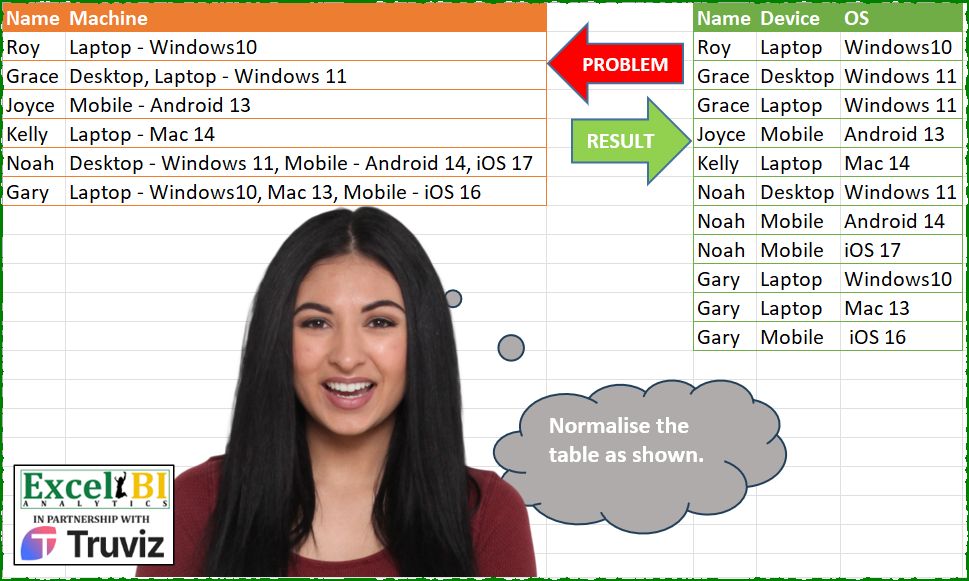
Normalise the table as shown.
📌 Challenge Details and Links
ExcelBI Power Query Challenge Number: 219
Challenge Difficulty: ⭐️⭐️⭐️⭐️
📥Download Sample File
📥Link to the solutions on LinkedIn
Solving the challenge of Normalize Staff Entries with Power Query
_x000D_Power Query solution 1 for Normalize Staff Entries, proposed by Zoran Milokanović:
let
  Source = Excel.CurrentWorkbook(){[Name = "Input"]}[Content],
  H = {"Name", "Device", "OS"},
  S = Table.FillUp(
    Table.FillDown(
      Table.FromList(
        List.TransformMany(
          Table.ToRows(Source),
          each Text.Split(_{1}, ", "),
          (i, _) => {i{0}} & Text.Split(_, " - ")
        ),
        each
          if List.Count(_) = 3 then
            _
          else
            List.InsertRange(_, 1 + Byte.From(Text.PositionOfAny(_{1}, {"1" .. "9"}) = - 1), {null}),
        H
      ),
      {H{1}}
    ),
    {H{2}}
  )
in
SPower Query solution 2 for Normalize Staff Entries, proposed by Kris Jaganah:
let
  A = Excel.CurrentWorkbook(){[Name = "Table1"]}[Content],
  B = List.Distinct(Table.TransformColumns(A, {"Machine", each Text.SplitAny(_, ", "){0}})[Machine]),
  C = Table.ExpandListColumn(
    Table.TransformColumns(A, {"Machine", each Text.Split(_, ", ")}),
    "Machine"
  ),
  D = Table.FillDown(
    Table.AddColumn(
      C,
      "Device",
      each
        let
          a = [Machine]
        in
          List.Select(B, each Text.BeforeDelimiter(a, " - ") = _){0}?
    ),
    {"Device"}
  ),
  E = Table.SplitColumn(D, "Machine", Splitter.SplitTextByAnyDelimiter(B), {"1", "2"}),
  F = Table.FillUp(
    Table.AddColumn(
      E,
      "OS",
      each
        let
          a = Text.AfterDelimiter([2], " - ") & [1],
          b = if a = "" then null else a
        in
          b
    ),
    {"OS"}
  )[[Name], [Device], [OS]]
in
FPower Query solution 3 for Normalize Staff Entries, proposed by Aditya Kumar Darak 🇮🇳:
let
  Source = Excel.CurrentWorkbook(){[Name = "data"]}[Content],
  Transform = Table.TransformColumns(
    Source,
    {
      "Machine",
      each [
        S1 = Text.Split(_, ", "),
        T = Table.FromColumns({S1}, {"C"}),
        G = Table.Group(
          T,
          "C",
          {"R", (f) => Text.Combine(f[C], ", ")},
          0,
          (x, y) => Number.From(Text.Contains(y, "-"))
        ),
        S2 = Table.SplitColumn(G, "R", (f) => Text.Split(f, " - "), {"R1", "R2"}),
        S3 = Table.TransformColumns(S2, {"R2", (f) => try Text.Split(f, ", ") otherwise null}),
        E = Table.ExpandListColumn(S3, "R2"),
        R = Table.FillUp(E, {"R2"})
      ][R]
    }
  ),
  Return = Table.ExpandTableColumn(Transform, "Machine", {"R1", "R2"}, {"Device", "OS"})
in
ReturnPower Query solution 4 for Normalize Staff Entries, proposed by Alejandro Simón 🇵🇦 🇪🇸:
let
  Source = Excel.CurrentWorkbook(){[Name = "Table1"]}[Content],
  Equipos = List.Distinct(
    List.Transform(List.Transform(Source[Machine], each Text.SplitAny(_, " - ,")), each _{0})
  ),
  Calc = Table.AddColumn(
    Source,
    "A",
    each
      let
        a = Text.Split([Machine], ", "),
        b =
          if List.Count(a) <= 1 then
            a
          else
            List.Transform(
              a,
              (x) =>
                if Text.Contains(x, "-") then
                  x
                else if List.Contains(Equipos, x) then
                  x & " - "
                else
                  " - " & x
            ),
        c = Table.FromRows(List.Transform(b, each Text.Split(_, " - ")), {"Device", "OS"}),
        d = Table.ReplaceValue(c, "", null, Replacer.ReplaceValue, Table.ColumnNames(c)),
        e = Table.FillUp(Table.FillDown(d, Table.ColumnNames(c)), Table.ColumnNames(c))
      in
        e
  )[[Name], [A]],
  Sol = Table.ExpandTableColumn(Calc, "A", Table.ColumnNames(Calc[A]{0}))
in
SolPower Query solution 5 for Normalize Staff Entries, proposed by Luan Rodrigues:
let
  Fonte = Tabela1,
  add = Table.AddColumn(
    Fonte,
    "tab",
    each
      let
        a = Table.Combine(
          List.Transform(
            Text.Split([Machine], ", "),
            (x) =>
              [
                lista = {"Desktop", "Laptop", "Mobile"},
                a = Text.Split(x, " - "),
                b = Table.FromRows(
                  {
                    if List.Count(a) = 1 and List.ContainsAny(lista, {a{0}}) then
                      a & {null}
                    else if List.Count(a) = 1 and not List.ContainsAny(lista, {a{0}}) then
                      {null} & a
                    else
                      a
                  },
                  {"Device", "OS"}
                )
              ][b]
          )
        ),
        b = Table.FillDown(a, Table.ColumnNames(a))
      in
        Table.FillUp(b, Table.ColumnNames(a))
  ),
  res = Table.ExpandTableColumn(add, "tab", Table.ColumnNames(add[tab]{0}))[[Name], [Device], [OS]]
in
resPower Query solution 6 for Normalize Staff Entries, proposed by Abdallah Ally:
let
  Source = Excel.CurrentWorkbook(){[Name = "Table1"]}[Content],
  Transform1 = Table.TransformColumns(Source, {"Machine", each Text.Split(_, ", ")}),
  Expand1 = Table.ExpandListColumn(Transform1, "Machine"),
  Transform2 = Table.TransformColumns(
    Expand1,
    {
      "Machine",
      each [
        a = Text.Split(_, " - "),
        b =
          if Text.Contains(_, " - ") then
            [Device = a{0}, OS = a{1}]
          else if List.Sum(
            List.Transform(
              {"Windows", "Mac", "Android", "iOS"},
              (x) => Byte.From(Text.Replace(_, x, "") = _)
            )
          )
            = 4
          then
            [Device = _, OS = null]
          else
            [Device = null, OS = _]
      ][b]
    }
  ),
  Expand2 = Table.ExpandRecordColumn(Transform2, "Machine", {"Device", "OS"}),
  FillDown = Table.FillDown(Expand2, {"Device"}),
  Result = Table.FillUp(FillDown, {"OS"})
in
ResultPower Query solution 7 for Normalize Staff Entries, proposed by Eric Laforce:
let
  Source = Excel.CurrentWorkbook(){[Name = "tData219"]}[Content],
  Devices = List.Distinct(
    List.Transform(Source[Machine], each Text.Trim(Text.SplitAny(_, "-,"){0}))
  ),
  Transform = Table.TransformColumns(
    Source,
    {
      "Machine",
      each
        let
          _R = List.Transform(
            Text.Split(_, ", "),
            each
              if Text.Contains(_, " - ") then
                Text.Split(_, " - ")
              else if List.Contains(Devices, _) then
                {_, null}
              else
                {null, _}
          ),
          _T = Table.FromRows(_R, {"Device", "OS"}),
          _Fill = Table.FillUp(Table.FillDown(_T, {"Device"}), {"OS"})
        in
          _Fill
    }
  ),
  Expand = Table.ExpandTableColumn(Transform, "Machine", {"Device", "OS"})
in
ExpandPower Query solution 8 for Normalize Staff Entries, proposed by Peter Tholstrup:
let
  Source = Excel.CurrentWorkbook(){[Name = "Table1"]}[Content],
  splitter = (d) => Splitter.SplitTextByEachDelimiter({d}, null, true),
  into_rows = (source, col) =>
    [
      transform = Table.TransformColumns(source, {col, splitter(", ")}),
      expand    = Table.ExpandListColumn(transform, col)
    ][expand],
  last_os = Table.SplitColumn(Source, "Machine", splitter(" - "), {"tbc", "last os"}),
  split_devices = into_rows(last_os, "tbc"),
  os = [
    override_os = Table.SplitColumn(split_devices, "tbc", splitter(" - "), {"Device", "first os"}),
    identify_os = Table.AddColumn(override_os, "OS", each [first os] ?? [last os])
  ][identify_os][[Name], [Device], [OS]],
  result = into_rows(os, "OS")
in
resultPower Query solution 9 for Normalize Staff Entries, proposed by Ahmed Ariem:
let
f1 = (w)=>  [
 b= List.Select({"Laptop","Desktop","Mobile"},(x)=> Text.Contains(w,x)),
 c = List.RemoveMatchingItems( Splitter.SplitTextByAnyDelimiter(b)(w),{"",", "}),
 d= List.Zip({b, if List.Count(b)=2 and List.Count(c)=1 then List.Repeat(c,2) else c}),
 f = List.Transform(d,Text.Combine)
][f],
f2= (x)=>List.RemoveMatchingItems( Text.Split(x,","),{" "}),

 Source = Excel.CurrentWorkbook(){[Name="Table1"]}[Content],
 Expand= Table.ExpandListColumn(Table.TransformColumns( Source,{"Machine",f1}),"Machine"),
 SplitColumn = Table.SplitColumn(Expand, "Machine", Splitter.SplitTextByDelimiter("- "), {"Device","OS"}),
 Expand2= Table.ExpandListColumn(Table.TransformColumns(SplitColumn,{"OS",f2}),"OS")
in
 Expand2
---------
attached file
https://1drv.ms/x/s!AiUZ0Ws7G26RkQD9yCw9cj0lS2Fe?e=cnM7y0
Power Query solution 10 for Normalize Staff Entries, proposed by Gertjan Davies:
let
  Source = Problem,
  OnlyCommas = Table.ReplaceValue(Source, " - ", ", ", Replacer.ReplaceText, {"Machine"}),
  ToRows = Table.ExpandListColumn(
    Table.TransformColumns(
      OnlyCommas,
      {
        {
          "Machine",
          Splitter.SplitTextByDelimiter(", ", QuoteStyle.Csv),
          let
            itemType = (type nullable text) meta [Serialized.Text = true]
          in
            type {itemType}
        }
      }
    ),
    "Machine"
  ),
  // meta a Device does not contain numbers, OS does, otherwise Gary is not solvable
  Types = Table.AddColumn(
    ToRows,
    "Type",
    each
      if List.AnyTrue(
        List.Transform(
          {0 .. 9},
          (NumberColumn) => Text.Contains([Machine], Number.ToText(NumberColumn))
        )
      )
        = true
      then
        "OS"
      else
        "Device"
  ),
  Group_T = Table.Group(Types, {"Name", "Type"}, {{"Elements", each [Machine], type list}}),
  Group_N = Table.Group(
    Group_T,
    {"Name"},
    {{"Details", each _, type table [Name = nullable text, Type = text, Elements = list]}}
  ),
  Prep = Table.AddColumn(
    Group_N,
    "Prep",
    each Table.FromColumns([Details][Elements], [Details][Type])
  ),
  Relevant = Table.RemoveColumns(Prep, {"Details"}),
  Expand = Table.ExpandTableColumn(Relevant, "Prep", List.Distinct(Group_T[Type])),
  Fill = Table.FillDown(Expand, {"Device", "OS"})
in
FillSolving the challenge of Normalize Staff Entries with Excel
_x000D_Excel solution 1 for Normalize Staff Entries, proposed by Bo Rydobon 🇹🇭:
=TRANSPOSE(
    SCAN(
        ,
        REDUCE(
            TOCOL(
                D1:F1
            ),
            B2:B7,
            LAMBDA(
                a,
                v,
                HSTACK(
                    a,
                    VSTACK(
                        @+A7:v,
                        REGEXEXTRACT(
                            TEXTSPLIT(
                                REGEXREPLACE(
                                    v,
                                    "pLK(?=, .*?( - w+ ?d+))",
                                    "$1"
                                ),
                                ", "
                            ),
                            "pL+"&{"b(?! ?d)";" ?d+"}
                        )
                    )
                )
            )
        ),
        LAMBDA(
            a,
            v,
            IFNA(
                v,
                a
            )
        )
    )
)Excel solution 2 for Normalize Staff Entries, proposed by Bo Rydobon 🇹🇭:
=LET(z,
    REDUCE(
        D1:F1,
        B2:B7,
        LAMBDA(
            a,
            v,
            VSTACK(
                a,
                HSTACK(
                    @+A7:v,
                    REGEXEXTRACT(
                        TEXTSPLIT(
                            v,
                            ,
                            ", "
                        ),
                        "pL+"&{"b(?! ?d)",
                        " ?d+"}
                    )
                )
            )
        )
    ),
    MAKEARRAY(ROWS(
        z
    ),
    3,
    LAMBDA(r,
    c,
    LET(y,
    c<3,
    TAKE(TOCOL(IF(
        y,
        TAKE,
        DROP
    )(INDEX(
        z,
        ,
        c
    ),
    r-1+y),
    3),
-1^y)))))Excel solution 3 for Normalize Staff Entries, proposed by Bo Rydobon 🇹🇭:
=REDUCE(
    D1:F1,
    B2:B7,
    LAMBDA(
        b,
        w,
        VSTACK(
            b,
            LET(
                m,
                @+w:A7,
                r,
                REDUCE(
                    ,
                    TEXTSPLIT(
                        w,
                        ,
                        {" - ",
                        ", "}
                    ),
                    LAMBDA(
                        a,
                        v,
                        VSTACK(
                            a,
                            IF(
                                RIGHT(
                                    v
                                )>"9",
                                v,
                                HSTACK(
                                    TAKE(
                                        a,
                                        -1,
                                        1
                                    ),
                                    v
                                )
                            )
                        )
                    )
                ),

                UNIQUE(
                    IFNA(
                        HSTACK(
                            m,
                            TAKE(
                                r,
                                ,
                                1
                            ),
                            MAP(
                                SEQUENCE(
                                    ROWS(
                                        r
                                    )
                                )-1,
                                LAMBDA(
                                    i,
                                    @TOCOL(
                                        DROP(
                                            r,
                                            i,
                                            1
                                        ),
                                        3
                                    )
                                )
                            )
                        ),
                        m
                    )
                )
            )
        )
    )
)Excel solution 4 for Normalize Staff Entries, proposed by Julian Poeltl:
=LET(
R,
REDUCE(
HSTACK(
"Name",
"Device",
"OS"
),
B2:B7,
LAMBDA(
A,
B,
VSTACK(
A,
HSTACK(
@+A7:B,
LET(
D,
B,
S,
TRIM(
TEXTSPLIT(
D,
{",",
"-"}
)
),
L,
SUM(
--ISNUMBER(
--RIGHT(
S
)
)
)>1,
R,
SCAN(
0,
IF(
L,
NOT(
ISNUMBER(
--RIGHT(
S
)
)
),
ISNUMBER(
& --RIGHT(
S
)
)
),
LAMBDA(
A,
D,
A+D
)
),
IF(
L,
DROP(
REDUCE(
0,
UNIQUE(
R,
1
),
LAMBDA(
C,
D,
VSTACK(
C,
HSTACK(
TAKE(
FILTER(
S,
R=D
),
,
1
),
TOCOL(
DROP(
FILTER(
S,
R=D
),
,
1
)
)
)
)
)
),
1
),
DROP(
REDUCE(
0,
D,
LAMBDA(
A,
D,
VSTACK(
A,
HSTACK(
TOCOL(
DROP(
TRIM(
TEXTSPLIT(
D,
{",",
"-"}
)
),
,
-1
)
),
TAKE(
TRIM(
TEXTSPLIT(
D,
{",",
"-"}
)
),
,
-1
)
)
)
)
),
1
)
)
)
)
)
)
),
HSTACK(
SCAN(
,
TAKE(
R,
,
1
),
LAMBDA(
A,
B,
IFNA(
B,
A
)
)
),
SCAN(
,
CHOOSECOLS(
R,
2
),
LAMBDA(
A,
B,
IFNA(
B,
A
)
)
),
SCAN(
,
TAKE(
R,
,
-1
),
LAMBDA(
A,
B,
IFNA(
B,
A
)
)
)
)
)Excel solution 5 for Normalize Staff Entries, proposed by Oscar Mendez Roca Farell:
=LET(
    s,
     {" -",
     ", "} ,
     u,
     UNIQUE(
         TEXTSPLIT(
             B2:B7,
              s
         )
     ),
     REDUCE(
         D1:F1,
          A2:A7,
          LAMBDA(
              i,
               x,
               LET(
                   r,
                    TAKE(
                        x:B7,
                         1
                    ),
                    m,
                    DROP(
                        r,
                         ,
                         1
                    ),
                    VSTACK(
                        i,
                         TEXTSPLIT(
                             CONCAT(
                                 @+r&"|"&TOCOL(
                                     TOCOL(
                                         REPT(
                                             u,
                                              FIND(
                                                  u,
                                                   m
                                              )^0
                                         ),
                                          3
                                     )&"|"&TEXTSPLIT(
                                         m,
                                          ", ",
                                          u&s,
                                          1
                                     ),
                                      2
                                 )&"/"
                             ),
                              "|",
                              "/",
                              1
                         )
                    )
               )
          )
     )
)Excel solution 6 for Normalize Staff Entries, proposed by Sunny Baggu:
=LET(
 _h, SUBSTITUTE(  DROP( REDUCE("",SEQUENCE(ROWS(A2:B7)), LAMBDA(x, y,  VSTACK(  x,
 LET( _l, INDEX(A2:B7, y, 1), _m, INDEX(A2:B7, y, 2),
 _a, TEXTSPLIT(_m, , {"Laptop"; "Desktop"; "Mobile"} & {" - ", ", "}, 1),
 _b, TEXTSPLIT(_m, , _a, 1),
 _c, DROP(REDUCE( "", SEQUENCE(ROWS(_a)),LAMBDA(a, v, VSTACK(
 a,
 LET(_e, INDEX(_a, v, 1), _f, INDEX(_b, v, 1), HSTACK(IFNA(TEXTSPLIT(_f, , ", ", 1), _f), IFNA(TEXTSPLIT(_e, , ", ", 1), _e)))
 )   )   ),    1 ),
 IFNA(HSTACK(_l, _c), _l)    )    )     )    ),   1   ), " - ", "" ),
 HSTACK(TAKE(_h, , 1),
 SCAN("", IF(DROP(TAKE(_h, , 2), , 1) = TAKE(_h, , 1), "", DROP(TAKE(_h, , 2), , 1)), LAMBDA(s, d, IF(d = "", s, d))),
 SCAN("", IF(TAKE(_h, , 1) = TAKE(_h, , -1), "", TAKE(_h, , -1)), LAMBDA(b, n, IF(n = "", b, n)))
 )
)Excel solution 7 for Normalize Staff Entries, proposed by JvdV -:
=REDUCE(
    {"Name",
    "Device",
    "OS"},
    REGEXREPLACE(
        REGEXREPLACE(
            B2:B7,
            "(?:pLK(?=,.*?( -[^,n]+))|(pL+ - )[^-]*d, K(?=w+ ?d))",
            "$1$2"
        ),
        "^|, K",
        A2:A7&" - "
    ),
    LAMBDA(
        x,
        y,
        VSTACK(
            x,
            TEXTSPLIT(
                y,
                " - ",
                ", "
            )
        )
    )
)

I have no more time now but I feel I can incorporate the outer REGEXREPLACE too with conditional replacement strings. Maybe a nice challenge for whoever is up for it? :)Excel solution 8 for Normalize Staff Entries, proposed by Nonbow Wu:
=LET(
    dev,
    "Des,Lap,Mob",

    isP,
    LAMBDA(
        v,
        p,
        ISNUMBER(
            FIND(
                "-",
                v
            )
        )+ISNUMBER(
            FIND(
                LEFT(
                    v,
                    3
                ),
                dev
            )
        )*p
    ),

    rev,
    LAMBDA(
        r,
        SORTBY(
            r,
            SEQUENCE(
                ROWS(
                    r
                )
            ),
            -1
        )
    ),

    F,
    LAMBDA(
        r,
        d,
        SCAN(
            "",
            r,
            LAMBDA(
                a,
                v,
                IF(
                    isP(
                        v,
                        d=-1
                    ),
                    v,

                     LET(
                         k,
                         TAKE(
                             TEXTSPLIT(
                                 a,
                                 "-"
                             ),
                             ,
                             -d
                         ),
                         IF(
                             d=-1,
                             k&"-"&v,
                             v&"-"&k
                         )
                     )
                )
            )
        )
    ),

    m,
    DROP(
        REDUCE(
            "",
            B2:B7,
            LAMBDA(
                a,
                v,

                 LET(
                     p,
                     OFFSET(
                         v,
                         ,
                         -1
                     ),
                     VSTACK(
                         a,
                         IFNA(
                             HSTACK(
                                 p,
                                 TRIM(
                                     TEXTSPLIT(
                                         v,
                                         ,
                                         ","
                                     )
                                 )
                             ),
                             p
                         )
                     )
                 )
            )
        ),
        1
    ),

    ta,
    F(
        TAKE(
            m,
            ,
            -1
        ),
        -1
    ),

    tb,
    rev(
        F(
            rev(
                ta
            ),
            1
        )
    ),

    ds,
    REDUCE(
        {"Device",
        "Os"},
        tb,
        LAMBDA(
            A,
            v,
            VSTACK(
                A,
                TRIM(
                    TEXTSPLIT(
                        v,
                        "-"
                    )
                )
            )
        )
    ),

    HSTACK(
        VSTACK(
            "Name",
            TAKE(
                m,
                ,
                1
            )
        ),
        ds
    )
)Solving the challenge of Normalize Staff Entries with Python
_x000D_Python solution 1 for Normalize Staff Entries, proposed by Konrad Gryczan, PhD:
import pandas as pd
import numpy as np
path = "PQ_Challenge_219.xlsx"
input = pd.read_excel(path, usecols="A:B", nrows=6)
test = pd.read_excel(path, usecols="D:F", nrows=12).rename(columns=lambda x: x.replace(".1", "")).apply(lambda x: x.str.strip() if x.dtype == "object" else x)
devices = ["Laptop", "Desktop", "Mobile"]
input = input.assign(Machine=input["Machine"].str.split(", ")).explode("Machine")
input[["Device", "OS"]] = input["Machine"].str.split(" - ", expand=True)
input["OS"] = np.where(input["OS"].isnull(), np.where(input["Device"].isin(devices), input["OS"].shift(-1), input["Device"]), input["OS"])
input["Device"] = np.where(input["Device"].isin(devices), input["Device"], input["Device"].shift(1))
input = input.drop("Machine", axis=1).reset_index(drop=True)
print(input.equals(test)) # True
Solving the challenge of Normalize Staff Entries with Python in Excel
_x000D_Python in Excel solution 1 for Normalize Staff Entries, proposed by Alejandro Campos:
df = xl("A1:B7", headers=True)
devices = {part.split(' - ')[0].strip() for entry in df['Machine'] for part in entry.split(', ')}
def transform(row):
 name, entries = row['Name'], row['Machine'].split(', ')
 return [[name, *(entry.split(' - ') + [None])[:2]] if ' - ' in entry else
 [name, entry.strip() if entry.strip() in devices else None, None if entry.strip() in devices else entry.strip()]
 for entry in entries]
normalized_data = [row for _, row in df.iterrows() for row in transform(row)]
normalized_df = pd.DataFrame(normalized_data, columns=['Name', 'Device', 'OS']).ffill()
normalized_df
Solving the challenge of Normalize Staff Entries with R
_x000D_R solution 1 for Normalize Staff Entries, proposed by Konrad Gryczan, PhD:
library(tidyverse)
library(readxl)
path = "Power Query/PQ_Challenge_219.xlsx"
input = read_excel(path, range = "A1:B7")
test = read_excel(path, range = "D1:F12")
devices = c("Laptop", "Desktop", "Mobile")
result = input %>%
 separate_rows(Machine, sep = ", ") %>%
 separate(Machine, into = c("Device", "OS"), sep = " - ",remove = FALSE) %>%
 mutate(OS = case_when(
 is.na(OS) & Device %in% devices ~ lead(OS,1),
 is.na(OS) & !Device %in% devices ~ Device,
 TRUE ~ OS),
 Device = case_when(
 !Device %in% devices ~ lag(Device,1),
 TRUE ~ Device)) %>%
 select(-Machine)
identical(result, test)
#> [1] TRUE