
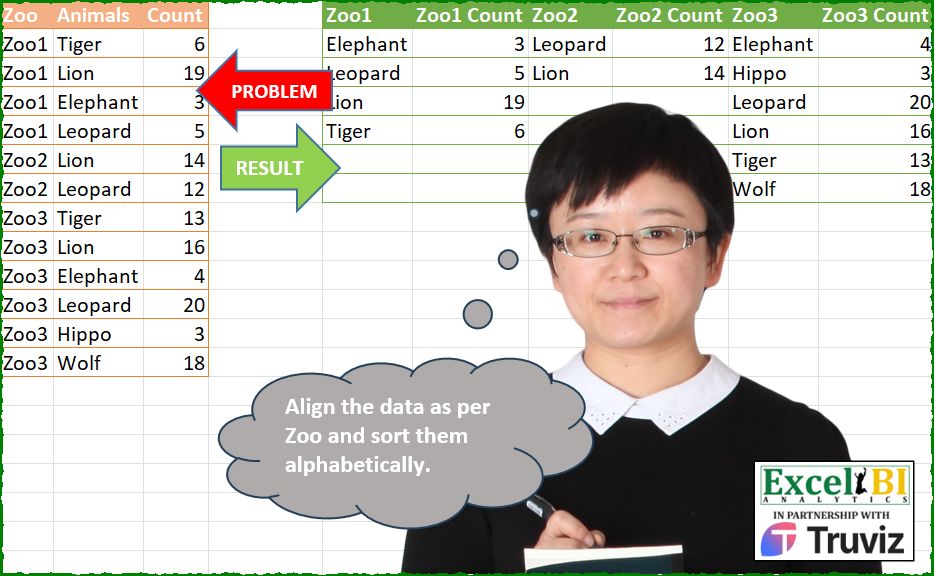
Align the data as per Zoo and sort them alphabetically.
📌 Challenge Details and Links
ExcelBI Power Query Challenge Number: 214
Challenge Difficulty: ⭐️
📥Download Sample File
📥Link to the solutions on LinkedIn
Solving the challenge of Sort Zoo Records Alphabetically with Power Query
Power Query solution 1 for Sort Zoo Records Alphabetically, proposed by Zoran Milokanović:
let
  Source = Excel.CurrentWorkbook(){[Name = "Input"]}[Content],
  P = Table.Group(Source, "Zoo", {"A", each List.Skip(Table.ToColumns(Table.Sort(_, "Animals")))}),
  S = Table.FromColumns(
    List.Combine(P[A]),
    List.TransformMany(P[Zoo], each {_, _ & " Count"}, (i, _) => _)
  )
in
  S
Power Query solution 2 for Sort Zoo Records Alphabetically, proposed by Kris Jaganah:
let
  Source = Excel.CurrentWorkbook(){[Name = "Table1"]}[Content],
  Sort = Table.Sort(Source, {{"Zoo", 0}, {"Animals", 0}}),
  Merge = Table.CombineColumns(
    Table.TransformColumnTypes(Sort, {{"Count", type text}}, "en-US"),
    {"Animals", "Count"},
    Combiner.CombineTextByDelimiter(",", QuoteStyle.None),
    "Merged"
  ),
  Grp = Table.Group(Merge, {"Zoo"}, {"Merge", each [Merged]}),
  Tab = Table.FromColumns(Grp[Merge], Grp[Zoo]),
  Split = List.Accumulate(
    Table.ColumnNames(Tab),
    Tab,
    (x, y) => Table.SplitColumn(x, y, Splitter.SplitTextByDelimiter(","), {y, y & " Count"})
  ),
  ColName = List.Select(Table.ColumnNames(Split), each Text.Contains(_, "Count")),
  Type = List.Accumulate(ColName, Split, (v, w) => Table.TransformColumnTypes(v, {{w, Int64.Type}}))
in
  Type
Power Query solution 3 for Sort Zoo Records Alphabetically, proposed by Aditya Kumar Darak 🇮🇳:
let
  Source = Excel.CurrentWorkbook(){[Name = "data"]}[Content],
  Group = Table.Group(
    Source,
    "Zoo",
    {"A", each [S = Table.Sort(_, "Animals"), TC = Table.ToColumns(S), R = List.Skip(TC)][R]}
  ),
  Headers = List.TransformMany(Group[Zoo], each {"", " Count"}, (x, y) => x & y),
  Return = Table.FromColumns(List.Combine(Group[A]), Headers)
in
  Return
Power Query solution 4 for Sort Zoo Records Alphabetically, proposed by Alejandro Simón 🇵🇦 🇪🇸:
let
  Source = Excel.CurrentWorkbook(){[Name = "Table1"]}[Content],
  Group = Table.Group(
    Source,
    {"Zoo"},
    {
      {
        "A",
        each
          let
            a = _,
            b = Table.ToColumns(a),
            c = Table.FromColumns(List.Skip(b), {b{0}{0}, b{0}{0} & " Count"}),
            d = Table.Sort(c, Table.ColumnNames(c){0})
          in
            d
      }
    }
  )[A],
  Col = List.Combine(List.Transform(Group, each Table.ColumnNames(_))),
  Sol = Table.FromColumns(List.Combine(List.Transform(Group, each Table.ToColumns(_))), Col)
in
  Sol
Power Query solution 5 for Sort Zoo Records Alphabetically, proposed by Luan Rodrigues:
let
  Fonte = Tabela1,
  grp = Table.Group(
    Fonte,
    {"Zoo"},
    {
      "tab",
      each
        let
          a = Table.Sort(Table.RemoveColumns(_, {"Zoo"}), {"Animals"}),
          b = Table.ToColumns(a)
        in
          Table.FromColumns(b, {[Zoo]{0}, [Zoo]{0} & " Count"})
    }
  )[tab],
  cmb = Table.Combine(grp),
  res = Table.FromColumns(
    List.Transform(Table.ToColumns(cmb), each List.RemoveNulls(_)),
    Table.ColumnNames(cmb)
  )
in
  res
Power Query solution 6 for Sort Zoo Records Alphabetically, proposed by Hussein SATOUR:
let
  Source = Excel.CurrentWorkbook(){[Name = "Table1"]}[Content],
  GroupByZoo = Table.Group(Source, {"Zoo"}, {{"All", each _, type table}}),
  GenerateTabByZoo = Table.AddColumn(
    GroupByZoo,
    "Custom",
    each
      let
        a = [Zoo],
        b = Table.Sort([All], {{"Animals", 0}}),
        c = Table.RenameColumns(b, {{"Animals", a}, {"Count", a & " count"}}),
        d = Table.DemoteHeaders(c)
      in
        Table.Skip(Table.Transpose(d), 1)
  ),
  ExpandAllCols = Table.Combine(GenerateTabByZoo[Custom]),
  Transpos = Table.Transpose(ExpandAllCols),
  PromotHeaders = Table.PromoteHeaders(Transpos, [PromoteAllScalars = true])
in
  PromotHeaders
Power Query solution 7 for Sort Zoo Records Alphabetically, proposed by Abdallah Ally:
let
  Source = Excel.CurrentWorkbook(){[Name = "Table1"]}[Content],
  Zoos = List.Distinct(List.Sort(Source[Zoo], each _)),
  Columns = List.Combine(List.Transform(Zoos, each {_, _ & " Count"})),
  Transform = List.Transform(
    Zoos,
    each [
      a = Table.SelectRows(Source, (x) => x[Zoo] = _)[[Animals], [Count]],
      b = Table.Sort(a, each [Animals]),
      c = Table.ToColumns(b)
    ][c]
  ),
  Result = Table.FromColumns(List.Combine(Transform), Columns)
in
  Result
Power Query solution 8 for Sort Zoo Records Alphabetically, proposed by Eric Laforce:
let
  Source = Excel.CurrentWorkbook(){[Name = "tData214"]}[Content],
  Sort = Table.Sort(Source, {{"Zoo", Order.Ascending}, {"Animals", Order.Ascending}}),
  Group = Table.Group(
    Sort,
    "Zoo",
    {"All", each Table.FromColumns({_[Animals], _[Count]}, {_[Zoo]{0}, _[Zoo]{0} & " Count"})}
  ),
  Accumulate = List.Accumulate(
    Group[All],
    [cols = {}, cnames = {}],
    (s, c) => [cols = s[cols] & Table.ToColumns(c), cnames = s[cnames] & Table.ColumnNames(c)]
  ),
  Result = Table.FromColumns(Accumulate[cols], Accumulate[cnames])
in
  Result
Power Query solution 9 for Sort Zoo Records Alphabetically, proposed by Sanket Doijode:
let
  Source = Table.FromColumns(
    Table.ExpandListColumn(
      Table.TransformColumns(
        Table.TransformColumns(
          Table.TransformColumns(
            Table.SelectColumns(
              Table.Group(
                Excel.CurrentWorkbook(){[Name = "Table1"]}[Content],
                {"Zoo"},
                {{"Count", each _, type table [Zoo = text, Animals = text, Count = number]}}
              ),
              "Count"
            ),
            {"Count", each Table.RemoveColumns(_, "Zoo")}
          ),
          {"Count", each Table.Sort(_, {"Animals", Order.Ascending})}
        ),
        {"Count", each Table.ToColumns(_)}
      ),
      "Count"
    )[Count],
    {"Zoo1", "Zoo1 Count", "Zoo2", "Zoo2 Count", "Zoo3", "Zoo3 Count"}
  )
in
  Source
Solving the challenge of Sort Zoo Records Alphabetically with Excel
Excel solution 1 for Sort Zoo Records Alphabetically, proposed by Bo Rydobon 🇹🇭:
=LET(
    z,
    A2:A13,
    b,
    LAMBDA(
        b,
        a,
        LET(
            n,
            ROWS(
                a
            ),
            IF(
                n=1,
                VSTACK(
                    a&{"",
                    " count"},
                    SORT(
                        FILTER(
                            B2:C13,
                            z=a
                        )
                    )
                ),
                IFNA(
                    HSTACK(
                        b(
                            b,
                            TAKE(
                                a,
                                n/2
                            )
                        ),
                        b(
                            b,
                            DROP(
                                a,
                                n/2
                            )
                        )
                    ),
                    ""
                )
            )
        )
    ),
    b(
        b,
        UNIQUE(
            z
        )
    )
)
Excel solution 2 for Sort Zoo Records Alphabetically, proposed by Bo Rydobon 🇹🇭:
=LET(
    z,
    A2:A13,
    DROP(
        REDUCE(
            0,
            UNIQUE(
                z
            ),
            LAMBDA(
                a,
                v,
                IFNA(
                    HSTACK(
                        a,
                        VSTACK(
                            v&{"",
                            " count"},
                            SORT(
                                FILTER(
                                    B2:C13,
                                    z=v
                                )
                            )
                        )
                    ),
                    ""
                )
            )
        ),
        ,
        1
    )
)
Excel solution 3 for Sort Zoo Records Alphabetically, proposed by Rick Rothstein:
=LET(
    z,
    A2:A13,
    u,
    UNIQUE(
        z
    ),
    VSTACK(
        TOROW(
            HSTACK(
                u,
                u&" Count"
            )
        ),
        IFNA(
            DROP(
                REDUCE(
                    "",
                    u,
                    LAMBDA(
                        a,
                        x,
                        HSTACK(
                            a,
                            SORT(
                                FILTER(
                                    B2:C13,
                                    z=x,
                                    ""
                                )
                            )
                        )
                    )
                ),
                ,
                1
            ),
            ""
        )
    )
)
Excel solution 4 for Sort Zoo Records Alphabetically, proposed by محمد حلمي:
=DROP(
    REDUCE(
        0,
        UNIQUE(
            A2:A13
        ),
        LAMBDA(
            a,
            v,

            IFNA(
                HSTACK(
                    a,
                    VSTACK(
                        HSTACK(
                            v,
                            v&" "&C1
                        ),

                        SORT(
                            FILTER(
                                B2:C13,
                                A2:A13=v
                            )
                        )
                    )
                ),
                ""
            )
        )
    ),
    ,
    1
)
Excel solution 5 for Sort Zoo Records Alphabetically, proposed by محمد حلمي:
=DROP(
    REDUCE(
        0,
        UNIQUE(
            A2:A13
        ),
        LAMBDA(
            a,
            v,

            IFNA(
                HSTACK(
                    a,
                    VSTACK(
                        v&{"",
                        " Count"},

                        SORT(
                            FILTER(
                                B2:C13,
                                A2:A13=v
                            )
                        )
                    )
                ),
                ""
            )
        )
    ),
    ,
    1
)
Excel solution 6 for Sort Zoo Records Alphabetically, proposed by Kris Jaganah:
=LET(
    a,
    UNIQUE(
        A2:A13
    ),
    IFNA(
        VSTACK(
            TOROW(
                HSTACK(
                    a,
                    a&" Count"
                )
            ),
            DROP(
                REDUCE(
                    "",
                    a,
                    LAMBDA(
                        x,
                        y,
                        HSTACK(
                            x,
                            SORT(
                                FILTER(
                                    HSTACK(
                                        B2:B13,
                                        C2:C13
                                    ),
                                    A2:A13=y
                                )
                            )
                        )
                    )
                ),
                ,
                1
            )
        ),
        ""
    )
)
Excel solution 7 for Sort Zoo Records Alphabetically, proposed by Julian Poeltl:
=IFNA(
    DROP(
        REDUCE(
            0,
            UNIQUE(
                A2:A13
            ),
            LAMBDA(
                A,
                B,
                HSTACK(
                    A,
                    VSTACK(
                        HSTACK(
                            B,
                            B&" Count"
                        ),
                        SORT(
                            FILTER(
                                B2:C13,
                                A2:A13=B
                            )
                        )
                    )
                )
            )
        ),
        ,
        1
    ),
    ""
)
Excel solution 8 for Sort Zoo Records Alphabetically, proposed by Julian Poeltl:
=LET(
    Z,
    A2:A13,
    U,
    UNIQUE(
        Z
    ),
    IFNA(
        DROP(
            REDUCE(
                0,
                SEQUENCE(
                    ,
                    ROWS(
                        U
                    )
                ),
                LAMBDA(
                    A,
                    B,
                    HSTACK(
                        A,
                        VSTACK(
                            HSTACK(
                                INDEX(
                                    U,
                                    B
                                ),
                                INDEX(
                                    U,
                                    B
                                )&" Count"
                            ),
                            SORT(
                                HSTACK(
                                    FILTER(
                                        B2:B13,
                                        Z=INDEX(
                                    U,
                                    B
                                )
                                    ),
                                    FILTER(
                                        C2:C13,
                                        Z=INDEX(
                                    U,
                                    B
                                )
                                    )
                                )
                            )
                        )
                    )
                )
            ),
            ,
            1
        ),
        ""
    )
)
Excel solution 9 for Sort Zoo Records Alphabetically, proposed by Oscar Mendez Roca Farell:
=LET(
    a,
     A2:A13,
     DROP(
         REDUCE(
             "",
              UNIQUE(
                  a
              ),
              LAMBDA(
                  i,
                   x,
                   LET(
                       m,
                        XMATCH(
                            x,
                             a,
                             ,
                            -1
                        ),
                        IFNA(
                            HSTACK(
                                i,
                                 VSTACK(
                                     x&{"",
                                      " Count"},
                                      SORT(
   &                                       DROP(
                                              TAKE(
                                                  B2:C13,
                                                   m
                                              ),
                                               m-COUNTIF(
                                                   a,
                                                    x
                                               )
                                          )
                                      )
                                 )
                            ),
                             ""
                        )
                   )
              )
         ),
          ,
          1
     )
)
Excel solution 10 for Sort Zoo Records Alphabetically, proposed by Duy Tùng:
=DROP(
    REDUCE(
        0,
        UNIQUE(
            A2:A13
        ),
        LAMBDA(
            x,
            y,
            IFNA(
                HSTACK(
                    x,
                    GROUPBY(
                        VSTACK(
                            y,
                            B2:B13
                        ),
                        VSTACK(
                            y&" Count",
                            C2:C13
                        ),
                        SUM,
                        3,
                        0,
                        ,
                        A2:A13=y
                    )
                ),
                ""
            )
        )
    ),
    ,
    1
)
Excel solution 11 for Sort Zoo Records Alphabetically, proposed by Sunny Baggu:
=IFNA(

     DROP(

          REDUCE(

               "",

               UNIQUE(
                   A2:A13
               ),

               LAMBDA(
                   a,
                    v,

                    HSTACK(
                        a,
                         SORT(
                             WRAPROWS(
                                 TOCOL(
                                     IF(
                                         A2:A13 = v,
                                          B2:C13,
                                          x
                                     ),
                                      3
                                 ),
                                  2
                             )
                         )
                    )

               )

          ),

          ,

          1

     ),

     ""

)
Excel solution 12 for Sort Zoo Records Alphabetically, proposed by Sunny Baggu:
=LET(

     _u,
     UNIQUE(
         A2:A13
     ),

     _c,
     MAP(
         _u,
          LAMBDA(
              x,
               SUM(
                   N(
                       A2:A13 = x
                   )
               )
          )
     ),

     _ur,
     TOROW(
         _u
     ),

     _a,
     IF(
         A2:A13 = _ur,
          B2:B13,
          x
     ),

     _b,
     IF(
         A2:A13 = _ur,
          C2:C13,
          x
     ),

     _t,
     IFERROR(

          DROP(

               REDUCE(

                    "",

                    SEQUENCE(
                        ROWS(
         _u
     )
                    ),

                    LAMBDA(
                        a,
                         v,
                         HSTACK(
                             a,
                              SORT(
                                  HSTACK(
                                      INDEX(
                                          _a,
                                           ,
                                           v
                                      ),
                                       INDEX(
                                           _b,
                                            ,
                                            v
                                       )
                                  )
                              )
                         )
                    )

               ),

               ,

               1

          ),

          ""

     ),

     VSTACK(
         TOROW(
             HSTACK(
                 _u,
                  _u & " Count"
             )
         ),
          TAKE(
              _t,
               MAX(
                   _c
               )
          )
     )

)
Excel solution 13 for Sort Zoo Records Alphabetically, proposed by Abdallah Ally:
=LET(
    a,
    A2:A13,
    IFNA(
        DROP(
            REDUCE(
                "",
                UNIQUE(
                    a
                ),
                LAMBDA(
                    x,
                    y,
                    HSTACK(
                         x,
                        VSTACK(
                            HSTACK(
                                y,
                                 y & " Count"
                            ),
                            SORT(
                                FILTER(
                                    B2:C13,
                                    a=y
                                )
                            )
                        )
                    )
                )
            ),
            ,
            1
        ),
        ""
    )
)
Excel solution 14 for Sort Zoo Records Alphabetically, proposed by Asheesh Pahwa:
=LET(
    z,
    A2:A13,
    ac,
    B2:C13,
    IFNA(
        DROP(
            REDUCE(
                "",
                UNIQUE(
                    z
                ),
                LAMBDA(
                    x,
                    y,

                    HSTACK(
                        x,
                        LET(
                            f,
                            VSTACK(
                                HSTACK(
                                    y,
                                    y&" Count"
                                ),
                                SORT(
                                    FILTER(
                                        ac,
                                        z=y
                                    ),
                                    1
                                )
                            ),
                            f
                        )
                    )
                )
            ),
            ,
            1
        ),
        ""
    )
)
Excel solution 15 for Sort Zoo Records Alphabetically, proposed by ferhat CK:
=VSTACK(
    {"Zoo1",
    "Zoo1 Count",
    "Zoo2",
    "Zoo2 Count",
    "Zoo3",
    "Zoo3 Count"},
    DROP(
        IFERROR(
            REDUCE(
                0,
                UNIQUE(
                    A2:A13
                ),
                LAMBDA(
                    x,
                    y,
                    HSTACK(
                        x,
                        SORT(
                            FILTER(
                                B2:C13,
                                A2:A13=y
                            ),
                            1,
                            1
                        )
                    )
                )
            ),
            ""
        ),
        ,
        1
    )
)
Excel solution 16 for Sort Zoo Records Alphabetically, proposed by Jaroslaw Kujawa:
=DROP(IFERROR(
    REDUCE(
        "";
        UNIQUE(
            A2:A13
        );

        LAMBDA(
             a ;
             v ;

            HSTACK(
                 a ;

                VSTACK(
                     v ;
                     SORT(
                         FILTER(
                             B2:C13;
                             A2:A13= v
                         ) ;
                          {1;
                         2}
                     )
                )
            )
        );
        ""
    );
    ;
    TRUE
)
Excel solution 17 for Sort Zoo Records Alphabetically, proposed by Imam Hambali:
=IFNA(
    DROP(
        REDUCE(
            "",
            UNIQUE(
                A2:A13
            ),
             LAMBDA(
                 x,
                 y,
                  HSTACK(
                      x,
                       SORT(
                           FILTER(
                               B2:C13,
                               A2:A13=y
                           ),
                           1,
                           1
                       )
                  )
             )
        ),
        ,
        1
    ),
    ""
)
Excel solution 18 for Sort Zoo Records Alphabetically, proposed by Eddy Wijaya:
=LET(

    g,
    A2:A13,

    f,
    LAMBDA(
        a,
        VSTACK(
            HSTACK(
                a,
                a&" Count"
            ),
            SORT(
                FILTER(
                    B2:C13,
                    g=a
                ),
                1,
                1
            )
        )
    ),

    DROP(
        IFNA(
            REDUCE(
                "",
                UNIQUE(
                    g
                ),
                LAMBDA(
                    a,
                    v,
                    HSTACK(
                        a,
                        f(
                            v
                        )
                    )
                )
            ),
            ""
        ),
        ,
        1
    )
)
Excel solution 19 for Sort Zoo Records Alphabetically, proposed by Mey Tithveasna:
=LET(
    a,
    A2:A13,
    IFNA(
        DROP(
            REDUCE(
                "",
                UNIQUE(
                    a
                ),
                LAMBDA(
                    x,
                    y,
                    HSTACK(
                        x,
                        VSTACK(
                            y&{"",
                            " Count"},
                            SORT(
                                FILTER(
                                    B2:C13,
                                    a=y
                                )
                            )
                        )
                    )
                )
            ),
            ,
            1
        ),
        ""
    )
)
Excel solution 20 for Sort Zoo Records Alphabetically, proposed by Peter Bartholomew:
=LAMBDA(
    filterArray,
     criterionArr,

     LAMBDA(
         criterion,

          FILTER(
              filterArray,
               criterionArr = criterion
          )
     )
)

Then I pulled the MAPλ helper function out of my back pocket to produce the solution with
= MAPλ(TOROW(
    UNIQUE(
        zoo
    )
),
     FILTERλ(animalCount,
     zoo))

MAPλ works like MAP should work in that it will stack ARRAY results horizontally or vertically (or both)
Excel solution 21 for Sort Zoo Records Alphabetically, proposed by Songglod P.:
=DROP(
    REDUCE(
        "",
        UNIQUE(
            A2:A13
        ),
        LAMBDA(
            a,
            v,
            IFNA(
                HSTACK(
                    a,
                    SORT(
                        FILTER(
                            B2:C13,
                            A2:A13=v
                        )
                    )
                ),
                ""
            )
        )
    ),
    ,
    1
)
Solving the challenge of Sort Zoo Records Alphabetically with Python
Python solution 1 for Sort Zoo Records Alphabetically, proposed by Konrad Gryczan, PhD:
import pandas as pd
path = "PQ_Challenge_214.xlsx"
input = pd.read_excel(path, usecols="A:C")
test = pd.read_excel(path, usecols="E:J", nrows=6)
test[test.columns[test.columns.str.contains("Count")]] = test[test.columns[test.columns.str.contains("Count")]].astype("float64")
result = input.sort_values(by=["Animals", "Zoo"]).assign(nr=lambda x: x.groupby("Zoo").cumcount() + 1).pivot(index="nr", columns="Zoo", values=["Animals", "Count"]).reset_index(drop=True)
result.columns = [' '.join(col).strip() for col in result.columns.values]
result = result[["Animals Zoo1", "Count Zoo1", "Animals Zoo2", "Count Zoo2", "Animals Zoo3", "Count Zoo3"]]
result.columns = test.columns
result[result.columns[result.columns.str.contains("Count")]] = result[result.columns[result.columns.str.contains("Count")]].astype("float64")
print(result.equals(test)) # True
Python solution 2 for Sort Zoo Records Alphabetically, proposed by Aman Mashetty:
path = 'PQ_Challenge_214.xlsx'
df = pd.read_excel(path,usecols = 'A:C',nrows = 12)
df = df.sort_values(by = ['Zoo','Animals'],ascending = [True,True])
grouped = df.groupby('Zoo')
output_df = pd.DataFrame()
# Iterate through each Zoo group and stack Animals and Counts
for zoo, group in grouped:
 temp_df = group[['Animals', 'Count']].reset_index(drop=True)
 temp_df.columns = [zoo, f'{zoo} Count']
 output_df = pd.concat([output_df, temp_df], axis=1)
print(output_df)
Solving the challenge of Sort Zoo Records Alphabetically with Python in Excel
Python in Excel solution 1 for Sort Zoo Records Alphabetically, proposed by Alejandro Campos:
df = xl("A1:C13", headers=True)
df_sorted = df.sort_values(by=['Zoo', 'Animals'])
zoo1 = df_sorted[df_sorted['Zoo'] == 'Zoo1'][['Animals', 'Count']].reset_index(drop=True)
zoo2 = df_sorted[df_sorted['Zoo'] == 'Zoo2'][['Animals', 'Count']].reset_index(drop=True)
zoo3 = df_sorted[df_sorted['Zoo'] == 'Zoo3'][['Animals', 'Count']].reset_index(drop=True)
result = pd.DataFrame({
 'Zoo1': zoo1['Animals'],
 'Zoo1_Count': zoo1['Count'],
 'Zoo2': zoo2['Animals'],
 'Zoo2_Count': zoo2['Count'],
 'Zoo3': zoo3['Animals'],
 'Zoo3_Count': zoo3['Count']
}).fillna('')
result
Python in Excel solution 2 for Sort Zoo Records Alphabetically, proposed by Abdallah Ally:
df = xl("A1:C13", headers=True)
# Perform data manipulation
zoos = sorted(df['Zoo'].unique())
columns = [x for y in zoos for x in (y, y + ' Count')]
dfs = []
for zoo in zoos:
 dfi = df[df['Zoo'] == zoo]
 dfi = dfi.sort_values(by='Animals', ignore_index=True)
 dfs.append(dfi[['Animals', 'Count']])
df = pd.concat(dfs, axis=1).fillna('')
df.columns = columns
df
Solving the challenge of Sort Zoo Records Alphabetically with R
R solution 1 for Sort Zoo Records Alphabetically, proposed by Konrad Gryczan, PhD:
library(tidyverse)
library(readxl)
path = "Power Query/PQ_Challenge_214.xlsx"
input = read_excel(path, range = "A1:C13")
test = read_excel(path, range = "E1:J7")
result = input %>%
 arrange(Animals, .by = Zoo) %>%
 mutate(nr = row_number(), .by = Zoo) %>%
 pivot_wider(
 names_from = Zoo,
 values_from = c(Animals, Count),
 names_glue = "{.value}_{Zoo}"
 ) %>%
 select(contains("Zoo1"), contains("Zoo2"), cont&ains("Zoo3"))
colnames(result) = colnames(test)
all.equal(result, test)
#> [1] TRUE
Solving the challenge of Sort Zoo Records Alphabetically with DAX
DAX solution 1 for Sort Zoo Records Alphabetically, proposed by Eddy Wijaya:
https://www.linkedin.com/feed/update/urn:li:activity:7235858918315356160?commentUrn=urn%3Ali%3Acomment%3A%28activity%3A7235858918315356160%2C7235866491768688640%29&dashCommentUrn=urn%3Ali%3Afsd_comment%3A%287235866491768688640%2Curn%3Ali%3Aactivity%3A7235858918315356160%29
&