
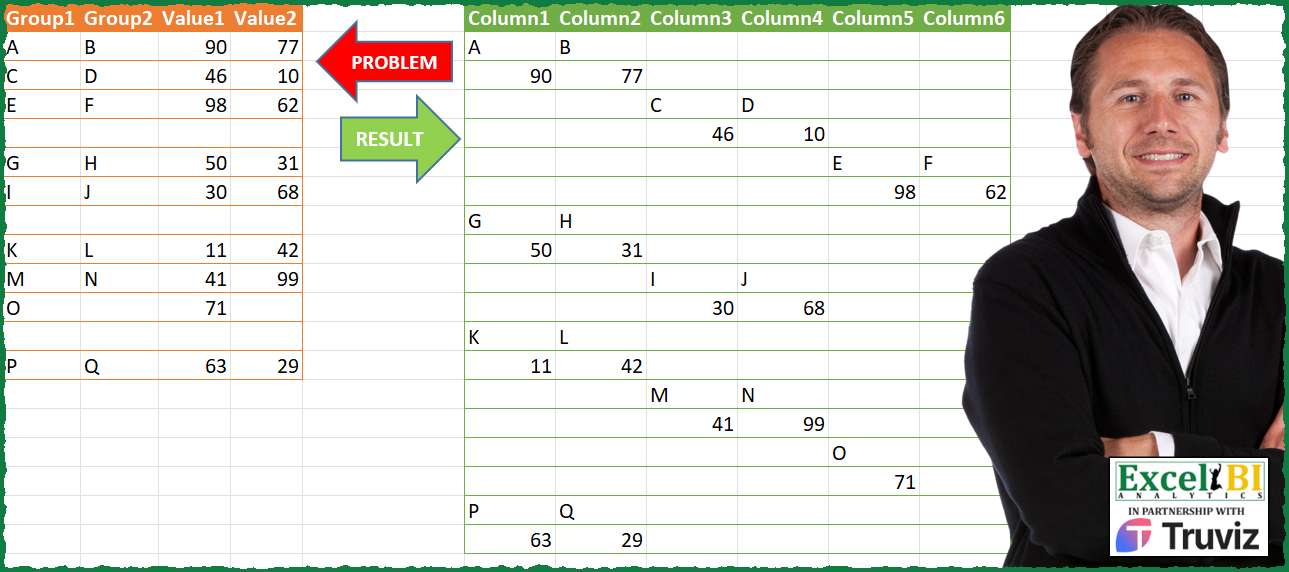
Generate the result table from problem table.
📌 Challenge Details and Links
ExcelBI Power Query Challenge Number: 206
Challenge Difficulty: ⭐️⭐️⭐️
📥Download Sample File
📥Link to the solutions on LinkedIn
Solving the challenge of Compile Role Based Totals with Power Query
Power Query solution 1 for Compile Role Based Totals, proposed by Zoran Milokanović:
let
  Source = Table.ToRows(Excel.CurrentWorkbook(){[Name = "Input"]}[Content]),
  G = List.Zip(Source){0},
  S = Table.FromColumns(
    List.Zip(
      List.TransformMany(
        Source,
        each {List.Split(_, 2), {}}{Byte.From(_{0} = null)},
        (i, _) =>
          List.Repeat(
            {null},
            List.Count(List.LastN(List.FirstN(G, List.PositionOf(G, i{0})), each _ <> null)) * 2
          )
            & _
      )
    )
  )
in
  S
Power Query solution 2 for Compile Role Based Totals, proposed by Alejandro Simón 🇵🇦 🇪🇸:
let
  Source = Excel.CurrentWorkbook(){[Name = "Table1"]}[Content],
  Group = Table.Group(
    Source,
    {"Group1"},
    {
      {
        "All",
        each
          let
            a = _,
            b = Table.SelectRows(a, each List.Distinct(Record.ToList(_)) <> {null}),
            c = Table.AddIndexColumn(b, "I", 0),
            d = Table.AddColumn(
              c,
              "A",
              each Table.FromRows(
                List.Transform(
                  List.Split(List.RemoveLastN(Record.ToList(_)), 2),
                  (z) => List.Repeat({null, null}, [I]) & z
                )
              )
            )[A],
            e = Table.Combine(d)
          in
            e
      }
    },
    0,
    (x, y) => Number.From(y[Group1] = null)
  )[All],
  Sol = Table.Combine(Group)
in
  Sol
Power Query solution 3 for Compile Role Based Totals, proposed by Luan Rodrigues:
let
  Fonte = Tabela1,
  add = Table.AddColumn(
    Fonte,
    "Personalizar",
    each Table.FromColumns(
      List.Zip(
        {
          List.Alternate(Record.FieldValues(_), 1, 1, 1),
          List.Alternate(Record.FieldValues(_), 1, 1)
        }
      )
    )[[Column2], [Column1]]
  ),
  grp = Table.Group(
    add,
    {"Group1"},
    {
      {
        "tab",
        each
          let
            a = Table.SelectRows(
              _,
              each List.NonNullCount(List.RemoveLastN(Record.FieldValues(_), 1)) > 0
            )[Personalizar],
            b = Table.Combine(a),
            c = Table.TransformColumns(
              Table.AddIndexColumn(b, "Ind", 1, 1),
              {"Ind", each Text.Combine({"Column", Text.From(_)})}
            )
          in
            Table.Split(c, 2)
      }
    },
    0,
    (a, b) => Number.From(b[Group1] = null)
  )[tab],
  res = Table.Combine(
    List.TransformMany(
      grp,
      each _,
      (a, b) => Table.PromoteHeaders(Table.ReverseRows(Table.Transpose(b)))
    )
  )
in
  res
Power Query solution 4 for Compile Role Based Totals, proposed by Eric Laforce:
let
  Source = Excel.CurrentWorkbook(){[Name = "tData206"]}[Content],
  Group = Table.Group(
    Source,
    "Group1",
    {
      "G",
      each
        let
          _Rows = Table.ToRows(Table.SelectRows(_, each [Group1] <> null)),
          _RC = List.Count(_Rows),
          _CN = List.Split(List.Transform({1 .. 2 * _RC}, each "Column" & Text.From(_)), 2),
          _SubTables = List.Transform(
            {0 .. _RC - 1},
            each Table.FromRows(List.Split(_Rows{_}, 2), _CN{_})
          )
        in
          Table.Combine(_SubTables)
    },
    GroupKind.Local,
    (x, y) => if (y = null) then 1 else 0
  ),
  Combine = Table.Combine(Group[G])
in
  Combine
Power Query solution 5 for Compile Role Based Totals, proposed by 🇮🇷 Navid Esmaeilzadeh اسماعیل زاده:
let
  S = Excel.CurrentWorkbook(){[Name = "Table1"]}[Content],
  A = Table.AddIndexColumn(S, "I", 1, 1, Int64.Type),
  B = Table.AddColumn(A, "T", each if [I] = 1 or [Group1] = null then [I] else null),
  C = Table.FillDown(B, {"T"}),
  D = Table.SelectRows(C, each ([Group1] <> null)),
  E = Table.SelectColumns(D, {"T", "Group1", "Group2", "Value1", "Value2"}),
  F = Table.Group(
    E,
    {"T"},
    {
      {
        "Tbl",
        each _,
        type table [
          T = number,
          Group1 = nullable text,
          Group2 = nullable text,
          Value1 = nullable number,
          Value2 = nullable number
        ]
      }
    }
  ),
  Mf = (f) =>
    let
      a = Table.AddColumn(f, "T1", each List.Zip(List.Split(List.Skip(Record.ToList(_), 1), 2))),
      b = Table.AddIndexColumn(a, "In", 1, 2, Int64.Type),
      c = Table.AddColumn(
        b,
        "tbl",
        each Table.FromColumns([T1], {"column" & Text.From([In]), "column" & Text.From([In] + 1)})
      ),
      d = Table.SelectColumns(c, {"tbl"}),
      e = Table.ExpandTableColumn(
        d,
        "tbl",
        {"column1", "column2", "column3", "column4", "column5", "column6"},
        {"column1", "column2", "column3", "column4", "column5", "column6"}
      )
    in
      e,
  G = Table.AddColumn(F, "N", each Mf([Tbl])),
  H = Table.SelectColumns(G, {"N"}),
  I = Table.ExpandTableColumn(
    H,
    "N",
    {"column1", "column2", "column3", "column4", "column5", "column6"},
    {"column1", "column2", "column3", "column4", "column5", "column6"}
  )
in
  I
Power Query solution 6 for Compile Role Based Totals, proposed by Ahmed Ariem:
let
 Source = Excel.CurrentWorkbook(){[Name="tbl"]}[Content],
 Listfrom = Table.FromList( {null},(x)=>{x}, Table.ColumnNames( Source)) & Source,
 Group = Table.Group(Listfrom, "Group1", {{"tmp",
 (x)=> [ a = Table.Skip(x),
 b = Table.ToRows(a),
 c = Table.FromValue( List.Transform(b, (x)=> Table.Transpose( Table.FromColumns( List.Split(x,2)) ))),
 d= Table.AddIndexColumn(c,"idx",0,1) ][d]

}},0, (x,y)=> Number.From(y=null)),
 Combine= Table.Combine( Table.SelectColumns(Group,{"tmp"})[tmp]),
 Expand = Table.ExpandTableColumn(Combine, "Value", {"Column1", "Column2"}),
 AddCol= Table.AddColumn(Expand, "Column", each [
 a = Text.From (if [Column1] = null then "" else [Column1]),
 b = Text.From (if [Column2] = null then "" else [Column2]),
 c = Text.Repeat(";", if [idx]=0 then 0 else [idx]*2)&a&";"&b][c]),
 SelectCol= Table.SelectColumns(AddCol,{"Column"}),
 Split = Table.SplitColumn(SelectCol, "Column", Splitter.SplitTextByDelimiter(";", QuoteStyle.Csv), {"Column1", "Column2", "Column3", "Column4", "Column5", "Column6"})
in
 Split

attached  file
https://1drv.ms/f/s!AiUZ0Ws7G26RhgCvMt2xlt4fkBtc?e=lbj0fI
Power Query solution 7 for Compile Role Based Totals, proposed by Mihai Radu O:
let
  Source = Excel.CurrentWorkbook(){[Name = "Table1"]}[Content],
  r = [
    tbl = Table.SelectRows(
      Source,
      each not List.IsEmpty(List.RemoveMatchingItems(Record.FieldValues(_), {null}))
    ),
    a = List.Transform(Source[Group1], each if _ <> null then 1 else 0),
    b = List.Generate(
      () => [x = a{0}, y = 0],
      each [y] < List.Count(a),
      each [y = [y] + 1, x = if a{[y] + 1} = 0 then 0 else [x] + a{[y] + 1}],
      each [x]
    ),
    c = List.Transform(List.Select(b, each _ <> 0), each _ - 1),
    d = List.Transform(c, each (List.Max(c) - _) * 2),
    e = List.Transform(Table.ToRows(tbl), each List.Split(_, 2)),
    f = Table.Combine(
      List.Transform(
        List.Zip({c, e, d}),
        (x) =>
          Table.FromRows(
            List.Transform(
              {0 .. List.Count(x{1}) - 1},
              (y) => List.Repeat({null}, x{0} * 2) & x{1}{y} & List.Repeat({null}, x{2})
            )
          )
      )
    )
  ][f]
in
  r
Solving the challenge of Compile Role Based Totals with Excel
Excel solution 1 for Compile Role Based Totals, proposed by Bo Rydobon 🇹🇭:
=LET(
    x,
    IFNA(
        REDUCE(
            0,
            A2:A13,
            LAMBDA(
                a,
                v,
                LET(
                    b,
                    TAKE(
                        v:D13,
                        1
                    ),
                    VSTACK(
                        a,
                        IF(
                            v=0,
                            0,
                            HSTACK(
                                IF(
                                    SEQUENCE(
                                        ,
                                        MATCH(
                                            9^9,
                                            TAKE(
                                                a,
                                                -1
                                            )
                                        )
                                    ),
                                    ""
                                ),
                                FILTER(
                                    WRAPROWS(
                                        b,
                                        2
                                    ),
                                    DROP(
                                        b,
                                        ,
                                        2
                                    )
                                )
                            )
                        )
                    )
                )
            )
        ),
        ""
    ),
    FILTER(
        DROP(
            x,
            ,
            1
        ),
        TAKE(
            x,
            ,
            1
        )>0
    )
)
Excel solution 2 for Compile Role Based Totals, proposed by Bo Rydobon 🇹🇭:
=index(array,1,1)Excel solution 3 for Compile Role Based Totals, proposed by محمد حلمي:
=IFNA(
    DROP(

        REDUCE(
            0,
            A2:A13,
            LAMBDA(
                a,
                v,
                LET(

                    e,
                    TOCOL(
                        OFFSET(
                            v,
                            ,
                            ,
                            ,
                            4
                        ),
                        1
                    ),

                    w,
                    WRAPROWS(
                        e,
                        ROWS(
                            e
                        )/2
                    ),

                    IF(
                        v=0,
                        a,

                        VSTACK(
                            a,
                            IF(
                                OR(
                                    ROW(
                                        v
                                    )=2,
                                    OFFSET(
                                        v,
                                        -1,

                                    )=0
                                ),
                                w,

                                HSTACK(
                                    TEXT(

                                        TAKE(
                                            a,
                                            -1,
                                            XMATCH(
                                                TRUE,
                                                TAKE(
                                                    a,
                                                    -1
                                                )>0,
                                                ,
                                                -1
                                            )
                                        ),
                                        ""
                                    ),
                                    w
                                )
                            )
                        )
                    )
                )
            )
        ),
        1
    ),
    ""
)
Excel solution 4 for Compile Role Based Totals, proposed by Julian Poeltl:
=LET(T,
    A2:D13,
    G,
    TAKE(
        T,
        ,
        2
    ),
    V,
    TAKE(
        T,
        ,
        -2
    ),
    W,
    WRAPROWS(
        TOCOL(
            HSTACK(
                G,
                G,
                G,
                V,
                V,
                V
            )
        ),
        6
    ),
    F,
    FILTER(
        W,
        TAKE(
            W,
            ,
            1
        )<>0
    ),
    S,
    SCAN(
        0,
        TAKE(
            T,
            ,
            1
        ),
        LAMBDA(
            A,
            B,
            IF(
                ISBLANK(
                    B
                ),
                0,
                A+1
            )
        )
    ),
    FS,
    FILTER(
        S,
        S>0,
        FS
    ),
    O,
    TOCOL(
        HSTACK(
            FS,
            FS
        )
    ),
    C,
    MAKEARRAY(
        ROWS(
            F
        ),
        COLUMNS(
            F
        ),
        LAMBDA(
            A,
            B,
            B
        )
    ),
    R,
    IFS((C<3)*(O=1),
    F,
    (O=2)*(C>2)*(C<5),
    F,
    (O=3)*(C>4),
    F,
    1,
    ""),
    RR,
    IF(
        R=0,
        "",
        R
    ),
    VSTACK(
        "Column"&SEQUENCE(
            ,
            6
        ),
        RR
    ))
Excel solution 5 for Compile Role Based Totals, proposed by Oscar Mendez Roca Farell:
=LET(
    s,
     SCAN(
         0,
          A1:A13,
          LAMBDA(
              i,
               x,
               1+COUNTIF(
                   A2:x,
                    ""
               )
          )
     ),
     REDUCE(
         F1:K1,
          UNIQUE(
              s
          ),
          LAMBDA(
              y ,
              j,
               LET(
                   d,
                    DROP(
                        FILTER(
                            A1:D13,
                             s=j
                        ),
                         1
                    ),
                    t,
                    TAKE(
                        d,
                         ,
                        2
                    ),
                    v,
                    DROP(
                        d,
                         ,
                        2
                    ),
                    IFNA(
                        VSTACK(
                            y,
                             DROP(
                                 REDUCE(
                                     "",
                                      SEQUENCE(
                                          ROWS(
                                              d
                                          )
                                      ),
                                      LAMBDA(
                                          z,
                                           k,
                                           VSTACK(
                                               z,
                                                REPT(
                                                    VSTACK(
                                                        TOROW(
                                                            t
                                                        ),
                                                         TOROW(
                                                             v
                                                         )
                                                    ),
                                                     ISNUMBER(
                                                         XMATCH(
                                                             TOROW(
                                                            t
                                                        ),
                                                              INDEX(
                                                                  t,
                                                            &       k,

                                                              )
                                                         )
                                                     )
                                                )
                                           )
                                      )
                                 ),
                                  1
                             )
                        ),
                         ""
                    )
               )
          )
     )
)
Excel solution 6 for Compile Role Based Totals, proposed by Sunny Baggu:
=LET(

     _a1,
     SCAN(
         1,
          N(
              A1:A13 <> ""
          ),
          LAMBDA(
              a,
               v,
               IF(
                   v,
                    a,
                    1 + a
               )
          )
     ),

     _ua1,
     UNIQUE(
         _a1
     ),

     _b1,
     MAP(
         _ua1,
          LAMBDA(
              a,
               ROWS(
                   FILTER(
                       _a1,
                        _a1 = a
                   )
               ) - 1
          )
     ),

     _b2,
     _b1 * 2,

     IFNA(

          DROP(

               REDUCE(

                    "",

                    _ua1,

                    LAMBDA(
                        x,
                         y,

                         VSTACK(

                              x,

                              LET(

                                   n,
                                   INDEX(
                                       _b2,
                                        y,
                                        1
                                   ),

                                   _s,
                                   SEQUENCE(
                                       n
                                   ),

                                   _s1,
                                   ROUNDUP(
                                       _s / 2,
                                        0
                                   ),

                                   _r1,
                                   TOROW(
                                       _s1
                                   ),

                                   _c1,
                                   IF(
                                       _r1 <= _s,
                                        _r1,
                                        _s
                                   ),

                                   _c2,
                                   IF(
                                       _r1 = _s1,
                                        _s1,
                                        0
                                   ),

                                   _d1,
                                   TOCOL(
                                       IF(
                                           SEQUENCE(
                                               n / 2
                                           ),
                                            {0,
                                            2}
                                       )
                                   ),

                                   _d2,
                                   TOROW(
                                       IF(
                                           SEQUENCE(
                                               n / 2
                                           ),
                                            {1,
                                            2}
                                       )
                                   ),

                                   _d3,
                                   IF(
                                       _c2,
                                        _d1 + _d2,
                                        0
                                   ),

                                   _d4,
                                   IF(
                                       _c2,
                                        INDEX(
                                            DROP(
                                                FILTER(
                                                    A1:D13,
                                                     _a1 = INDEX(
                                                         _ua1,
                                                          y,
                                                          1
                                                     ),
                                                     ""
                                                ),
                                                 1
                                            ),
                                             _c2,
                                             _d3
                                        ),
                                        ""
                                   ),

                                   IF(
                                       _d4 = 0,
                                        "",
                                        _d4
                                   )

                              )

                         )

                    )

               ),

               1

          ),

          ""

     )

)
Excel solution 7 for Compile Role Based Totals, proposed by Md. Zohurul Islam:
=LET(u,
    A2:D13,
    v,
    TAKE(
        u,
        ,
        1
    ),

w,
    SCAN(
        1,
        IF(
            v="",
            1,
            0
        ),
        SUM
    ),

Function,
    LAMBDA(
        w,
        LET(

             a,
            BYROW(
                WRAPROWS(
                    TOCOL(
                        w
                    ),
                    2
                ),
                ARRAYTOTEXT
            ),

             b,
            SEQUENCE(
                COUNTA(
                    a
                )
            ),

             c,
            SCAN(
                ,
                MOD(
                    b,
                    2
                ),
                SUM
            ),

             d,
            UNIQUE(
                c
            ),

             rpt,
            IFS(
                c=1,
                0,
                c=2,
                3,
                TRUE,
                5
            ),

             e,
            BYROW(
                DROP(
                    REDUCE(
                        "",
                        a,
                        LAMBDA(
                            x,
                            y,
                            VSTACK(
                                x,
                                TEXTSPLIT(
                                    y,
                                    ", "
                                )
                            )
                        )
                    ),
                    1
                ),
                ARRAYTOTEXT
            ),

             f,
            DROP(
                REDUCE(
                    "",
                    rpt,
                    LAMBDA(
                        x,
                        y,
                        VSTACK(
                            x,
                            IFERROR(
                                TEXTSPLIT(
                                    REPT(
                                        ""&",",
                                        y
                                    ),
                                    ","
                                ),
                                ""
                            )
                        )
                    )
                ),
                1,
                1
            ),

             g,
            IFERROR(
                BYROW(
                    f,
                    LAMBDA(
                        x,
                        ARRAYTOTEXT(
                            TOCOL(
                                x,
                                2
                            )
                        )
                    )
                ),
                ""
            ),

             h,
            g&","&e,

             i,
            IFNA(
                DROP(
                    REDUCE(
                        "",
                        h,
                        LAMBDA(
                            x,
                            y,
                            VSTACK(
                                x,
                                TEXTSPLIT(
                                    y,
                                    {", ",
                                    ","}
                                )
                            )
                        )
                    ),
                    1,
                    1
                ),
                ""
            ),

             i
        )
    ),

z,
    IFNA(DROP(REDUCE("",
    UNIQUE(
                        w
                    ),
    LAMBDA(x,
    y,
    LET(p,
    FILTER(u,
    (w=y)*(v<>"")),
    VSTACK(
        x,
        Function(
            p
        )
    )))),
    1),
    ""),

zz,
    IFERROR(
        ABS(
            z
        ),
        z
    ),

result,
    VSTACK(
        "column"&SEQUENCE(
            ,
            COLUMNS(
            z
        )
        ),
        zz
    ),

result)
Excel solution 8 for Compile Role Based Totals, proposed by Imam Hambali:
=LET(

    g,
     TEXT(
         A2:B13,
         ""
     ),

    v,
     IF(
         C2:D13=0,
         "",
         C2:D13
     ),

    val,
     WRAPROWS(
         TOCOL(
             HSTACK(
                 g,
                 g,
                 g,
                 v,
                 v,
                 v
             )
         ),
         6
     ),

    num,
     SCAN(
         0,
          IF(
              A2:A13<>0,
              1,
              0
          ),
          LAMBDA(
              x,
              y,
               IF(
                   y=0,
                   y,
                    x+y
               )
          )
     ),

    f,
     TOCOL(
         HSTACK(
             num,
             num
         )
     ),

    fm,
     FLOOR.MATH(
         SEQUENCE(
             ,
             COLUMNS(
                 val
             )
         )/2+0.5
     ),

    VSTACK(
        "Column "&SEQUENCE(
            ,
            6
        ),
        FILTER(
            IF(
                f=fm,
                val,
                ""
            ),
            f>0
        )
    )

)
Excel solution 9 for Compile Role Based Totals, proposed by Imam Hambali:
=LET(
g, TEXT(A2:B13,""),
v, IF(C2:D13=0,"",C2:D13),
ss, SEQUENCE(ROWS(g)),
s, SCAN(0, IF(A2:A13<>0,1,0), LAMBDA(x,y, IF(y=0,y, x+y))),
h, TOROW(IF(SEQUENCE(,2),{1;2;3})),
l, LAMBDA(x,   HSTACK(ss, IF(s=h, HSTACK(x,x,x),""))),
f, --(s>0)*ss,
srt, SORT(VSTACK(l(g), l(v)),1),
val, DROP(FILTER(srt, XLOOKUP(TAKE(srt,,1),f,f,0)>0),,1),
VSTACK("Column "& SEQUENCE(,6),val)
)
Excel solution 10 for Compile Role Based Totals, proposed by Eddy Wijaya:
=LET(
raw,
    A2:D13,

counter,
    SCAN(
        0,
        DROP(
            raw,
            ,
            -3
        ),
        LAMBDA(
            a,
            v,
            LET(

                ttv,
                LEN(
                    v
                ),
                IF(
                    v=0,
                    0*a+ttv,
                    a+ttv
                )
            )
        )
    ),

genTab,
    HSTACK(
        raw,
        counter,
        counter
    ),

adjTab,
    WRAPROWS(
        TOCOL(
            CHOOSECOLS(
                genTab,
                1,
                2,
                -1,
                3,
                4,
                5
            )
        ),
        3
    ),

adjTabWithCom,
    HSTACK(BYROW(DROP(
        adjTab,
        ,
        2
    ),
    LAMBDA(r,
    IF(r>0,
    REPT(",",
    (r-1)*2),
    ""))),
    DROP(
        adjTab,
        ,
        -1
    )),

joinedTab,
    BYROW(
        adjTabWithCom,
        LAMBDA(
            r,

            LET(
                j,
                TEXTJOIN(
                    ",",
                    TRUE,
                    r
                ),

                IF(
                    LEFT(
                        j,
                        1
                    )=",",
                    MID(
                        j,
                        2,
                        100
                    ),
                    j
                )
            )
        )
    ),

REDUCE(
    "Column"&SEQUENCE(
        ,
        MAX(
            counter
        )*2
    ),
    FILTER(
        joinedTab,
        joinedTab<>""
    ),
    LAMBDA(
        a,
        v,
        IFNA(
            VSTACK(
                a,

                TEXTSPLIT(
                    v,
                    ","
                )
            ),
            ""
        )
    )
))
Solving the challenge of Compile Role Based Totals with Python in Excel
Python in Excel solution 1 for Compile Role Based Totals, proposed by Abdallah Ally:
df = xl("A1:D13", headers=True)
# Perform data munging
df = df.drop(index=[3, 10]).reset_index(drop=True)
df = pd.concat(
 [
 pd.DataFrame([[df.iat[i, 0], df.iat[i, 1]], [df.iat[i, 2], df.iat[i, 3]]])
 for i in df.index
 ], ignore_index=True
)
dfs = [df.iloc[i : i + 6, :].reset_index(drop=True) for i in df.index[::6]]
dfs = [pd.concat([df.iloc[i : i + 2, :] for i in df.index[::2]], axis=1) for df in dfs]
for dfi in dfs:
 dfi.columns = ['Column' + str(i + 1) for i in range(len(dfi.columns))]
df = pd.concat(dfs).dropna(how='all', ignore_index=True).fillna('')
df
Solving the challenge of Compile Role Based Totals with R
R solution 1 for Compile Role Based Totals, proposed by Konrad Gryczan, PhD:
library(tidyverse)
library(readxl)
path = "Power Query/PQ_Challenge_206.xlsx"
input = read_excel(path, range = "A1:D13")
test = read_excel(path, range = "F1:K19")
r1 = input %>%
 mutate(group = cumsum(is.na(Group1)) + 1) %>%
 filter(!is.na(Group1)) %>%
 mutate(nr = row_number(), .by = group) %>%
 unite("Group", Group1:Group2, sep = "-") %>%
 unite("Value", Value1:Value2, sep = "-") %>%
 pivot_longer(-c(nr, group), names_to = "Variable", values_to = "Value") %>%
 select(-Variable)
rearrange_df <- function(df, part) {
 df %>%
 filter(group == part) %>%
 select(-group) %>%
 mutate(col = nr, row = row_number()) %>%
 pivot_wider(names_from = col, values_from = Value) %>%
 as.data.frame()
}
result = map_df(unique(r1$group), ~ rearrange_df(r1, .x)) %>%
 select(-c(1,2)) %>%
 separate_wider_delim(1:ncol(.), delim = "-", names_sep = "-") %>%
 mutate(across(everything(), ~ if_else(. == "NA", NA_character_, .)))
names(result) = names(test)
all.equal(result, test)
# [1] TRUE
&&