
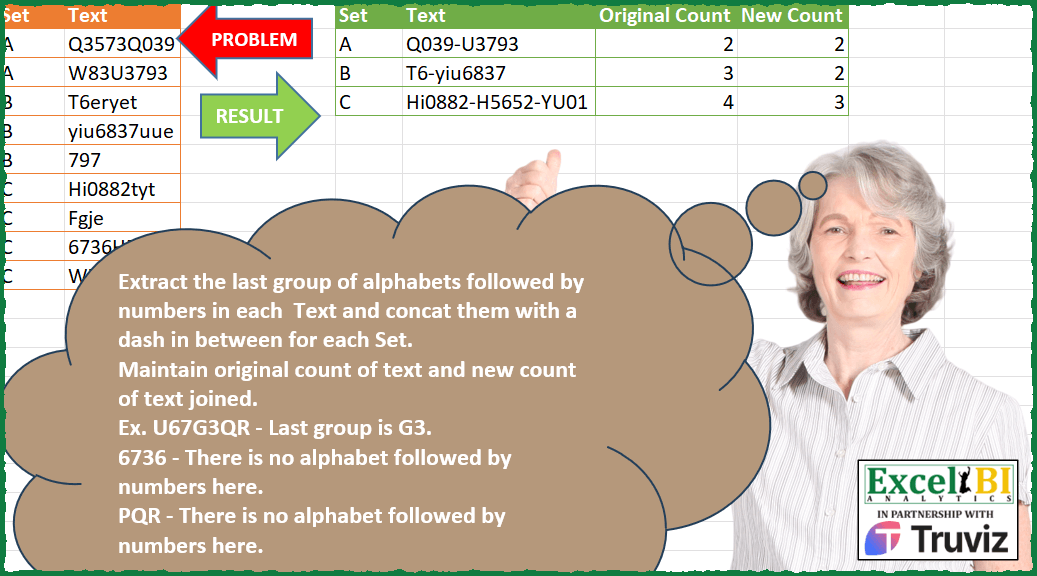
Extract the last group of alphabets followed by numbers in each Text and concat them with a dash in between for each Set. Maintain original count of text and new count of text joined. Ex. U67G3QR – Last group is G3. 6736 – There is no alphabet followed by numbers here. PQR – There is no alphabet followed by numbers here.
📌 Challenge Details and Links
ExcelBI Power Query Challenge Number: 184
Challenge Difficulty: ⭐️⭐️⭐️
📥Download Sample File
📥Link to the solutions on LinkedIn
Solving the challenge of Extract Ending Pattern Group with Power Query
Power Query solution 1 for Extract Ending Pattern Group, proposed by Zoran Milokanović:
let
  Source = Excel.CurrentWorkbook(){[Name = "Input"]}[Content],
  A = {"a" .. "z", "A" .. "Z"},
  N = {"0" .. "9"},
  C = (_, X) => Text.Length(Text.Select(_, X)) > 0,
  G = Table.Group(
    Table.AddColumn(
      Source,
      "T",
      each List.Last(
        List.Select(
          Splitter.SplitTextByCharacterTransition(N, A)([Text]),
          each List.AllTrue({C(_, A), C(_, N)})
        )
      )
    ),
    {"Set"},
    {
      {"Text", each Text.Combine([T], "-")},
      {"Original Count", each List.Count([T])},
      {"New Count", each List.NonNullCount([T])}
    }
  )
in
  G
Power Query solution 2 for Extract Ending Pattern Group, proposed by Aditya Kumar Darak 🇮🇳:
let
  Source = Excel.CurrentWorkbook(){[Name = "data"]}[Content],
  Digits = {"0" .. "9"},
  Alphabets = {"A" .. "Z", "a" .. "z"},
  Transform = Table.TransformColumns(
    Source,
    {
      "Text",
      each [
        S = Splitter.SplitTextByCharacterTransition(Digits, Alphabets)(_),
        L = List.Select(
          S,
          (f) =>
            [
              t = List.Transform({Digits, Alphabets}, (x) => Text.Length(Text.Select(f, x))),
              r = List.Min(t) <> 0
            ][r]
        ),
        R = List.Last(L)
      ][R]
    }
  ),
  Return = Table.Group(
    Transform,
    "Set",
    {
      {"Text", each Text.Combine([Text], "-")},
      {"Old Count", Table.RowCount},
      {"New Count", each List.NonNullCount([Text])}
    }
  )
in
  Return
Power Query solution 3 for Extract Ending Pattern Group, proposed by Alejandro Simón 🇵🇦 🇪🇸:
let
  Source = Excel.CurrentWorkbook(){[Name = "Table1"]}[Content],
  Group = Table.Group(
    Source,
    {"Set"},
    {
      {
        "A",
        each
          let
            a = [Text],
            b = List.RemoveNulls(
              List.Transform(
                a,
                each
                  let
                    c = Splitter.SplitTextByCharacterTransition({"0" .. "9"}, {"A" .. "z"})(_),
                    d = List.Last(
                      List.Select(
                        c,
                        each try
                          not List.Contains({"0" .. "9"}, Text.Start(_, 1))
                            and Number.From(Text.End(_, 1))
                            is number
                        otherwise
                          false
                      )
                    )
                  in
                    d
              )
            ),
            e = Text.Combine(b, "-"),
            f = List.Count([Text]),
            g = List.Count(b),
            h = Table.FromColumns({{e}, {f}, {g}}, {"Text", "Original Count", "New Count"})
          in
            h
      }
    }
  ),
  Sol = Table.ExpandTableColumn(Group, "A", Table.ColumnNames(Group[A]{0}))
in
  Sol
Power Query solution 4 for Extract Ending Pattern Group, proposed by Luan Rodrigues:
let
  Fonte = Tabela1,
  add = Table.AddColumn(
    Fonte,
    "Personalizar",
    each [
      a = Splitter.SplitTextByCharacterTransition({"0" .. "9"}, {"A" .. "Z", "a" .. "z"})([Text]),
      b = List.Select(a, each List.ContainsAny(Text.ToList(_), {"0" .. "9"})),
      c = List.Last(List.Select(b, each List.ContainsAny(Text.ToList(_), {"A" .. "Z", "a" .. "z"})))
    ][c]
  ),
  gp = Table.Group(
    add,
    {"Set"},
    {
      {
        "Contagem",
        each
          let
            a = Text.Combine([Personalizar], "-"),
            b = List.Count([Text]),
            c = List.Count(List.RemoveNulls([Personalizar]))
          in
            Table.FromRows({{a, b, c}}, {"Text", "Original Count", "New Count"})
      }
    }
  ),
  res = Table.ExpandTableColumn(gp, "Contagem", Table.ColumnNames(gp[Contagem]{0}))
in
  res
Power Query solution 5 for Extract Ending Pattern Group, proposed by Brian Julius:
let
  Source = DataRaw,
  RScript = R.Execute(
    "library(stringr)#(lf)df <- dataset#(lf)target <- ""([A-Za-z]+)(d+)(?!.*[A-Za-z]+d+)""#(lf)df$Cleaned <- sapply(str_extract_all(df$Text, target ), function(x) paste(x, collapse = "", ""))#(lf)df",
    [dataset = Source]
  ),
  Result = RScript{[Name = "df"]}[Value],
  RepBlanks = Table.ReplaceValue(Result, "", null, Replacer.ReplaceValue, {"Cleaned"}),
  Group = Table.Group(
    RepBlanks,
    {"Set"},
    {
      {"OrigCount", each List.Count(_)},
      {"NewCount", each List.Count(List.Select(_, each [Cleaned] <> null))},
      {"Text", each [Cleaned]}
    }
  ),
  Extract = Table.TransformColumns(
    Group,
    {"Text", each Text.Combine(List.Transform(_, Text.From), "-")}
  ),
  Reorder = Table.ReorderColumns(Extract, {"Set", "Text", "OrigCount", "NewCount"})
in
  Reorder
Power Query solution 6 for Extract Ending Pattern Group, proposed by Ramiro Ayala Chávez:
let
  S = Excel.CurrentWorkbook(){[Name = "Table1"]}[Content],
  a = Table.TransformColumnTypes(S, {"Text", type text}),
  b = Table.Group(a, {"Set"}, {{"Original Count", each Table.RowCount(_)}, {"T", each [Text]}}),
  Fx = (x) =>
    let
      T = List.Transform,
      A = x,
      B = T(A, Splitter.SplitTextByCharacterTransition({"0" .. "9"}, {"A" .. "z"})),
      C = T(B, each T(_, each Text.ToList(_))),
      D = T(C, each T(_, each if List.ContainsAny(_, {"0" .. "9"}) then _ else {null})),
      E = T(D, each T(_, each if List.ContainsAny(_, {"A" .. "z"}) then Text.Combine(_) else null)),
      F = List.RemoveNulls(T(E, each List.Last(List.RemoveNulls(_)))),
      G = Text.Combine(F, "-")
    in
      G,
  c = Table.AddColumn(b, "Text", each Fx([T])),
  d = Table.AddColumn(c, "New Count", each List.Count(Text.Split([Text], "-"))),
  Sol = Table.SelectColumns(d, {"Set", "Text", "Original Count", "New Count"})
in
  Sol
Power Query solution 7 for Extract Ending Pattern Group, proposed by Eric Laforce:
let
  Source = Excel.CurrentWorkbook(){[Name = "tData184"]}[Content],
  NChar = {"0" .. "9"},
  LChar = {"A" .. "Z", "a" .. "z"},
  Group = Table.Group(
    Source,
    "Set",
    {
      {
        "Text",
        each
          let
            _L = List.Transform(
              [Text],
              each
                let
                  _Split = Splitter.SplitTextByCharacterTransition(NChar, LChar)(_),
                  _Select = List.Select(
                    _Split,
                    each List.Contains(LChar, Text.Start(_, 1))
                      and List.Contains(NChar, Text.End(_, 1))
                  )
                in
                  List.Last(_Select)
            )
          in
            Text.Combine(_L, "-")
      },
      {"Original Count", List.Count}
    }
  ),
  Add_NewC = Table.AddColumn(Group, "New Count", each List.Count(Text.Split([Text], "-")))
in
  Add_NewC
Power Query solution 8 for Extract Ending Pattern Group, proposed by 🇮🇷 Navid Esmaeilzadeh اسماعیل زاده:
let
  S = Excel.CurrentWorkbook(){[Name = "Table1"]}[Content],
  A = Table.AddColumn(
    S,
    "Sp",
    each Splitter.SplitTextByCharacterTransition({"0" .. "9"}, {"A" .. "Z", "a" .. "z"})([Text])
  ),
  B = Table.ExpandListColumn(A, "Sp"),
  C = Table.AddColumn(
    B,
    "L",
    each
      let
        A = Text.Length(Text.Select([Sp], {"A" .. "Z", "a" .. "z"})),
        B = Text.Length(Text.Select([Sp], {"0" .. "9"})),
        C = Text.Length([Sp]),
        D = C - A,
        E = C - B,
        F = if D = 0 or E = 0 then null else true
      in
        F
  ),
  D = Table.SelectRows(C, each ([L] = true)),
  E = Table.Group(
    D,
    {"Set", "Text"},
    {{"Tbl", each _, type table [Set = text, Text = text, Sp = text, L = logical]}}
  ),
  F = Table.AddColumn(E, "Lp", each List.Last([Tbl][Sp])),
  G = Table.Group(F, {"Set"}, {{"txt", each Text.Combine([Lp], "-"), type text}}),
  H = Table.AddColumn(G, "Org-C", each Table.RowCount(Table.SelectRows(S, (OC) => OC[Set] = [Set]))),
  I = Table.AddColumn(H, "N-C", each Table.RowCount(Table.SelectRows(F, (NC) => NC[Set] = [Set])))
in
  I
Power Query solution 9 for Extract Ending Pattern Group, proposed by Venkata Rajesh:
let
  Source = Data,
  Text = Table.AddColumn(
    Source,
    "NewText",
    each [
      x = Splitter.SplitTextByCharacterTransition({"0" .. "9"}, {"a" .. "z", "A" .. "Z"})([Text]),
      y = List.Select(
        x,
        each [
          x = Text.Select(Text.Upper(_), {"A" .. "Z"}),
          y = Text.Select(_, {"0" .. "9"}),
          z = Text.Length(x) > 0 and Text.Length(y) > 0
        ][z]
      ),
      z = List.Last(y)
    ][z]
  ),
  Group = Table.Group(
    Text,
    {"Set"},
    {
      {"Text", each Text.Combine(List.RemoveNulls([NewText]), "-"), Text.Type},
      {"Original Count", each Table.RowCount(_), Int64.Type},
      {"New Count", each List.NonNullCount([NewText]), Int64.Type}
    }
  )
in
  Group
Solving the challenge of Extract Ending Pattern Group with Excel
Excel solution 1 for Extract Ending Pattern Group, proposed by Bo Rydobon 🇹🇭:
=VSTACK(D1:G1,DROP(GROUPBY(A2:A10,IFNA(REGEXEXTRACT(B2:B10,"[A-Z]+d+(?!.*[A-Z]+d+)",,1),""),
HSTACK(LAMBDA(x,TEXTJOIN("-",,x)),ROWS,LAMBDA(x,SUM(--(x>"")))),,0),1))


=REGEXEXTRACT(B2:B10,"[A-Za-z]+d+(?![A-Za-z]+d+)")

Explanation for learning
[A-Za-z]+d+  capture  Alphabet+ follow by digit+

?!  Exclude anything follow by  Negative Lookahead
(?![A-Za-z]+d+) Exclude  anything follow by Alphabet+follow by digit+

[A-Za-z]+d+(?![A-Za-z]+d+)
Excel solution 2 for Extract Ending Pattern Group, proposed by Bo Rydobon 🇹🇭:
=REDUCE(D1:G1,UNIQUE(A2:A10),LAMBDA(a,v,
LET(y,A2:A10=v,m,MAP(0&IF(y,B2:B10),LAMBDA(b,LET(s,SEQUENCE(26),c,TAKE(TEXTSPLIT(b,,CHAR(s+64),1,1),-1),IFERROR(TEXTAFTER(TEXTBEFORE(b,c,-1),s-1,-1)&c,"")))),VSTACK(a,HSTACK(v,TEXTJOIN("-",,m),SUM(N(m>"")),SUM(--y))))))
Excel solution 3 for Extract Ending Pattern Group, proposed by محمد حلمي:
=LET(s,A2:A10,d,SEQUENCE(26)-1,
x,MAP(B2:B10,LAMBDA(b,LET(
j,TEXTSPLIT(b,d,,1)&TEXTSPLIT(b,CHAR(d+65),,1,1),
XLOOKUP(9,FIND(j,b),j,"",-1)))),
REDUCE(D1:G1,UNIQUE(s),LAMBDA(a,v,LET(
e,REPT(x,s=v),VSTACK(a,
HSTACK(v,TEXTJOIN("-",,e),COUNTIF(s,v),SUM(N(e>""))))))))
Excel solution 4 for Extract Ending Pattern Group, proposed by محمد حلمي:
=REDUCE(D1:G1,UNIQUE(A2:A10),LAMBDA(a,v,VSTACK(a,LET(s,A2:A10,d,SEQUENCE(26),e,REPT(MAP(B2:B10,LAMBDA(
b,LET(j,TEXTSPLIT(b,d-1,,1)&TEXTSPLIT(b,CHAR(d+64),,1,1),
XLOOKUP(9,FIND(j,b),j,"",-1)))),s=v),
HSTACK(v,TEXTJOIN("-",,e),COUNTIF(s,v),SUM(N(e>"")))))))
Excel solution 5 for Extract Ending Pattern Group, proposed by محمد حلمي:
=REDUCE(D1:G1,UNIQUE(A2:A10),LAMBDA(a,v,VSTACK(a,LET(s,A2:A10,e,REPT(MAP(B2:B10,LAMBDA(b,LET(d,SEQUENCE(26),j,TEXTSPLIT(b,d-1,,1)&TEXTSPLIT(b,CHAR(d+64),,1,1),
IFNA(LOOKUP(9,FIND(j,b),j),)))),s=v),
HSTACK(v,TEXTJOIN("-",,e),COUNTIF(s,v),SUM(N(e>"")))))))
Excel solution 6 for Extract Ending Pattern Group, proposed by محمد حلمي:
=REDUCE(D1:G1,UNIQUE(A2:A10),LAMBDA(a,v,VSTACK(a,LET(s,A2:A10,e,REPT(MAP(B2:B10,LAMBDA(b,LET(d,SEQUENCE(26),j,TEXTSPLIT(b,d-1,,1)&TEXTSPLIT(b,CHAR(d+64),,1,1),
i,IFERROR(IF(FIND(j,b),j),),XLOOKUP(TRUE,i>0,i,"",,-1)))),s=v),
HSTACK(v,TEXTJOIN("-",,e),COUNTIF(s,v),SUM(N(e>"")))))))
Excel solution 7 for Extract Ending Pattern Group, proposed by Julian Poeltl:
=LET(T,A1:B10,TT,DROP(T,1),S,TAKE(TT,,1),Te,TAKE(TT,,-1),US,UNIQUE(S),OC,MAP(US,LAMBDA(A,COUNTA(FILTER(S,S=A)))),TC,MAP(Te,LAMBDA(A,LET(L,LEN(A),SL,SEQUENCE(L),SP,MID(A,SEQUENCE(L),1),PN,ISNUMBER(SP*1)*SL,PT,ISNUMBER(XMATCH(UPPER(SP),CHAR(64+SEQUENCE(26))))*SL,MN,MAX(PN),MT,MAX(FILTER(PT,PTExcel solution 8 for Extract Ending Pattern Group, proposed by Duy Tùng:
=DROP(GROUPBY(A2:A10,MAP(B2:B10,LAMBDA(x,IFNA(TAKE(REGEXEXTRACT(x,"[a-zA-Z]+d+",1),,-1),""))),HSTACK(LAMBDA(x,TEXTJOIN("-",,x)),COUNTA,LAMBDA(v,SUM(N(v>"")))),,0),1)Excel solution 9 for Extract Ending Pattern Group, proposed by Sunny Baggu:
=DROP(
 REDUCE(
 "",
 UNIQUE(A2:A10),
 LAMBDA(x, y,
 VSTACK(
 x,
 LET(
 _f, FILTER(B2:B10, A2:A10 = y),
 _c, DROP(
 REDUCE(
 "",
 _f,
 LAMBDA(a, v,
 VSTACK(
 a,
 LET(
 _a, TEXTSPLIT(v, , SEQUENCE(10) - 1, 1),
 _b, TEXTSPLIT(v, , _a, 1),
 _r, MIN(ROWS(_a), ROWS(_b)),
 _a1, IF(_r = 1, TAKE(_a, 1), TAKE(_a, -1)),
 _b1, IF(_r = 1, TAKE(_b, -1), TAKE(_b, -1)),
 IFERROR(_a1 & _b1, "")
 )                   )
 )                ),
 1
 ),
 _c1, FILTER(_c, _c <> ""),
 HSTACK(y, TEXTJOIN("-", , _c1), ROWS(_f), ROWS(_c1))
 )          )        )    ),    1)
Excel solution 10 for Extract Ending Pattern Group, proposed by 🇵🇪 Ned Navarrete C.:
=LET(e,MAP(B2:B10,LAMBDA(i,LET(c,TEXTSPLIT(i,CHAR(ROW(65:90)),,1,1),t,TAKE(c,,-1),IFERROR(TAKE(TEXTSPLIT(TEXTBEFORE(i,t),ROW(1:10)-1,,1),,-1)&t,"")))),REDUCE(D1:G1,UNIQUE(A2:A10),LAMBDA(a,v,LET(f,FILTER(e,A2:A10=v),VSTACK(a,HSTACK(v,TEXTJOIN("-",1,f),ROWS(f),SUM(N(f>""))))))))Excel solution 11 for Extract Ending Pattern Group, proposed by Md. Zohurul Islam:
=LET(u,A2:A10,v,B2:B10,
sq,CHAR(SEQUENCE(26,,65)),
num,SEQUENCE(10,,0),
hdr,HSTACK(A1:B1,"Original Count","New Count"),
w,MAP(v,LAMBDA(x,LET(a,TEXTSPLIT(x,sq,,1,1),
 b,TAKE(a,,-1),
 c,TEXTBEFORE(x,b),
 d,TEXTSPLIT(c,num,,1),
 e,TAKE(d,,-1),
 f,IFERROR(e&b,""),
 f))),
z,REDUCE(hdr,UNIQUE(u),LAMBDA(x,y,LET(
 g,FILTER(w,u=y),
 h,TEXTJOIN("-",1,g),
 I,COUNTA(g),
 j,SUM(ABS(g<>"")),
 k,HSTACK(y,h,I,j),
 m,VSTACK(x,k),m))),
z)
Excel solution 12 for Extract Ending Pattern Group, proposed by LUIS FLORENTINO COUTO CORTEGOSO:
=LET(f,LAMBDA(z,LET(n,TEXTSP&LIT(z,CHAR(ROW(65:91)),,1,1),t,TEXTSPLIT(z,SEQUENCE(10)-1,,1),IFERROR(CONCAT(CHOOSECOLS(t,-2),TAKE(n,,-1)),""))),VSTACK(D1:G1,DROP(GROUPBY(A2:A10,MAP(0&B2:B10&"a",f),HSTACK(LAMBDA(x,TEXTJOIN("-",1,x)),COUNTA,LAMBDA(x,SUM(--(x>"")))),,0),1) ))Solving the challenge of Extract Ending Pattern Group with Python
Python solution 1 for Extract Ending Pattern Group, proposed by Konrad Gryczan, PhD:
import pandas as pd
import re
input = pd.read_excel("PQ_Challenge_184.xlsx", usecols="A:B", nrows = 9)
test = pd.read_excel("PQ_Challenge_184.xlsx", usecols="D:G", nrows = 3)
test.columns = test.columns.str.replace(".1", "")
input["group"] = input["Text"].str.findall("[A-Za-z]+\d+")
input["group"] = input["group"].apply(lambda x: x[-1] if len(x) > 1 else x[0] if len(x) == 1 else None)
result = input.groupby("Set").agg(
 Text=("group", lambda x: "-".join([group for group in x if group])),
 Original_Count=("group", "size"),
 New_Count=("group", lambda x: x.notnull().sum())).rename(columns={"Original_Count": "Original Count",
 "New_Count": "New Count"}).reset_index()
print(result.equals(test)) # True
Python solution 2 for Extract Ending Pattern Group, proposed by Luan Rodrigues:
PY Solution!
import pandas as pd
import re
import numpy as np
file = r'C:UsersLuanProjetos_PYPYPQ_Challenge_184PQ_Challenge_184.xlsx'
dfc = pd.read_excel(file, usecols="A:B")
df = pd.read_excel(file, usecols="A:B")
df['max'] = df['Text'].apply(lambda x: re.sub(r'(?<=[0-9])(?=[A-Za-z])', ' ', x).split())
df = df[['Set', 'Text', 'max']].explode('max')
df = df[df['max'].apply(lambda x: any(char.isalpha() for char in x) and any(char.isdigit() for char in x))]
dfgroup = df.groupby(['Set', 'Text']).agg({'max': list}).reset_index()
dfgroup['count'] = dfgroup['max'].apply(len)
dfgroup['cond'] = np.where(dfgroup['count'] == 2, dfgroup['max'].str[1], dfgroup['max'].str[0])
def gp(group):
 Texto = '-'.join(group['cond'])
 return Texto
dfgroup3 = dfgroup.groupby('Set', group_keys=False).apply(gp, include_groups=False).reset_index(name='Text')
dfgroup0 = dfc.groupby('Set').size().reset_index(name='Original Count')
dfgroup1 = dfgroup.groupby('Set').size().reset_index(name='New Count')
df_res = dfgroup3.merge(dfgroup0, on='Set', how='left')
df_res1 = df_res.merge(dfgroup1, on='Set', how='left')
df_res1.columns = ['Set', 'Text', 'Original Count', 'New Count']
print(df_res1)
Solving the challenge of Extract Ending Pattern Group with Python in Excel
Python in Excel solution 1 for Extract Ending Pattern Group, proposed by Abdallah Ally:
# I love regular expressions
import pandas as pd
import re
file_path = 'PQ_Challenge_184.xlsx'
df = pd.read_excel(file_path, usecols='A:B')
# Perform data wrangling
def extract_alphabets(text):
 text = re.findall('[a-zA-Z]+d+', text)
 return text[-1] if text else ''

df['Alphabets'] = df.iloc[:, 1].map(extract_alphabets)
df = df.groupby('Set').agg(
 Text = ('Alphabets', lambda x: '-'.join(x[x != ''])),
 Original_Count = ('Set', 'count'),
 New_Count = ('Alphabets', lambda x: x[x != ''].count())
 ).reset_index()
df = df.rename(columns={'Original_Count': 'Original Count',
 'New_Count': 'New Count'})
df
Solving the challenge of Extract Ending Pattern Group with R
R solution 1 for Extract Ending Pattern Group, proposed by Konrad Gryczan, PhD:
library(tidyverse)
library(readxl)
input = read_excel("Power Query/PQ_Challenge_184.xlsx", range = "A1:B10")
test = read_excel("Power Query/PQ_Challenge_184.xlsx", range = "D1:G4")
result = input %>%
 mutate(group = str_extract_all(Text,"[A-Za-z]+\d+")) %>%
 mutate(group = map_chr(group, ~if(length(.x) > 1) tail(.x, 1) else if(length(.x) == 0) NA_character_ else .x)) %>%
 summarise(
 Text = paste(group[!is.na(group)], collapse = "-"),
 `Original Count` = n() %>% as.numeric(),
 `New Count` = sum(!is.na(group)) %>% as.numeric(),
 .by = Set
 )
identical(result, test)
# [1] TRUE
&&