
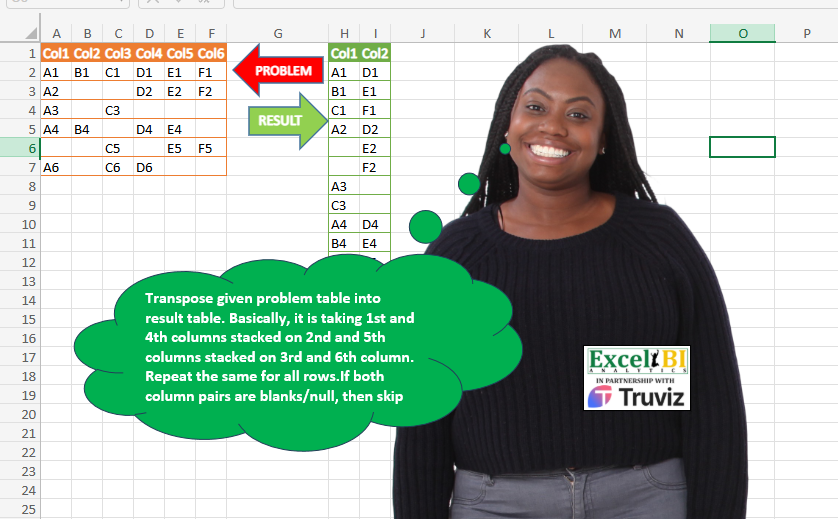
Transpose given problem table into result table. Basically, it is taking 1st and 4th columns stacked on 2nd and 5th columns stacked on 3rd and 6th column. Repeat the same for all rows. If both column pairs are blanks/null, then skip that.
📌 Challenge Details and Links
ExcelBI Power Query Challenge Number: 171
Challenge Difficulty: ⭐️⭐️
📥Download Sample File
📥Link to the solutions on LinkedIn
Solving the challenge of Stack and Transform Columns with Power Query
Power Query solution 1 for Stack and Transform Columns, proposed by Zoran Milokanović:
let
  Source = Excel.CurrentWorkbook(){[Name = "Input"]}[Content],
  S = Table.FromRows(
    List.TransformMany(
      Table.ToRows(Source),
      each List.RemoveItems(List.Zip(List.Split(_, 3)), {{null, null}}),
      (i, _) => _
    ),
    {"Col1", "Col2"}
  )
in
  S
Power Query solution 2 for Stack and Transform Columns, proposed by Kris Jaganah:
let
  Source = Excel.CurrentWorkbook(){[Name = "Table1"]}[Content],
  ColName = Table.ColumnNames(Source),
  RepNull = Table.ReplaceValue(Source, null, "0", Replacer.ReplaceValue, ColName),
  Unpivot = Table.Unpivot(RepNull, ColName, "A", "V"),
  ToCol = Table.AddColumn(
    Unpivot,
    "Custom",
    each
      if (List.Count(ColName) / 2) / Number.From(Text.AfterDelimiter([A], "Col")) < 1 then
        "Col2"
      else
        "Col1"
  ),
  Group = Table.Group(ToCol, {"Custom"}, {"All", each _}),
  Idx = Table.AddColumn(Group, "Index", each Table.AddIndexColumn([All], "Index", 1, 1)),
  Xpand = Table.ExpandTableColumn(Idx, "Index", {"A", "V", "Index"}, {"A", "V", "Index"}),
  Rmove = Table.RemoveColumns(Xpand, {"All", "A"}),
  Pivot = Table.Pivot(Rmove, List.Distinct(Rmove[Custom]), "Custom", "V"),
  Filter = Table.SelectRows(Pivot, each ([Col1] = "0" and [Col2] = "0") = false),
  Rmove1 = Table.RemoveColumns(Filter, {"Index"}),
  RepZero = Table.ReplaceValue(Rmove1, "0", null, Replacer.ReplaceValue, {"Col1", "Col2"})
in
  RepZero
Power Query solution 3 for Stack and Transform Columns, proposed by Aditya Kumar Darak 🇮🇳:
let
  Source = Excel.CurrentWorkbook(){[Name = "data"]}[Content],
  Calculation = Table.AddColumn(
    Source,
    "Calc",
    each [TL = Record.ToList(_), S = List.Split(TL, 3), Z = List.Zip(S)][Z]
  ),
  Combine = List.Combine(Calculation[Calc]),
  Select = List.Select(Combine, each List.NonNullCount(_) > 0),
  Return = Table.FromRows(Select, {"Col1", "Col2"})
in
  Return
Power Query solution 4 for Stack and Transform Columns, proposed by Alejandro Simón 🇵🇦 🇪🇸:
let
  Source = Excel.CurrentWorkbook(){[Name = "Table1"]}[Content],
  Sol = Table.SelectRows(
    Table.FromRows(
      List.Combine(
        Table.AddColumn(
          Source,
          "A",
          each
            let
              a = Record.ToList(_),
              b = List.Split(a, 3),
              c = List.Zip(b)
            in
              c
        )[A]
      ),
      {"Col1", "Col2"}
    ),
    each [Col1] <> null or [Col2] <> null
  )
in
  Sol
Power Query solution 5 for Stack and Transform Columns, proposed by Luan Rodrigues:
let
  Fonte = Tabela1,
  tab = Table.AddColumn(
    Fonte,
    "tab",
    each
      let
        a = Record.FieldValues(_),
        b = Table.FromColumns(List.Split(a, List.Count(a) / 2)),
        c = Table.SelectRows(b, each List.NonNullCount(Record.FieldValues(_)) <> 0)
      in
        c
  )[tab],
  res = Table.Combine(tab)
in
  res
Power Query solution 6 for Stack and Transform Columns, proposed by Pavel A.:
let
  listMagic = Table.Combine(
    List.Transform(
      Table.ToList(inputTable),
      (tblRow) =>
        [
          lVal = List.Buffer(Text.Split(tblRow, ",")),
          out = Table.FromColumns(
            List.Zip(
              List.Select(
                List.Transform({0 .. 2}, (index) => {lVal{index}, lVal{index + 3}}),
                (actVal) => actVal <> {"", ""}
              )
            )
          )
        ][out]
    )
  )
in
  listMagic
Power Query solution 7 for Stack and Transform Columns, proposed by Ramiro Ayala Chávez:
let
  S = Excel.CurrentWorkbook(){[Name = "Table1"]}[Content],
  L = List.Transform,
  R = Table.ReplaceValue(S, null, "-", Replacer.ReplaceValue, Table.ColumnNames(S)),
  a = L(Table.ToRows(R), each {{_{0}} & {_{3}}} & {{_{1}} & {_{4}}} & {{_{2}} & {_{5}}}),
  b = L(a, each L(_, each Table.FromList(_, null))),
  c = L(List.Combine(b), each Table.Transpose(_)),
  d = Table.ReplaceValue(Table.Combine(c), "-", null, Replacer.ReplaceValue, {"Column1", "Column2"}),
  e = Table.SelectRows(d, each [Column1] <> null or [Column2] <> null),
  Sol = Table.TransformColumnNames(e, each Text.Start(_, 3) & Text.End(_, 1))
in
  Sol
Power Query solution 8 for Stack and Transform Columns, proposed by Eric Laforce:
let
  Source = Excel.CurrentWorkbook(){[Name = "tData171"]}[Content],
  Transform = List.Transform(
    Table.ToRows(Source),
    each List.RemoveItems(List.Zip(List.Split(_, 3)), {{null, null}})
  ),
  ToTable = Table.FromRows(List.Combine(Transform), {"Col1", "Col2"})
in
  ToTable
Power Query solution 9 for Stack and Transform Columns, proposed by 🇮🇷 Navid Esmaeilzadeh اسماعیل زاده:
let
  S = Excel.CurrentWorkbook(){[Name = "Table1"]}[Content],
  A = Table.TransformColumnTypes(
    S,
    {
      {"Col1", type text},
      {"Col2", type text},
      {"Col3", type text},
      {"Col4", type text},
      {"Col5", type text},
      {"Col6", type text}
    }
  ),
  B = Table.AddColumn(
    A,
    "Tbl",
    each Table.FromColumns(
      {
        List.Sort(List.FirstN(Record.ToList(_), 3), (x, y) => Value.Compare(x ?? "~", y ?? "~")),
        List.Sort(List.LastN(Record.ToList(_), 3), (x, y) => Value.Compare(x ?? "~", y ?? "~"))
      },
      {"Col1", "Col2"}
    )
  ),
  C = Table.SelectColumns(B, {"Tbl"}),
  D = Table.ExpandTableColumn(C, "Tbl", {"Col1", "Col2"}, {"Col1", "Col2"}),
  E = Table.AddColumn(D, "Null", each [Col1] = null and [Col2] = null),
  F = Table.SelectRows(E, each ([Null] = false)),
  Sol = Table.RemoveColumns(F, {"Null"})
in
  Sol
Power Query solution 10 for Stack and Transform Columns, proposed by Glyn Willis:
let
  Source = Excel.CurrentWorkbook(){[Name = "Table1"]}[Content],
  Custom1 = List.Count(Table.ColumnNames(Source)),
  Custom2 =
    let
      a = List.Split(Table.ToColumns(Source), (Custom1 / 2))
    in
      Table.FromRows(
        List.Combine(List.Transform({0 .. (Custom1 / 2) - 1}, (x) => List.Zip({a{0}{x}, a{1}{x}})))
      ),
  #"Removed Blank Rows" = Table.SelectRows(
    Custom2,
    each not List.IsEmpty(List.RemoveMatchingItems(Record.FieldValues(_), {"", null}))
  )
in
  #"Removed Blank Rows"
Power Query solution 11 for Stack and Transform Columns, proposed by Arnaud Duvernois:
let
  Source = Excel.CurrentWorkbook(){[Name = "Tableau1"]}[Content],
  List = List.Transform(Table.ToRows(Source), (s) => List.Split(s, 3)),
  Result = List.Accumulate(
    {0 .. List.Count(List) - 1},
    {},
    (s, c) => s & List.Zip({List{c}{0}, List{c}{1}})
  )
in
  Table.FromRows(Result, {"Col1", "Col2"})
Solving the challenge of Stack and Transform Columns with Excel
Excel solution 1 for Stack and Transform Columns, proposed by Bo Rydobon 🇹🇭:
=LET(a,TOCOL(A2:C7&""),b,TOCOL(D2:F7&""),FILTER(HSTACK(a,b),a&b>""))Excel solution 2 for Stack and Transform Columns, proposed by Rick Rothstein:
=LET(h,HSTACK(A2:A7&"-"&D2:D7,B2:B7&"-"&E2:E7,C2:C7&"-"&F2:F7),t,TOCOL(IF(h="-",1/0,h),2),HSTACK(TEXTBEFORE(t,"-"),TEXTAFTER(t,"-")))Excel solution 3 for Stack and Transform Columns, proposed by محمد حلمي:
=REDUCE(H1:I1,ROW(A2:F7)-1,LAMBDA(a,d,LET(i,WRAPCOLS(CHOOSEROWS(A2:F7,d),3)&"",VSTACK(a,FILTER(i,BYROW(i,LAMBDA(a,SUM(LEN(a)))))))))Excel solution 4 for Stack and Transform Columns, proposed by 🇰🇷 Taeyong Shin:
=LET(d,WRAPROWS(TOCOL(CHOOSECOLS(A2:F7,1,4,2,5,3,6)),2),T(FILTER(d,BYROW(d>"",OR))))Excel solution 5 for Stack and Transform Columns, proposed by Kris Jaganah:
=LET(a,A2:F7,b,HSTACK(TOCOL(TAKE(a,,3)),TOCOL(TAKE(a,,-3))),c,FILTER(b,BYROW(b,CONCAT)<>"00"),IF(c=0,"",c))Excel solution 6 for Stack and Transform Columns, proposed by Konrad Gryczan, PhD:
= input %>%
 transmute(
 Col = pmap(
 list(Col1, Col4, Col2, Col5, Col3, Col6),
 ~list(c(..1, ..2), c(..3, ..4), c(..5, ..6))
 )
 ) %>%
 unnest(cols = Col) %>%
 unnest_wider(Col, names_sep = "") %>%
 filter(!(is.na(Col1) & is.na(Col2)))
Excel solution 7 for Stack and Transform Columns, proposed by Julian Poeltl:
=LET(T,A2:F7,W,COLUMNS(T),A,HSTACK(TOCOL(CHOOSECOLS(T,SEQUENCE(W/2))),TOCOL(CHOOSECOLS(T,SEQUENCE(W/2,,(W/2)+1)))),F,FILTER(A,(CHOOSECOLS(A,1)<>0)+(CHOOSECOLS(A,2)<>0)),IF(F=0,"",F))Excel solution 8 for Stack and Transform Columns, proposed by Oscar Mendez Roca Farell:
=LET(m, WRAPROWS(TOCOL(CHOOSECOLS(A2:F7, {1,4,2,5,3,6})), 2), FILTER(m, MMULT(N(m>""), {1; 1})))Excel solution 9 for Stack and Transform Columns, proposed by Duy Tùng:
=REDUCE(A1:B1,F2:F7,LAMBDA(x,y,LET(a,WRAPCOLS(TAKE(A7:y,1),3),VSTACK(x,TEXT(FILTER(a,BYROW(a>0,OR)),";")))))Excel solution 10 for Stack and Transform Columns, proposed by Sunny Baggu:
=LET(
 _a, T(
 HSTACK(
 TOCOL(CHOOSECOLS(A2:F7, {1, 2, 3})),
 TOCOL(CHOOSECOLS(A2:F7, {4, 5, 6}))
 )
 ),
 FILTER(_a, BYROW(_a, LAMBDA(x, OR(x <> ""))))
)
Excel solution 11 for Stack and Transform Columns, proposed by Abdallah Ally:
=LET(a,A2:F7,b,COLUMNS(a)/2,c,HSTACK(TOCOL(TAKE(a,,b)),TOCOL( TAKE(a,,-b))),d,IF(c=0,"",c),VSTACK({"Col1","Col2"},FILTER(d,BYROW(d, LAMBDA(x,OR(x<>""))))))Excel solution 12 for Stack and Transform Columns, proposed by 🇵🇪 Ned Navarrete C.:
=LET(m,A2:C7&"*"&D2:F7,TEXTSPLIT(TEXTJOIN("|",,IF(m="*","",m)),"*","|"))Excel solution 13 for Stack and Transform Columns, proposed by Md. Zohurul Islam:
=LET(z,A2:F7,
f,LAMBDA(a,b,TOCOL(CHOOSECOLS(a,b))),
n,COLUMNS(z),
sq,SEQUENCE(,n),
nr,SEQUENCE(ROWS(z)),
u,DROP(REDUCE("",nr,LAMBDA(x,y,LET(a,INDEX(z,y,),b,HSTACK(f(a,TAKE(sq,,n/2)),f(a,TAKE(sq,,-n/2))),c,VSTACK(x,b),c))),1),
r,TAKE(u,,1)&TAKE(u,,-1)<>"",
s,VSTACK("Col"&SEQUENCE(,COLUMNS(u)),FILTER(u,r)),
IF(s=0,"",s))
Excel solution 14 for Stack and Transform Columns, proposed by Asheesh Pahwa:
=LET(a,A2:F7,d,DROP(REDUCE("",SEQUENCE(
ROWS(a)),LAMBDA(x,y,VSTACK(x,WRAPROWS(
CHOOSECOLS(INDEX(a,y,),{1,4,2,5,3,6}),2)))),1),f,FILTER(d,NOT(TAKE(d,,1)=TAKE(d,,-1)),IF(f=0,"",f))
Excel solution 15 for Stack and Transform Columns, proposed by Songglod P.:
=LET(data,A2:F7,r,ROWS(data),res,HSTACK(TOCOL(TAKE(data,r,3)),TOCOL(TAKE(data,r,-3))),SUBSTITUTE(FILTER(res,(CHOOSECOLS(res,1)<>0)+(CHOOSECOLS(res,2)<>0)),0,""))Excel solution 16 for Stack and Transform Columns, proposed by Gabriel Raigosa:
=LET(m,LET(a,TOCOL(TAKE(A2:F7,,3)),b,TOCOL(TAKE(A2:F7,,-3)),s,((a=0)+(b=0))<2,HSTACK(FILTER(a,s),FILTER(b,s))),IF(m=0,"",m))
🔹ES:
=LET(m,LET(a,ENCOL(TOMAR(A2:F7,,3)),b,ENCOL(TOMAR(A2:F7,,-3)),s,((a=0)+(b=0))<2,APILARH(FILTRAR(a,s),FILTRAR(b,s))),SI(m=0,"",m))
Excel solution 17 for Stack and Transform Columns, proposed by Dinc Doga:
=LET(
 a, A2:F7,
 d, DROP(REDUCE("", SEQUENCE(ROWS(a)), LAMBDA(x,y, VSTACK(x, WRAPROWS(CHOOSECOLS(INDEX(a, y, ), {1,4,2,5,3,6}), 2)))), 1),
 f, FILTER(d, NOT(TAKE(d, , 1) = TAKE(d, , -1))),
 IF(f=0, "", f)
)
Solving the challenge of Stack and Transform Columns with Python
Python solution 1 for Stack and Transform Columns, proposed by Konrad Gryczan, PhD:
import pandas as pd
input = pd.read_excel("PQ_Challenge_171.xlsx", usecols="A:F", nrows = 6)
test  = pd.read_excel("PQ_Challenge_171.xlsx", usecols="H:I", nrows = 15)
test = test.rename(columns = {"Col1.1": "Col1", "Col2.1": "Col2"})
input["M"] = list(zip(zip(input["Col1"], input["Col4"]), zip(input["Col2"], input["Col5"]), zip(input["Col3"], input["Col6"])))
input = input.explode("M")
input = input.pop("M").apply(pd.Series).reset_index(drop=True)
input.columns = ["Col1", "Col2"]
input = input.dropna(subset=["Col1", "Col2"], how="all").reset_index(drop=True)
print(test.equals(input)) # True
Python solution 2 for Stack and Transform Columns, proposed by Luan Rodrigues:
py Solution
import pandas as pd
import numpy as np
file_path = 'PQ_Challenge_171.xlsx'
df = pd.read_excel(file_path, usecols='A:F')
df.replace('NaN', np.nan, inplace=True)
filtro0 = df.iloc[0:len(df.columns) ]
lista_dicionarios = filtro0.to_dict(orient='records').copy()

dfs_concatenados = []
for i in range(len(df.columns) ):
 a = list(lista_dicionarios[i].values())
 lista = ['0' if pd.isna(x) else x for x in a]
 split = 3
 lista = [a[i:i + split] for i in range(0, len(a), split)]
 df1 = pd.DataFrame(lista).T.reset_index()
 df1 = df1.rename(columns={0: 'coluna1', 1: 'coluna2'})
 df1['concatenado'] = df1['coluna1'].fillna('0') + df1['coluna2'].fillna('0')
 filtro = df1.loc[df1['concatenado']!= '00']
 res = filtro[['coluna1', 'coluna2']]

 dfs_concatenados.append(res)

df_concatenado = pd.concat(dfs_concatenados, ignore_index=True)
df_concatenado['coluna1'] = df_concatenado['coluna1'].str.split(',').str[0]
print(df_concatenado)
Python solution 3 for Stack and Transform Columns, proposed by Raphael Okoye:
import pandas as pd
df = pd.read_excel("ch2.xlsx")
value_a = []
value_b = []
column_pairs = [(0, 3), (1, 4), (2, 5)]
for index, row in df.iterrows():
 for i, (col_a, col_b) in enumerate(column_pairs):
 val_a = row.iloc[col_a] if col_a < len(row) else None
 val_b = row.iloc[col_b] if col_b < len(row) else None
 value_a.append(val_a)
 value_b.append(val_b)
new_df = pd.DataFrame({'Value A': value_a, 'Value B': value_b})
new_df.to_excel("output_file1.xlsx", index=False)
print("New columns created and written to 'output_file.xlsx'.")
Solving the challenge of Stack and Transform Columns with Python in Excel
Python in Excel solution 1 for Stack and Transform Columns, proposed by Abdallah Ally:
import pandas as pd
file_path = 'PQ_Challenge_171.xlsx'
df = pd.read_excel(file_path, nrows=6, usecols='A:F')
# Transform and clean data
columns = df.shape[1] // 2
values = {'Col1': [], 'Col2': []}
for row in df.iterrows():
 values['Col1'].extend(row[1].values[: columns])
 values['Col2'].extend(row[1].values[columns: ])
df = pd.DataFrame(values)
df.dropna(how='all', inplace=True)
df.reset_index(drop=True, inplace=True)
df.replace(float('nan'), '', inplace=True)
print(df)
Solving the challenge of Stack and Transform Columns with R
R solution 1 for Stack and Transform Columns, proposed by Konrad Gryczan, PhD:
library(tidyverse)
library(readxl)
input = read_excel("Power Query/PQ_Challenge_171.xlsx", range = "A1:F7")
test = read_excel("Power Query/PQ_Challenge_171.xlsx", range = "H1:I15")
result = Map(function(c1, c4, c2, c5, c3, c6) list(c(c1, c4), c(c2, c5), c(c3, c6)),
 input$Col1, input$Col4, input$Col2, input$Col5, input$Col3, input$Col6) %>%
 unlist(recursive = F) %>%
 Map(function(x) list(x[1], x[2]), .) %>%
 tibble(Col = .) %>%
 unnest_wider(Col, names_sep = "") %>%
 filter(!(is.na(Col1) & is.na(Col2)))
R solution 2 for Stack and Transform Columns, proposed by Anil Kumar Goyal:
R Tidyverse solution
library(tidyverse)
library(readxl)
df <- read_xlsx("PQ/PQ_Challenge_171.xlsx", range = cell_cols(LETTERS[1:6]))
split.default(1:6, (0:5 %% 3) + 1) %>%
 map_dfr(~df %>%
 select(all_of(.x)) %>%
 rename_with(~ paste0("Col", 1:2))) %>%
 filter(if_any(everything(), ~!is.na(.)))
&&