
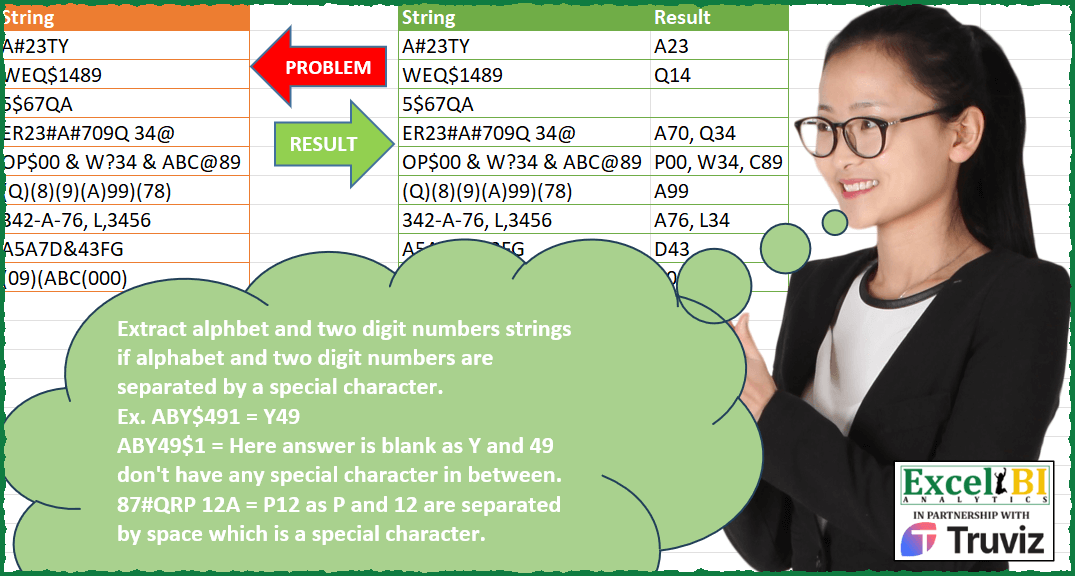
Extract alphabet and two digit numbers strings if alphabet and two digit numbers are separated by a special character. Ex. ABY$491 = Y49 ABY49$1 = Here answer is blank as Y and 49 don’t have any special character in between.
📌 Challenge Details and Links
ExcelBI Power Query Challenge Number: 162
Challenge Difficulty: ⭐️⭐️⭐️⭐️
📥Download Sample File
📥Link to the solutions on LinkedIn
Solving the challenge of Extract Alphabet Number Pairs with Power Query
Power Query solution 1 for Extract Alphabet Number Pairs, proposed by Zoran Milokanović:
let
  Source = Excel.CurrentWorkbook(){[Name = "Input"]}[Content],
  C = {"A" .. "Z"},
  N = {"0" .. "9"},
  IsC = each _ = Text.Select(_, C),
  IsS = each Text.Length(Text.Remove(_, C & N)) = 1,
  IsN = each _ = Text.Select(_, N),
  F = (_, r) =>
    if Text.Length(_) < 4 then
      r
    else
      let
        M = Text.Middle,
        c = M(_, 0, 1),
        n = M(_, 2, 2),
        f = Number.From(List.AllTrue({IsC(c), IsS(M(_, 1, 1)), IsN(n)}))
      in
        @F(Text.Range(_, 1 + 3 * f), r & {{}, {c & n}}{f}),
  S = Table.AddColumn(Source, "Result", each Text.Combine(F([String], {}), ", "))
in
  S
Power Query solution 2 for Extract Alphabet Number Pairs, proposed by Alejandro Simón 🇵🇦 🇪🇸:
let
  Source = Excel.CurrentWorkbook(){[Name = "Table1"]}[Content],
  Sol = Table.AddColumn(
    Source,
    "Result",
    (x) =>
      let
        a = List.RemoveNulls(
          List.Transform(
            {0 .. Text.Length(x[String])},
            each try Text.ToList(Text.Range(x[String], _, 4)) otherwise null
          )
        ),
        b = List.Distinct(
          Text.ToList(Text.Remove(Text.Combine(Source[String]), {"0" .. "9", "A" .. "Z"}))
        ),
        c = List.Select(
          a,
          each try
            List.Contains({"A" .. "Z"}, _{0})
              and List.Contains(b, _{1})
              and Number.From(_{2})
              is number and Number.From(_{3})
              is number
          otherwise
            false
        ),
        d = List.Transform(c, each Text.Remove(Text.Combine(_), b))
      in
        Text.Combine(d, ", ")
  )
in
  Sol
Power Query solution 3 for Extract Alphabet Number Pairs, proposed by Eric Laforce:
let
  Source = Excel.CurrentWorkbook(){[Name = "tData162"]}[Content],
  Result = Table.AddColumn(
    Source,
    "Result",
    each
      let
        s = [String],
        l = List.Select(Text.SplitAny(s, Text.Remove(s, {"0" .. "9"})), each _ <> ""),
        r = List.Accumulate(
          {0 .. List.Count(l) - 1},
          [str = s, r = {}],
          (s, c) =>
            let
              sNum = l{c},
              sTxt = Text.BeforeDelimiter(s[str], sNum),
              _r =
                if (Text.Length(sTxt) < 2 or Text.Length(sNum) < 2) then
                  {}
                else
                  let
                    sC1 = Text.End(sTxt, 1),
                    sC2 = Text.Range(sTxt, Text.Length(sTxt) - 2, 1)
                  in
                    if (not (List.Contains({"A" .. "Z"}, sC1)) and List.Contains({"A" .. "Z"}, sC2)) then
                      {sC2 & Text.Start(sNum, 2)}
                    else
                      {}
            in
              [str = Text.AfterDelimiter(s[str], sNum), r = s[r] & _r]
        )
      in
        Text.Combine(r[r], ", ")
  )
in
  Result
Power Query solution 4 for Extract Alphabet Number Pairs, proposed by Mihai Radu O:
let
  Source = Excel.CurrentWorkbook(){[Name = "Table2"]}[Content],
  sol = Table.AddColumn(
    Source,
    "r",
    each
      let
        abc = {"A" .. "Z"},
        nr = {"0" .. "9"},
        s99 = List.Transform(
          {0 .. 99},
          (x) => if Text.Length(Text.From(x)) = 1 then "0" & Text.From(x) else Text.From(x)
        ),
        l = Text.ToList([String]),
        sep = List.Difference(List.Distinct(l & abc & nr), abc & nr),
        a = List.PositionOfAny(l, sep, Occurrence.All),
        b = List.Transform(
          a,
          (x) =>
            let
              f = if x > 0 and List.Contains(abc, l{x - 1}) then l{x - 1} else null,
              s =
                if x < List.Count(l) - 2 and List.Contains(s99, l{x + 1} & l{x + 2}) then
                  l{x + 1} & l{x + 2}
                else
                  null
            in
              {f, s}
        ),
        c = List.Select(List.Transform(b, each _{0} & _{1}), each _ <> null),
        d = Text.Combine(c, ", ")
      in
        d
  )[r]
in
  sol
Solving the challenge of Extract Alphabet Number Pairs with Excel
Excel solution 1 for Extract Alphabet Number Pairs, proposed by Bo Rydobon 🇹🇭:
=MAP(A2:A10,LAMBDA(a,LET(d,CHAR(SEQUENCE(255)),t,TEXTSPLIT(a,,FILTER(d,d<"0")),r,RIGHT(DROP(t,-1)),l,LEFT(DROP(t,1),2),
TEXTJOIN(", ",,REPT(r&l,(r>"9")*ISNUMBER(-l))))))
Excel solution 2 for Extract Alphabet Number Pairs, proposed by Rick Rothstein:
=MAP(A2:A10,LAMBDA(r,LET(t,TEXTSPLIT(r,TEXTSPLIT(r,BASE(SEQUENCE(36,,0),36),,TRUE),,1),SUBSTITUTE(TRIM(REDUCE("",SEQUENCE(COUNTA(t)-1),LAMBDA(a,x,LET(p,RIGHT(INDEX(t,,x)),q,LEFT(INDEX(t,,x+1)&"X",2),a&" "&IF((CODE(p)>64)*ISNUMBER(-q),p&q,"")))))," ",", "))))Excel solution 3 for Extract Alphabet Number Pairs, proposed by محمد حلمي:
=MAP(A2:A10,LAMBDA(A,LET(
I,SORT(CHAR(SEQUENCE(255))),
B,TEXTSPLIT(A,CHAR(SEQUENCE(,26)+64)&
FILTER(I,I<"0")),X,LEFT(B,2),V,IFERROR(IF(-X,X,X),),
J,DROP(MID(A,FIND(B,A)-2,1)&V,,1),
IFERROR(ARRAYTOTEXT(FILTER(J,LEN(J)=3)),""))))
Excel solution 4 for Extract Alphabet Number Pairs, proposed by 🇰🇷 Taeyong Shin:
=MAP(A2:A10,LAMBDA(x,LET(c,MID(x,SEQUENCE(LEN(x)),4),ARRAYTOTEXT(FILTER(REPLACE(c,2,1,),(MID(c,2,1)<"0")*(LEFT(c)>"9")*ISNUMBER(-RIGHT(c,2))*(LEN(c)=4),"")))))Excel solution 5 for Extract Alphabet Number Pairs, proposed by JvdV -:
=INDEX(SUBSTITUTE(TRIM(REGEXREPLACE(A2:A10,"([A-Z])[W_](dd)|.","$1$2 "))," ",", "))

Or, same length:

=INDEX(REGEXREPLACE(REGEXREPLACE(A2:A10,"([A-Z])[W_](dd)|.","$1$2"),"BD",", $0"))
Excel solution 6 for Extract Alphabet Number Pairs, proposed by Tolga Demirci, PMP, PMI-ACP, MOS-Expert:
=MAP(A2:A10;LAMBDA(n;LET(j;n;LET(i;MID(j;SEQUENCE(LEN(j));1);LET(o;LET(y;MID(j;SEQUENCE(LEN(j));1);FILTER(FILTER(SEQUENCE(LEN(j));ISNUMBER(SEARCH("true";MAP(y;LAMBDA(x;TEXTJOIN(";";;x=VSTACK(CHAR(ROW(A65:A90));CHAR(ROW(A97:A122))))));1)))+1;MAP(MAP(MAP(FILTER(SEQUENCE(LEN(j));ISNUMBER(SEARCH("true";MAP(y;LAMBDA(x;TEXTJOIN(";";;x=VSTACK(CHAR(ROW(A65:A90));CHAR(ROW(A97:A122))))));1)))+1;LAMBDA(a;INDEX(y;a)));LAMBDA(x;TEXTJOIN(";";;x=VSTACK(" ";UNIQUE(VSTACK(CHAR(ROW(A33:A47));CHAR(ROW(A58:A64));CHAR(ROW(A91:A96));CHAR(ROW(A123:A191))))))));LAMBDA(d;ISNUMBER(SEARCH("true";d;1))))));TEXTJOIN(",";;LET(l;MAP(o;LAMBDA(m;TEXTJOIN(;;IF(ISNUMBER(SEARCH("false";TEXTJOIN(;;ISNUMBER(INDEX(i;m-1)+0));1));INDEX(i;m-1)))));FILTER(l;l<>""))&LET(l;MAP(o;LAMBDA(m;TEXTJOIN(;;IF(ISNUMBER(SEARCH("false";TEXTJOIN(;;ISNUMBER(INDEX(i;m+{1;2})+0));1));"";INDEX(i;m+{1;2})))));FILTER(l;l<>""))))))))Excel solution 7 for Extract Alphabet Number Pairs, proposed by Luis Couto:
=MAP(A2:A10,LAMBDA(t,LET(m,MID(t,SEQUENCE(LEN(t)-3),4),c,MID(m,SEQUENCE(,4),1),TEXTJOIN(", ",,BYROW((FILTER(CHOOSECOLS(c,1,3,4),(CHOOSECOLS(c,1)>"9")*(CHOOSECOLS(c,2)<"0")*(ISNUMBER(--RIGHT(m,2))),"")),CONCAT)))))Solving the challenge of Extract Alphabet Number Pairs with Python in Excel
Python in Excel solution 1 for Extract Alphabet Number Pairs, proposed by JvdV -:
Excel's PY() function:
import re
[', '.join(re.sub(r'([A-Z])[W_](dd)|.',r'12 ',s).split())for s in xl("A2:A10")[0]]
Solving the challenge of Extract Alphabet Number Pairs with R
R solution 1 for Extract Alphabet Number Pairs, proposed by Konrad Gryczan, PhD:
library(tidyverse)
library(readxl)
input = read_excel("Power Query/PQ_Challenge_162.xlsx", range = "A1:A10")
test = read_excel("Power Query/PQ_Challenge_162.xlsx", range = "C1:D10")
result = input %>%
 mutate(result = str_extract_all(String, "([[:alpha:]])[^[:alnum:]]([[:digit:]]{2})")) %>%
 unnest_longer(result, keep_empty = TRUE) %>%
 mutate(result = str_remove(result, "[^[:alnum:]]")) %>%
 group_by(String) %>%
 summarise(Result = paste(result, collapse = ", ")) %>%
 ungroup() %>%
 mutate(Result = if_else(Result == "NA", NA, Result))

test1 = test %>%
 left_join(result, by = c("String" = "String"), suffix = c(".test", ".result"))
&&&