
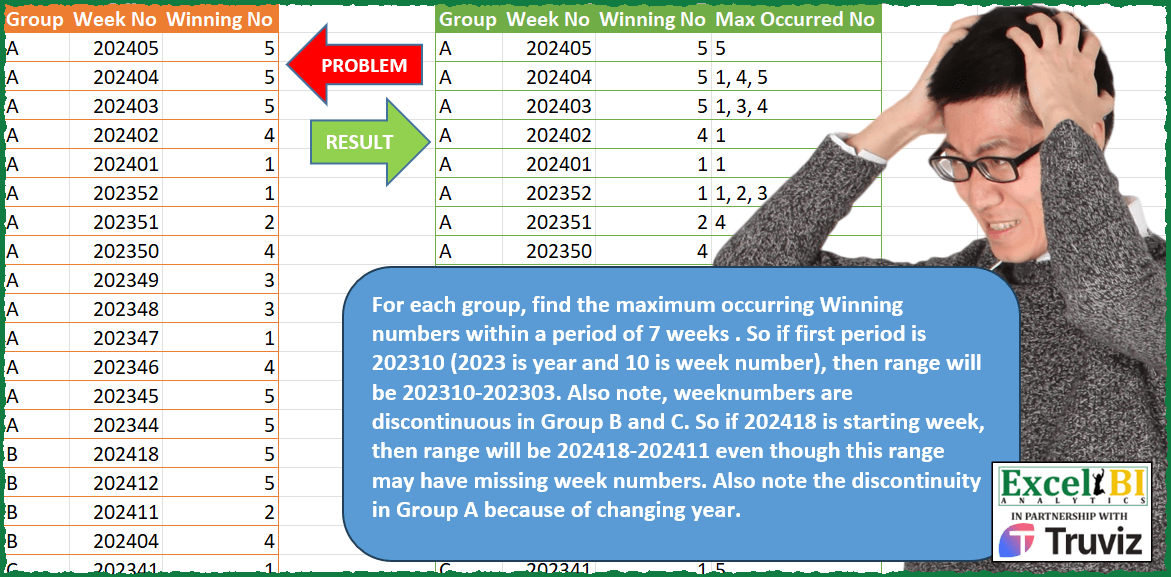
For each group, find the maximum occurring Winning numbers within a period of 7 weeks . So if first period is 202310 (2023 is year and 10 is week number), then range will be 202310-202303. Also note, week numbers are discontinuous in Group B and C. So if 202418 is starting week, then range will be 202418-202411 even though this range may have missing week numbers. Also note the discontinuity in Group A because of changing year. If 7 periods are not available, then answer will be blank. Starting row 9 i.e. 202350, there has to be 202343 for 7 periods weeks. In group A, last entry is 202344 i.e. 7 periods are not available starting 202350. Hence, from row 9 onwards, it will be blanks.
📌 Challenge Details and Links
ExcelBI Power Query Challenge Number: 161
Challenge Difficulty: ⭐️⭐️⭐️⭐️
📥Download Sample File
📥Link to the solutions on LinkedIn
Solving the challenge of Winning Numbers Weekly Range with Power Query
Power Query solution 1 for Winning Numbers Weekly Range, proposed by Zoran Milokanović:
let
  Source = Excel.CurrentWorkbook(){[Name = "Input"]}[Content],
  S = Table.AddColumn(
    Source,
    "Max Occurred No",
    each
      let
        g = each [Group],
        w = each [Week No],
        n = Number.Mod(w(_), 100),
        c = Number.From(n < 8),
        b = (Number.IntegerDivide(w(_), 100) - c) * 100 + c * 52 + n - 7,
        r = Table.SelectRows(Source, (r) => (g(r) = g(_)) and w(r) <= w(_) and w(r) >= b),
        t = Table.SelectRows(Source, (r) => (g(r) = g(_)) and w(r) <= b)
      in
        if Table.RowCount(r) > 1 and Table.RowCount(t) > 0 then
          Text.Combine(List.Transform(List.Sort(List.Modes(r[Winning No])), Text.From), ", ")
        else
          null
  )
in
  S
Power Query solution 2 for Winning Numbers Weekly Range, proposed by Alejandro Simón 🇵🇦 🇪🇸:
let
 Source = Excel.CurrentWorkbook(){[Name="Table1"]}[Content],
 Years = List.Distinct(List.Transform(Source[Week No], each Text.Start(Text.From(_),4))),
 YearsWeek = List.TransformMany(Years, (x)=> {1..52}, (x,y)=> x&Text.PadStart(Text.From(y),2,"0")),
 Group = Table.Group(Source, {"Group"}, {{"A", each
let
a = Table.ToRows(Table.RemoveColumns(_, "Group")),
b = YearsWeek,
c = List.Distinct(List.TransformMany(b, (x)=> {0..List.Count(a)-1}, (x,y)=> if Number.From(x)=a{y}{0} then {x,a{y}{1}} else {x,null}) ),
d = List.Sort(c, {each _{0}, 1}),
e = Table.RemoveFirstN(Table.FromRows(d, List.Skip(Table.ColumnNames(_))), each [Winning No] = null),
f = Table.ReverseRows(Table.RemoveFirstN(Table.ReverseRows(Table.TransformColumns(Table.Group(e, "Week No", {"Winning No", each List.Select([Winning No], each _ <> null)}), {"Winning No", each try _{0} otherwise null})), each [Winning No] = null)),
Power Query solution 3 for Winning Numbers Weekly Range, proposed by Alejandro Simón 🇵🇦 🇪🇸:
let
i = List.FirstN(List.Skip(f[Winning No], [Idx]), 8),
j = List.Select(List.Transform(List.Distinct(i), (x)=> {x, List.Count(List.Select(i, each x = _))}), each _{0}<>null),
k = List.Max(List.Transform({0..List.Count(j)-1}, each j{_}{1})),
l = List.Sort(List.Transform(List.Select(j, each _{1}=k), each Text.From(_{0})))
in Text.Combine(l, ", "))
in Table.RemoveColumns(h, "Idx")}}),
 Sol = Table.SelectRows(Table.ExpandTableColumn(Group, "A", Table.ColumnNames(Group[A]{0})), each [Winning No]<>null)
in
 Sol
Power Query solution 4 for Winning Numbers Weekly Range, proposed by Eric Laforce:
let
 fxYWAddWeeks = (yw, n)=>let
 y = Number.IntegerDivide(yw,100), w=Number.Mod(yw,100),
 d = Date.AddWeeks(hashtag#date(y,1,1), w+n)
 in Date.Year(d)*100 + Date.WeekOfYear(d),

 Source = Excel.CurrentWorkbook(){[Name="tData161"]}[Content],
 Group = Table.Group(Source, "Group", {"All", each let
 _tb = Table.Buffer(_),
 _WMin = fxYWAddWeeks (List.Min([Week No]), 6),
 AddOcc = Table.AddColumn(_, "Max Occured No", each let
 _W = [Week No], _lW = {fxYWAddWeeks(_W, -8).._W},
 _t = Table.SelectRows(_tb,
 each (_W>=_WMin and List.Contains(_lW, [Week No]))),
 _l1 = List.Modes(_t[Winning No]),
 _l2 = List.Transform(List.Sort(List.Distinct(_l1)), Number.ToText)
 in Text.Combine(_l2, ", ") )
 in AddOcc}),
 Expand = Table.ExpandTableColumn(Group, "All", {"Week No", "Winning No", "Max Occured No"})
in
 Expand
Power Query solution 5 for Winning Numbers Weekly Range, proposed by Glyn Willis:
let
  Source = Excel.CurrentWorkbook(){[Name = "Table1"]}[Content],
  dup = Table.DuplicateColumn(Source, "Week No", "Week"),
  yr = Table.AddColumn(dup, "Year", each Text.Start(Text.From([Week No], "en-GB"), 4), type text),
  ct = Table.TransformColumnTypes(
    yr,
    {
      {"Group", type text},
      {"Week No", type text},
      {"Winning No", Int64.Type},
      {"Week", Int64.Type},
      {"Year", Int64.Type}
    }
  ),
  wk = Table.TransformColumns(
    ct,
    {
      {
        "Week",
        each
          let
            t = Text.From(_)
          in
            (Int64.From(Text.Start(t, 4)) * 52) + Int64.From(Text.End(t, 2)),
        Int64.Type
      }
    }
  ),
  ans = Table.AddColumn(
    wk,
    "r",
    each
      let
        pt = Table.SelectRows(wk, (x) => (x[Group] = [Group])),
        mw = List.Min(pt[Week]),
        w = [Week],
        w7 = w - 7,
        t =
          if w7 >= mw then
            let
              l = Table.SelectRows(pt, (x) => (x[Week] <= w) and (x[Week] >= w7))[Winning No],
              g = Table.FromRows(
                List.Transform(l, (x) => {x, List.Count(List.PositionOf(l, x, Occurrence.All))}),
                {"num", "count"}
              ),
              mg = List.Max(g[count]),
              sg = Table.SelectRows(g, (x) => x[count] = mg),
              r = Text.Combine(
                List.Transform(List.Sort(List.Distinct(sg[num])), (x) => Text.From(x)),
                ", "
              )
            in
              r
          else
            null
      in
        t,
    type text
  )
in
  ans
Solving the challenge of Winning Numbers Weekly Range with Excel
Excel solution 1 for Winning Numbers Weekly Range, proposed by Bo Rydobon 🇹🇭:
=LET(g,A2:A30,w,B2:B30,v,LEFT(w,4)*52+RIGHT(w,2),MAP(g,v,LAMBDA(a,b,REPT(TEXTJOIN(", ",,SORT(MODE.MULT(IF({1,1},FILTER(C2:C30,(g=a)*(v<=b)*(v>b-8)))))),b-6>MIN(IF(g=a,v))))))Excel solution 2 for Winning Numbers Weekly Range, proposed by محمد حلمي:
=LET(g,A2:A30,w,B2:B30,MAP(g,w,LAMBDA(a,b,
LET(j,b+SEQUENCE(8)-8,e,--RIGHT(j,2),
v,LEFT(j,4),i,IFS(e=0,v-1&52,e>52,v&e-48,1,j),
u,SORT(TOCOL(XLOOKUP(a&i,g&w,C2:C30),2)),
IF(MIN(i)>=MINIFS(w,g,a),
ARRAYTOTEXT(MODE.MULT(VSTACK(u,u))),"")))))
Solving the challenge of Winning Numbers Weekly Range with Python in Excel
Python in Excel solution 1 for Winning Numbers Weekly Range, proposed by Owen Price:
https://www.linkedin.com/posts/owenhprice_apply-a-custom-function-to-grouped-data-activity-7170870641196253185-5z_K
&&&