
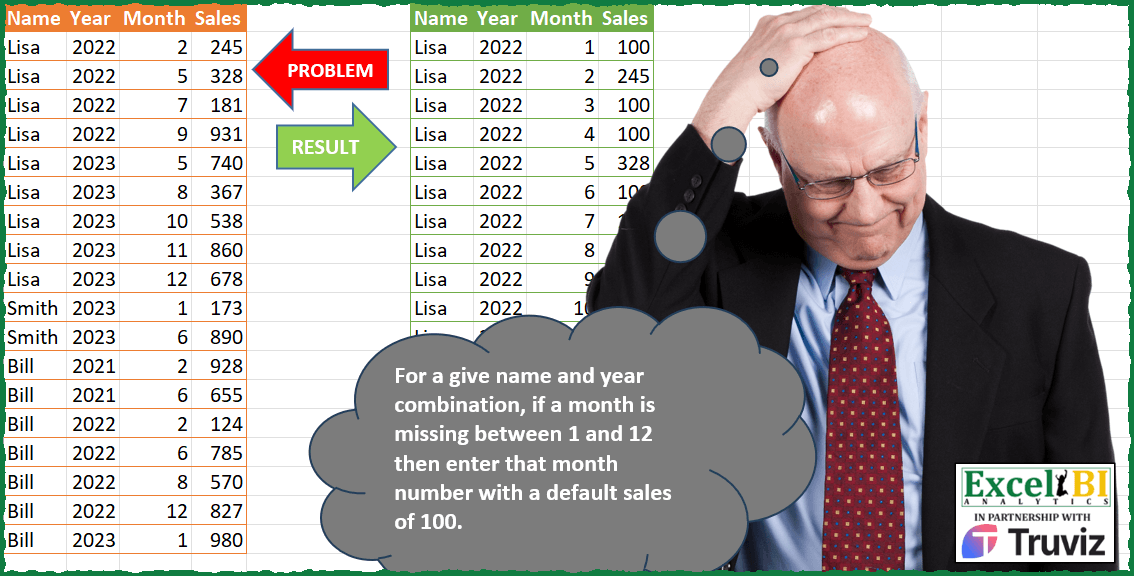
For a give name and year combination, if a month is missing between 1 and 12 then enter that month number with a default sales of 100.
📌 Challenge Details and Links
ExcelBI Power Query Challenge Number: 159
Challenge Difficulty: ⭐️⭐️⭐️
📥Download Sample File
📥Link to the solutions on LinkedIn
Solving the challenge of Fill Missing Months Default with Power Query
Power Query solution 1 for Fill Missing Months Default, proposed by Zoran Milokanović:
let
  Source = Excel.CurrentWorkbook(){[Name = "Input"]}[Content],
  S = Table.FromRows(
    List.TransformMany(
      List.Distinct(Table.ToRows(Source[[Name], [Year]])),
      (x) => {1 .. 12},
      (x, y) => x & {y} & {(Source{[Name = x{0}, Year = x{1}, Month = y]}? ?? [Sales = 100])[Sales]}
    ),
    Table.ColumnNames(Source)
  )
in
  S
Power Query solution 2 for Fill Missing Months Default, proposed by Alejandro Simón 🇵🇦 🇪🇸:
let
  Source = Excel.CurrentWorkbook(){[Name = "Table1"]}[Content],
  Group = Table.Group(
    Source,
    {"Name", "Year"},
    {
      {
        "A",
        each
          let
            a = List.Zip({[Month], [Sales]}),
            b = List.Difference({1 .. 12}, [Month]),
            c = List.Sort(List.Zip({b, List.Repeat({100}, List.Count(b))}) & a, each _{0}),
            d = Table.FromRows(c, List.Skip(Table.ColumnNames(_), 2))
          in
            d
      }
    }
  ),
  Sol = Table.ExpandTableColumn(Group, "A", Table.ColumnNames(Group[A]{0}))
in
  Sol
Power Query solution 3 for Fill Missing Months Default, proposed by Luan Rodrigues:
let
 Fonte = Tabela1,
 gp = Table.Group(Fonte, {"Name","Year"}, {
 {"tab", each [
 a = List.Difference({1..12},_[Month]),
 b = Table.Sort(Table.Combine(List.Transform(a, (x)=> hashtag#table(Table.ColumnNames(Fonte),{{_[Name]{0},_[Year]{0},x,100}}))) & _,{each [Month],0})
 ][b]}})[tab],
 res = Table.Combine(gp)
in
 res
Power Query solution 4 for Fill Missing Months Default, proposed by Hussein SATOUR:
let
  Source = Excel.CurrentWorkbook(){[Name = "Table1"]}[Content],
  #"Expanded Month" = Table.Combine(
    {
      Source,
      Table.ExpandListColumn(
        Table.AddColumn(
          Table.AddColumn(
            Table.Distinct(Table.RemoveColumns(Source, {"Month", "Sales"})),
            "Month",
            each {1 .. 12}
          ),
          "Sales",
          each 100
        ),
        "Month"
      )
    }
  ),
  #"Removed Duplicates1" = Table.Distinct(#"Expanded Month", {"Name", "Year", "Month"})
in
  #"Removed Duplicates1"
Power Query solution 5 for Fill Missing Months Default, proposed by Brian Julius:
let
  Source = Excel.CurrentWorkbook(){[Name = "Table1"]}[Content],
  Master = Table.Distinct(Table.SelectColumns(Source, {"Name", "Year"})),
  AddMonths = Table.AddColumn(Master, "Months", each {1 .. 12}),
  Expand = Table.RenameColumns(
    Table.ExpandListColumn(AddMonths, "Months"),
    {{"Name", "Names"}, {"Year", "Years"}}
  ),
  Join = Table.Join(
    Expand,
    {"Names", "Years", "Months"},
    Source,
    {"Name", "Year", "Month"},
    JoinKind.LeftOuter
  ),
  Clean = Table.RemoveColumns(Join, {"Name", "Year", "Month"}),
  ReplaceNulls = Table.ReplaceValue(Clean, null, 100, Replacer.ReplaceValue, {"Sales"}),
  Rename = Table.RenameColumns(
    ReplaceNulls,
    {{"Names", "Name"}, {"Years", "Year"}, {"Months", "Month"}}
  )
in
  Rename
Power Query solution 6 for Fill Missing Months Default, proposed by Ramiro Ayala Chávez:
let
  S = Excel.CurrentWorkbook(){[Name = "Table1"]}[Content],
  a = Table.CombineColumns(
    Table.TransformColumnTypes(S, {{"Year", type text}}),
    {"Name", "Year"},
    Combiner.CombineTextByDelimiter("|"),
    "M"
  ),
  b = Table.Group(a, {"M"}, {{"G", each _}}),
  c = Table.TransformColumns(
    b,
    {
      "G",
      each Table.InsertRows(
        _,
        Table.RowCount(_),
        {
          [
            M = [M]{0},
            Month = Text.Combine(
              List.Transform(List.Difference({1 .. 12}, [Month]), Text.From),
              ","
            ),
            Sales = 100
          ]
        }
      )
    }
  )[[G]],
  d = Table.TransformColumns(c, {"G", each Table.TransformColumnTypes(_, {{"Month", type text}})}),
  e = Table.TransformColumns(
    d,
    {
      "G",
      each Table.ExpandListColumn(
        Table.TransformColumns(
          _,
          {
            {
              "Month",
              Splitter.SplitTextByDelimiter(","),
              let
                itemType = (type nullable text) meta [Serialized.Text = true]
              in
                type {itemType}
            }
          }
        ),
        "Month"
      )
    }
  ),
  f = Table.TransformColumns(
    e,
    {"G", each Table.Sort(Table.TransformColumnTypes(_, {{"Month", Int64.Type}}), {{"Month", 0}})}
  ),
  Sol = Table.SplitColumn(
    Table.Combine(f[G]),
    "M",
    Splitter.SplitTextByDelimiter("|"),
    {"Name", "Year"}
  )
in
  Sol
Power Query solution 7 for Fill Missing Months Default, proposed by Eric Laforce:
let
  Source = Excel.CurrentWorkbook(){[Name = "tData159"]}[Content],
  Group = Table.Group(
    Source,
    {"Name", "Year"},
    {
      "All",
      each
        let
          _r = List.Zip({[Month], [Sales]})
            & List.Transform(List.Difference({1 .. 12}, _[Month]), each {_, 100})
        in
          Table.Sort(Table.FromRows(_r, {"Month", "Sales"}), "Month")
    }
  ),
  Expand = Table.ExpandTableColumn(Group, "All", {"Month", "Sales"})
in
  Expand
Power Query solution 8 for Fill Missing Months Default, proposed by 🇮🇷 Navid Esmaeilzadeh اسماعیل زاده:
let
  S = Excel.CurrentWorkbook(){[Name = "Table1"]}[Content],
  G = Table.Group(S, {"Name", "Year"}, {{"Month", each {1 .. 12}, type list}}),
  E = Table.ExpandListColumn(G, "Month"),
  C = Table.NestedJoin(
    E,
    {"Name", "Year", "Month"},
    S,
    {"Name", "Year", "Month"},
    "N",
    JoinKind.LeftOuter
  ),
  E2 = Table.ExpandTableColumn(C, "N", {"Sales"}, {"N.Sales"}),
  A = Table.AddColumn(E2, "Sales", each if [N.Sales] = null then 100 else [N.Sales], type number),
  Sol = Table.SelectColumns(A, {"Name", "Year", "Month", "Sales"})
in
  Sol
Power Query solution 9 for Fill Missing Months Default, proposed by Sandeep Marwal:
let
  Source = Excel.CurrentWorkbook(){[Name = "Table1"]}[Content],
  #"Removed Columns" = Table.RemoveColumns(Source, {"Month", "Sales"}),
  #"Removed Duplicates" = Table.Distinct(#"Removed Columns"),
  #"Added Index" = Table.AddIndexColumn(#"Removed Duplicates", "Index", 1, 1, Int64.Type),
  #"Added Custom" = Table.AddColumn(#"Added Index", "Custom", each {1 .. 12}),
  #"Expanded Custom" = Table.ExpandListColumn(#"Added Custom", "Custom"),
  #"Merged Queries" = Table.NestedJoin(
    #"Expanded Custom",
    {"Name", "Year", "Custom"},
    Source,
    {"Name", "Year", "Month"},
    "Table1",
    JoinKind.LeftOuter
  ),
  #"Expanded Table1" = Table.ExpandTableColumn(#"Merged Queries", "Table1", {"Sales"}, {"Sales"}),
  #"Replaced Value" = Table.ReplaceValue(
    #"Expanded Table1",
    null,
    100,
    Replacer.ReplaceValue,
    {"Sales"}
  ),
  #"Sorted Rows" = Table.Sort(
    #"Replaced Value",
    {{"Index", Order.Ascending}, {"Custom", Order.Ascending}}
  ),
  #"Removed Columns1" = Table.RemoveColumns(#"Sorted Rows", {"Index"})
in
  #"Removed Columns1"
Power Query solution 10 for Fill Missing Months Default, proposed by Glyn Willis:
let
  Source = Excel.CurrentWorkbook(){[Name = "Table1"]}[Content],
  #"Changed Type" = Table.TransformColumnTypes(
    Source,
    {{"Name", type text}, {"Year", Int64.Type}, {"Month", Int64.Type}, {"Sales", Int64.Type}}
  ),
  #"Grouped Rows" = Table.Group(
    #"Changed Type",
    {"Name", "Year"},
    {
      {
        "Count",
        each Table.Sort(
          Table.Combine(
            {
              _,
              Table.FromRecords(
                List.Transform(
                  List.Difference({1 .. 12}, [Month]),
                  (x) => [Name = [Name]{0}, Year = [Year]{0}, Sales = 100] & [Month = x]
                )
              )
            }
          ),
          {{"Year", Order.Ascending}, {"Month", Order.Ascending}}
        ),
        type table
      }
    }
  ),
  Count = Table.Combine(#"Grouped Rows"[Count])
in
  Count
Power Query solution 11 for Fill Missing Months Default, proposed by Arden Nguyen, CPA:
let
  Source = Excel.CurrentWorkbook(){[Name = "Table1"]}[Content],
  a = Table.Group(
    Source,
    {"Name", "Year"},
    {
      {
        "Rows",
        each Table.FromRows(
          List.Transform(
            {1 .. 12},
            (x) => {x, List.First(Table.SelectRows(_, (y) => y[Month] = x)[Sales]) ?? 100}
          ),
          {"Month", "Sales"}
        )
      }
    }
  ),
  b = Table.ExpandTableColumn(a, "Rows", {"Month", "Sales"})
in
  b
Solving the challenge of Fill Missing Months Default with Excel
Excel solution 1 for Fill Missing Months Default, proposed by Bo Rydobon 🇹🇭:
=LET(a,A2:A19,b,B2:B19,c,C2:C19,d,D2:D19,m,SEQUENCE(,12),
REDUCE(A1:D1,UNIQUE(a),LAMBDA(e,v,LET(y,FILTER(b,a=v),u,UNIQUE(y),z,TOCOL(IF(m,u)),n,TOCOL(IF(u,m)),
VSTACK(e,IFNA(HSTACK(v,z,n,XLOOKUP(v&z&n,a&b&c,d,100)),v))))))
Excel solution 2 for Fill Missing Months Default, proposed by Rick Rothstein:
=LET(r,A2:A19&"-"&B2:B19&"-",h,"-100",t,TEXTSPLIT(REDUCE(TEXTJOIN("/",,DROP(REDUCE("",UNIQUE(r),LAMBDA(a,x,VSTACK(a,x&SEQUENCE(12)&h))),1)),r&C2:C19&"-"&D2:D19,LAMBDA(a,x,SUBSTITUTE(a,TEXTBEFORE(x,"-",-1)&h,x))),"-","/"),IFERROR(t+0,t))Excel solution 3 for Fill Missing Months Default, proposed by محمد حلمي:
=REDUCE(A1:D1,UNIQUE(A2:A19),LAMBDA(a,d,LET(r,
A2:A19,b,B2:B19,s,SEQUENCE(,12),i,UNIQUE(FILTER(b,r=d)),
v,TOCOL(IF(s,i)),x,TOCOL(IF(i,s)),VSTACK(a,HSTACK(IF(v,d),
v,x,XLOOKUP(d&v&x,r&b&C2:C19,D2:D19,100))))))
Excel solution 4 for Fill Missing Months Default, proposed by 🇰🇷 Taeyong Shin:
=LET(u,UNIQUE(A2:B19),s,SEQUENCE(,12),f,LAMBDA(x,TOCOL(IFNA(TAKE(u,,x),s))),arr,HSTACK(f(1),f(-1),TOCOL(IFNA(s,u))),func,LAMBDA(x,BYROW(x,CONCAT)),HSTACK(arr,XLOOKUP(func(arr),func(A2:C19),D2:D19,100)))Excel solution 5 for Fill Missing Months Default, proposed by Kris Jaganah:
=LET(a,A2:A19,b,B2:B19,c,C2:C19,d,TOCOL(UNIQUE(a&b)&TEXT(SEQUENCE(,12),"00")),e,RIGHT(d,6),f,TEXTSPLIT(d,e),VSTACK({"Name","Year","Month","Sales"},HSTACK(f,--LEFT(e,4),--RIGHT(e,2),XLOOKUP(d,a&b&TEXT(c,"00"),D2:D19,100))))Excel solution 6 for Fill Missing Months Default, proposed by Duy Tùng:
=LET(a,A2:A19,b,REDUCE(A1:C1,UNIQUE(a),LAMBDA(x,y,VSTACK(x,IFNA(HSTACK(y,--TEXTSPLIT(ARRAYTOTEXT(UNIQUE(FILTER(B2:B19,a=y))&"/"&SEQUENCE(,12)),"/",", ")),y)))),HSTACK(b,XLOOKUP(BYROW(b,CONCAT),BYROW(A1:C19,CONCAT),D1:D19,100)))Excel solution 7 for Fill Missing Months Default, proposed by Sunny Baggu:
=LET(
 _u, UNIQUE(A2:B19),
 _tbl, DROP(
 REDUCE(
 "🙏🌼",
 SEQUENCE(ROWS(_u)),
 LAMBDA(x, y,
 VSTACK(
 x,
 DROP(REDUCE("🎉❤", SEQUENCE(12), LAMBDA(a, v, VSTACK(a, HSTACK(INDEX(_u, y, 1), INDEX(_u, y, 2), v)))), 1)
 )
 )
 ),
 1
 ),
 HSTACK(_tbl, XLOOKUP(BYROW(_tbl, LAMBDA(d, CONCAT(d))), A2:A19 & B2:B19 & C2:C19, D2:D19, 100))
)
Excel solution 8 for Fill Missing Months Default, proposed by LEONARD OCHEA 🇷🇴:
=LET(n,A2:A19,y,B2:B19,t,SEQUENCE(,12),k,n&"*"&y,u,UNIQUE(k),l,XLOOKUP(u&t,k&C2:C19,D2:D19,100),r,TEXTSPLIT(TEXTJOIN("/",,IF(l,u&"*"&t&"*"&l)),"*","/"),VSTACK(A1:D1,IFERROR(--r,r)))Excel solution 9 for Fill Missing Months Default, proposed by 🇵🇪 Ned Navarrete C.:
=LET(u,UNIQUE(A2:B19),m,TOCOL(TAKE(u,,1)&"-"&TAKE(u,,-1)&"-"& SEQUENCE(,12)),n,XLOOKUP(SUBSTITUTE(m,"-",""),BYROW(A2:C19,LAMBDA(f,CONCAT(f))),D2:D19,100),i,TEXTSPLIT(TEXTJOIN("*",,m&"-"&n),"-","*"),IFERROR(i*1,i))Excel solution 10 for Fill Missing Months Default, proposed by Md. Zohurul Islam:
=LET(
 z, A2:D19,
 hdr, A1:D1,
 sq, SEQUENCE(12),
 u, TAKE(z, , 1),
 v, REDUCE(
 hdr,
 UNIQUE(u),
 LAMBDA(x, y,
 LET(
 g, FILTER(DROP(z, , 1), u = y),
 yr, TAKE(g, , 1),
 h, DROP(
 REDUCE(
 "",
 UNIQUE(yr),
 LAMBDA(p, q,
 LET(
 a, FILTER(
 CHOOSECOLS(g, 2),
 yr = q
 ),
 b, FILTER(
 TAKE(g, , -1),
 yr = q
 ),
 c, XLOOKUP(sq, a, b, 100),
 d, IFNA(HSTACK(q, sq, c), q),
 VSTACK(p, d)
 )
 )
 ),
 1
 ),
 i, IFNA(HSTACK(y, h), y),
 j, VSTACK(x, i),
 j
 )
 )
 ),
 v
)
Excel solution 11 for Fill Missing Months Default, proposed by Charles Roldan:
=LET(s, SEQUENCE(, 12), f, LAMBDA(x,y, TOCOL(IF(x = x, y))), ny, _[Name] & _[Year], uny, UNIQUE(ny), fm, f(uny, s), fny, f(s, uny), VSTACK(_[hashtag#Headers], HSTACK(CHOOSEROWS(_[[Name]:[Year]], XMATCH(fny, ny)), fm, XLOOKUP(fny & fm, _[Name] & _[Year] & _[Month], _[Sales], 100))))Solving the challenge of Fill Missing Months Default with Python in Excel
Python in Excel solution 1 for Fill Missing Months Default, proposed by Abdallah Ally:
import pandas as pd
file_path = 'PQ_Challenge_159.xlsx'
df = pd.read_excel(file_path, usecols='A:D')
df.dropna(inplace=True)
# Create a DataFrame with combinations of Name, Year, and all 12 Months
df2 = pd.DataFrame(
 [(n, y, m) for n in df['Name'].unique() for y in df[df['Name'] == n]['Year'].unique() for m in range(1, 13)],
 columns=['Name', 'Year', 'Month'])
# Left join with original DataFrame
df = pd.merge(df2, df, on=['Name', 'Year', 'Month'], how='left')
# Fill missing sales values with 100
df['Sales'] = df['Sales'].fillna(100)
df[['Year', 'Month', 'Sales']] = df[['Year', 'Month', 'Sales']].astype(int)
print(df)
https://github.com/mathematiciantz/Exc&el_BI_Challenges/blob/main/Power_Query_Challenge_159.py
Solving the challenge of Fill Missing Months Default with R
R solution 1 for Fill Missing Months Default, proposed by Konrad Gryczan, PhD:
library(tidyverse)
library(readxl)
input = read_excel("Power Query/PQ_Challenge_159.xlsx", range = "A1:D19")
test = read_excel("Power Query/PQ_Challenge_159.xlsx", range = "F1:I73")
calendar = input %>%
 select(-c(Sales,Month)) %>%
 group_by(Name) %>%
 expand_grid(Y = unique(Year), M = 1:12) %>%
 distinct() %>%
 filter(Y == Year) %>%
 select(Name, Year, Month = M) %>%
 ungroup()
result = calendar %>%
 left_join(input, by = c("Name", "Year", "Month")) %>%
 replace_na(list(Sales = 100))
Solving the challenge of Fill Missing Months Default with DAX
DAX solution 1 for Fill Missing Months Default, proposed by Zoran Milokanović:
EVALUATE
ADDCOLUMNS(
 CROSSJOIN(
 SUMMARIZECOLUMNS(Input[Name], Input[Year]),
 SELECTCOLUMNS(GENERATESERIES(1, 12), "Month", [Value])
 ), "Sales",
 VAR N = Input[Name]
 VAR Y = Input[Year]
 VAR M = [Month]
 RETURN
 CALCULATE(COALESCE(MAX(Input[Sales]), 100), FILTER(Input, Input[Name] = N && Input[Year] = Y && Input[Month] = M))
)
ORDER BY
 SWITCH(Input[Name], "Lisa", 1, "Smith", 2, "Bill", 3, 4), Input[Year], [Month]
&&