
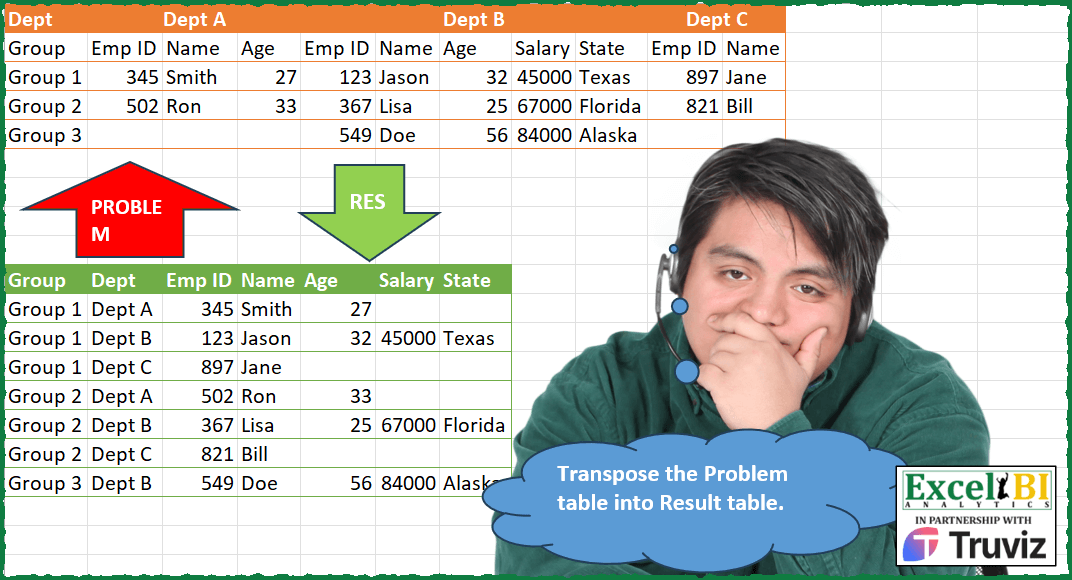
Transpose the Problem table into Result table.
📌 Challenge Details and Links
ExcelBI Power Query Challenge Number: 158
Challenge Difficulty: ⭐️⭐️⭐️⭐️⭐️
📥Download Sample File
📥Link to the solutions on LinkedIn
Solving the challenge of Transpose Problem Table Format with Power Query
Power Query solution 1 for Transpose Problem Table Format, proposed by Zoran Milokanović:
let
  Source = Excel.CurrentWorkbook(){[Name = "Input"]}[Content],
  D = List.Select(Table.ColumnNames(Source), each Text.At(_, 0) = "D"),
  H = List.InsertRange(List.Distinct(Record.ToList(Source{0})), 1, {D{0}}),
  S = Table.SelectRows(
    Table.FromColumns(
      List.Zip(
        List.TransformMany(
          List.Skip(Table.ToRows(Source)),
          (x) =>
            let
              R = List.Range
            in
              {{D{1}} & R(x, 1, 3), {D{2}} & R(x, 4, 5), {D{3}} & R(x, 9, 2)},
          (x, y) => {x{0}} & y
        )
      ),
      H
    ),
    each [Emp ID] <> null
  )
in
  S
Power Query solution 2 for Transpose Problem Table Format, proposed by Alejandro Simón 🇵🇦 🇪🇸:
let
  Source = Excel.CurrentWorkbook(){[Name = "Table1"]}[Content],
  DH = Table.DemoteHeaders(Source),
  TT = Table.Transpose(DH),
  PH = Table.PromoteHeaders(TT, [PromoteAllScalars = true]),
  Dept = Table.TransformColumns(PH, {"Dept", each if Text.Contains(_, "Dept") then _ else null}),
  FD = Table.FillDown(Dept, {"Dept"}),
  UOC = Table.UnpivotOtherColumns(FD, {"Dept", "Group"}, "A", "V"),
  PC = Table.RenameColumns(
    Table.Pivot(UOC, List.Distinct(UOC[Group]), "Group", "V"),
    {"A", "Group"}
  ),
  Sort = Table.Sort(PC, {{"Group", Order.Ascending}, {"Dept", Order.Ascending}}),
  Sol = Table.SelectColumns(Sort, {"Group", "Dept"} & List.Distinct(PH[Group]))
in
  Sol
Power Query solution 3 for Transpose Problem Table Format, proposed by Luan Rodrigues:
let
  Fonte = Table.DemoteHeaders(Tabela1),
  cab = List.Distinct(Table.ToRows(Table.SelectRows(Fonte, each [Column1] = "Group")){0}),
  sk = List.Skip(Fonte[Column1], 2),
  rep = Table.ReplaceValue(
    Fonte,
    each {},
    each _,
    (a, b, c) => if Text.StartsWith(a, "Column") then null else a,
    Table.ColumnNames(Fonte)
  ),
  tt = Table.PromoteHeaders(Table.FillDown(Table.Transpose(rep), {"Column1"})),
  gp = Table.Group(
    tt,
    {"Dept"},
    {
      {
        "Contagem",
        each
          let
            a = List.Skip(Table.ToColumns(_), 2),
            b = Table.FromColumns({sk} & Table.ToColumns(Table.FromRows(a)))
          in
            b
      }
    }
  ),
  exp = Table.ExpandTableColumn(
    gp,
    "Contagem",
    List.Transform({1 .. List.Count(cab)}, each "Column" & Text.From(_)),
    cab
  ),
  res = Table.SelectColumns(
    Table.Sort(exp, {{"Group", 0}, {"Dept", 0}}),
    {"Group", "Dept"} & List.Skip(cab, 1)
  ),
  ren = Table.SelectRows(res, each [Emp ID] is number)
in
  ren
Power Query solution 4 for Transpose Problem Table Format, proposed by Bhavya Gupta:
let
  Source = Excel.CurrentWorkbook(){[Name = "Table1"]}[Content],
  Output = Table.Sort(
    Table.Combine(
      Table.Group(
        Table.FillDown(
          Table.ReplaceValue(
            Table.UnpivotOtherColumns(Source, {"Dept"}, "Attribute", "Value"),
            "Column",
            null,
            (a, b, c) => if Text.StartsWith(a, b) then null else a,
            {"Attribute"}
          ),
          {"Attribute"}
        ),
        {"Attribute"},
        {
          {
            "All",
            each Table.AddColumn(
              Table.PromoteHeaders(
                Table.Combine(
                  Table.Group(_, {"Dept"}, {{"Tbl", each Table.FromRows({{[Dept]{0}} & [Value]})}})[
                    Tbl
                  ]
                )
              ),
              "Dept",
              (x) => [Attribute]{0}
            )
          }
        }
      )[All]
    ),
    {"Group"}
  )
in
  Output
Power Query solution 5 for Transpose Problem Table Format, proposed by Ramiro Ayala Chávez:
let
  S   = Excel.CurrentWorkbook(){[Name = "Table1"]}[Content],
  a   = Table.Transpose(Table.DemoteHeaders(S)),
  b   = Table.TransformColumns(a, {"Column1", each if Text.StartsWith(_, "C") then null else _}),
  c   = Table.PromoteHeaders(Table.FillDown(b, {"Column1"})),
  d   = Table.UnpivotOtherColumns(c, {"Dept", "Group"}, "Group1", "V"),
  e   = Table.Pivot(d, List.Distinct(d[Group]), "Group", "V"),
  f   = List.RemoveItems(Table.ColumnNames(e), {"Group1"}),
  g   = Table.ReorderColumns(e, {"Group1"} & f),
  Sol = Table.RenameColumns(Table.Sort(g, {{"Group1", 0}, {"Dept", 0}}), {"Group1", "Group"})
in
  Sol
Power Query solution 6 for Transpose Problem Table Format, proposed by Eric Laforce:
let
  Source = Excel.CurrentWorkbook(){[Name = "tData158"]}[Content],
  Rows = Table.ToRows(Source),
  CN = {"Group", "Dept"} & List.Skip(List.Distinct(Rows{1})),
  H = List.Zip(List.FirstN(Rows, 2)),
  Records = List.Accumulate(
    List.RemoveFirstN(Rows, 2),
    {},
    (s, r) =>
      let
        Transform = List.Accumulate(
          List.Skip(List.Zip({H, r})),
          [lr = {}, cr = [Dept = "", #"Emp ID" = null]],
          (s, c) =>
            let
              _New =
                if (c{0}{0} = null) then
                  [lr = {}, cr = s[cr]]
                else
                  [lr = {s[cr]}, cr = [Group = r{0}, Dept = c{0}{0}]]
            in
              [lr = s[lr] & _New[lr], cr = Record.AddField(_New[cr], c{0}{1}, c{1})]
        )
      in
        s & Transform[lr] & {Transform[cr]}
  ),
  ToTable = Table.FromRecords(List.Select(Records, each [Emp ID] <> null), CN, MissingField.UseNull)
in
  ToTable
Power Query solution 7 for Transpose Problem Table Format, proposed by Albert Cid Cañigueral:
let
 Origen = Excel.CurrentWorkbook(){[Name="Tabla1"]}[Content],
 ndA = Table.PromoteHeaders(Table.CombineColumns(Table.FillDown(Table.Transpose(Origen),{"Column1"}),{"Column1", "Column2"},Combiner.CombineTextByDelimiter("|", QuoteStyle.None),"Combinada")),
 ndB = Table.UnpivotOtherColumns(ndA , {"Dept|Group"}, "Group", "Valor")[[Group],[#"Dept|Group"],[Valor]],
 ndC = Table.SplitColumn(ndB, "Dept|Group", Splitter.SplitTextByDelimiter("|"), {"Dept", "V"}),
 ndD = Table.Pivot(ndC, List.Distinct(ndC[V]), "V", "Valor")
in
 ndD


        Show translation


        Show translation of this comment
Power Query solution 8 for Transpose Problem Table Format, proposed by 🇮🇷 Navid Esmaeilzadeh اسماعیل زاده:
let
  Source = Excel.CurrentWorkbook(){[Name = "Table1"]}[Content],
  C = Table.TransformColumnTypes(
    Source,
    {
      {"Column1", type text},
      {"Column2", type any},
      {"Column3", type text},
      {"Column4", type any},
      {"Column5", type any},
      {"Column6", type text},
      {"Column7", type any},
      {"Column8", type any},
      {"Column9", type text},
      {"Column10", type any},
      {"Column11", type text}
    }
  ),
  T = Table.Transpose(C),
  P = Table.PromoteHeaders(T, [PromoteAllScalars = true]),
  C2 = Table.TransformColumnTypes(
    P,
    {
      {"Dept", type text},
      {"Group", type text},
      {"Group 1", type any},
      {"Group 2", type any},
      {"Group 3", type any}
    }
  ),
  F = Table.FillDown(C2, {"Dept"}),
  Un = Table.UnpivotOtherColumns(F, {"Dept", "Group"}, "Attribute", "Value"),
  Pi = Table.Pivot(Un, List.Distinct(Un[Group]), "Group", "Value"),
  R = Table.ReorderColumns(Pi, {"Attribute", "Dept", "Emp ID", "Name", "Age", "Salary", "State"}),
  Sol = Table.Sort(R, {{"Attribute", Order.Ascending}, {"Dept", Order.Ascending}})
in
  Sol
Power Query solution 9 for Transpose Problem Table Format, proposed by CA Raghunath Gundi:
let
 Source = Excel.Workbook(File.Contents("C:UsersRaghuDownloadsPQ_Challenge_158.xlsx"), null, true),
 Sheet1_Sheet = Source{[Item="Sheet1",Kind="Sheet"]}[Data],
 #"Top 5 Rows" = Table.FirstN(Sheet1_Sheet,5),
 #"Transposed Table" = Table.Transpose(#"Top 5 Rows"),
 #"Filled Down" = Table.FillDown(#"Transposed Table",{"Column1"}),
 #"Merged Columns" = Table.CombineColumns(#"Filled Down",{"Column1", "Column2"},Combiner.CombineTextByDelimiter("||", QuoteStyle.None),"Merged"),
 #"Promoted Headers" = Table.PromoteHeaders(#"Merged Columns", [PromoteAllScalars=true]),
 #"Unpivoted Other Columns" = Table.UnpivotOtherColumns(#"Promoted Headers", {"Dept||Group"}, "Attribute", "Value"),
Power Query solution 10 for Transpose Problem Table Format, proposed by CA Raghunath Gundi:
#"Merged Columns1" = Table.CombineColumns(#"Unpivoted Other Columns",{"Attribute", "Dept||Group"},Combiner.CombineTextByDelimiter("||", QuoteStyle.None),"Merged"),
 #"Split Column by Delimiter" = Table.SplitColumn(#"Merged Columns1", "Merged", Splitter.SplitTextByEachDelimiter({"||"}, QuoteStyle.Csv, true), {"Merged.1", "Merged.2"}),
 #"Pivoted Column" = Table.Pivot(#"Split Column by Delimiter", List.Distinct(#"Split Column by Delimiter"[Merged.2]), "Merged.2", "Value"),
 #"Split Column by Delimiter1" = Table.SplitColumn(#"Pivoted Column", "Merged.1", Splitter.SplitTextByDelimiter("||", QuoteStyle.Csv), {"Merged.1.1", "Merged.1.2"}),
 #"Renamed Columns" = Table.RenameColumns(#"Split Column by Delimiter1",{{"Merged.1.1", "Group"}, {"Merged.1.2", "Dept"}})
in
 #"Renamed Columns"
Power Query solution 11 for Transpose Problem Table Format, proposed by Sandeep Marwal:
let
  Source = Excel.CurrentWorkbook(){[Name = "Table3"]}[Content],
  #"Transposed Table" = Table.Transpose(Source),
  #"Filled Down" = Table.FillDown(#"Transposed Table", {"Column1"}),
  #"Merged Columns" = Table.CombineColumns(
    #"Filled Down",
    {"Column1", "Column2"},
    Combiner.CombineTextByDelimiter(",", QuoteStyle.None),
    "Merged"
  ),
  #"Transposed Table1" = Table.Transpose(#"Merged Columns"),
  #"Promoted Headers" = Table.PromoteHeaders(#"Transposed Table1", [PromoteAllScalars = true]),
  #"Unpivoted Other Columns" = Table.UnpivotOtherColumns(
    #"Promoted Headers",
    {"Dept,Group"},
    "Attribute",
    "Value"
  ),
  #"Split Column by Delimiter" = Table.SplitColumn(
    #"Unpivoted Other Columns",
    "Attribute",
    Splitter.SplitTextByDelimiter(",", QuoteStyle.Csv),
    {"Attribute.1", "Attribute.2"}
  ),
  #"Pivoted Column" = Table.Pivot(
    #"Split Column by Delimiter",
    List.Distinct(#"Split Column by Delimiter"[Attribute.2]),
    "Attribute.2",
    "Value"
  ),
  #"Renamed Columns" = Table.RenameColumns(
    #"Pivoted Column",
    {{"Dept,Group", "Group"}, {"Attribute.1", "Dept"}}
  )
in
  #"Renamed Columns"
Power Query solution 12 for Transpose Problem Table Format, proposed by Glyn Willis:
let
  idc = {"Dept"},
  tbcn = Table.ColumnNames(Source),
  r1 = List.Distinct(List.Skip(Record.ToList(Source{0}), 1)),
  Source = Excel.CurrentWorkbook(){[Name = "Table1"]}[Content],
  C1 = Table.ToRows(
    Table.AddColumn(
      Table.FillDown(
        Table.FromColumns(
          {
            tbcn,
            List.Transform(
              tbcn,
              (x) => if Text.StartsWith(x, "Column", Comparer.OrdinalIgnoreCase) then null else x
            ),
            Record.ToList(Source{0})
          }
        ),
        {"Column2"}
      ),
      "cn",
      each [Column2] & "|" & [Column3]
    )[[Column1], [cn]]
  ),
  C2 = Table.RenameColumns(Table.Skip(Source, 1), C1),
  #"Grouped Rows" = Table.Group(
    C2,
    {"Dept|Group"},
    {
      {
        "a",
        each [
          d = List.Transform(
            Table.SelectRows(
              Record.ToTable(_{0}),
              (x) => Text.Contains(x[Name], "Emp ID") and x[Value] <> null
            )[Name],
            (w) => Text.BeforeDelimiter(w, "|")
          ),
          l = Table.FromRows(
            List.Transform(
              d,
              (y) =>
                {y} & List.Transform(r1, (z) => try Record.Field(_{0}, y & "|" & z) otherwise null)
            ),
            idc & r1
          )
        ][l],
        type any
      }
    }
  ),
  #"Expanded a" = Table.ExpandTableColumn(#"Grouped Rows", "a", idc & r1, idc & r1),
  #"Changed Type" = Table.TransformColumnTypes(
    #"Expanded a",
    {
      {"Dept|Group", type text},
      {"Emp ID", Int64.Type},
      {"Name", type text},
      {"Age", Int64.Type},
      {"Salary", Int64.Type},
      {"State", type text},
      {"Dept", type text}
    }
  )
in
  #"Changed Type"
Power Query solution 13 for Transpose Problem Table Format, proposed by Arden Nguyen, CPA:
let
  Source = Excel.CurrentWorkbook(){[Name = "Table3"]}[Content],
  a = Table.Transpose(Source),
  b = Table.FillDown(Table.PromoteHeaders(a, [PromoteAllScalars = true]), {"Dept"}),
  c = Table.Group(
    b,
    {"Dept"},
    {
      {
        "Rows",
        each [
          _a = Table.RemoveColumns(_, {"Group", "Dept"}),
          _b = Table.ColumnNames(_a),
          _c = Table.FromRows(Table.ToColumns(_a), [Group]),
          _d = Table.ToColumns(Table.FromColumns({_b} & {[Dept]})),
          _e = Table.FromColumns(_d & Table.ToColumns(_c), {"Group", "Dept"} & [Group]),
          _f = Table.FirstN(_e, List.NonNullCount(_e[Emp ID]))
        ][_f]
      }
    },
    GroupKind.Local,
    (x, y) => Byte.From(x[Dept] <> y[Dept])
  ),
  d = Table.Combine(c[Rows]),
  e = Table.Sort(d, {{"Group", Order.Ascending}})
in
  e
Solving the challenge of Transpose Problem Table Format with Excel
Excel solution 1 for Transpose Problem Table Format, proposed by Bo Rydobon 🇹🇭:
=LET(h,B1:K1,e,B2:K2,i,SCAN(,h,LAMBDA(a,v,IF(v>0,v,a))),j,
TOCOL(h,3),k,UNIQUE(e,1),REDUCE(HSTACK(A2,A1,k),A3:A5,
LAMBDA(a,v,LET(b,XLOOKUP(j&k,i&e,INDEX(B3:K5,ROWS(v:A3),),""),
VSTACK(a,FILTER(IFNA(HSTACK(v,j,b),v),TAKE(b,,1)))))))
Excel solution 2 for Transpose Problem Table Format, proposed by محمد حلمي:
=LET(g,A3:A5,b,SCAN(,B1:K1,LAMBDA(a,d,IF(d=0,a,d))),
REDUCE(HSTACK(A2,A1,UNIQUE(B2:K2,1)),g,LAMBDA(a,v,
VSTACK(a,IFNA(HSTACK(v,DROP(REDUCE(0,UNIQUE(b,1),
LAMBDA(a,d,LET(i,FILTER(FILTER(B3:K5,g=v),b=d),
IFNA(IF(@i,VSTACK(a,HSTACK(d,i)),a),"")))),1)),v)))))
Excel solution 3 for Transpose Problem Table Format, proposed by Sunny Baggu:
=LET(
 _r, SCAN("", B1:K1, LAMBDA(a, v, IF(v = "", a, v))),
 _c12, DROP(REDUCE("", A3:A5, LAMBDA(a, v, IFNA(VSTACK(a, HSTACK(v, TOCOL(B1:K1, 3))), v))), 1),
 _u, UNIQUE(B2:K2, 1),
 _tbl, MAKEARRAY(
 ROWS(_c12),
 COLUMNS(_u),
 LAMBDA(r, c,
 IFERROR(INDEX(TOROW(IF(INDEX(TAKE(_c12, , 1) & TAKE(_c12, , -1), r, ) = A3:A5 & _r, B3:K5, x), 3), c), "")
 )
 ),
 _cri, BYROW(IF(_tbl = "", _tbl = "", _tbl = 0), LAMBDA(a, NOT(AND(a)))),
 VSTACK(HSTACK(A2, A1, _u), FILTER(HSTACK(_c12, _tbl), _cri))
)
Excel solution 4 for Transpose Problem Table Format, proposed by LEONARD OCHEA 🇷🇴:
=LET(d,SCAN(0,B1:K1,LAMBDA(a,b,IF(b>0,b,a))),F,LAMBDA(x,TOCOL(IF(B3:K5<>"",x,z),3)),PIVOTBY(HSTACK(F(A3:A5),F(d)),F(B2:K2),F(B3:K5),CONCAT,,0,,0))Excel solution 5 for Transpose Problem Table Format, proposed by Md. Zohurul Islam:
=LET(u,A3:A5,v,B3:K5,
w,SCAN(,B1:K1,LAMBDA(x,y,IF(y="",x,y))),
hdr,HSTACK(A2,A1,UNIQUE(B2:K2,1)),
dpt,UNIQUE(TOCOL(w)),
s,REDUCE(hdr,u,LAMBDA(x,y,LET(
 a,FILTER(v,u=y),
 b,DROP(IFNA(REDUCE("",dpt,LAMBDA(p,q,VSTACK(p,HSTACK(q,FILTER(a,w=q))))),""),1),
 c,FILTER(b,CHOOSECOLS(b,2)<>0),
 d,IFNA(HSTACK(y,c),y),
 e,VSTACK(x,d),e))),
s)
Solving the challenge of Transpose Problem Table Format with R
R solution 1 for Transpose Problem Table Format, proposed by Konrad Gryczan, PhD:
library(tidyverse)
library(readxl)
input = read_excel("Power Query/PQ_Challenge_158.xlsx", range = "A1:K5",
 col_names = T, .name_repair = "unique")
test = read_excel("Power Query/PQ_Challenge_158.xlsx", range = "A10:G17") %>%
 mutate(across(everything(), as.character))
r1 = input %>%
 pivot_longer(cols = -c(1), values_to = "value", names_to = "variable") %>%
 mutate(variable = if_else(str_starts(variable, "D"), variable, NA_character_)) %>%
 fill(variable, .direction = "down") %>%
 group_by(Dept) %>%
 nest()
headers = r1[[2]][[1]]$value
r2 = r1 %>%
 filter(Dept != "Group") %>%
 unnest(data) %>%
 mutate(headers = headers) %>%
 pivot_wider(names_from = headers, values_from = value) %>%
 filter(!is.na(`Emp ID`)) %>%
 select(Group = Dept, Dept = variable, everything()) %>%
 ungroup()
&&