
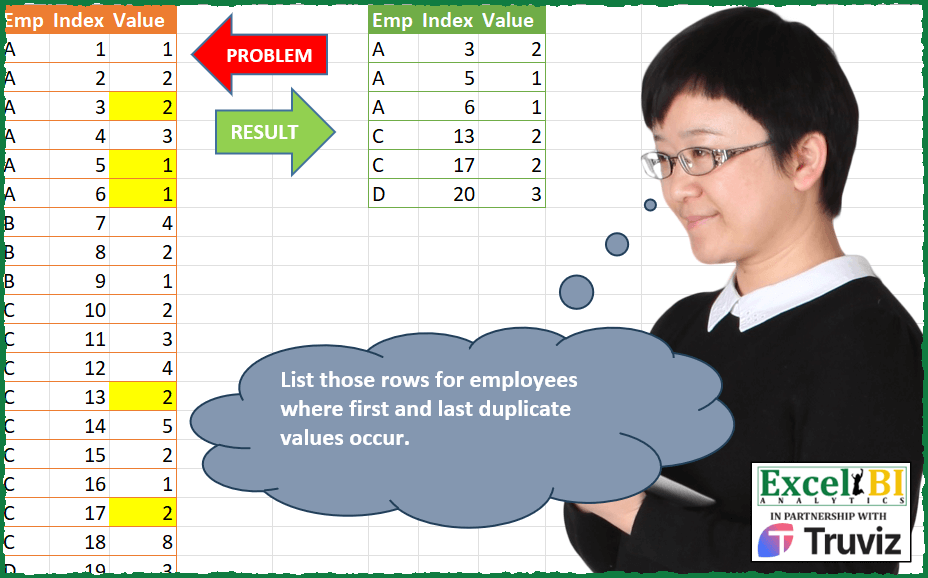
List those rows for employees where first and last duplicate values occur for a value. I have highlighted those cells in yellow for sake of brevity. Ex. Emp A has 3 values of 1. First and last duplicates are in index 5 and 6. Emp A also 2 values of 2. Hence, first and last duplicates are same for 2. Emp C has 4 values of 2. First and last duplicates are in index 13 and 17.
📌 Challenge Details and Links
ExcelBI Power Query Challenge Number: 143
Challenge Difficulty: ⭐️⭐️⭐️⭐️⭐️
📥Download Sample File
📥Link to the solutions on LinkedIn
Solving the challenge of First and Last Duplicates with Power Query
Power Query solution 1 for First and Last Duplicates, proposed by John V.:
let
 S = Excel.CurrentWorkbook(){[Name="Data"]}[Content],
 N = {"Emp", "Value"}, C = Table.RowCount, F = Table.SelectRows,
 G = Table.Group(S, N, {"M", each C(_), Int64.Type}),
 J = Table.NestedJoin(S, N, G, N, "M", JoinKind.LeftOuter),
 M = Table.Sort(Table.ExpandTableColumn(J, "M", {"M"}), "Index"),
 A = Table.AddColumn(M, "A", each
 let E = [Emp], V = [Value], I = [Index]
 in C(F(S, each [Emp] = E and [Value] = V and [Index] <= I))),
 R = F(A, each [A] = 2 or ([A] > 2 and [M] = [A]))[[Emp], [Index], [Value]]
in
 R
Blessings!
Power Query solution 2 for First and Last Duplicates, proposed by Alejandro Simón 🇵🇦 🇪🇸:
let
  Source = Excel.CurrentWorkbook(){[Name = "Table1"]}[Content],
  Group = Table.Group(
    Source,
    {"Emp"},
    {
      {
        "All",
        each Table.RemoveColumns(
          Table.SelectRows(
            Table.Group(
              _,
              {"Value"},
              {
                {"Rep", each Table.RowCount(_)},
                {
                  "Index",
                  each
                    let
                      a = List.Skip([Index]),
                      b = List.Distinct({List.First(a)} & {List.Last(a)})
                    in
                      b
                }
              }
            ),
            each [Rep] > 1
          ),
          "Rep"
        )[[Index], [Value]]
      }
    }
  ),
  Expand = Table.ExpandTableColumn(Group, "All", Table.ColumnNames(Group[All]{0})),
  Sol = Table.Sort(
    Table.SelectRows(Table.ExpandListColumn(Expand, "Index"), each ([Index] <> null)),
    {{"Index", 0}}
  )
in
  Sol
Power Query solution 3 for First and Last Duplicates, proposed by Luan Rodrigues:
let
  Fonte = Tabela1,
  gp = Table.Group(
    Fonte,
    {"Emp", "Value"},
    {
      {"Select", each Table.RowCount(_)},
      {
        "Split",
        each Table.FromRows(
          {List.First(List.RemoveFirstN(Table.ToRows(_)))}
            & {List.Last(List.RemoveFirstN(Table.ToRows(_)))},
          Table.ColumnNames(Fonte)
        )
      }
    }
  ),
  fil = Table.Distinct(Table.Combine(Table.SelectRows(gp, each ([Select] > 1))[Split])),
  res = Table.Sort(fil, {{"Index", 0}})
in
  res
Power Query solution 4 for First and Last Duplicates, proposed by Brian Julius:
let
  Source = Excel.CurrentWorkbook(){[Name = "Table1"]}[Content],
  GroupEmpValue = Table.Group(
    Source,
    {"Emp", "Value"},
    {
      {"Count", each Table.RowCount(_), Int64.Type},
      {
        "All",
        each _,
        type table [Emp = nullable text, Index = nullable number, Value = nullable number]
      }
    }
  ),
  FilterValGT1 = Table.SelectRows(GroupEmpValue, each ([Count] <> 1)),
  RemTopRows = Table.SelectColumns(
    Table.TransformColumns(FilterValGT1, {"All", each Table.RemoveFirstN(_, 1)}),
    {"All"}
  ),
  Expand = Table.ExpandTableColumn(
    RemTopRows,
    "All",
    {"Emp", "Index", "Value"},
    {"Emp", "Index", "Value"}
  ),
  GroupEmpValue2 = Table.Group(
    Expand,
    {"Emp", "Value"},
    {
      {"MaxIndex", each List.Max([Index]), type number},
      {"MinIndex", each List.Min([Index]), type number},
      {"All", each _, type table [Emp = text, Index = number, Value = number]}
    }
  ),
  Expand2 = Table.ExpandTableColumn(GroupEmpValue2, "All", {"Index"}, {"Index"}),
  FilterNReorder = Table.ReorderColumns(
    Table.RemoveColumns(
      Table.SelectRows(Expand2, each [Index] = [MinIndex] or [Index] = [MaxIndex]),
      {"MaxIndex", "MinIndex"}
    ),
    {"Emp", "Index", "Value"}
  ),
  Sort = Table.Sort(FilterNReorder, {{"Emp", Order.Ascending}, {"Index", Order.Ascending}})
in
  Sort
Power Query solution 5 for First and Last Duplicates, proposed by Mihai Radu O:
let
  Source = Excel.CurrentWorkbook(){[Name = "Table1"]}[Content],
  #"Grouped Rows" = Table.Group(
    Source,
    {"Emp", "Value"},
    {
      {
        "all",
        each
          let
            a = Table.RemoveFirstN(_, 1),
            b = Table.FirstN(a, 1),
            c = Table.LastN(a, 1),
            d = Table.Combine({b, c})
          in
            Table.Distinct(d)[Index]
      }
    }
  ),
  #"Expanded all" = Table.ExpandListColumn(#"Grouped Rows", "all"),
  #"Filtered Rows" = Table.SelectRows(#"Expanded all", each ([all] <> null))
in
  #"Filtered Rows"
Power Query solution 6 for First and Last Duplicates, proposed by Venkata Rajesh:
let
  Source = Data,
  Output = Table.SelectRows(
    Source,
    each [
      emp   = [Emp],
      value = [Value],
      list  = List.Skip(Table.SelectRows(Source, each [Emp] = emp and [Value] = value)[Index]),
      check = [Index] = List.First(list) or [Index] = List.Last(list)
    ][check]
  )
in
  Output
Power Query solution 7 for First and Last Duplicates, proposed by Sandeep Marwal:
let
  Source = Excel.CurrentWorkbook(){[Name = "Table1"]}[Content],
  #"Grouped Rows" = Table.Group(Source, {"Emp", "Value"}, {{"Count", each Table.Skip(_)}}),
  #"Added Custom" = Table.AddColumn(#"Grouped Rows", "Custom", each Table.RowCount([Count])),
  #"Filtered Rows" = Table.SelectRows(#"Added Custom", each ([Custom] <> 0)),
  #"Added Custom1" = Table.AddColumn(
    #"Filtered Rows",
    "Custom.1",
    each Table.Distinct(Table.FirstN([Count], 1) & Table.LastN([Count], 1))
  )[[Custom.1]],
  #"Expanded Custom.1" = Table.ExpandTableColumn(
    #"Added Custom1",
    "Custom.1",
    {"Emp", "Index", "Value"},
    {"Emp", "Index", "Value"}
  )
in
  #"Expanded Custom.1"
Power Query solution 8 for First and Last Duplicates, proposed by Glyn Willis:
let
  Source = Excel.CurrentWorkbook(){[Name = "Table1"]}[Content],
  #"Changed Type" = Table.TransformColumnTypes(
    Source,
    {{"Emp", type text}, {"Index", Int64.Type}, {"Value", Int64.Type}}
  ),
  #"Sorted Rows" = Table.Sort(#"Changed Type", {{"Index", Order.Ascending}}),
  #"Grouped Rows" = Table.Group(
    #"Sorted Rows",
    {"Emp", "Value"},
    {
      {
        "Dupes",
        each
          if Table.RowCount(_) = 2 then
            Table.MaxN(_, "Index", 1)
          else if Table.RowCount(_) > 2 then
            Table.MinN(Table.Skip(_, 1), "Index", 1) & Table.MaxN(_, "Index", 1)
          else
            null,
        type table
      }
    }
  ),
  #"Filtered Rows" = Table.Combine(Table.SelectRows(#"Grouped Rows", each ([Dupes] <> null))[Dupes]),
  #"Sorted Rows1" = Table.Sort(#"Filtered Rows", {{"Index", Order.Ascending}})
in
  #"Sorted Rows1"
Power Query solution 9 for First and Last Duplicates, proposed by Arden Nguyen, CPA:
let
  Source = Table.FromRows(
    Json.Document(
      Binary.Decompress(
        Binary.FromText(
          "Vc45DgAhCAXQu1hbKO7lLLcw3v8aM3zjTyhIeILAnO5y3kXE8luCOEpGGS9Hxfyr1P1nDd1HnVNUg52PZoFFMHIHKBwEJtuccQZZbLXaRc1WOw5TvsrBvUoJm+sD",
          BinaryEncoding.Base64
        ),
        Compression.Deflate
      )
    ),
    let
      _t = ((type nullable text) meta [Serialized.Text = true])
    in
      type table [Emp = _t, Index = _t, Value = _t]
  ),
  #"Changed Type" = Table.TransformColumnTypes(
    Source,
    {{"Emp", type text}, {"Index", Int64.Type}, {"Value", Int64.Type}}
  ),
  #"Grouped Rows" = Table.Group(
    #"Changed Type",
    {"Emp", "Value"},
    {
      {
        "rows",
        each Table.AlternateRows(Table.Skip(_), 1, List.Max({Table.RowCount(_) - 3, 0}), 1),
        type table [Emp = nullable text, Index = nullable number, Value = nullable number]
      }
    }
  ),
  expand = Table.Combine(#"Grouped Rows"[rows]),
  #"Sorted Rows" = Table.Sort(expand, {{"Index", Order.Ascending}})
in
  #"Sorted Rows"
Power Query solution 10 for First and Last Duplicates, proposed by Frank Schreiber:
let
  Source = Excel.CurrentWorkbook(){[Name = "Table1"]}[Content],
  GroupedRows = Table.Group(
    Source,
    {"Emp", "Value"},
    {{"AllGrp", each _, type table [Emp = text, Index = number, Value = number]}}
  ),
  RemovedOtherColumns = Table.SelectColumns(GroupedRows, {"AllGrp"}),
  RemoveTablesWithOneRow = Table.SelectRows(RemovedOtherColumns, each Table.RowCount([AllGrp]) > 1),
  RemoveFirstRowEachTable = Table.TransformColumns(
    RemoveTablesWithOneRow,
    {{"AllGrp", each Table.RemoveRows(_, 0)}}
  ),
  RemoveRowsBasedOnOffset = Table.TransformColumns(
    RemoveFirstRowEachTable,
    {
      {
        "AllGrp",
        each Table.RemoveRows(_, 1, if Table.RowCount(_) > 2 then Table.RowCount(_) - 2 else 0)
      }
    }
  ),
  ExpandedAllGrp = Table.ExpandTableColumn(
    RemoveRowsBasedOnOffset,
    "AllGrp",
    {"Emp", "Index", "Value"},
    {"Emp", "Index", "Value"}
  ),
  Sorted = Table.Sort(ExpandedAllGrp, {{"Index", Order.Ascending}})
in
  Sorted
Solving the challenge of First and Last Duplicates with Excel
Excel solution 1 for First and Last Duplicates, proposed by Bo Rydobon 🇹🇭:
=LET(a,A2:A21,c,C2:C21,FILTER(A2:C21,MAP(a,c,LAMBDA(i,j,LET(n,COUNTIFS(A2:i,i,C2:j,j),(n=2)+(n>2)*(n=COUNTIFS(a,i,c,j)))))))Excel solution 2 for First and Last Duplicates, proposed by John V.:
=LET(x,A2:A21,y,C2:C21,b,MAP(x,y,LAMBDA(a,c,COUNTIFS(A2:a,a,C2:c,c))),FILTER(A2:C21,(b=2)+(b>2)*(b=COUNTIFS(x,x,y,y))))Excel solution 3 for First and Last Duplicates, proposed by محمد حلمي:
=LET(x,C2:C21,i,MAP(A2:A21,x,LAMBDA(a,c,COUNTIFS(A2:a,a,C2:c,c))),v,ISEVEN(i),FILTER(A2:C21,IF(v,i,v+x=N(+C1:C20))))Excel solution 4 for First and Last Duplicates, proposed by Kris Jaganah:
=LET(a,A2:A21,b,B2:B21,c,C2:C21,d,a&c,e,MAP(b,LAMBDA(x,SUM(--(CHOOSEROWS(d,x)=TAKE(d,x))))),f,FILTER(HSTACK(a,b,c,e,d),e>1),g,TAKE(f,,-1),h,CHOOSECOLS(f,4),i,IF(h=2,h,MAP(g,LAMBDA(x,MAX((x=g)*h)))),VSTACK(A1:C1,FILTER(TAKE(f,,3),h=i)))Excel solution 5 for First and Last Duplicates, proposed by Oscar Mendez Roca Farell:
=LET(_e, A2:A21,_i, B2:B21,_v, C2:C21,_m, MAP(_e,_i,_v, LAMBDA(a, b, c, XMATCH(b, AGGREGATE({15, 14}, 6, _i/(_e&_v=a&c)/(COUNTIFS(A2:a, a,C2:c, c)>1), {2,1})))), FILTER(A2:C21,ISNUMBER(_m)))Excel solution 6 for First and Last Duplicates, proposed by Krzysztof Nowak:
= 'Duplicated'
),
Answer AS (
 SELECT
 *,
 MIN(DuplicateIndex) OVER (PARTITION BY "Emp") AS MinDI,
 MAX(DuplicateIndex) OVER (PARTITION BY "Emp") AS MaxDI
 FROM Duplicated
)
Solving the challenge of First and Last Duplicates with Python in Excel
Python in Excel solution 1 for First and Last Duplicates, proposed by Alejandro Campos:
df = xl("A1:C21", headers=True)
def find_duplicate_indices(df):
 result = []
 for emp in df['Emp'].unique():
 emp_data = df[df['Emp'] == emp]
 for value, indices in emp_data.groupby('Value')['Index'].apply(list).items():
 if len(indices) > 1:
 result.append({'Emp': emp, 'Index': indices[1], 'Value': value})
 result.append({'Emp': emp, 'Index': indices[-1], 'Value': value})
 return pd.DataFrame(result).sort_values(by=['Emp', 'Index']).reset_index(drop=True)
 .drop([1, len(result)-1], errors='ignore').reset_index(drop=True)
result_df = find_duplicate_indices(df)
result_df
Solving the challenge of First and Last Duplicates with R
R solution 1 for First and Last Duplicates, proposed by Konrad Gryczan, PhD:
library(tidyverse)
library(readxl)
input = read_excel("Power Query/PQ_Challenge_143.xlsx", range = "A1:C21")
test = read_excel("Power Query/PQ_Challenge_143.xlsx", range = "F1:H7")
result = input %>%
 group_by(Emp, Value) %>%
 mutate(rn = row_number()) %>%
 filter(rn == 2 | (rn == max(rn) & rn > 2)) %>%
 select(-rn) %>%
 ungroup()
&&&