
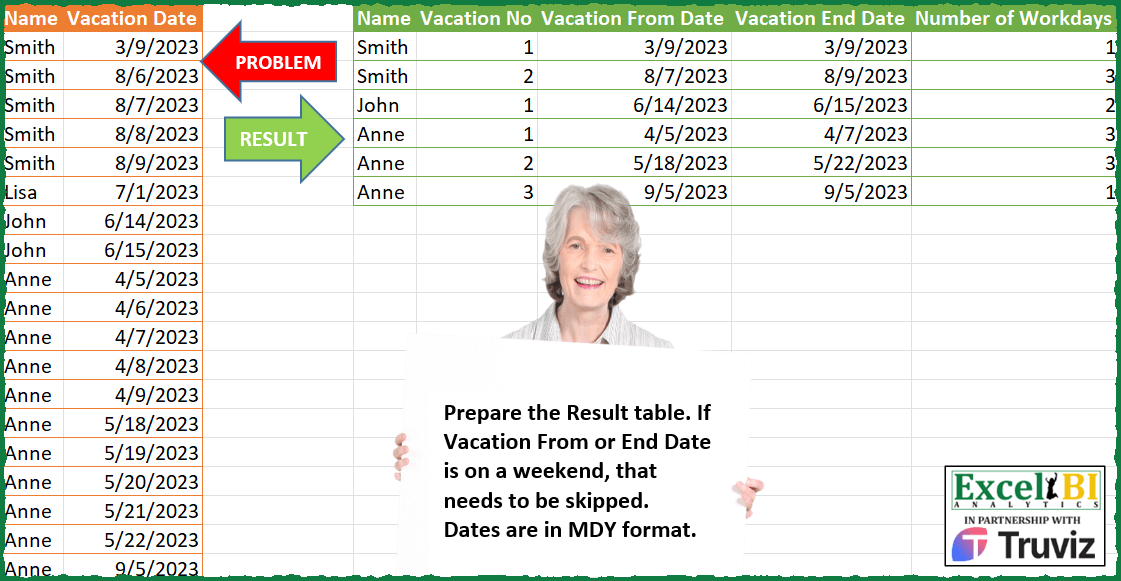
Prepare the Result table. If Vacation From or End Date is on a weekend, that needs to be skipped. Dates are in MDY format.
📌 Challenge Details and Links
ExcelBI Power Query Challenge Number: 139
Challenge Difficulty: ⭐️⭐️⭐️⭐️
📥Download Sample File
📥Link to the solutions on LinkedIn
Solving the challenge of Exclude Weekend Vacation Dates with Power Query
Power Query solution 1 for Exclude Weekend Vacation Dates, proposed by Zoran Milokanović:
let
  Source = Excel.CurrentWorkbook(){[Name = "Input"]}[Content],
  V = each [Vacation Date],
  W = each Date.DayOfWeek(_, 1) < 5,
  G = Table.RenameColumns(
    Table.ExpandRecordColumn(
      Table.Group(
        Source,
        {"Name", "Vacation Date"},
        {
          {
            "R",
            each
              let
                d = List.Select(V(_), W)
              in
                [
                  Vacation From Date = List.Min(d),
                  Vacation End Date  = List.Max(d),
                  Number of Workdays = List.Count(d)
                ]
          }
        },
        0,
        (b, n) =>
          Number.From(
            Duration.Days(V(n) - V(b))
              + 1
                <> Table.RowCount(
                  Table.SelectRows(Source, each [Name] = n[Name] and V(_) >= V(b) and V(_) <= V(n))
                )
          )
      ),
      "R",
      {"Vacation From Date", "Vacation End Date", "Number of Workdays"}
    ),
    {{"Vacation Date", "Vacation No"}}
  ),
  S = Table.FromRows(
    List.Accumulate(
      Table.ToRows(G),
      {},
      (s, c) =>
        let
          l = List.Last(s, {"", 0})
        in
          if c{4} = 0 then
            s
          else
            s & {{c{0}, if l{0} <> c{0} then 1 else l{1} + 1} & List.Skip(c, 2)}
    ),
    Table.ColumnNames(G)
  )
in
  S
Power Query solution 2 for Exclude Weekend Vacation Dates, proposed by Zoran Milokanović:
let
  Source = Excel.CurrentWorkbook(){[Name = "Input"]}[Content],
  W = each Date.DayOfWeek(_, 1) < 5,
  S = Table.SelectRows(
    Table.FromRows(
      List.TransformMany(
        List.Accumulate(
          Table.ToRows(Source),
          {},
          (s, c) =>
            let
              l = List.Last(s)
            in
              if s = {} or l{0} <> c{0} or Date.AddDays(l{3}, 1) <> c{1} then
                s & {{c{0}, if s = {} or l{0} <> c{0} then 1 else l{1} + 1, c{1}, c{1}}}
              else
                List.RemoveLastN(s) & {{l{0}, l{1}, l{2}, c{1}}}
        ),
        (i) =>
          let
            d = List.Select(
              List.DateTimes(i{2}, Duration.Days(i{3} - i{2}) + 1, Duration.From(1)),
              W
            )
          in
            {{i{0}, i{1}, List.Min(d), List.Max(d), List.Count(d)}},
        (i, o) => o
      ),
      {"Name", "Vacation No", "Vacation From Date", "Vacation End Date", "Number of Workdays"}
    ),
    each [Number of Workdays] > 0
  )
in
  S
Power Query solution 3 for Exclude Weekend Vacation Dates, proposed by Alejandro Simón 🇵🇦 🇪🇸:
let
  Source = Table.SelectRows(
    Excel.CurrentWorkbook(){[Name = "Table1"]}[Content],
    each not List.Contains({0, 6}, Date.DayOfWeek([Vacation Date]))
  ),
  Agrupar = Table.Combine(
    Table.Group(
      Source,
      {"Name"},
      {
        {
          "All",
          each
            let
              a = _,
              b = List.RemoveLastN(
                List.Generate(
                  () => [x = 0, y = 1],
                  each [x] <= Table.RowCount(a),
                  each [
                    x = [x] + 1,
                    y =
                      if Number.From(a[Vacation Date]{[x] + 1} - a[Vacation Date]{[x]})
                        = 1
                          or (
                            Date.DayOfWeek(a[Vacation Date]{[x] + 1})
                              = 1 and Date.DayOfWeek(a[Vacation Date]{[x]})
                              = 5
                          )
                      then
                        [y]
                      else
                        [y] + 1
                  ],
                  each [y]
                )
              ),
              c = Table.FromColumns(
                Table.ToColumns(a) & {b},
                Table.ColumnNames(a) & {"Vacation No"}
              ),
              d = Table.Group(
                c,
                "Vacation No",
                {
                  "A",
                  each Table.FromRows(
                    {
                      {List.First([Vacation Date])}
                        & {List.Last([Vacation Date])}
                        & {List.Count([Vacation Date])}
                    },
                    {"Vacation From Date", "Vacation End Date", "Number of Workdays"}
                  )
                }
              )
            in
              d
        }
      }
    )[All]
  ),
  Sol = Table.ExpandTableColumn(Agrupar, "A", Table.ColumnNames(Agrupar[A]{0}))
in
  Sol
Power Query solution 4 for Exclude Weekend Vacation Dates, proposed by Luan Rodrigues:
let
  Fonte = Tabela1,
  fil = Table.SelectRows(Fonte, each not List.Contains({0, 6}, Date.DayOfWeek([Vacation Date]))),
  ma = Table.AddColumn(fil, "Mes-Ano", each DateTime.ToText([Vacation Date], "MM/yyyy")),
  gp1 = Table.Group(
    ma,
    {"Name", "Mes-Ano"},
    {
      {
        "Contagem",
        each [
          a = List.Transform(
            List.Select(
              {
                Number.From(DateTime.From(List.Min([Vacation Date]))) .. Number.From(
                  DateTime.From(List.Max([Vacation Date]))
                )
              },
              each not List.Contains({0, 6}, Date.DayOfWeek(Date.From(_)))
            ),
            Date.From
          ),
          b = Table.FromRows(
            {{List.Min(a)} & {List.Max(a)} & {List.Count(a)}},
            {"Vacation From Date", "Vacation End Date", "Number of Workdays"}
          )
        ][b]
      }
    }
  ),
  exp = Table.ExpandTableColumn(gp1, "Contagem", Table.ColumnNames(gp1[Contagem]{0})),
  gp2 = Table.Group(
    exp,
    {"Name"},
    {{"Contagem", each Table.AddIndexColumn(_, "Vacation No", 1, 1)}}
  ),
  res = Table.ExpandTableColumn(
    gp2,
    "Contagem",
    List.RemoveFirstN(Table.ColumnNames(gp2[Contagem]{0}), 2)
  )
in
  res
Power Query solution 5 for Exclude Weekend Vacation Dates, proposed by Bhavya Gupta:
let
  Source = Excel.CurrentWorkbook(){[Name = "Table1"]}[Content],
  PrevVac = Table.FromColumns(
    Table.ToColumns(Source)
      & {{Source[Vacation Date]{0}} & List.RemoveLastN(Source[Vacation Date], 1)},
    Table.ColumnNames(Source) & {"Previous Vacation Date"}
  ),
  DaysDiff = Table.AddColumn(
    PrevVac,
    "Days Diff",
    each Duration.Days([Vacation Date] - [Previous Vacation Date]),
    Int64.Type
  ),
  Records = Table.Group(
    DaysDiff,
    {"Name", "Days Diff"},
    {
      {
        "All",
        each
          let
            a = Table.SelectRows(
              _,
              each not List.Contains({6, 7}, Date.DayOfWeek([Vacation Date], Day.Monday) + 1)
            )
          in
            [
              Name     = a[Name]{0},
              From     = List.Min(a[Vacation Date]),
              To       = List.Max(a[Vacation Date]),
              Workdays = Table.RowCount(a)
            ]
      }
    },
    0,
    (x, y) => Number.From((y[Days Diff] <> 1) or (x[Name] <> y[Name]))
  )[All],
  Tbl = Table.FromRecords(Records),
  Filtered = Table.SelectRows(Tbl, each ([Workdays] <> 0)),
  Grouped = Table.Combine(
    Table.Group(Filtered, {"Name"}, {{"All", each Table.AddIndexColumn(_, "Vacation No", 1)}})[All]
  )
in
  Grouped
Power Query solution 6 for Exclude Weekend Vacation Dates, proposed by Luke Jarych:
let
 Source = Table1,
 Index = Table.AddIndexColumn(Source, "Index", 1, 1, Int64.Type),
 g = Table.Group(
 Index, {"Name", "Vacation Date", "Index"},
 {
 {"All", each Table.SelectRows(_, each not List.Contains({0,6}, Date.DayOfWeek([Vacation Date], Day.Sunday)))}
 },
 GroupKind.Local,
 (s, c) => Byte.From(
 (Duration.Days(c[Vacation Date] - s[Vacation Date]) <> (c[Index] - s[Index]))
 )
 ),
 SelectRows = Table.SelectRows(g, each not Table.IsEmpty([All])),
 a = Table.AddColumn(SelectRows, "Solution Fields", each
 let
 b = [All][Vacation Date],
 LMin = List.Min(b),
 LMax = List.Max(b),
 LCount = List.Count(b),
 c = [
 Vacation From Date = LMin,
 Vacation End Date = LMax,
 Number of Workdays = LCount
 ]
 in c),
 test = Table.Group(a, "Name", {"vac", each Table.AddIndexColumn(_, "Vacation No", 1, 1)})[[vac]],
 ExpandedVac = Table.ExpandTableColumn(test, "vac", {"Name", "Solution Fields", "Vacation No"}, {"Name", "Solution Fields", "Vacation No"}),
Power Query solution 7 for Exclude Weekend Vacation Dates, proposed by Luke Jarych:
ReorderedColumns = Table.ReorderColumns(ExpandedSolutionFields,{"Name", "Vacation No", "Vacation From Date", "Vacation End Date", "Number of Workdays"})
in
 ReorderedColumns
In code clean and simple.
Solving the challenge of Exclude Weekend Vacation Dates with Excel
Excel solution 1 for Exclude Weekend Vacation Dates, proposed by Bo Rydobon 🇹🇭:
=LET(a,A2:A20,d,B2:B20,b,SCAN(0,d-DROP(VSTACK(0,d),-1)=1,LAMBDA(a,v,a+1-v)),
g,SORT(DROP(GROUPBY(HSTACK(a,b),d,HSTACK(MIN,MAX,COUNT),,0,,WEEKDAY(d,2)<6),1),2),
n,TAKE(g,,1),HSTACK(n,1+INDEX(g,,2)-VLOOKUP(n,g,2,0),DROP(g,,2)))
Excel solution 2 for Exclude Weekend Vacation Dates, proposed by Bo Rydobon 🇹🇭:
=LET(a,A2:A20,d,B2:B20,b,SCAN(0,(a=DROP(VSTACK(0,a),-1))*(d-DROP(VSTACK(0,d),-1)=1),LAMBDA(a,v,a+1-v)),
REDUCE(D1:H1,UNIQUE(b),LAMBDA(c,i,LET(n,XLOOKUP(i,b,a),f,XLOOKUP(i,b,d),e,XLOOKUP(i,b,d,,,-1),w,NETWORKDAYS(f,e),
IF(w,VSTACK(c,HSTACK(n,SUM(N(n=INDEX(c,,1)))+1,WORKDAY(f-1,1),WORKDAY(e+1,-1),w)),c)))))
Excel solution 3 for Exclude Weekend Vacation Dates, proposed by محمد حلمي:
=LET(
e,SCAN(0,B2:B20-N(+B1:B19),LAMBDA(a,d,(d<>1)+a)),
REDUCE(D1:H1,UNIQUE(e),LAMBDA(a,d,LET(
e,FILTER(A2:B20,e=d),m,MIN(e),v,MAX(e),
n,NETWORKDAYS(m,v),x,TAKE(a,-1,2),
IF(n,VSTACK(a,HSTACK(@e,(@e=@x)*MAX(x)+1,
m+(WEEKDAY(m)=1),v-(WEEKDAY(v)=1)*2,n)),a)))))
Excel solution 4 for Exclude Weekend Vacation Dates, proposed by Oscar Mendez Roca Farell:
=LET(_r, REDUCE(HSTACK(A1, TEXTBEFORE(B1, " ")&{" N°"," From "," End "}&{"","Date","Date"}, "Number of Workdays"), UNIQUE(A2:A20), LAMBDA(y, j, LET(_v, FILTER(B2:B20,A2:A20=j),_m, MONTH(_v),_u, UNIQUE(_m), VSTACK(y, IFERROR(DROP(REDUCE("",_u, LAMBDA(i, x, LET(_d, AGGREGATE({15, 14}, 6,_v/(WEEKDAY(_v, 2)<6)/(_m=x), 1), VSTACK(i, HSTACK(j, XMATCH(x,_u),_d, 1+SUM(_d*{-1,1})))))), 1), ""))))), FILTER(_r, TAKE(_r, ,1)<>""))Excel solution 5 for Exclude Weekend Vacation Dates, proposed by Bhavya Gupta:
=LET(n,A2:A20,v,B2:B20,g,VSTACK(1,DROP(n,1)<>DROP(n,-1)),k,SORT(DROP(GROUPBY(HSTACK(n,SCAN(0,g,LAMBDA(x,y,x+y)),SCAN(0,VSTACK(1,(DROP(v,1)-DROP(v,-1))<>1)+g,LAMBDA(x,y,IFS(y=2,1,y=1,x+y,1,x)))),v,HSTACK(MIN,MAX,COUNT),0,0,,NETWORKDAYS(--v,--v)),1),2),HSTACK(TAKE(k,,1),DROP(k,,2)))Excel solution 6 for Exclude Weekend Vacation Dates, proposed by Bhavya Gupta:
=LET(name,A2:A20,vac,B2:B20,grp,SORT(DROP(GROUPBY(HSTACK(name,SCAN(0,VSTACK(1,(DROP(vac,1)-DROP(vac,-1))<>1),LAMBDA(x,y,x+y))),vac,HSTACK(MIN,MAX,COUNT),0,0,,NETWORKDAYS(--vac,--vac)),1),2),k,TAKE(grp,,1),HSTACK(k,SCAN(0,VSTACK(0,DROP(k,1)=DROP(k,-1)),LAMBDA(x,y,IF(y,x+y,1))),DROP(grp,,2)))Excel solution 7 for Exclude Weekend Vacation Dates, proposed by Tolga Demirci, PMP, PMI-ACP, MOS-Expert:
=LET(o;FILTER(A2:B20;NOT(ISNUMBER(SEARCH(BYROW(B2:B20;LAMBDA(x;TEXT(x;"ddd")));CONCAT("Sun";"Sat");1))));LET(p;BYROW(DROP(o;;1);LAMBDA(a;MONTH(a)&YEAR(a)));HSTACK(TEXTSPLIT(TEXTJOIN(";";;MAP(BYROW(UNIQUE(TAKE(o;;1));LAMBDA(s;SUM(IFERROR(SEARCH(s;UNIQUE(TAKE(o;;1)&p);1);0))));LAMBDA(c;TEXTJOIN(";";;SEQUENCE(c;1;1)))));;";");MAP(UNIQUE(TAKE(o;;1)&p);LAMBDA(H;XLOOKUP(H;TAKE(o;;1)&p;TAKE(o;;1))));BYROW(UNIQUE(TAKE(o;;1)&p);LAMBDA(w;MIN(LET(q;MAP(DROP(o;;1);TAKE(o;;1)&p;LAMBDA(m;n;XLOOKUP(w;n;m)));FILTER(q;NOT(ISNA(q)))))));BYROW(UNIQUE(TAKE(o;;1)&p);LAMBDA(w;MAX(LET(q;MAP(DROP(o;;1);TAKE(o;;1)&p;LAMBDA(m;n;XLOOKUP(w;n;m)));FILTER(q;NOT(ISNA(q))))))))))Excel solution 8 for Exclude Weekend Vacation Dates, proposed by Edwin Tisnado:
=LET(a,A2:A20,b,B2:B20,c,N(+OFFSET(b,-1,)),d,SCAN(0,b-c,LAMBDA(x,y,x+(y<>1))),e,UNIQUE(d),m,XLOOKUP(e,d,a),n,SEQUENCE(ROWS(m))-XMATCH(m,m,0)+1,o,XLOOKUP(e,d,b),p,XLOOKUP(e,d,b,,,-1),q,NETWORKDAYS(o,p),VSTACK(D1:H1,FILTER(HSTACK(m,n,WORKDAY(o-1,1),WORKDAY(p+1,-1),q),q)))Solving the challenge of Exclude Weekend Vacation Dates with R
R solution 1 for Exclude Weekend Vacation Dates, proposed by Konrad Gryczan, PhD:
library(tidyverse)
library(readxl)
library(lubridate)
input = read_excel("PQ_Challenge_139.xlsx", range = "A1:B20") %>% janitor::clean_names()
test = read_excel("PQ_Challenge_139.xlsx", range = "D1:H7") %>% janitor::clean_names()
result = input %>%
 group_by(name) %>%
 mutate(lagged = lag(vacation_date, 1),
 diff = as.numeric(difftime(vacation_date, lagged, units = "days")),
 diff = ifelse(is.na(diff), 0, diff),
 vacation_no = cumsum(ifelse(diff != 1, 1, 0)),
 wd = wday(vacation_date, week_start = 1)) %>%
 ungroup() %>%
 filter(!wd %in% c(6, 7)) %>%
 group_by(name, vacation_no) %>%
 summarise(vacation_from_date = min(vacation_date),
 vacation_end_date = max(vacation_date),
 ungroup() %>%
 arrange(desc(name))
Solving the challenge of Exclude Weekend Vacation Dates with DAX
DAX solution 1 for Exclude Weekend Vacation Dates, proposed by Luke Jarych:
https://www.linkedin.com/feed/update/urn:li:activity:7141638071652958208?commentUrn=urn%3Ali%3Acomment%3A%28activity%3A7141638071652958208%2C7143508548751130624%29&dashCommentUrn=urn%3Ali%3Afsd_comment%3A%287143508548751130624%2Curn%3Ali%3Aactivity%3A7141638071652958208%29
&&&