
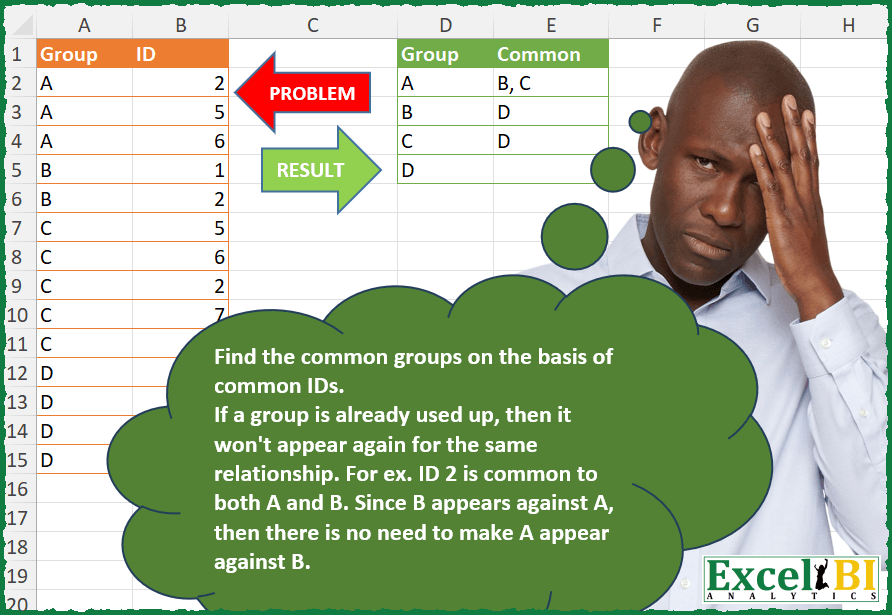
Find the common groups on the basis of common IDs. If a group is already used up in a relationship, then it won’t appear again for the same relationship (relationship means common ID). For ex. ID 2 is common to both A and B. Since B appears against A, then there is no need to make A appear against B.
📌 Challenge Details and Links
ExcelBI Power Query Challenge Number: 136
Challenge Difficulty: ⭐️⭐️⭐️
📥Download Sample File
📥Link to the solutions on LinkedIn
Solving the challenge of Detect Common Groups by ID with Power Query
Power Query solution 1 for Detect Common Groups by ID, proposed by Zoran Milokanović:
let
  Source = Excel.CurrentWorkbook(){[Name = "Input"]}[Content],
  g = each [Group],
  S = Table.Group(
    Source,
    {"Group"},
    {
      "Common",
      each Text.Combine(
        List.Distinct(
          g(Table.SelectRows(Source, (r) => List.Contains([ID], r[ID]) and g(r) > g(_){0}))
        ),
        ", "
      )
    }
  )
in
  S
Power Query solution 2 for Detect Common Groups by ID, proposed by Kris Jaganah:
let
  Source = Excel.CurrentWorkbook(){[Name = "Table1"]}[Content],
  Merge = Table.NestedJoin(Source, {"ID"}, Source, {"ID"}, "Source", JoinKind.RightOuter),
  Xpand = Table.ExpandTableColumn(Merge, "Source", {"Group"}, {"Source.Group"}),
  RemoveDupAll = Table.Distinct(Xpand),
  RemoveFirst = Table.SelectRows(RemoveDupAll, each [Source.Group] <> [Group]),
  RemoveDupMerge = Table.Distinct(RemoveFirst, {"Source.Group", "Group"}),
  Sort = Table.Sort(RemoveDupMerge, {{"Group", Order.Ascending}, {"Source.Group", Order.Ascending}}),
  RemoveGreater = Table.AddColumn(
    Sort,
    "Custom",
    each if [Group] >= [Source.Group] then null else [Source.Group]
  ),
  Group = Table.Group(RemoveGreater, {"Group"}, {"Common", each Text.Combine([Custom], ",")})
in
  Group
Power Query solution 3 for Detect Common Groups by ID, proposed by Alejandro Simón 🇵🇦 🇪🇸:
let
  Source = Excel.CurrentWorkbook(){[Name = "Table1"]}[Content],
  Col = Table.AddColumn(
    Source,
    "A",
    (x) => Table.SelectRows(Source, each [ID] = x[ID] and [Group] <> x[Group])[Group]
  ),
  Sol = Table.Group(
    Col,
    {"Group"},
    {
      {
        "Common",
        each Text.Combine(
          List.Select(List.Distinct(List.Combine([A])), (x) => x > [Group]{0}),
          ", "
        )
      }
    }
  )
in
  Sol
Power Query solution 4 for Detect Common Groups by ID, proposed by Alejandro Simón 🇵🇦 🇪🇸:
let
  Source = Excel.CurrentWorkbook(){[Name = "Table1"]}[Content],
  Group = Table.Group(Source, {"Group"}, {{"All", each [ID]}}),
  Rows = Table.ToRows(Group),
  Acum = List.Transform(
    {0 .. List.Count(Rows) - 1},
    each List.Transform(
      {_ + 1 .. List.Count(Rows) - 1},
      (x) => if List.ContainsAny(Rows{_}{1}, Rows{x}{1}) then Rows{x}{0} else null
    )
  ),
  Comb = List.Transform(Acum, each Text.Combine(_, ", ")),
  Sol = Table.FromColumns({Group[Group], Comb}, {"Group", "Common"})
in
  Sol
Power Query solution 5 for Detect Common Groups by ID, proposed by Alejandro Simón 🇵🇦 🇪🇸:
let
  Source = Excel.CurrentWorkbook(){[Name = "Table1"]}[Content],
  Group = Table.Group(Source, {"Group"}, {{"All", each [ID]}}),
  Rows = Table.ToRows(Group),
  Acum = List.Accumulate(
    {0 .. List.Count(Rows) - 1},
    {},
    (s, c) =>
      s
        & {
          List.Transform(
            {c + 1 .. List.Count(Rows) - 1},
            each if List.ContainsAny(Rows{c}{1}, Rows{_}{1}) then Rows{_}{0} else null
          )
        }
  ),
  Comb = List.Transform(Acum, each Text.Combine(_, ", ")),
  Sol = Table.FromColumns({Group[Group], Comb}, {"Group", "Common"})
in
  Sol
Power Query solution 6 for Detect Common Groups by ID, proposed by Luan Rodrigues:
let
  Fonte = Tabela1,
  res = Table.Group(
    Fonte,
    "Group",
    {
      {
        "Common",
        each [
          a = Table.SelectRows(_, (x) => [Group] <> x[Group])[ID],
          b = List.Distinct(Table.SelectRows(Fonte, each List.ContainsAny({[ID]}, a))[Group]),
          c = Text.Combine(List.RemoveFirstN(b, List.PositionOfAny(b, [Group], 2){0} + 1), ", ")
        ][c]
      }
    }
  )
in
  res
Power Query solution 7 for Detect Common Groups by ID, proposed by Alexis Olson:
letely clear on the logic. I would have thought cell E3 would be "C, D" since groups B and C are related.

Edit: It looks like the linked file has been updated to align with my assumption.

Using this interpretation:

let
 Source = Excel.CurrentWorkbook(){[Name="Table1"]}[Content],
 #"Merged Queries" = Table.NestedJoin(Source, {"ID"}, Source, {"ID"}, "Common", JoinKind.LeftOuter),
 Matches = Table.TransformColumns(#"Merged Queries", {{"Common", each [Group], type list}}),
 #"Grouped Rows" = Table.Group(Matches, {"Group"}, {{"Common", each [
 UniqueMatches = List.Distinct(List.Combine([Common])),
 SortAndJoin = Text.Combine(List.Sort(UniqueMatches), ", "),
 RemoveUsed = Text.AfterDelimiter(SortAndJoin, List.Max([Group]) & ", ")
 ][RemoveUsed], type text}}
 )
in
 #"Grouped Rows"
Power Query solution 8 for Detect Common Groups by ID, proposed by Brian Julius:
let
  Source = Excel.CurrentWorkbook(){[Name = "Table1"]}[Content],
  Join = Table.SelectRows(
    Table.Join(Source, "ID", Table.RenameColumns(Source, {"Group", "Gp"}), "ID"),
    each [Group] <> [Gp]
  ),
  AddIsFlipped = Table.AddColumn(Join, "IsFlip", each Text.Combine(List.Sort({[Group], [Gp]}), " ")),
  Split = Table.SplitColumn(
    AddIsFlipped,
    "IsFlip",
    Splitter.SplitTextByEachDelimiter({" "}, QuoteStyle.Csv, false),
    {"IsFlip.1", "IsFlip.2"}
  ),
  AddTestCond = Table.AddColumn(
    Split,
    "TestCond",
    each if [Group] = [IsFlip.1] then [IsFlip.2] else null
  ),
  SelectCols = Table.SelectColumns(AddTestCond, {"Group", "TestCond"}),
  Group = Table.Group(
    SelectCols,
    {"Group"},
    {"Common", each List.RemoveNulls(List.Distinct([TestCond]))}
  ),
  Extract = Table.TransformColumns(
    Group,
    {"Common", each Text.Combine(List.Transform(_, Text.From), ", "), type text}
  )
in
  Extract
Power Query solution 9 for Detect Common Groups by ID, proposed by Bhavya Gupta:
let
  Source = Excel.CurrentWorkbook(){[Name = "Table1"]}[Content],
  AddedLookup = Table.AddColumn(
    Source,
    "Lookup",
    each Source[Group]{List.PositionOf(Source[ID], [ID])}
  ),
  Grouped = Table.Group(
    AddedLookup,
    {"Lookup"},
    {{"Count", each Text.Combine(List.Skip(List.Distinct([Group])), ", ")}}
  )
in
  Grouped
Power Query solution 10 for Detect Common Groups by ID, proposed by Eric Laforce:
Back to previouly missed challenges, with PQ proposal in 3 main steps
2) Transform rows to requested Selection to avoid previous Group and only keep those with List.Intersect on IDs
3) ToTable from rows
Power Query solution 11 for Detect Common Groups by ID, proposed by 🇮🇷 Navid Esmaeilzadeh اسماعیل زاده:
let
  Source = Excel.CurrentWorkbook(){[Name = "Table1"]}[Content],
  A = Table.AddColumn(
    Source,
    "C",
    each Table.SelectRows(Source, (Tbl) => Tbl[ID] = [ID] and Tbl[Group] <> [Group])[Group]
  ),
  E = Table.ExpandListColumn(A, "C"),
  A2 = Table.AddColumn(E, "C1", each List.Sort({[Group], [C]})),
  E2 = Table.TransformColumns(
    A2,
    {"C1", each Text.Combine(List.Transform(_, Text.From), ","), type text}
  ),
  R1 = Table.Distinct(E2, {"C1"}),
  #"Removed Other Columns" = Table.SelectColumns(R1, {"Group", "C"}),
  #"Grouped Rows" = Table.Group(
    #"Removed Other Columns",
    {"Group"},
    {{"Common", each Text.Combine([C], ", "), type nullable text}}
  )
in
  #"Grouped Rows"
Power Query solution 12 for Detect Common Groups by ID, proposed by Peter Tholstrup:
let
  Source = Excel.CurrentWorkbook(){[Name = "Data"]}[Content],
  merged = Table.NestedJoin(Source, {"ID"}, Source, {"ID"}, "Merged", JoinKind.LeftOuter),
  expanded = Table.ExpandTableColumn(merged, "Merged", {"Group"}, {"Common"}),
  grouped = Table.Group(expanded, {"Group"}, {{"Common", each List.Distinct(_[Common])}}),
  result = Table.FromRecords(
    Table.TransformRows(
      grouped,
      each [
        Group  = [Group],
        Common = Text.Combine(List.RemoveMatchingItems([Common], {"A" .. [Group]}), ", ")
      ]
    )
  )
in
  result
Power Query solution 13 for Detect Common Groups by ID, proposed by Sandeep Marwal:
let
  Source = Excel.CurrentWorkbook(){[Name = "Table1"]}[Content],
  Custom1 = Table.Partition(Source, "ID", List.Max(Source[ID]), each Number.From(_)),
  Custom2 = List.Transform(
    Custom1,
    (t) =>
      [
        #"Added Custom" = Table.AddColumn(t, "Custom", each t),
        #"Expanded Custom" = Table.ExpandTableColumn(
          #"Added Custom",
          "Custom",
          {"Group", "ID"},
          {"Group.1", "ID.1"}
        ),
        #"Added Custom1" = Table.AddColumn(#"Expanded Custom", "Custom", each [Group] < [Group.1]),
        #"Filtered Rows" = Table.SelectRows(#"Added Custom1", each ([Custom] = true))
      ][#"Filtered Rows"]
  ),
  Custom3 = Table.Combine(Custom2),
  #"Removed Other Columns" = Table.SelectColumns(Custom3, {"Group", "Group.1"}),
  #"Sorted Rows" = Table.Sort(
    #"Removed Other Columns",
    {{"Group", Order.Ascending}, {"Group.1", Order.Ascending}}
  ),
  #"Removed Duplicates" = Table.Distinct(#"Sorted Rows"),
  #"Grouped Rows" = Table.Group(
    #"Removed Duplicates",
    {"Group"},
    {{"Count", each Text.Combine([Group.1], ","), type text}}
  )
in
  #"Grouped Rows"
Solving the challenge of Detect Common Groups by ID with Excel
Excel solution 1 for Detect Common Groups by ID, proposed by Bo Rydobon 🇹🇭:
=LET(a,A2:A15,b,B2:B15,u,UNIQUE(a),HSTACK(u,MAP(u,LAMBDA(c,TEXTJOIN(", ",,UNIQUE(REPT(a,(XLOOKUP(b,b,a)=c)*(a>c))))))))Excel solution 2 for Detect Common Groups by ID, proposed by محمد حلمي:
=LET(a,A2:A15,b,B2:B15,u,UNIQUE(a),x,REDUCE(0,UNIQUE(b),LAMBDA(acc,d,IFNA(HSTACK(acc,FILTER(a,b=d)),""))),v,CHOOSECOLS(DROP(x,1),XMATCH(u,TAKE(x,1))),HSTACK(u,TOCOL(BYCOL(IF(v=TOROW(u),"",v),LAMBDA(a,TEXTJOIN(", ",,a))))))Excel solution 3 for Detect Common Groups by ID, proposed by Kris Jaganah:
=LET(a,A2:A15,b,B2:B15,c,MAP(a,b,LAMBDA(x,y,TAKE(FILTER(a,(b=y)*(a>x),""),1))),d,UNIQUE(a),HSTACK(d,MAP(d,LAMBDA(z,TEXTJOIN(", ",,UNIQUE(SORT(FILTER(c,a=z))))))))Excel solution 4 for Detect Common Groups by ID, proposed by Sunny Baggu:
=LET(
 _g, A2:A15,
 _id, B2:B15,
 _s, SEQUENCE(9),
 _ug, UNIQUE(_g),
 _f1, MAP(_s, LAMBDA(a, TAKE(FILTER(_g, _id = a, ""), 1))),
 _f2, MAP(
 _s,
 LAMBDA(a, IFERROR(ARRAYTOTEXT(DROP(UNIQUE(FILTER(_g, _id = a, "")), 1)), ""))
 ),
 HSTACK(_ug, XLOOKUP(_ug, _f1, _f2))
)
Excel solution 5 for Detect Common Groups by ID, proposed by Sunny Baggu:
=LET(
 _s, SEQUENCE(9),
 _ug, UNIQUE(A2:A15),
 _e1, LAMBDA(a, UNIQUE(FILTER(A2:A15, B2:B15 = a, ""))),
 _f1, MAP(_s, LAMBDA(x, TAKE(_e1(x), 1))),
 _f2, MAP(_s, LAMBDA(x, IFERROR(ARRAYTOTEXT(DROP(_e1(x), 1)), ""))),
 HSTACK(_ug, XLOOKUP(_ug, _f1, _f2))
)
Excel solution 6 for Detect Common Groups by ID, proposed by Bhavya Gupta:
=LET(grp,A2:A15,id,B2:B15,GROUPBY(XLOOKUP(id,id,grp),grp,LAMBDA(x,TEXTJOIN(", ",,DROP(VSTACK(UNIQUE(x),""),1))),0,0))Excel solution 7 for Detect Common Groups by ID, proposed by Bhavya Gupta:
=LET(grp,A2:A15,id,B2:B15,l,XLOOKUP(id,id,grp),GROUPBY(l,IF(grp=l,"",grp),LAMBDA(x,TEXTJOIN(", ",,UNIQUE(x))),0,0))Excel solution 8 for Detect Common Groups by ID, proposed by Tolga Demirci, PMP, PMI-ACP, MOS-Expert:
=LET(m;UNIQUE(A2:A15);MAP(SEQUENCE(COUNTA(m));m;LAMBDA(i;h;TEXTJOIN(", ";;MAP(LET(m;MAP(LET(j;MAP(UNIQUE(B2:B15);LAMBDA(c;TEXTJOIN(", ";;LET(x;MAP(B2:B15;A2:A15;LAMBDA(x;y;XLOOKUP(c;x;y)));FILTER(x;NOT(ISNA(x)))))));LET(a;SUBSTITUTE(UNIQUE(TEXTSPLIT(TEXTJOIN(", ";;FILTER(j;ISNUMBER(SEARCH(h;j;1))));;", "));h;"";1);FILTER(a;a<>"")));LAMBDA(d;XLOOKUP(d;m;SEQUENCE(COUNTA(m)))));FILTER(m;m>i));LAMBDA(v;XLOOKUP(v;SEQUENCE(COUNTA(m));m)))))))Excel solution 9 for Detect Common Groups by ID, proposed by Mey Tithveasna:
=LET(a,A2:A15,b,B2:B15,u,UNIQUE(a), HSTACK(u,MAP(u,LAMBDA(c,TEXTJOIN(",",,UNIQUE(IF((XLOOKUP(b,b,a)=c)*(a<>c),a,"")))))))Excel solution 10 for Detect Common Groups by ID, proposed by LUIS FLORENTINO COUTO CORTEGOSO:
=LET(g,A2:A15,i,B2:B15,u,UNIQUE(g),HSTACK(u,MAP(u,LAMBDA(x,ARRAYTOTEXT(UNIQUE(FILTER(g,(BYROW(TRANSPOSE(FILTER(i,g=x))=i,LAMBDA(f,OR(f))))*(g>x),"")))))))Solving the challenge of Detect Common Groups by ID with R
R solution 1 for Detect Common Groups by ID, proposed by Konrad Gryczan, PhD:
library(tidyverse)
library(readxl)
input <- read_excel("PQ_Challenge_136.xlsx", range = "A1:B15")
test <- read_excel("PQ_Challenge_136.xlsx", range = "D1:E5")
groups <- input %>%
 group_by(Group) %>%
 summarise(all = list(ID), .groups = 'drop')
row_indices <- seq_len(nrow(groups)) - 1
acum <- map(row_indices, ~{
 current_ids <- groups$all[[.x + 1]]
 subsequent_rows <- row_indices[.x + 2:length(row_indices)]
 map(subsequent_rows, ~{
 if (any(groups$all[[.x + 1]] %in% current_ids)) {
 groups$Group[.x + 1]
 } else {
 NA_character_
 }
 }) %>% unlist() %>% na.omit()
}) %>% map_chr(., ~str_c(.x, collapse = ", "))
result <- tibble(Group = groups$Group, Common = acum) %>%
 mutate(Common = if_else(Common == "", NA_charac&ter_, Common))
&&