
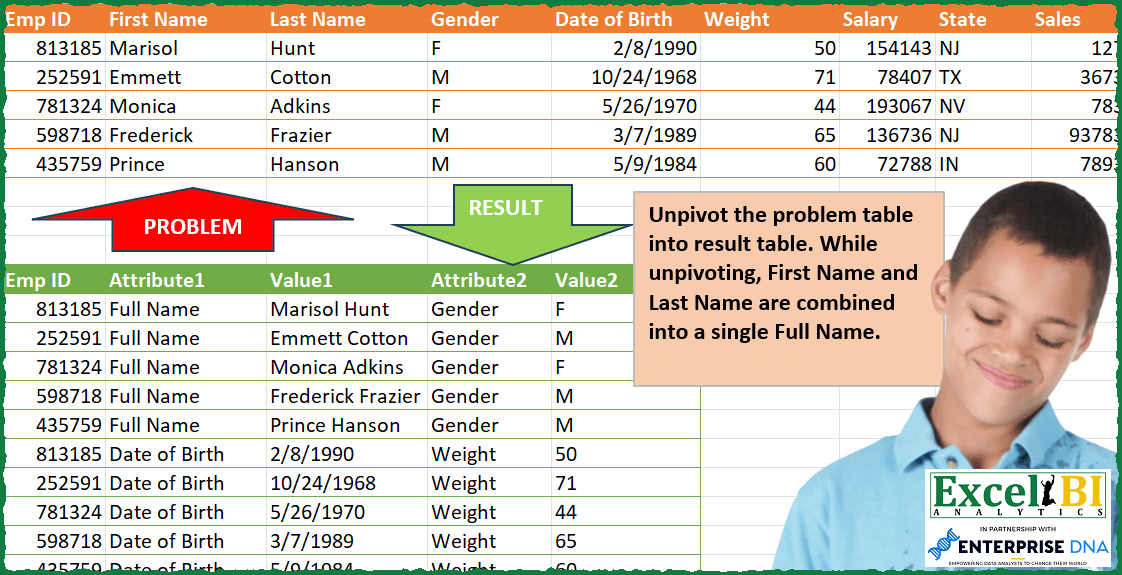
Unpivot the problem table into result table. While unpivoting, First Name and Last Name are combined into a single Full Name.
📌 Challenge Details and Links
ExcelBI Power Query Challenge Number: 132
Challenge Difficulty: ⭐️⭐️⭐️⭐️⭐️
📥Download Sample File
📥Link to the solutions on LinkedIn
Solving the challenge of Unpivot and Merge Names with Power Query
Power Query solution 1 for Unpivot and Merge Names, proposed by Zoran Milokanović:
let
  Source = Table.CombineColumns(
    Excel.CurrentWorkbook(){[Name = "Input"]}[Content],
    {"First Name", "Last Name"},
    each Text.Combine(_, " "),
    "Full Name"
  ),
  r = Table.ToRows(Source),
  h = Table.ColumnNames(Source),
  s = List.Skip,
  c = List.Combine,
  t = List.Transform,
  z = List.Zip,
  p = List.PositionOf,
  S = Table.FromColumns(
    z(
      List.Sort(
        c(t(r, each t(List.Split(c(z({s(h), s(_)})), 4), (t) => {_{0}} & t))),
        {each p(List.Alternate(s(h), 1, 1, 1), _{1}), each p(Source[Emp ID], _{0})}
      )
    ),
    {h{0}} & {"Attribute1", "Value1", "Attribute2", "Value2"}
  )
in
  S
Power Query solution 2 for Unpivot and Merge Names, proposed by Kris Jaganah:
let
 Source = Excel.CurrentWorkbook(){[Name="Table1"]}[Content],
 NameCombine = Table.AddColumn(Source, "Full Name", each [First Name]&" "&[Last Name]),
 TypeChangeDate = Table.TransformColumnTypes(NameCombine,{{"Date of Birth", type date}}),
 Order = Table.ReorderColumns(TypeChangeDate,{"Emp ID", "First Name", "Last Name", "Full Name", "Gender", "Date of Birth", "Salary", "Weight", "State", "Sales"}),
 Unpivot = Table.Unpivot(Order, {"Full Name","Date of Birth", "Salary", "Sales"}, "Attribute1", "Value1"),
 Group = Table.Group(Unpivot, {"Attribute1"}, {{"All", each _, type table [Emp ID=number, First Name=text, Last Name=text, Gender=text, Weight=number, State=text, Attribute=text, Value=any]}}),
 Index = Table.AddColumn(Group, "Custom", each Table.AddIndexColumn([All],"Idx",1,1)),
 Xpand = Table.ExpandTableColumn(Index, "Custom", {"Emp ID", "First Name", "Last Name", "Gender", "Weight", "State", "Value1", "Idx"}, {"Emp ID", "First Name", "Last Name", "Gender", "Weight", "State", "Value1", "Idx"}),
Power Query solution 3 for Unpivot and Merge Names, proposed by Alejandro Simón 🇵🇦 🇪🇸:
let
  Source = Excel.CurrentWorkbook(){[Name = "Table1"]}[Content],
  Merge = Table.CombineColumns(
    Source,
    {"First Name", "Last Name"},
    Combiner.CombineTextByDelimiter(" ", QuoteStyle.None),
    "Full Name"
  ),
  Tabla2 = Table.SelectColumns(Merge, {"Emp ID", "Gender", "Weight", "State"}),
  Unpivot = Table.UnpivotOtherColumns(Tabla2, {"Emp ID"}, "Attribute2", "Value2"),
  SortTable2 = Table.Sort(
    Unpivot,
    {
      each List.PositionOf(List.Skip(Table.ColumnNames(Tabla2)), [Attribute2]),
      each List.PositionOf(Source[Emp ID], [Emp ID])
    }
  ),
  Tabla1 = Table.SelectColumns(Merge, {"Emp ID", "Full Name", "Date of Birth", "Salary", "Sales"}),
  Unpivot1 = Table.UnpivotOtherColumns(Tabla1, {"Emp ID"}, "Attribute1", "Value1"),
  SortTable1 = Table.Sort(
    Unpivot1,
    {
      each List.PositionOf(List.Skip(Table.ColumnNames(Tabla1)), [Attribute1]),
      each List.PositionOf(Source[Emp ID], [Emp ID])
    }
  ),
  Sol = Table.FromColumns(
    Table.ToColumns(SortTable1) & List.Skip(Table.ToColumns(SortTable2)),
    Table.ColumnNames(Unpivot1) & List.Skip(Table.ColumnNames(Unpivot))
  )
in
  Sol
Power Query solution 4 for Unpivot and Merge Names, proposed by Luan Rodrigues:
let
  Fonte = Tabela1,
  names = Table.CombineColumns(
    Fonte,
    {"First Name", "Last Name"},
    Combiner.CombineTextByDelimiter(" ", QuoteStyle.None),
    "Full Name"
  ),
  tab1 = Table.UnpivotOtherColumns(
    names,
    {"Emp ID", "Full Name", "Date of Birth", "Salary", "Sales"},
    "Atributo",
    "Valor"
  ),
  tab2 = Table.RemoveColumns(
    Table.UnpivotOtherColumns(names, {"Emp ID", "Gender", "Weight", "State"}, "Atributo", "Valor"),
    {"Gender", "Weight", "State"}
  ),
  tab = Table.AddColumn(
    tab2,
    "Personalizar",
    each [
      a = Table.SelectRows(
        Table.SelectRows(tab1, (x) => [Emp ID] = x[Emp ID] and [Valor] = x[Full Name]),
        each [Atributo] = "Gender"
      )[[Atributo], [Valor]],
      b = Table.SelectRows(
        Table.SelectRows(tab1, (x) => [Emp ID] = x[Emp ID] and [Valor] = x[Date of Birth]),
        each [Atributo] = "Weight"
      )[[Atributo], [Valor]],
      c = Table.SelectRows(
        Table.SelectRows(tab1, (x) => [Emp ID] = x[Emp ID] and [Valor] = x[Salary]),
        each [Atributo] = "State"
      )[[Atributo], [Valor]],
      d = Table.Combine({a, b, c})
    ][d]
  ),
  exp = Table.ExpandTableColumn(tab, "Personalizar", {"Atributo", "Valor"}, {"Atributo2", "Valor2"}),
  res = Table.Combine(Table.Group(exp, {"Atributo"}, {{"Contagem", each _}})[Contagem])
in
  res
Power Query solution 5 for Unpivot and Merge Names, proposed by Ramiro Ayala Chávez:
let
  Origen = Excel.CurrentWorkbook(){[Name = "Tabla1"]}[Content],
  a = Table.TransformColumnTypes(
    Table.CombineColumns(
      Origen,
      {"First Name", "Last Name"},
      Combiner.CombineTextByDelimiter(" "),
      "Full Name"
    ),
    {{"Date of Birth", type date}}
  ),
  b = Table.UnpivotOtherColumns(a, {"Emp ID", "Gender", "Weight", "State"}, "Attribute1", "Value1"),
  c = Table.Group(b, {"Attribute1"}, {{"A", each _}})[[A]],
  d = Table.ColumnNames(a),
  e = Table.TransformColumns(
    c,
    {
      "A",
      each Table.AddColumn(
        _,
        "Attribute2",
        each
          if [Attribute1] = "Full Name" then
            d{2}
          else if [Attribute1] = "Date of Birth" then
            d{4}
          else if [Attribute1] = "Salary" then
            d{6}
          else
            null
      )
    }
  ),
  f = Table.TransformColumns(
    e,
    {
      "A",
      each Table.AddColumn(
        _,
        "Value2",
        each
          if [Attribute1] = "Full Name" then
            [Gender]
          else if [Attribute1] = "Date of Birth" then
            [Weight]
          else if [Attribute1] = "Salary" then
            [State]
          else
            null
      )
    }
  ),
  Sol = Table.Combine(f[A])[[Emp ID], [Attribute1], [Value1], [Attribute2], [Value2]]
in
  Sol
Power Query solution 6 for Unpivot and Merge Names, proposed by Eric Laforce:
lete table

let
 Source = Excel.CurrentWorkbook(){[Name="tData132"]}[Content],
 Prepare = let
 Chg_Date = Table.TransformColumns(Source,{"Date of Birth",
 each Date.ToText(Date.From(_), [Format="dd/MM/yyyy"])}),
 Add_FName = Table.CombineColumns(Chg_Date,{"First Name", "Last Name"},
 Combiner.CombineTextByDelimiter(" ", QuoteStyle.None),"Full Name")
 in Add_FName,
 Transform = let
 Cluster = 2, N = Table.RowCount(Prepare),
 fxCCN = (size)=>List.Accumulate({1..size}, {},
 (s,c)=>s & List.Transform({"Attribute","Value"}, each _&Text.From(c)) ),
 CID = List.Buffer(Prepare[Emp ID]),
 CV = Table.ToColumns(Prepare),
 CA = List.Transform(Table.ColumnNames(Prepare), each List.Repeat({_},N)),
 CAV = List.Combine(List.Skip(List.Zip({CA, CV}))),
 T= List.Accumulate(List.Split(CAV, Cluster*2), {},
 (s,c)=> s & {Table.FromColumns({CID} & c, {"Emp ID"} & fxCCN(List.Count(c)/2))})
 in T,
 Result = Table.Combine(Transform)
in
 Result
Solving the challenge of Unpivot and Merge Names with Excel
Excel solution 1 for Unpivot and Merge Names, proposed by Bo Rydobon 🇹🇭:
=LET(L,LAMBDA(x,IF({1,0},@+x,DROP(x,1))),m,LAMBDA(i,j,IFERROR(HSTACK(A2:A6,L(i),L(j)),"")),VSTACK(m(VSTACK("Full Name",B2:B6&" "&C2:C6),D1:D6),m(E1:E6,F1:F6),m(G1:G6,H1:H6),m(I1:I6,"")))Excel solution 2 for Unpivot and Merge Names, proposed by محمد حلمي:
=TRIM(REDUCE(" "&A10:E10,A2:A6,LAMBDA(a,d,
LET(c,TAKE(d:I2,-1),i,DROP(A1:I1,,3),
s,SEQUENCE(COLUMNS(A1:I6)-6,,,2),SORT(VSTACK(a,
IFNA(HSTACK(d,IFNA(SORTBY(HSTACK(VSTACK(
" Full Name",INDEX(i,s+1)),INDEX(i,s),WRAPROWS(
HSTACK(INDEX(c,,2)&" "&INDEX(c,,3),DROP(c,,3)),2)),{1,3,2,4}),"")),d)),2)))))
Excel solution 3 for Unpivot and Merge Names, proposed by محمد حلمي:
=LET(a,A2:A6,
i,LAMBDA(c,d,i,HSTACK(a,c,d,IF(SEQUENCE(ROWS(a)),i))),
IFNA(SORTBY(VSTACK(i(B2:B6&" "&C2:C6,D2:D6,
HSTACK("Full Name",D1)),i(E2:E6,F2:F6,E1:F1),
i(G2:G6,H2:H6,G1:H1),i(I2:I6,"",I1)),{1,3,5,2,4}),""))
Excel solution 4 for Unpivot and Merge Names, proposed by Sunny Baggu:
=LET(
 _a, HSTACK(A2:A6, B11, B2:B6 & " " & C2:C6, D1, D2:D6),
 _b, HSTACK(A2:A6, E1, TEXT(E2:E6, "m/d/yyy"), F1, F2:F6),
 _c, HSTACK(A2:A6, G1, G2:G6, H1, H2:H6),
 _d, HSTACK(A2:A6, I1, C26:C30),
 _f, LAMBDA(arr,
 TRANSPOSE(SCAN("", TRANSPOSE(arr), LAMBDA(a, v, IFNA(v, a))))
 ),
 IFNA(VSTACK(_f(_a), _f(_b), _f(_c), _d), "")
)
Excel solution 5 for Unpivot and Merge Names, proposed by LEONARD OCHEA 🇷🇴:
=2
=LET(t,A1:I6,r,2,c,ROUNDUP((COLUMNS(t)-1)/r,0),h,INDEX(t,1,),d,DROP(t,1),i,INDEX(d,,1),F,LAMBDA(x,HSTACK(IF(i<>"",INDEX(h,,x)),INDEX(d,,x))),REDUCE(HSTACK(INDEX(t,1,1),TOROW(HSTACK("Attribute","Value")&SEQUENCE(r))),SEQUENCE(c,,,r),LAMBDA(m,n,VSTACK(m,REDUCE(i,SEQUENCE(r),LAMBDA(a,b,HSTACK(a,IFERROR(IF(b+n=2,HSTACK(IF(i<>"","Full Name"),INDEX(d,,2)&" "&INDEX(d,,3)),F(b+n+1)),IF(F(1)<>"","")))))))))
Excel solution 6 for Unpivot and Merge Names, proposed by Edwin Tisnado:
=LET(a,CHOOSECOLS(A1:I6,1,2,3,5,7,9,4,6,8),f,LAMBDA(x,TEXTSPLIT(TEXTJOIN("/",,x),"*","/")),j,VSTACK("Full Name",DROP(CHOOSECOLS(a,2)&" "&CHOOSECOLS(a,3),1)),b,HSTACK(TAKE(a,,1),j,TAKE(a,,-6)),t,f(TOCOL(DROP(TAKE(b,1,5),,1))&"*"&TOROW(DROP(b,1,-7))&"*"&TRANSPOSE(DROP(TAKE(b,,5),1,1))),l,f(TOCOL(TAKE(b,1,-3))&"*"&TRANSPOSE(DROP(b,1,5))),IFNA(HSTACK(CHOOSECOLS(t,2,1,3),l),""))Solving the challenge of Unpivot and Merge Names with Python in Excel
Python in Excel solution 1 for Unpivot and Merge Names, proposed by Owen Price:
Here's one way of doing it with Python:
df = xl("A1:I6", headers=True)
df_left = df.iloc[:, [0] + list(range(1, df.shape[1], 2))].melt(id_vars='Emp ID', var_name='Attribute1', value_name='Value1')
df_right = df.iloc[:,2::2].melt(var_name='Attribute2', value_name='Value2')
pd.concat([df_left, df_right], axis=1)
Solving the challenge of Unpivot and Merge Names with R
R solution 1 for Unpivot and Merge Names, proposed by Konrad Gryczan, PhD:
library(tidyverse)
library(readxl)
input = read_excel("PQ_Challenge_132.xlsx", range = "A1:I6")
test = read_excel("PQ_Challenge_132.xlsx", range = "A10:E30")
result = input %>%
empty = result %>%
 select(1) %>%
 mutate(Attr = NA_character_, Value = NA_character_, `Emp ID` = as.character(`Emp ID`))

rest = result %>%
 mutate(across(everything(), as.character)) %>%
 pivot_longer(-1, names_to = "Attribute", values_to = "Value") %>%
 group_by(`Emp ID`) %>%
 mutate(row = row_number()) %>%
 nest(data = c(Attribute, Value)) %>%
 arrange(row) %>%
 mutate(row_even = if_else(row %% 2 == 0, "2","1" ))
final_one = rest %>%
 filter(row_even == "1") %>%
 unnest(data) %>%
 select(-row_even, -row)
 filter(row_even == "2") %>%
 unnest(data) %>%
 select(-row_even, -row) %>%
 bind_rows(empty)
final = final_one %>%
 select(1,2,3,5,6)
colnames(final) <- c("Emp ID", "Attribute1", "Value1", "Attribute2", "Value2")
&&&