
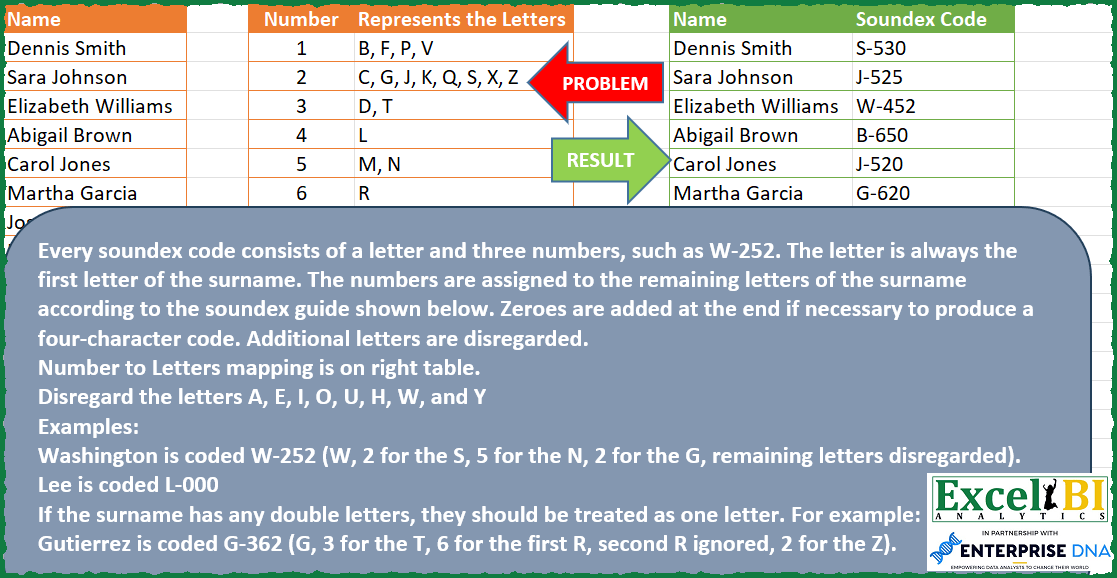
Every Soundex code consists of a letter and three numbers, such as W-252. The letter is always the first letter of the surname. The numbers are assigned to the remaining letters of the surname according to the Soundex guide shown below. Zeroes are added at the end if necessary to produce a four-character code. Additional letters are disregarded. Number to Letters mapping is on right table. Disregard the letters A, E, I, O, U, H, W, and Y Examples: Washington is coded W-252 (W, 2 for the S, 5 for the N, 2 for the G, remaining letters disregarded). Lee is coded L-000 If the surname has any double letters, they should be treated as one letter. For example: Gutierrez is coded G-362 (G, 3 for the T, 6 for the first R, second R ignored, 2 for the Z).
📌 Challenge Details and Links
ExcelBI Power Query Challenge Number: 128
Challenge Difficulty: ⭐️⭐️⭐️
📥Download Sample File
📥Link to the solutions on LinkedIn
Solving the challenge of Generate Soundex Codes with Power Query
Power Query solution 1 for Generate Soundex Codes, proposed by Zoran Milokanović:
let
  Source = G("Table1"),
  G = each Excel.CurrentWorkbook(){[Name = _]}[Content],
  S = Table.AddColumn(
    Source,
    "Soundex Code",
    each
      let
        t = G("Table2"),
        c = Table.ColumnNames(t),
        l = Text.ToList(Text.Upper(Text.Split([Name], " "){1})),
        r = List.ReplaceMatchingItems(
          l,
          Table.ToRows(
            Table.SelectColumns(
              Table.ExpandListColumn(
                Table.TransformColumns(t, {{c{1}, each Text.Split(_, ", ")}}),
                c{1}
              ),
              {c{1}, c{0}}
            )
          )
        )
      in
        Text.Start(
          List.Accumulate(
            {1 .. List.Count(r) - 1},
            l{0} & "-",
            (s, c) => s & (if r{c} <> r{c - 1} and r{c} is number then Text.From(r{c}) else "")
          )
            & "000",
          5
        )
  )
in
  S
Power Query solution 2 for Generate Soundex Codes, proposed by Alejandro Simón 🇵🇦 🇪🇸:
letras dobles, como en el caso de "Williams" (l), y  respetando otras repeticiones como en "Johnson" (n).

let
 T1 = Excel.CurrentWorkbook(){[Name="Table1"]}[Content],
 T2 = List.Transform(Table.ToRows(Table.ExpandListColumn(Table.TransformColumns(Excel.CurrentWorkbook(){[Name="Table2"]}[Content], {"Represents the Letters", each Text.Split(_, ", ")}), "Represents the Letters")), List.Reverse),
 Sol = Table.AddColumn(T1, "Soundex Code", each
 let
 a = Text.Split([Name], " "){1},
 b = Table.Group(Table.FromColumns({Text.ToList(Text.Upper(a))}), {"Column1"}, {"T", each _}, 0)[Column1],
 c = List.RemoveMatchingItems(List.Skip(b), {"A","E","I","O","U","H","W","Y"}),
 d = Text.Start(a,1)&"-"&Text.Start(Text.PadEnd(Text.Combine(List.Transform(List.ReplaceMatchingItems(c, T2), Text.From)), 3, "0"),3)
 in d)
in
 Sol
Power Query solution 3 for Generate Soundex Codes, proposed by Luan Rodrigues:
let
  Fonte = Tabela1,
  des = {"A", "E", "I", "O", "U", "H", "W", "Y"},
  list = List.Zip(
    List.Reverse(
      Table.ToColumns(
        Table.ExpandListColumn(
          Table.TransformColumns(Tabela2, {{"Represents the Letters", each Text.Split(_, ", ")}}),
          "Represents the Letters"
        )
      )
    )
  ),
  res = Table.AddColumn(
    Fonte,
    "Personalizar",
    each [
      a = Text.Split(Text.Lower([Name]), " "){1},
      b = List.FirstN(
        List.RemoveMatchingItems(
          List.RemoveFirstN(Text.ToList(a), 1),
          des,
          Comparer.OrdinalIgnoreCase
        ),
        4
      ),
      c = Table.Group(Table.FromColumns({b}), "Column1", {{"Count", each _}}, GroupKind.Local)[
        Column1
      ],
      d = List.ReplaceMatchingItems(c, list, Comparer.OrdinalIgnoreCase),
      e = Text.Upper(Text.Start(a, 1))
        & "-"
        & Text.Combine(
          List.Transform(
            if List.Count(d) = 4 then
              List.FirstN(d, 3)
            else if List.Count(d) = 2 then
              d & {0}
            else
              d,
            Text.From
          )
        )
    ][e]
  )
in
  res
Power Query solution 4 for Generate Soundex Codes, proposed by Alexis Olson:
let
  NumbersTable = Excel.CurrentWorkbook(){[Name = "Table3"]}[Content],
  SplitColumn = Table.ExpandListColumn(
    Table.TransformColumns(
      NumbersTable,
      {{"Represents the Letters", Splitter.SplitTextByDelimiter(", ")}}
    ),
    "Represents the Letters"
  ),
  T2 = Table.TransformColumnTypes(
    SplitColumn,
    {{"Number", type text}, {"Represents the Letters", type text}}
  ),
  NamesTable = Excel.CurrentWorkbook(){[Name = "Table1"]}[Content],
  AddColumn = Table.AddColumn(
    NamesTable,
    "Custom",
    each [
      Surname = Text.AfterDelimiter([Name], " "),
      First = Text.Start(Surname, 1),
      Remaining = Text.ToList(Text.Upper(Text.Remove(Surname, First))),
      Dedupe = List.Accumulate(Remaining, {}, (s, c) => if List.Last(s) = c then s else s & {c}),
      Letters = List.Select(Dedupe, (X) => List.Contains(T2[Represents the Letters], X)),
      Replacements = List.Zip({T2[Represents the Letters], T2[Number]}),
      Digits = Text.Combine(List.ReplaceMatchingItems(Letters, Replacements)),
      Result = First & "-" & Text.PadEnd(Text.Start(Digits, 3), 3, "0")
    ][Result],
    type text
  )
in
  AddColumn
Power Query solution 5 for Generate Soundex Codes, proposed by Luke Jarych:
let
 Source = Table1,
 DisregardLetters = {"A","E","I","O","U","H","W","Y"},
 SplitSurname = Table.AddColumn(Source, "ListSplit", each Text.ToList(Text.Split(Text.Upper([Name]), " "){1})),
 RemoveNotMatchingLetters = Table.AddColumn (SplitSurname, "RemoveLetters",
 each let
 surname = Text.Split([Name], " "){1},
 a = [ListSplit],
 b = List.RemoveMatchingItems(a, DisregardLetters),
 c = List.ReplaceMatchingItems(b, T2),
 d = List.Distinct(List.FirstN(List.RemoveFirstN(c, 1),3)),
 e = Text.PadEnd(Text.Start(surname,1) & "-" & Text.Combine(List.Transform(d, each Text.From(_)), ""),5,"0")
 in e)
in
 RemoveNotMatchingLetters

and T2:
let
 Source = Excel.CurrentWorkbook(){[Name="Table2"]}[Content],
 AddedCustom = Table.AddColumn(Source, "Split", each Text.Split([Represents the Letters], ", ")),
 ExpandedSplit = List.Reverse(Table.ToColumns(Table.ExpandListColumn(AddedCustom, "Split")[[Number], [Split]])),
 ListZip = List.Zip(ExpandedSplit)
in
 ListZip
Power Query solution 6 for Generate Soundex Codes, proposed by Obi E, MPH:
let
 Source = Excel.CurrentWorkbook(){[Name="Table4"]}[Content],
 Custom1 = Source,
 #"Filtered Rows" = Table.SelectRows(Custom1, each [Number] = 4),
 #"Replaced Value" = Table.ReplaceValue(#"Filtered Rows","L","",Replacer.ReplaceText,{"Represents the Letters"}),
 #"Appended Query" = Table.Combine({Source, #"Replaced Value"}),
 #"Split Column by Delimiter" = Table.ExpandListColumn(Table.TransformColumns(#"Appended Query", {{"Represents the Letters", Splitter.SplitTextByDelimiter(",", QuoteStyle.Csv), let itemType = (type nullable text) meta [Serialized.Text = true] in type {itemType}}}), "Represents the Letters"),
 #"Trimmed Text" = Table.TransformColumns(#"Split Column by Delimiter",{{"Represents the Letters", Text.Trim, type text}}),
 #"Cleaned Text" = Table.TransformColumns(#"Trimmed Text",{{"Represents the Letters", Text.Clean, type text}})
in
 #"Cleaned Text"


          let Source = Excel.CurrentWorkbook(){[Name="Table3"]}[Content], #"Dupl - Pastebin.com
          Pastebin.com is the number one paste tool since 2002. Pastebin is a website where you can store text online for a set period of time.
Solving the challenge of Generate Soundex Codes with Excel
Excel solution 1 for Generate Soundex Codes, proposed by Bo Rydobon 🇹🇭:
=MAP(TEXTAFTER(A2:A11," "),LAMBDA(a,LET(m,MID(a,SEQUENCE(9)+1,1),LEFT(a)&"-"&LEFT(CONCAT(TOCOL(IFS(m<>VSTACK(0,m),MATCH("*"&m&"*",VSTACK("",D2:D7),)-1),3),0,0),3))))Excel solution 2 for Generate Soundex Codes, proposed by Rick Rothstein:
=LET(u,UPPER(TEXTAFTER(A2:A11," ",-1)),t,MID(u,2,99),n,REDUCE(REDUCE(t,MID("AEIOUHWY",SEQUENCE(,8),1),LAMBDA(a,x,SUBSTITUTE(a,x,""))),CHAR(SEQUENCE(26,,65)),LAMBDA(a,x,SUBSTITUTE(a,x&x,x))),LEFT(u)&"-"&MAP(n,LAMBDA(x,LEFT(REDUCE("",MID(x,SEQUENCE(,LEN(x)),1),LAMBDA(a,x,a&MATCH("*"&x&"*",D2:D7,0)))&"000",3))))Excel solution 3 for Generate Soundex Codes, proposed by محمد حلمي:
=MAP(A2:A11,LAMBDA(c,LET(
e,TEXTAFTER(c," "),LEFT(e)&-LEFT(CONCAT(SCAN(,TOCOL(MAP(MID(e,SEQUENCE(
LEN(e)-1,,2),1),LAMBDA(a,TOCOL(SEARCH(a,D2:D7)^0*
C2:C7,2))),2),LAMBDA(a,d,IF(a=d,"",d))),0),3))))
Excel solution 4 for Generate Soundex Codes, proposed by Kris Jaganah:
=HSTACK(A2:A11,MAP(A2:A11,LAMBDA(z,LET(a,TEXTSPLIT(ARRAYTOTEXT(C2:D7),,", "),b,SCAN(1,IFERROR(--a,),LAMBDA(x,y,IF(y=0,x,y))),c,TEXTAFTER(z," "),d,MID(c,SEQUENCE(LEN(c)),1),e,VSTACK(TAKE(d,1),DROP(d,-1)),f,FILTER(d,d<>e),LEFT(TAKE(d,1)&"-"&CONCAT(XLOOKUP(f,a,b,""))&"00",5)))))Excel solution 5 for Generate Soundex Codes, proposed by Sunny Baggu:
=MAP(
 A2:A11,
 LAMBDA(x,
 LET(
 _ta, TEXTAFTER(x, " "),
 _t1, LEFT(_ta),
 _t2, RIGHT(_ta, LEN(_ta) - 1),
 _m, MID(_t2, SEQUENCE(LEN(_t2)), 1),
 _list, FILTER(_m, VSTACK(1, NOT(DROP(_m, -1) = DROP(_m, 1)))),
 _t1 & "-" &
 LEFT(TEXTJOIN("", 1, VSTACK(MAP(_list, LAMBDA(x, FILTER(C2:C7, ISNUMBER(SEARCH(x, D2:D7)), ""))), 0)), 3)
 )
 )
)
Excel solution 6 for Generate Soundex Codes, proposed by LEONARD OCHEA 🇷🇴:
=MAP(A2:A11,LAMBDA(a,LET(b,TEXTAFTER(a," "),s,MID(b,SEQUENCE(LEN(b)-1,,2),1),c,REDUCE(CONCAT(XLOOKUP("*"&s&"*",D2:D7,C2:C7,"",2)),SEQUENCE(9),LAMBDA(a,b,SUBSTITUTE(a,b*11,b))),LEFT(b)&"-"&LEFT(100*c,3))))

with header
=LET(t,A1:A11,HSTACK(t,VSTACK("Soundex Code",MAP(DROP(t,1),LAMBDA(a,LET(b,TEXTAFTER(a," "),s,MID(b,SEQUENCE(LEN(b)-1,,2),1),c,REDUCE(CONCAT(XLOOKUP("*"&s&"*",D2:D7,C2:C7,"",2)),SEQUENCE(9),LAMBDA(a,b,SUBSTITUTE(a,b*11,b))),LEFT(b)&"-"&LEFT(100*c,3)))))))
Excel solution 7 for Generate Soundex Codes, proposed by Stefan Olsson:
=MAP(A2:A11,
LAMBDA(_n,
LET(
_i, REGEXEXTRACT(_n, "([A-Z])[a-z]*$"),
_s, REGEXEXTRACT(_n, "([a-z]*$)"),
_x, SCAN(,REGEXEXTRACT(UPPER(_s), REPT("(.)", LEN(_s))),
LAMBDA(p, _l,
LET(c, IFNA(FILTER(C2:C7, REGEXMATCH(D2:D7, _l)),""), IF(p=c,,c))
)),
LEFT(TEXTJOIN("", 1, _i, "-", _x, "000"), 5)
)))
Excel solution 8 for Generate Soundex Codes, proposed by Edwin Tisnado:
=LEFT(TEXTAFTER(A2:A11," "),1)&BYROW(MAP(MID(MAP(A2:A11,LAMBDA(a,CONCAT(TEXTSPLIT(TEXTAFTER(a," "),{"a","e","i","o","u","h","w","y"},,1)))),{2,3,4},1),LAMBDA(x,IF(x="",0,SUM(NOT(ISERR(SEARCH(x,D2:D7)))*ROW(1:6))))),LAMBDA(f,"-"&CONCAT(f)))Excel solution 9 for Generate Soundex Codes, proposed by Edwin Tisnado:
=MAP(A2:A11,LAMBDA(a,LET(b,TEXTAFTER(a," "),MAP(CONCAT(TEXTSPLIT(b,{"a","e","i","o","u","h","w","y"})),LAMBDA(c,LEFT(b,1)&"-"&CONCAT(MAP(MID(REDUCE("",MID(c,ROW(2:5),1),LAMBDA(x,y,IF(RIGHT(x,1)=y,x,x&y))),{1,2,3},1),LAMBDA(z,IF(z="",0,SUM(NOT(ISERR(SEARCH(z,D2:D7)))*ROW(1:6)))))))))))Excel solution 10 for Generate Soundex Codes, proposed by Hazem Hassan:
=LET(a,TEXTAFTER(A2:A11," "),
LEFT(a)&"-"&LEFT(MAP(MAP(a,LAMBDA(x,CONCAT(TOCOL(VLOOKUP(MID(x,SEQUENCE(LEN(x),,2),1),TRIM(CHOOSECOLS(TEXTSPLIT(CONCAT(SUBSTITUTE(","&D2:D7,",","@"&C2:C7&"*")),"*","@",1),2,1)),2,0),3)))),LAMBDA(x,CONCAT(SCAN(,MID(x,SEQUENCE(LEN(x)),1),LAMBDA(x,y,IF(x=y,"",y))))))&REPT(0,3),3))
Excel solution 11 for Generate Soundex Codes, proposed by Hazem Hassan:
=MAP(TEXTAFTER(A2:A11," "),LAMBDA(Y,LET(a,C2:C7,b,D2:D7,c,CONCAT(TOCOL(IF(FIND(UNIQUE(PROPER(DROP(MID(Y,SEQUENCE(,LEN(Y),2),1),,-1)),1),b)>=1,a,""),3,1)),LEFT(Y)&"-"&LEFT(c&REPT("0",100-LEN(c)),3))))Solving the challenge of Generate Soundex Codes with R
R solution 1 for Generate Soundex Codes, proposed by Konrad Gryczan, PhD:
library(tidyverse)
library(readxl)
names = read_excel("PQ_Challenge_128.xlsx", range = "A1:A11")
mapping_table = read_excel("PQ_Challenge_128.xlsx", range = "C1:D7")
test = read_excel("PQ_Challenge_128.xlsx", range = "F1:G11")
remove_consecutive_doubles <- function(vec) {
 paste(vec[c(TRUE, vec[-1] != vec[-length(vec)])], collapse = "")
}
mapping <- mapping_table %>%
 separate_rows(2, sep = ", ") %>%
 rename(letter = 2) %>%
 mutate(letter = str_to_lower(letter))

part 1/2 (to much characters ;D)
R solution 2 for Generate Soundex Codes, proposed by Konrad Gryczan, PhD:
result <- names %>%
 separate(1, into = c("first_name", "surname"), sep = " ") %>%
 select(surname) %>%
 mutate(
 first_letter = str_sub(surname, 1, 1),
 soundex_code = str_sub(surname, 2) %>%
 str_split("") %>%
 map_chr(~ remove_consecutive_doubles(.x)) %>%
 str_split("") %>%
 map(~ .x[!.x %in% c("a", "e", "i", "o", "u", "h", "w")]) %>%
 map(~ ifelse(.x %in% mapping$letter, as.character(mapping$Number[match(.x, mapping$letter)]), .x)) %>%
 map_chr(~ {
 if (length(.x) < 3) return(str_pad(paste0(.x, collapse = ""), width = 3, side = "right", pad = "0"))
 if (length(.x) > 3) return(str_sub(paste0(.x, collapse = ""), 1, 3))
 return(paste0(.x, collapse = ""))
 })) %>%
 mutate(final_soundex = str_c(first_letter, soundex_code, sep = "-")) %>%
 bind_cols(names, .) %>%
 select(Name = 1,`Soundex Code` = 5)
identical(result, test)
# > TRUE
R solution 3 for Generate Soundex Codes, proposed by Krzysztof Nowak:
 separate_longer_delim(cols = represents_the_letters,delim = ",") |>
 mutate(represents_the_letters = trimws(represents_the_letters))
Solving the challenge of Generate Soundex Codes with DAX
DAX solution 1 for Generate Soundex Codes, proposed by Zoran Milokanović&:
Soundex Code =
VAR n = Table1[Name]
VAR l = LEN(n)
VAR s = UPPER(RIGHT(n, l - FIND(" ", n, 1, 0)))
VAR t1 = GROUPBY(ADDCOLUMNS(GENERATESERIES(2, LEN(s)), "L", MID(s, [Value], 1)), [L])
RETURN LEFT(LEFT(s, 1) & "-" & CONCATENATEX(NATURALINNERJOIN(t2, t1), [Num]) & "000", 5)
&&