
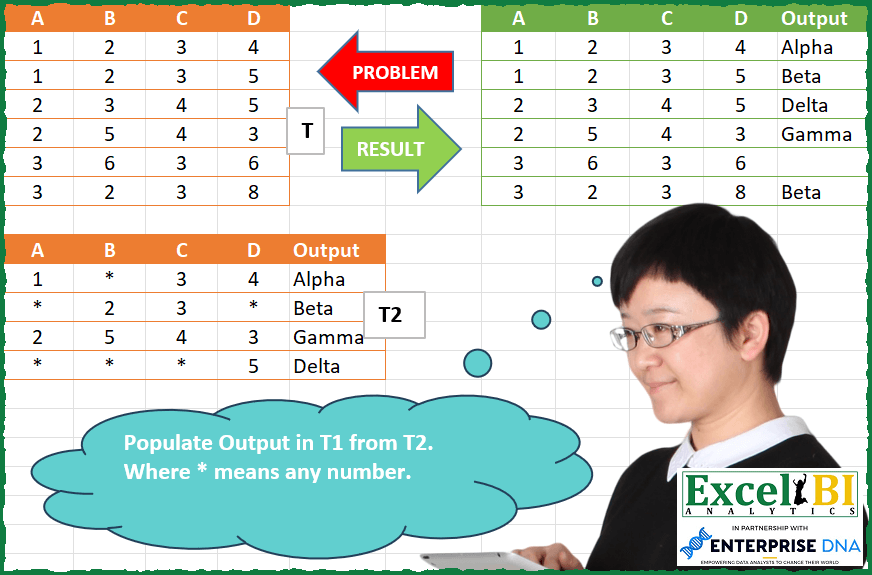
Populate Output in T1 from T2. Where * means any number.
📌 Challenge Details and Links
ExcelBI Power Query Challenge Number: 125
Challenge Difficulty: ⭐️⭐️
📥Download Sample File
📥Link to the solutions on LinkedIn
Solving the challenge of Wildcard Pattern Matching Lookup with Power Query
Power Query solution 1 for Wildcard Pattern Matching Lookup, proposed by Zoran Milokanović:
let
  Source = Excel.CurrentWorkbook(){[Name = "Table1"]}[Content],
  T2 = Excel.CurrentWorkbook(){[Name = "Table2"]}[Content],
  S = Table.AddColumn(
    Source,
    Table.ColumnNames(T2){4},
    each
      let
        t1 = Record.FieldValues(_),
        S  = List.Select
      in
        S(
          List.Sort(Table.ToRows(T2), each List.Count(S(_, (c) => c = "*"))),
          each List.AllTrue(List.Transform(List.Positions(t1), (p) => _{p} = "*" or _{p} = t1{p}))
        ){0}?{4}?
  )
in
  S
Power Query solution 2 for Wildcard Pattern Matching Lookup, proposed by Rick de Groot:
let
  Source1 = Excel.CurrentWorkbook(){[Name = "Table2"]}[Content],
  ChType = Table.TransformColumnTypes(
    Source1,
    let
      t = type text
    in
      {{"A", t}, {"B", t}, {"C", t}, {"D", t}, {"Output", t}}
  ),
  Source2 = Excel.CurrentWorkbook(){[Name = "Table1"]}[Content],
  ChTyp = Table.TransformColumnTypes(
    Source2,
    let
      t = type text
    in
      {{"A", t}, {"B", t}, {"C", t}, {"D", t}}
  ),
  Match = Table.AddColumn(
    ChTyp,
    "JoinTable",
    (x) =>
      Table.First(
        Table.SelectRows(
          ChType,
          each [
            searchvalue  = Text.Combine({[A], [B], [C], [D]}, ""),
            charList     = Text.ToList(Text.Combine({x[A], x[B], x[C], x[D]}, "")),
            _positions   = Text.PositionOf(searchvalue, "*", Occurrence.All),
            retrieveList = List.Difference({0 .. Text.Length(searchvalue)}, _positions),
            extract      = List.Transform(retrieveList, each charList{_}?),
            result       = Text.Remove(searchvalue, {"*"}) = Text.Combine(extract)
          ][result]
        )
      )
  ),
  Exp = Table.ExpandRecordColumn(Match, "JoinTable", {"Output"}, {"Output"})
in
  Exp
Power Query solution 3 for Wildcard Pattern Matching Lookup, proposed by Alejandro Simón 🇵🇦 🇪🇸:
let
  T1 = Excel.CurrentWorkbook(){[Name = "Table1"]}[Content],
  T2 = Excel.CurrentWorkbook(){[Name = "Table2"]}[Content],
  Sol = Table.AddColumn(
    T1,
    "Output",
    each
      let
        a = Record.ToList(_),
        b = T2,
        c = List.PositionOf(
          List.Transform(
            Table.ToRows(b),
            each List.Sum(
              List.Transform(
                {0 .. List.Count(a) - 1},
                (x) => if _{x} = "*" then 1 else Number.From(_{x} = a{x})
              )
            )
          ),
          4
        )
      in
        try T2[Output]{c} otherwise null
  )
in
  Sol
Power Query solution 4 for Wildcard Pattern Matching Lookup, proposed by Luan Rodrigues:
let
  Fonte = T1,
  t2 = Table.AddColumn(
    T2,
    "tab",
    each [
      lt = List.Transform,
      a  = lt(List.RemoveLastN(Record.FieldValues(_)), Text.From),
      b  = lt(List.Zip({a, lt(List.Positions(a), Text.From)}), Text.Combine)
    ][b]
  ),
  t1 = Table.AddColumn(
    T1,
    "tab",
    each [
      lt = List.Transform,
      o  = lt(Record.FieldValues(_), Text.From),
      p  = lt(List.Zip({o, lt(List.Positions(o), Text.From)}), Text.Combine)
    ][p]
  ),
  res = Table.AddColumn(
    t1,
    "Output",
    each Table.SelectRows(
      t2,
      (x) =>
        List.Count(List.Intersect({[tab], x[tab]}))
          = List.Count(List.Select(x[tab], each not Text.Contains(_, "*")))
    )[Output]{0}?
      ?? null
  )
in
  res
Power Query solution 5 for Wildcard Pattern Matching Lookup, proposed by Eric Laforce:
let
 fxListEqual = (l1, l2)=> List.Accumulate(l1, [r=true, i=0],
 (s,c)=>[r=s[r] and (c=l2{s[i]} or c="*"), i=s[i]+1])[r],

 TKO = Excel.CurrentWorkbook(){[Name="tData125_2"]}[Content],
 LKO = List.Transform(Table.ToRows(TKO),
 each {List.RemoveLastN(_), List.Last(_)}) ),
 Source = Excel.CurrentWorkbook(){[Name="tData125"]}[Content],
 Add_O = Table.AddColumn(Source, "Output", each
 List.Accumulate(LKO, null, (s,c)=>
 if(s=null and fxListEqual(c{0},Record.ToList(_))) then c{1} else s))
in
 Add_O
Power Query solution 6 for Wildcard Pattern Matching Lookup, proposed by Obi E, MPH:
let
 Source = Excel.CurrentWorkbook(){[Name="Table1"]}[Content],
 #"Inserted Merged Column" = Table.AddColumn(Source, "Merged", each Text.Combine({Text.From([A], "en-GB"), Text.From([B], "en-GB"), Text.From([C], "en-GB"), Text.From([D], "en-GB")}, ""), type text),
 #"Merged Queries" = Table.NestedJoin(#"Inserted Merged Column", {"Merged"}, T2_, {"Merged"}, "T2", JoinKind.LeftOuter),
 #"Expanded T2" = Table.ExpandTableColumn(#"Merged Queries", "T2", {"Output"}, {"T2.Output"})
in
 #"Expanded T2"


          let Source = Excel.CurrentWorkbook(){[Name="Table2"]}[Content], #"Repl - Pastebin.com
          Pastebin.com is the number one paste tool since 2002. Pastebin is a website where you can store text online for a set period of time.
Power Query solution 7 for Wildcard Pattern Matching Lookup, proposed by Obi E, MPH:
let Source = Excel.CurrentWorkbook(){[Name="Table1"]}[Content], #"Adde - Pastebin.com
          Pastebin.com is the number one paste tool since 2002. Pastebin is a website where you can store text online for a set period of time.
Solving the challenge of Wildcard Pattern Matching Lookup with Excel
Excel solution 1 for Wildcard Pattern Matching Lookup, proposed by Bo Rydobon 🇹🇭:
=VSTACK(A9:E9,HSTACK(A2:D7,BYROW(A2:D7,LAMBDA(r,LET(c,A10:D13,XLOOKUP(4,MMULT(IF(N(+c),N(c=r),1.1),SEQUENCE(4)^0),E10:E13,"",1))))))Excel solution 2 for Wildcard Pattern Matching Lookup, proposed by Bo Rydobon 🇹🇭:
=LET(c,BYROW(A10:D13,LAMBDA(x,SUBSTITUTE(CONCAT(x),"*","?"))),
VSTACK(A9:E9,HSTACK(A2:D7,BYROW(A2:D7,LAMBDA(x,XLOOKUP(1,SEARCH(c,CONCAT(x)),E10:E13,""))))))
Excel solution 3 for Wildcard Pattern Matching Lookup, proposed by محمد حلمي:
=BYROW(A2:D7,LAMBDA(b,LET(v,A10:D13,s,SEQUENCE(4)^0,x,v<>"*",XLOOKUP(TRUE,MMULT(-(b=v)*x,s)=MMULT(-x,s),E10:E13,""))))Excel solution 4 for Wildcard Pattern Matching Lookup, proposed by Sunny Baggu:
=HSTACK(
 A2:D7,
 BYROW(
 A2:D7,
 LAMBDA(y,
 FILTER(
 E10:E13,
 LET(
 _c1, BYROW(
 y = IF(ISNUMBER(A10:D13), A10:D13, 1 / x),
 LAMBDA(a, SUM(N(TOROW(a, 3))) * AND(TOROW(a, 3)))
 ),
 _cri, (MAX(_c1) <> 0) * (_c1 = MAX(_c1)),
 _cri
 ),
 ""
 )
 )
 )
)
Excel solution 5 for Wildcard Pattern Matching Lookup, proposed by JvdV –:
=VSTACK(A9:E9,HSTACK(A2:D7,BYROW(A2:D7,LAMBDA(x,@FILTER(E10:E13,MMULT(IFERROR(SEARCH(A10:D13,x),),{1;1;1;1})=4,"")))))Excel solution 6 for Wildcard Pattern Matching Lookup, proposed by Pieter de Bruijn:
=LET(a,A2:A7&B2:B7&C2:C7&D2:D7,b,A10:A13&B10:B13&C10:C13&D10:D13,c,E10:E13,IFERROR(HSTACK(A2:D7,MAP(a,LAMBDA(x,ARRAYTOTEXT(TOCOL(IFS(XMATCH(b,x,2),c),2))))),""))Excel solution 7 for Wildcard Pattern Matching Lookup, proposed by Ziad A.:
=REDUCE(A9:E9,ROW(1:6),LAMBDA(a,i,LET(d,A10:D13,c,INDEX(A2:D7,i,),VSTACK(a,HSTACK(c,TAKE(FILTER(E10:E13,BYROW((c=d)+(d="*"),LAMBDA(r,AND(r))),""),1))))))Excel solution 8 for Wildcard Pattern Matching Lookup, proposed by Jeff Blakley:
=HSTACK(A1:D7,VSTACK("Output",BYROW(A2:D7,LAMBDA(rw,XLOOKUP(1,BYROW((rw=A10:D13)+(A10:D13="*"),LAMBDA(r,PRODUCT(r))),E10:E13,"")))))Excel solution 9 for Wildcard Pattern Matching Lookup, proposed by Baris Hazar:
=INDEX($E$10:$E$13,MATCH(4,(MMULT(--(G2:J2=SUBSTITUTE($A$10:$D$13,CHAR(42),G2:J2)*1),SEQUENCE(ROWS($E$10:$E$13),,,0))),0))&&&