
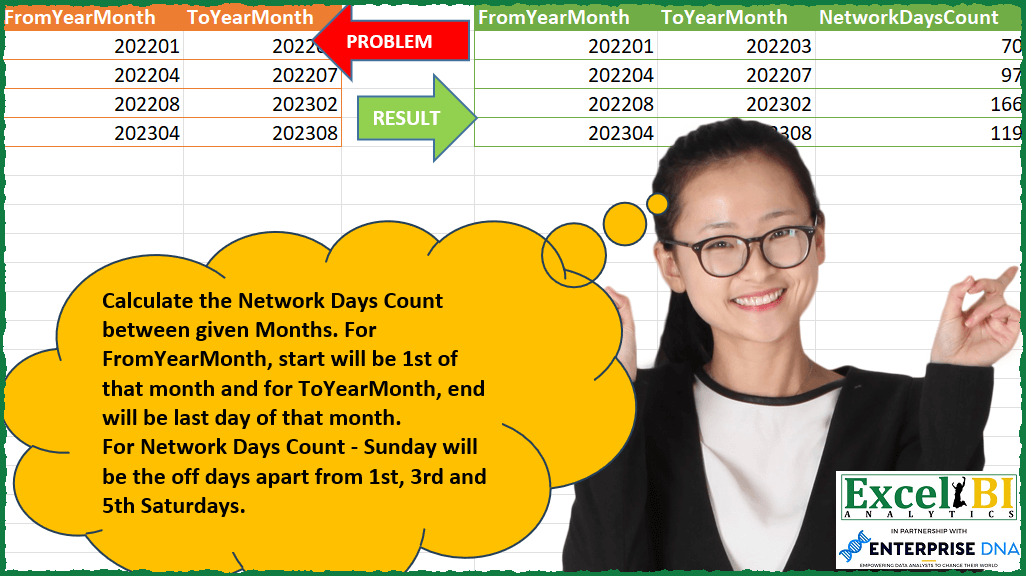
Calculate the Network Days Count between given Months. For FromYearMonth, start will be 1st of that month and for ToYearMonth, end will be last day of that month. For Network Days Count – Sunday will be the off days apart from 1st, 3rd and 5th Saturdays.
📌 Challenge Details and Links
ExcelBI Power Query Challenge Number: 124
Challenge Difficulty: ⭐️⭐️⭐️
📥Download Sample File
📥Link to the solutions on LinkedIn
Solving the challenge of Network Days Between Year-Months with Power Query
Power Query solution 1 for Network Days Between Year-Months, proposed by Zoran Milokanović:
let
  Source = Excel.CurrentWorkbook(){[Name = "Input"]}[Content],
  C = each Date.FromText(Text.From(_), [Format = "yyyyMM"]),
  W = each Date.DayOfWeek(_, 1),
  S = Table.AddColumn(
    Source,
    "NetworkDaysCount",
    each List.Count(
      List.Select(
        List.Dates(
          C([FromYearMonth]),
          Duration.Days(Date.EndOfMonth(C([ToYearMonth])) - C([FromYearMonth])) + 1,
          Duration.From(1)
        ),
        each not (W(_) = 6 or (W(_) = 5 and List.Contains({1, 3, 5}, Date.WeekOfMonth(_))))
      )
    )
  )
in
  S
Power Query solution 2 for Network Days Between Year-Months, proposed by Alejandro Simón 🇵🇦 🇪🇸:
let
  Source = Excel.CurrentWorkbook(){[Name = "Table1"]}[Content],
  Sol = Table.AddColumn(
    Source,
    "NetworkDayCount",
    each
      let
        a = Date.FromText(Text.From([FromYearMonth]) & "01"),
        b = Date.EndOfMonth(Date.FromText(Text.From([ToYearMonth]) & "01")),
        c = List.Transform({Number.From(a) .. Number.From(b)}, Date.From),
        d = List.Select(c, each Date.DayOfWeek(_) <> 0),
        e = List.Select(
          List.Transform(d, each {_} & {Date.Month(_)}),
          each Date.DayOfWeek(_{0}) = 6
        ),
        f = Table.Combine(
          Table.Group(
            Table.FromRows(e),
            {"Column2"},
            {"A", each Table.AlternateRows(_, 0, 1, 1)[[Column1]]}
          )[A]
        )[Column1],
        g = List.Select(d, each Date.DayOfWeek(_) <> 6) & f,
        h = List.Count(g)
      in
        h
  )
in
  Sol
Power Query solution 3 for Network Days Between Year-Months, proposed by Eric Laforce:
let
 fxDateFrom = each Date.FromText(Text.From(_), [Format="yyyyMM"]),

 Source = Excel.CurrentWorkbook(){[Name="tData124"]}[Content],
 AddCol = Table.AddColumn(Source, "NetworkDayCount", each let
 _From = fxDateFrom([FromYearMonth]),
 _To = Date.EndOfMonth(fxDateFrom([ToYearMonth])),
 _Days = List.Select(
 List.Dates(_From, Duration.Days(_To - _From)+1, hashtag#duration(1,0,0,0)),
 each let
 _DW = Date.DayOfWeek(_, Day.Monday),
 _WM = Date.WeekOfMonth(_, Day.Monday)
 in not(_DW=6 or (_DW=5 and List.Contains({1,3,5}, _WM))) )
 in List.Count(_Days) )
in
 AddCol
Power Query solution 4 for Network Days Between Year-Months, proposed by Sandeep Marwal:
let
 Source = Excel.CurrentWorkbook(){[Name="Table1"]}[Content],
 S1 = Table.TransformColumnTypes(Source,{{"FromYearMonth", type text}, {"ToYearMonth", type text}}),
 S2 = Table.AddColumn(S1,"listofdate", each
List.Dates(hashtag#date(Number.From(Text.Start([FromYearMonth],4)),Number.From(Text.End([FromYearMonth],2)),1),1 + Duration.Days(Date.EndOfMonth(hashtag#date(Number.From(Text.Start([ToYearMonth],4)),Number.From(Text.End([ToYearMonth], 2)),1))-hashtag#date(Number.From(Text.Start([FromYearMonth],4)),Number.From(Text.End([FromYearMonth],2)),1)),hashtag#duration(1,0,0,0))),
 S3 = Table.TransformColumns(S2,{"listofdate",each
[#"Converted to Table" = Table.FromList(_, each {_,Date.DayOfWeekName(_),Date.MonthName(_)},{"Date","Day","Month"}),
 #"Grouped Rows" = Table.Group(#"Converted to Table", {"Month", "Day"}, {{"Count", each _}})[Count],
 Custom2 = Table.Combine(List.Transform(#"Grouped Rows",each Table.SelectRows(Table.AddIndexColumn(_, "Index", 1, 1, Int64.Type), each not((([Index] = 1 or [Index] = 3 or [Index] = 5) and ([Day] = "Saturday")))))),
 Custom4=Table.RowCount(Table.SelectRows(Custom2, each ([Day] <> "Sunday")))
 ][Custom4]
 })
in
 S3
Power Query solution 5 for Network Days Between Year-Months, proposed by Challa Sai Kumar Reddy:
let
  Source = Excel.CurrentWorkbook(){[Name = "tData124"]}[Content],
  AddCol = Table.AddColumn(
    Source,
    "NetworkDayCount",
    each
      let
        FromDate = Date.FromText(Text.From([FromYearMonth]), [Format = "yyyyMM"]),
        ToDate = Date.EndOfMonth(Date.FromText(Text.From([ToYearMonth]), [Format = "yyyyMM"])),
        DaysList = List.Dates(FromDate, Duration.From(ToDate - FromDate) + Duration(1, 0, 0, 0)),
        NetworkDays = List.Select(
          DaysList,
          each Date.DayOfWeek(_, Day.Monday)
            <> 6
              and (
                Date.DayOfWeek(_, Day.Monday)
                  <> 5 or not List.Contains({1, 3, 5}, Date.WeekOfMonth(_))
              )
        )
      in
        List.Count(NetworkDays)
  )[[NetworkDayCount]]
in
  AddCol
Solving the challenge of Network Days Between Year-Months with Excel
Excel solution 1 for Network Days Between Year-Months, proposed by Bo Rydobon 🇹🇭:
=LET(a,TEXT(A2:A5,"0-00-1"),b,EDATE(TEXT(B2:B5,"0-00-1"),1),NETWORKDAYS(a,b-1)+DATEDIF(a,b,"m")*2)Excel solution 2 for Network Days Between Year-Months, proposed by محمد حلمي:
=MAP(A2:A5,B2:B5,LAMBDA(a,b,LET(c,"0-00-00",
h,TEXT(a&"01",c),w,TEXT(1+b&"01",c)-1,
i,SEQUENCE(w-h+1,,h),e,DAY(i),NETWORKDAYS(h,w)+
SUM(--((WEEKDAY(i)=7)*((e>7)*(e<15)+(e>21)*(e<29)))))))
Excel solution 3 for Network Days Between Year-Months, proposed by 🇰🇷 Taeyong Shin:
=MAP(TEXT(A2:A5,"00-00"),TEXT(B2:B5+1,"00-00")-1,LAMBDA(a,b,NETWORKDAYS(a,b)+COUNT(WORKDAY.INTL(EDATE(a,SEQUENCE(DATEDIF(a,b,"M")+1,,0))-1,{2,4},"1111101"))))Excel solution 4 for Network Days Between Year-Months, proposed by Oscar Mendez Roca Farell:
=LET(_d, EOMONTH(TEXT(A2:B5, "0-00-1"), {-1, 0})+{1, 0},_i, TAKE(_d, ,1), _f, DROP(_d, ,1), NETWORKDAYS(_i,_f)+2*(DATEDIF(_i,_f, "m")+1))Solving the challenge of Network Days Between Year-Months with Python in Excel
Python in Excel solution 1 for Network Days Between Year-Months, proposed by 🇰🇷 Taeyong Shin:
df = xl("A1:B5", headers=True)
df['FromYearMonth'] = pd.to_datetime(df['FromYearMonth'], format='%Y%m')
df['ToYearMonth'] = pd.to_datetime(df['ToYearMonth'], format='%Y%m') + pd.offsets.MonthEnd()
 sat = pd.date_range(start, end, freq="W-SAT")
 sat_count = (
 sat.to_series()
 .resample(rule="M")
 .apply(func=lambda x: len(x.iloc[list(filter(lambda i: i < len(x), np.array(nth) - 1))])).sum()
 )
 return pd.date_range(start, end, freq="B").size + sat_count
df.assign(
 axis=1,
 )
)
&&&