
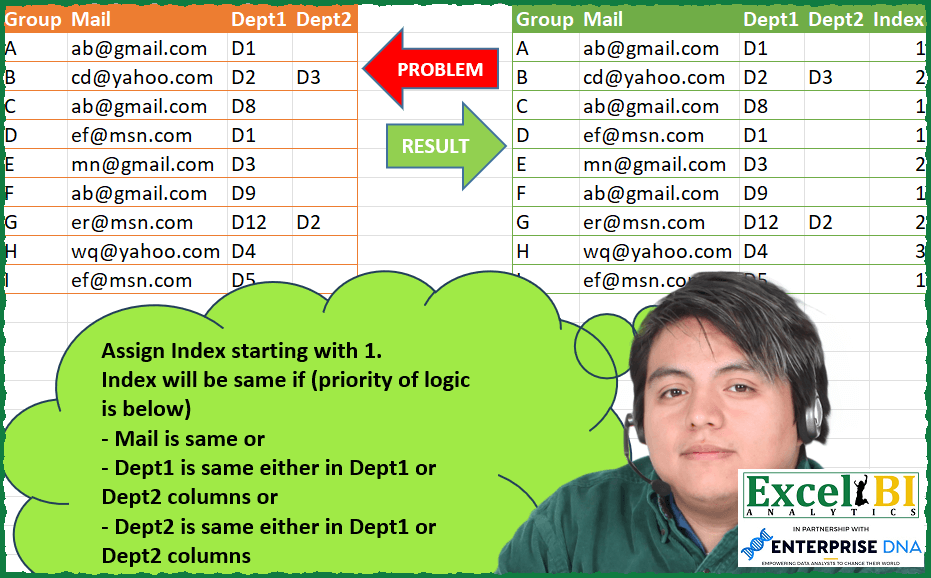
Assign Index starting with 1. Index will be same if (priority of logic is below) – Mail is same or – Dept1 is same either in Dept1 or Dept2 columns or – Dept2 is same either in Dept1 or Dept2 columns
📌 Challenge Details and Links
ExcelBI Power Query Challenge Number: 118
Challenge Difficulty: ⭐️⭐️⭐️⭐️⭐️
📥Download Sample File
📥Link to the solutions on LinkedIn
Solving the challenge of Index by Department or Mail with Power Query
Power Query solution 1 for Index by Department or Mail, proposed by Bo Rydobon 🇹🇭:
let
  Source = Excel.CurrentWorkbook(){[Name = "Table1"]}[Content],
  Ans = Table.FromRows(
    List.Accumulate(
      Table.ToRows(Source),
      {},
      (s, l) =>
        if s = {} then
          {l & {1}}
        else
          s
            & {
              l
                & {
                  List.Select(
                    s,
                    each _{1}
                      = l{1}
                        or List.Contains(List.Range(_, 2, 2), l{2})
                        or (l{3} <> null and List.Contains(List.Range(_, 2, 2), l{3}))
                  ){0}?{4}?
                    ?? List.Max(List.Zip(s){4})
                    + 1
                }
            }
    ),
    Table.ColumnNames(Source) & {"Index"}
  )
in
  Ans
Power Query solution 2 for Index by Department or Mail, proposed by Zoran Milokanović:
let
  Source = Excel.CurrentWorkbook(){[Name = "Input"]}[Content],
  S = Table.FromRows(
    List.Accumulate(
      Table.ToRows(Source),
      {},
      (s, c) =>
        s
          & {
            let
              f = List.Select(
                s,
                each _{1} = c{1} or List.ContainsAny({_{2}, _{3}? ?? ""}, {c{2}, c{3}})
              )
            in
              c & {if List.Count(f) > 0 then f{0}{4} else List.Last(s, {"", "", "", "", 0}){4} + 1}
          }
    ),
    Table.ColumnNames(Source) & {"Index"}
  )
in
  S
Power Query solution 3 for Index by Department or Mail, proposed by Luan Rodrigues:
let
  Fonte = Tabela1,
  dp = [
    a = List.RemoveNulls(Fonte[Dept2]),
    b = Table.FromColumns(
      {
        List.Transform(
          List.Select(
            List.Transform(
              Fonte[Mail],
              (x) => {x} & {List.Count(List.Select(Fonte[Mail], each x = _))}
            ),
            each _{1} = 1
          ),
          each _{0}
        )
      },
      {"Mail"}
    ),
    c = Table.ExpandListColumn(Table.AddColumn(b, "dp", each a), "dp")
  ][c],
  res = Table.AddColumn(
    Fonte,
    "Index",
    each [
      a = try
        if Table.SelectRows(dp, (x) => [Mail] = x[Mail])[Mail]{0} <> null then 3 else 1
      otherwise
        1,
      b = try

          if Table.SelectRows(dp, (x) => [Mail] = x[Mail] and ([Dept1] = x[dp] or [Dept2] = x[dp]))[
            Mail
          ]{0}
            <> null
          then
            2
          else
            1
      otherwise
        a
    ][b]
  )
in
  res
Power Query solution 4 for Index by Department or Mail, proposed by Eric Laforce:
let
  Source = Excel.CurrentWorkbook(){[Name = "tData118"]}[Content],
  Transform = List.Accumulate(
    Table.ToRecords(Source),
    [Done = {}, Index = 0],
    (s, c) =>
      let
        _d2 = List.RemoveNulls({c[Dept1], c[Dept2]}),
        _Select = List.Select(
          s[Done],
          each [Mail] = c[Mail] or List.Contains(_d2, [Dept1]) or List.Contains(_d2, [Dept2])
        ),
        _i = if List.IsEmpty(_Select) then s[Index] + 1 else _Select{0}[Index]
      in
        [Done = s[Done] & {Record.AddField(c, "Index", _i)}, Index = List.Max({_i, s[Index]})]
  ),
  ToTable = Table.FromRecords(Transform[Done])
in
  ToTable
Solving the challenge of Index by Department or Mail with Excel
Excel solution 1 for Index by Department or Mail, proposed by Bo Rydobon 🇹🇭:
=DROP(REDUCE(0,B2:B10,LAMBDA(a,v,LET(b,D1:v,c,TAKE(b,-1),p,DROP(b,-1),VSTACK(a,IF(SUM(COUNTIF(p,c)),@TOCOL(XLOOKUP(c,TOCOL(p),TOCOL(IF(p>0,a))),3),MAX(a)+1))))),1)Excel solution 2 for Index by Department or Mail, proposed by محمد حلمي:
=SCAN(0,REDUCE(0,ROW(1:5),LAMBDA(a,d,LET(
v,{1,1;2,2;3,3;2,3;3,2},
b,B2:D10,a+(COUNTIF(INDEX(b,,INDEX(v,d,1)),
INDEX(b,,INDEX(v,d,2)))>1)))),
LAMBDA(a,d,IF(d,1,1+a)))

////
=LET(
b,B2:B10,
d,D2:D10,
c,C2:C10,
i,LAMBDA(x,u,COUNTIF(x,u)),
SCAN(0,BYROW(HSTACK(i(b,b),i(d,d),i(c,c),i(c,d),i(d,c)),
LAMBDA(a,OR(a>1))),LAMBDA(a,v,IF(v,1,1+a))))
Excel solution 3 for Index by Department or Mail, proposed by محمد حلمي:
=SCAN(0,COUNTIF(G2:G10,G2:G10)>1,LAMBDA(a,d,IF(d,1,a+1)))Excel solution 4 for Index by Department or Mail, proposed by Sunny Baggu:
=LET(
 mail, B2:B10,
 _D1, C2:C10,
 _D2, D2:D10,
 _cond, MAP(
 mail,
 _D1,
 _D2,
 LAMBDA(a, b, c,
 OR(
 ROWS(TOCOL(IF(mail = a, 1, 1 / x), 3)) > 1,
 ROWS(TOCOL(IF(_D1 = b, 1, 1 / x), 3)) > 1,
 IF(c = "", FALSE, ROWS(TOCOL(IF(_D2 = c, 1, 1 / x), 3)) > 1)
 )
 )
 ),
 SCAN(0, _cond, LAMBDA(a, v, IF(v, 1, a + 1)))
)
Excel solution 5 for Index by Department or Mail, proposed by samir tobeil:
=LET(b,B2:B10,c,C2:C10,d,D2:D10,x,COUNTIF(C2:D10,c),y,COUNTIF(C2:D10,d),
IFS(COUNTIF(b,b)>1,1,COUNTIF(c,c)>1,1,COUNTIF(d,d)>1,1,x>1,x,y>1,y,1,3))
Excel solution 6 for Index by Department or Mail, proposed by ASHFAQUE AHMED:
= Table.PrevNRows(#"YourTable", [Index], 1)Solving the challenge of Index by Department or Mail with Python in Excel
Python in Excel solution 1 for Index by Department or Mail, proposed by Bo Rydobon 🇹🇭:
b=[]
for a in xl("A2:D10").values:
 if not b: b.append(a.tolist()+[1])
 else:
 d = [c for c in b if c[1]==a[1] or a[2] in c[2:4] or (a[3] is not None and a[3] in c[2:4])]
 b.append(a.tolist()+([np.array(b)[:,4].max()+1] if not d else [d[0][4]]))

pd.DataFrame(b).fillna('')
&&&