
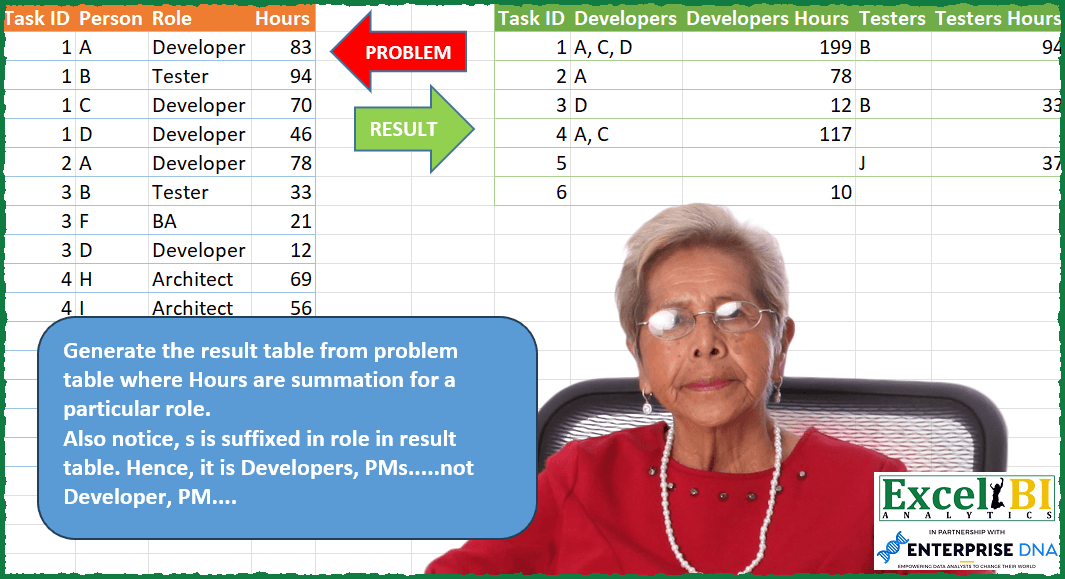
Generate the result table from problem table where Hours are summation for a particular role. Also notice, s is suffixed in role in result table. Hence, it is Developers, PMs…..not Developer, PM….
📌 Challenge Details and Links
ExcelBI Power Query Challenge Number: 112
Challenge Difficulty: ⭐️⭐️⭐️⭐️⭐️
📥Download Sample File
📥Link to the solutions on LinkedIn
Solving the challenge of Summarize Hours by Role Title with Power Query
Power Query solution 1 for Summarize Hours by Role Title, proposed by Bo Rydobon 🇹🇭:
let
  Source = Excel.CurrentWorkbook(){[Name = "Table1"]}[Content],
  Group = Table.Pivot(
    Table.Group(
      Source,
      {"Task ID", "Role"},
      {"V", each {Text.Combine([Person], ", "), List.Sum([Hours])}}
    ),
    List.Distinct(Source[Role]),
    "Role",
    "V"
  ),
  Ans = Table.FromRows(
    List.Transform(
      Table.ToRows(Group),
      each List.Combine(
        List.Transform(
          _,
          each if Value.Is(_, type number) then {_} else if _ = null then {null, null} else _
        )
      )
    ),
    {"Task ID"}
      & List.Combine(List.Transform(List.Distinct(Source[Role]), each {_ & "s", _ & "s Hours"}))
  )
in
  Ans
Power Query solution 2 for Summarize Hours by Role Title, proposed by Zoran Milokanović:
let
  Source = Excel.CurrentWorkbook(){[Name = "Input"]}[Content],
  G = Table.Group(
    Source,
    {"Task ID", "Role"},
    {{"Person", each Text.Combine([Person], ", ")}, {"Hours", each List.Sum([Hours])}}
  ),
  U = Table.UnpivotOtherColumns(G, {"Task ID", "Role"}, "A", "V"),
  M = Table.CombineColumns(
    U,
    {"Role", "A"},
    each _{0} & "s" & (if _{1} = "Hours" then " " & _{1} else ""),
    "P"
  ),
  S = Table.Pivot(M, List.Distinct(M[P]), "P", "V")
in
  S
Power Query solution 3 for Summarize Hours by Role Title, proposed by Rick de Groot:
let
  Source = Ch,
  Group = Table.Group(
    Source,
    {"Task ID", "Role"},
    {{"Record", each {Text.Combine([Person], ", "), List.Sum([Hours])}}}
  ),
  ExpList = Table.ExpandListColumn(Group, "Record"),
  AddIndex = Table.AddIndexColumn(ExpList, "Index", 1, 1, Int64.Type),
  Repl = Table.ReplaceValue(
    AddIndex,
    each [Role],
    each if Number.IsOdd([Index]) then [Role] & "s" else [Role] & " Hours",
    Replacer.ReplaceText,
    {"Role"}
  ),
  Remove = Table.RemoveColumns(Repl, {"Index"}),
  Piv = Table.Pivot(Remove, List.Distinct(Remove[Role]), "Role", "Record")
in
  Piv
Power Query solution 4 for Summarize Hours by Role Title, proposed by Alejandro Simón 🇵🇦 🇪🇸:
let
  Source = Excel.CurrentWorkbook(){[Name = "Table1"]}[Content],
  GroupTR = Table.Group(
    Source,
    {"Task ID", "Role"},
    {
      {
        "All",
        each Table.FromRows(
          {{Text.Combine([Person], ",")} & {List.Sum([Hours])}},
          {_[Role]{0} & "s", _[Role]{0} & "s Hours"}
        )
      }
    }
  ),
  Expand = Table.RemoveColumns(
    Table.ExpandTableColumn(GroupTR, "All", Table.ColumnNames(Table.Combine(GroupTR[All]))),
    "Role"
  ),
  Group2 = Table.Group(
    Expand,
    {"Task ID"},
    {
      {
        "All",
        each Table.FromColumns(
          List.Transform(List.Skip(Table.ToColumns(_)), each List.Select(_, (x) => x <> null)),
          List.Skip(Table.ColumnNames(_))
        )
      }
    }
  ),
  Sol = Table.ExpandTableColumn(Group2, "All", Table.ColumnNames(Group2[All]{0}))
in
  Sol
Power Query solution 5 for Summarize Hours by Role Title, proposed by Alejandro Simón 🇵🇦 🇪🇸:
let
  Source = Excel.CurrentWorkbook(){[Name = "Table1"]}[Content],
  Group = Table.Combine(
    Table.Group(
      Source,
      {"Role"},
      {
        {
          "All",
          each
            let
              a = Table.Group(
                _,
                {"Task ID"},
                {
                  {
                    "All1",
                    (x) =>
                      let
                        b = x,
                        c = Table.ToColumns(b),
                        d = Table.FromRows(
                          {{c{0}{0}} & {Text.Combine(c{1}, ", ")} & {List.Sum(c{3})}},
                          {"Task ID", b[Role]{0} & "s", b[Role]{0} & "s Hours"}
                        )
                      in
                        d
                  }
                }
              )
            in
              a
        }
      }
    )[All]
  ),
  Group2 = Table.Sort(
    Table.Combine(
      Table.Group(
        Group,
        {"Task ID"},
        {
          {
            "All2",
            each
              let
                z = Table.Combine([All1]),
                a = Table.RemoveColumns(z, "Task ID"),
                b = List.Combine(List.Transform(Table.ToRows(a), List.RemoveNulls)),
                c = Table.FromRows({{z[Task ID]{0}} & b}, {"Task ID"} & Table.ColumnNames(a))
              in
                c
          }
        }
      )[All2]
    ),
    {{"Task ID", Order.Ascending}}
  )
in
  Group2
Power Query solution 6 for Summarize Hours by Role Title, proposed by Luan Rodrigues:
let
  Fonte = Tabela1,
  gp = Table.Group(
    Fonte,
    {"Task ID"},
    {
      {
        "Contagem",
        each Table.ToRows(
          Table.Group(
            _,
            {"Role"},
            {{"Soma", each List.Sum(_[Hours])}, {"Role2", each Text.Combine(_[Person], ", ")}}
          )
        )
      }
    }
  ),
  trf = Table.TransformColumns(
    gp,
    {
      {
        "Contagem",
        each [
          w = List.Combine(
            List.Transform(
              _,
              (x) =>
                Record.ToList(
                  [
                    a = List.Transform({x}, (y) => y{0} & "s"){0},
                    b = List.Transform({x}, (y) => y{0} & "s Hours"){0}
                  ]
                )
            )
          ),
          y = List.Combine(List.Transform(_, (x) => List.Reverse(List.RemoveFirstN(x, 1)))),
          z = Table.FromColumns({w, y}),
          u = Table.Pivot(z, List.Distinct(z[Column1]), "Column1", "Column2")
        ][u]
      }
    }
  ),
  res = Table.ExpandTableColumn(
    trf,
    "Contagem",
    List.Distinct(List.Combine(List.Transform(trf[Contagem], Table.ColumnNames)))
  )
in
  res
Power Query solution 7 for Summarize Hours by Role Title, proposed by Hussein SATOUR:
let
  Source = Excel.CurrentWorkbook(){[Name = "Table1"]}[Content],
  AddS = Table.TransformColumns(Source, {{"Role", each _ & "s", type text}}),
  #"Changed Type" = Table.TransformColumnTypes(AddS, {{"Hours", Int64.Type}}),
  Group = Table.Group(
    #"Changed Type",
    {"Task ID", "Role"},
    {
      {"", each Text.Combine(_[Person], ", "), type nullable text},
      {" Hours", each List.Sum([Hours]), type nullable number}
    }
  ),
  Unpivoted = Table.UnpivotOtherColumns(Group, {"Task ID", "Role"}, "Attribute", "Value"),
  Merge = Table.CombineColumns(
    Unpivoted,
    {"Role", "Attribute"},
    Combiner.CombineTextByDelimiter("", QuoteStyle.None),
    "Merged"
  ),
  PivotCols = Table.Pivot(Merge, List.Distinct(Merge[Merged]), "Merged", "Value")
in
  PivotCols
Power Query solution 8 for Summarize Hours by Role Title, proposed by Eric Laforce:
let
  Source = Excel.CurrentWorkbook(){[Name = "tData112"]}[Content],
  Group = Table.Group(
    Source,
    {"Task ID"},
    {
      "Data",
      each
        let
          _G = Table.Group(
            _,
            {"Role"},
            {
              "R",
              each
                let
                  _R = [Role]{0} & "s",
                  _F = {_R, _R & " Hours"},
                  _V = {Text.Combine([Person], ", "), List.Sum([Hours])}
                in
                  Record.FromList(_V, _F)
            }
          )
        in
          Record.Combine(_G[R])
    }
  ),
  Expand = Table.ExpandRecordColumn(
    Group,
    "Data",
    List.Union(List.Transform(Group[Data], each Record.FieldNames(_)))
  )
in
  Expand
Power Query solution 9 for Summarize Hours by Role Title, proposed by Eric Laforce:
let
  Source = Excel.CurrentWorkbook(){[Name = "tData112"]}[Content],
  Group1 = Table.Group(
    Source,
    {"Task ID", "Role"},
    {
      "R",
      each Record.FromList(
        {Text.Combine([Person], ", "), List.Sum([Hours])},
        {[Role]{0} & "s", [Role]{0} & " Hours"}
      )
    }
  ),
  Group2 = Table.Group(Group1, {"Task ID"}, {"R", each Record.Combine([R])}),
  Expand = Table.ExpandRecordColumn(
    Group2,
    "R",
    List.Union(List.Transform(Group2[R], each Record.FieldNames(_)))
  )
in
  Expand
Power Query solution 10 for Summarize Hours by Role Title, proposed by Sandeep Marwal:
let
  Source = Excel.CurrentWorkbook(){[Name = "Table1"]}[Content],
  S1     = Table.RemoveColumns(Source, {"Hours"}),
  S2     = Table.Pivot(S1, List.Distinct(S1[Role]), "Role", "Person", each Text.Combine(_, ",")),
  S3     = Table.UnpivotOtherColumns(S2, {"Task ID"}, "Attribute", "Value"),
  S4     = Table.TransformColumns(S3, {{"Attribute", each _ & "s", type text}}),
  S5     = Table.RemoveColumns(Source, {"Person"}),
  S6     = Table.Pivot(S5, List.Distinct(S5[Role]), "Role", "Hours", List.Sum),
  S7     = Table.UnpivotOtherColumns(S6, {"Task ID"}, "Attribute", "Value"),
  S8     = Table.TransformColumns(S7, {{"Attribute", each _ & "s Hours", type text}}),
  S9     = S4 & S8,
  S10    = Table.Pivot(S9, List.Distinct(S9[Attribute]), "Attribute", "Value")
in
  S10
Power Query solution 11 for Summarize Hours by Role Title, proposed by Szabolcs Phraner:
let
  Source = Excel.CurrentWorkbook(){[Name = "Tasks"]}[Content],
  // List of all the Column Names, that will be needed later
  Columns = List.Combine(List.Transform(List.Distinct(Source[Role]), each {_ & "s", _ & "s Hours"})),
  //Nested list of Column Names, functions to generate values, and data types to be used in the Group By function
  GroupTransformations = List.Transform(
    Columns,
    each
      let
        //Condition to check if the Column is an Hour column
        Hour = Text.Contains(_, "Hours"),
        //Variable to Filter the initial Grouped table by Role
        Role = if Hour then Text.Replace(_, "s Hours", "") else Text.Start(_, Text.Length(_) - 1)
      in
        //for Hour Columns it sums the Hour Column for each role, else it creates a combined Text Strings of all persons working on the specific task and relate role
        if Hour then
          {
            _,
            each List.Sum(Table.Column(Table.SelectRows(_, each [Role] = Role), "Hours")),
            Int64.Type
          }
        else
          {
            _,
            each Text.Combine(Table.Column(Table.SelectRows(_, each [Role] = Role), "Person"), ", "),
            type text
          }
  ),
  GroupBy = Table.Group(Source, {"Task ID"}, GroupTransformations)
in
  GroupBy
Power Query solution 12 for Summarize Hours by Role Title, proposed by Emil M.:
let

 Source = Excel.CurrentWorkbook(){[Name="Table1"]}[Content],

 ColNames = List.Distinct(Source[Role]),
 UpdateType = Table.TransformColumnTypes(Source,{
 {"Task ID", Int64.Type}, {"Person", type text}, {"Role", type text}, {"Hours", Int64.Type}
 }),
 GroupbyTask = Table.Group(UpdateType, {"Task ID", "Role"},
{
{"Ppls", each Text.Combine([Person], ", "), type nullable text},
{"Hrs", each List.Sum([Hours]), type nullable number}
}),
 MergedPplHrs = Table.CombineColumns(Table.TransformColumnTypes(GroupbyTask, {{"Hrs", type text}}, "en-US"),{"Ppls", "Hrs"},Combiner.CombineTextByDelimiter("", QuoteStyle.None),"Merged"),
 PivotedbyRole = Table.Pivot(MergedPplHrs, List.Distinct(MergedPplHrs[Role]), "Role", "Merged"),
Solving the challenge of Summarize Hours by Role Title with Excel
Excel solution 1 for Summarize Hours by Role Title, proposed by Bo Rydobon 🇹🇭:
=LET(a,A2:A16,c,C2:C16,r,UNIQUE(c),REDUCE(HSTACK(A1,TOROW(r&{"s","s Hours"})),UNIQUE(a),
LAMBDA(x,i,VSTACK(x,TOROW(HSTACK(i,MAP(r,LAMBDA(r,TEXTJOIN(", ",,REPT(B2:B16,(c=r)*(a=i))))),IFERROR(1/(1/SUMIFS(D2:D16,a,i,c,r)),"")),3)))))
Excel solution 2 for Summarize Hours by Role Title, proposed by محمد حلمي:
=LET(e,A2:A16,c,C2:C16,u,UNIQUE(c),y,UNIQUE(e),
w,HSTACK(u,u),q,VSTACK(HSTACK(A1,TOROW(w&{"s","s Hours"})),HSTACK(y,MAP(SEQUENCE(ROWS(y),ROWS(u)*2),y&TOROW(w),LAMBDA(v,a,IF(ISODD(v),TEXTJOIN(", ",,
REPT(B2:B16,a=e&c)),SUM(D2:D16*(a=e&c))))))),IF(q=0,"",q))
Excel solution 3 for Summarize Hours by Role Title, proposed by Duy Tùng:
=LET(c,C2:C16,H,HSTACK,VSTACK(H(A1,TOROW(UNIQUE(c)&{"s","s Hours"})),DROP(PIVOTBY(A2:A16,H(XMATCH(c,c),c),H(B2:B16,D2:D16),HSTACK(ARRAYTOTEXT,SUM),,0,,0),3)))Excel solution 4 for Summarize Hours by Role Title, proposed by Sunny Baggu:
=LET(
 _id, UNIQUE(A2:A16),
 _header, TOROW(IF(SEQUENCE(2), TOROW(UNIQUE(C2:C16))), , 1),
 _cond, ISODD(SEQUENCE(, COLUMNS(_header))),
 HSTACK(
 _id,
 MAKEARRAY(
 ROWS(_id),
 COLUMNS(_header),
 LAMBDA(r, c,
 INDEX(
 LET(
 _col, IF(
 _cond,
 IF((A2:A16 = INDEX(_id, r, 1)) * (C2:C16 = _header), B2:B16, ""),
 (A2:A16 = INDEX(_id, r, 1)) * (C2:C16 = _header) * D2:D16
 ),
 IF(_cond, BYCOL(_col, LAMBDA(a, TEXTJOIN(", ", , a))), BYCOL(_col, LAMBDA(b, SUM(b))))
 ),
 c
 )
 )
 )
 )
)
Excel solution 5 for Summarize Hours by Role Title, proposed by Sunny Baggu:
=LET(
 _id, UNIQUE(A2:A16),
 _role, TOROW(UNIQUE(C2:C16)),
 _e1, LAMBDA(_col,
 DROP(
 REDUCE(
 "",
 _role,
 LAMBDA(a, v,
 HSTACK(
 a,
 MAP(
 _id,
 LAMBDA(x, LET(_cond, UNIQUE(FILTER(_col, (C2:C16 = v) * (A2:A16 = x), "")), IF(SUM(_cond) = 0, ARRAYTOTEXT(_cond), SUM(_cond))))
 )
 )
 )
 ),
 ,
 1
 )
 ),
 HSTACK(_id, DROP(REDUCE("", SEQUENCE(COLUMNS(_role)), LAMBDA(a, v, HSTACK(a, INDEX(_e1(B2:B16), , v), INDEX(_e1(D2:D16), , v)))), , 1))
)
Excel solution 6 for Summarize Hours by Role Title, proposed by LEONARD OCHEA 🇷🇴:
=> A1:D16 + Headers included

1️⃣  With MAKEARRAY :
 =LET(t,A1:D16,d,DROP(t,1),C,LAMBDA(x,INDEX(d,,x)),u,UNIQUE(C(3)),v,UNIQUE(C(1)),i,u&"s",j,i&" Hours",h,TOROW(HSTACK(i,j)),r,MAKEARRAY(ROWS(v),COLUMNS(h),LAMBDA(a,b,IF(ISODD(b),ARRAYTOTEXT(FILTER(C(2),(C(3)&"s"=INDEX(h,,b))*(C(1)=a),"")),SUM(FILTER(C(4),(C(3)&"s Hours"=INDEX(h,,b))*(C(1)=a),0))))),VSTACK(HSTACK(INDEX(t,1,1),h),HSTACK(v,IF(r=0,"",r))))


2️⃣  With 2 REDUCE :
=LET(t,A1:D16,q,DROP(t,1),V,LAMBDA(a,INDEX(q,,a)),u,UNIQUE(V(3)),i,u&"s",j,i&" Hours",h,TOROW(HSTACK(i,j)),r,REDUCE(HSTACK(INDEX(t,1,1),h),UNIQUE(V(1)),LAMBDA(a,b,VSTACK(a,REDUCE(b,SEQUENCE(COLUMNS(h)),LAMBDA(c,d,HSTACK(c,IF(ISODD(d),ARRAYTOTEXT(FILTER(V(2),(V(3)&"s"=INDEX(h,,d))*(V(1)=b),"")),SUM(TOROW(FILTER(V(4),(V(3)&"s Hours"=INDEX(h,,d))*(V(1)=b),0),1))))))))),IF(r=0,"",r))
Solv&ing the challenge of Summarize Hours by Role Title with Python in Excel
Python in Excel solution 1 for Summarize Hours by Role Title, proposed by Bo Rydobon 🇹🇭:
df = xl("A1:D16", headers=True)
ro =pd.unique(df.Role)
dh = lambda r,i: [', '.join((d:=df[df.Role==r][df['Task ID']==i]).Person),s if(s:=sum(d.Hours))>0 else '']
gr = [[i]+[b for a in [dh(r,i) for r in ro] for b in a] for i in np.unique(df['Task ID'])]
[['Task Id']+[b for a in [[r+'s',r+'s Hours'] for r in ro] for b in a]]+gr
Python in Excel solution 2 for Summarize Hours by Role Title, proposed by Bo Rydobon 🇹🇭:
df = xl("A1:D16", headers=True)
ro =pd.unique(df.Role)
gr = [[i]+list(np.array([[', '.join((d:=df[df.Role==r][df['Task ID']==i]).Person),s if (s:=sum(d.Hours))>0 else '']
for r in ro]).flatten()) for i in np.unique(df['Task ID'])]
[['Task Id']+[b for a in [[r+'s',r+'s Hours'] for r in ro] for b in a]]+gr
Still have problem with np.array that change number to text
Python in Excel solution 3 for Summarize Hours by Role Title, proposed by Diarmuid Early:
df = xl("A1:D16", headers=True)
ids = pd.unique(df["Task ID"])
roles = pd.unique(df.Role)
headers = ["Task ID"] + [a for b in [[role + "s",role + "s Hours"] for role in roles] for a in b]
main = [[id] + [a for b in [[", ".join(df[(df["Task ID"] == id) & (df.Role == role)].Person), sum(df[(df["Task ID"] == id) & (df.Role == role)].Hours)] if df[(df["Task ID"] == id) & (df.Role == role)].shape[0] != 0 else ["",""] for role in roles] for a in b] for id in ids]
np.vstack([headers,main])
[[role + "s",role + "s Hours"] for role in roles]
makes a list of pairs like ["Developers","Developers Hours"], and then
[a for b in [[role + "s",role + "s Hours"] for role in roles] for a in b]
I'm saving all my Python solutions to these challenges here if anyone wants to explore:
bit.ly/PythonLearningFolder
&&