
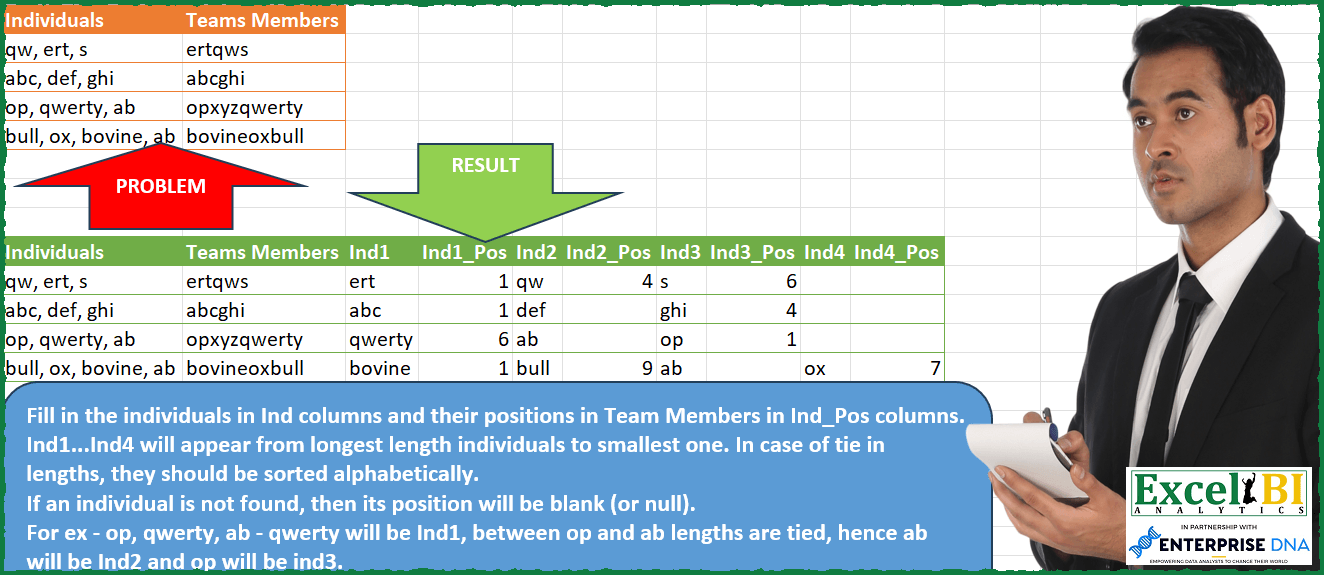
Fill in the individuals in Ind columns and their positions in Team Members in Ind_Pos columns. Ind1…Ind4 will appear from longest length individuals to smallest one. In case of tie in lengths, they should be sorted alphabetically. If an individual is not found, then its position will be blank (or null). For ex – op, qwerty, ab – qwerty will be Ind1, between op and ab lengths are tied, hence ab will be Ind2 and op will be ind3.
📌 Challenge Details and Links
ExcelBI Power Query Challenge Number: 111
Challenge Difficulty: ⭐️⭐️⭐️
📥Download Sample File
📥Link to the solutions on LinkedIn
Solving the challenge of Sort and Position Team Members with Power Query
Power Query solution 1 for Sort and Position Team Members, proposed by Bo Rydobon 🇹🇭:
let
  Source = Excel.CurrentWorkbook(){[Name = "Table1"]}[Content],
  Ans = Table.Combine(
    Table.AddColumn(
      Source,
      "T",
      each
        let
          m = List.Combine(
            List.Sort(
              List.Transform(
                Text.Split([Individuals], ", "),
                (t) =>
                  let
                    p = Text.PositionOf([Teams Members], t) + 1
                  in
                    {t, if p > 0 then p else null}
              ),
              {{each - Text.Length(_{0}), 0}, {each _{0}}}
            )
          )
        in
          Table.FromRows(
            {Record.ToList(_) & m},
            Table.ColumnNames(Source)
              & List.Combine(
                List.Transform(
                  {1 .. List.Count(m) / 2},
                  (i) => {"Ind" & Text.From(i), "Ind" & Text.From(i) & "_Pos"}
                )
              )
          )
    )[T]
  )
in
  Ans
Power Query solution 2 for Sort and Position Team Members, proposed by Zoran Milokanović:
let
  Source = Excel.CurrentWorkbook(){[Name = "Input"]}[Content],
  S =
    let
      m = Table.FromColumns(
        List.Transform(
          Table.ToRows(Source),
          each
            let
              i = List.Sort(Text.Split(_{0}, ", "), {{each Text.Length(_), 1}, {each _}}),
              p = List.Transform(
                i,
                (i) =>
                  let
                    f = Text.PositionOf(_{1}, i) + 1
                  in
                    if f = 0 then null else f
              )
            in
              _ & List.Combine(List.Zip({i, p}))
        )
      )
    in
      Table.FromRows(
        Table.ToColumns(m),
        Table.ColumnNames(Source)
          & List.Transform(
            {1 .. Table.RowCount(m) - 2},
            each
              let
                a = Number.Mod(_, 2)
              in
                "Ind" & Text.From(Number.RoundUp(_ / 2)) & (if a = 1 then "" else "_Pos")
          )
      )
in
  S
Power Query solution 3 for Sort and Position Team Members, proposed by Rick de Groot:
let
  Source = Table.FromRows(
    Json.Document(
      Binary.Decompress(
        Binary.FromText(
          "LYpJDoAgEAS/Mplz/4hwAMUlMQ6ICvp6B/XW1VXGcCqgsO2gzGAdqWS2MOx8B+rDABqnWZVyG01JBKWi7QVyXp3Eet3f8wb+WBaQVJCXc17Dn30gtWm29gE=",
          BinaryEncoding.Base64
        ),
        Compression.Deflate
      )
    ),
    let
      _t = ((type nullable text) meta [Serialized.Text = true])
    in
      type table [Individuals = _t, #"Teams Members" = _t]
  ),
  Add = Table.AddColumn(
    Source,
    "Custom",
    each [
      a = Text.Split([Individuals], ", "),
      b = List.Sort(a, {{each Text.Length(_), 1}, {each _, 0}}),
      c = List.Count(b),
      d = List.Transform({"1" .. Text.From(c)}, each "Ind" & _),
      e = List.Transform(b, (x) => Text.PositionOf(_[Teams Members], x) + 1),
      f = List.ReplaceValue(e, 0, null, Replacer.ReplaceValue),
      g = List.Transform({"1" .. Text.From(c)}, each "Ind" & _ & "_Pos"),
      h = List.Combine(List.Zip({b, f})),
      i = List.Combine(List.Zip({d, g})),
      z = Record.FromList(h, i)
    ][z]
  ),
  Exp = Table.ExpandRecordColumn(Add, "Custom", Record.FieldNames(Record.Combine(Add[Custom])))
in
  Exp
Power Query solution 4 for Sort and Position Team Members, proposed by Alejandro Simón 🇵🇦 🇪🇸:
let
  Source = Excel.CurrentWorkbook(){[Name = "Table1"]}[Content],
  AddCol = Table.AddColumn(
    Source,
    "Custom",
    (x) =>
      [
        a = List.Sort(
          Text.Split(x[Individuals], ", "),
          {{each - Text.Length(_)}, {each Text.Start(_, 1)}}
        ),
        b = List.Transform(a, each Text.PositionOf(x[Teams Members], _) + 1),
        c = List.Combine(
          List.Transform({"1" .. Text.From(List.Count(b))}, (z) => {"Ind" & z, "Ind" & z & "_Pos"})
        ),
        d = Table.FromRows(
          {List.Transform(List.Combine(List.Zip({a, b})), each Replacer.ReplaceValue(_, 0, null))},
          c
        )
      ][d]
  ),
  Sol = Table.ExpandTableColumn(AddCol, "Custom", Table.ColumnNames(Table.Combine(AddCol[Custom])))
in
  Sol
Power Query solution 5 for Sort and Position Team Members, proposed by Luan Rodrigues:
let
  Fonte = Tabela1,
  add = Table.AddColumn(
    Fonte,
    "Personalizar",
    each [
      a = List.Sort(
        Text.Split([Individuals], ", "),
        {{each Text.Length(_), 1}, {each Text.Start(_, 1), 0}}
      ),
      b = List.Transform(a, (x) => Text.PositionOf([Teams Members], x) + 1),
      c = Table.TransformColumns(
        Table.AddIndexColumn(Table.FromColumns({b}), "Ind", 1, 1),
        {{"Ind", each "Ind_Pos" & Text.From(_)}}
      ),
      d = Table.TransformColumns(
        Table.AddIndexColumn(Table.FromColumns({a}), "Ind", 1, 1),
        {{"Ind", each "Ind" & Text.From(_)}}
      ),
      e = Table.Pivot(d, List.Distinct(d[Ind]), "Ind", "Column1"),
      f = Table.Pivot(c, List.Distinct(c[Ind]), "Ind", "Column1"),
      g = Table.ReplaceValue(f & e, 0, null, Replacer.ReplaceValue, Table.ColumnNames(f)),
      h = Table.ReorderColumns(
        Table.FromColumns(
          List.Transform(Table.ToColumns(g), List.RemoveNulls),
          Table.ColumnNames(g)
        ),
        List.Sort(
          Table.ColumnNames(g),
          {{each Number.From(Text.Select(_, {"0" .. "9"})), 0}, {each Text.Length(_), 0}}
        )
      )
    ][h]
  ),
  count = [
    x = Table.TransformColumns(add[[Personalizar]], {{"Personalizar", each Table.ColumnCount(_)}})[
      Personalizar
    ],
    y = List.PositionOf(x, List.Max(x))
  ][y],
  res = Table.ExpandTableColumn(add, "Personalizar", Table.ColumnNames(add[Personalizar]{count}))
in
  res
Power Query solution 6 for Sort and Position Team Members, proposed by Eric Laforce:
let
  Source = Excel.CurrentWorkbook(){[Name = "tData111"]}[Content],
  Add_Col = Table.AddColumn(
    Source,
    "Custom",
    each
      let
        _M = [Teams Members],
        _LP = List.Accumulate(
          Text.Split([Individuals], ", "),
          {},
          (s, c) =>
            let
              _P = Text.PositionOf(_M, c)
            in
              s & {[Ind = c, Pos = if (_P = - 1) then null else _P + 1, Len = Text.Length(c)]}
        ),
        _T = Table.AddIndexColumn(
          Table.Sort(Table.FromRecords(_LP), {"Len", Order.Descending}),
          "Index",
          1
        ),
        _R = List.Accumulate(
          Table.ToRecords(_T),
          [],
          (s, c) =>
            s
              & Record.FromList(
                {c[Ind], c[Pos]},
                {"Ind" & Text.From(c[Index]), "Ind" & Text.From(c[Index]) & "_Pos"}
              )
        )
      in
        _R
  ),
  Expand = Table.ExpandRecordColumn(
    Add_Col,
    "Custom",
    List.Union(List.Transform(Add_Col[Custom], each Record.FieldNames(_)))
  )
in
  Expand
Power Query solution 7 for Sort and Position Team Members, proposed by Szabolcs Phraner:
let
  Source = Excel.CurrentWorkbook(){[Name = "Table"]}[Content],
  Individuals_And_Positions = Table.AddColumn(
    Source,
    "Individuals_And_Positions",
    each
      let
        Split = Text.Split([Individuals], ", "),
        //Create Table
        Table = Table.FromRows(List.Transform(Split, each {_, Text.Length(_)}), {"Ind", "Length"}),
        //Reorder Individuals based on text length and alphabetical order
        Reorder = Table.Sort(Table, {{"Length", Order.Descending}, {"Ind", Order.Ascending}}),
        Ind = Reorder[Ind],
        //Nested List of Individuals and their Pos
        Ind_List = List.Zip({Ind, List.Positions(Ind)})
      //Create a record containing all individuals and their positions
    in  List.Accumulate(
          Ind_List,
          [],
          (state, current) =>
            let
              Position  = Text.PositionOf([Teams Members], current{0}),
              FieldName = "Ind" & Text.From(current{1} + 1),
              Add_Ind   = Record.AddField(state, FieldName, current{0})
            in
              Record.AddField(
                Add_Ind,
                FieldName & "_Pos",
                if Position = - 1 then null else Position
              )
        )
  ),
  FieldNames = List.Union(
    Table.AddColumn(
      Individuals_And_Positions,
      "FieldNames",
      each Record.FieldNames([Individuals_And_Positions])
    )[FieldNames]
  ),
  ExpandRecord = Table.ExpandRecordColumn(
    Individuals_And_Positions,
    "Individuals_And_Positions",
    FieldNames
  )
in
  ExpandRecord
Power Query solution 8 for Sort and Position Team Members, proposed by Emil M.:
let
 Source = Excel.CurrentWorkbook(){[Name="Table1"]}[Content],
 Grouped_by_Team_Members = Table.Group(Source, {"Teams Members"}, {{"All", each _, type table [Individuals=nullable text, Teams Members=nullable text]}}),
 Results = Table.AddColumn(Grouped_by_Team_Members, "Custom", each let
 Split_Ind_Rows = Table.ExpandListColumn(Table.TransformColumns([All], {{"Individuals", Splitter.SplitTextByDelimiter(", ", QuoteStyle.Csv), let itemType = (type nullable text) meta [Serialized.Text = true] in type {itemType}}}), "Individuals"),
 Add_Pos = Table.AddColumn(Split_Ind_Rows, "Pos", each Text.PositionOf([Teams Members],[Individuals])),
 Add_Len = Table.AddColumn(Add_Pos, "Len", each Text.Length([Individuals])),
 Replaced_nulls = Table.ReplaceValue(Add_Len,-1,null,Replacer.ReplaceValue,{"Pos"}),
Solving the challenge of Sort and Position Team Members with Excel
Excel solution 1 for Sort and Position Team Members, proposed by Bo Rydobon 🇹🇭:
=LET(b,A1:B5,d,DROP(REDUCE(0,A2:A5,LAMBDA(c,v,LET(t,TEXTSPLIT(v,,", "),
IFERROR(VSTACK(c,TOROW(SORTBY(HSTACK(t,FIND(t,VLOOKUP(v,b,2,))),-LEN(t),,t,))),"")))),1),
HSTACK(b,VSTACK(TOROW("Ind"&SEQUENCE(COLUMNS(d)/2)&{"","_Pos"}),d)))
Excel solution 2 for Sort and Position Team Members, proposed by Rick Rothstein:
=LET(r,IFERROR(TEXTSPLIT(TEXTJOIN("=",,MAP(A2:A5,B2:B5,LAMBDA(a,b,LET(t,SORT(TEXTSPLIT(a,", "),,,1),s,TOCOL(SORTBY(t,LEN(t),-1)),TEXTJOIN("/",0,HSTACK(a,b,TOROW(HSTACK(s,IFERROR(FIND(s,b),""))))))))),"/","="),""),VSTACK(HSTACK(A1:B1,TOROW({"Ind","Ind_Pos"}&SEQUENCE((COLUMNS(r)-2)/2))),r))Excel solution 3 for Sort and Position Team Members, proposed by محمد حلمي:
=LET(i,A2:A5,
REDUCE(HSTACK(A1:B1,
TOROW({"Ind","Ind"}&SEQUENCE(
MAX(LEN(i)-LEN(SUBSTITUTE(i,",",))) +1)&{"","_Pos"})),
i,LAMBDA(a,d,LET(e,TEXTSPLIT(d,", "),v,OFFSET(d,,1),s,SORTBY(e,-LEN(e),,e,),IFERROR(VSTACK(a,HSTACK(d,v,
TOROW(VSTACK(s,FIND(s,v)),,1))),"")))))
Excel solution 4 for Sort and Position Team Members, proposed by Oscar Mendez Roca Farell:
=LET(_d,A1:B5,_f,SEQUENCE(ROWS(_d)-1), HSTACK(_d,REDUCE(TOROW("Ind"&_f&IF({1, 0},"", "_Pos")),_f, LAMBDA(i, x, LET(_w, TEXTSPLIT(INDEX(_d, x+1, 1), ,", "),_o,SORTBY(_w, LEN(_w), -1, _w, 1), IFNA(VSTACK(i, TOROW(IFERROR(HSTACK(_o,FIND(_o,INDEX(_d, x+1, 2))), ""))), ""))))))Excel solution 5 for Sort and Position Team Members, proposed by Duy Tùng:
=HSTACK(A1:B5,REDUCE(TOROW("Ind"&SEQUENCE(MAX(MAP(A2:A5,LAMBDA(x,ROWS(TEXTSPLIT(x,,","))))))&{"","_Pos"}),B2:B5,LAMBDA(x,y,LET(a,TEXTSPLIT(@+A5:y,,", "),IFERROR(VSTACK(x,TOROW(SORTBY(HSTACK(a,FIND(a,y)),-LEN(a),,a,))),"")))))Excel solution 6 for Sort and Position Team Members, proposed by Sunny Baggu:
=HSTACK(
 A2:B5,
 IFERROR(
 MAKEARRAY(
 ROWS(A2:A5),
 MAX(MAP(A2:A5, LAMBDA(a, ROWS(TEXTSPLIT(a, , ", ")) * 2))),
 LAMBDA(r, c,
 INDEX(
 LET(
 _ts, SORT(TEXTSPLIT(INDEX(A2:A5, r, ), ", "), , , TRUE),
 _list, SORTBY(_ts, LEN(_ts), -1),
 _pos, IFERROR(SEARCH(_list, INDEX(B2:B5, r, )), ""),
 TOROW(VSTACK(_list, _pos), , 1)
 ),
 c
 )
 )
 ),
 ""
 )
)
Excel solution 7 for Sort and Position Team Members, proposed by Sunny Baggu:
=IFNA(
 REDUCE(
 {
 "Individuals",
 "Teams Members",
 "Ind1",
 "Ind1_Pos",
 "Ind2",
 "Ind2_Pos",
 "Ind3",
 "Ind3_Pos",
 "Ind4",
 "Ind4_Pos"
 },
 SEQUENCE(ROWS(A2:A5)),
 LAMBDA(a, v,
 VSTACK(
 a,
 LET(
 _ts, SORT(TEXTSPLIT(INDEX(A2:A5, v, 1), ", "), , , TRUE),
 _list, SORTBY(_ts, LEN(_ts), -1),
 _pos, IFERROR(SEARCH(_list, INDEX(B2:B5, v, 1)), ""),
 HSTACK(
 INDEX(A2:A5, v, 1),
 INDEX(B2:B5, v, 1),
 TOROW(VSTACK(_list, _pos), , 1)
 )
 )
 )
 )
 ),
 ""
)
Excel solution 8 for Sort and Position Team Members, proposed by LEONARD OCHEA 🇷🇴:
=> A1:B5

=LET(t,A1:B5,i,DROP(TAKE(t,,1),1),j,DROP(TAKE(t,,-1),1),F,LAMBDA(x,y,LET(m,TEXTSPLIT(x,", "),l,LEN(m),o,SORTBY(m,l,-1,m,1),n,FIND(o,y),TOROW(TRANSPOSE(VSTACK(o,n))))),r,ROWS(i),c,1+MAX(LEN(i)-LEN(SUBSTITUTE(i,",",""))),s,SEQUENCE(c),HSTACK(t,IFERROR(REDUCE(TOROW(HSTACK("Ind"&s,"Ind"&s&"_Pos")),SEQUENCE(r),LAMBDA(a,b,VSTACK(a,F(INDEX(i,b),INDEX(j,b))))),"")))
Excel solution 9 for Sort and Position Team Members, proposed by JvdV –:
=HSTACK(A1:B5,LET(z,DROP(IFNA(REDUCE(0,A2:A5,LAMBDA(a,b,VSTACK(a,LET(x,TEXTSPLIT(b,,", "),y,HSTACK(x,IFERROR(FIND(x,OFFSET(b,,1)),"")),TOROW(SORTBY(y,LEN(x),-1,x,)))))),""),1),VSTACK("Ind"&TOROW(SEQUENCE(COLUMNS(z)/2)&{"","_Pos"}),z)))Excel solution 10 for Sort and Position Team Members, proposed by Pieter de Bruijn:
=LET(a,A1:A5,b,B1:B5,m,"Ind"&SEQUENCE(MAX(LEN(a)-LEN(SUBSTITUTE(a,",","")))+1),HSTACK(a,b,REDUCE(TOROW(HSTACK(m,m&"_Pos")),SEQUENCE(ROWS(a)-1,,2),LAMBDA(c,d,
LET(e,TEXTSPLIT(INDEX(a,d),,", "),f,SORTBY(e,LEN(e),-1,LEFT(e),1),IFERROR(VSTACK(c,TOROW(HSTACK(f,FIND(f,INDEX(b,d))))),""))))))
Excel solution 11 for Sort and Position Team Members, proposed by samir tobeil:
=VSTACK(HSTACK(A1:B1,"Ind1","Ind1_Pos","Ind2","Ind2_Pos","Ind3","Ind3_Pos","Ind4","Ind4_Pos"),DROP(IFERROR(REDUCE("",A2:A5,LAMBDA(a,x,LET(k,TRIM(TEXTSPLIT(x,",")),u,LEN(k),g,SORTBY(k,u,-1,k,1),l,OFFSET(x,,1),o,IFERROR(FIND(g,l),""),
VSTACK(a,HSTACK(x,l,MAKEARRAY(1,COUNTA(k)*2,LAMBDA(r,c,LET(i,SUM(SEQUENCE(c))/c,IF(ISODD(c),INDEX(g,,i),INDEX(o,,ROUNDUP(i,0.5)-1)))))))))),""),1))
Python in Excel solution 1 for Sort and Position Team Members, proposed by Bo Rydobon 🇹🇭:
Python
df =xl("A1:B5", headers=True)
gr =[[a[0]]+[a[1]]+[c for b in sorted([[t, a[1].index(t)+1 if t in a[1] else '' ] for t in sorted(a[0].split(", "))],key=lambda x:-len(x[0])) for c in b] for a in df.values]
r = range(1,int(max(len(g) for g in gr)/2))
rs = pd.DataFrame(gr).fillna('')
rs.columns=list(df.columns)+[f'Ind{i}' if j==0 else f'Ind{i}_Pos' for i in r for j in range(2)]
rs
Python in Excel solution 2 for Sort and Position Team Members, proposed by Diarmuid Early:
df = xl("A1:B5", headers=True)
lists = [list(zip(ind:=input.split(", "),map(lambda x:memb.index(x)+1 if x in memb else "",ind))) for input, memb in df.values]
sortedLists = [sorted(sorted(list),key=lambda a:-len(a[0])) for list in lists]
maxLen = max([len(a) for a in lists])
# add each pair of columns
for i in range(maxLen):
 df[[f"Ind{i+1}",f"Ind{i+1}_Pos"]] = [list(sortedLists[j][i]) if len(sortedLists[j])>i else ["",""] for j in range(df.shape[0])]
&&