
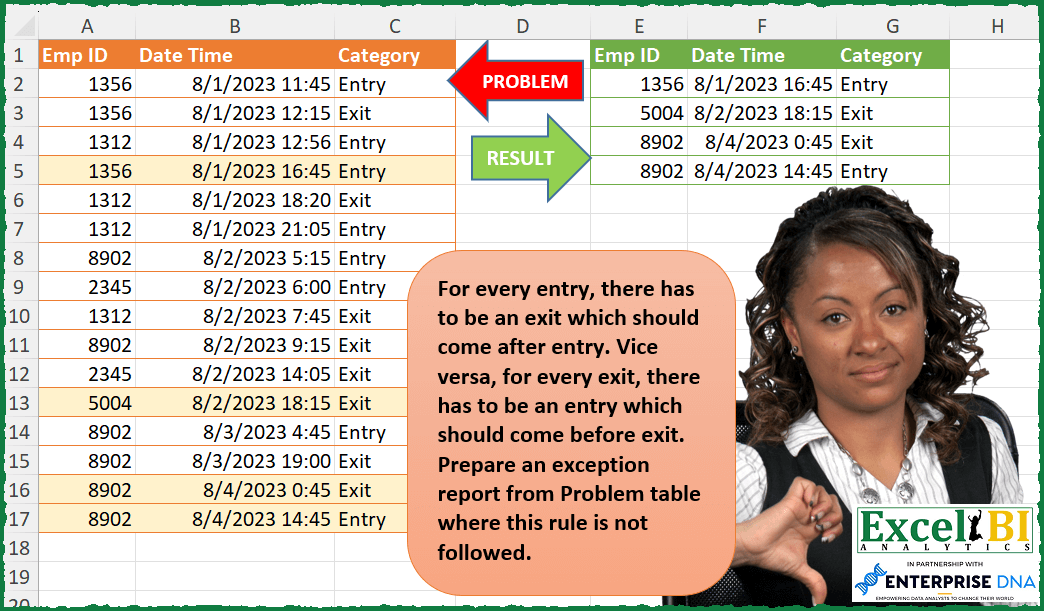
For every entry, there has to be an exit which should come after entry. Vice versa, for every exit, there has to be an entry which should come before exit. Prepare an exception report from Problem table where this rule is not followed. For ex. 5004 has only an exit record. 8902 has an exit record which comes before entry record. (Exception cases highlighted)
📌 Challenge Details and Links
ExcelBI Power Query Challenge Number: 109
Challenge Difficulty: ⭐️⭐️⭐️⭐️
📥Download Sample File
📥Link to the solutions on LinkedIn
Solving the challenge of Find Entry-Exit Exceptions with Power Query
Power Query solution 1 for Find Entry-Exit Exceptions, proposed by Bo Rydobon 🇹🇭:
let
  Source = Excel.CurrentWorkbook(){[Name = "Table1"]}[Content],
  Group = Table.Group(
    Source,
    "Emp ID",
    {
      "T",
      each Table.FromRows(
        List.Select(
          List.Zip(
            Table.ToColumns(_)
              & {
                Text.ToList(
                  Text.Replace(
                    Text.Combine(List.Transform([Category], each Text.Middle(_, 1, 1))),
                    "nx",
                    "11"
                  )
                )
              }
          ),
          each _{3} > "1"
        ),
        Table.ColumnNames(Source) & {"x"}
      )
    }
  ),
  Ans = Table.Sort(Table.RemoveColumns(Table.Combine(Group[T]), "x"), {"Date Time"})
in
  Ans
Power Query solution 2 for Find Entry-Exit Exceptions, proposed by Zoran Milokanović:
let
  Source = Excel.CurrentWorkbook(){[Name = "Input"]}[Content],
  C = Table.ToColumns(Table.Sort(Source, {"Emp ID", "Date Time"})),
  R = List.Select(
    List.Positions(C{0}),
    each C{2}{_}
      = "Entry" and not (C{0}{_} = C{0}{_ + 1}? and C{2}{_} <> C{2}{_ + 1}?) or C{2}{_}
      = "Exit" and (_ = 0 or not (C{0}{_} = C{0}{_ - 1}? and C{2}{_} <> C{2}{_ - 1}?))
  ),
  S = Table.FromColumns(
    List.Transform({0 .. 2}, each List.Transform(R, (r) => C{_}{r})),
    Table.ColumnNames(Source)
  )
in
  S
Power Query solution 3 for Find Entry-Exit Exceptions, proposed by Kris Jaganah:
let
  Source = Excel.CurrentWorkbook(){[Name = "Table2"]}[Content],
  Sort = Table.Sort(Source, {{"Emp ID", Order.Ascending}, {"Date Time", Order.Ascending}}),
  Index = Table.AddIndexColumn(Sort, "Index", 1, 1, Int64.Type),
  Group = Table.Group(
    Index,
    {"Emp ID"},
    {
      {
        "All",
        each _,
        type table [Emp ID = number, Date Time = datetime, Category = text, Index = number]
      },
      {"Count", each Table.RowCount(_), Int64.Type}
    }
  ),
  IndexEmpID = Table.AddColumn(
    Group,
    "IndexEmpID",
    each Table.AddIndexColumn([All], "IndexEmpID", 1)
  ),
  Expand = Table.ExpandTableColumn(
    IndexEmpID,
    "IndexEmpID",
    {"Date Time", "Category", "Index", "IndexEmpID"},
    {"Date Time", "Category", "Index", "IndexEmpID"}
  ),
  Filter = Table.SelectRows(
    Expand,
    each (Number.Mod([Count], 2) = 1 and [IndexEmpID] = [Count])
      or (
        if Number.Mod([IndexEmpID], 2) = 1 and [Category] = "Entry" then
          1
        else if Number.Mod([IndexEmpID], 2) = 0 and [Category] = "Exit" then
          1
        else
          0
      )
      = 0
  ),
  Answer = Table.SelectColumns(Filter, {"Emp ID", "Date Time", "Category"}),
  Change = Table.TransformColumnTypes(Answer, {{"Date Time", type datetime}})
in
  Change
Power Query solution 4 for Find Entry-Exit Exceptions, proposed by Rick de Groot:
let
 Source = Excel.CurrentWorkbook(){[Name="Table1"]}[Content],
 Sort = Table.Sort(Source,{{"Emp ID", Order.Ascending}, {"Date Time", Order.Ascending}}),
 Add.i1 = Table.AddIndexColumn(Sort, "i1", 1, 1, Int64.Type),
 Add.i2 = Table.AddIndexColumn(Add.i1, "i2", 0, 1, Int64.Type),
 MergeNext = Table.NestedJoin(Add.i2, {"i1"}, Add.i2, {"i2"}, "Add.i2", JoinKind.LeftOuter),
 ExpNext = Table.ExpandTableColumn(MergeNext, "Add.i2", {"Emp ID", "Category"}, {"Next.Emp ID", "Next.Category"}),
 MergePrev = Table.NestedJoin(ExpNext, {"i2"}, ExpNext, {"i1"}, "Expanded Add.i2", JoinKind.LeftOuter),
 ExpPrev = Table.ExpandTableColumn(MergePrev, "Expanded Add.i2", {"Emp ID", "Category"}, {"Prev.Emp ID", "Prev.Category"}),
 AddCus = Table.AddColumn(ExpPrev, "IsWrong", each
([Emp ID] <> [Next.Emp ID] and [Category] = "Entry") or
([Emp ID] <> [Prev.Emp ID] and [Category] = "Exit") or
([Emp ID] = [Prev.Emp ID] and [Prev.Category] = "Exit" and [Category] = "Exit") or
([Emp ID] = [Next.Emp ID] and [Category] = "Entry") and [Next.Category] = "Entry" ),
 Result = Table.SelectRows(AddCus, each [IsWrong] = true)[[Emp ID],[Date Time],[Category]]
in
 Result
Looking forward to what others cooked up
Power Query solution 5 for Find Entry-Exit Exceptions, proposed by Alejandro Simón 🇵🇦 🇪🇸:
let
 Source = Excel.CurrentWorkbook(){[Name="Table1"]}[Content],
 Sol = Table.Sort(Table.Combine(Table.Group(Source, {"Emp ID"}, {{"All", each
 let
 z = Table.Sort(_, {"Date Time"}),
 a = Table.Split(z, 2),
 b = Text.Combine({"Entry", "Exit"}),
 c = List.Select(a, each Text.Combine([Category]) <> b),
 d = Table.Combine(c)
 in d}})[All]), {"Emp ID", "Date Time"})
in
 Sol
Código inicial
let
 Source = Excel.CurrentWorkbook(){[Name="Table1"]}[Content],
 Sol = Table.Sort(Table.Combine(Table.Group(Source, {"Emp ID"}, {{"All", each
 let
 a = Table.Split(_, 2),
 b = {"Entry", "Exit"},
 c = List.Select(a, each [Category] <> b)
 in Table.Combine(c)}})[All]), {"Emp ID", "Date Time"})
in
 Sol
Power Query solution 6 for Find Entry-Exit Exceptions, proposed by Luan Rodrigues:
let
  Fonte = Tabela1,
  tp = Table.TransformColumnTypes(Fonte, {{"Date Time", type text}}),
  gp = Table.Group(
    tp,
    {"Emp ID"},
    {
      {
        "Hora",
        each List.Transform(
          List.Split(Table.ToRows(_), 2),
          each Text.Combine(List.Transform(_, (x) => x{1}), ";")
        )
      },
      {
        "Contagem",
        each List.Transform(
          List.Split(Table.ToRows(_), 2),
          each Text.Combine(List.Transform(_, (x) => x{2}), ";")
        )
      }
    }
  ),
  ad = Table.SelectRows(
    Table.AddColumn(
      gp,
      "Personalizar",
      each [
        a = List.Transform(
          List.Zip({[Hora], [Contagem]}),
          (x) => {List.Select(x, each {_}{0} <> "Entry;Exit")}
            & {List.Count(List.Select(x, each {_}{0} <> "Entry;Exit"))}
        ),
        b = List.RemoveNulls(List.Transform(a, (y) => if y{1} = 2 then y{0} else null)){0}? ?? null,
        c = try
          Table.FromColumns(List.Transform(b, each Text.Split(_, ";")), {"Date Time", "Category"})
        otherwise
          null
      ][c]
    )[[Emp ID], [Personalizar]],
    each [Personalizar] <> null
  ),
  res = Table.ExpandTableColumn(ad, "Personalizar", {"Date Time", "Category"}),
  cl = Table.Sort(res, {{"Emp ID", 0}})
in
  cl
Power Query solution 7 for Find Entry-Exit Exceptions, proposed by Hussein SATOUR:
let
  Source = Excel.CurrentWorkbook(){[Name = "Table1"]}[Content],
  Group = Table.Group(
    Source,
    {"Emp ID"},
    {
      {
        "Count",
        each _,
        type table [Emp ID = nullable text, Date Time = nullable text, Category = nullable text]
      }
    }
  ),
  Work = Table.AddColumn(
    Group,
    "a",
    each
      let
        b = Table.AddColumn(
          Table.AddIndexColumn([Count], "Index", 1),
          "Check",
          each [Index] + (if [Category] = "Entry" then 0 else - 1)
        ),
        c =
          let
            columnNames = {"Check"},
            addCount = Table.Group(b, columnNames, {{"Count.1", Table.RowCount, type number}}),
            selectDuplicates = Table.SelectRows(addCount, each [Count.1] = 1),
            removeCount = Table.RemoveColumns(selectDuplicates, "Count.1")
          in
            Table.Join(b, columnNames, removeCount, columnNames, JoinKind.Inner)
      in
        c
  ),
  Rem = Table.RemoveColumns(Work, {"Emp ID", "Count"}),
  Exp = Table.ExpandTableColumn(
    Rem,
    "a",
    {"Emp ID", "Date Time", "Category"},
    {"Emp ID", "Date Time", "Category"}
  ),
  Filt = Table.SelectRows(Exp, each ([Emp ID] <> null))
in
  Filt
Power Query solution 8 for Find Entry-Exit Exceptions, proposed by Eric Laforce:
let
  Source = Excel.CurrentWorkbook(){[Name = "tData109"]}[Content],
  Sort = Table.Sort(
    Table.TransformColumnTypes(Source, {{"Emp ID", Int64.Type}, {"Date Time", type datetime}}),
    {{"Emp ID", Order.Ascending}, {"Date Time", Order.Ascending}}
  ),
  Add_Index = Table.AddIndexColumn(Sort, "Index", 0, 1, Int64.Type),
  Records = List.Buffer(Table.ToRecords(Add_Index)),
  Select = List.Select(
    Records,
    each
      let
        _Relative = try Records{_[Index] + (if _[Category] = "Entry" then + 1 else - 1)} otherwise _
      in
        _[Emp ID] <> _Relative[Emp ID] or _[Category] = _Relative[Category]
  ),
  ToTable = Table.FromRecords(Select, Table.ColumnNames(Source))
in
  ToTable
Power Query solution 9 for Find Entry-Exit Exceptions, proposed by Victor Wang:
let
  Source = Excel.CurrentWorkbook(){[Name = "Table1"]}[Content],
  Group = Table.Group(
    Source,
    {"Emp ID"},
    {
      {
        "All",
        each List.Select(
          Table.Split(Table.Sort(_, "Date Time"), 2),
          (a) => a[Category] <> {"Entry", "Exit"}
        )
      }
    }
  ),
  Combine = Table.Sort(Table.Combine(List.Combine(Group[All])), "Date Time")
in
  Combine
Solving the challenge of Find Entry-Exit Exceptions with Excel
Excel solution 1 for Find Entry-Exit Exceptions, proposed by Bo Rydobon 🇹🇭:
=LET(z,A2:C17,e,A2:A17,SORT(DROP(REDUCE(0,UNIQUE(e),LAMBDA(a,v,LET(f,FILTER(z,e=v),g,SUBSTITUTE(CONCAT(MID(DROP(f,,2),2,1)),"nx",11),h,FILTER(f,MID(g,SEQUENCE(ROWS(f)),1)>"1",0),IF(@h,VSTACK(a,h),a)))),1),2))Excel solution 2 for Find Entry-Exit Exceptions, proposed by محمد حلمي:
=REDUCE(A1:C1,UNIQUE(A2:A17),LAMBDA(a,d,LET(
i,FILTER(A2:C17,d=A2:A17),
r,ROWS(i),
u,ISODD(SEQUENCE(r)),
e,DROP(i,,2),
UNIQUE(VSTACK(a,IF(ISODD(r),TAKE(i,-1),
FILTER(i,IFS(u,e="Exit",1-u,e="Entry"),a)))))))
Excel solution 3 for Find Entry-Exit Exceptions, proposed by Hussein SATOUR:
=LET(a, SORT(TEXTSPLIT(CONCAT(MAP(UNIQUE(A2:A17), LAMBDA(x, LET(
b, FILTER(A2:A17&"/"&B2:B17&"/"&C2:C17, A2:A17=x),
c, SEQUENCE(COUNTA(b)),
d, IF(TEXTAFTER(b,"/",-1)="Entry", 0, -1) + c,
CONCAT(IFERROR(XLOOKUP(UNIQUE(d,,1), d, b), "") &"|"))))), "/", "|",1), {1,2}), IFERROR(--a, a))
Excel solution 4 for Find Entry-Exit Exceptions, proposed by Sunny Baggu:
=LET(_res,
REDUCE({"Emp ID","Date Time","Category"},UNIQUE(A2:A17),
 LAMBDA(a,v,VSTACK(a,
 LET(_tbl,FILTER(A2:C17,A2:A17=v),
 _r,TAKE(_tbl,,-1)<>TAKE(TOCOL(IF(SEQUENCE(ROWS(_tbl)),{"Entry","Exit"}),3),ROWS(_tbl)),
 IF(ISODD(ROWS(_r)),
 TAKE(_tbl,-1,),
 FILTER(_tbl,_r,"")))))),
FILTER(_res,1-ISNA(TAKE(_res,,-1))))
Excel solution 5 for Find Entry-Exit Exceptions, proposed by Asheesh Pahwa:
=LET(a,REDUCE("",UNIQUE(A2:A17), LAMBDA(a,v, VSTACK(a,LET(fl,FILTER(A2:C17,A2:A17=v)
rw,ROWS(fl),ee,TAKE(TOCOL(IF(SEQUENCE(rw){"Entry","Exit"}),3),rw),tf,NOT(ee-TAKE(fl,,-1)),
IF(ISODD(rw), TAKE(fl,-1), IF(tf, "", FILTER(fl,tf,""))))))),
VSTACK(A1:C1,SORT(FILTER(a,ISNUMBER(TAKE(a,,1))))))
Excel solution 6 for Find Entry-Exit Exceptions, proposed by Ziad A.:
=SORT(LET(a,A2:A17,c,C2:C17,s,ROW(a),t,TOCOL(,1),REDUCE(t,UNIQUE(a),LAMBDA(e,v,VSTACK(e,LET(l,a&","&COUNTIFS(a,v,c,c,s,"<"&s)&c,r,REGEXREPLACE(REGEXREPLACE(JOIN(,FILTER(l,a=v)),v&",d+Entry"&v&",d+Exit",),"("&v&",d+[^d]+)","$1|"),IF(r="",t,FILTER(A2:C17,REGEXMATCH(l,LEFT(r,LEN(r)-1))))))))),2,1)Excel solution 7 for Find Entry-Exit Exceptions, proposed by Md Ismail Hosen:
=LET(data, A2:C17, fxOne, LAMBDA(ForId, LET(FilteredData, FILTER(data, CHOOSECOLS(data, 1) = ForId), Seq, SEQUENCE(ROWS(FilteredData)), EntryRowsIndex, FILTER(Seq, INDEX(FilteredData, Seq, 3) = "Entry"), ValidExitRows, FILTER(EntryRowsIndex, IFERROR(INDEX(FilteredData, EntryRowsIndex + 1, 3) = "Exit", FALSE)), ValidRows, VSTACK(ValidExitRows, ValidExitRows + 1), IsInValidRows, MMULT(--(Seq = TOROW(ValidRows)), SEQUENCE(ROWS(ValidRows)) ^ 0) = 0, Result, IF(AND(ISERROR(ValidRows)), FilteredData, IFERROR(FILTER(FilteredData, IsInValidRows), "")), Result)), Result, REDUCE("", UNIQUE(CHOOSECOLS(data, 1)), LAMBDA(a,v, VSTACK(a, fxOne(v)))), Final, FILTER(Result, CHOOSECOLS(Result, 1) <> ""), Final)Solving the challenge of Find Entry-Exit Exceptions with Python in Excel
Python in Excel solution 1 for Find Entry-Exit Exceptions, proposed by Bo Rydobon 🇹🇭:
Finally
Python
df=xl("A2:C17")
abc =[[d for d,c in zip(list(df[df[0]==e].values),''.join(df[df[0]==e].iloc[:,2].str[1:2]).replace('nx','11')) if c !='1'] for e in np.unique(df[0])]
[a for bc in abc for a in bc]
Python in Excel solution 2 for Find Entry-Exit Exceptions, proposed by Diarmuid Early:
df = xl("A1:C17", headers=True).sort_values(["Emp ID","Date Time"]).values
checked = -1
fails = np.array(["Emp ID","Date Time","Category"])
for rwNm in range(df.shape[0]):
 if checked >= rwNm:
 continue
 elif rwNm == df.shape[0]-1:
 fails = np.vstack([fails,df[rwNm:rwNm+1][0]])
 else:
 if all([df[rwNm][0] == df[rwNm+1][0], df[rwNm][1]
Solving the challenge of Find Entry-Exit Exceptions with Excel VBA
Excel VBA solution 1 for Find Entry-Exit Exceptions, proposed by Tomasz Głuszkowski:
Sub Filtr()
Dim i As Long, j As Long
i = 2: j = 2
While Not IsEmpty(Range("A" & i))
 If Range("A" & i).Interior.Pattern <> xlNone Then
 Range("E" & j & ":G" & j) = Range("A" & i & ":C" & i).Value
 j = j + 1
 End If
 i = i + 1
Wend
End Sub
&&&