
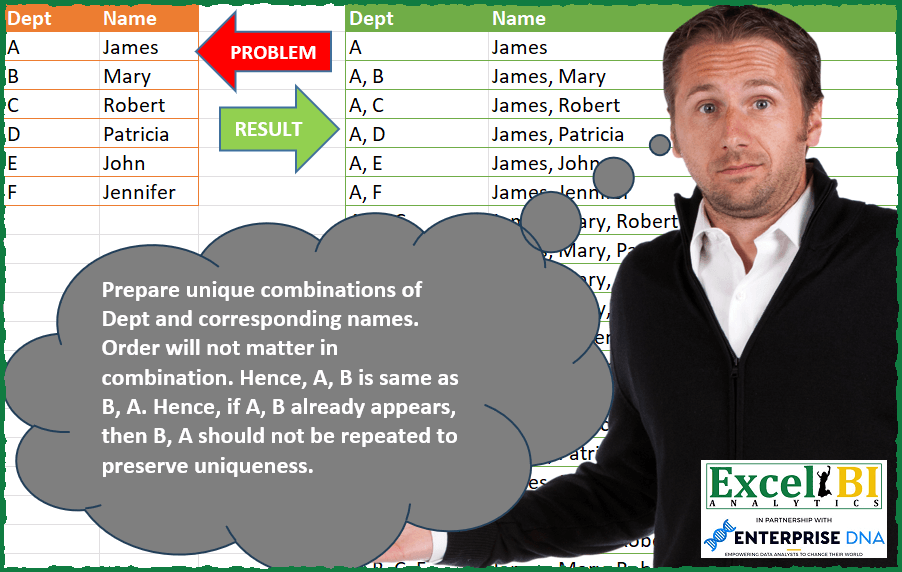
Prepare unique combinations of Dept and corresponding names. Order will not matter in combination. Hence, A, B is same as B, A. Hence, if A, B already appears, then B, A should not be repeated to preserve uniqueness.
📌 Challenge Details and Links
ExcelBI Power Query Challenge Number: 102
Challenge Difficulty: ⭐️⭐️⭐️⭐️
📥Download Sample File
📥Link to the solutions on LinkedIn
Solving the challenge of Unique Dept-Name Combinations with Power Query
Power Query solution 1 for Unique Dept-Name Combinations, proposed by Bo Rydobon 🇹🇭:
let
  Source = Excel.CurrentWorkbook(){[Name = "Table1"]}[Content],
  Com = List.Sort(
    List.Transform(
      List.Skip(
        List.Accumulate(Source[Dept], {""}, (s, l) => s & List.Transform(s, each _ & ", " & l))
      ),
      each Text.Middle(_, 2, 999)
    ),
    each Text.Start(_, 1) & Text.From(Text.Length(_) / 1000)
  ),
  Ans = Table.FromColumns(
    {
      Com,
      List.Transform(
        Com,
        each Text.Combine(
          List.ReplaceMatchingItems(Text.Split(_, ", "), List.Zip(Table.ToColumns(Source))),
          ", "
        )
      )
    },
    Table.ColumnNames(Source)
  )
in
  Ans
Power Query solution 2 for Unique Dept-Name Combinations, proposed by Zoran Milokanović:
let
  Source = Excel.CurrentWorkbook(){[Name = "Input"]}[Content],
  CwoR = (n, k) =>
    let
      i = List.Transform({0 .. k - 1}, each {0 + _ .. n - k + _})
    in
      List.Accumulate(
        List.Skip(i),
        List.Transform(i{0}, each {_}),
        (S, C) =>
          List.Combine(
            List.Transform(
              C,
              each List.Accumulate(S, {}, (s, c) => if _ > List.Last(c) then s & {c & {_}} else s)
            )
          )
      ),
  C = (l) =>
    let
      c = List.Count(l)
    in
      List.Transform(
        List.Combine(List.Transform({1 .. c}, each CwoR(c, _))),
        each Text.Combine(List.Transform(_, each l{_}), ", ")
      ),
  S = Table.FromColumns({C(Source[Dept]), C(Source[Name])}, Table.ColumnNames(Source))
in
  S
Power Query solution 3 for Unique Dept-Name Combinations, proposed by Alexis Olson:
let
  Source = Excel.CurrentWorkbook(){[Name = "Table1"]}[Content],
  ListSubsets = (L as list) =>
    let
      N = List.Count(L),
      Subsets = List.Transform(
        {1 .. Number.Power(2, N) - 1},
        (i) =>
          List.Transform(
            {0 .. N - 1},
            (j) =>
              if Number.Mod(Number.IntegerDivide(i, Number.Power(2, j)), 2) = 1 then L{j} else null
          )
      ),
      Concatenate = List.Transform(Subsets, each Text.Combine(List.RemoveNulls(_), ", "))
    in
      Concatenate,
  Depts = ListSubsets(Source[Dept]),
  Names = ListSubsets(Source[Name]),
  OutputTable = Table.FromColumns({Depts, Names}, {"Dept", "Name"})
in
  OutputTable
Solving the challenge of Unique Dept-Name Combinations with Excel
Excel solution 1 for Unique Dept-Name Combinations, proposed by Bo Rydobon 🇹🇭:
=LET(a,TOROW(A2:A7),b,MID(DROP(REDUCE(0,a,LAMBDA(c,v,UNIQUE(VSTACK(c,TOCOL(IFS(RIGHT(c)Excel solution 2 for Unique Dept-Name Combinations, proposed by محمد حلمي:
=LET(i,LAMBDA(x,DROP(TEXTAFTER(REDUCE("",x,LAMBDA(a,d,VSTACK(a,a&", "&d))),", "),1)),v,i(A2:A7),VSTACK(A1:B1,
SORTBY(HSTACK(v,i(B2:B7)),LEFT(v),,LEN(v),,v,)))
Excel solution 3 for Unique Dept-Name Combinations, proposed by محمد حلمي:
=LET(i,LAMBDA(x,DROP(TEXTAFTER(REDUCE("",x,LAMBDA(a,d,VSTACK(a,a&", "&d))),", "),1)),VSTACK(A1:B1,SORT(HSTACK(i(A2:A7),i(B2:B7)))))Excel solution 4 for Unique Dept-Name Combinations, proposed by Hussein SATOUR:
=LET(G, LAMBDA(z, LET(
L, SEQUENCE(123456),
F, FILTER(L, MAP(L, LAMBDA(x, LET(a, --MID(x, SEQUENCE(LEN(x)), 1), (MAX(a)<7) * (MIN(a)>0) * (COUNT(a) = COUNT(UNIQUE(a))))))),
UNIQUE(MAP(F, LAMBDA(y, TEXTJOIN(", ",,SORT(INDEX(z, MID(y, SEQUENCE(LEN(y)), 1))))))))),
SORT(HSTACK(G(A2:A7), G(B2:B7))))
Excel solution 5 for Unique Dept-Name Combinations, proposed by Oscar Mendez Roca Farell:
=LET(_s, SEQUENCE(ROWS(A2:B7)), VSTACK(A1:B1, DROP(SORT(REDUCE("",_s,LAMBDA(i, x, LET(_b,BASE(SEQUENCE(6*10^(x-1)), 7, x),_m,--(ISNUMBER(FIND(TOROW(_s),_b))),_t, MMULT(_m,_s^0),_u,UNIQUE(BYROW(FILTER(_m,_t=x), LAMBDA(r, CONCAT(r)))), VSTACK(i, DROP(REDUCE("",_u,LAMBDA(j, y, VSTACK(j, BYCOL(IF(--MID(y,_s,1), A2:B7, NOD()), LAMBDA(c, ARRAYTOTEXT(TOCOL(c, 2))))))), 1)))))), 1)))Excel solution 6 for Unique Dept-Name Combinations, proposed by Md. Zohurul Islam:
=LET(u,A2:A7,v,B2:B7,hdr,A1:B1,
a,DROP(REDUCE("",u,LAMBDA(x,y,VSTACK(x,x&", "&y))),1),
b,UNIQUE(SORT(RIGHT(a,LEN(a)-2))),
d,DROP(REDUCE("",b,LAMBDA(x,y,VSTACK(x,ARRAYTOTEXT(MAP(TEXTSPLIT(y,,", "),LAMBDA(p,XLOOKUP(p,u,v))))))),1),
e,VSTACK(hdr,SORT(HSTACK(b,d),{1,2})),
e)
Excel solution 7 for Unique Dept-Name Combinations, proposed by Narayanan J 🇮🇳:
=LET(indx,Sheet1!A2:A7,rws,ROWS(indx),rw,SEQUENCE(2^rws-1,1),bin,DEC2BIN(rw,rws),arr, SEQUENCE(ROWS(bin),rws,0),c,MOD(arr,rws),r,(arr-c)/rws,b,MID(XLOOKUP(r+1,rw,bin),c+1,1),op,IF(b="1",INDEX(indx,c+1),"")&IF(c+1=rws,"|",""),allChr,TEXTJOIN(",",TRUE,op),rslt,TEXTSPLIT(SUBSTITUTE(SUBSTITUTE(allChr,"|,","|"),",|","|"),";","|"),disp,IF(RIGHT(rslt)=",",TEXTBEFORE(rslt,",",-1),rslt),SORT(FILTER(rslt,rslt<>"","")))&&&