
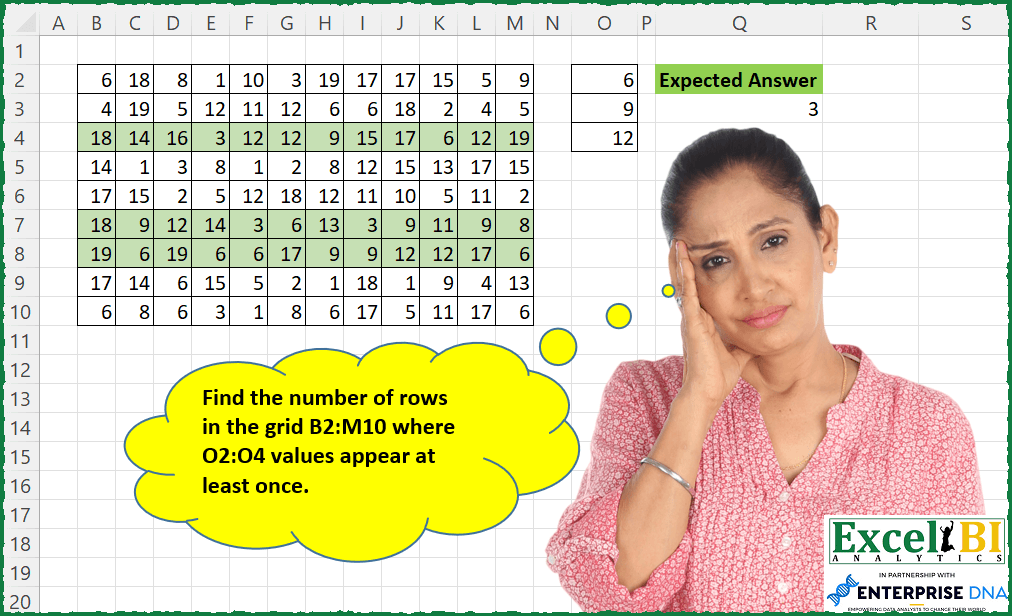
Find the number of rows in the grid B2:M10 where O2:O4 values appear at least once.
📌 Challenge Details and Links
ExcelBI Excel Challenge Number: 95
Challenge Difficulty: ⭐️
📥Download Sample File
📥Link to the solutions on LinkedIn
Solving the challenge of Count Rows with All Values with Power Query
Power Query solution 1 for Count Rows with All Values, proposed by Alejandro Simón 🇵🇦 🇪🇸:
let
 Source = Excel.CurrentWorkbook(){[Name="Table1"]}[Content],
 Custom1 = Table.ToRows (Source),
 Custom2 = List.Count (List.Select (List.Transform (Custom1, each List.ContainsAll(_, List)), each _ = true))
in
 Custom2


let
 Source = Excel.CurrentWorkbook(){[Name="Table2"]}[Content],
 Column1 = Source[Column1]
in
 Column1
Power Query solution 2 for Count Rows with All Values, proposed by Luan Rodrigues:
let
  Fonte = Data,
  Result = Table.AddColumn(
    Fonte,
    "Personalizar",
    each [a = {6, 9, 12}, b = Record.FieldValues(_), c = List.ContainsAll(b, a)][c]
  )
in
  Table.RowCount(Table.SelectRows(Result, each [Personalizar] = true))
Power Query solution 3 for Count Rows with All Values, proposed by Brian Julius:
let
 Source = Excel.CurrentWorkbook(){[Name="Table1"]}[Content],
 AddIndex = Table.AddIndexColumn( Source, "Index", 1, 1),
 Unpivot = Table.UnpivotOtherColumns(AddIndex, {"Index"}, "Attribute", "Value"),
 Group = Table.Group(Unpivot, {"Index"}, {{"All", each [Value]}}),
 ContainsAll = Table.SelectRows( Table.AddColumn(Group, "In", each List.ContainsAll([All], Values[Column1])), each [In] ),
 Rowcount = Table.RowCount( ContainsAll ),
 ToTable = Table.RenameColumns( hashtag#table(1, {{Rowcount}}), {"Column1", "Answer"})
in
 ToTable
Power Query solution 4 for Count Rows with All Values, proposed by Bhavya Gupta:
let
  Source = Excel.CurrentWorkbook(){[Name = "Table1"]}[Content],
  LookupList = {6, 9, 12},
  ExpectedOutput = List.Sum(
    List.Transform(Table.ToRows(Source), each Number.From(List.ContainsAll(_, LookupList)))
  )
in
  ExpectedOutput
Power Query solution 5 for Count Rows with All Values, proposed by Bhavya Gupta:
let
 Source = Excel.CurrentWorkbook(){[Name="Table1"]}[Content],
 LookupList = {6,9,12},
 ExpectedOutput = List.Count(List.Select(List.Transform(Table.ToRows(Source), each List.Intersect({List.Distinct(_),LookupList})), each List.Count(_)=List.Count(LookupList)))
in
 ExpectedOutput


-----------------------------------------------------------------------
let
 Source = Excel.CurrentWorkbook(){[Name="Table1"]}[Content],
 LookupList = {6,9,12},
 ExpectedOutput = List.Count(List.Select(List.Transform(Table.ToRows(Source), each List.Difference(LookupList,_)), each List.Count(_)= List.Count(LookupList)-1))
in
 ExpectedOutput
Power Query solution 6 for Count Rows with All Values, proposed by Matthias Friedmann:
let
  Source = Excel.CurrentWorkbook(){[Name = "NumbersInRows"]}[Content],
  Custom = List.Count(List.Select(Table.ToRows(Source), each List.ContainsAll(_, {6, 9, 12})))
in
  Custom
Power Query solution 7 for Count Rows with All Values, proposed by Rafael González B.:
let
  Source = Excel.CurrentWorkbook(){[Name = "Table1"]}[Content],
  ValuesToCheck = Excel.CurrentWorkbook(){[Name = "Table2"]}[Content][Column1],
  SourceToTable = Table.FromList(
    Table.ToColumns(Source),
    Splitter.SplitByNothing(),
    {"ValuesList"},
    null,
    ExtraValues.Error
  ),
  TotalSum = List.Sum(
    Table.AddColumn(
      SourceToTable,
      "Check",
      each Number.From(List.ContainsAll([ValuesList], ValuesToCheck))
    )[Check]
  )
in
  TotalSum
Power Query solution 8 for Count Rows with All Values, proposed by Krzysztof Kominiak:
let
 Source = Excel.CurrentWorkbook(){[Name="Table1"]}[Content],
 NumList = {6,9,12},
 Result = hashtag#table({"Expected Answer"}, {{List.Count(List.Select(Table.AddColumn( Source, "Rec", each List.Count(List.Intersect({Record.ToList(_), NumList })) )[Rec], each _= List.Count(NumList))) }} )
in
 Result
Power Query solution 9 for Count Rows with All Values, proposed by Mahmoud Bani Asadi:
let
  Source = Excel.CurrentWorkbook(){[Name = "Table1"]}[Content],
  LookupList = {6, 9, 12},
  CountLookup = List.Count(LookupList),
  Result = List.Sum(
    List.Transform(
      Table.ToRows(Source),
      each Number.From(List.Count(List.Intersect({_, LookupList})) = CountLookup)
    )
  )
in
  Result
Power Query solution 10 for Count Rows with All Values, proposed by Mahmoud Bani Asadi:
let
  Source = Excel.CurrentWorkbook(){[Name = "Table1"]}[Content],
  Transpose = Table.Transpose(Source),
  Unpivot = Table.UnpivotOtherColumns(Transpose, {}, "Attribute", "Value"),
  MergQ = Table.NestedJoin(
    Unpivot,
    {"Value"},
    SelectedList,
    {"Numbers"},
    "SelectedList",
    JoinKind.RightOuter
  ),
  RemoveDup = Table.Distinct(MergQ, {"Attribute", "Value"}),
  Group = Table.Group(RemoveDup, {"Attribute"}, {{"Count", each Table.RowCount(_), Int64.Type}}),
  Filter = Table.SelectRows(Group, each ([Count] = 3)),
  CalcCount = List.NonNullCount(Filter[Count])
in
  CalcCount
Power Query solution 11 for Count Rows with All Values, proposed by Mahmoud Bani Asadi:
= List.Count(List.Select(List.Transform(Table.ToRows(Source),each List.Count(List.Select(List.Transform({6,9,12},(x)=> List.PositionOf(_,x)),each _>-1))),each _>2))
Power Query solution 12 for Count Rows with All Values, proposed by Jan Willem Van Holst:
let
  Source = Table.FromRows(
    Json.Document(
      Binary.Decompress(
        Binary.FromText(
          "VVFBEsQgCPsL5x4WtLS8xen/v7GCBNsDGVRCAo5BSgfxPcGDPX4TmifmcBWcEzyMnmNQR4VfsTgwMs2Ivn7Ro85pccVBVugIwCATglpvS3GxkgS3glyK216Og1fu5WN302rsEyfZZq3KemorVBqeOZN70QxFSBSW7NNQ9qjbaEc99i34GMxsudHpwWmaK6h9vs7RsqaC1vMH",
          BinaryEncoding.Base64
        ),
        Compression.Deflate
      )
    ),
    let
      _t = ((type nullable text) meta [Serialized.Text = true])
    in
      type table [
        Column1 = _t,
        Column2 = _t,
        Column3 = _t,
        Column4 = _t,
        Column5 = _t,
        Column6 = _t,
        Column7 = _t,
        Column8 = _t,
        Column9 = _t,
        Column10 = _t,
        Column11 = _t,
        Column12 = _t
      ]
  ),
  Result =
    let
      s1 = Table.ToRows(Source),
      s2 = List.Transform(s1, each List.Count(List.Intersect({_, {"6", "9", "12"}}))),
      s3 = List.Select(s2, each _ = 3),
      s4 = List.Count(s3)
    in
      s4
in
  Result
Solving the challenge of Count Rows with All Values with Excel
Excel solution 1 for Count Rows with All Values, proposed by Bo Rydobon 🇹🇭:
=SUM(
    N(
        BYROW(
            B2:M10,
            LAMBDA(
                r,
                COUNT(
                    XMATCH(
                        O2:O4,
                        r
                    )
                )
            )
        )=3
    )
)
Excel solution 2 for Count Rows with All Values, proposed by Bo Rydobon 🇹🇭:
=SUM(--BYROW(B2:M10,LAMBDA(r,AND(COUNTIF(r,O2:O4)))))Excel solution 3 for Count Rows with All Values, proposed by Rick Rothstein:
=COUNT(BYROW(B2:M10,LAMBDA(x,PRODUCT(MATCH(O2:O4,x,0)))))Excel solution 4 for Count Rows with All Values, proposed by John V.:
=SUM(--(BYROW(B2:M10,LAMBDA(x,SUM(--(COUNTIF(x,O2:O4)>0))))=3))
✅ =SUM(BYROW(B2:M10,LAMBDA(x,--AND(COUNTIF(x,O2:O4)))))
Excel solution 5 for Count Rows with All Values, proposed by محمد حلمي:
=SUM(--(BYROW(B2:M10,LAMBDA(b,
COUNT(XMATCH(O2:O4,b))))=3))
Excel solution 6 for Count Rows with All Values, proposed by 🇰🇷 Taeyong Shin:
=REDUCE(
     0,
     SEQUENCE(
         ROWS(
             B2:M10
         )
     ),

     LAMBDA(
         a,
         n,
          a + AND(
              SIGN(
                  COUNTIF(
                      INDEX(
                          B2:M10,
                           n,
                           0
                      ),
                       O2:O4
                  )
              ) = SIGN(
                  O2:O4
              )
          )
     )

)
Excel solution 7 for Count Rows with All Values, proposed by Kris Jaganah:
=SUM(IF(BYROW($B$2:$M$10,LAMBDA(x,SUM(IF(UNIQUE(x,TRUE)=$O$2:$O$4,1,0))))=COUNT($O$2:$O$4),1,0))Excel solution 8 for Count Rows with All Values, proposed by Julian Poeltl:
=SUM(
    --ISNUMBER(
        BYROW(
            B2:M10,
            LAMBDA(
                A,
                PRODUCT(
                    XMATCH(
                        O2:O4,
                        A
                    )
                )
            )
        )
    )
)
Excel solution 9 for Count Rows with All Values, proposed by Aditya Kumar Darak 🇮🇳:
=SUM(
 N(
 BYROW(
 B2:M10,
 LAMBDA(a, SUM(--(COUNTIFS(a, O2:O4) > 0)) = 3)
 )
 )
)
Excel solution 10 for Count Rows with All Values, proposed by Aditya Kumar Darak 🇮🇳:
=SUM(
 N(
 BYROW(
 B2:M10,
 LAMBDA(a, COUNT(XMATCH(O2:O4, a)) = 3)
 )
 )
)
Excel solution 11 for Count Rows with All Values, proposed by Aditya Kumar Darak 🇮🇳:
=SUM(
 N(
 BYROW(
 B2:M10,
 LAMBDA(a, AND(BYROW(a = O2:O4, LAMBDA(x, OR(x)))))
 )
 )
)
Excel solution 12 for Count Rows with All Values, proposed by Timothée BLIOT:
=LET(Data,B2:M10, Test,O2:O4, func, LAMBDA(a, BYROW(--(a=Data), LAMBDA(x, IF(SUM(x)>0,1,0) )) ),
SUM(BYROW(MAKEARRAY(ROWS(Data),ROWS(Test), LAMBDA(a,b, INDEX(func(INDEX(Test,b)),a,1) )), LAMBDA(a, IF(SUM(a)=ROWS(Test),1,0) )) ))
Excel solution 13 for Count Rows with All Values, proposed by Bhavya Gupta:
=SUM(--(BYROW(B2:M10,
    LAMBDA(x,
    SUM(--(ISNUMBER(
        XMATCH(
            UNIQUE(
                x,
                1
            ),
            O2:O4
        )
    )))))=ROWS(
        O2:O4
    )))
Excel solution 14 for Count Rows with All Values, proposed by Bhavya Gupta:
=SUM(0+(BYROW(B3:M11,LAMBDA(x,IFERROR(ROWS(TOCOL(XMATCH(O2:O4,x),2)),0)=ROWS(O2:O4)))))Excel solution 15 for Count Rows with All Values, proposed by Charles Roldan:
=SUM(--BYROW(B2:M10,LAMBDA(x,IFNA(AND(XMATCH(O2:O4,x)),))))Excel solution 16 for Count Rows with All Values, proposed by Jaroslaw Kujawa:
=COUNT(BYROW($B$2:$M$10;LAMBDA(a;SUM(XMATCH(TRANSPOSE(O2:O4);a)))))Excel solution 17 for Count Rows with All Values, proposed by Stefan Olsson:
=COUNTIF(

     BYCOL(

          TRANSPOSE(
              B2:M10
          ),

          LAMBDA(
              cc,

               COUNTUNIQUE(
                   QUERY(
                       cc,
                        "WHERE Col1 Matches "&JOIN(
                            "|",
                            "'",
                            O2:O4,
                            "'"
                        ),
                        0
                   )
               )

          )

     ),

    3
)
Excel solution 18 for Count Rows with All Values, proposed by Mahmoud Bani Asadi:
=SUM(
    BYROW(
        Table1,
        LAMBDA(
            x,
            --AND(
                COUNTIF(
                    x,
                    O2:O4
                )<>0
            )
        )
    )
)
Solving the challenge of Count Rows with All Values with Python
Python solution 1 for Count Rows with All Values, proposed by Igor Perković:
import pandas as pd
# Source
df = pd.read_excel('Grid Find.xlsx', usecols="B:M",    skiprows=1, header=None)
df2 = pd.read_excel('Grid Find.xlsx', usecols="O", nrows=3, skiprows=1,& header=None)
pattern = [p[0] for p in df2.values.tolist()]
# Processing
cn = 0
for rows in df.values.tolist():
 print(rows)
 res = [x for x in rows if x in pattern]
 if set(res) == set(pattern):
 cn += 1
 else:
print('nn🎯 EXPECTED ANSWER:',cn)
Solving the challenge of Count Rows with All Values with SQL
SQL solution 1 for Count Rows with All Values, proposed by Zoran Milokanović:
WITH
DATA_PREPARATION_GRID
AS
(
 SELECT
 ROW_NUMBER() OVER () AS ID
 ,G.B, G.C, G.D, G.E, G.F, G.G, G.H, G.I, G.J, G.K, G.L, G.M
 FROM GRID G
),
DATA_PREPARATION_VALUE
AS
(
 SELECT
 V.VALUE
 ,COUNT(*) OVER () AS TOTAL_TO_MATCH
 FROM VALUE V
)
SELECT
 COUNT(*) AS EXPECTED_ANSWER
FROM
(
 SELECT
 G.ID
 ,G.B, G.C, G.D, G.E, G.F, G.G, G.H, G.I, G.J, G.K, G.L, G.M
 ,V.TOTAL_TO_MATCH
 ,COUNT(*) AS TOTAL_MATCH
 FROM DATA_PREPARATION_GRID G
 CROSS JOIN DATA_PREPARATION_VALUE V
 WHERE
 V.VALUE IN (G.B, G.C, G.D, G.E, G.F, G.G, G.H, G.I, G.J, G.K, G.L, G.M)
 GROUP BY
 G.ID
 ,G.B, G.C, G.D, G.E, G.F, G.G, G.H, G.I, G.J, G.K, G.L, G.M
 ,V.TOTAL_TO_MATCH
 HAVING
 COUNT(*) /*TOTAL_MATCH*/ = V.TOTAL_TO_MATCH
) F
;