
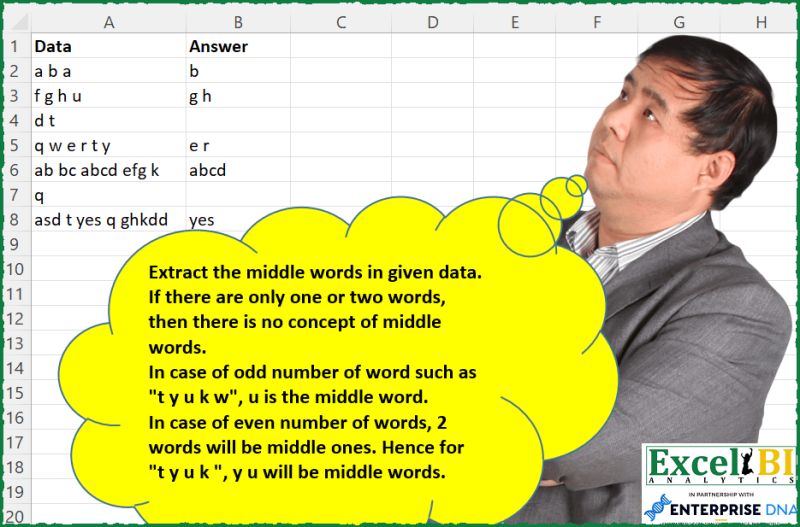
Extract the middle words in given data. If there are only one or two words, then there is no concept of middle words. Hence, answer would be blanks in this case. In case of odd number of word such as “t y u k w”, u is the middle word. In case of even number of words, 2 words will be middle ones. Hence for “t y u k “, y u will be middle words.
📌 Challenge Details and Links
ExcelBI Excel Challenge Number: 94
Challenge Difficulty: ⭐️⭐️
📥Download Sample File
📥Link to the solutions on LinkedIn
Solving the challenge of Extract Middle Word(s) with Power Query
Power Query solution 1 for Extract Middle Word(s), proposed by Bo Rydobon 🇹🇭:
let
  Source = Excel.CurrentWorkbook(){[Name = "Table2"]}[Content],
  Res = Table.TransformColumns(
    Source,
    {
      "Data",
      each
        let
          a = Text.Split(_, " "),
          c = List.Count(a),
          b = Number.IntegerDivide(c - 1, 2)
        in
          if c > 2 then Text.Combine(List.RemoveLastN(List.Skip(a, b), b), " ") else null
    }
  )
in
  Res
Power Query solution 2 for Extract Middle Word(s), proposed by Alejandro Simón 🇵🇦 🇪🇸:
let
  Source = Excel.CurrentWorkbook(){[Name = "Table1"]}[Content],
  Solucion = Table.AddColumn(
    Source,
    "Answer",
    each
      let
        a = Table.FromList(Text.Split([Data], " ")),
        b = Table.AddIndexColumn(a, "Idx", 1, 1),
        c = Table.RowCount(a),
        d =
          if c = 1 or c = 2 then
            ""
          else if Number.IsOdd(c) then
            Text.Combine(
              Table.SelectRows(b, each [Idx] = Number.RoundDown(c / 2) + 1)[Column1],
              " "
            )
          else
            Text.Combine(Table.SelectRows(b, each [Idx] = c / 2 or [Idx] = c / 2 + 1)[Column1], " ")
      in
        d
  )[[Answer]]
in
  Solucion
Power Query solution 3 for Extract Middle Word(s), proposed by Luan Rodrigues:
let
  Fonte = Data,
  Result = Table.AddColumn(
    Fonte,
    "Resposta",
    each [
      a = Text.Split([Data], " "),
      b = List.Count(a) - 1,
      c = Number.RoundUp(List.Median({1 .. b}) - 1),
      d = if c >= 2 then List.RemoveLastN(a, c) else List.RemoveLastN(a, 1),
      e = if c >= 2 then List.RemoveFirstN(d, c) else List.RemoveFirstN(d, 1),
      f = try Text.Combine(e, " ") otherwise null
    ][f]
  )[[Resposta]]
in
  Result
Power Query solution 4 for Extract Middle Word(s), proposed by Victor Wang:
let
  Source = Excel.CurrentWorkbook(){[Name = "Table1"]}[Content],
  Custom1 = List.Transform(
    Source[Data],
    each Text.Combine(
      [
        s  = Text.Split(_, " "),
        c  = List.Count(s),
        m1 = List.Range(s, Number.IntegerDivide(c, 2), 1),
        m2 = List.Range(s, c / 2 - 1, 2),
        r  = if c < 3 then {null} else if Number.IsOdd(c) then m1 else m2
      ][r],
      " "
    )
  )
in
  Custom1
Power Query solution 5 for Extract Middle Word(s), proposed by Mahmoud Bani Asadi:
let
  Source = Excel.CurrentWorkbook(){[Name = "Table1"]}[Content],
  Result = Table.AddColumn(
    Source,
    "Answer",
    each [
      a = Text.Split([Data], " "),
      b = List.Count(a),
      c = b / 2,
      d = Number.RoundTowardZero(c, 0),
      e = a{c - 1} & " " & a{c},
      f = if b > 2 then if c = d then e else a{c - 0.5} else null
    ][f]
  )
in
  Result
Power Query solution 6 for Extract Middle Word(s), proposed by Jan Willem Van Holst:
let
  Source = Table.FromRows(
    Json.Document(
      Binary.Decompress(
        Binary.FromText(
          "NYs5DoAwDAS/MnLNj6IUNg6JRMUlxO9xgqh2Z1abkiiGyiQmeUqyUGlcwZHDOGfQqBs3hZ2TJ1S0YdWwGbXZKUtljanD9/iveni/lYON2lb3GIIk5xc=",
          BinaryEncoding.Base64
        ),
        Compression.Deflate
      )
    ),
    let
      _t = ((type nullable text) meta [Serialized.Text = true])
    in
      type table [Data = _t, Answer = _t]
  ),
  #"Added Custom" = Table.AddColumn(
    Source,
    "Result",
    each
      let
        ListOfWords = Text.Split(_[Data], " "),
        NumOfElem = List.Count(ListOfWords),
        ReturnPosition = if Number.IsOdd(NumOfElem) then NumOfElem / 2 - 0.5 else NumOfElem / 2 - 1,
        Range = if Number.IsOdd(NumOfElem) then 1 else 2,
        Result =
          if NumOfElem < 3 then
            ""
          else
            Text.Combine(List.Range(ListOfWords, ReturnPosition, Range), " ")
      in
        Result
  )
in
  #"Added Custom"
Solving the challenge of Extract Middle Word(s) with Excel
Excel solution 1 for Extract Middle Word(s), proposed by Bo Rydobon 🇹🇭:
=MAP(A2:A8,LAMBDA(a,LET(t,TEXTSPLIT(a,," "),c,ROWS(t),TEXTJOIN(" ",,REPT(t,ABS(SEQUENCE(c)*2-c-1)<2*(c>2))))))Excel solution 2 for Extract Middle Word(s), proposed by Bo Rydobon 🇹🇭:
=REDUCE(A2:A8,SEQUENCE(9),LAMBDA(a,n,IFNA(TEXTBEFORE(TEXTAFTER(a," ",)," ",-1),REPT(a,n>1))))Excel solution 3 for Extract Middle Word(s), proposed by John V.:
=MAP(A2:A8,
    LAMBDA(x,
    LET(t,
    TEXTSPLIT(
        x,
        ,
        " "
    ),
    r,
    ROWS(
        t
    ),
    TEXTJOIN(" ",
    ,
    IF(r>2,
    INDEX(t,
    (r-1)/2+SEQUENCE(
        2-MOD(
            r,
            2
        )
    )),
    "")))))

✅ =MAP(
    A2:A8,
    LAMBDA(
        x,
        LET(
            r,
            ROWS(
                TEXTSPLIT(
                    x,
                    ,
                    " "
                )
            ),
            b,
            INT(
                1+r/2
            ),
            REPT(
                TEXTAFTER(
                    TEXTBEFORE(
                        x,
                        " ",
                        b
                    ),
                    " ",
                    r-b
                ),
                r>2
            )
        )
    )
)
Excel solution 4 for Extract Middle Word(s), proposed by محمد حلمي:
=MAP(
    A2:A8,
    LAMBDA(
        a,

        LET(

            e,
            TEXTSPLIT(
                a,
                " "
            ),

            s,
            COUNTA(
                e
            )/2,

            IF(
                s>1,
                TEXTJOIN(
                    " ",
                    ,

                    IF(
                        INT(
                            s
                        )=s,
                        INDEX(
                            e,
                            s+{0,
                            1}
                        ),
                        INDEX(
                            e,
                            s+0.5
                        )
                    )
                ),
                ""
            )
        )
    )
)
Excel solution 5 for Extract Middle Word(s), proposed by Julian Poeltl:
=MAP(
    A2:A8,
    LAMBDA(
        D,
        LET(
            SP,
            TEXTSPLIT(
                D,
                " "
            ),
            C,
            COLUMNS(
                SP
            ),
            IFS(
                C<3,
                "",
                ISODD(
                    C
                ),
                CHOOSECOLS(
                    SP,
                    ROUNDUP(
                        C/2,
                        0
                    )
                ),
                1,
                TEXTJOIN(
                    " ",
                    ,
                    CHOOSECOLS(
                        SP,
                        SEQUENCE(
                            2,
                            ,
                            ROUNDDOWN(
                        C/2,
                        0
                    )
                        )
                    )
                )
            )
        )
    )
)
Excel solution 6 for Extract Middle Word(s), proposed by Aditya Kumar Darak 🇮🇳:
=LET(
 _d, A2:A8,
 _e1, LAMBDA(x, TEXTSPLIT(x, , " ")),
 _e2, LAMBDA(x, TEXTJOIN(" ", 1, x)),
 _e3, LAMBDA(x, y, CHOOSEROWS(x, y)),
 _e4, LAMBDA(x,
 UNIQUE(
 ROUND(MEDIAN(SEQUENCE(ROWS(_e1(x)))) + {-0.49; 0.49}, 0)
 )
 ),
 _e5, LAMBDA(a, _e2(_e3(_e1(a), _e4(a)))),
 _f, MAP(_d, _e5),
 _r, IF(_f = _d, "", _f),
 _r
)
Excel solution 7 for Extract Middle Word(s), proposed by Timothée BLIOT:
=LET(A, IFERROR(TEXTSPLIT(TEXTJOIN("/",1,A2:A8)," ","/"),0),
B, BYROW(A,LAMBDA(x, COLUMNS(A)-COUNT(x) )),
BYROW(SEQUENCE(ROWS(A)),LAMBDA(x, IF(INDEX(B,x)>2,
IF(ISODD(INDEX(B,x)),INDEX(A,x,INT(INDEX(B,x)/2)+1),TEXTJOIN(" ",1,INDEX(A,x,{0,1}+INT(INDEX(B,x)/2)))),"") )))
Excel solution 8 for Extract Middle Word(s), proposed by Charles Roldan:
=LET(Data, A2:A8,
Spaces, LEN(Data)-LEN(SUBSTITUTE(Data, " ", )), Half, INT(Spaces/2),
IFNA(TEXTAFTER(TEXTBEFORE(Data, " ", Spaces-Half+1), " ", Half), ""))
Excel solution 9 for Extract Middle Word(s), proposed by Charles Roldan:
=LET(
    Data,
     A2:A8,
     Spaces,
     LEN(
         Data
     )-LEN(
         SUBSTITUTE(
             Data,
              " ",

         )
     ),
     IFERROR(
         TEXTBEFORE(
             TEXTAFTER(
                 Data,
                  " ",
                  INT(
                      Spaces/2
                  )
             ),
              " ",
              1+MOD(
                  Spaces,
                   2
              )
         ),
          ""
     )
)
Excel solution 10 for Extract Middle Word(s), proposed by Stefan Olsson:
=MAP(
A2:A8,
LAMBDA(_d,
IF(
 LEN(REGEXREPLACE(_d,"[^ ]",""))<2,"",
 REGEXEXTRACT(_d,
 "^"&
 REPT(".*? ", LEN(REGEXREPLACE(_d,"[^ ]",""))/2)&
 "(.*)"&
 REPT(" .*?", LEN(REGEXREPLACE(_d,"[^ ]",""))/2)&
 "$"
 )
 )
 )
)
Excel solution 11 for Extract Middle Word(s), proposed by Abhishek Kumar Jain:
=LET(
    a,
    A2:A8,
    b,
    LEN(
        a
    )-LEN(
        SUBSTITUTE(
            a,
            " ",
            ""
        )
    ),
    c,
    INT(
        b/2
    ),
    d,
    IF(
        ISEVEN(
            b
        ),
        c+1,
        c+2
    ),
    e,
    FIND(
        "~",
        SUBSTITUTE(
            a,
            " ",
            "~",
            c
        )
    ),
    f,
    FIND(
        "~",
        SUBSTITUTE(
            a,
            " ",
            "~",
            d
        )
    ),
    IFERROR(
        MID(
            a,
            e+1,
            f-e-1
        ),
        ""
    )
)
Excel solution 12 for Extract Middle Word(s), proposed by kamal shaterian:
MidPoint,FIND("@",SUBSTITUTE(A1," ","@",SpaceCount/2)),
IF(SpaceCount>1,
IF(ISEVEN(SpaceCount),
MID(A1,MidPoint+1,FIND("@",SUBSTITUTE(A1," ","@",SpaceCount/2+1))-MidPoint),
MID(A1,MidPoint+1,ABS(MidPoint-FIND("@",SUBSTITUTE(A1," ","@",CEILING.MATH(SpaceCount/2)+1))))
),
""))
Excel solution 13 for Extract Middle Word(s), proposed by Mehdi Ghanimifard:
=IF(

     COLUMNS(
         SPLIT(
             A2,
              " "
         )
     )>2,

     IF(

          MOD(
              COLUMNS(
                  SPLIT(
                      A2,
                       " "
                  )
              ),
              2
          )=1,

          INDEX(
              SPLIT(
                  A2,
                   " "
              ),
              1,
              ROUNDUP(
                  COLUMNS(
                      SPLIT(
                          A2,
                           " "
                      )
                  )/2
              )
          ),

          CONCATENATE(

               INDEX(
                   SPLIT(
                       A2,
                        " "
                   ),
                   1,
                   ROUNDUP(
                       COLUMNS(
                           SPLIT(
                               A2,
                                " "
                           )
                       )/2
                   )
               ),

               " ",

               INDEX(
                   SPLIT(
                       A2,
                        " "
                   ),
                   1,
                   ROUNDUP(
                       COLUMNS(
                           SPLIT(
                               A2,
                                " "
                           )
                       )/2
                   )+1
               )
          )
     ),

     ""

)
Solving the challenge of Extract Middle Word(s) with SQL
SQL solution 1 for Extract Middle Word(s), proposed by Zoran Milokanović:
WITH
DATA_PREPARATION -- Vertica Analytic Database v9.2.0-7
AS
(
 SELECT
 DP.ORDINAL_NUMBER
 ,DP.NO_OF_WORDS
 ,DECODE(MOD(DP.NO_OF_WORDS, 2), 1, 'ODD', 'EVEN') AS NUMBER_TYPE
 , DP.DATA
 FROM
 (
 SELECT
 ROW_NUMBER() OVER () ORDINAL_NUMBER
 ,LENGTH(REGEXP_REPLACE(D.DATA, '[^ ]+', '')) /*NO_OF_DELIMITERS*/ + 1 AS NO_OF_WORDS
 , D.DATA
 FROM DATA D
 ) DP
)
SELECT
 CASE
 THEN DECODE(DP.NUMBER_TYPE,
 'ODD', SPLIT_PART(DP.DATA, ' ', DP.SECOND_POSITION),
 'EVEN', SPLIT_PART(DP.DATA, ' ', DP.FIRST_POSITION)
 || ' ' || SPLIT_PART(DP.DATA, ' ', DP.SECOND_POSITION)
 )
 END AS ANSWER
FROM DATA_PREPARATION DP
ORDER BY
 DP.ORDINAL_NUMBER
;