
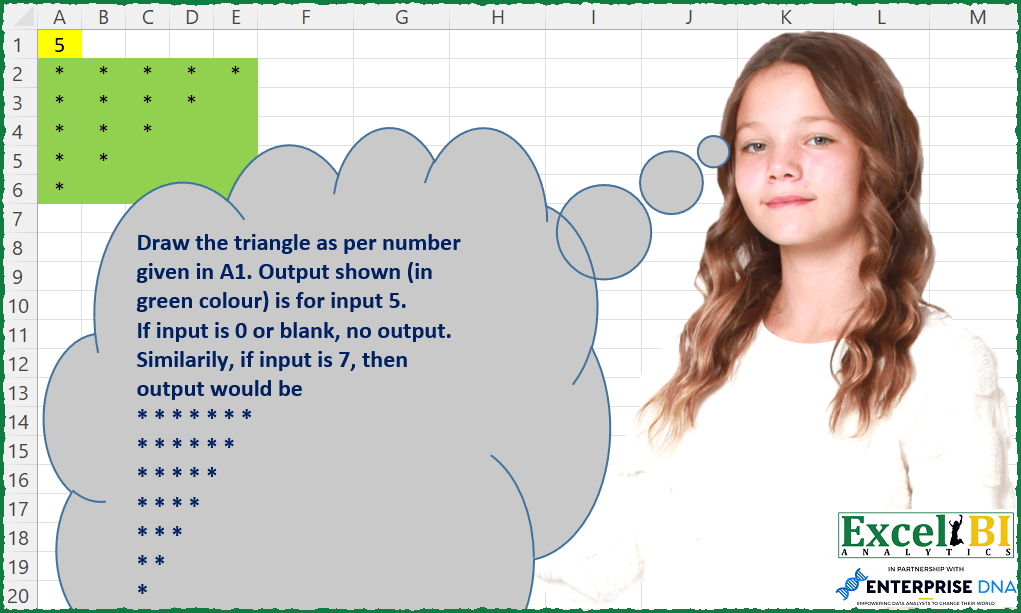
Draw the triangle as per number given in A1. Output shown (in green colour) is for input 5. If input is 0 or blank, no output. Similarly, if input is 7, then output would be * * * * * * * * * * * * * * * * * * * * * * * * * * * *
📌 Challenge Details and Links
ExcelBI Excel Challenge Number: 93
Challenge Difficulty: ⭐️
📥Download Sample File
📥Link to the solutions on LinkedIn
Solving the challenge of Draw Descending Triangle with Power Query
Power Query solution 1 for Draw Descending Triangle, proposed by Alejandro Simón 🇵🇦 🇪🇸:
let
  Source = Excel.CurrentWorkbook(){[Name = "Table2"]}[Content],
  BackToTable = try
    Table.FromList(
      List.Accumulate(
        List.Reverse({1 .. Source[Column1]{0}}),
        {},
        (S, C) => S & {List.Select(Text.Split(Text.Repeat("* ", C), " "), each _ <> "")}
      ),
      Splitter.SplitByNothing(),
      null,
      null,
      ExtraValues.Error
    )
  otherwise
    {},
  ExtractedValues = try
    Table.TransformColumns(
      BackToTable,
      {"Column1", each Text.Combine(List.Transform(_, Text.From)), type text}
    )
  otherwise
    {},
  FinalSplit =
    if ExtractedValues = {} then
      {}
    else
      Table.SplitColumn(
        ExtractedValues,
        "Column1",
        Splitter.SplitTextByRepeatedLengths(1),
        Source[Column1]{0}
      )
in
  FinalSplit
Power Query solution 2 for Draw Descending Triangle, proposed by Luan Rodrigues:
let
  Fonte = if Data = null then 0 else Data,
  a = [a = {0 .. Fonte - 1}, b = List.Transform(a, each List.Repeat({"*"}, Fonte - _))][b],
  b = Table.FromList(a, Splitter.SplitByNothing(), null, null),
  c =
    if Fonte = 0 then
      []
    else
      Table.TransformColumns(b, {"Column1", each Text.Combine(List.Transform(_, Text.From), "|")}),
  d =
    if Fonte = 0 then
      []
    else
      Table.SplitColumn(c, "Column1", Splitter.SplitTextByDelimiter("|", QuoteStyle.Csv), Fonte)
in
  d
Power Query solution 3 for Draw Descending Triangle, proposed by Brian Julius:
let
 Source = if Size = 0 then 0 else List.Transform( List.Reverse( {1..Size} ), each Text.Repeat("*", _)),

 ToTable = if Size = 0 then hashtag#table(1, {}) else Table.FromList(Source, Splitter.SplitByNothing(), null, null, ExtraValues.Error),

 Split = Table.SplitColumn(ToTable, "Column1", Splitter.SplitTextByRepeatedLengths(1))
in
 Split
Power Query solution 4 for Draw Descending Triangle, proposed by Bhavya Gupta:
let
 Source = Table.FromColumns(List.Transform(List.Reverse({1..List.Max({4,0})}), each List.Repeat({"*"},_))),
 Final = if Table.IsEmpty(Source) then hashtag#table({"Column1"}, {{null}}) else Source
in
 Final
Power Query solution 5 for Draw Descending Triangle, proposed by Matthias Friedmann:
let
 Source = Excel.CurrentWorkbook(){[Name = "TriangleSize"]}[Content][Column1]{0},
 list =
 if Source = null or Source = 0 then
 {{""}}
 else
 List.Transform(
 {0 .. Source - 1},
 each List.Repeat({"*"}, Source - _) & List.Repeat({null}, _)
 ),
 table = Table.FromRows(list)
in
 table


original with Table.FromList and Table.SplitColumn
let
 Source = Excel.CurrentWorkbook(){[Name="TriangleSize"]}[Content][Column1]{0},
 input = if Source = null then 0 else Source,
 list = List.Transform({0..input-1}, each Text.Combine(List.Repeat({"*"}, input-_)) ),
 Converted = Table.FromList(list, Splitter.SplitByNothing(), {""}, null, ExtraValues.Error),
 Split = if input = 0 then Converted else Table.SplitColumn(Converted, "", Splitter.SplitTextByRepeatedLengths(1))
in
 Split
Power Query solution 6 for Draw Descending Triangle, proposed by Melissa de Korte:
let
  Triangle = Table.FromColumns(List.Reverse(List.Transform({1 .. n}, each List.Repeat({"*"}, _))))
in
  Triangle
Power Query solution 7 for Draw Descending Triangle, proposed by Thomas DUCROQUETZ:
let
  triangleSize = InputSize ?? 0,
  TriangleRows = List.Accumulate(
    List.Reverse({1 .. triangleSize}),
    {},
    (rows, currentSize) =>
      let
        Cols = List.Transform({1 .. currentSize}, each "Col " & Number.ToText(_)),
        Row  = Record.FromList(List.Repeat({"*"}, currentSize), Cols)
      in
        rows & {Row}
  ),
  ConstructTriangle = Table.FromRecords(
    TriangleRows,
    List.Transform({1 .. triangleSize}, each "Col " & Number.ToText(_)),
    MissingField.UseNull
  )
in
  ConstructTriangle
Solving the challenge of Draw Descending Triangle with Excel
Excel solution 1 for Draw Descending Triangle, proposed by Bo Rydobon 🇹🇭:
=REPT(
    "*",
    A1+2>SEQUENCE(
        A1
    )+SEQUENCE(
        ,
        A1
    )
)
Excel solution 2 for Draw Descending Triangle, proposed by Rick Rothstein:
=IFERROR(
    MAKEARRAY(
        A1,
        A1,
        LAMBDA(
            r,
            c,
            IF(
                A1-r+1>=c,
                "*",
                ""
            )
        )
    ),
    ""
)
Excel solution 3 for Draw Descending Triangle, proposed by Rick Rothstein:
=IFERROR(
    EXPAND(
        "*",
        A1,
        A1-SEQUENCE(
            A1
        )-SEQUENCE(
            ,
            A1,
            0
        )+1,
        "*"
    ),
    ""
)
Excel solution 4 for Draw Descending Triangle, proposed by Rick Rothstein:
=IFERROR(IF(A1>=SEQUENCE(A1)+SEQUENCE(,A1,0),"*",""),"")

I am noticing that not all the formula solutions are handling the "If input is 0 or blank, no output" requirement. If that is acceptable, then my formula would become this even shorter one...

=IF(A1>=SEQUENCE(A1)+SEQUENCE(,A1,0),"*","")
Excel solution 5 for Draw Descending Triangle, proposed by John V.:
=IFERROR(REPT("*",SEQUENCE(A1)+SEQUENCE(,A1)-2Excel solution 6 for Draw Descending Triangle, proposed by محمد حلمي:
=LET(a,A1,b,EXPAND("*",a,a,"*"),
IF(SEQUENCE(a,,a,-1)>=SEQUENCE(,a),b,""))
Excel solution 7 for Draw Descending Triangle, proposed by محمد حلمي:
=IF(
    SEQUENCE(
        ,
        A1,
        A1,
        -1
    )>=SEQUENCE(
        A1
    ),
    "*",
    ""
)
Excel solution 8 for Draw Descending Triangle, proposed by Kris Jaganah:
=MID(REPT("*",SEQUENCE(A1,,A1,-1)),SEQUENCE(,A1),1)Excel solution 9 for Draw Descending Triangle, proposed by Julian Poeltl:
=IFERROR(LET(N,
    A1,
    MAKEARRAY(N,
    N,
    LAMBDA(A,
    B,
    IF((A+B)<=N+1,
    "*",
    "")))),
    "")
Excel solution 10 for Draw Descending Triangle, proposed by Aditya Kumar Darak 🇮🇳:
= LAMBDA(char, num,
 LET(
 _e, LAMBDA(a, b, VSTACK(a, EXPAND(char, , b, char))),
 _seq, SEQUENCE(num),
 _c, DROP(REDUCE("", _seq, _e), 1),
 _s, SORTBY(_c, _seq, -1),
 _r, IFERROR(_s, ""),
 _r
 )
)
Excel solution 11 for Draw Descending Triangle, proposed by Timothée BLIOT:
=IFERROR(MAKEARRAY(A1,A1,LAMBDA(a,b, IF(b<=A1-a+1,"*",""))),"")Excel solution 12 for Draw Descending Triangle, proposed by Bhavya Gupta:
=MAKEARRAY(A1,A1,LAMBDA(x,y,IF(y-1<=A1-x,"*","")))
=LET(n,A1,s,SEQUENCE(n),SORTBY(IF(SEQUENCE(,n)<=s,"*",""),s,-1))
Ignoring IF Condition (idea by Bo Rydobon) -
=MAKEARRAY(A1,A1,LAMBDA(x,y,REPT("*",y-1<=A1-x)))
Excel solution 13 for Draw Descending Triangle, proposed by Stefan Olsson:
=IFERROR(MAKEARRAY(A1,A1,LAMBDA(rr,cc,IF(rr+cc<(A1+2),"*",))))
This however works as expected in both
=IFERROR(MAKEARRAY(A1,A1,LAMBDA(rr,cc,IF(rr+cc<(A1+2),"*",""))),"")
Excel solution 14 for Draw Descending Triangle, proposed by Peter Bartholomew:
= LET(

     k,
     SEQUENCE(
         N,
         ,
         0
     ),

     v,
     k + TRANSPOSE(
         k
     ),

     IF(
         N>0,
         IF(
             v
Excel solution 15 for Draw Descending Triangle, proposed by Abhishek Kumar Jain:
=IF(
    OR(
        A1=0,
        A1=""
    ),
    "",
    TEXTSPLIT(
        TEXTJOIN(
            "|",
            TRUE,
            REPT(
                "* ",
                SEQUENCE(
                    A1,
                    ,
                    A1,
                    -1
                )
            ),
            " "
        ),
        " ",
        "|",
        TRUE,
        ,
        ""
    )
)

Using IFERROR instead of IF statement:

=IFERROR(
    TEXTSPLIT(
        TEXTJOIN(
            "|",
            TRUE,
            REPT(
                "* ",
                SEQUENCE(
                    A1,
                    ,
                    A1,
                    -1
                )
            ),
            " "
        ),
        " ",
        "|",
        TRUE,
        ,
        ""
    ),
    ""
)
Excel solution 16 for Draw Descending Triangle, proposed by Abhishek Kumar Jain:
=IF(
    OR(
        A1=0,
        A1=""
    ),
    "",
    REPT(
        "*",
        SEQUENCE(
            A1,
            ,
            A1,
            -1
        )
    )
)
Excel solution 17 for Draw Descending Triangle, proposed by Sergei Baklan:
= LAMBDA(n,
 IF( n = 1, "*",
 IF(n = 0, "",
 IFNA( HSTACK(IF(SEQUENCE(n), "*"), stars(n - 1)), "")
 ) )
)
Excel solution 18 for Draw Descending Triangle, proposed by Amardeep Singh:
=LET(n,A1,MAKEARRAY(n,n,LAMBDA(r,c,IF(r+c-1>n,"","*"))))Excel solution 19 for Draw Descending Triangle, proposed by roberto mensa:
=REPT("*",IFERROR(ROW(OFFSET(A1,,,A1))+COLUMN(OFFSET(A1,,,,A1))-1<=A1,0))Excel solution 20 for Draw Descending Triangle, proposed by Pawan Keswani:
=IF($G$2>0,IF(($G$2-(COLUMN(G$1)-COLUMN($G$1)))>0,
IF(($G$2-ROW($G2)+ROW($G$2))>0,
IF((-ROW($G$2)+ROW($G2)-COLUMN($F$2)+COLUMN(F$2))<$G$2,"*"," ")," ")," ")," ")
Where G2 cell address is any no. (0,1,2, etc)
Excel solution 21 for Draw Descending Triangle, proposed by Pawan Keswani:
=IF($G$2>0,IF(($G$2-(COLUMN(G$1)-COLUMN($G$1)))>0,
IF(($G$2-ROW($G2)+ROW($G$2))>0,"*"," ")," ")," ")

Where G2 cell address has the given no. (5,6, etc)
Solving the challenge of Draw Descending Triangle with Python
Python solution 1 for Draw Descending Triangle, proposed by Igor Perković:
Video: https://www.dropbox.com/s/n9kvrkvbyqmtkou/2022-12-23%2020-14-31.mkv?dl=0
Solving the challenge of Draw Descending Triangle with SQL
SQL solution 1 for Draw Descending Triangle, proposed by Zoran Milokanović:
WITH -- Microsoft SQL Server 2019
INPUT
AS
(
 SELECT 5 AS A1_CELL
),
DATA_PREPARATION
AS
(
 SELECT
 1 AS ROW
 ,I.A1_CELL
 FROM INPUT I
 UNION ALL
 SELECT
 DP.ROW + 1 AS ROW
 ,DP.A1_CELL
 FROM DATA_PREPARATION DP
 WHERE
 DP.ROW < DP.A1_CELL
)
SELECT
 CAST(I.A1_CELL AS VARCHAR) AS EXPECTED_ANSWER
FROM INPUT I
UNION ALL
SELECT
 REPLICATE('* ', DP.A1_CELL - DP.ROW + 1) AS EXPECTED_ANSWER
FROM DATA_PREPARATION DP
;