
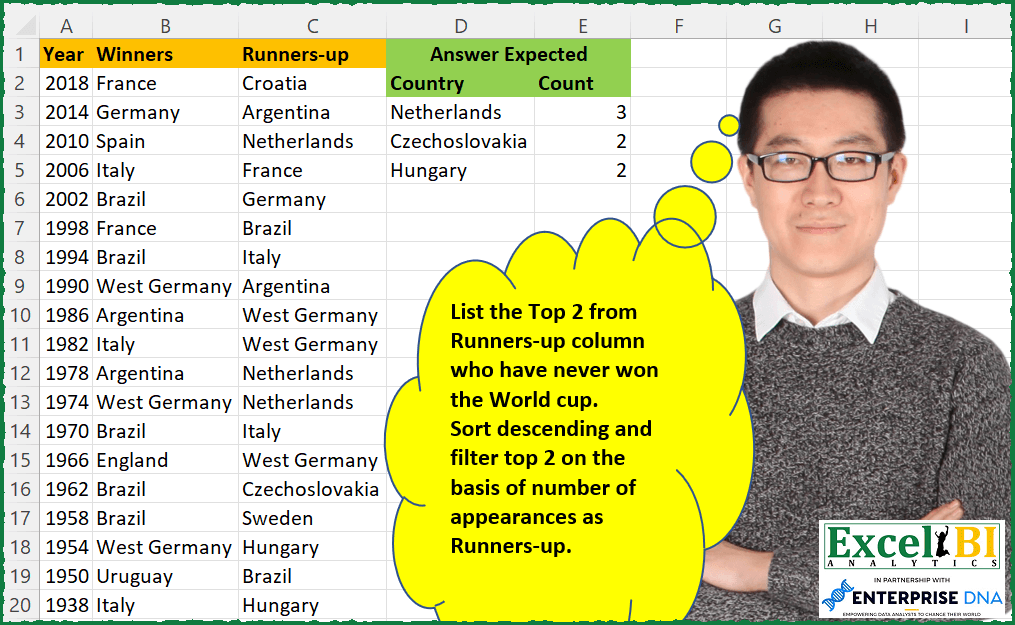
— This week will be FIFA World Cup week. All challenges will be related to FIFA World Cup only for this week. — List the Top 2 from Runners-up column who have never won the World cup. Sort descending and filter top 2 on the basis of number of appearances as Runners-up. Your formula need not be different from others as long as you have worked out your formula independently)
📌 Challenge Details and Links
ExcelBI Excel Challenge Number: 72
Challenge Difficulty: ⭐️⭐️
📥Download Sample File
📥Link to the solutions on LinkedIn
Solving the challenge of Top 2 Runner-ups Without Win with Power Query
Power Query solution 1 for Top 2 Runner-ups Without Win, proposed by Aditya Kumar Darak 🇮🇳:
let
  Source       = Excel.CurrentWorkbook(){[Name = "data"]}[Content],
  TopN         = 2,
  Count        = Table.Group(Source, "Runners-up", {"Count", Table.RowCount}),
  Filter       = Table.SelectRows(Count, each not List.Contains(Source[Winners], [#"Runners-up"])),
  Group        = Table.Group(Filter, "Count", {"All", each _}),
  TopNFiltered = Table.MaxN(Group, "Count", TopN),
  Return       = Table.Combine(TopNFiltered[All])
in
  Return
Power Query solution 2 for Top 2 Runner-ups Without Win, proposed by Luan Rodrigues:
let
  Fonte = Data,
  vnc = Table.AddColumn(
    Fonte,
    "Personalizar",
    each [
      v   = List.Distinct(Fonte[#"Runners-up"]),
      c   = List.Distinct(Fonte[Winners]),
      vnc = List.Difference(v, c)
    ][vnc]
  )[Personalizar]{0},
  a = Table.SelectRows(
    Table.AddColumn(Fonte, "Personalizar", each List.Contains(vnc, [#"Runners-up"])),
    each [Personalizar] = true
  ),
  Result = Table.SelectRows(
    Table.AddRankColumn(
      Table.Group(a, {"Runners-up"}, {{"Count", each Table.RowCount(_)}}),
      "Rank",
      {"Count", Order.Descending}
    ),
    each [Rank] <= 2
  )[[#"Runners-up"], [Count]]
in
  Result
Power Query solution 3 for Top 2 Runner-ups Without Win, proposed by Brian Julius:
let
  Source = Table.RemoveColumns(RunnersUpRaw, "Year"),
  Winners = Table.RenameColumns(Table.SelectColumns(Source, "Winners"), {"Winners", "Country"}),
  Losers = Table.RenameColumns(Table.SelectColumns(Source, "Runners-up"), {"Runners-up", "Country"}),
  SecondPlace = Table.RemoveMatchingRows(Losers, Table.ToRecords(Winners)),
  CountRows = Table.Group(SecondPlace, {"Country"}, {{"Count", each Table.RowCount(_), Int64.Type}}),
  Ranking = Table.AddColumn(
    CountRows,
    "Rank",
    each Table.AddRankColumn(
      CountRows,
      "Rank",
      {"Count", Order.Descending},
      [RankKind = RankKind.Dense]
    )
  )[Rank]{0},
  Filter = Table.RemoveColumns(Table.SelectRows(Ranking, each ([Rank] <= 2)), "Rank")
in
  Filter
Power Query solution 4 for Top 2 Runner-ups Without Win, proposed by Jaroslaw Kujawa:
let
  Source = Excel.CurrentWorkbook(){[Name = "Runners_up"]}[Content],
  #"Added Custom1" = Table.AddColumn(
    Source,
    "Custom",
    each List.PositionOf(Source[Winners], [#"Runners-up"])
  ),
  #"Filtered Rows" = Table.SelectRows(#"Added Custom1", each ([Custom] = - 1)),
  #"Removed Other Columns" = Table.SelectColumns(#"Filtered Rows", {"Runners-up"}),
  #"Grouped Rows" = Table.Group(
    #"Removed Other Columns",
    {"Runners-up"},
    {{"Count", each Table.RowCount(_), Int64.Type}}
  ),
  #"Added Custom2" = Table.AddColumn(
    #"Grouped Rows",
    "Custom",
    each [Count] >= List.Min(List.MaxN(#"Grouped Rows"[Count], 2))
  ),
  #"Filtered Rows1" = Table.SelectRows(#"Added Custom2", each ([Custom] = true))
in
  Table.RemoveColumns(#"Filtered Rows1", {"Custom"})
Power Query solution 5 for Top 2 Runner-ups Without Win, proposed by Venkata Rajesh:
let
  Source = Data,
  Runners = Table.FromList(
    List.RemoveMatchingItems(Source[#"Runners-up"], Source[Winners]),
    null,
    {"Country"}
  ),
  #"Grouped Rows" = Table.Group(
    Runners,
    {"Country"},
    {{"Count", each Table.RowCount(_), Int64.Type}}
  ),
  #"Sorted Rows" = Table.SelectRows(
    Table.Sort(#"Grouped Rows", {{"Count", Order.Descending}}),
    each [Count] > List.Max(#"Grouped Rows"[Count]) - 2
  )
in
  #"Sorted Rows"
Power Query solution 6 for Top 2 Runner-ups Without Win, proposed by Mahmoud Bani Asadi:
let
  Source       = Excel.CurrentWorkbook(){[Name = "Table1"]}[Content],
  FilteredRows = Table.SelectRows(Source, each not List.Contains(Source[Winners], [#"Runners-up"])),
  Group        = Table.Group(FilteredRows, {"Runners-up"}, {{"Count", Table.RowCount}}),
  Filtered     = Table.SelectRows(Group, each [Count] >= List.Min(List.MaxN(Group[Count], 2)))
in
  Filtered
Solving the challenge of Top 2 Runner-ups Without Win with Excel
Excel solution 1 for Top 2 Runner-ups Without Win, proposed by Rick Rothstein:
=LET(r,C2:C22,u,UNIQUE(IFNA(MATCH(r,B2:B22,),r)),c,COUNTIF(r,u),SORT(FILTER(HSTACK(u,c),c>=LARGE(c,2)),2,-1))Excel solution 2 for Top 2 Runner-ups Without Win, proposed by John V.:
=LET(
    r,
    C2:C22,
    u,
    UNIQUE(
        r
    ),
    b,
    IF(
        COUNTIF(
            B2:B22,
            u
        ),
        ,
        COUNTIF(
            r,
            u
        )
    ),
    SORT(
        FILTER(
            HSTACK(
                u,
                b
            ),
            b>=LARGE(
                b,
                2
            )
        ),
        2,
        -1
    )
)
Excel solution 3 for Top 2 Runner-ups Without Win, proposed by 🇰🇷 Taeyong Shin:
=LET(
    t,
    TEXTSPLIT(
        C2:C22,
        B2:B22
    ),
    g,
    GROUPBY(
        t,
        t,
        ROWS,
        ,
        0,
        -2,
        t>""
    ),
    FILTER(
        g,
        LARGE(
            g,
            2
        )<=DROP(
            g,
            ,
            1
        )
    )
)
Excel solution 4 for Top 2 Runner-ups Without Win, proposed by Kris Jaganah:
=LET(a,
    C2:C22,
    b,
    UNIQUE(
        IFERROR(
            IF(
                LEN(
                    VLOOKUP(
                        C2:C22,
                        B2:B22,
                        1,
                        FALSE
                    )
                )>0,
                ""
            ),
            C2:C22
        )
    ),
    c,
    COUNTIF(
        a,
        b
    ),
    d,
    HSTACK(
        b,
        c
    ),
    FILTER(d,
    c>=(LARGE(
        c,
        2
    ))))
Excel solution 5 for Top 2 Runner-ups Without Win, proposed by Julian Poeltl:
=LET(W,B2:B22,R,C2:C22,U,UNIQUE(R),UR,FILTER(U,ISNA(XMATCH(U,W))),C,COUNTIF(R,UR),FILTER(HSTACK(UR,C),C>=LARGE(C,2)))Excel solution 6 for Top 2 Runner-ups Without Win, proposed by Aditya Kumar Darak 🇮🇳:
=LET(
 _n, 2,
 _w, B2:B22,
 _ru, C2:C22,
 _nwru, UNIQUE(FILTER(_ru, COUNTIFS(_w, _ru) = 0)),
 _cnt, COUNTIFS(_ru, _nwru),
 _l, LARGE(_cnt, MIN(_n, COUNT(_cnt))),
 _r, SORT(FILTER(HSTACK(_nwru, _cnt), _cnt >= _l), {2, 1}, {-1, 1}),
 _r
)
Excel solution 7 for Top 2 Runner-ups Without Win, proposed by Timothée BLIOT:
=LET(RunnersUp,
     C2:C22,
     Winners,
     B2:B22,

NeverWinners,
     FILTER(
         RunnersUp,
          BYROW(
              RunnersUp,
              LAMBDA(
                  a,
                  IF(
                      --ISNUMBER(
                          XMATCH(
                              a,
                              Winners
                          )
                      ),
                      0,
                      1
                  )
              )
          )
     ),

Count,
     BYROW(NeverWinners,
     LAMBDA(a,
     SUMPRODUCT(1*(a=NeverWinners)) )),

Order,
     UNIQUE(
         SORT(
             HSTACK(
                 NeverWinners,
                 Count
             ),
             2,
             -1
         )
     ),

FILTER(
    Order,
     INDEX(
         Order,
         ,
         2
     )>=LARGE(
         INDEX(
         Order,
         ,
         2
     ),
         2
     ),

))
Excel solution 8 for Top 2 Runner-ups Without Win, proposed by Charles Roldan:
=LET(n, 2, Wins, B2:B22, Losses, C2:C22,
Losers, UNIQUE(Losses),
Unwon, FILTER(Losers, ISNA(XMATCH(Losers, Wins))),
Sorrow, COUNTIF(Losses, Unwon),
SORT(FILTER(HSTACK(Unwon, Sorrow),Sorrow>=LARGE(Sorrow, n)),2,-1))
Excel solution 9 for Top 2 Runner-ups Without Win, proposed by Gerson Pineda:
=LET(
    sc,
    C2:C22,
    m,
    IF(
        ISERROR(
            MATCH(
                sc,
                B2:B22,

            )
        ),
        sc
    ),

    TAKE(
        SORT(
            UNIQUE(
                HSTACK(
                    m,
                    MAP(
                        m,
                        LAMBDA(
                            i,
                            VSTACK(
                                COUNTIF(
                                    C2:C22,
                                    i
                                )
                            )
                        )
                    )
                )
            ),
            2,
            -1
        ),
        3
    )
)
Excel solution 10 for Top 2 Runner-ups Without Win, proposed by Gerson Pineda:
=LET(sc,C2:C22,m,IF(ISERROR(MATCH(sc,B2:B22,)),sc),
LET(u,UNIQUE(FILTER(m,m<>0)),
TAKE(SORT(HSTACK(u,MAP(u,LAMBDA(i,VSTACK(COUNTIF(C2:C22,i))))),2,-1),3)))
Excel solution 11 for Top 2 Runner-ups Without Win, proposed by Victor Momoh (MVP, MOS, R.Eng):
=LET(
    a,
    UNIQUE(
        FILTER(
            C2:C22,
            COUNTIF(
                B2:B22,
                C2:C22
            )=0
        )
    ),

    b,
    SORT(
        HSTACK(
            a,
            COUNTIF(
                C2:C22,
                a
            )
        ),
        2,
        -1
    ),

    c,
    DROP(
        b,
        ,
        1
    ),

    FILTER(
        b,
        c>=LARGE(
            c,
            2
        )
    )
)
Excel solution 12 for Top 2 Runner-ups Without Win, proposed by El Badlis Mohd Marzudin:
=LET(
_winner,B2:B22,
_runnersup,C2:C22,
_uniquerunnersup,UNIQUE(_runnersup),
_RUnoWinner,FILTER(_uniquerunnersup,COUNTIFS(_winner,_uniquerunnersup)=0),
_countRUnoWinner,COUNTIFS(_runnersup,_RUnoWinner),
_final, HSTACK(_RUnoWinner,_countRUnoWinner),


SORT(
 FILTER(_final,INDEX(_final,,2)>=LARGE(INDEX(_final,,2),2)),
 {2,1},{-1,1}
 )
)
Excel solution 13 for Top 2 Runner-ups Without Win, proposed by RIJESH T.:
=LET(w,UNIQUE(B2:B22),r,C2:C22,u,UNIQUE(r),c,COUNTIF(r,u),I,ISNA(XMATCH(UNIQUE(u),w)),FILTER(HSTACK(u,c),I*c>1))Excel solution 14 for Top 2 Runner-ups Without Win, proposed by Talha Jafri:
=LET(
run,
    C2:C22,

a,
    FILTER(
        run,
        COUNTIF(
            B2:B22,
            run
        )=0
    ),

v,
    MAP(a,
    LAMBDA(b,
    SUM(--(a=b)))),

s,
    UNIQUE(
        SORT(
            HSTACK(
                a,
                v
            ),
            2,
            -1
        )
    ),

i,
    DROP(
        s,
        ,
        1
    ),

FILTER(
    s,
    i>=LARGE(
        i,
        2
    )
))
Solving the challenge of Top 2 Runner-ups Without Win with DAX
DAX solution 1 for Top 2 Runner-ups Without Win, proposed by Zoran Milokanović:
EVALUATE
SELECTCOLUMNS(
 TOPN(
 2,
 SUMMARIZE(
 FILTER('Index', NOT(CONTAINSROW(ALL('Index'[Winners]), 'Index'[Runners-up]))),
 'Index'[Runners-up],
 "C", COUNTROWS('Index')
 ),
 [C], DESC
 ),
 "Country", 'Index'[Runners-up],
 "Count", [C]
)
ORDER BY
 [Count] DESC, [Country]
Solving the challenge of Top 2 Runner-ups Without Win with SQL
SQL solution 1 for Top 2 Runner-ups Without Win, proposed by Zoran Milokanović:
SELECT
 F.RUNNERS_UP AS COUNTRY
,F.COUNT
FROM
(
 SELECT
 T.RUNNERS_UP
 ,T.COUNT
 ,RANK() OVER (ORDER BY T.COUNT DESC) AS TOP_N_WITH_TIES
 FROM
 (
 SELECT
 DR.RUNNERS_UP
 ,COUNT(*) AS COUNT
 FROM DATA DR
 WHERE
 GROUP BY
 DR.RUNNERS_UP
 ) T
) F
WHERE
 F.TOP_N_WITH_TIES <= 2
ORDER BY
 2 DESC, 1
;