
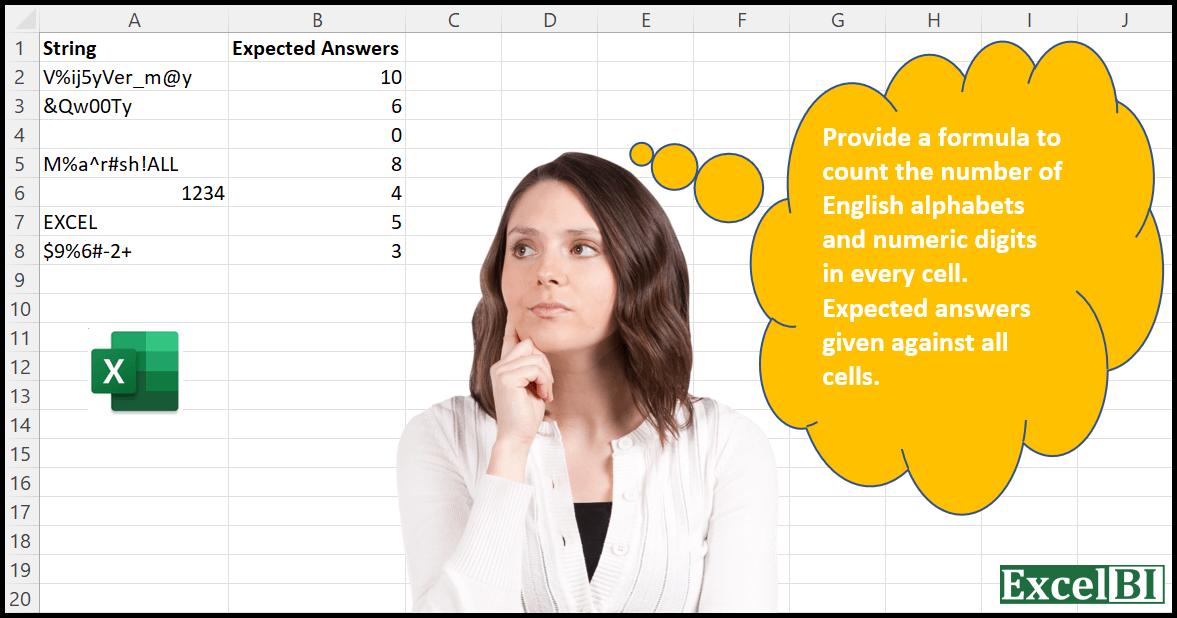
Provide a formula to count the number of English alphabets and numeric digits in every cell. Expected answers given against all cells.
📌 Challenge Details and Links
ExcelBI Excel Challenge Number: 7
Challenge Difficulty: ⭐️
📥Download Sample File
📥Link to the solutions on LinkedIn
Solving the challenge of Count Letters and Digits with Power Query
Power Query solution 1 for Count Letters and Digits, proposed by Aditya Kumar Darak 🇮🇳:
let
  Source = Excel.CurrentWorkbook(){[Name = "data"]}[Content],
  Split = Table.AddColumn(Source, "Split", each Text.ToList([String])),
  Characters = List.Transform({"A" .. "Z"} & {0 .. 9} & {"a" .. "z"}, each Text.From(_)),
  Select = Table.AddColumn(
    Split,
    "Select",
    each List.Select([Split], (f) => List.Contains(Characters, f))
  ),
  Count = Table.AddColumn(Select, "Count", each try List.Count([Select]) otherwise null),
  Final = Table.SelectColumns(Count, {"String", "Count"})
in
  Final
Power Query solution 2 for Count Letters and Digits, proposed by Sergei Baklan:
let
  Source = Excel.CurrentWorkbook(){[Name = "data"]}[Content],
  #"Promoted Headers" = Table.PromoteHeaders(Source, [PromoteAllScalars = true]),
  fnTextToList = (s) => Text.ToList(Text.Lower(Text.From(s))),
  abc = List.Combine({{"0" .. "9"}, {"a" .. "z"}}),
  countABC = Table.AddColumn(
    #"Promoted Headers",
    "Count",
    each try
      List.Count(fnTextToList([String])) - List.Count(List.RemoveItems(fnTextToList([String]), abc))
    otherwise
      0
  )
in
  countABC
Solving the challenge of Count Letters and Digits with Excel
Excel solution 1 for Count Letters and Digits, proposed by محمد حلمي:
=SUM(IFERROR(--(MID(A2;ROW($1:$50);1))^0;);--(TRANSPOSE(MID(A2;ROW($1:$50);1))=CHAR(ROW(65:90))))Excel solution 2 for Count Letters and Digits, proposed by محمد حلمي:
=LEN(
    A2:A8
)-
LEN(
    REDUCE(
        UPPER(
    A2:A8
),

        VSTACK(
            CHAR(
                ROW(
                    65:90
                )
            ),
            ROW(
                1:10
            )-1
        ),

        LAMBDA(
            A,
            X,
             SUBSTITUTE(
                 A,
                 X,
                 ""
             )
        )
    )
)

1-
=MAP(
    A2:A8,
    LAMBDA(
        A,

        IFERROR(
            LEN(
                A
            )-LEN(
                CONCAT(

                    TEXTSPLIT(
                        UPPER(
                A
            ),

                        VSTACK(
            CHAR(
                ROW(
                    65:90
                )
            ),
            ROW(
                1:10
            )-1
        ),
                        ,
                        1
                    )
                )
            ),

            LEN(
                A
            )
        )
    )
)
Excel solution 3 for Count Letters and Digits, proposed by 🇰🇷 Taeyong Shin:
=REDUCE(0,SEQUENCE(MAX(LEN(A2:A8))),LAMBDA(a,n,a+(MID(A2:A8,n,1)>">")))

REGEX
=LEN(REGEXREPLACE(A2:A8,"[pPpS]",))
Excel solution 4 for Count Letters and Digits, proposed by Julian Poeltl:
=MAP(A2:A8;LAMBDA(S;LET(C;CODE(MID(S;SEQUENCE(LEN(S));1));IFERROR(SUM((C>64)*(C<91)+(C>96)*(C<123)+(C>=48)*(C<58));0))))Excel solution 5 for Count Letters and Digits, proposed by Alejandro Campos:
=MAP(

     A2:A8,

     LAMBDA(
         x,
          LEN(
              REGEXREPLACE(
                  x,
                   "[^A-Za-z0-9]",
                   ""
              )
          )
     )

)
Excel solution 6 for Count Letters and Digits, proposed by Timothée BLIOT:
=IF(
    LEN(
        A2
    )=0,
    0,

    LET(
        string,
        MID(
            A2,
            SEQUENCE(
                LEN(
        A2
    )
            ),
            1
        ),

        COUNTA(
            FILTER(
                string,
                ISNUMBER(
                    SEARCH(
                        string,
                        "ABCDEFGHIJKLMNOPQRSTUVWXYZ1234567890"
                    )
                )
            )
        )
    )
)
Excel solution 7 for Count Letters and Digits, proposed by Hussein SATOUR:
=LET(
    Ch,
     UNICODE(
         UPPER(
             MID(
                 A2,
                  SEQUENCE(
                      LEN(
                          A2
                      )
                  ),
                 1
             )
         )
     ),

     IFERROR(

          SUM(
              IFS(
                  Ch<48,
                   0,
                   Ch<58,
                   1,
                   Ch<65,
                   0,
                   Ch < 91,
                  1,
                   TRUE,
                   0
              )
          ),

          0
     )

)
Excel solution 8 for Count Letters and Digits, proposed by Duy Tùng:
=LET(a,MID(A2:A8,SEQUENCE(,20),1),LEN(BYROW(IF(a>="0",a,""),CONCAT)))
=LEN(A2:A8)-LEN(REGEXREPLACE(A2:A8,"[pld]",""))
Excel solution 9 for Count Letters and Digits, proposed by Bhavya Gupta:
=LET(
    str,
     CLEAN(
         TRIM(
             A2:A8
         )
     ),
     LEN(
         str
     )-LEN(
         SUBSTITUTE(
             REDUCE(
                 UPPER(
         str
     ),
                 VSTACK(
                     SEQUENCE(
                         10,
                         ,
                         0
                     ),
                     CHAR(
                         SEQUENCE(
                             26,
                             ,
                             65
                         )
                     )
                 ),
                 LAMBDA(
                     x,
                     y,
                      SUBSTITUTE(
                          x,
                          y,
                          " "
                      )
                 )
             ),
             " ",
             ""
         )
     )
)
Excel solution 10 for Count Letters and Digits, proposed by Charles Roldan:
=MAP(
    A2:A8,
     LAMBDA(
         x,
          IFERROR(
              SUM(
                  --ISEVEN(
                      MATCH(
                          CODE(
                              MID(
                                  x,
                                   SEQUENCE(
                                       LEN(
                                           x
                                       )
                                   ),
                                   1
                              )
                          ),
                           {1;48;58;65;91;97;123}
                      )
                  )
              ),

          )
     )
)
Excel solution 11 for Count Letters and Digits, proposed by 🇮🇷 Navid Esmaeilzadeh اسماعیل زاده:
={IFERROR(SUM(IF(((CODE(MID(UPPER(A2),ROW($A$1:INDIRECT("A"&LEN(A2))),1))>=48)*(CODE(MID(UPPER(A2),ROW($A$1:INDIRECT("A"&LEN(A2))),1))<=57))+((CODE(MID(UPPER(A2),ROW($A$1:INDIRECT("A"&LEN(A2))),1))>=65)*(CODE(MID(UPPER(A2),ROW($A$1:INDIRECT("A"&LEN(A2))),1))<=90)),1,0)),0)Excel solution 12 for Count Letters and Digits, proposed by Tolga Demirci, PMP, PMI-ACP, MOS-Expert:
=COUNTA(TEXT(MID(A2;ROW(INDIRECT("A1:"&"A"&LEN(A2)));1);"?"))-COUNTA(MID(TEXTJOIN(;;IFERROR(MID(A2;FIND({"%";"_";"@";"&";"#";"^";"!";"$";"-";"+"};A2;1);1);""));ROW(INDIRECT("A1:"&"A"&LEN(TEXTJOIN(;;IFERROR(MID(A2;FIND({"%";"_";"@";"&";"#";"^";"!";"$";"-";"+"};A2;1);1);"")));1));1))Excel solution 13 for Count Letters and Digits, proposed by Tolga Demirci, PMP, PMI-ACP, MOS-Expert:
=IF(A2="";0;(COUNTA(MID(A2;ROW(INDIRECT("A1:"&"A"&LEN(A2)));1))-COUNT(FIND({"%";"_";"@";"&";"#";"^";"!";"$";"-";"+"};A2;1))))Excel solution 14 for Count Letters and Digits, proposed by Jardiel Euflázio:
=SUM(0+ISNUMBER(MATCH(MID(A2,SEQUENCE(LEN(A2)),1),VSTACK(CHAR(SEQUENCE(26,,65)),CHAR(SEQUENCE(26,,97)),SEQUENCE(10,,0)&""),0)))Excel solution 15 for Count Letters and Digits, proposed by Sergei Baklan:
=IFERROR(
 SUM(--( CHAR(VSTACK( SEQUENCE(10, , 48), SEQUENCE( 26, , 65) ) )=
 TRANSPOSE( MID(A2, SEQUENCE( LEN(A2) ), 1 ) ) ) ),
 0)
Excel solution 16 for Count Letters and Digits, proposed by Sergei Baklan:
=
LAMBDA( s,
 LET(
 ABC, LAMBDA(chr,
 ISNUMBER(--chr) +
 IFERROR( CHAR(BITXOR(CODE(chr), 32)) = chr, 0)  ),
 acc, LAMBDA( s, LAMBDA( a, v, a+ABC( MID(s,v,1) ) ) ),
 IFERROR(
 REDUCE(0, SEQUENCE(LEN(s)), acc(s) ), 0 )
) )
Excel solution 17 for Count Letters and Digits, proposed by Sergei Baklan:
=
LAMBDA(s,
 LET(
 ABC, LAMBDA( chr,
 ISNUMBER(--chr) +
 IFERROR( CHAR( BITXOR(CODE(chr), 32) ) = chr, 0)  ),
 IF( s= "", 0,
 ABC( LEFT(s) ) +
 countABC( RIGHT(s, LEN(s)-1) )  ) )
)
Excel solution 18 for Count Letters and Digits, proposed by Cary Ballard, DML:
=LET(

     a,
     A2,

     b,
     MID(
         a,
          SEQUENCE(
              LEN(
                  a
              )
          ),
          1
     ),

     c,
     REDUCE(
         SEQUENCE(
             10,
              ,
              0
         ) & "",
          {65,
          97},
          LAMBDA(
              x,
               v,
               VSTACK(
                   x,
                    CHAR(
                        SEQUENCE(
                            26,
                             ,
                             v
                        )
                    )
               )
          )
     ),

     SUM(
         N(
             ISNUMBER(
                 XMATCH(
                     b,
                      c
                 )
             )
         )
     )

)
Excel solution 19 for Count Letters and Digits, proposed by Rajesh Sinha:
=LEN(CONCAT(IF(CODE(MID(A1,ROW(INDIRECT("1:"&LEN(A1))),1))>64,MID(A1,ROW(INDIRECT("1:"&LEN(A1))),1),"")))+LEN(TEXTJOIN("",TRUE,IFERROR((MID(A1,ROW(INDIRECT("1:"&LEN(A1))),1)*1),"")))Excel solution 20 for Count Letters and Digits, proposed by Ibrahim Sadiq:
=LEN(REDUCE(A2:A8,{“^”,”@“,”&”,”$”,”-“,”+”,”#”,”_”,”!”,”%”},LAMBDA(a,b,SUBSTITUTE(a,b,””))))Excel solution 21 for Count Letters and Digits, proposed by Amr Tawfik CMA®,FMVA,Lean Coach:
=MAP(
    A2:A8,
    LAMBDA(
        x,
        SUM(
            --ISNUMBER(
                --MID(
                    x,
                    SEQUENCE(
                        LEN(
                            x
                        ),
                        ,
                        1,
                        1
                    ),
                    1
                )
            ),
            --ISNUMBER(
                SEARCH(
                    MID(
                    x,
                    SEQUENCE(
                        LEN(
                            x
                        ),
                        ,
                        1,
                        1
                    ),
                    1
                ),
                    TEXTJOIN(
                        "",
                        TRUE,
                        CHAR(
                            SEQUENCE(
                                ,
                                26,
                                97,
                                1
                            )
                        )
                    )
                )
            )
        )
    )
)
Excel solution 22 for Count Letters and Digits, proposed by red craven:
=LEN(
    REGEXREPLACE(
        A2:A8,
        "[W_]",
        ""
    )
)
or
=LEN(
    REDUCE(
        A2:A8,
        CHAR(
            SEQUENCE(
                6
            )+{32,
            39,
            58,
            90}
        ),
        LAMBDA(
            x,
            y,
            SUBSTITUTE(
                x,
                y,
                ""
            )
        )
    )
)
Excel solution 23 for Count Letters and Digits, proposed by Riley Johnson:
=NOT( EXACT( UPPER(_chars), LOWER(_chars) ) )

*Requires eta reduction*

=LET(
 strings, A2:A8,

 fn, LAMBDA(string,
 LET(
 _chars, MID( string, SEQUENCE(LEN(string)), 1 ),
 _count, SUM(--NOT(EXACT(UPPER(_chars), LOWER(_chars)))+--ISNUMBER(--_chars)),
 IFERROR(_count,0)
 )
 ),

 MAP(strings, fn)
)
Solving the challenge of Count Letters and Digits with Python in Excel
Python in Excel solution 1 for Count Letters and Digits, proposed by Alejandro Campos:
import re
cells = xl("A2:A8")[0].fillna("").astype(str)
df = pd.DataFrame({"Count": [len(re.findall(r'[A-Za-zd]', cell)) for cell in cells]})
Python in Excel solution 2 for Count Letters and Digits, proposed by Aditya Kumar Darak& 🇮🇳:
import re
data = xl("A1:A8", True)
data["Answer"] = [
 (len(re.findall(r"[A-Za-z0-9]", str(i))) if i != None else 0)
 for i in data["String"]
]
data
Solving the challenge of Count Letters and Digits with Excel VBA
Excel VBA solution 1 for Count Letters and Digits, proposed by Mehdi HAMMADI:
Public Function fxNbrLettersAndDigits(sText As String) As Integer

 Dim iTextLenght, iCounter As Long
 Dim sCharacter As String * 1
 Dim sExtractedLettersAndDigits As String

 iTextLenght = Len(sText)
 fxNbrLettersAndDigits = 0
 sExtractedLettersAndDigits = ""

 For iCounter = 1 To iTextLenght

 sCharacter = Mid(sText, iCounter, 1)

 If (Asc(sCharacter) >= Asc(0) And Asc(sCharacter) <= Asc(9)) _
 Or (Asc(sCharacter) >= Asc("A") And Asc(sCharacter) <= Asc("Z")) _
 Or (Asc(sCharacter) >= Asc("a") And Asc(sCharacter) <= Asc("z")) Then

 sExtractedLettersAndDigits = sExtractedLettersAndDigits & sCharacter

 End If

 Next

 fxNbrLettersAndDigits = Len(sExtractedLettersAndDigits)

End Function
Solving the challenge of Count Letters and Digits with DAX
DAX solution 1 for Count Letters and Digits, proposed by Zoran Milokanović:
EVALUATE ADDCOLUMNS(Input, "Expected Answers", VAR S = UPPER(Input[String]) VAR L = COALESCE(LEN(S), 0) RETURN COALESCE(SUMX(ADDCOLUMNS(GENERATESERIES(1, L), "C", VAR N = MID(S, [Value], 1) RETURN IF((UNICODE(N) > 47 && UNICODE(N) < 58) || (UNICODE(N) > 64 && UNICODE(N) < 91), 1, 0)), [C]), 0))
&&