
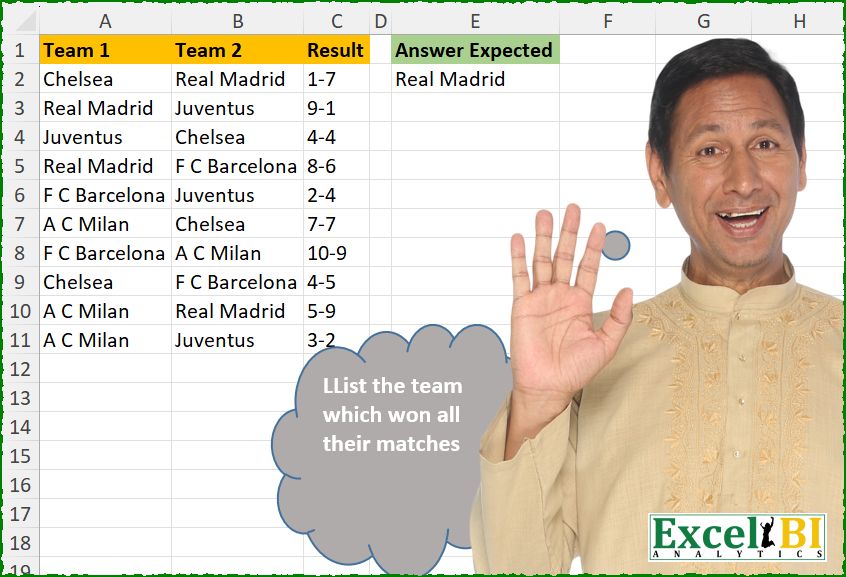
List the team which won all their matches.
📌 Challenge Details and Links
ExcelBI Excel Challenge Number: 692
Challenge Difficulty: ⭐️
📥Download Sample File
📥Link to the solutions on LinkedIn
Solving the challenge of Team with All Wins with Power Query
Power Query solution 1 for Team with All Wins, proposed by Ramiro Ayala Chávez:
let
  S   = Excel.CurrentWorkbook(){[Name = "Table1"]}[Content],
  a   = Table.SplitColumn(S, "Result", Splitter.SplitTextByDelimiter("-"), {"R1", "R2"}),
  b   = Table.AddColumn(a, "L1", each if [R1] <= [R2] then [Team 1] else null),
  c   = Table.AddColumn(b, "L2", each if [R2] <= [R1] then [Team 2] else null),
  d   = List.Distinct(List.RemoveNulls(c[L1] & c[L2])),
  e   = List.Distinct(c[Team 1] & c[Team 2]),
  Sol = Table.FromColumns({List.Difference(e, d)}, {"Answer Expected"})
in
  Sol
Power Query solution 2 for Team with All Wins, proposed by Seokho MOON:
let
  Source = Excel.CurrentWorkbook(){[Name = "Table1"]}[Content],
  AddCol = Table.AddColumn(Source, "NW", Fun),
  Fun = each [
    A = Expression.Evaluate([Result]),
    B = if A > 0 then {[Team 2]} else if A < 0 then {[Team 1]} else {[Team 1], [Team 2]}
  ][B],
  Lst = List.RemoveItems(List.Distinct(Source[Team 1] & Source[Team 2]), List.Combine(AddCol[NW])),
  Res = Table.FromList(Lst, each {_}, {"Answer Expected"})
in
  Res
Power Query solution 3 for Team with All Wins, proposed by Meganathan Elumalai:
let
  Source = Excel.CurrentWorkbook(){[Name = "Table1"]}[Content],
  Lst = List.RemoveNulls(
    Table.ReplaceValue(
      Source,
      each [Team 1],
      each [Team 2],
      (x, y, z) =>
        [num = Expression.Evaluate(x), fin = if num < 0 then z else if num > 0 then y else null][
          fin
        ],
      {"Result"}
    )[Result]
  ),
  Result = Table.FromList(
    List.Select(
      List.Distinct(Lst),
      (f) => List.Count(List.Select(Lst, (x) => f = x)) = List.Count(List.Distinct(Lst))
    ),
    null,
    {"Result"}
  )
in
  Result
Power Query solution 4 for Team with All Wins, proposed by Antriksh Sharma:
let
  Source = Table.SelectRows(Table, each Expression.Evaluate([Result]) <> 0),
  A = Table.CombineColumns(Source, {"Team 1", "Team 2"}, each _, "Teams"),
  B = Table.TransformColumns(
    A,
    {"Result", each List.Transform(Text.Split(_, "-"), Number.From), type list}
  ),
  C = Table.CombineColumns(
    B,
    {"Teams", "Result"},
    each Table.First(
      Table.Sort(Table.FromColumns(_, {"Team", "Score"}), {"Score", Order.Descending})
    )[Team],
    "Teams"
  ),
  D = Table.ToRows(Table.Group(C, "Teams", {"Count", each Table.RowCount(_), Int64.Type})),
  E = List.Select(
    D,
    (x) => List.Count(List.Select(Source[Team 1] & Source[Team 2], (z) => z = x{0})) = x{1}
  ){0}{0}
in
  E
Power Query solution 5 for Team with All Wins, proposed by Peter Krkos:
let
  Ad_Winner = Table.AddColumn(
    Source,
    "Winner",
    each
      let
        res = List.Transform(Text.Split([Result], "-"), Number.From)
      in
        if res{0} = res{1} then null else Record.ToList(_){Byte.From(res{0} < res{1})}
  ),
  Result = [
    a = List.RemoveNulls(Ad_Winner[Winner]),
    b = List.Select(
      List.Distinct(a),
      each List.Count(List.Select(a, (x) => x = _))
        = List.Count(
          List.Select(List.Combine(Table.ToColumns(Ad_Winner[[Team 1], [Team 2]])), (x) => x = _)
        )
    ),
    c = Table.FromList(b, null, type table [Answer = text])
  ][c]
in
  Result
Power Query solution 6 for Team with All Wins, proposed by Alexandre Garcia:
let
A = Excel.CurrentWorkbook(){[Name="Table1"]}[Content],
B = Table.ToList(A, each ((x)=> {_{1},null, _{0}} {Value.Compare(x{0},x{1}) + 1}) (Text.Split(_{2},"-"))),
C = ((x)=> hashtag#table({"Answer"}, {{{"None", x} {Byte.From(List.Count(List.Select(B, each _ = x))
= Table.RowCount(Table.SelectRows(A, each [Team 1] = x or [Team 2] = x)))}}})) (List.Mode(B)) in C
Power Query solution 7 for Team with All Wins, proposed by Maciej Kopczyński:
let
  source = Excel.CurrentWorkbook(){[Name = "tblStart"]}[Content],
  A = Table.TransformColumns(
    source,
    {
      {
        "Result",
        each
          if (Text.Split(_, "-"){0} > Text.Split(_, "-"){1}) then
            "Won - Lost"
          else if Text.Split(_, "-"){0} = Text.Split(_, "-"){1} then
            "Tie - Tie"
          else
            "Lost - Won"
      }
    }
  ),
  B = Table.SplitColumn(A, "Result", Splitter.SplitTextByDelimiter(" - "), {"Team1Res", "Team2Res"})[
    [Team 1],
    [Team1Res],
    [Team 2],
    [Team2Res]
  ],
  C = Table.UnpivotOtherColumns(B, {}, "Attr", "Val")[[Val]],
  D = Table.AddIndexColumn(C, "X", 0, 1, Int64.Type),
  E = Table.AddColumn(D, "Y", each Number.Mod([X], 2), type number),
  F = Table.TransformColumns(E, {{"X", each Number.IntegerDivide(_, 2), Int64.Type}}),
  G = Table.Pivot(
    Table.TransformColumnTypes(F, {{"Y", type text}}, "pl-PL"),
    List.Distinct(Table.TransformColumnTypes(F, {{"Y", type text}}, "pl-PL")[Y]),
    "Y",
    "Val"
  ),
  H = Table.Group(
    G,
    {"0"},
    {
      {
        "Result",
        each Table.RowCount(Table.SelectRows(_, each [1] = "Won")) = Table.RowCount(_),
        Int64.Type
      }
    }
  ),
  I = Table.RenameColumns(Table.SelectRows(H, each [Result] = true)[[0]], {{"0", "WinningTeams"}})
in
  I
Power Query solution 8 for Team with All Wins, proposed by Ernesto Vega Castillo:
let
  Source = Excel.CurrentWorkbook(){[Name = "Table1"]}[Content],
  A = Table.SplitColumn(
    Source,
    "Result",
    Splitter.SplitTextByDelimiter("-", QuoteStyle.Csv),
    {"Result.1", "Result.2"}
  ),
  B = Table.TransformColumnTypes(
    A,
    {
      {"Team 1", type text},
      {"Team 2", type text},
      {"Result.1", Int64.Type},
      {"Result.2", Int64.Type}
    }
  ),
  C = Table.AddColumn(
    B,
    "Answer Expected",
    each if [Result.1] - [Result.2] < 0 then [Team 2] else [Team 1]
  ),
  #"Answer Expected" = Table.FirstN(
    Table.Group(C, {"Answer Expected"}, {{"Count", each Table.RowCount(_), Int64.Type}})[
      [Answer Expected]
    ],
    1
  )
in
  #"Answer Expected"
Solving the challenge of Team with All Wins with Excel
Excel solution 1 for Team with All Wins, proposed by Bo Rydobon 🇹🇭:
=LET(r,
    C2:C11,
    x,
    A2:B11,
    TOCOL(MAP(UNIQUE(
        TOCOL(
            x
        )
    ),
    LAMBDA(y,
    IFS(AND(IF(y=x,
    (TEXTSPLIT(
        r,
        "-"
    )-TEXTAFTER(
        r,
        "-"
    ))*{1,
    -1})>0),
    y))),
    3))
Excel solution 2 for Team with All Wins, proposed by Rick Rothstein:
=UNIQUE(
    VSTACK(
        UNIQUE(
            TOCOL(
                A2:B11
            )
        ),
        IF(
            -TEXTBEFORE(
                C2:C11,
                "-"
            )<=-TEXTAFTER(
                C2:C11,
                "-"
            ),
            B2:B11,
            A2:A11
        )
    ),
    ,
    1
)
EDIT NOTE: I should have included a test just in case no team won all of its games. That formula would look like this...
=IFERROR(
    UNIQUE(
        VSTACK(
            UNIQUE(
            TOCOL(
                A2:B11
            )
        ),
            IF(
                -TEXTBEFORE(
                    C2:C11,
                    "-"
                )<=-TEXTAFTER(
                    C2:C11,
                    "-"
                ),
                B2:B11,
                A2:A11
            )
        ),
        ,
        1
    ),
    "None"
)
Excel solution 3 for Team with All Wins, proposed by 🇰🇷 Taeyong Shin:
=LET(r,C2:C11&"i",t,IF(IMREAL(r)>-IMAGINARY(r),A2:A11,B2:B11),@GROUPBY(t,t,ROWS,,,-2))

=LET(r,NUMBERVALUE(C2:C11,"-"),c,IF(INT(r)>MOD(r,1)*10,A2:A11,B2:B11),INDEX(c,MODE(XMATCH(c,c))))

=LET(r,C2:C11&"i",t,IF(IMREAL(r)>-IMAGINARY(r),A2:A11,B2:B11),g,GROUPBY(t,t,ROWS),@FILTER(g,DROP(g=COUNTIF(A2:B11,TAKE(g,,1)),,1),""))
Excel solution 4 for Team with All Wins, proposed by Kris Jaganah:
=LET(a,A2:A11,b,B2:B11,c,C2:C11,d,IF(TEXTAFTER(c,"-")-TEXTSPLIT(c,"-")>0,b,a),TAKE(GROUPBY(d,d,COUNTA,,0,-2),1,1))Excel solution 5 for Team with All Wins, proposed by Alejandro Campos:
=LET(
 m, --TEXTBEFORE(C2:C11, "-") > --TEXTAFTER(C2:C11, "-"),
 a, VSTACK(
 UNIQUE(IF(m, A2:A11, B2:B11)),
 UNIQUE(IF(NOT(m), A2:A11, B2:B11))),
 UNIQUE(a, , TRUE))
Excel solution 6 for Team with All Wins, proposed by Timothée BLIOT:
=LET(A,
    --REGEXEXTRACT(
        C2:C11,
        {"d+",
        "(?<=-)d+"}
    ),
     B,
    VSTACK(
        A2:A11,
        B2:B11
    ),
     C,
    VSTACK(
        A,
        HSTACK(
            TAKE(
                A,
                ,
                -1
            ),
            TAKE(
                A,
                ,
                1
            )
        )
    ),
     TOCOL(MAP(UNIQUE(
         B
     ),
    LAMBDA(x,
    IF(PRODUCT(--(FILTER(
        TAKE(
            C,
            ,
            1
        ),
        B=x
    )>FILTER(
        TAKE(
            C,
            ,
            -1
        ),
        B=x
    ))),
    x,
    1/0))),
    3))
Excel solution 7 for Team with All Wins, proposed by Hussein SATOUR:
=LET(t,COUNTA(UNIQUE(TOCOL(A2:B11))),a,TEXTBEFORE(C2:C11,"-"),b,TEXTAFTER(C2:C11,"-"),c,IF(a>b,A2:A11,B2:B11),UNIQUE(FILTER(c,MAP(c,LAMBDA(x,COUNTA(FILTER(c,c=x))))=t-1)))Excel solution 8 for Team with All Wins, proposed by Oscar Mendez Roca Farell:
=LET(t,IF(MONTH(C2:C11)Excel solution 9 for Team with All Wins, proposed by Oscar Mendez Roca Farell:
=LET(
    s,
    -SUBSTITUTE(
        C2:C11,
        "-",
        "."
    ),
     t,
     IF(
         TRUNC(
             s
         )/10
Excel solution 10 for Team with All Wins, proposed by Sunny Baggu:
=LET(

     _u,
     UNIQUE(
         TOCOL(
             A2:B11
         )
     ),

     _v,
     TEXTSPLIT(
         ARRAYTOTEXT(
             C2:C11
         ),
          "-",
          ","
     ) + 0,

     FILTER(

          _u,

          MAP(

               _u,

               LAMBDA(
                   t,

                    LET(

                         _f,
                         N(
                             A2:B11 = t
                         ),

                         _c,
                         BYROW(
                             _f,
                              LAMBDA(
                                  a,
                                   OR(
                                       a
                                   )
                              )
                         ),

                         _b,
                         FILTER(
                             _v,
                              _c
                         ),

                         _d,
                         IF(
                             FILTER(
                                 _f,
                                  _c
                             ),
                              1,
                              -1
                         ),

                         AND(
                             BYROW(
                                 _b * _d,
                                  LAMBDA(
                                      a,
                                       SUM(
                                       a
                                   )
                                  )
                             ) > 0
                         )

                    )

               )

          )

     )

)
Excel solution 11 for Team with All Wins, proposed by LEONARD OCHEA 🇷🇴:
=LET(
    p,
    A2:B11,
    r,
    C2:C11,
    u,
    UNIQUE(
        TOCOL(
            p
        )
    ),
    b,
    --TEXTBEFORE(
        r,
        "-"
    )>--TEXTAFTER(
        r,
        "-"
    ),
    FILTER(
        u,
        MAP(
            u,
            LAMBDA(
                x,
                AND(
                    N(
                        p=x
                    )=HSTACK(
                        b,
                        1-b
                    )*(
                        p=x
                    )
                )
            )
        )
    )
)
Excel solution 12 for Team with All Wins, proposed by Anshu Bantra:
=LET(
 Team_1_, A2:A11,
 Team_2_, B2:B11,
 Team_1_score, --TEXTBEFORE(C2:C11, "-"),
 Team_2_score, --TEXTAFTER(C2:C11, "-"),
 winner_, IF(Team_1_score > Team_2_score, Team_1_, Team_2_),
 teams_, SORT(UNIQUE(TOCOL(HSTACK(Team_1_:Team_2_)))),
 matches_, BYROW(teams_, LAMBDA(x, COUNTIFS(A2:B11, x))),
 final_, GROUPBY(winner_, winner_, COUNTA, , 0),
 fltr_, BYROW(
 final_ = HSTACK(teams_, matches_),
 LAMBDA(x, PRODUCT(--x))
 ),
 FILTER(final_, fltr_)
)
Excel solution 13 for Team with All Wins, proposed by Md. Zohurul Islam:
=LET(
    u,
    A2:A11,
    v,
    B2:B11,
    w,
    C2:C11,
    z,
    TOCOL(
        HSTACK(
            u,
            v
        )
    ),

    n,
    MAP(
        w,
        LAMBDA(
            x,
            SUM(
                TEXTSPLIT(
                    x,
                    "-"
                )*{-1,
                1}
            )
        )
    ),

    a,
    IF(
        n>=0,
        v,
        u
    ),

    b,
    GROUPBY(
        a,
        a,
        COUNTA,
        0,
        0
    ),

    m,
    MAP(
        UNIQUE(
            z
        ),
        LAMBDA(
            x,
            SUM(
                ABS(
                    z=x
                )
            )
        )
    ),

    d,
    FILTER(
        TAKE(
            b,
            ,
            1
        ),
        m=DROP(
            b,
            ,
            1
        )
    ),

    d
)
Excel solution 14 for Team with All Wins, proposed by Hamidi Hamid:
=LET(
    x,
    TEXTBEFORE(
        C2:C11,
        "-"
    )*1,
    y,
    TEXTAFTER(
        C2:C11,
        "-"
    )*1,
    u,
    SORT(
        UNIQUE(
            A2:A11
        )
    ),
    s,
    TOCOL(
        IF(
            HSTACK(
                x-y,
                y-x
            )<0,
            1/0,
            A2:B11
        ),
        3
    ),
    q,
    HSTACK(
        u,
        MAP(
            u,
            LAMBDA(
                a,
                SUM(
                    N(
                        s=a
                    )
                )
            )
        )
    ),
    TAKE(
        FILTER(
            u,
            TAKE(
                q,
                ,
                -1
            )=MAX(
                TAKE(
                q,
                ,
                -1
            )
            )
        ),
        1
    )
)
Excel solution 15 for Team with All Wins, proposed by Asheesh Pahwa:
=LET(s,C2:C11,d,TEXTSPLIT(s,"-")-TEXTAFTER(s,"-"),
i,IF(d<0,B2:B11,A2:A11),t,TOCOL(A2:B11),r,DROP(REDUCE("",UNIQUE(t),LAMBDA(x,y,VSTACK(x,LET(l,LAMBDA(a,SUM(N(ISNUMBER(XMATCH(a,y))))),
HSTACK(l(t),l(i)))))),1),FILTER(UNIQUE(t),TAKE(r,,1)=TAKE(r,,-1)))
Excel solution 16 for Team with All Wins, proposed by ferhat CK:
=TOCOL(LET(r,UNIQUE(TOCOL(A2:B11)),MAP(r,LAMBDA(x,LET(a,FILTER(A2:C11,(A2:A11=x)+(B2:B11=x)),b,HSTACK(--TEXTBEFORE(TAKE(a,,-1),"-"),--TEXTAFTER(TAKE(a,,-1),"-")),c,IF(TAKE(a,,2)=x,1,-1),IF(AND(BYROW(b*c,SUM)>0),x,1/0))))),2)Excel solution 17 for Team with All Wins, proposed by Ankur Sharma:
=LET(
    a,
     LEFT(
         C2:C11,
          1
     ),
     b,
     RIGHT(
         C2:C11,
          1
     ),

    c,
     IF(
         a = b,
          "",
          IF(
              --a > --b,
               A2:A11,
               B2:B11
          )
     ),

    d,
     GROUPBY(
         c,
          c,
          COUNTA,
          ,
          0,
          ,
          c <> ""
     ),

    FILTER(
        TAKE(
            d,
             ,
             1
        ),
         TAKE(
             d,
              ,
              -1
         ) = MAX(
             TAKE(
             d,
              ,
              -1
         )
         )
    )
)
Excel solution 18 for Team with All Wins, proposed by Imam Hambali:
=LET(

    ht,
     A2:A11,

    at,
     B2:B11,

    r,
     C2:C11,

    rh,
     TEXTBEFORE(
         r,
         "-"
     )*1,

    ra,
     TEXTAFTER(
         r,
         "-"
     )*1,

    rhp,
     IF(
         rh>ra,
         3,
         IF(
             rh=ra,
             1,
             0
         )
     ),

    rap,
     IF(
         rhp=3,
         0,
         IF(
             rhp=1,
             1,
             3
         )
     ),

    g,
     GROUPBY(
         VSTACK(
             ht,
             at
         ),
         VSTACK(
             rhp,
              rap
         ),
         AVERAGE,
         0,
         0
     ),

    FILTER(
        TAKE(
            g,
            ,
            1
        ),
         TAKE(
             g,
             ,
             -1
         )=3
    )

)
Excel solution 19 for Team with All Wins, proposed by Gerson Pineda:
=LET(
    j,
    C2:C11,
    r,
    TOCOL(
        A2:B11
    ),
    m,
    IF(
        --TEXTBEFORE(
            j,
            "-"
        )>--RIGHT(
            j
        ),
        A2:A11,
        B2:B11
    ),
    e,
    GROUPBY(
        m,
        m,
        ROWS,
        ,
        0
    ),
    @FILTER(
        e,
        BYROW(
            e=MAX(
                GROUPBY(
                    r,
                    r,
                    ROWS,
                    ,
                    0
                )
            ),
            OR
        )
    )
)

Or

=LET(
    j,
    C2:C11,
    r,
    TOCOL(
        A2:B11
    ),
    m,
    IF(
        --TEXTBEFORE(
            j,
            "-"
        )>--RIGHT(
            j
        ),
        A2:A11,
        B2:B11
    ),
    e,
    GROUPBY(
        m,
        m,
        ROWS,
        ,
        0
    ),
    @FILTER(
        e,
        TAKE(
            e,
            ,
            -1
        )=MAX(
                GROUPBY(
                    r,
                    r,
                    ROWS,
                    ,
                    0
                )
            )
    )
)
Excel solution 20 for Team with All Wins, proposed by Milan Shrimali:
=LET(A,A2:C11,B,ARRAYFORMULA(HSTACK(A,SPLIT(CHOOSECOLS(A,3),"-"))),FNL,BYROW(B,LAMBDA(X,IF(CHOOSECOLS(X,4)=CHOOSECOLS(X,5),"",IF(CHOOSECOLS(X,4)>CHOOSECOLS(X,5),CHOOSECOLS(X,1),CHOOSECOLS(X,2))))),BYROW(UNIQUE(TOCOL(CHOOSECOLS(A,1,2))),LAMBDA(X,LET(MAIN,HSTACK(X,COUNTIF(TOCOL(CHOOSECOLS(A,1,2)),X)),IF(COUNTIF(FNL,X)=CHOOSECOLS(MAIN,2),X,"")))))Excel solution 21 for Team with All Wins, proposed by Ahmed Ariem:
=CHOOSECOLS(TAKE(GROUPBY(VSTACK(A2:A11,B2:B11),VSTACK(--TEXTBEFORE(C2:C11,"-"),--TEXTAFTER(C2:C11,"-")),SUM,0,0,-2),1),1)Excel solution 22 for Team with All Wins, proposed by Erdit Qendro:
=LET(
    gTo,
    TEXTBEFORE(
        C2:C11,
        "-"
    ),
    gTt,
    TEXTAFTER(
        C2:C11,
        "-"
    ),

    wTs,
    IF(
        gTo>gTt,
        A2:A11,
        IF(
            gTt>gTo,
            B2:B11,
            "None"
        )
    ),

    wT,
    UNIQUE(
        wTs
    ),

    mpl,
    MAP(
        wT,
        LAMBDA(
            a,
            SUM(
                N(
                    TOCOL(
                        A2:B11
                    )=a
                )
            )=SUM(
                N(
                    wTs=a
                )
            )
        )
    ),

    FILTER(
        wT,
        mpl,
        "None"
    )
)
Excel solution 23 for Team with All Wins, proposed by LUIS FLORENTINO COUTO CORTEGOSO:
=LET(u,
    UNIQUE(
        TOCOL(
            A3:B11
        )
    ),
    w,
    IF((TEXTBEFORE(
        C2:C11,
        "-"
    )-TEXTAFTER(
        C2:C11,
        "-"
    ))>0,
    A2:A11,
    B2:B11),
    FILTER(u,
     COUNTIF(
         A2:B11,
         u
     )=BYROW(u,
    LAMBDA(i,
    SUM(--(w=i))))))
Excel solution 24 for Team with All Wins, proposed by Fredson Alves Pinho:
=LET(grp,GROUPBY(TOCOL(A2:B11),TOCOL((MONTH(C2:C11)-DAY(C2:C11))*{1,-1}),MIN),FILTER(TAKE(grp,,1),TAKE(grp,,-1)>0))Excel solution 25 for Team with All Wins, proposed by Craig Runciman:
=LET(d,A2:C11,ix,INDEX,h,HSTACK,v,VSTACK,tb,TEXTBEFORE,ta,TEXTAFTER,tk,TAKE,tt,tk(v(tk(d,,2),h(ix(d,,2),ix(d,,1))),,1),
r,BYROW(ix(d,,3),LAMBDA(r,(--tb(r,"-"))-(--ta(r,"-")))),sc,SIGN(v(r,-r)),tk(GROUPBY(tt,h(SEQUENCE(ROWS(tt),,1,0),sc),SUM,,0,-3),1,1))
Excel solution 26 for Team with All Wins, proposed by Craig Runciman:
=LET(
    data,
    A2:C10,
    j,
    TEXTJOIN,
    rx,
    REGEXEXTRACT,
    wrr,
     WRAPROWS,
     tk,
    TAKE,
    tmf,
    BYCOL(
        data,
        LAMBDA(
            c,
            REGEXTEST(
                CONCAT(
                    c
                ),
                "[A-Za-z]+"
            )
        )
    ),

     fixts,
    FILTER(
        data,
        tmf
    ),
    scrs,
     FILTER(
         data,
         NOT(
             tmf
         )
     ),
    htm,
    INDEX(
        fixts,
        ,
        1
    ),
    atm,
    INDEX(
        fixts,
        ,
        2
    ),

     hgls,
    VALUE(
        tk(
            wrr(
                rx(
                    j(
                        ";",
                        ,
                        scrs
                    ),
                    "[d]+",
                    1
                ),
                2
            ),
            ,
            1
        )
    ),
    agls,
    VALUE(
        tk(
            wrr(
                rx(
                    j(
                        ";",
                        ,
                        scrs
                    ),
                    "[d]+",
                    1
                ),
                2
            ),
            ,
            -1
        )
    ),

     hagg,
    hgls-agls,
    aagg,
    agls-hgls,
    hwdl,
    IF(
        hagg>0,
        1,
        0
    ),
    awdl,
    IF(
        aagg>0,
        1,
        0
    ),
    tm,
     VSTACK(
         htm,
         atm
     ),

     res,
     GROUPBY(
         tm,
         VSTACK(
             hwdl,
             awdl
         ),
         SUM,
         ,
         0
     ),
    TAKE(
        FILTER(
            res,
            INDEX(
                res,
                ,
                2
            )=4
        ),
        ,
        1
    )
)
Excel solution 27 for Team with All Wins, proposed by Aurélio Zafindaza:
=LET(team,VSTACK(A2:A11,B2:B11),score,C2:C11,rank,HSTACK(team,VALUE(TEXTSPLIT(TEXTJOIN("-",,score),,"-"))),TAKE(GROUPBY(CHOOSECOLS(rank,1),CHOOSECOLS(rank,2),SUM,0,0,-1),1,1))Excel solution 28 for Team with All Wins, proposed by Joseph Désiré Mbambu:
=DROP(TAKE(GROUPBY(CHOOSECOLS(HSTACK(VSTACK(A2:A11,B2:B11),VSTACK(N(--TEXTSPLIT(C2:C11,"-")---TEXTAFTER(C2:C11,"-")>0),N(--TEXTSPLIT(C2:C11,"-")---TEXTAFTER(C2:C11,"-")<0))),1),CHOOSECOLS(HSTACK(VSTACK(A2:A11,B2:B11),VSTACK(N(--TEXTSPLIT(C2:C11,"-")---TEXTAFTER(C2:C11,"-")>0),N(--TEXTSPLIT(C2:C11,"-")---TEXTAFTER(C2:C11,"-")<0))),2),SUM,,0,),-1),,-1)Solving the challenge of Team with All Wins with Python
Python solution 1 for Team with All Wins, proposed by Konrad Gryczan, PhD:
import pandas as pd
path = "692 Team having won all matches.xlsx"
input = pd.read_excel(path, usecols="A:C", nrows=11)
test = pd.read_excel(path, usecols="E", nrows=1)
input['rn'] = range(1, len(input) + 1)
input['Teams'] = input['Team 1'] + "-" + input['Team 2']
input = input.drop(columns=['Team 1', 'Team 2'])
input = input.assign(Result=input['Result'].astype(str).str.split('-'),
 Teams=input['Teams'].str.split('-')).explode(['Result', 'Teams'])
input['verdict'] = input.groupby('rn')['Result'].transform(
 lambda x: ['WIN' if val == max(x.astype(int)) else 'LOSE' for val in x.astype(int)]
)
summary = input.groupby(['verdict', 'Teams']).size().reset_index(name='n')
result = summary[(summary['n'] == 4) & (summary['verdict'] == 'WIN')][['Teams']].reset_index(drop=True)
print(test["Answer Expected"].equals(result["Teams"])) # True
Python solution 2 for Team with All Wins, proposed by Anshu Bantra:
from collections import Counter
df = to_df(REF("A1:C11"))
df[['Score_1', 'Score_2']] = df['Result'].str.split('-',expand=True).astype(int)
df['Winner'] = np.where(df['Score_1']>df['Score_2'],df['Team 1'], df['Team 2'])
df['Versus'] = np.where(df['Team 1']==df['Winner'],df['Team 2'], df['Team 1'])
df_group = df[['Winner', 'Score_2']].groupby('Winner').count()
lst = df['Team 1'].to_list() + df['Team 2'].to_list()
match_dict = Counter(lst)
[team for team, matches in df_group.reset_index().values if match_dict.get(team) == matches]
Python solution 3 for Team with All Wins, proposed by Claudiu B.:
A Python-Pandas solution:
import pandas as pd
df =pd.read_excel("matches.xlsx")
df['Result_split'] = df['Result'].str.split("-")
df['left'] = df['Result_split'].str[0].astype('int')
df['right'] = df['Result_split'].str[1].astype('int')
tab = df.copy().iloc[:, [0,1,4,5]]
res_left = (tab
 .query("left > right")
 .groupby(['Team_1']).agg(num_vic = ('Team_2', 'count'))
 .reset_index()
 )
res_right = (tab
 .query("left < right")
 .groupby(['Team_2']).agg(num_vic = ('Team_1', 'count'))
 .reset_index()
 )
comb = pd.merge(res_left, res_right, how='left', left_on='Team_1', right_on='Team_2').fillna(0)
comb['total_num_vic'] = comb['num_vic_x'] + comb['num_vic_y']
max_num_vic = comb['total_num_vic'].max()
final_result = comb.query("total_num_vic == @ max_num_vic")['Team_1'].reset_index(drop=True)
print(final_result)
Output:
0  Real Madrid
Name: Team_1, dtype: object
Solving the challenge of Team with All Wins with Python in Excel
Python in Excel solution 1 for Team with All Wins, proposed by Alejandro Campos:
df = xl("A1:C11", headers=True)
df['Winner'] = df.apply(lambda r: r['Team 1'] if int(r['Result'].split('-')[0]) > int(r['Result'].split('-')[1]) else r['Team 2'] if int(r['Result'].split('-')[0]) < int(r['Result'].split('-')[1]) else None, axis=1)
t = next((team for team in df['Winner'].dropna().unique() if (df['Winner'] == team).sum() == ((df['Team 1'] == team) | (df['Team 2'] == team)).sum()), None)
'Won all matches', t
Python in Excel solution 2 for Team with All Wins, proposed by Aditya Kumar Darak 🇮🇳:
df = xl("A1:C11", True)
wins = set()
losses = set()
for _, row in df.iterrows():
 score1, score2 = map(int, row["Result"].split("-"))
 if score1 > score2:
 wins.add(row["Team 1"])
 losses.add(row["Team 2"])
 elif score2 > score1:
 wins.add(row["Team 2"])
 losses.add(row["Team 1"])
result = wins - losses
Solving the challenge of Team with All Wins with R
R solution 1 for Team with All Wins, proposed by Konrad Gryczan, PhD:
library(tidyverse)
library(readxl)
path = "Excel/692 Team having won all matches.xlsx"
input = read_excel(path, range = "A1:C11")
test  = read_excel(path, range = "E1:E2")
result = input %>%
 mutate(rn = row_number()) %>%
 unite("Teams", c(`Team 1`, `Team 2`), sep = "-") %>%
 separate_rows(c(Result, Teams), sep = "-") %>%
 mutate(verdict = ifelse(Result == max(Result), "WIN", "LOSE"), .by = rn) %>%
 summarise(n = n(), .by = c(verdict, Teams)) %>%
 filter(n == 4, verdict == "WIN") %>%
 select(Teams)
all.equal(result$Teams, test$`Answer Expected`)
#> [1] TRUE
R solution 2 for Team with All Wins, proposed by Jaroslaw Kujawa:
=LET(ab;A2:B11;c;C2:C11;w;IF(--(--LEFT(c;LEN(c)-2)>--RIGHT(c));TAKE(ab;;1);IF(--(--LEFT(c;LEN(c)-2)<--RIGHT(c));TAKE(ab;;-1);""));v;GROUPBY(w;w;COUNTA;;0);vv;HSTACK(v;COUNTIF(ab;TAKE(v&;;1)));TAKE(FILTER(vv;TAKE(v;;-1)=TAKE(vv;;-1));;1))&