
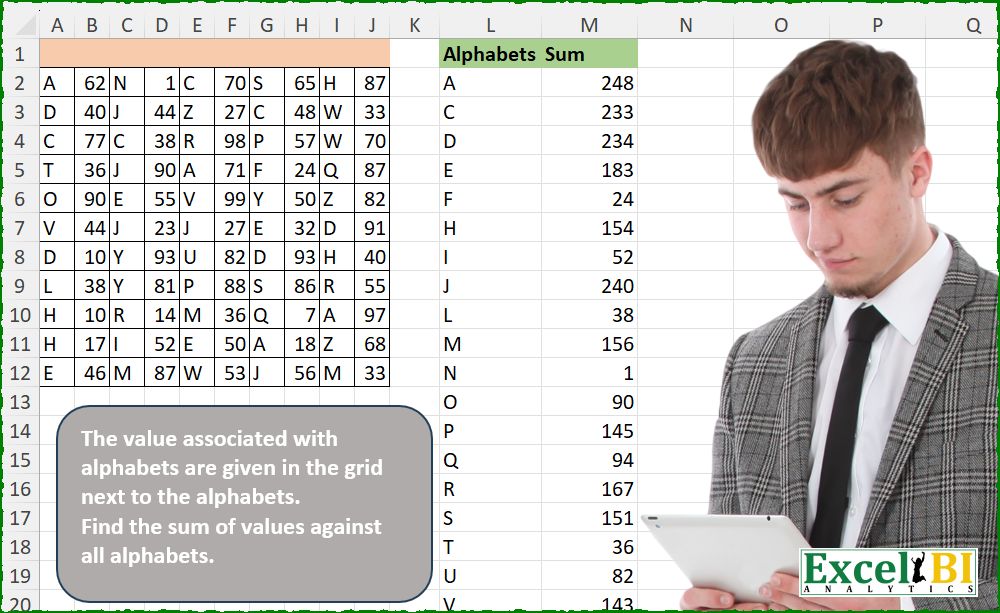
The value associated with alphabets are given in the grid next to the alphabets. Find the sum of values against all alphabets.
📌 Challenge Details and Links
ExcelBI Excel Challenge Number: 690
Challenge Difficulty: ⭐️
📥Download Sample File
📥Link to the solutions on LinkedIn
Solving the challenge of Sum of Values for Alphabets with Power Query
Power Query solution 1 for Sum of Values for Alphabets, proposed by Kris Jaganah:
let
  A = Excel.CurrentWorkbook(){[Name = "Table1"]}[Content],
  B = (x) => List.Combine(List.Alternate(Table.ToColumns(A), 1, 1, x)),
  C = Table.FromColumns({B(1), B(0)}, {"Alphabets", "Sum"}),
  D = Table.Group(C, "Alphabets", {"Sum", each List.Sum([Sum])}),
  E = Table.Sort(D, "Alphabets")
in
  E
Power Query solution 2 for Sum of Values for Alphabets, proposed by Alejandro Simón 🇵🇦 🇪🇸:
let
  Origen = Excel.CurrentWorkbook(){[Name = "Tabla1"]}[Content],
  Zip = Table.FromRows(
    List.Combine(List.Transform(List.Split(Table.ToColumns(Origen), 2), List.Zip))
  ),
  Sol = Table.Sort(
    Table.Group(Zip, {"Column1"}, {{"Sum", each List.Sum([Column2])}}),
    {{"Column1", 0}}
  )
in
  Sol
Power Query solution 3 for Sum of Values for Alphabets, proposed by Abdallah Ally:
let
  Source = Excel.CurrentWorkbook(){[Name = "Table1"]}[Content],
  Unpivot = Table.UnpivotOtherColumns(Source, {}, "Attribute", "Value"),
  FromRows = Table.FromRows(
    List.Zip({List.Alternate(Unpivot[Value], 1, 1, 1), List.Alternate(Unpivot[Value], 1, 1)}),
    {"Alphabets", "Value"}
  ),
  Result = Table.Group(
    FromRows,
    "Alphabets",
    {"Sum", each List.Sum([Value]), type number},
    1,
    (x, y) => Value.Compare(x, y)
  )
in
  Result
Power Query solution 4 for Sum of Values for Alphabets, proposed by Seokho MOON:
let
  Source = Excel.CurrentWorkbook(){[Name = "Table1"]}[Content],
  Rows = List.Sort(
    List.TransformMany(Table.ToRows(Source), each List.Split(_, 2), (x, y) => y),
    each _{0}
  ),
  Res = Table.Group(
    Table.FromRows(Rows, {"Alphabets", "Sum"}),
    "Alphabets",
    {"Sum", each List.Sum([Sum])}
  )
in
  Res
Power Query solution 5 for Sum of Values for Alphabets, proposed by Meganathan Elumalai:
let
  Source = Excel.CurrentWorkbook(){[Name = "Table1"]}[Content],
  List = Table.UnpivotOtherColumns(Source, {}, "A", "V")[V],
  Tbl = Table.FromColumns(
    {List.Alternate(List, 1, 1, 1)} & {List.Alternate(List, 1, 1)},
    {"Alphabets", "Value"}
  ),
  Result = Table.Sort(Table.Group(Tbl, "Alphabets", {"Sum", each List.Sum([Value])}), "Alphabets")
in
  Result
Power Query solution 6 for Sum of Values for Alphabets, proposed by Meganathan Elumalai:
let
  Source = Excel.CurrentWorkbook(){[Name = "Table1"]}[Content],
  Lst1 = List.Sort(List.Distinct(List.Combine(List.Alternate(Table.ToColumns(Source), 1, 1, 1)))),
  Lst2 = List.Combine(List.Transform(Table.ToRows(Source), (f) => List.Split(f, 2))),
  Result = Table.FromRows(
    List.Transform(
      Lst1,
      (x) => {x, List.Sum(List.Transform(List.Select(Lst2, each _{0} = x), List.Last))}
    ),
    {"Alphabets", "Sum"}
  )
in
  Result
Power Query solution 7 for Sum of Values for Alphabets, proposed by Antriksh Sharma:
let
  Source  = Table1,
  unpivot = Table.UnpivotOtherColumns(Source, {}, "A", "V"),
  combine = Table.FromRows(List.Split(unpivot[V], 2), {"A", "V"}),
  group   = Table.Group(combine, "A", {"Sum", each List.Sum([V]), type number}),
  sort    = Table.Sort(group, {"A", Order.Ascending})
in
  sort
Power Query solution 8 for Sum of Values for Alphabets, proposed by Antriksh Sharma:
let
  Source = Table1,
  cols = Table.ToColumns(Source),
  A = List.Combine(List.Alternate(cols, 1, 1, 1)),
  V = List.Combine(List.Alternate(cols, 1, 1, 0)),
  combine = List.Zip({A, V}),
  transform = List.TransformMany(
    List.Distinct(A),
    (x) => {List.Zip(List.Select(combine, (z) => z{0} = x)){1}},
    (x, y) => {x, List.Sum(y)}
  ),
  totable = Table.Sort(
    Table.FromRows(transform, {"Alphabets", "sum"}),
    {"Alphabets", Order.Ascending}
  )
in
  totable
Power Query solution 9 for Sum of Values for Alphabets, proposed by Rafael González B.:
let
  Source = Question_Table,
  ST = Table.Split(Table.Transpose(Source), 2),
  CT = Table.Combine(List.Transform(ST, each Table.Transpose(_, {"Alphabets", "Value"}))),
  GA = Table.Sort(Table.Group(CT, {"Alphabets"}, {{"Sum", each List.Sum([Value])}}), "Alphabets")
in
  GA
Power Query solution 10 for Sum of Values for Alphabets, proposed by Peter Krkos:
PowerQuery solution:
= Table.Sort(
 Table.Group(
 Table.FromRows(List.TransformMany(Table.ToRows(Source), each List.Split(_, 2), (x,y)=> y), type table[Alphabets=text, Sum=Int64.Type]),
 "Alphabets", {"Sum", each List.Sum([Sum]), Int64.Type}),
 "Alphabets")
Power Query solution 12 for Sum of Values for Alphabets, proposed by Mihai Radu O:
let
  Source = Excel.CurrentWorkbook(){[Name = "Table1"]}[Content],
  fct = (tbl, nr) =>
    List.Combine(
      Table.ToColumns(
        Table.SelectColumns(
          tbl,
          List.Select(
            Table.ColumnNames(tbl),
            (x) => Number.Mod(Number.From(Text.Select(x, {"0" .. "9"})), 2) = nr
          )
        )
      )
    ),
  tbl = Table.FromColumns(List.Transform({1, 0}, (x) => fct(Source, x)), {"Alphabets", "Sum"}),
  grup = Table.Sort(
    Table.Group(tbl, {"Alphabets"}, {"Sum", each List.Sum([Sum]), type number}),
    {"Alphabets", Order.Ascending}
  )
in
  grup
Power Query solution 13 for Sum of Values for Alphabets, proposed by Aleksandar Kovacevic:
let
  Source = Excel.CurrentWorkbook(){[Name = "Table1"]}[Content],
  Res = Table.Sort(
    Table.Group(
      Table.FromColumns(
        List.Transform({1, 0}, each List.Combine(List.Alternate(Table.ToColumns(Source), 1, 1, _))),
        {"Alphabets", "N"}
      ),
      "Alphabets",
      {"Sum", each List.Sum(_[N])}
    ),
    "Alphabets"
  )
in
  Res
Solving the challenge of Sum of Values for Alphabets with Excel
Excel solution 1 for Sum of Values for Alphabets, proposed by Bo Rydobon 🇹🇭:
=GROUPBY(TOCOL(IFS(B2:J12,A2:I12),3),TOCOL(--B2:J12,3),SUM,,0)Excel solution 2 for Sum of Values for Alphabets, proposed by Rick Rothstein:
=LET(
    r,
    A2:J12,
    t,
    UNIQUE(
        SORT(
            TOCOL(
                IFS(
                    r>"",
                    r
                ),
                3
            )
        )
    ),
    HSTACK(
        t,
        MAP(
            t,
            LAMBDA(
                x,
                SUM(
                    IF(
                        r=x,
                        OFFSET(
                            r,
                            ,
                            1
                        )
                    )
                )
            )
        )
    )
)
Excel solution 3 for Sum of Values for Alphabets, proposed by Kris Jaganah:
=LET(a,A2:J12,GROUPBY(TOCOL(IFS(ISTEXT(a),a),3),TOCOL(--a,3),SUM,,0))Excel solution 4 for Sum of Values for Alphabets, proposed by Kris Jaganah:
=LET(
    a,
    A2:J12,
    b,
    SORT(
        UNIQUE(
            TOCOL(
                IFS(
                    ISTEXT(
                        a
                    ),
                    a
                ),
                3
            )
        )
    ),
    HSTACK(
        b,
        MAP(
            b,
            LAMBDA(
                x,
                SUM(
                    IF(
                        a=x,
                        OFFSET(
                            a,
                            ,
                            1
                        ),
                        0
                    )
                )
            )
        )
    )
)
Excel solution 5 for Sum of Values for Alphabets, proposed by Julian Poeltl:
=LET(W,WRAPROWS(TOROW(A2:J12),2),GROUPBY(TAKE(W,,1),DROP(W,,1),SUM,,0))Excel solution 6 for Sum of Values for Alphabets, proposed by Hussein SATOUR:
=LET(
    a,
    TOCOL(
        A2:J12
    ),
    GROUPBY(
        FILTER(
            a,
            ISTEXT(
                a
            )
        ),
        FILTER(
            a,
            ISNUMBER(
                a
            )
        ),
        SUM
    )
)
Excel solution 7 for Sum of Values for Alphabets, proposed by Oscar Mendez Roca Farell:
=LET(
    d,
    B2:J12,
    GROUPBY(
        TOCOL(
            IFS(
                d,
                A2:I12
            ),
            2
        ),
        TOCOL(
            --d,
            2
        ),
        SUM,
        ,
        0
    )
)
Excel solution 8 for Sum of Values for Alphabets, proposed by Duy Tùng:
=LET(a,A2:I12,b,SORT(UNIQUE(TOCOL(IFS(a>"",a),3))),HSTACK(b,MAP(b,LAMBDA(v,SUM((a=v)*(N(+B2:J12)))))))Excel solution 9 for Sum of Values for Alphabets, proposed by Duy Tùng:
=DROP(GROUPBY(TOCOL(T(+A2:I12),3),TOCOL(N(+B2:J12)),SUM,,0),1)Excel solution 10 for Sum of Values for Alphabets, proposed by Sunny Baggu:
=LET(
 _t, WRAPROWS(TOCOL(A2:J12), 2),
 _a, TAKE(_t, , 1),
 _b, TAKE(_t, , -1),
 _u, SORT(UNIQUE(_a)),
 _v, MAP(_u, LAMBDA(a, SUM((_a = a) * _b))),
 HSTACK(_u, _v)
)
Excel solution 11 for Sum of Values for Alphabets, proposed by LEONARD OCHEA 🇷🇴:
=LET(t,WRAPROWS(TOCOL(A2:J12),2),I,INDEX,GROUPBY(I(t,,1),I(t,,2),SUM,,0))

=LET(t,A2:J12,F,LAMBDA([x],TOCOL(IFS(MOD(COLUMN(t),2)-x,t),3)),GROUPBY(F(),F(1),SUM,,0))

With function of functions
=LET(t,A2:J12,F,LAMBDA(x,TOCOL(IFS(x(COLUMN(t)),t),3)),GROUPBY(F(ISODD),F(ISEVEN),SUM,,0))
Excel solution 12 for Sum of Values for Alphabets, proposed by Anshu Bantra:
=LET(

     data_,
     WRAPROWS(
         TOCOL(
             A2:J12
         ),
          2
     ),

     GROUPBY(

          CHOOSECOLS(
              data_,
               1
          ),

          CHOOSECOLS(
              data_,
               2
          ),

          SUM,

          ,

          0

     )

)
Excel solution 13 for Sum of Values for Alphabets, proposed by Md. Zohurul Islam:
=LET(
    i,
    WRAPROWS(
        TOCOL(
            A2:J12
        ),
        2
    ),
    GROUPBY(
        TAKE(
            i,
            ,
            1
        ),
        DROP(
            i,
            ,
            1
        ),
        SUM,
        0,
        0
    )
)
Excel solution 14 for Sum of Values for Alphabets, proposed by Pieter de B.:
=LET(a,A2:J12,L,LAMBDA(x,TOCOL(IFS(x-ISTEXT(a),a),2)),GROUPBY(L(0),L(1),SUM,,0))Excel solution 15 for Sum of Values for Alphabets, proposed by Hamidi Hamid:
=LET(s,A2:J12,f,LAMBDA(p,TOCOL(CHOOSECOLS(s,SEQUENCE(,COLUMNS(s)/2,p,2)))),GROUPBY(f(1),f(2),SUM,,0))Excel solution 16 for Sum of Values for Alphabets, proposed by Asheesh Pahwa:
=MAP(
    SORT(
        UNIQUE(
            TOCOL(
                IF(
                    ISTEXT(
                        A2:J12
                    ),
                    A2:J12,
                    NA()
                ),
                2
            )
        )
    ),
    LAMBDA(
        a,
        SUM(
            SCAN(
                "",
                A2:J12,
                LAMBDA(
                    x,
                    y,
                    IF(
                        y=a,
                        OFFSET(
                            y,
                            0,
                            1
                        ),
                        ""
                    )
                )
            )
        )
    )
)
Excel solution 17 for Sum of Values for Alphabets, proposed by Dhaval Patel:
=SORT(UNIQUE(VSTACK(A2:A12, C2:C12, E2:E12, G2:G12, I2:I12)))

Formula for cell M2,
=SUMPRODUCT((A$2:A$12=L2)*B$2:B$12) + SUMPRODUCT((C$2:C$12=L2)*D$2:D$12) + SUMPRODUCT((E$2:E$12=L2)*F$2:F$12) + SUMPRODUCT((G$2:G$12=L2)*H$2:H$12) + SUMPRODUCT((I$2:I$12=L2)*J$2:J$12)
Excel solution 18 for Sum of Values for Alphabets, proposed by ferhat CK:
=LET(a,CHAR(SEQUENCE(26,,65)),b,HSTACK(a,MAP(a,LAMBDA(x,SUM(IF(A2:J12=x,OFFSET(A2:J12,,1),0))))),FILTER(b,TAKE(b,,-1)>0))<&!-- wp:details -->_x000D_
Excel solution 19 for Sum of Values for Alphabets, proposed by ferhat CK:
=LET(
    a,
    WRAPROWS(
        TOCOL(
            A2:J12
        ),
        2
    ),
    GROUPBY(
        TAKE(
            a,
            ,
            1
        ),
        TAKE(
            a,
            ,
            -1
        ),
        SUM,
        ,
        0
    )
)
_x000D_
_x000D_
Excel solution 20 for Sum of Values for Alphabets, proposed by Jaroslaw Kujawa:
=LET(y;DROP(REDUCE("";CHAR(SEQUENCE(90-65+1;;65));LAMBDA(a;x;VSTACK(a;HSTACK(x;SUM(IF(A2:I12=x;B2:J12))))));1);FILTER(y;TAKE(y;;-1)))

=LET(y;WRAPROWS(TOCOL(A2:J12);2);GROUPBY(TAKE(y;;1);TAKE(y;;-1);SUM;;0))
_x000D_
_x000D_
Excel solution 21 for Sum of Values for Alphabets, proposed by Ankur Sharma:
=LET(a, WRAPROWS(TOROW(A2:J12), 2),
GROUPBY(TAKE(a, , 1), TAKE(a, , -1), SUM, , 0))
_x000D_
_x000D_
Excel solution 22 for Sum of Values for Alphabets, proposed by Meganathan Elumalai:
=LET(a,
    A2:J12,
    b,
    SORT(
        UNIQUE(
            TOCOL(
                IFS(
                    a>"",
                    a
                ),
                3
            )
        )
    ),
    HSTACK(b,
    MAP(b,
    LAMBDA(x,
    SUM(IFERROR((DROP(
        a,
        ,
        -1
    )=x)*DROP(
        a,
        ,
        1
    ),
    0))))))
_x000D_
_x000D_
Excel solution 23 for Sum of Values for Alphabets, proposed by Antriksh Sharma:
=LET(

     Source,
     A2:J12,

     ColCount,
     COLUMNS(
         Source
     ),

     Seq,
     SEQUENCE(
         ColCount
     ),

     A,
     FILTER(
         Seq,
          MOD(
              Seq,
               2
          ) = 1
     ),

     B,
     FILTER(
         Seq,
          MOD(
              Seq,
               2
          ) = 0
     ),

     Headers,
     TOCOL(
         CHOOSECOLS(
             Source,
              A
         )
     ),

     Data,
     TOCOL(
         CHOOSECOLS(
             Source,
              B
         )
     ),

     Acc,
     DROP(
         REDUCE(
             "",
              UNIQUE(
                  Headers
              ),
              LAMBDA(
                  state,
                   current,
                   VSTACK(
                       state,
                        HSTACK(
                            current,
                             SUM(
                                 FILTER(
                                     Data,
                                      Headers = current
                                 )
                             )
                        )
                   )
              )
         ),
          1
     ),

     VSTACK(
         {"Alphabets",
          "Sum"},
          SORT(
              Acc,
               1
          )
     )

)
_x000D_
_x000D_
Excel solution 24 for Sum of Values for Alphabets, proposed by CA Raghunath Gundi:
=LET(
    sp,
    TOCOL(
        A2:J12,
        0,
        TRUE
    ),
    alpha,
    FILTER(
        sp,
        ISTEXT(
            sp
        )
    ),
    num,
    FILTER(
        sp,
        ISNUMBER(
            sp
        )
    ),
    GROUPBY(
        alpha,
        num,
        SUM,
        0,
        0
    )
)

=LET(
    a,
    TRANSPOSE(
        WRAPCOLS(
            TOCOL(
                A2:J12
            ),
            2
        )
    ),
    GROUPBY(
        TAKE(
            a,
            ,
            1
        ),
        TAKE(
            a,
            ,
            -1
        ),
        SUM,
        0,
        0
    )
)
_x000D_
_x000D_
Excel solution 25 for Sum of Values for Alphabets, proposed by Eddy Wijaya:
=LET(
t,A2:J12,
c,LAMBDA(x,TOCOL(CHOOSECOLS(t,SEQUENCE(5,,x,2)))),
GROUPBY(c(1),c(2),SUM,,0))
_x000D_
_x000D_
Excel solution 26 for Sum of Values for Alphabets, proposed by Gerson Pineda:
=GROUPBY(TOCOL(SI(B2:J12,A2:I12),2),TOCOL(--A2:J12,2),SUM,,0)
_x000D_
_x000D_
Excel solution 27 for Sum of Values for Alphabets, proposed by Milan Shrimali:
=LET(DATA,WRAPROWS(TOCOL(A2:J12),2),SORT(BYROW(UNIQUE(CHOOSECOLS(DATA,1)),LAMBDA(X,HSTACK(X,SUM(FILTER(CHOOSECOLS(DATA,2),CHOOSECOLS(DATA,1)=X))))),1,1))
_x000D_
_x000D_
Excel solution 28 for Sum of Values for Alphabets, proposed by Maciej Kopczyński:
=LET(

     arr,
     TRANSPOSE(
         WRAPCOLS(
             TOCOLS(
                 A2:J12
             ),
              2
         )
     ),

     alphabets,
     CHOOSECOLS(
         arr,
          1
     ),

     sum,
     CHOOSECOLS(
         arr,
          2
     ),

     headers,
     {"Alphabets",
     "Sum"},

     result,
     VSTACK(
         headers,
          GROUPBY(
              alphabets,
               sum,
               SUM,
               0,
               0,
               1
          )
     ),

     result

)
_x000D_
_x000D_
Excel solution 29 for Sum of Values for Alphabets, proposed by Fredson Alves Pinho:
=GROUPBY(TOCOL(IFS(ISODD(COLUMN(A2:J12)),A2:J12),2),TOCOL(IFS(ISEVEN(COLUMN(A2:J12)),A2:J12),2),SUM)
_x000D_
_x000D_
Excel solution 30 for Sum of Values for Alphabets, proposed by Craig Runciman:
=LET(data,WRAPROWS(TOCOL(A2:J12),2),GROUPBY(TAKE(data,,1),TAKE(data,,-1),SUM,,0))
_x000D_
_x000D_
Excel solution 31 for Sum of Values for Alphabets, proposed by Dominic Walsh:
=LET(
    a,
    WRAPROWS(
        TOCOL(
            A2:J12
        ),
        2
    ),
    GROUPBY(
        TAKE(
            a,
            ,
            1
        ),
        TAKE(
            a,
            ,
            -1
        ),
        SUM,
        ,
        0
    )
)
_x000D_
_x000D_
Excel solution 32 for Sum of Values for Alphabets, proposed by Hussain Ali Nasser:
=LET(
    d,
    WRAPROWS(
        TOCOL(
            A2:J12
        ),
        2
    ),
    PIVOTBY(
        INDEX(
            d,
            ,
            1
        ),
        ,
        INDEX(
            d,
            ,
            2
        ),
        SUM,
        ,
        0
    )
)
_x000D_
_x000D_
Excel solution 33 for Sum of Values for Alphabets, proposed by Hussain Ali Nasser:
=LET(g,A2:J12,i,INDEX,tc,TOCOL,r,ROWS(g),c,COLUMNS(g),s,SEQUENCE,l,tc(i(g,s(r),s(,c/2,1,2))),n,tc(i(g,s(r),s(,c/2,2,2))),PIVOTBY(l,,n,SUM,0))
_x000D_
_x000D_
Excel solution 34 for Sum of Values for Alphabets, proposed by abdelaziz kamal allam:
=LET(x,WRAPROWS(TOCOL(A2:J12),2),GROUPBY(CHOOSECOLS(x,1),CHOOSECOLS(x,2),SUM))
_x000D_
_x000D_
Excel solution 35 for Sum of Values for Alphabets, proposed by CA Mohit Saxena:
=LET(
    r,
     A2:J12,
    _r1,
    WRAPROWS(
        TOCOL(
            IFNUMBER(
                r
            )>0,
            r
        )
    ),
    2
),
    _c1,
    TAKE(
        _r1,
        ,
        1
    ),
    _c2,
    TAKE(
        _r1,
        ,
        -1
    ),
    u,
    SORT(
        UNIQUE(
            _c1
        )
    ),
    HSTACK(
        u,
        MAP(
            u,
            LAMBDA(
                x,
                SUM(
                    FILTER(
                        _c2,
                        _c1=x
                    )
                )
            )
        )
    ))
_x000D_
_x000D_
Excel solution 36 for Sum of Values for Alphabets, proposed by CA Mohit Saxena:
=LET(r,A2:J12,s, SUBSTITUTE(TEXTSPLIT(ARRAYTOTEXT(IF(ISTEXT(r),r,"")),,", , "),",",""),f,--SUBSTITUTE(TEXTSPLIT(ARRAYTOTEXT(IF(ISNUMBER(r),r,"")),,", , "),",",""),_c1,SORT(UNIQUE(s)),HSTACK(_c1,MAP(_c1,LAMBDA(x,SUM(FILTER(f,s=x))))))
_x000D_
_x000D_
Excel solution 37 for Sum of Values for Alphabets, proposed by Aurélio Zafindaza:
=LET(
    to,
    TOCOL,
    val,
    A2:J12,
    arr,
    WRAPROWS(
        to(
            val
        ),
        2
    ),
    alpha,
    CHOOSECOLS(
        arr,
        1
    ),
    num,
    CHOOSECOLS(
        arr,
        -1
    ),
    GROUPBY(
        alpha,
        num,
        SUM,
        0,
        0
    )
)
_x000D_
Solving the challenge of Sum of Values for Alphabets with Python
_x000D_
Python solution 1 for Sum of Values for Alphabets, proposed by Konrad Gryczan, PhD:
import pandas as pd
import numpy as np
path = "690 Alphabets Grid Sum.xlsx"
input = pd.read_excel(path, usecols="A:J", nrows = 11, skiprows = 1, header=None).to_numpy()
test = pd.read_excel(path, usecols="L:M", nrows = 23)
result = pd.DataFrame(input.reshape((-1, 2)), columns=["Alphabets", "Sum"])
result["Sum"] = pd.to_numeric(result["Sum"], errors="coerce")
summary = result.groupby("Alphabets", as_index=False)["Sum"].sum()
summary = summary.sort_values("Alphabets")
print(summary.equals(test)) # True
_x000D_
Solving the challenge of Sum of Values for Alphabets with Python in Excel
_x000D_
Python in Excel solution 1 for Sum of Values for Alphabets, proposed by Alejandro Campos:
from collections import defaultdict
data = xl("A2:J12").values
letter_totals = defaultdict(int)
for row in data:
 for i in range(0, len(row), 2):
 letter = row[i]
 value = row[i + 1]
 letter_totals[letter] += value
df_result = pd.DataFrame(sorted(letter_totals.items()), columns=["Letter", "Total"])
_x000D_
_x000D_
Python in Excel solution 2 for Sum of Values for Alphabets, proposed by Antriksh Sharma:
df = xl("A1:J12", headers= True)
headers = (
 df.iloc[:, 0::2]
 .melt(value_name = 'Alphabets')
 .loc[:, ['Alphabets']]
)
data = (
 df.iloc[:, 1::2]
 .melt(value_name = 'V')
 .iloc[:, [1]]
)
result = (
 pd.concat([headers, data], axis = 1)
 .groupby('Alphabets').agg(Sum = ('V', 'sum'))
 .reset_index()
)
result
_x000D_
Solving the challenge of Sum of Values for Alphabets with R
_x000D_
R solution 1 for Sum of Values for Alphabets, proposed by Konrad Gryczan, PhD:
library(tidyverse)
library(readxl)
path = "Excel/690 Alphabets Grid Sum.xlsx"
input = read_excel(path, range = "A2:J12", col_names = FALSE) %>% as.matrix()
test  = read_excel(path, range = "L1:M23")
M = input %>%
 t() %>%
 matrix(ncol = 2, byrow = TRUE) %>%
 as.data.frame() %>%
 mutate(V2 = as.numeric(V2)) %>%
 summarise(V2 =  sum(V2), .by = V1) %>%
 arrange(V1) %>%
 select(Alphabets = V1, Sum = V2)
all.equal(M, test, check.attributes = FALSE)
# [1] TRUE
_x000D_
&&