
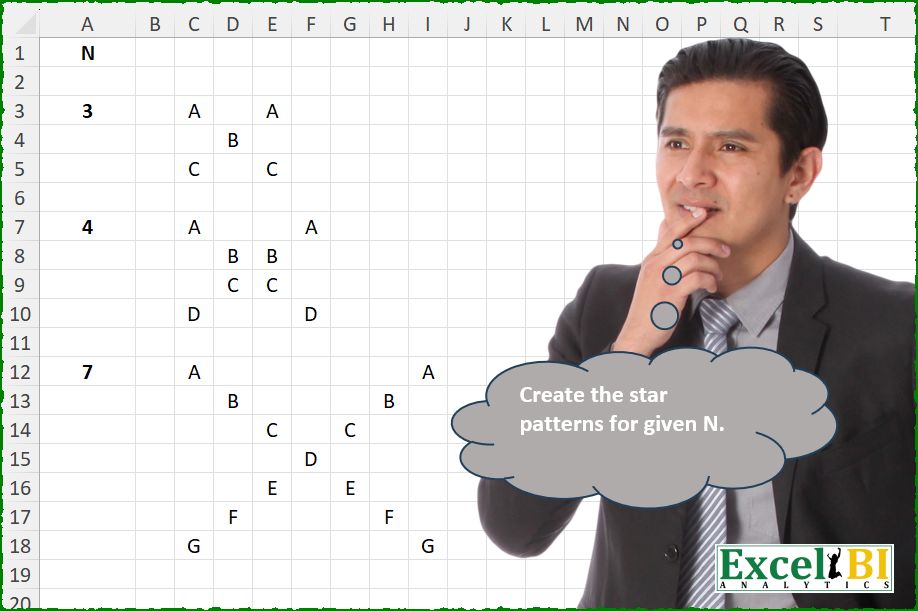
Create the star patterns for given N.
📌 Challenge Details and Links
ExcelBI Excel Challenge Number: 673
Challenge Difficulty: ⭐️
📥Download Sample File
📥Link to the solutions on LinkedIn
Solving the challenge of Draw Star Shape Pattern with Power Query
Power Query solution 1 for Draw Star Shape Pattern, proposed by Kris Jaganah:
let
  A = 7,
  B = Table.FromRows(
    List.Split(
      List.TransformMany(
        {1 .. A},
        each {1 .. A},
        (x, y) => if x = y or x + y - 1 = A then Character.FromNumber(x + 64) else null
      ),
      A
    )
  )
in
  B
Solving the challenge of Draw Star Shape Pattern with Excel
Excel solution 1 for Draw Star Shape Pattern, proposed by Bo Rydobon 🇹🇭:
=LET(n,A12,s,SEQUENCE(n),m,MUNIT(n),LEFT(CHAR(s+64),m+SORTBY(m,-s)>0))Excel solution 2 for Draw Star Shape Pattern, proposed by Rick Rothstein:
=MAKEARRAY(
    A12,
    A12,
    LAMBDA(
        r,
        c,
        IF(
            OR(
                r=c,
                r=A12+1-c
            ),
            CHAR(
                64+r
            ),
            ""
        )
    )
)
Excel solution 3 for Draw Star Shape Pattern, proposed by John V.:
=LET(n,A12,r,SEQUENCE(n),c,TOROW(r),IF((r=c)+(r+c=1+n),CHAR(64+r),""))Excel solution 4 for Draw Star Shape Pattern, proposed by Kris Jaganah:
=MAKEARRAY(A12,
    A12,
    LAMBDA(x,
    y,
    IF((x=y)+((x+y)=A12+1),
    CHAR(
        x+64
    ),
    "")))
Excel solution 5 for Draw Star Shape Pattern, proposed by Julian Poeltl:
=LET(
    N,
    A12,
    MAKEARRAY(
        N,
        N,
        LAMBDA(
            A,
            B,
            IF(
                OR(
                    A=B,
                    B=N-A+1
                ),
                CHAR(
                    64+A
                ),
                ""
            )
        )
    )
)
Excel solution 6 for Draw Star Shape Pattern, proposed by Timothée BLIOT:
=LET(A,MUNIT(A3),B,SEQUENCE(A3),IF(A+SORTBY(A,A3-B),CHAR(B+64),""))Excel solution 7 for Draw Star Shape Pattern, proposed by Oscar Mendez Roca Farell:
=LET(s,SEQUENCE(A12),t,TOROW(s),IF((s=t)+(s=A12+1-t),CHAR(s+64),""))Excel solution 8 for Draw Star Shape Pattern, proposed by Sunny Baggu:
=LET(
 n, 7,
 _r, SEQUENCE(n),
 _c1, TOROW(_r),
 _c2, SORT(_c1, , -1, 1),
 _v, SIGN((_r = _c1) + (_r = _c2)),
 IF(_v, CHAR(_v + _r + 63), "")
)
Excel solution 9 for Draw Star Shape Pattern, proposed by Md. Zohurul Islam:
=LET(n,A12,sq,SEQUENCE(n),z,sq+SEQUENCE(,n),
w,DROP(REDUCE("",sq,LAMBDA(y,x,LET(
 a,CHOOSEROWS(z,x),
 b,MAP(a,LAMBDA(p,IF(OR(p=2*x,p=n+1),CHAR(64+x),""))),
 VSTACK(y,b)))),1),
w)
Excel solution 10 for Draw Star Shape Pattern, proposed by Md. Zohurul Islam:
=2*r,r+c=n+1),CHAR(64+r),""))),w)Excel solution 11 for Draw Star Shape Pattern, proposed by Pieter de B.:
=LET(
    n,
    A12,
    s,
    SEQUENCE(
        n
    ),
    m,
    MUNIT(
        n
    ),
    REPT(
        CHAR(
            64+s
        ),
        SIGN(
            m+SORTBY(
                m,
                -s
            )
        )
    )
)
Excel solution 12 for Draw Star Shape Pattern, proposed by Hamidi Hamid:
=LET(n,A12,m,SEQUENCE(n,n),p,(m=SEQUENCE(n,,1,n+1))*SEQUENCE(n,,65,1),q,(m=SEQUENCE(n,,n,n-1))*SEQUENCE(n,,65,1)*1,IFERROR(CHAR(IF(p+q>65+n,p,p+q)),""))Excel solution 13 for Draw Star Shape Pattern, proposed by Charles Roldan:
=LAMBDA(n, MAKEARRAY(n, n, LAMBDA(x, y, REPT(CHAR(x + 64), OR(x - y = 0, x + y = n + 1)))))(7)Excel solution 14 for Draw Star Shape Pattern, proposed by Jaroslaw Kujawa:
=LET(x;A3;MAKEARRAY(x;x;LAMBDA(r;c;IF((r=c)+(r+c=x+1);CHAR(64+r);""))))Excel solution 15 for Draw Star Shape Pattern, proposed by Eddy Wijaya:
=LET(

    n,
    A3,

    MAKEARRAY(
        n,
        n,
        LAMBDA(
            r,
            c,

            IF(
                OR(
                    r=c,
                    r+c=n+1
                ),
                CHAR(
                    64+r
                ),
                ""
            )
        )
    )
),


Dynamic Array
=IFNA(
    DROP(
        REDUCE(
            0,
            TOCOL(
                A3:A12,
                3
            ),
            LAMBDA(
                a,
                v,
                VSTACK(
                    a,
                    MAKEARRAY(
                        v,
                        v,
                        LAMBDA(
                            r,
                            c,
                            IF(
                                OR(
                                    r=c,
                                    r+c=v+1
                                ),
                                CHAR(
                    64+r
                ),
                                ""
                            )
                        )
                    ),
                    ""
                )
            )
        ),
        1
    ),
    ""
)
Excel solution 16 for Draw Star Shape Pattern, proposed by Mey Tithveasna:
=LET(n,
    A12,
    MAKEARRAY(n,
    n,

LAMBDA(a,
    b,
    IF((a=b)+(a=n-b+1),
    CHAR(
        64+a
    ),
    "")))
Excel solution 17 for Draw Star Shape Pattern, proposed by Edwin Tisnado:
=LET(d,A13,u,MUNIT(d),s,SEQUENCE(d),IF(u+SORTBY(u,s,-1),CHAR(64+s),""))Excel solution 18 for Draw Star Shape Pattern, proposed by Josh Brodrick:
=MAKEARRAY(A12,A12,LAMBDA(x,y,IF(OR(x=y,x+y=A12+1),CHAR(x+64),"")))Excel solution 19 for Draw Star Shape Pattern, proposed by O. Zini:
=LET(number;3;MAKEARRAY(number;number;LAMBDA(r;c;IF(OR(r=c;r+c=number+1);CHAR(CODE("A")+r-1);""))))Excel solution 20 for Draw Star Shape Pattern, proposed by Jazen Cosby:
=LET(
 n, A12,
 pattern, MAKEARRAY(n, n, LAMBDA(r, c,
 IF(
 OR(r = c, r + c = n + 1),
 CHAR(64 + r),
 ""
 )
 ),
 pattern
)
Solving the challenge of Draw Star Shape Pattern with R
R solution 1 for Draw Star Shape Pattern, proposed by Konrad Gryczan, PhD:
library(tidyverse)
library(readxl)
library(matricks)
path = "Excel/673 Star Pattern.xlsx"
test3  = read_excel(path, range = "C3:E5", col_names = FALSE) %>% as.matrix()
test4  = read_excel(path, range = "C7:F10", col_names = FALSE) %>% as.matrix()
test7 = read_excel(path, range = "C12:I18", col_names = FALSE) %>% as.matrix()
make_star = function(side) {
 M = matrix(NA_character_, side, side)
 for (i in 1:side){
 M[i,i] = LETTERS[i]
 M[i,side+1-i] = LETTERS[i]
 }
 return(M)
}
all.equal(make_star(3), test3, check.attributes = FALSE) # TRUE
all.equal(make_star(4), test4, check.attributes = FALSE) # TRUE
all.equal(make_star(7), test7, check.attributes = FALSE) # TRUE
&&&