
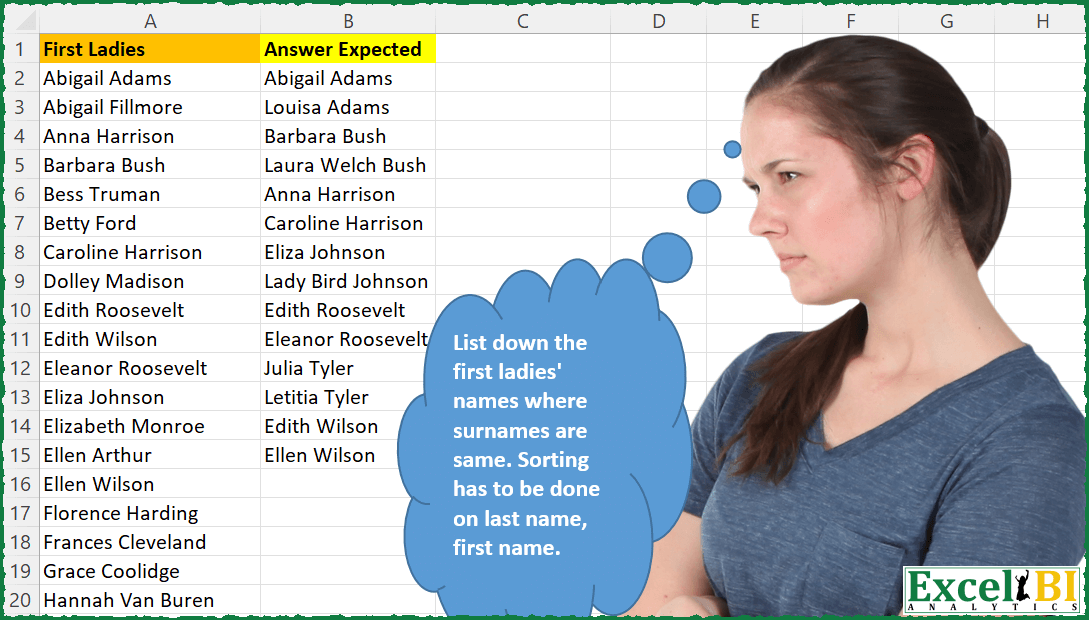
List down the first ladies’ names where surnames (i.e. last word) are same. Sorting has to be done on last name, first name. Also this is case insensitive. Your formula need not be different from others as long as you have worked out your formula independently)
📌 Challenge Details and Links
ExcelBI Excel Challenge Number: 67
Challenge Difficulty: ⭐️⭐️
📥Download Sample File
📥Link to the solutions on LinkedIn
Solving the challenge of Find Duplicate Surnames with Power Query
Power Query solution 1 for Find Duplicate Surnames, proposed by Kris Jaganah:
let
  Source = Excel.CurrentWorkbook(){[Name = "Table1"]}[Content],
  #"Split Column by Delimiter" = Table.SplitColumn(
    Source,
    "First Ladies",
    Splitter.SplitTextByEachDelimiter({" "}, QuoteStyle.None, true),
    {"First Ladies.1", "First Ladies.2"}
  ),
  #"Kept Duplicates" =
    let
      columnNames = {"First Ladies.2"},
      addCount = Table.Group(
        #"Split Column by Delimiter",
        columnNames,
        {{"Count", Table.RowCount, type number}}
      ),
      selectDuplicates = Table.SelectRows(addCount, each [Count] > 1),
      removeCount = Table.RemoveColumns(selectDuplicates, "Count")
    in
      Table.Join(
        #"Split Column by Delimiter",
        columnNames,
        removeCount,
        columnNames,
        JoinKind.Inner
      ),
  #"Reordered Columns" = Table.ReorderColumns(
    #"Kept Duplicates",
    {"First Ladies.2", "First Ladies.1"}
  ),
  #"Added Custom" = Table.AddColumn(
    #"Reordered Columns",
    "Custom",
    each [First Ladies.2] & " " & [First Ladies.1]
  ),
  #"Sorted Rows1" = Table.Sort(#"Added Custom", {{"Custom", Order.Ascending}}),
  #"Added Custom1" = Table.AddColumn(
    #"Sorted Rows1",
    "Custom.1",
    each [First Ladies.1] & " " & [First Ladies.2]
  ),
  #"Removed Columns" = Table.RemoveColumns(
    #"Added Custom1",
    {"First Ladies.2", "First Ladies.1", "Custom"}
  )
in
  #"Removed Columns"
Power Query solution 2 for Find Duplicate Surnames, proposed by Kris Jaganah:
let
 Source = Excel.CurrentWorkbook(){[Name="Table1"]}[Content],
 #"Changed Type" = Table.TransformColumnTypes(Source,{{"First Ladies", type text}}),
 #"Split Column by Delimiter" = Table.SplitColumn(#"Changed Type", "First Ladies", Splitter.SplitTextByEachDelimiter({" "}, QuoteStyle.None, true), {"First Ladies.1", "First Ladies.2"}),
 #"Changed Type1" = Table.TransformColumnTypes(#"Split Column by Delimiter",{{"First Ladies.1", type text}, {"First Ladies.2", type text}}),
 #"Kept Duplicates" = let columnNames = {"First Ladies.2"}, addCount = Table.Group(#"Changed Type1", columnNames, {{"Count", Table.RowCount, type number}}), selectDuplicates = Table.SelectRows(addCount, each [Count] > 1), removeCount = Table.RemoveColumns(selectDuplicates, "Count") in Table.Join(#"Changed Type1", columnNames, removeCount, columnNames, JoinKind.Inner),
 #"Sorted Rows" = Table.Sort(#"Kept Duplicates",{{"First Ladies.2", Order.Ascending}}),
 #"Reordered Columns" = Table.ReorderColumns(#"Sorted Rows",
Power Query solution 3 for Find Duplicate Surnames, proposed by Aditya Kumar Darak 🇮🇳:
let
  Source = Excel.CurrentWorkbook(){[Name = "data"]}[Content],
  Surname = Table.AddColumn(
    Source,
    "Surname",
    each List.Last(Text.Split(Text.Proper([First Ladies]), " "))
  ),
  Count = Table.Group(Surname, "Surname", {"Count", Table.RowCount}),
  Repeated = Table.SelectRows(Count, each [Count] > 1)[Surname],
  Filter = Table.SelectRows(Surname, each List.Contains(Repeated, [Surname])),
  Return = Table.Sort(Filter, "Surname")
in
  Return
Power Query solution 4 for Find Duplicate Surnames, proposed by Alejandro Simón 🇵🇦 🇪🇸:
let
  Source = Excel.CurrentWorkbook(){[Name = "Table1"]}[Content],
  Split = Table.SplitColumn(
    Source,
    "First Ladies",
    Splitter.SplitTextByEachDelimiter({" "}, QuoteStyle.Csv, true),
    {"First Ladies.1", "First Ladies.2"}
  ),
  #"Grouped Rows" = Table.SelectRows(
    Table.Group(Split, {"First Ladies.2"}, {{"Names", each _}, {"Count", each Table.RowCount(_)}}),
    each ([Count] = 2)
  )[[Names]],
  #"Expanded Names" = Table.ExpandTableColumn(
    #"Grouped Rows",
    "Names",
    {"First Ladies.1", "First Ladies.2"},
    {"First Ladies", "Answer Expected"}
  ),
  #"Sorted Rows" = Table.Sort(#"Expanded Names", {{"Answer Expected", Order.Ascending}}),
  Solution = Table.CombineColumns(
    #"Sorted Rows",
    {"First Ladies", "Answer Expected"},
    Combiner.CombineTextByDelimiter(" ", QuoteStyle.None),
    "Answer Expected"
  )
in
  Solution
Power Query solution 5 for Find Duplicate Surnames, proposed by Luan Rodrigues:
let
  Fonte = Data,
  sn = Table.AddColumn(
    Fonte,
    "Personalizar",
    each [
      a = List.Count(Text.Split([First Ladies], " ")) - 2,
      b = Text.AfterDelimiter([First Ladies], " ", a)
    ][b]
  ),
  Group = Table.Group(
    sn,
    {"Personalizar"},
    {
      {
        "Contagem",
        each
          let
            tab = Table.Group(
              _,
              {"Personalizar"},
              {{"Count", each List.Count(_), type table [Cont = number]}}
            )
          in
            tab
      }
    }
  ),
  Exp = Table.SelectRows(
    Table.ExpandTableColumn(Group, "Contagem", {"Count"}, {"Count"}),
    each [Count] = 2
  ),
  Mesc = Table.Sort(
    Table.NestedJoin(Exp, {"Personalizar"}, sn, {"Personalizar"}, "Personalizar1"),
    {"Personalizar", Order.Ascending}
  ),
  Result = Table.Combine(Mesc[Personalizar1])[[First Ladies]]
in
  Result
Power Query solution 6 for Find Duplicate Surnames, proposed by Matthias Friedmann:
let
 Source = Excel.CurrentWorkbook(){[Name="FirstLadies"]}[Content],
 #"Inserted Text After Delimiter" = Table.AddColumn(Source, "Last Name", each Text.AfterDelimiter([First Ladies], " ", {0, RelativePosition.FromEnd}), type text),

 #"Grouped Rows" = Table.Group(#"Inserted Text After Delimiter", {"Last Name"}, {{"Count", each Table.RowCount(_), Int64.Type}, {"All", each [[First Ladies]], type table [First Ladies=text]}}),
 #"Filtered Rows" = Table.SelectRows(#"Grouped Rows", each [Count] > 1),
 #"Sorted Rows" = Table.Sort(#"Filtered Rows",{{"Last Name", Order.Ascending}}),
 Custom = Table.Combine(#"Sorted Rows"[All])
in
 Custom

_____
 #"Kept Duplicates" =
 let
 columnNames = {"Last Name"},
 addCount = Table.Group(#"Inserted Text After Delimiter", columnNames, {{"Count", Table.RowCount, type number}}),
 selectDuplicates = Table.SelectRows(addCount, each [Count] > 1),
 removeCount = Table.RemoveColumns(selectDuplicates, "Count")
 in
 Table.Join(#"Inserted Text After Delimiter", columnNames, removeCount, columnNames, JoinKind.Inner),
 #"Sorted Rows" = Table.Sort(#"Kept Duplicates",{{"Last Name", Order.Ascending}})[[First Ladies]]
Power Query solution 7 for Find Duplicate Surnames, proposed by Victor Wang:
let
  Source = Excel.CurrentWorkbook(){[Name = "Ladies"]}[Content],
  GetLastNames = Table.AddColumn(
    Source,
    "LastName",
    each Text.AfterDelimiter([First Ladies], " ", {0, RelativePosition.FromEnd})
  ),
  Filter = Table.SelectRows(
    GetLastNames,
    each (try GetLastNames{[LastName = [LastName]]})[HasError]
  ),
  Sort = Table.Sort(Filter, {{"LastName", 0}, {"First Ladies", 0}})[[First Ladies]]
in
  Sort
Power Query solution 8 for Find Duplicate Surnames, proposed by Venkata Rajesh:
Step1: Custom column extract Surname
Step2: Keep Duplicates on Surname
Power Query solution 9 for Find Duplicate Surnames, proposed by Abdoul Karim N.:
let
  Source = Excel.CurrentWorkbook(){[Name = "Ladies"]}[Content],
  ChangedType = Table.TransformColumnTypes(Source, {{"First Ladies", type text}}),
  GetSurname = Table.AddColumn(
    ChangedType,
    "Surname",
    each Text.End([First Ladies], Text.PositionOf(Text.Reverse([First Ladies]), " "))
  ),
  Grouped = Table.Group(
    GetSurname,
    {"Surname"},
    {
      {"Table", each _, type table [First Ladies = nullable text, Surname = text]},
      {"Repetition", each Table.RowCount(_), Int64.Type}
    }
  ),
  FilterRepetition = Table.SelectRows(Grouped, each ([Repetition] = 2)),
  Expation = Table.ExpandTableColumn(
    FilterRepetition,
    "Table",
    {"First Ladies", "Surname"},
    {"First Ladies", "Surname.1"}
  )[First Ladies]
in
  Expation
Solving the challenge of Find Duplicate Surnames with Excel
Excel solution 1 for Find Duplicate Surnames, proposed by Rick Rothstein:
=LET(
    a,
    A2:A48,
    f,
    FILTER(
        a,
        COUNTIF(
            a,
            "* "&TEXTAFTER(
                a,
                " ",
                -1
            )
        )>1
    ),
    SORTBY(
        f,
        TEXTAFTER(
            f,
            " ",
            -1
        )
    )
)
Excel solution 2 for Find Duplicate Surnames, proposed by John V.:
=LET(l,A2:A48,s,TEXTAFTER(l," ",-1),TAKE(SORT(FILTER(HSTACK(l,s),COUNTIF(l,"* "&s)>1),2),,1))Excel solution 3 for Find Duplicate Surnames, proposed by محمد حلمي:
=LET(
a,A2:A48,
b,TEXTAFTER(a," ",-1),
c,FILTER(a,ISNA(XMATCH(b,UNIQUE(b,,1)))),
SORTBY(c,TEXTAFTER(c," ",-1)))
Excel solution 4 for Find Duplicate Surnames, proposed by محمد حلمي:
=LET(
    a,
    A2:A48,
    b,
    TEXTAFTER(
        a,
        " ",
        -1
    ),
    c,
    FILTER(
        a,
        ISNA(
            XMATCH(
                b,
                UNIQUE(
                    b,
                    ,
                    1
                )
            )
        )
    ),
    SORTBY(
        c,
        TEXTAFTER(
            c,
            " ",
            -1
        ),
        ,
        c,

    )
)
Excel solution 5 for Find Duplicate Surnames, proposed by Julian Poeltl:
=LET(
    F,
    A2:A48,
    A,
    MAP(
        F,
        LAMBDA(
            A,
            TAKE(
                TEXTSPLIT(
                    A,
                    " "
                ),
                ,
                -1
            )
        )
    ),
    S,
    SORTBY(
        F,
        A
    ),
    SS,
    SORT(
        A
    ),
    D,
    IFERROR(
        SS=DROP(
            SS,
            1
        ),
        0
    ),
    FILTER(
        S,
        D+VSTACK(
            0,
            DROP(
                D,
                -1
            )
        )
    )
)
Excel solution 6 for Find Duplicate Surnames, proposed by Aditya Kumar Darak 🇮🇳:
= LET(

     _fl,

     A2:A48,

     _s,

     TEXTAFTER(
         _fl,
          " ",
          -1
     ),

     _ss,

     FILTER(
         HSTACK(
             _fl,
              _s
         ),
          ISNA(
              XMATCH(
                  _s,
                   UNIQUE(
                       _s,
                        ,
                        TRUE
                   )
              )
          )
     ),

     _r,

     TAKE(
         SORT(
             _ss,
              {2,
             1}
         ),
          ,
          1
     ),

     _r
)
Excel solution 7 for Find Duplicate Surnames, proposed by Timothée BLIOT:
=LET(FirstLadies,A2:A48,
Names, SORT(
HSTACK( BYROW(FirstLadies, LAMBDA(a, TEXTBEFORE(a," ") )), BYROW(FirstLadies, LAMBDA(a, TEXTAFTER(a," ",-1,,1) )) ), {2,1}),

Same,BYROW(SEQUENCE(ROWS(Names)),LAMBDA(a,IF(
OR(IFERROR(INDEX(Names,a,2)=INDEX(Names,a-1,2),0),IFERROR(INDEX(Names,a,2)=INDEX(Names,a+1,2),0)),1,0))),

BYROW(FILTER(Names,Same),LAMBDA(a,TEXTJOIN(" ",1,a))))
Excel solution 8 for Find Duplicate Surnames, proposed by Bhavya Gupta:
=LET(FL,A2:A48,TA,TEXTAFTER(FL," ",-1),UA,UNIQUE(TA,,1),CR,ISNA(XMATCH(TA,UA)),RS,SORT(FILTER(HSTACK(TEXTBEFORE(FL," ",-1),TA),CR),{2,1}),BYROW(RS,LAMBDA(x,TEXTJOIN(" ",TRUE,x))))Excel solution 9 for Find Duplicate Surnames, proposed by Bhavya Gupta:
=LET(
    FL,
    A2:A48,
    TA,
    TEXTAFTER(
        FL,
        " ",
        -1
    ),
    UA,
    UNIQUE(
        VSTACK(
            UNIQUE(
                TA
            ),
            UNIQUE(
                TA,
                ,
                TRUE
            )
        ),
        ,
        TRUE
    ),
    CR,
    ISNUMBER(
        XMATCH(
            TA,
            UA
        )
    ),
    RS,
    SORT(
        FILTER(
            HSTACK(
                TEXTBEFORE(
                    FL,
                    " ",
                    -1
                ),
                TA
            ),
            CR
        ),
        {2,
        1}
    ),
    BYROW(
        RS,
        LAMBDA(
            x,
            TEXTJOIN(
                " ",
                TRUE,
                x
            )
        )
    )
)
Excel solution 10 for Find Duplicate Surnames, proposed by Charles Roldan:
=LET(
    Ladies,
    A2:A48,
    LastNames,
    TEXTAFTER(
        Ladies,
        " ",
        -1
    ),

    _COUNT,
    LAMBDA(
        y,
        BYROW(
            --EXACT(
                y,
                TOROW(
                    y
                )
            ),
            LAMBDA(
                x,
                SUM(
                    x
                )
            )
        )
    ),

    TAKE(
        SORT(
            FILTER(
                HSTACK(
                    Ladies,
                    LastNames
                ),
                _COUNT(
                    LastNames
                )>1
            ),
            {2,
            1}
        ),
        ,
        1
    )
)
Excel solution 11 for Find Duplicate Surnames, proposed by Stefan Olsson:
=LAMBDA(
    _ladies,
    _fn,
     _ln,
     QUERY(
         {_ladies,
         _fn,
         _ln},
         "Select Col1 Where Not Col1 Matches "&textjoin(
             "|.*",
             True,
             "'dummy",
             UNIQUE(
                 _ln,
                 False,
                 True
             ),
             "dummy'"
         )&" Order By Col3, Col2",
         0
     )
)({A2:A48},
    ArrayFormula(
        REGEXEXTRACT(
            A2:A48,
            "^(w+)"
        )
    ),
    ArrayFormula(
        REGEXEXTRACT(
            A2:A48,
            "(w+)$"
        )
    ))
Excel solution 12 for Find Duplicate Surnames, proposed by Victor Momoh (MVP, MOS, R.Eng):
=LET(
    a,
    A2:A48,
    b,
    SORTBY(
        a,
        TEXTAFTER(
            a,
            " ",
            -1
        ),
        1,
        TEXTBEFORE(
            a,
            "
",
            1
        ),
        1
    ),
    FILTER(
        b,
        1
Excel solution 13 for Find Duplicate Surnames, proposed by Sergei Baklan:
=LET(
 source, TOCOL(A2:A100,3 ),
 fnLast, LAMBDA(str, TEXTAFTER(str, " ", -1) ),
 data,   SORTBY( source, fnLast(source) ),
 last,   fnLast(data),
 double, UNIQUE(VSTACK( UNIQUE(last,,1), UNIQUE(last) ),,1),
 VSTACK( {"Answer"}, TOCOL( IF(XMATCH( last, double ), data),2 ) )
)
Excel solution 14 for Find Duplicate Surnames, proposed by Amardeep Singh:
=LET(r,
    SORT(
        A2:A48
    ),
    s,
    TEXTAFTER(
        r,
        " ",
        -1
    ),
    c,
    MAP(s,
    LAMBDA(x,
    SUM(--(x=s)))),
    CHOOSECOLS(
        SORT(
            FILTER(
                HSTACK(
                    r,
                    s,
                    c
                ),
                c>1
            ),
            2
        ),
        1
    ))
Excel solution 15 for Find Duplicate Surnames, proposed by Viswanathan M B:
=Let(Names,
     A2:A20,

 NSpaces,
     Len(
         Names
     )-Len(
         Substitute(
             Names,
             " ",
             ""
         )
     ),

 LName,
     TextAfter(
         Names,
          " ",
          NSpaces
     ),

 Filter(Names,
     ByRow(--(Lname=Transpose(
         Lname
     )),
     Lambda(
         a,
          sum(
              a
          )
     ))>1)
 )
Excel solution 16 for Find Duplicate Surnames, proposed by Viswanathan M B:
=Sortby(List, Textafter(List, " ",-1),1,List,1)

So this is how the final one would look

=LET(Names, A2:A48,
 NSpaces, LEN(Names)-LEN(SUBSTITUTE(Names," ","")),
 LName, TEXTAFTER(Names, " ", -1),
 List, FILTER(Names, BYROW(--(LName=TRANSPOSE(LName)), LAMBDA(a, SUM(a)))>1),
 SORTBY(List, TEXTAFTER(List," ",-1),1,List,1))