
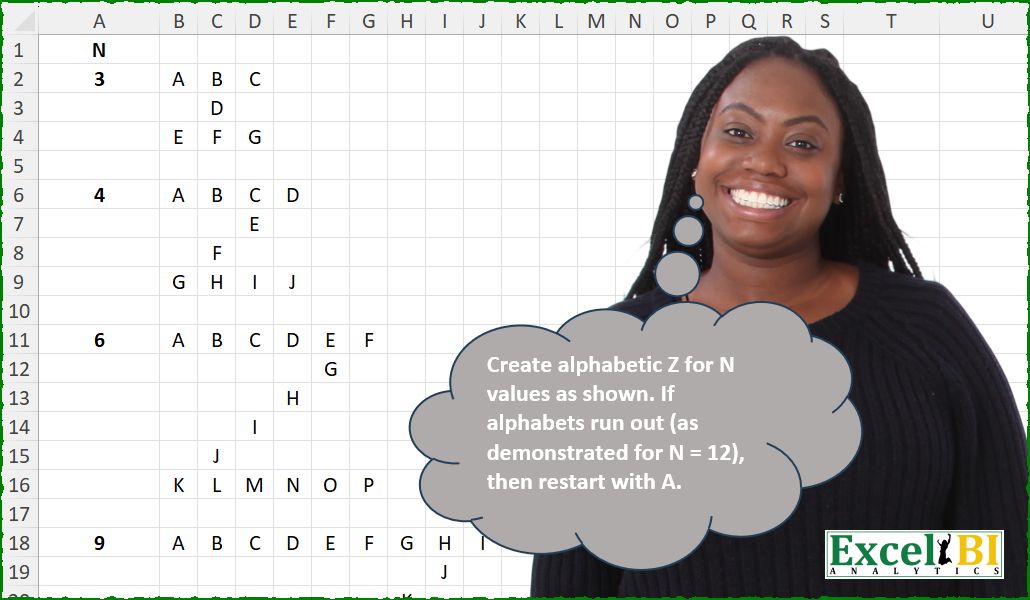
Create alphabetic Z for N values as shown. If alphabets run out (as demonstrated for N = 12), then restart with A.
📌 Challenge Details and Links
ExcelBI Excel Challenge Number: 668
Challenge Difficulty: ⭐️⭐️⭐️
📥Download Sample File
📥Link to the solutions on LinkedIn
Solving the challenge of Draw Alphabet Z Pattern with Power Query
Power Query solution 1 for Draw Alphabet Z Pattern, proposed by Kris Jaganah:
let
  a = 12,
  b = Table.FromRows(
    List.Split(
      List.TransformMany(
        {1 .. a},
        each {1 .. a},
        (x, y) =>
          Character.FromNumber(
            Number.Mod(
              (
                if x = 1 then
                  y
                else if x + y = a + 1 then
                  x + a - 1
                else if x = a then
                  (a * 2) - 2 + y
                else
                  null
              )
                - 1,
              26
            )
              + 65
          )
      ),
      a
    )
  )
in
  b
Power Query solution 2 for Draw Alphabet Z Pattern, proposed by Ramiro Ayala Chávez:
let
  n = 6,
  a = {"A" .. "Z"},
  b = if n > 9 then List.Repeat(a, 2) else a,
  c = List.FirstN(b, n * n - (n - 1) * (n - 2)),
  d = List.FirstN(c, n),
  e = List.Difference(c, d),
  f = List.LastN(e, n),
  g = List.Transform(List.Difference(e, f), each {_}),
  h = List.Generate(
    () => [i = 0],
    each [i] < List.Count(g),
    each [i = [i] + 1],
    each List.Repeat({null}, n - [i] - 2) & g{[i]} & List.Repeat({null}, [i] + 1)
  ),
  Sol = Table.FromRows({d} & h & {f})
in
  Sol
Power Query solution 3 for Draw Alphabet Z Pattern, proposed by Peter Krkos:
let
  N = 6,
  L = List.Buffer({"A" .. "Z"}),
  FirstRow = List.Repeat(L, Number.IntegerDivide(N, 26)) & List.FirstN(L, Number.Mod(N, 26)),
  Diagonal = [
    a = List.PositionOf(L, List.Last(FirstRow)),
    b = List.Transform({a + 1 .. a + N - 2}, (x) => L{Number.Mod(x, 26)})
  ][b],
  LastRow = [
    a = List.PositionOf(L, List.Last(Diagonal)),
    b = List.Transform({a + 1 .. a + N}, (x) => L{Number.Mod(x, 26)})
  ][b],
  Z = [
    a = List.Buffer(List.Repeat({null}, N - 1)),
    b = Table.FromRows(
      {FirstRow}
        & List.Transform(
          List.Zip({List.Reverse({1 .. N - 2}), Diagonal}),
          (x) => List.InsertRange(a, x{0}, {x{1}})
        )
        & {LastRow}
    )
  ][b]
in
  Z
Power Query solution 4 for Draw Alphabet Z Pattern, proposed by Glyn Willis:
let
 CreateTable = (Num as number) as table =>
 let
 N = Num,
 NumLett = N + N + (N-2),
 Lett = List.Range(List.Repeat({"A".."Z"},2),0,NumLett),
 TR = List.Transform({1..N},(y)=> Lett{y-1}),
 BR = List.Transform({NumLett-N+1 .. NumLett},(y)=> Lett{y-1}),
 MR = List.Transform({N+1 .. N+(N-2)},(x)=> List.Transform(List.Repeat({x},N),(y)=> Lett{y-1})),
 RLMatrix =[m = List.Transform(List.Reverse({2..N-1}),(x)=> List.RemoveItems({1..N},{x})),a = List.Zip({MR,m}),b = List.Transform(a, (x)=> List.Accumulate(x{1},x{0},(s,c)=>List.ReplaceRange(s,c-1,1,{null})))][b],
 Tbl = Table.FromRows({TR} & RLMatrix & {BR})
 in
 Tbl,
 L = Table.FromList({3..12},Splitter.SplitByNothing(),type table[Num = number]),
 #"Added Custom" = Table.AddColumn(L, "T", each CreateTable([Num])),
 #"Expanded T" = Table.ExpandTableColumn(#"Added Custom", "T", {"Column1", "Column2", "Column3", "Column4", "Column5", "Column6", "Column7", "Column8", "Column9", "Column10", "Column11", "Column12"}, {"T.Column1", "T.Column2", "T.Column3", "T.Column4", "T.Column5", "T.Column6", "T.Column7", "T.Column8", "T.Column9", "T.Column10", "T.Column11", "T.Column12"})
in
 #"Expanded T"


        Show translation


        Show translation of this comment
Power Query solution 5 for Draw Alphabet Z Pattern, proposed by Sahan Jayasuriya:
let
  Source = Excel.CurrentWorkbook(){[Name = "selectedvalue"]}[Content]{0}[Column1],
  Result = [
    a = {"A" .. "Z"},
    b = List.Generate(() => Source - 1, each _ < Source * Source - 1, each _ + Source - 1),
    c = {0 .. List.First(b) - 1} & b & {List.Last(b) + 1 .. Source * Source - 1},
    d = List.TransformMany(
      c,
      (x) => {List.PositionOf(c, x)},
      (x, y) => {x} & {a{Number.Mod(y, 26)}}
    ),
    e = {0 .. Source * Source - 1},
    f = List.Transform(e, each try List.Select(d, (k) => k{0} = _){0}{1} otherwise null),
    g = List.Split(f, Source),
    h = Table.FromRows(g, List.Transform({1 .. Source}, each "C." & Text.From(_)))
  ][h]
in
  Result
Solving the challenge of Draw Alphabet Z Pattern with Excel
Excel solution 1 for Draw Alphabet Z Pattern, proposed by Bo Rydobon 🇹🇭:
=LET(n,A28,r,SEQUENCE(n),c,TOROW(r),IF((r=1)+(r=n)+(r+c-1=n),CHAR(MOD(r*2+c-3,26)+65),""))Excel solution 2 for Draw Alphabet Z Pattern, proposed by Rick Rothstein:
=LET(
    a,
    A18,
    MAKEARRAY(
        a,
        a,
        LAMBDA(
            r,
            c,
            IF(
                r=1,
                CHAR(
                    65+MOD(
                        c-1,
                        26
                    )
                ),
                IF(
                    r=a,
                    CHAR(
                        65+MOD(
                            c+2*a-3,
                            26
                        )
                    ),
                    IF(
                        c=a-r+1,
                        CHAR(
                            65+MOD(
                                a+r-2,
                                26
                            )
                        ),
                        ""
                    )
                )
            )
        )
    )
)
Excel solution 3 for Draw Alphabet Z Pattern, proposed by John V.:
=LET(
    n,
    A28,
    MAKEARRAY(
        n,
        n,
        LAMBDA(
            r,
            c,
            IF(
                OR(
                    r=1,
                    r=n,
                    r+c=n+1
                ),
                CHAR(
                    65+MOD(
                        2*r+c-3,
                        26
                    )
                ),
                ""
            )
        )
    )
)
Excel solution 4 for Draw Alphabet Z Pattern, proposed by Kris Jaganah:
=LET(a,
    A28,
    MAKEARRAY(a,
    a,
    LAMBDA(x,
    y,
    IFNA(CHAR(MOD(IFS(x=1,
    y,
    x+y=a+1,
    x+a-1,
    x=a,
    (a*2)-2+y)-1,
    26)+65),
    ""))))
Excel solution 5 for Draw Alphabet Z Pattern, proposed by Timothée BLIOT:
=LET(N,
    A2,
    MAKEARRAY(N,
    N,
    LAMBDA(x,
    y,
    IF(OR(
        x=1,
        x=N,
        N-y+1=x
    ),
    CHAR(MOD((x=1)*y+(x=N)*(y-1)+(x>1)*(N)+x-2,
    26)+65),
    ""))))
Excel solution 6 for Draw Alphabet Z Pattern, proposed by Hussein SATOUR:
=LET(n,
    A2,
    l,
    n*3-2,
    s,
    SEQUENCE(
        l
    ),
    a,
    CONCAT(CHAR(
        IF(
            s<27,
            s,
            s-26
        )+64
    )&"/"&IF((s>=n)*(s<=l-n),
    REPT(
        " ",
        n-2
    ),
    "")),
    WRAPROWS(
        TEXTSPLIT(
            a,
            {"/",
            " "},
            1
        ),
        n,
        ""
    ))
Excel solution 7 for Draw Alphabet Z Pattern, proposed by Sunny Baggu:
=LET(
 n, A18,
 r, SEQUENCE(n - 2),
 c, TOROW(r),
 rr, SORT(r, , -1),
 _v, VSTACK(
 SEQUENCE(, n, 65),
 HSTACK(IF(r, " ", ""), IF((rr = c), SEQUENCE(n - 2, , 65 + n), "")),
 SEQUENCE(, n, 65 + n + n - 2)
 ),
 IFERROR(
 WRAPROWS(
 CHAR(
 MAP(
 TOCOL(_v),
 LAMBDA(a,
 MAX(
 BYROW(
 IFERROR(WRAPCOLS(SEQUENCE(1000, , 65), 26) = a, FALSE),
 LAMBDA(a, OR(a))
 ) * SEQUENCE(26, , 65)
 )
 )
 )
 ),
 n
 ),
 ""
 )
)
Excel solution 8 for Draw Alphabet Z Pattern, proposed by Pieter de B.:
=LET(n,A2,MAKEARRAY(n,n,LAMBDA(x,y,LET(z,IF(MOD(x,n)<2,x+x+y-2,IF(x-1=n-y,n-y+n,0)),IF(z,CHAR(64+z),"")))))Excel solution 9 for Draw Alphabet Z Pattern, proposed by Hamidi Hamid:
=LET(
    f,
    12,
    x,
    SEQUENCE(
        f,
        f,
        1,
        1
    ),
    g,
    TAKE(
        SEQUENCE(
            f,
            f,
            f,
            f-1
        ),
        1
    ),
    k,
    VSTACK(
        TAKE(
            x,
            1
        ),
        DROP(
            DROP(
                XLOOKUP(
                    x,
                    g,
                    g,
                    0
                ),
                1
            ),
            -1
        ),
        TAKE(
            x,
            -1
        )
    ),
    u,
    SUM(
        IFERROR(
            k^0,
            0
        )
    ),
    r,
    SEQUENCE(
        u
    )+64,
    p,
    CHAR(
        IF(
            r>90,
            r-90+65,
            r
        )
    ),
    h,
    TOCOL(
        IF(
            k=0,
            1/0,
            k
        ),
        3
    ),
    z,
    HSTACK(
        h,
        p
    ),
    XLOOKUP(
        x,
        TAKE(
            z,
            ,
            1
        ),
        TAKE(
            z,
            ,
            -1
        ),
        ""
    )
)
Excel solution 10 for Draw Alphabet Z Pattern, proposed by ferhat CK:
=LET(
    n,
    9,
    d,
    CHAR,
    MAKEARRAY(
        n,
        n,
        LAMBDA(
            x,
            y,
            IFS(
                x=1,
                d(
                    64+y
                ),
                x=n,
                d(
                    64+n+x+y-2
                ),
                y=n-x+1,
                d(
                    64+n+x-1
                ),
                1,
                ""
            )
        )
    )
)

edited formula:

=LET(
    n,
    12,
    r,
    MOD,
    d,
    CHAR,
    i,
    MAKEARRAY(
        n,
        n,
        LAMBDA(
            x,
            y,
            IFS(
                x=1,
                d(
                    64+r(
                        y,
                        26
                    )
                ),
                x=n,
                d(
                    64+r(
                        n+x+y-2,
                        26
                    )
                ),
                y=n-x+1,
                d(
                    64+r(
                        n+x-1,
                        26
                    )
                ),
                1,
                ""
            )
        )
    ),
    IF(
        i="@",
        "Z",
        i
    )
)
Excel solution 11 for Draw Alphabet Z Pattern, proposed by Charles Roldan:
=LAMBDA(n, MAKEARRAY(n, n, LAMBDA(a,b, REPT(CHAR(65 + MOD(2 * a + b - 3, 26)), OR(a = 1, a + b = n + 1, a = n)))))(12)Excel solution 12 for Draw Alphabet Z Pattern, proposed by Ankur Sharma:
=LET(r, CHAR(SCAN(64, SEQUENCE(1, A2 * 2 + (A2 -2), 65, 0), LAMBDA(iv, ar, IF(iv = 90, 65, iv + 1)))),
f, TAKE(r, , A2),
l, DROP(r, , A2 + (A2 - 2)),
m, TAKE(DROP(r, , A2), , A2 - 2),
IFNA(
VSTACK(f,
TEXTSPLIT(TEXTJOIN("-", FALSE, MAP(SEQUENCE(1, A2 - 2, A2 - 2, -1), m, LAMBDA(y, z, REPT(", ", y) & z))), ", ", "-"),
l),
""))
Solving the challenge of Draw Alphabet Z Pattern with Python
Python solution 1 for Draw Alphabet Z Pattern, proposed by Konrad Gryczan, PhD:
import pandas as pd
import numpy as np
path = "668 Alphabetic Z.xlsx"
test3 = pd.read_excel(path, usecols="B:D", skiprows=1, nrows=3, header=None).fillna("").to_numpy()
test4 = pd.read_excel(path, usecols="B:E", skiprows=5, nrows=4, header=None).fillna("").to_numpy()
test6 = pd.read_excel(path, usecols="B:G", skiprows=10, nrows=6, header=None).fillna("").to_numpy()
test9 = pd.read_excel(path, usecols="B:J", skiprows=17, nrows=9, header=None).fillna("").to_numpy()
test12 = pd.read_excel(path, usecols="B:M", skiprows=27, nrows=13, header=None).fillna("").to_numpy()
def draw_z(side):
 L2 = list("ABCDEFGHIJKLMNOPQRSTUVWXYZ") * 2
 M = np.full((side, side), "", dtype=object)
 M[0, :] = L2[:side]
 for i in range(side):
 M[i, side - i - 1] = L2[side + i - 1]
 M[side-1, :] = L2[(2 * side - 2):(3 * side - 2)]
 return M
print(np.array_equal(draw_z(3), test3)) # True
print(np.array_equal(draw_z(4), test4)) # True
print(np.array_equal(draw_z(6), test6)) # True
print(np.array_equal(draw_z(9), test9)) # True
print(np.array_equal(draw_z(12), test12))  # Different structure of Z
Python solution 2 for Draw Alphabet Z Pattern, proposed by Alejandro Campos:
import string
def generate_z_pattern_df(N):
 A, i = string.ascii_uppercase, 0
 G = [[' '] * N for _ in range(N)]
 for c in range(N): G[0][c], i = A[i % 26], i + 1
 for d in range(1, N - 1): G[d][N - 1 - d], i = A[i % 26], i + 1
 for c in range(N): G[N - 1][c], i = A[i % 26], i + 1
 return pd.DataFrame(G)
N = 9
df = generate_z_pattern_df(N)
&&&