
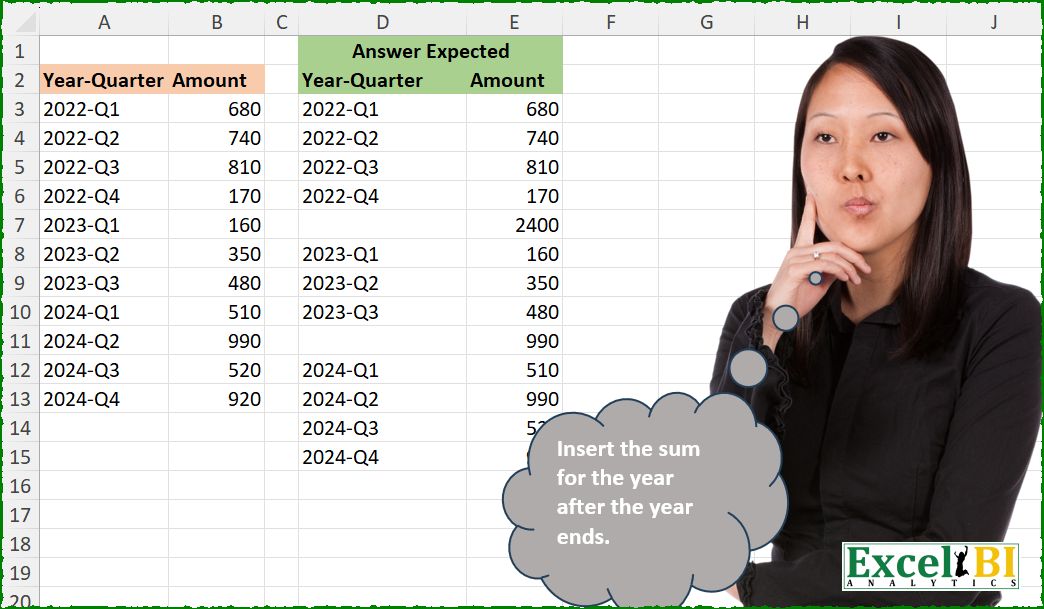
Insert the sum for the year after the year ends.
📌 Challenge Details and Links
ExcelBI Excel Challenge Number: 660
Challenge Difficulty: ⭐️
📥Download Sample File
📥Link to the solutions on LinkedIn
Solving the challenge of Insert Yearly Sum Totals with Power Query
Power Query solution 1 for Insert Yearly Sum Totals, proposed by Zoran Milokanović:
let
  Source = Excel.CurrentWorkbook(){[Name = "Input"]}[Content],
  R = Table.ToRows(Source),
  _ = Table.FromRows(
    List.TransformMany(
      R,
      each
        let
          i = each Text.Split(_, "-"),
          j = List.Select(R, (r) => Text.Contains(r{0}, i(_{0}){0}))
        in
          {_}
            & {{}, {{null, List.Sum(List.Zip(j){1})}}}{
              Byte.From(i(_{0}){1} = i(List.Last(j){0}){1})
            },
      (i, _) => _
    ),
    Value.Type(Source)
  )
in
  _
Power Query solution 2 for Insert Yearly Sum Totals, proposed by Kris Jaganah:
let
  A = Excel.CurrentWorkbook(){[Name = "Table1"]}[Content],
  B = Table.AddColumn(A, "Year", each Text.BeforeDelimiter([#"Year-Quarter"], "-")),
  C = Table.Combine(
    Table.Group(
      B,
      "Year",
      {
        "All",
        each
          let
            a = [[#"Year-Quarter"], [Amount]]
          in
            Table.InsertRows(
              a,
              Table.RowCount(a),
              {[#"Year-Quarter" = null, Amount = List.Sum([Amount])]}
            )
      }
    )[All]
  )
in
  C
Power Query solution 3 for Insert Yearly Sum Totals, proposed by Vida Vaitkunaite:
let
  Source = Excel.CurrentWorkbook(){[Name = "Table1"]}[Content],
  Gr = Table.Group(
    Source,
    "Year-Quarter",
    {
      {
        "tmp",
        each
          let
            a = _,
            b = Table.FromRows({{null, List.Sum(_[Amount])}}, Table.ColumnNames(Source)),
            c = a & b
          in
            c
      }
    },
    0,
    (x, y) => Number.From(Text.Start(y, 4) <> Text.Start(x, 4))
  ),
  Final = Table.Combine(Gr[tmp])
in
  Final
Power Query solution 4 for Insert Yearly Sum Totals, proposed by Vida Vaitkunaite:
let
  Source = Excel.CurrentWorkbook(){[Name = "Table1"]}[Content],
  Group = Table.Group(
    Source,
    {"Year-Quarter"},
    {
      {
        "All",
        each
          let
            a = _,
            b = Table.ToRows(a) & {{null, List.Sum(a[Amount])}},
            c = Table.FromRows(b, Table.ColumnNames(a))
          in
            c
      }
    },
    0,
    (x, y) => Number.From(Text.Start(x[#"Year-Quarter"], 4) <> Text.Start(y[#"Year-Quarter"], 4))
  ),
  Final = Table.Combine(Group[All])
in
  Final
Power Query solution 5 for Insert Yearly Sum Totals, proposed by Alejandro Simón 🇵🇦 🇪🇸:
let
  Source = Excel.CurrentWorkbook(){[Name = "Table1"]}[Content],
  Sol = Table.Combine(
    Table.Group(
      Source,
      "Year-Quarter",
      {
        {
          "A",
          each
            let
              a = _,
              b = Table.FromRows({{null, List.Sum(a[Amount])}}, Table.ColumnNames(a))
            in
              a & b
        }
      },
      0,
      (x, y) => Number.From(Text.Start(x, 4) <> Text.Start(y, 4))
    )[A]
  )
in
  Sol
Power Query solution 6 for Insert Yearly Sum Totals, proposed by Abdallah Ally:
let
  Source = Excel.CurrentWorkbook(){[Name = "Table1"]}[Content],
  Transform = List.Transform(
    Source[#"Year-Quarter"],
    each [
      a = Table.SelectRows(Source, (x) => Text.Start(x[#"Year-Quarter"], 4) = Text.Start(_, 4)),
      b = Table.RowCount(a),
      c = Table.InsertRows(a, b, {[#"Year-Quarter" = null, Amount = List.Sum(a[Amount])]})
    ][c]
  ),
  Result = Table.Combine(List.Distinct(Transform))
in
  Result
Power Query solution 7 for Insert Yearly Sum Totals, proposed by Abdallah Ally:
let
  Source = Excel.CurrentWorkbook(){[Name = "Table1"]}[Content],
  Result = Table.Combine(
    Table.Group(
      Source,
      "Year-Quarter",
      {
        "Data",
        each [
          a = Table.RowCount(_),
          b = Table.InsertRows(_, a, {[#"Year-Quarter" = null, Amount = List.Sum([Amount])]})
        ][b]
      },
      0,
      (x, y) => Value.Compare(Text.Start(x, 4), Text.Start(y, 4))
    )[Data]
  )
in
  Result
Power Query solution 8 for Insert Yearly Sum Totals, proposed by Ramiro Ayala Chávez:
let
  S = Excel.CurrentWorkbook(){[Name = "Table1"]}[Content],
  a = Table.Group(
    S,
    "Year-Quarter",
    {"G", each _},
    0,
    (x, y) => Number.From(Text.Start(x, 4) <> Text.Start(y, 4))
  )[G],
  Fx = (x) =>
    let
      b = Table.InsertRows(
        x,
        Table.RowCount(x),
        {[#"Year-Quarter" = "", Amount = List.Sum(x[Amount])]}
      )
    in
      b,
  Sol = Table.Combine(List.Transform(a, each Fx(_)))
in
  Sol
Power Query solution 9 for Insert Yearly Sum Totals, proposed by Seokho MOON:
let
  Source = Excel.CurrentWorkbook(){[Name = "Table1"]}[Content],
  Group = Table.Group(
    Source,
    "Year-Quarter",
    {"Tbl", Fun},
    0,
    (x, y) => Number.From(Text.Start(x, 4) <> Text.Start(y, 4))
  )[Tbl],
  Fun = each [
    A = [#"Year-Quarter" = null, Amount = List.Sum([Amount])],
    B = Table.InsertRows(_, Table.RowCount(_), {A})
  ][B],
  Res = Table.Combine(Group)
in
  Res
Power Query solution 10 for Insert Yearly Sum Totals, proposed by Ankur Sharma:
let
Source = Excel.CurrentWorkbook(){[Name="Table1"]}[Content],

YearCol = Table.AddColumn(Source, "Year", each Text.BeforeDelimiter([#"Year-Quarter"], "-"), type text),

GroupByYear = Table.Group(YearCol, {"Year"}, {{"Count", each _}}),

InsertTotalRow = Table.TransformColumns(GroupByYear, {{"Count", each Table.InsertRows(_, Table.RowCount(_), {[#"Year-Quarter" = "", Amount = List.Sum(_[Amount]), Year = ""]})}}),

Expand = Table.ExpandTableColumn(InsertTotalRow, "Count", {"Year-Quarter", "Amount"}, {"Year-Quarter", "Amount"}),

#"Removed Columns" = Table.RemoveColumns(Expand,{"Year"})
in
 #"Removed Columns"

Best Wishes!
Power Query solution 11 for Insert Yearly Sum Totals, proposed by Meganathan Elumalai:
let
  Source = Excel.CurrentWorkbook(){[Name = "Table1"]}[Content],
  Result = Table.Combine(
    Table.Group(
      Source,
      "Year-Quarter",
      {"New", each _ & Table.FromRows({{"", List.Sum([Amount])}}, Table.ColumnNames(Source))},
      0,
      (x, y) => Value.Compare(Text.Start(x, 4), Text.Start(y, 4))
    )[New]
  )
in
  Result
Power Query solution 12 for Insert Yearly Sum Totals, proposed by Antriksh Sharma:
let
  Source = Table,
  Group = Table.Group(
    Source,
    "Year-Quarter",
    {
      {
        "T",
        each Table.InsertRows(
          _,
          Table.RowCount(_),
          {[#"Year-Quarter" = "Total", Amount = List.Sum([Amount])]}
        )
      }
    },
    GroupKind.Local,
    (x, y) => Value.Compare(Text.BeforeDelimiter(y, "-"), Text.BeforeDelimiter(x, "-"))
  )[T],
  Combine = Table.Combine(Group)
in
  Combine
Power Query solution 13 for Insert Yearly Sum Totals, proposed by Peter Krkos:
PowerQuery solution:
= Table.Combine(
 Table.Group(ChangedType, "Year-Quarter", {{"T",
 each Table.InsertRows(_, Table.RowCount(_), {[#"Year-Quarter" = null, Amount = List.Sum([Amount])]}) , type table}},
 0,
 (x,y)=> Byte.From(Value.Compare(Text.BeforeDelimiter(y, "-"), Text.BeforeDelimiter(x, "-"))))[T])
Power Query solution 14 for Insert Yearly Sum Totals, proposed by Alexandre Garcia:
let
H = Excel.CurrentWorkbook(){[Name="Table1"]}[Content],
P = Table.AddColumn(H, "x", each let x = [#"Year-Quarter"] in {Text.Start(x,4), [Amount] meta [x = x]})[x],
L = Table.Pivot(hashtag#table({"x","y"}, P), List.Distinct(List.Zip(P){0}), "x", "y", each hashtag#table(Value.Type(H), List.Transform(_ & {List.Sum(_)}, each {Value.Metadata(_)[x] ? ?? null,_}))),
C = Table.Combine(Record.ToList(L{0}))
in C
Power Query solution 15 for Insert Yearly Sum Totals, proposed by Krzysztof Kominiak:
let
  Source = Table.TransformColumnTypes(
    Table.FromRows(
      Json.Document(
        Binary.Decompress(
          Binary.FromText(
            "Tc1BDsAgCETRu7C2iSCoHKNr4/2vUYhpO9uX/Jm1SKrIdTMV6rPSLq9IyFCUFjIZRUN4fNLODneU3GmGkjv6f+mpjFGyckfJygQl3z1lPw==",
            BinaryEncoding.Base64
          ),
          Compression.Deflate
        )
      ),
      let
        _t = ((type nullable text) meta [Serialized.Text = true])
      in
        type table [#"Year-Quarter" = _t, Amount = _t]
    ),
    {{"Amount", Int64.Type}}
  ),
  Result = Table.Combine(
    Table.Group(
      Source,
      "Year-Quarter",
      {
        {
          "tmp",
          each _ & Table.FromList({{"", List.Sum(_[Amount])}}, (x) => x, {"Year-Quarter", "Amount"})
        }
      },
      0,
      (x, y) => Byte.From(Text.Start(y, 4) <> Text.Start(x, 4))
    )[tmp]
  )
in
  Result
Power Query solution 16 for Insert Yearly Sum Totals, proposed by Melissa de Korte:
let's do something different...

let
 Y = List.Transform(Source[#"Year-Quarter"], (y) => Number.From(Text.BeforeDelimiter(y, "-"))),
 Source = Excel.CurrentWorkbook(){[Name="Table1"]}[Content],
 P = Table.Partition( Source, "Year-Quarter", List.Count(List.Distinct(Y)), (x)=> Number.From(Text.Split(x, "-"){0}) - List.Min(Y)),
 R = Table.Combine( List.Transform( P, (x)=> x & hashtag#table({"Amount"}, {{List.Sum(x[Amount])}})))
in
 R
Power Query solution 17 for Insert Yearly Sum Totals, proposed by Sahan Jayasuriya:
let
  Source = Excel.CurrentWorkbook(){[Name = "Data"]}[Content],
  GroupedTables = Table.Group(
    Source,
    {"Year-Quarter"},
    {
      {
        "All",
        each [
          a = Table.ColumnNames(_),
          b = Table.ToRows(_),
          c = {{null, List.Sum(_[Amount])}},
          d = Table.FromRows(b & c, a)
        ][d]
      }
    },
    GroupKind.Global,
    (x, y) =>
      Value.Compare(
        Text.BeforeDelimiter(x[#"Year-Quarter"], "-"),
        Text.BeforeDelimiter(y[#"Year-Quarter"], "-")
      )
  )[All],
  CombineTables = Table.Combine(GroupedTables)
in
  CombineTables
Solving the challenge of Insert Yearly Sum Totals with Excel
Excel solution 1 for Insert Yearly Sum Totals, proposed by Bo Rydobon 🇹🇭:
=DROP(
    GROUPBY(
        LEFT(
            A2:A13,
            {4,
            99}
        ),
        B2:B13,
        SUM,
        3,
        2
    ),
    -1,
    1
)
Excel solution 2 for Insert Yearly Sum Totals, proposed by John V.:
=DROP(GROUPBY(LEFT(A3:A13,{4,7}),B3:B13,SUM,,2),-1,1)Excel solution 3 for Insert Yearly Sum Totals, proposed by Kris Jaganah:
=DROP(GROUPBY(HSTACK(TEXTBEFORE(A2:A13,"-"),A2:A13),B2:B13,SUM,3,2),-1,1)Excel solution 4 for Insert Yearly Sum Totals, proposed by Timothée BLIOT:
=DROP(GROUPBY(HSTACK(LEFT(A2:A13,4),A2:A13),B2:B13,SUM,3,2),-1,1)Excel solution 5 for Insert Yearly Sum Totals, proposed by Hussein SATOUR:
=DROP(GROUPBY(HSTACK(LEFT(A3:A13,4),A3:A13),B3:B13,SUM,,2),-1,1)Excel solution 6 for Insert Yearly Sum Totals, proposed by Oscar Mendez Roca Farell:
=DROP(GROUPBY(MID(A2:A13,1,{4,7}),B2:B13,SUM,3,2),-1,1)Excel solution 7 for Insert Yearly Sum Totals, proposed by Duy Tùng:
=DROP(GROUPBY(HSTACK(LEFT(A2:A13,4),A2:A13),B2:B13,SUM,3,2),-1,1)Excel solution 8 for Insert Yearly Sum Totals, proposed by Sunny Baggu:
=LET(

     _l,
     LEFT(
         A3:A13,
          4
     ),

     _u,
     UNIQUE(
         _l
     ),

     REDUCE(

          A2:B2,

          _u,

          LAMBDA(
              a,
               v,

               VSTACK(

                    a,

                    LET(

                         _f,
                         FILTER(
                             A3:B13,
                              _l = v
                         ),

                         VSTACK(
                             _f,
                              HSTACK(
                                  "",
                                   SUM(
                                       TAKE(
                                           _f,
                                            ,
                                            -1
                                       )
                                   )
                              )
                         )

                    )

               )

          )

     )

)
Excel solution 9 for Insert Yearly Sum Totals, proposed by Anshu Bantra:
=LET(

    data_,
     A3:B13,

    yrs_,
     TEXTSPLIT(
         CHOOSECOLS(
             data_,
             1
         ),
         "-"
     ),

    groups_,
     GROUPBY(
         yrs_,
         CHOOSECOLS(
             data_,
             2
         ),
         SUM,
         ,
         0
     &),

    totals_,
     HSTACK(
         TEXT(
             CHOOSECOLS(
                 groups_,
                 1
             ),
             "0"
         )&"-Q5",
          CHOOSECOLS(
              groups_,
              2
          )
     ),

    final_,
     SORT(
         VSTACK(
             data_,
              totals_
         ),
         1
     ),

    VSTACK(
        {"Year-Quarter",
        "Amount"},
         IF(
             ISNUMBER(
                 FIND(
                     "-Q5",
                     final_
                 )
             ),
             "",
             final_
         )
    )
)
Excel solution 10 for Insert Yearly Sum Totals, proposed by Md. Zohurul Islam:
VSTACK(A2:B2,DROP(GROUPBY(HSTACK(TEXTBEFORE(A3:A13,"-"),A3:A13),B3:B13,SUM,,2),-1,1))Excel solution 11 for Insert Yearly Sum Totals, proposed by Md. Zohurul Islam:
=LET(u,A3:A13,v,B3:B13,hdr,A2:B2,w,--TEXTBEFORE(u,"-"),z,REDUCE(hdr,UNIQUE(w),LAMBDA(x,y,LET(a,FILTER(HSTACK(u,v),w=y),b,SUM(DROP(a,,1)),d,VSTACK(a,HSTACK("",b)),VSTACK(x,d)))),z)Excel solution 12 for Insert Yearly Sum Totals, proposed by Pieter de B.:
=DROP(
    GROUPBY(
        LEFT(
            A3:A13,
            {4,
            7}
        ),
        B3:B13,
        SUM,
        ,
        2
    ),
    -1,
    1
)
Excel solution 13 for Insert Yearly Sum Totals, proposed by Hamidi Hamid:
=LET(
    h,
    A3:A13,
    x,
    IFERROR(
        LEFT(
            h,
            4
        )-LEFT(
            A4:A14,
            4
        ),
        -1
    ),
    y,
    IF(
        x=0,
        1/0,
        ""
    ),
    g,
    TOCOL(
        HSTACK(
            B3:B13,
            y
        ),
        3
    ),
    f,
    VSTACK(
        0,
        SCAN(
            0,
            g,
            LAMBDA(
                a,
                b,
                IF(
                    b="",
                    0,
                    a+b
                )
            )
        )
    ),
    t,
    DROP(
        IF(
            g<>"",
            g,
            f
        ),
        -1
    ),
    p,
    TOCOL(
        HSTACK(
            h,
            IF(
                x=0,
                1/0,
                IF(
                    x=-1,
                    "",
                    x
                )
            )
        ),
        3
    ),
    HSTACK(
        p,
        t
    )
)
Excel solution 14 for Insert Yearly Sum Totals, proposed by Asheesh Pahwa:
=LET(
    q,
    A3:A13,
    a,
    B3:B13,
    l,
    LEFT(
        q,
        4
    ),
    u,
    UNIQUE(
        l
    ),
    REDUCE(
        D2:E2,
        u,
        LAMBDA(
            x,
            y,
            VSTACK(
                x,
                LET(
                    f,
                    FILTER(
                        HSTACK(
                            q,
                            a
                        ),
                        l=y
                    ),
                    t,
                    SUM(
                        TAKE(
                            f,
                            ,
                            -1
                        )
                    ),
                    VSTACK(
                        f,
                        HSTACK(
                            "",
                            t
                        )
                    )
                )
            )
        )
    )
)
Excel solution 15 for Insert Yearly Sum Totals, proposed by ferhat CK:
=REDUCE(
    A2:B2,
    UNIQUE(
        LEFT(
            A3:A13,
            4
        )
    ),
    LAMBDA(
        x,
        y,
        VSTACK(
            x,
            LET(
                f,
                FILTER(
                    A3:B13,
                    LEFT(
            A3:A13,
            4
        )=y
                ),
                r,
                VSTACK(
                    f,
                    BYCOL(
                        f,
                        SUM
                    )
                ),
                IF(
                    r=0,
                    "",
                    r
                )
            )
        )
    )
)
Excel solution 16 for Insert Yearly Sum Totals, proposed by Jaroslaw Kujawa:
=DROP(REDUCE(2022;A3:A13;LAMBDA(a;x;IF(LEFT(x;4)=LEFT(OFFSET(x;1;);4);VSTACK(a;HSTACK(x;OFFSET(x;;1)));VSTACK(a;HSTACK(x;OFFSET(x;;1));HSTACK("";SUM(IF(1*LEFT(A3:A13;4)=1*LEFT(x;4);B3:B13)))))));1)Excel solution 17 for Insert Yearly Sum Totals, proposed by Ankur Sharma:
=LET(a, TEXTBEFORE(A3:A13, "-"),
b, GROUPBY(HSTACK(a, A3:A13), B3:B13, SUM, , 2),
DROP(b, -1, 1))
Excel solution 18 for Insert Yearly Sum Totals, proposed by Meganathan Elumalai:
=DROP(
    GROUPBY(
        HSTACK(
            LEFT(
                A2:A13,
                4
            ),
            A2:A13
        ),
        B2:B13,
        SUM,
        3,
        2
    ),
    -1,
    1
)
Excel solution 19 for Insert Yearly Sum Totals, proposed by Milan Shrimali:
=IFERROR(
LET(A,A3:B13,B,HSTACK(A,ARRAYFORMULA(LEFT(CHOOSECOLS(A,1),4))), REDUCE("",UNIQUE(CHOOSECOLS(B,3)),LAMBDA(X,Y,VSTACK(X,BYROW(Y,LAMBDA(Z,VSTACK(FILTER(CHOOSECOLS(B,1,2),CHOOSECOLS(B,3)=Z), HSTACK("",SUM(FILTER(CHOOSECOLS(B,2),CHOOSECOLS(B,3)=Z)))))))))),"")
Excel solution 20 for Insert Yearly Sum Totals, proposed by Erdit Qendro:
=LET(ar,A3:B13,yr,LEFT(TAKE(ar,,1),4),
DROP(REDUCE("",UNIQUE(yr),
LAMBDA(a,i,
LET(yrVal,FILTER(ar,yr=i),
VSTACK(a,yrVal,HSTACK("",SUM(TAKE(yrVal,,-1))))))),1))
Excel solution 21 for Insert Yearly Sum Totals, proposed by Burhan Cesur:
DROP(PIVOTBY(LEFT(A2:A13;{47});;B2:B13;SUM;1;2);-1;1)
Pieter de B
Excel solution 22 for Insert Yearly Sum Totals, proposed by Burhan Cesur:
=LET(a,LEFT(A3:A13,4),REDUCE(A2:B2,--UNIQUE(a),LAMBDA(s,v,VSTACK(s,MAP(PIVOTBY(a&RIGHT(A3:A13,3),,B3:B13,SUM,0,,,,,--a=v),LAMBDA(x,IF(x="total","",x)))))))Excel solution 23 for Insert Yearly Sum Totals, proposed by Casper Badenhorst:
=LET(

     data,
     A3:B13,

     year_quarter,
     INDEX(
         data,
          0,
          1
     ),

     amount,
     INDEX(
         data,
          0,
          2
     ),

     year,
     LEFT(
         year_quarter,
          FIND(
              "-",
               year_quarter
          ) - 1
     ),

     unique_years,
     UNIQUE(
         year
     ),

     result,
     REDUCE(
         {"Year-Quarter",
         "Amount"},
          unique_years,
          LAMBDA(
              acc,
              y,

               LET(

                    filtered_data,
                    FILTER(
                        data,
                         year = y
                    ),

                    subtotal,
                    HSTACK(
                        "",
                         SUM(
                             FILTER(
                                 amount,
                                  year = y
                             )
                         )
                    ),

                    VSTACK(
                        acc,
                         filtered_data,
                         subtotal
                    )

               )

          )
     ),

     result

)
Excel solution 24 for Insert Yearly Sum Totals, proposed by Tze Sheng (Arvey) Yeo:
=REDUCE(
    {"Year-Quarter",
    "Amount"},
    UNIQUE(
        LEFT(
            A3:A13,
            4
        )
    ),
    LAMBDA(
        a,
        v,
        VSTACK(
            a,
            FILTER(
                A3:B13,
                LEFT(
            A3:A13,
            4
        )=v
            ),
            HSTACK(
                "",
                SUMIFS(
                    B3:B13,
                    A3:A13,
                    v&"*"
                )
            )
        )
    )
)
Solving the challenge of Insert Yearly Sum Totals with Python
Python solution 1 for Insert Yearly Sum Totals, proposed by Konrad Gryczan, PhD:
import pandas as pd
import numpy as np
path = "660 Insert Sum After Year Ends.xlsx"
input = pd.read_excel(path, usecols="A:B", skiprows=1, nrows=11)
test = pd.read_excel(path, usecols="D:E", skiprows=1, nrows=14).rename(columns=lambda x: x.replace('.1', ''))
input[['Year-Quarter', 'Quarter']] = input['Year-Quarter'].str.split('-', expand=True)
result = input.groupby('Year-Quarter', as_index=False)['Amount'].sum()
result['Quarter'] = 'Q5'
result = pd.concat([input, result], ignore_index=True)
result['Year-Quarter'] = result['Year-Quarter'] + '-' + result['Quarter']
result = result.sort_values(by='Year-Quarter')
result.loc[result['Quarter'] == 'Q5', 'Year-Quarter'] = np.NaN
result = result.drop(columns=['Quarter']).reset_index(drop=True)
print(result.equals(test)) # True
Python solution 2 for Insert Yearly Sum Totals, proposed by Luan Rodrigues:
import pandas as pd
import numpy as np
file = "Excel_Challenge_660 - Insert Sum After Year Ends.xlsx"
df = pd.read_excel(file,usecols='A:B',skiprows=1).dropna()
grp = df.groupby(df['Year-Quarter'].str.split('-').apply(lambda x : f'-Q5'))['Amount'].sum().reset_index()
df_fim = pd.concat([grp,df]).sort_values(by='Year-Quarter')
df_fim['Year-Quarter'] = np.where(df_fim['Year-Quarter'].str.endswith('Q5'),np.nan,df_fim['Year-Quarter'])
print(df_fim)
Python solution 3 for Insert Yearly Sum Totals, proposed by Abdallah Ally:
import pandas as pd
file_path = 'Excel_Challenge_660 - Insert Sum After Year Ends.xlsx'
df = pd.read_excel(io=file_path, usecols='A:B', skiprows=1, nrows=11)
# Perform data manipulation
dfs = []
for yq in df['Year-Quarter'].str[:4].unique():
 dfn = df[df['Year-Quarter'].str.contains(yq)].reset_index(drop=True)
 dfn.loc[len(dfn)] = ['', dfn['Amount'].sum()]
 dfs.append(dfn)
df = pd.concat(dfs, ignore_index=True)
df
Solving the challenge of Insert Yearly Sum Totals with Python in Excel
Python in Excel solution 1 for Insert Yearly Sum Totals, proposed by Alejandro Campos:
df = xl("A2:B13", headers=True)
yearly_sums = df.groupby(df['Year-Quarter'].str[:4])['Amount'].sum()
for year, total in yearly_sums.items():
 index = df[df['Year-Quarter'].str.startswith(year)].index.max() + 1
 df = pd.concat([df.iloc[:index], pd.DataFrame([{"Year-Quarter": "", "Amount": total}]), df.iloc[index:]]).reset_index(drop=True)
df
Python in Excel solution 2 for Insert Yearly Sum Totals, proposed by Aditya Kumar Darak 🇮🇳:
df = xl("A2:B13", True)
df["Year"] = df["Year-Quarter"].str[:4]
group = df.groupby("Year")["Amount"].sum().reset_index()
result = (
 pd.concat([df, group])
 .sort_values(["Year", "Year-Quarter"], ignore_index=True)
 .fillna("")
 .drop(columns="Year")
)
result
Solving the challenge of Insert Yearly Sum Totals with R
R solution 1 for Insert Yearly Sum Totals, proposed by Konrad Gryczan, PhD:
library(tidyverse)
library(readxl)
path = "Excel/660 Insert Sum After Year Ends.xlsx"
input = read_excel(path, range = "A2:B13")
test = read_excel(path, range = "D2:E16")
result = input %>%
 separate(`Year-Quarter`, into = c("Year-Quarter", "Quarter"), sep = "-") %>%
 summarise(Amount = sum(Amount), .by = `Year-Quarter`) %>%
 mutate(`Year-Quarter` = paste0(`Year-Quarter`, "-Q5")) %>%
 bind_rows(input) %>%
 arrange(`Year-Quarter`) %>%
 mutate(`Year-Quarter` = ifelse(str_detect(`Year-Quarter`, "Q5"), NA, `Year-Quarter`))
all.equal(result, test, check.attributes = FALSE)
#> [1] TRUE
&&