
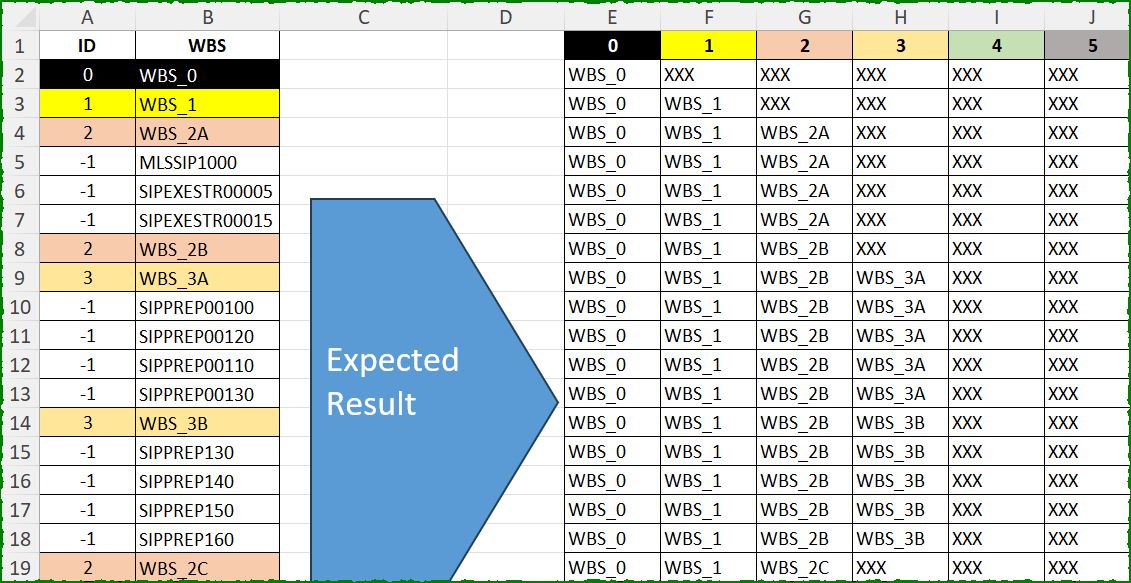
Today’s challenge is contributed by Ahmad Syawal Ramli. Align WBS data as shown.
📌 Challenge Details and Links
ExcelBI Excel Challenge Number: 645
Challenge Difficulty: ⭐️⭐️⭐️
📥Download Sample File
📥Link to the solutions on LinkedIn
Solving the challenge of Align WBS Hierarchy Data with Power Query
Power Query solution 1 for Align WBS Hierarchy Data, proposed by Kris Jaganah:
let
  A = Excel.CurrentWorkbook(){[Name = "Table1"]}[Content],
  B = List.Transform(List.Distinct(List.Select(A[ID], (z) => z >= 0)), Text.From),
  C = List.Accumulate(
    B,
    A,
    (x, y) =>
      [
        a = Table.AddColumn(
          x,
          y,
          each
            if Number.From(Text.Select(Text.Split([WBS], "WBS_"){1}?, {"0" .. "9"}))
              = Number.From(y)
            then
              [WBS]
            else
              null
        ),
        b = Table.FillDown(a, {y}),
        c = Table.TransformColumns(b, {y, each if _ = null then "XXX" else _})
      ][c]
  ),
  D = Table.SelectColumns(C, B)
in
  D
Power Query solution 2 for Align WBS Hierarchy Data, proposed by Vida Vaitkunaite:
let
  A = Excel.CurrentWorkbook(){[Name = "Table1"]}[Content],
  ColNames = List.Transform(
    List.Select({List.Min(A[ID]) .. List.Max(A[ID])}, each _ >= 0),
    Text.From
  ),
  Custom = Table.AddColumn(
    A,
    "Tbl",
    each
      let
        a = [ID] < 0,
        b = if a then {"0"} else ColNames,
        c = if a then List.Max(A[ID]) else List.Max(A[ID]) - [ID],
        d = if a then {null} else List.Repeat({null}, [ID]) & {[WBS]} & List.Repeat({"XXX"}, c),
        e = Table.Transpose(Table.FromColumns({d}, {"Col"}), b)
      in
        e
  ),
  Combine = Table.Combine(Custom[Tbl]),
  Final = Table.FillDown(Combine, ColNames)
in
  Final
Power Query solution 3 for Align WBS Hierarchy Data, proposed by Seokho MOON:
let
  Source = Excel.CurrentWorkbook(){[Name = "Table1"]}[Content],
  Rows = List.Accumulate(
    Table.ToRows(Source),
    {{}},
    (a, v) =>
      a
        & (
          if v{0} < 0 then
            {List.Last(a)}
          else
            {List.FirstN(List.Last(a), Number.From(Text.At(v{1}, 4))) & {v{1}}}
        )
  ),
  ColNames = List.Transform(List.Positions(List.Last(Rows)), each Text.From(_)),
  Res = Table.FromList(List.Skip(Rows), each _, ColNames, "XXX")
in
  Res
Power Query solution 4 for Align WBS Hierarchy Data, proposed by Seokho MOON:
let
  Source = Excel.CurrentWorkbook(){[Name = "Table1"]}[Content],
  Rows = List.Accumulate(
    Table.ToRows(Source),
    [D = 0, R = {{}}],
    (a, v) => [
      D = List.Max({v{0}, a[D]}),
      R = a[R]
        & (if v{0} < 0 then {List.Last(a[R])} else {List.FirstN(List.Last(a[R]), v{0}) & {v{1}}})
    ]
  ),
  ColNames = List.Transform({0 .. Rows[D]}, each Text.From(_)),
  Res = Table.FromList(List.Skip(Rows[R]), each _, ColNames, "XXX")
in
  Res
Power Query solution 5 for Align WBS Hierarchy Data, proposed by Peter Krkos:
PowerQuery solution:
 L = List.Buffer(Table.ToRows(Source)),
 Gen = List.Accumulate(List.Distinct(List.Select(Source[ID], (x)=> x >= 0)), {}, (s,c)=> s &
 { {c} & List.Transform({0..List.Count(L)-1}, (x)=>
 if L{x}{0} = c then L{x}{1} else
 if L{x}{0} >= c then null else
 if L{x}{0} > -1 and L{x}{0} < c then "XXX"
 else null )
 } ),
 ToTable = Table.PromoteHeaders(Table.FromColumns(Gen)),
 FilledDown = Table.FillDown(ToTable, Table.ColumnNames(ToTable))
in
 FilledDown
Solving the challenge of Align WBS Hierarchy Data with Excel
Excel solution 1 for Align WBS Hierarchy Data, proposed by Bo Rydobon 🇹🇭:
=IFNA(
    REDUCE(
        SEQUENCE(
            ,
            MAX(
                A2:A30
            )+1,
            0
        ),
        B2:B30,
        LAMBDA(
            a,
            v,
            LET(
                n,
                @+v:A30,
                VSTACK(
                    a,
                    IFS(
                        n<0,
                        TAKE(
                            a,
                            -1
                        ),
                        n,
                        HSTACK(
                            TAKE(
                                a,
                                -1,
                                n
                            ),
                            v
                        ),
                        1,
                        v
                    )
                )
            )
        )
    ),
    "XXX"
)
Excel solution 2 for Align WBS Hierarchy Data, proposed by John V.:
=DROP(REDUCE(0,
    SEQUENCE(
        1+MAX(
            A2:A30
        )
    )-1,
    LAMBDA(b,
    y,
    HSTACK(b,
    SCAN("XXX",
    B2:B30,
    LAMBDA(a,
    v,
    LET(i,
    @+A30:v,
    IFS(i=y,
    v,
    (i>0)*(i-1),
    b(
        SEQUENCE(
            ,
            1+b(
                9^9,
                i
            ),
            0
        ),
        i,
        DROP(
            B1:v,
            ,
            1
        )
    ))))),
    "XXX"),
    1)
Excel solution 3 for Align WBS Hierarchy Data, proposed by 🇰🇷 Taeyong Shin:
=LET(w,
    B2:B30,
    i,
    A2:A30,
    r,
    ROW(
        w
    ),
    s,
    SEQUENCE(
        ,
        6,
        0
    ),
    VSTACK(s,
    DROP(REDUCE(0,
    s,
    LAMBDA(a,
    v,
    HSTACK(a,
    IFNA(IFS(NOT((i
Excel solution 4 for Align WBS Hierarchy Data, proposed by Kris Jaganah:
=LET(a,B2:B30,b,SCAN("",a,LAMBDA(x,y,IF(LEFT(y)="W",y,x))),c,--LEFT(TEXTAFTER(b,"_")),f,TOROW(UNIQUE(c)),g,IFS(c=f,b,cExcel solution 5 for Align WBS Hierarchy Data, proposed by Kris Jaganah:
=LET(a,
    MAX(
        A2:A30
    )+1,
    b,
    SEQUENCE(
        ,
        a,
        0
    ),
    c,
    B2:B30,
    d,
    IFERROR(
        IF(
            FIND(
                "WBS_"&b,
                c
            ),
            c
        ),
        ""
    ),
    VSTACK(b,
    DROP(REDUCE("",
    b+1,
    LAMBDA(v,
    w,
    HSTACK(v,
    SCAN("",
    INDEX(
        d,
        ,
        w
    ),
    LAMBDA(x,
    y,
    IFS((y<>""),
    y,
    (y="")*(x=""),
    "XXX",
    1,
    x)))))),
    ,
    1)))
Excel solution 6 for Align WBS Hierarchy Data, proposed by Timothée BLIOT:
=LET(
    A,
    SEQUENCE(
        ,
        6
    )-1,
    VSTACK(
        A,
        DROP(
            REDUCE(
                0,
                A,
                LAMBDA(
                    w,
                    v,
                    LET(
                        B,
                        SCAN(
                            0,
                            A2:A30,
                            LAMBDA(
                                y,
                                x,
                                IF(
                                    x=v,
                                    y+1,
                                    y
                                )
                            )
                        ),
                        HSTACK(
                            w,
                            IF(
                                B>0,
                                "WBS_"&v&IF(
                                    MAX(
                                        B
                                    )>1,
                                    CHAR(
                                        B+64
                                    ),
                                    ""
                                ),
                                "XXX"
                            )
                        )
                    )
                )
            ),
            ,
            1
        )
    )
)
Excel solution 7 for Align WBS Hierarchy Data, proposed by Oscar Mendez Roca Farell:
=DROP(REDUCE(,A1:A30,LAMBDA(i,x,LET(r,A1:x,IFNA(VSTACK(i,XLOOKUP(SEQUENCE(,LOOKUP(2^9,r/(r>=0))+1,0),r,DROP(B1:x,,1),,,-1)),"XXX")))),1)Excel solution 8 for Align WBS Hierarchy Data, proposed by Md. Zohurul Islam:
=LET(
    a,
    A2:A30,
    b,
    B2:B30,

    d,
    TOROW(
        UNIQUE(
            IF(
                a<=0,
                0,
                a
            )
        )
    ),

    e,
    "WBS_"&d,

    f,
    IFERROR(
        SEARCH(
            e,
            b
        ),
        0
    ),

    g,
    IF(
        f,
        b,
        ""
    ),

    z,
    LAMBDA(
        w,
        SCAN(
            "",
            w,
            LAMBDA(
                p,
                q,
                IF(
                    q="",
                    p,
                    q
                )
            )
        )
    ),

    u,
    SEQUENCE(
        ,
        COUNT(
            d
        )
    ),

    h,
    DROP(
        REDUCE(
            "",
            u,
            LAMBDA(
                x,
                y,
                HSTACK(
                    x,
                    z(
                        CHOOSECOLS(
                            g,
                            y
                        )
                    )
                )
            )
        ),
        ,
        1
    ),

    i,
    IF(
        h="",
        "XXX",
        h
    ),

    j,
    VSTACK(
        d,
        i
    ),

    j
)
Excel solution 9 for Align WBS Hierarchy Data, proposed by Pieter de B.:
=LET(
    a,
    A2:A30,
    s,
    SEQUENCE(
        ,
        MAX(
            a
        )+1,
        0
    ),
    REDUCE(
        s,
        a,
        LAMBDA(
            a,
            b,
            VSTACK(
                a,
                XLOOKUP(
                    s,
                    A2:b,
                    DROP(
                        B2:b,
                        ,
                        1
                    ),
                    "xxx",
                    ,
                    -1
                )
            )
        )
    )
)
Excel solution 10 for Align WBS Hierarchy Data, proposed by Pieter de B.:
=LET(
    a,
    A2:A30,
    s,
    SEQUENCE(
        ,
        MAX(
            a+1
        ),
        0
    ),
    IF(
        s<=VSTACK(
            MAX(
                a
            ),
            SCAN(
                ,
                a,
                LAMBDA(
                    x,
                    y,
                    IF(
                        y<0,
                        x,
                        y
                    )
                )
            )
        ),
        REDUCE(
            s,
            a,
            LAMBDA(
                x,
                y,
                VSTACK(
                    x,
                    XLOOKUP(
                        s,
                        A2:y,
                        TAKE(
                            B2:y,
                            ,
                            -1
                        ),
                        "xxx",
                        ,
                        -1
                    )
                )
            )
        ),
        "xxx"
    )
)
Excel solution 11 for Align WBS Hierarchy Data, proposed by Ankur Sharma:
=TEXTSPLIT(

    TEXTJOIN(
        "-",
         ,
         B2,

        SCAN(
            B2,
             SEQUENCE(
                 COUNTA(
                     A3:A30
                 )
             ),
             LAMBDA(
                 a,
                  b,

                 LET(
                     c,
                      INDEX(
                          A3:A30,
                           b
                      ),

                     IF(
                         c < 0,
                          a,
                          TEXTJOIN(
                              ", ",
                               ,
                               B2,
                               XLOOKUP(
                                   SEQUENCE(
                                       c
                                   ),
                                    TAKE(
                          A3:A30,
                           b
                      ),
                                    TAKE(
                                        B3:B30,
                                         b
                                    ),
                                    ,
                                    ,
                                    -1
                               )
                          )
                     )
                 )
             )
        )

    ),
     ", ",
     "-",
     ,
     ,
     "XXX"
)
Excel solution 12 for Align WBS Hierarchy Data, proposed by JvdV -:
=REDUCE(
    SEQUENCE(
        ,
        MAX(
            A2:A30
        )+1
    )-1,
    B2:B30,
    LAMBDA(
        x,
        y,
        IFNA(
            VSTACK(
                x,
                XLOOKUP(
                    "_"&TAKE(
                        x,
                        1,
                        @MOD(
                            y:A30,
                            MAX(
                                x
                            )+1
                        )+1
                    )&"D*$",
                    B2:y,
                    B2:y,
                    ,
                    3,
                    -1
                )
            ),
            "XXX"
        )
    )
)
Solving the challenge of Align WBS Hierarchy Data with Python
Python solution 1 for Align WBS Hierarchy Data, proposed by Konrad Gryczan, PhD:
import pandas as pd
import numpy as np
path = "645 Align WBS Data.xlsx"
input = pd.read_excel(path, usecols="A:B", nrows=30)
test = pd.read_excel(path, usecols="E:J", nrows=30)
def process_data(input):
 for i in range(6):
 col = str(i)
 input[col] = np.where(input['WBS'].str.contains(f'WBS_{col}'), input['WBS'], np.nan)
 input[col] = input[col].ffill() if i == 0 else input.groupby(str(i - 1))[col].ffill()
 return input.fillna("XXX").drop(columns=['WBS', 'ID'])
result = process_data(input)
result.columns = test.columns
print(result.equals(test)) # True
Solving the challenge of Align WBS Hierarchy Data with Python in Excel
Python in Excel solution 1 for Align WBS Hierarchy Data, proposed by Alejandro Campos:
df, hierarchy, levels = xl("A1:B30", headers=True), [], {}
for _, r in df.iterrows():
 if r["ID"] != -1: levels = {k: v for k, v in {**levels, r["ID"]: r["WBS"]}.items() if k <= r["ID"]}
 hierarchy.append([levels.get(i, "XXX") for i in range(6)])
result_df = pd.DataFrame(hierarchy, columns=range(6))
Python in Excel solution 2 for Align WBS Hierarchy Data, proposed by Seokho MOON:
def WBS(x):
 res = [[]]
 for row in x.itertuples(index=False):
 if row[0] < 0:
 res += [res[-1]]
 else:
 res += [res[-1][: int(row[1][4])] + [row[1]]]
 res_df = pd.DataFrame(res[1:]).fillna("XXX")
 res_df.columns = [str(i) for i in range(res_df.shape[1])]
 return res_df
WBS(df)
Solving the challenge of Align WBS Hierarchy Data with R
R solution 1 for Align WBS Hierarchy Data, proposed by Konrad Gryczan, PhD:
library(tidyverse)
library(readxl)
path = "Excel/645 Align WBS Data.xlsx"
input = read_excel(path, range = "A1:B30")
test = read_excel(path, range = "E1:J30")
result = reduce(0:5, function(data, i) {
 col = as.character(i)
 data = data %>%
 mutate(!!col := if_else(str_detect(WBS, paste0("WBS_", col)), WBS, NA_character_))

 data = if (i == 0) {
 data %>% fill(!!sym(col), .direction = "down")
 } else {
 data %>% group_by(!!sym(as.character(i - 1))) %>%
 fill(!!sym(col), .direction = "down") %>%
 ungroup()
 }
 data
}, .init = input) %>%
 mutate(across(everything(), ~replace_na(.x, "XXX"))) %>%
 select(-WBS, -ID)
all.equal(result, test, check.attributes = FALSE)
&&