
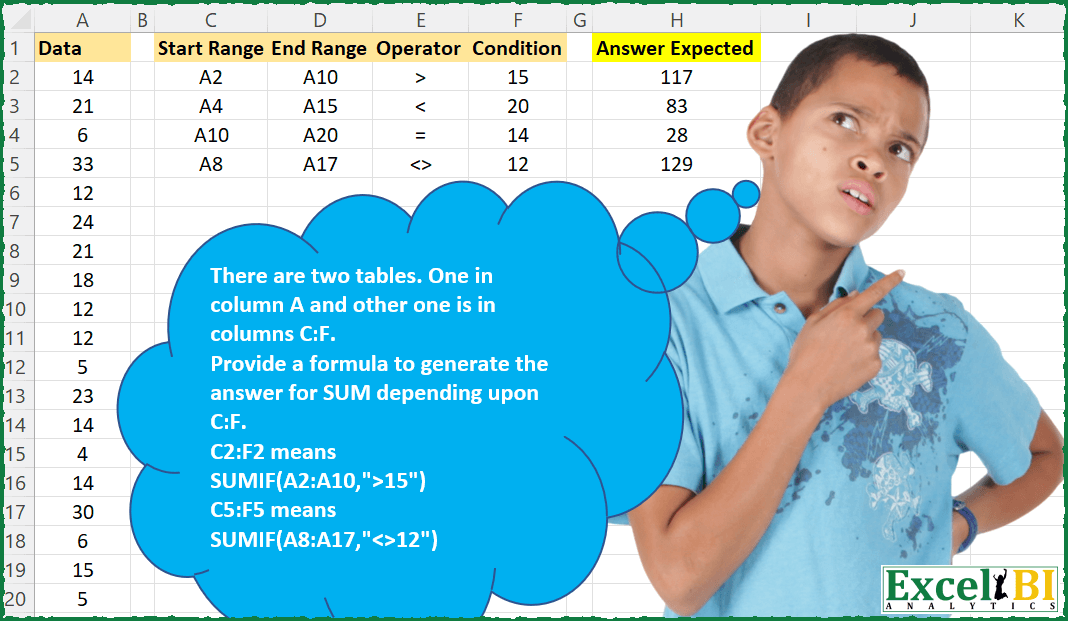
There are two tables. One in column A and other one is in columns C:F. Provide a formula to generate the answer for SUM depending upon C:F. C2:F2 means SUMIF(A2:A10,”>15″) C5:F5 means SUMIF(A8:A17,”<>12″) For Power Query, A2 should be taken as first row in your imported table.
📌 Challenge Details and Links
ExcelBI Excel Challenge Number: 60
Challenge Difficulty: ⭐️⭐️
📥Download Sample File
📥Link to the solutions on LinkedIn
Solving the challenge of Generate Sum with Conditions with Power Query
Power Query solution 1 for Generate Sum with Conditions, proposed by Matthias Friedmann:
let
  Source = Excel.CurrentWorkbook(){[Name = "SUMIF"]}[Content],
  #"Changed Type" = Table.TransformColumnTypes(Source, {{"Condition", type text}}),
  #"Extracted Text After Delimiter" = Table.TransformColumns(
    #"Changed Type",
    {
      {"Start Range", each Number.From(Text.AfterDelimiter(_, "A")) - 2, Int64.Type},
      {"End Range", each Number.From(Text.AfterDelimiter(_, "A")) - 1, Int64.Type}
    }
  ),
  #"Added Custom" = Table.AddColumn(
    #"Extracted Text After Delimiter",
    "SUMIF",
    each
      let
        cond = [Operator] & [Condition]
      in
        List.Sum(
          List.Select(
            List.RemoveFirstN(List.FirstN(DataColumA[Data], [End Range]), [Start Range]),
            each Expression.Evaluate(Text.From(_) & cond)
          )
        )
  )[[SUMIF]]
in
  #"Added Custom"
Power Query solution 2 for Generate Sum with Conditions, proposed by Abdoul Karim N.:
let
  Source = Excel.CurrentWorkbook(){[Name = "Data"]}[Content],
  ChangedType = Table.TransformColumnTypes(
    Source,
    {
      {"Start Range", type text},
      {"End Range", type text},
      {"Operator", type text},
      {"Condition", Int64.Type}
    }
  ),
  FinalResult = Table.AddColumn(
    ChangedType,
    "Answer",
    each [
      a        = Number.From(Text.Middle([Start Range], 1, 2)) - 2,
      b        = Number.From(Text.Middle([End Range], 1, 2)),
      c        = List.Range(Numbers[Data], a, b - a - 1),
      selector = Text.From([Operator]) & Text.From([Condition]),
      d        = List.Select(c, each Expression.Evaluate(Text.From(_) & selector)),
      e        = List.Sum(d)
    ][e]
  )
in
  FinalResult
Solving the challenge of Generate Sum with Conditions with Excel
Excel solution 1 for Generate Sum with Conditions, proposed by Rick Rothstein:
=SUMIF(INDIRECT(C2:C5&":"&D2:D5),""&E2:E5&F2:F5&"")Excel solution 2 for Generate Sum with Conditions, proposed by John V.:
=SUMIF(INDIRECT(C2:C5&":"&D2:D5),E2:E5&F2:F5)Excel solution 3 for Generate Sum with Conditions, proposed by محمد حلمي:
=SUMIF(INDIRECT(C2:C5&":"&D2:D5),E2:E5&F2:F5)Excel solution 4 for Generate Sum with Conditions, proposed by محمد حلمي:
=MAP(
    C2:C5,
    D2:D5,
    E2:E5,
    F2:F5,

    LAMBDA(
        c,
        d,
        e,
        f,
        SUMIF(
            INDIRECT(
                c&":"&d
            ),
            e&f
        )
    )
)
Excel solution 5 for Generate Sum with Conditions, proposed by Julian Poeltl:
=SUMIF(
    INDIRECT(
        C2:C5&":"&D2:D5
    );
    E2:E5&F2:F5
)
Excel solution 6 for Generate Sum with Conditions, proposed by Julian Poeltl:
=LET(A;INDIRECT(C2:C5&":"&D2:D5);SUMIFS(A;A;E2:E5&F2:F5))Excel solution 7 for Generate Sum with Conditions, proposed by Aditya Kumar Darak 🇮🇳:
= SUMIF(INDIRECT(C2:C5 & ":" & D2:D5), E2:E5 & F2:F5)Excel solution 8 for Generate Sum with Conditions, proposed by Stefan Olsson:
=MAP(C2:C5, D2:D5, E2:E5, F2:F5, LAMBDA(_s, _e, _o, _c, QUERY({OFFSET($A$1, REGEXEXTRACT(_s, "d+")-1, 0, REGEXEXTRACT(_e, "d+")-REGEXEXTRACT(_s, "d+")+1, 1)}, "Select Sum(Col1) Where Col1 "&_o&_c&" Label Sum(Col1) ''",0)))Excel solution 9 for Generate Sum with Conditions, proposed by Stefan Olsson:
=MAP(
    C2:C5,
     D2:D5,
     E2:E5,
     F2:F5,
     LAMBDA(
         _s,
         _e,
         _o,
         _c,
         QUERY(
             {INDEX(
                 A1:A20,
                 REGEXEXTRACT(
                     _s,
                     "d+"
                 ),
                 0
             ):INDEX(
                 A1:A20,
                 REGEXEXTRACT(
                     _e,
                     "d+"
                 ),
                 0
             )},
              "Select Sum(Col1) Where Col1 "&_o&_c&" Label Sum(Col1) ''",
             0
         )
     )
)
Excel solution 10 for Generate Sum with Conditions, proposed by Victor Momoh (MVP, MOS, R.Eng):
=MAP(
    C2:C5,
    D2:D5,
    E2:E5,
    F2:F5,
    LAMBDA(
        a,
        b,
        c,
        d,
        SUMIF(
            INDIRECT(
                a&":" &b
            ),
            c&d,
            INDIRECT(
                a&":" &b
            )
        )
    )
)

or
=SUMIF(
    INDIRECT(
        C2:C5&":" &D2:D5
    ),
    E2:E5&F2:F5,
    INDIRECT(
        C2:C5&":" &D2:D5
    )
)
Excel solution 11 for Generate Sum with Conditions, proposed by Paolo Pozzoli:
=SOMMA(FILTRO(INDIRETTO(C2&":"&D2);Evals(C2&":"&D2&E2&F2)))

Array approach:
=LET(
startRange;C2:C5;
endRange;D2:D5;
op;E2:E5;
cond;F2:F5;
out;MAP(startRange;endRange;op;cond;LAMBDA(s;e;o;c;SOMMA(FILTRO(INDIRETTO(s&":"&e);Evals(s&":"&e&o&c)))));
out)

VBA helper UDF
Function Evals(sExpression As String)
 Evals = Evaluate(sExpression)
Excel solution 12 for Generate Sum with Conditions, proposed by Deepak Dalal:
SUMIF(INDEX(A:A, RIGHT(C2,LEN(C2) - 1)):INDEX(A:A,RIGHT(D2,LEN(D2)-1)),E2&F2)Excel solution 13 for Generate Sum with Conditions, proposed by Talha Jafri:
=SUMIF(INDIRECT(C2:C5&":"&D2:D5),E2:E5&F2:F5,INDIRECT(C2:C5&":"&D2:D5))