
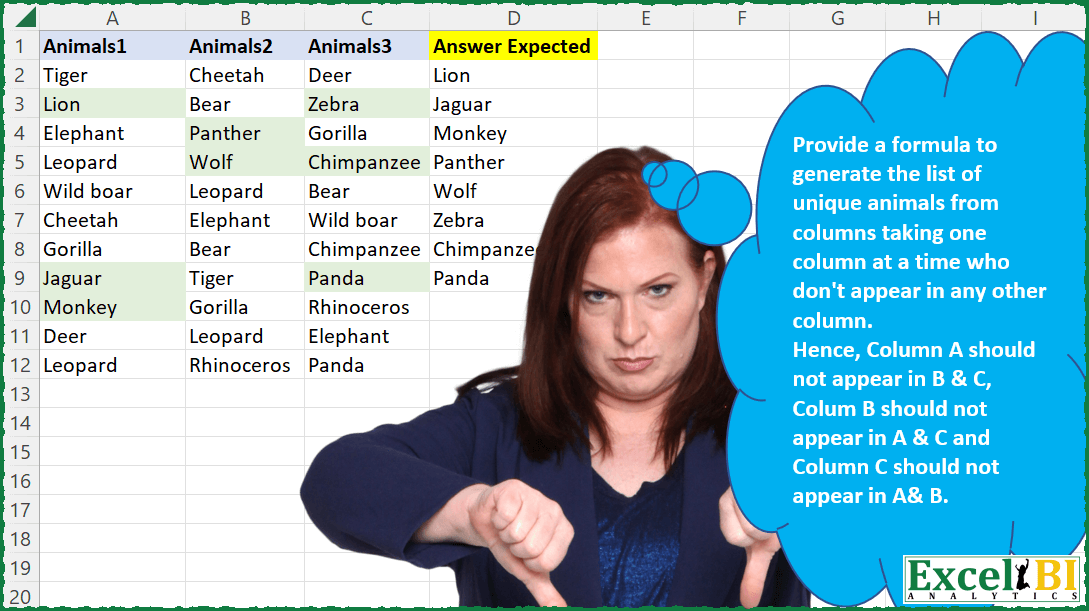
Provide a formula to generate the list of unique animals from columns taking one column at a time who don’t appear in any other column. Hence, Column A should not appear in B & C, Colum B should not appear in A & C and Column C should not appear in A & B. OPTIONAL (Only for Power Query solutions) – if PQ folks want to stretch themselves – I will encourage Power Query folks to take this challenge to incorporate dynamism. That is if I introduce 4th column D, A should not be in B,C,D and B should not be in A,C,D….and so on. Hence, the solution should work for n number of columns.
📌 Challenge Details and Links
ExcelBI Excel Challenge Number: 57
Challenge Difficulty: ⭐️⭐️⭐️
📥Download Sample File
📥Link to the solutions on LinkedIn
Solving the challenge of Unique Animals by Column with Power Query
Power Query solution 1 for Unique Animals by Column, proposed by Aditya Kumar Darak 🇮🇳:
let
  Source           = Excel.CurrentWorkbook(){[Name = "data"]}[Content],
  Unpivot          = Table.UnpivotOtherColumns(Source, {}, "C1", "Animals"),
  RemoveDuplicates = Table.Distinct(Unpivot),
  Count            = Table.Group(RemoveDuplicates, "Animals", {"Count", Table.RowCount}),
  Return           = Table.SelectRows(Count, each [Count] = 1)[Animals]
in
  Return
Power Query solution 2 for Unique Animals by Column, proposed by Matthias Friedmann:
letely dynamic!
Step by step comments: https://lnkd.in/ej4wBtQt
let
 Source = Excel.CurrentWorkbook(){[Name = "Animals"]}[Content],
 #"Unpivoted Columns" = Table.UnpivotOtherColumns(Source, {}, "Attribute", "Unique"),
 #"Grouped Rows" = Table.Group(
 #"Unpivoted Columns",
 {"Unique"},
 {{"Distinct", each Table.RowCount(Table.Distinct(_)), Int64.Type}}
 ),
 #"Filtered Rows" = Table.SelectRows(#"Grouped Rows", each ([Distinct] = 1))[[Unique]]
in
 #"Filtered Rows"
Power Query solution 3 for Unique Animals by Column, proposed by Antriksh Sharma:
let
  Source = DataSource,
  ColumnNames = Table.ColumnNames(DataSource),
  Transformation = List.Transform(
    ColumnNames,
    (ColumnName) =>
      let
        CurrentColumn = Table.Column(Source, ColumnName),
        OtherColumns  = List.Combine(Table.ToColumns(Table.RemoveColumns(Source, ColumnName))),
        Result        = List.Distinct(List.RemoveItems(CurrentColumn, OtherColumns))
      in
        Result
  ),
  Result = Table.FromColumns({List.Combine(Transformation)}, type table [Answer Expected = text])
in
  Result
Power Query solution 4 for Unique Animals by Column, proposed by Venkata Rajesh:
let
  Source = Data,
  #"Unpivoted Columns" = Table.UnpivotOtherColumns(Source, {}, "Attribute", "Animals"),
  #"Grouped Rows" = Table.Group(
    #"Unpivoted Columns",
    {"Animals"},
    {{"Count", each List.Count(List.Distinct([Attribute])), type text}}
  ),
  Output = Table.SelectRows(#"Grouped Rows", each ([Count] = 1))[Animals]
in
  Output
Power Query solution 5 for Unique Animals by Column, proposed by Sergei Baklan:
let
  Source = Excel.CurrentWorkbook(){[Name = "range"]}[Content],
  #"Promoted Headers" = Table.PromoteHeaders(Source, [PromoteAllScalars = true]),
  tbl = #"Promoted Headers",
  c = List.Combine(List.Transform(Table.ToColumns(tbl), List.Distinct)),
  answer = Table.FromColumns(
    {List.Sort(List.Select(c, (z) => List.Count(List.PositionOf(c, z, Occurrence.All)) = 1))},
    {"Answer"}
  )
in
  answer
Power Query solution 6 for Unique Animals by Column, proposed by Abdoul Karim N.:
let
  Source = Excel.CurrentWorkbook(){[Name = "Animals"]}[Content],
  Intermediate = [
    ListA      = Source[Animals1],
    ListB      = Source[Animals2],
    ListC      = Source[Animals3],
    CheckListA = List.RemoveItems(ListA, ListB & ListC),
    CheckListB = List.RemoveItems(ListB, ListA & ListC),
    CheckListC = List.RemoveItems(ListC, ListA & ListB),
    FinalList  = CheckListA & CheckListB & CheckListC
  ][FinalList],
  ResultDistinct = List.Distinct(Intermediate),
  ToTable = Table.FromList(ResultDistinct, Splitter.SplitByNothing(), {"Answer Expected"})
in
  ToTable
Solving the challenge of Unique Animals by Column with Excel
Excel solution 1 for Unique Animals by Column, proposed by Rick Rothstein:
=LET(
    f,
    LAMBDA(
        x,
        LET(
            u,
            UNIQUE(
                x
            ),
            FILTER(
                u,
                COUNTIF(
                    A2:C12,
                    u
                )=COUNTIF(
                    x,
                    u
                )
            )
        )
    ),
    VSTACK(
        f(
            A2:A12
        ),
        f(
            B1:B12
        ),
        f(
            C2:C12
        )
    )
)
Excel solution 2 for Unique Animals by Column, proposed by John V.:
=LET(
    f,
    LAMBDA(
        r,
        t,
        UNIQUE(
            r,
            ,
            t
        )
    ),
    f(
        VSTACK(
            f(
                A2:A12,

            ),
            f(
                B2:B12,

            ),
            f(
                C2:C12,

            )
        ),
        1
    )
)

Put three ranges:
=UNIQUE(
    VSTACK(
        UNIQUE(
            A2:A12
        ),
        UNIQUE(
            B2:B12
        ),
        UNIQUE(
            C2:C12
        )
    ),
    ,
    1
)

With two uniques and mid:
=UNIQUE(
    MID(
        UNIQUE(
            TOCOL(
                {1,
                2,
                3}&A2:C12,
                ,
                1
            )
        ),
        2,
        99
    ),
    ,
    1
)

And Bonus (not same order):
=UNIQUE(
    MID(
        UNIQUE(
            TOCOL(
                {1,
                2,
                3}&A2:C12
            )
        ),
        2,
        99
    ),
    ,
    1
)
Excel solution 3 for Unique Animals by Column, proposed by محمد حلمي:
=UNIQUE(LET(a,UNIQUE(
TOCOL(A2:C12&{1,2,3},,1)),MID(a,1,LEN(a)-1)),,1)
Excel solution 4 for Unique Animals by Column, proposed by محمد حلمي:
=UNIQUE(
    LET(
        a,
        UNIQUE(
            TOCOL(
                A2:C12&{1,
                2,
                3},
                ,
                1
            )
        ),
        MID(
            a,
            1,
            LEN(
                a
            )-1
        )
    ),
    ,
    1
)

2 -
=UNIQUE(
    VSTACK(
        UNIQUE(
            A2:A12
        ),

        UNIQUE(
            B2:B12
        ),
        UNIQUE(
            C2:C12
        )
    ),
    ,
    1
)

3 -
=UNIQUE(
    DROP(
        REDUCE(
            "",
            SEQUENCE(
                3
            ),
            LAMBDA(
                a,
                d,
                VSTACK(
                    a,
                    UNIQUE(
                        INDEX(
                            A2:C12,
                            ,
                            d
                        )
                    )
                )
            )
        ),
        1
    ),
    ,
    1
)
Excel solution 5 for Unique Animals by Column, proposed by Julian Poeltl:
=UNIQUE(
    TEXTSPLIT(
        TEXTJOIN(
            ",",
            ,
            BYCOL(
                A2:C12,
                LAMBDA(
                    A,
                    TEXTJOIN(
                        ",",
                        ,
                        UNIQUE(
                            A
                        )
                    )
                )
            )
        ),
        ,
        ","
    ),
    ,
    1
)
Excel solution 6 for Unique Animals by Column, proposed by Aditya Kumar Darak 🇮🇳:
= UNIQUE(TEXTAFTER(UNIQUE(TOCOL(COLUMN(A2:C12) & "-" & A2:C12, , TRUE)), "-"), , TRUE)Excel solution 7 for Unique Animals by Column, proposed by Timothée BLIOT:
=LET(Animals,A2:C12,
Animals1,UNIQUE(INDEX(Animals,,1)),
Animals2,UNIQUE(INDEX(Animals,,2)),
Animals3,UNIQUE(INDEX(Animals,,3)),
UNIQUE(VSTACK(Animals1,Animals2,Animals3),,1))
Excel solution 8 for Unique Animals by Column, proposed by Tolga Demirci, PMP, PMI-ACP, MOS-Expert:
=LET(b;VSTACK(UNIQUE(A2:A12);UNIQUE(B2:B12);UNIQUE(C2:C12));FILTER(b;MAP(b;LAMBDA(a;COUNTA(FILTER(b;b=a))=1))))Excel solution 9 for Unique Animals by Column, proposed by Stefan Olsson:
=UNIQUE(
    {UNIQUE(
        A2:A12
    );UNIQUE(
        B2:B12
    );UNIQUE(
        C2:C12
    )},
    ,
    TRUE
)
Excel solution 10 for Unique Animals by Column, proposed by Stevenson Yu:
=UNIQUE(VSTACK(UNIQUE(A2:A12),UNIQUE(B2:B12),UNIQUE(C2:C12)),,1)Solving the challenge of Unique Animals by Column with Python in Excel
Python in Excel solution 1 for Unique Animals by Column, proposed by Alejandro Campos:
df = xl("A1:C12", headers=True)
all_unique_animals = sum(
 (list(set(df[c]) - set().union(*(set(df[oc]) for oc in df.columns if oc != c)))
 for c in df.columns), [])
results_df = pd.DataFrame({'Unique Animals': all_unique_animals})
Solving the challenge of Unique Animals by Column with DAX
DAX solution 1 for Unique Animals by Column, proposed by Zoran Milokanović:
EVALUATE
UNION(
 EXCEPT(
 EXCEPT(
 ALL(Input[Animals1]),
 ALL(Input[Animals2])
 ),
 ALL(Input[Animals3])
 ),
 EXCEPT(
 ALL(Input[Animals2]),
 UNION(
 ALL(Input[Animals1]),
 ALL(Input[Animals3])
 )
 ),
 FILTER(
 ALL(Input[Animals3]),
 AND(
 NOT CONTAINS(ALL(Input[Animals1]), Input[Animals1], Input[Animals3]),
 NOT CONTAINS(ALL(Input[Animals2]), Input[Animals2], Input[Animals3])
 )
)
)
&&&