
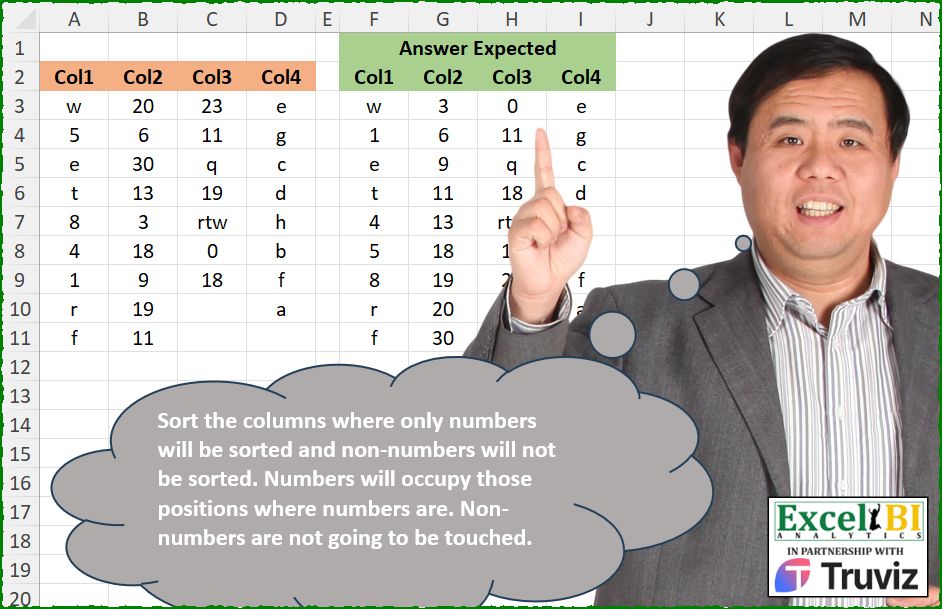
Sort the columns where only numbers will be sorted and non-numbers will not be sorted. Numbers will occupy those positions where numbers are. Non-numbers are not going to be touched.
📌 Challenge Details and Links
ExcelBI Excel Challenge Number: 564
Challenge Difficulty: ⭐️⭐️
📥Download Sample File
📥Link to the solutions on LinkedIn
Solving the challenge of Sort Only Numeric Columns with Power Query
Power Query solution 1 for Sort Only Numeric Columns, proposed by Kris Jaganah:
let
  S = Excel.CurrentWorkbook(){[Name = "Table1"]}[Content],
  Z = (x) =>
    [
      A = Table.Column(S, x),
      B = List.Select(A, each Value.Is(Value.FromText(_), type number)),
      C = List.Transform(B, each List.PositionOf(A, _)),
      D = List.Sort(B),
      E = Table.AddIndexColumn(Table.FromColumns({A}), "Id"),
      F = Table.AddColumn(
        E,
        "PP",
        each
          let
            a = [Id]
          in
            List.Combine(List.Select(List.Zip({D, C}), each _{1} = a)){0}? ?? [Column1]
      )[PP]
    ][F],
  X = Table.ColumnNames(S),
  Y = Table.FromColumns(List.Transform(X, each Z(_)), X)
in
  Y
Power Query solution 2 for Sort Only Numeric Columns, proposed by Alejandro Simón 🇵🇦 🇪🇸:
let
  Source = Excel.CurrentWorkbook(){[Name = "Table1"]}[Content],
  Lista = Table.ToColumns(Source),
  Sol = Table.FromColumns(
    List.Transform(
      Lista,
      each
        let
          a = List.RemoveNulls(_),
          b = List.Zip({a, {0 .. List.Count(a) - 1}}),
          c = List.Select(
            b,
            each List.AnyTrue(
              List.Transform({"a" .. "z"}, (x) => Text.Contains(Text.From(_{0}), x))
            )
          ),
          d = List.Difference(b, c),
          e = List.Zip({List.Sort(List.Transform(d, each _{0})), List.Transform(d, each _{1})}),
          f = List.Transform(List.Sort(c & e, each _{1}), each _{0})
        in
          f
    )
  )
in
  Sol
Power Query solution 3 for Sort Only Numeric Columns, proposed by Ramiro Ayala Chávez:
let
  S = Excel.CurrentWorkbook(){[Name = "Table1"]}[Content],
  a = Table.TransformColumnTypes(
    S,
    {{"Col1", type text}, {"Col2", type text}, {"Col3", type text}, {"Col4", type text}}
  ),
  b = Table.FromList(
    List.Transform(Table.ToColumns(S), List.RemoveNulls),
    Splitter.SplitByNothing(),
    {"L"}
  ),
  Fx = (x) =>
    let
      A = List.Zip({x, List.Positions(x)}),
      B = List.Select(A, each List.ContainsAny(_, {"a" .. "z", "rtw"})),
      C = List.Select(A, each not List.ContainsAny(_, {"a" .. "z", "rtw"})),
      D = List.Sort(List.Transform(List.Transform(C, each _{0}), Number.From)),
      E = List.Transform(C, each _{1}),
      F = Table.FromColumns(List.Zip(B & List.Zip({D, E}))),
      G = Table.Sort(F, {"Column2", 0})[Column1]
    in
      G,
  Sol = Table.FromColumns(Table.AddColumn(b, "A", each Fx([L]))[A], Table.ColumnNames(S))
in
  Sol
Power Query solution 4 for Sort Only Numeric Columns, proposed by Alexandre Garcia:
let
  a = Excel.CurrentWorkbook(){[Name = "Table1"]}[Content],
  b = (A, B) =>
    List.Skip(
      List.Generate(
        () => [w = 0, x = 0, y = 0, z = 0],
        each [w] < List.Count(A) + 1,
        each [
          w = [w] + 1,
          x = A{[w]} is number,
          y = [y] + Byte.From([x]),
          z = if x then B{y} else A{[w]}
        ],
        each [z]
      )
    ),
  c = Table.ColumnNames(a),
  d = List.TransformMany(
    Table.ToColumns(a),
    (x) => {List.Sort(List.Select(x, each _ is number))},
    (x, y) => b(x, y)
  ),
  Sol = Table.FromColumns(d, c)
in
  Sol
Power Query solution 5 for Sort Only Numeric Columns, proposed by Mihai Radu O:
 l = Table.ToColumns(Source),
 s = List.Transform(l,(x)=>
 [
 a = List.RemoveNulls(List.Transform (x, (y)=> try Number.From(y) otherwise null)),
 b = List.Sort(a),
 t1 = Table.AddIndexColumn( Table.FromColumns({x}),"i",0),
 t2 = Table.FromColumns({a,b}),
 t = Table.NestedJoin (t1,"Column1",t2,"Column1","t"),
 c = Table.Sort(Table.ExpandTableColumn(t, "t", {"Column2"}, {"Column2"}),{"i", Order.Ascending}),
 d = Table.AddColumn(c,"c",each if [Column2]=null then [Column1] else [Column2])[c]
 ][d]),
 f = Table.FromColumns(s)
in
 f
Power Query solution 6 for Sort Only Numeric Columns, proposed by Francesco Bianchi 🇮🇹:
let
  Source = Excel.CurrentWorkbook(){[Name = "Table1"]}[Content],
  TblToList = List.Transform(
    Table.ToColumns(Source),
    each List.Zip({List.RemoveNulls(_), List.Positions(List.RemoveNulls(_))})
  ),
  Sol = Table.FromColumns(
    List.Transform(
      TblToList,
      each List.Transform(
        List.Sort(
          List.Zip(
            {
              List.Transform(List.Sort(List.Select(_, (x) => x{0} is number), each _{0}), each _{0}),
              List.Transform(List.Sort(List.Select(_, (x) => x{0} is number), each _{1}), each _{1})
            }
          )
            & List.Select(_, (x) => x{0} is text),
          each _{1}
        ),
        each _{0}
      )
    ),
    Table.ColumnNames(Source)
  )
in
  Sol
Power Query solution 7 for Sort Only Numeric Columns, proposed by Sahan Jayasuriya:
let
  Source = Excel.CurrentWorkbook(){[Name = "Data"]}[Content],
  ColsToList = Table.ToColumns(Source),
  ListNumberSort = List.Transform(
    ColsToList,
    each [
      a = List.Zip({_, List.Positions(_)}),
      b = List.Select(a, (x) => Value.Type(x{0}) = type number),
      c = List.Sort(b, {(x) => x{0}, Order.Ascending}),
      d = List.Transform(List.Positions(c), (x) => {c{x}{0}} & {b{x}{1}}),
      e = List.Select(a, (x) => not (Value.Type(x{0}) = type number)),
      f = List.Sort(e & d, (x) => x{1}),
      g = List.Transform(f, (x) => x{0})
    ][g]
  ),
  Result = Table.FromColumns(ListNumberSort, Table.ColumnNames(Source))
in
  Result
Solving the challenge of Sort Only Numeric Columns with Excel
Excel solution 1 for Sort Only Numeric Columns, proposed by Bo Rydobon 🇹🇭:
=DROP(REDUCE(0,A3:D3,LAMBDA(a,v,LET(b,TOCOL(TAKE(v:D11,,1),3),IFNA(HSTACK(a,SORTBY(SORTBY(b,--b),SORTBY(SEQUENCE(ROWS(b)),b*0))),"")))),,1)Excel solution 2 for Sort Only Numeric Columns, proposed by Rick Rothstein:
=LET(
    f,
    LAMBDA(
        c,
        LET(
            n,
            TOCOL(
                0+c,
                3
            ),
            s,
            SORT(
                n
            ),
            IF(
                ISTEXT(
                    c
                ),
                c,
                XLOOKUP(
                    c,
                    n,
                    s
                )
            )
        )
    ),
    IFNA(
        HSTACK(
            f(
                A3:A11
            ),
            f(
                B3:B11
            ),
            f(
                C3:C9
            ),
            f(
                D3:D10
            )
        ),
        ""
    )
)

and if you do not like feeding each column individually into the internal LAMBDA function and then HSTACK'ing,
     this would also work...

=IFNA(
    DROP(
        REDUCE(
            0,
            SEQUENCE(
                COLUMNS(
                    A3:D11
                )
            ),
            LAMBDA(
                a,
                x,
                HSTACK(
                    a,
                    LET(
                        c,
                        TOCOL(
                            CHOOSECOLS(
                                A3:D11,
                                x
                            ),
                            1
                        ),
                        n,
                        TOCOL(
                0+c,
                3
            ),
                        s,
                        SORT(
                n
            ),
                        IF(
                ISTEXT(
                    c
                ),
                c,
                XLOOKUP(
                    c,
                    n,
                    s
                )
            )
                    )
                )
            )
        ),
        ,
        1
    ),
    ""
)
Excel solution 3 for Sort Only Numeric Columns, proposed by John V.:
=DROP(REDUCE(0,A3:D3,LAMBDA(a,v,LET(r,TAKE(v:D11,,1),HSTACK(a,IF(r<"",SMALL(r,SCAN(,r<"",SUM)),r&""))))),,1)Excel solution 4 for Sort Only Numeric Columns, proposed by Kris Jaganah:
=DROP(
    REDUCE(
        "",
        {1,
        2,
        3,
        4},
        LAMBDA(
            x,
            y,
            HSTACK(
                x,
                LET(
                    p,
                    A3:D11,
                    a,
                    IF(
                        p="",
                        "",
                        p
                    ),
                    b,
                    SEQUENCE(
                        ROWS(
                            a
                        )
                    ),
                    c,
                    INDEX(
                        a,
                        ,
                        y
                    ),
                    d,
                    --c,
                    e,
                    FILTER(
                        HSTACK(
                            b,
                            d
                        ),
                        -ISERR(
                            d
                        )=0,
                        ""
                    ),
                    f,
                    SORT(
                        TAKE(
                            e,
                            ,
                            -1
                        )
                    ),
                    g,
                    IFNA(
                        XLOOKUP(
                            b,
                            TAKE(
                                e,
                                ,
                                1
                            ),
                            f
                        ),
                        c
                    ),
                    g
                )
            )
        )
    ),
    ,
    1
)
Excel solution 5 for Sort Only Numeric Columns, proposed by Aditya Kumar Darak 🇮🇳:
=LET(

     _data,
     A3:D11,

     _rows,
     ROWS(
         _data
     ),

     _cols,
     COLUMNS(
         _data
     ),

     _thunk,
     BYCOL(

          _data,

          LAMBDA(
              a,

               LAMBDA(

                    LET(

                         empty,
                         TOCOL(
                             a,
                              1
                         ),

                         num,
                         ISNUMBER(
                             empty
                         ),

                         rt,
                         SCAN(
                             0,
                              --num,
                              SUM
                         ),

                         srt,
                         SORT(
                             empty
                         ),

                         rtrn,
                         IF(
                             num,
                              INDEX(
                                  srt,
                                   rt
                              ),
                              empty
                         ),

                         rtrn

                    )

               )

          )

     ),

     _return,
     MAKEARRAY(
         _rows,
          _cols,
          LAMBDA(
              r,
               c,
               INDEX(
                   INDEX(
                       _thunk,
                        1,
                        c
                   )(),
                    r,
                    1
               )
          )
     ),

     IFERROR(
         _return,
          ""
     )

)
Excel solution 6 for Sort Only Numeric Columns, proposed by Hussein SATOUR:
=LET(
    I,
    ISNUMBER,
    C,
    CONCAT,
    w,
    C(
        BYCOL(
            A3:D11,
            LAMBDA(
                y,
                LET(
                    a,
                    y,
                    b,
                    MAP(
                        a,
                        LAMBDA(
                            x,
                            SUM(
                                I(
                                    TAKE(
                                        a,
                                        1
                                    ):x
                                )*1
                            )
                        )
                    ),
                    C(
                        FILTER(
                            IF(
                                I(
                                    a
                                ),
                                INDEX(
                                    SORT(
                                    a
                                ),
                                    b
                                ),
                                a
                            ),
                            a<>""
                        )&","
                    )&"/"
                )
            )
        )
    ),
    TRANSPOSE(
        TEXTSPLIT(
            w,
            ",",
            "/",
            1,
            ,
            ""
        )
    )
)
Excel solution 7 for Sort Only Numeric Columns, proposed by Sunny Baggu:
=IF(

     A3:D11 <> "",

     DROP(

          REDUCE(

               "",

               SEQUENCE(
                   COLUMNS(
                       A2:D2
                   )
               ),

               LAMBDA(
                   x,
                    y,

                    HSTACK(

                         x,

                         LET(

                              rng,
                              TOCOL(
                                  CHOOSECOLS(
                                      A3:D11,
                                       y
                                  ),
                                   2
                              ),

                              _a,
                              ISNUMBER(
                                  rng
                              ),

                              _b,
                              FILTER(
                                  rng,
                                   _a
                              ),

                              _c,
                              SORT(
                                  _b
                              ),

                              IF(
                                  1 - _a,
                                   rng,
                                   XLOOKUP(
                                       rng,
                                        _b,
                                        _c
                                   )
                              )

                         )

                    )

               )

          ),

          ,

          1

     ),

     ""

)Excel solution 8 for Sort Only Numeric Columns, proposed by Asheesh Pahwa:
=DROP(REDUCE("",SEQUENCE(,4),LAMBDA(x,y,
HSTACK(x,LET(I,INDEX(A3:D11,,y),fl,FILTER(I,I<>""),f,FILTER(fl,ISNUMBER(--fl),""),s,SORT(f),xl,XLOOKUP(fl,f,s,""),IFNA(IF(xl="",I,xl),""))))),,1)Excel solution 9 for Sort Only Numeric Columns, proposed by ferhat CK:
=LET(
    a,
    A3:D11,
    DROP(
        REDUCE(
            0,
            SEQUENCE(
                COLUMNS(
                    a
                )
            ),
            LAMBDA(
                i,
                j,
                IFERROR(
                    HSTACK(
                        i,
                        LET(
                            n,
                            CHOOSECOLS(
                                a,
                                j
                            ),
                            w,
                            FILTER(
                                n,
                                ISNUMBER(
                                    n
                                )
                            ),
                            q,
                            MAKEARRAY(
                                COUNTA(
                                    n
                                ),
                                1,
                                LAMBDA(
                                    x,
                                    y,
                                    IF(
                                        ISNUMBER(
                                            INDEX(
                                                n,
                                                x
                                            )
                                        ),
                                        MATCH(
                                            INDEX(
                                                n,
                                                x
                                            ),
                                            w,
                                            0
                                        ),
                                        INDEX(
                                                n,
                                                x
                                            )
                                    )
                                )
                            ),
                            MAP(
                                q,
                                LAMBDA(
                                    x,
                                    IF(
                                        ISNUMBER(
                                            x
                                        ),
                                        SMALL(
                                            w,
                                            x
                                        ),
                                        x
                                    )
                                )
                            )
                        )
                    ),
                    ""
                )
            )
        ),
        ,
        1
    )
)Excel solution 10 for Sort Only Numeric Columns, proposed by Jaroslaw Kujawa:
=TRANSPOSE(
    TEXTSPLIT(
        TEXTJOIN(
            "|";
            ;
            BYCOL(
                A2:D10;
                LAMBDA(
                    y;
                    LET(
                        v;
                        SCAN(
                            0;
                            y;
                            LAMBDA(
                                a;
                                x;
                                LET(
                                    z;
                                    IF(
                                        ISNUMBER(
                                            x
                                        );
                                        a+1;
                                        a
                                    );
                                    z
                                )
                            )
                        );
                        ind_col;
                        HSTACK(
                            v;
                            y
                        );
                        num_sorted;
                        SORT(
                            FILTER(
                                y;
                                ISNUMBER(
                                    y
                                )
                            )
                        );
                        ind_num_sorted;
                        HSTACK(
                            SEQUENCE(
                                COUNT(
                                    num_sorted
                                )
                            );
                            num_sorted
                        );
                        ARRAYTOTEXT(
                            IF(
                                ISNUMBER(
                                    TAKE(
                                        ind_col;
                                        ;
                                        -1
                                    )
                                );
                                VLOOKUP(
                                    TAKE(
                                        ind_col;
                                        ;
                                        1
                                    );
                                    ind_num_sorted;
                                    2;
                                    0
                                );
                                IF(
                                    LEN(
                                    TAKE(
                                        ind_col;
                                        ;
                                        -1
                                    )
                                )>0;
                                    TAKE(
                                        ind_col;
                                        ;
                                        -1
                                    );
                                    ""
                                )
                            )
                        )
                    )
                )
            )
        );
        ";";
        "|"
    )
)Excel solution 11 for Sort Only Numeric Columns, proposed by JvdV -:
=MAP(A3:D11,LAMBDA(s,IF(ISNUMBER(s),LET(c,INDEX(A3:D11,,COLUMN(s)),SMALL(c,COUNT(TAKE(c,1):s))),s&"")))Excel solution 12 for Sort Only Numeric Columns, proposed by Eddy Wijaya:
=DROP(REDUCE(0,SEQUENCE(4),LAMBDA(a,v,HSTACK(a,LET(
d,CHOOSECOLS(A3:D11,v),
d_n,SORT(FILTER(d,ISNUMBER(d))),
s,SCAN(0,--d,LAMBDA(a,v,IF(ISERROR(v),0+a,a+1))),
adj_d,HSTACK(--d,s),
IFERROR(INDEX(d_n,--TEXTAFTER(BYROW(adj_d,LAMBDA(r,ARRAYTOTEXT(TOCOL(r,2)))),",")),d))))),,1)Excel solution 13 for Sort Only Numeric Columns, proposed by Ziad A.:
=ARRAYFORMULA(BYCOL(A3:D11,LAMBDA(c,LET(x,COUNTIFS(-ISTEXT(c),0,ROW(c),"<="&ROW(c)),IF(ISNUMBER(c),CHOOSEROWS(SORT(c),x+NOT(x)),c)))))Excel solution 14 for Sort Only Numeric Columns, proposed by Cary Ballard, DML:
=LET(a,
     A3:D11,
     IFNA(DROP(REDUCE("",
     SEQUENCE(
         COLUMNS(
             a
         )
     ),
     LAMBDA(acc,
     v,
     LET(c,
     CHOOSECOLS(
         a,
          v
     ),
     r,
     SUM(--(c <> "")),
     n,
     ISNUMBER(
         c
     ),
     f,
     FILTER(
         c,
          n
     ),
     HSTACK(
         acc,
          TAKE(
              IF(
                  n,
                   XLOOKUP(
                       c,
                        f,
                        SORT(
                            f
                        )
                   ),
                   c
              ),
               r
          )
     )))),
     ,
     1),
""))Solving the challenge of Sort Only Numeric Columns with Python
_x000D_Python solution 1 for Sort Only Numeric Columns, proposed by Konrad Gryczan, PhD:
import pandas as pd
path = "564 Sort Numbers only.xlsx"
input = pd.read_excel(path, usecols="A:D", skiprows=1, nrows=10).fillna("")
test = pd.read_excel(path, usecols="F:I", skiprows=1, nrows=10).rename(columns=lambda x: x.replace('.1', '')).fillna("")
def process_column(col):
 col = col.astype(str)
 num_positions = col.str.contains("[0-9]")
 col.loc[num_positions] = sorted(col[num_positions].astype(int))
 return col
input = input.apply(process_column)
print(all(input==test)) # True
Solving the challenge of Sort Only Numeric Columns with R
_x000D_R solution 1 for Sort Only Numeric Columns, proposed by Konrad Gryczan, PhD:
library(tidyverse)
library(readxl)
path = "Excel/564 Sort Numbers only.xlsx"
input = read_excel(path, range = "A2:D11")
test = read_excel(path, range = "F2:I11")
process_column = function(col) {
 letters = grep("[A-Za-z]", col)
 num_positions = grep("[0-9]", col)
 numbers = as.numeric(col[num_positions])
 numbers = sort(numbers)
 col[num_positions] = numbers
 return(col)
}
input = input %>% map_df(process_column)
all.equal(input, test)
#> [1] TRUE