
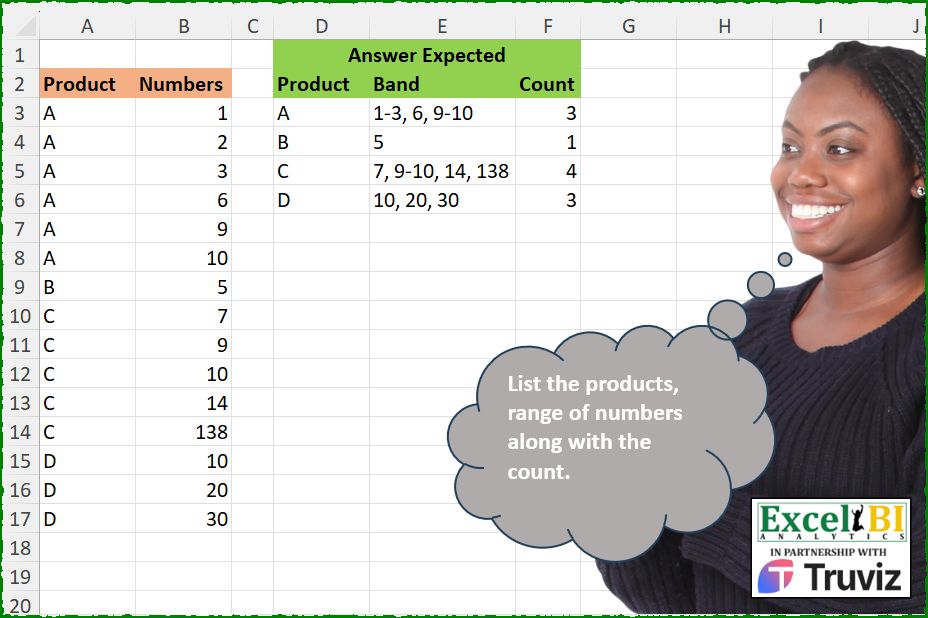
List the products, range of numbers along with the count of bands (not count of product).
📌 Challenge Details and Links
ExcelBI Excel Challenge Number: 563
Challenge Difficulty: ⭐️⭐️
📥Download Sample File
📥Link to the solutions on LinkedIn
Solving the challenge of Count Bands by Product Range with Power Query
Power Query solution 1 for Count Bands by Product Range, proposed by Kris Jaganah:
let
  A = Excel.CurrentWorkbook(){[Name = "Table1"]}[Content],
  B = Table.AddIndexColumn(A, "Id"),
  C = Table.AddColumn(B, "Pos", each try [Numbers] - B[Numbers]{[Id] - 1} otherwise 1),
  D = Table.AddColumn(
    C,
    "Grp",
    each List.Accumulate(List.FirstN(C[Pos], [Id] + 1), 0, (x, y) => if y = 1 then x else x + 1)
  ),
  E = Table.Group(
    D,
    {"Product", "Grp"},
    {
      "Ba",
      each
        let
          m = Text.From(List.Min([Numbers])),
          n = Text.From(List.Max([Numbers])),
          o = if m = n then m else m & "-" & n
        in
          o
    }
  ),
  F = Table.Group(
    E,
    {"Product"},
    {{"Band", each Text.Combine([Ba], ", ")}, {"Count", each List.Count([Ba])}}
  )
in
  F
Power Query solution 2 for Count Bands by Product Range, proposed by Alejandro Simón 🇵🇦 🇪🇸:
let
  Source = Excel.CurrentWorkbook(){[Name = "Table1"]}[Content],
  Group = Table.Group(
    Source,
    {"Product"},
    {
      {
        "Band",
        each
          let
            a = Table.AddIndexColumn([[Numbers]], "Idx"),
            b = Table.Group(
              a,
              "Idx",
              {
                {
                  "B",
                  each
                    let
                      a1 = [Numbers],
                      a2 =
                        if List.Count(a1) = 1 then
                          Text.From(a1{0})
                        else
                          Text.From(a1{0}) & "-" & Text.From(List.Last(a1))
                    in
                      a2
                }
              },
              0,
              (x, y) => Number.From(a[Numbers]{y} - a[Numbers]{y - 1} > 1)
            )[B]
          in
            Text.Combine(b, ", ")
      }
    }
  ),
  Sol = Table.AddColumn(Group, "Count", each Text.Length(Text.Select([Band], ",")) + 1)
in
  Sol
Power Query solution 3 for Count Bands by Product Range, proposed by Luan Rodrigues:
let
  Fonte = Tabela1,
  grp = Table.Group(
    Fonte,
    {"Product"},
    {
      "Band",
      each
        let
          a = _[Numbers],
          b = Table.AddColumn(
            _,
            "teste",
            each Number.From(List.ContainsAny(a, List.Transform({1, - 1}, (x) => [Numbers] + x)))
          ),
          c = Table.Group(
            b,
            "teste",
            {
              "grp",
              each
                let
                  cond = [
                    min = List.Min(_[Numbers]),
                    max = List.Max(_[Numbers]),
                    j   = Text.Combine(List.Distinct({Text.From(min), Text.From(max)}), "-")
                  ][j],
                  o = Text.Combine(List.Transform(_[Numbers], Text.From), ", ")
                in
                  {cond, o}
            },
            0
          ),
          d = Table.AddColumn(c, "valid", each if [teste] = 1 then [grp]{0} else [grp]{1})[valid]
        in
          Text.Combine(d, ", ")
    }
  ),
  res = Table.AddColumn(grp, "Count", each List.Count(Text.Split([Band], ",")))
in
  res
Power Query solution 4 for Count Bands by Product Range, proposed by Abdallah Ally:
let
  Source = Excel.CurrentWorkbook(){[Name = "Table1"]}[Content],
  Group = Table.Group(Source, "Product", {"Numbers", each [Numbers]}),
  Transform = Table.TransformColumns(
    Group,
    {
      "Numbers",
      each [
        a = List.Accumulate(
          {1 .. List.Count(_) - 1},
          Text.From(_{0}),
          (x, y) => x & (if _{y} = _{y - 1} + 1 then "," else ":") & Text.From(_{y})
        ),
        b = Text.Split(a, ":"),
        c = List.Transform(
          b,
          each [
            p = Text.Split(_, ","),
            q = if List.Count(p) = 1 then p{0} else p{0} & "-" & List.Last(p)
          ][q]
        ),
        d = [Band = Text.Combine(c, ", "), Count = List.Count(b)]
      ][d]
    }
  ),
  Result = Table.ExpandRecordColumn(Transform, "Numbers", {"Band", "Count"})
in
  Result
Power Query solution 5 for Count Bands by Product Range, proposed by Abdallah Ally:
let
  Source = Excel.CurrentWorkbook(){[Name = "Table1"]}[Content],
  Group = Table.Group(Source, "Product", {"Numbers", each [Numbers]}),
  Transform = Table.TransformColumns(
    Group,
    {
      "Numbers",
      each [
        a = List.Transform(_, (x) => try x = _{List.PositionOf(_, x) - 1} + 1 otherwise false),
        b = List.Transform(
          {0 .. List.Count(a) - 1},
          (x) =>
            if x = List.Count(a) - 1 then
              (if a{x} then "e" else "o")
            else if not a{x} and a{x + 1} then
              "s"
            else if a{x} and not a{x + 1} then
              "e"
            else if a{x} and a{x + 1} then
              null
            else
              "o"
        ),
        c = List.Select(List.Zip({_, b}), each _{1} <> null),
        d = List.Transform(
          {0 .. List.Count(c) - 1},
          (x) =>
            if c{x}{1} = "o" or (x = 0 and c{x}{1} = "e") then
              Text.From(c{x}{0})
            else if c{x}{1} = "s" then
              Text.From(c{x}{0})
                & "-"
                & Text.From(List.Select(List.Skip(c, x + 1), (y) => y{1} = "e"){0}{0})
            else
              null
        ),
        e = List.Distinct(List.RemoveNulls(d)),
        f = [Band = Text.Combine(e, ", "), Count = List.Count(e)]
      ][f]
    }
  ),
  Result = Table.ExpandRecordColumn(Transform, "Numbers", {"Band", "Count"})
in
  Result
Solving the challenge of Count Bands by Product Range with Excel
Excel solution 1 for Count Bands by Product Range, proposed by Bo Rydobon 🇹🇭:
=LET(L,LAMBDA(n,BYROW(3-ISNA(XMATCH(n+{1,-1},n))*{1,3},SUM)/2),DROP(GROUPBY(A3:A17,B3:B17,HSTACK(LAMBDA(i,MID(CONCAT(CHOOSE(L(i),", "&i,-i,"")),3,99)),LAMBDA(i,SUM(N(L(i)<2)))),0,0),1))Excel solution 2 for Count Bands by Product Range, proposed by John V.:
=LET(n,B3:B17,g,GROUPBY,h,HSTACK,d,DROP,i,g(h(A3:A17,SCAN(0,n-VSTACK(0,d(n,-1))>1,SUM)),n,LAMBDA(x,@x&REPT(-MAX(x),ROWS(x)>1)),,0),d(g(d(i,,-2),d(i,,2),h(ARRAYTOTEXT,ROWS),,0),1))Excel solution 3 for Count Bands by Product Range, proposed by 🇰🇷 Taeyong Shin:
=LET(f,LAMBDA([b],LAMBDA(x,IF(ROWS(x)>1,LET(s,FILTER(x,(x-VSTACK(@x,DROP(x,-1)))<>1),e,FILTER(x,IFNA((DROP(x,1)-x)<>1,1)),IF(b,ROWS(s),ARRAYTOTEXT(IF(s=e,s,s&"-"&e)))),IF(b,1,@x)))),DROP(GROUPBY(A3:A17,B3:B17,HSTACK(f(),f(1)),,0),1))Excel solution 4 for Count Bands by Product Range, proposed by Kris Jaganah:
=REDUCE({"Product","Band","Count"},UNIQUE(A3:A17),LAMBDA(z,u,VSTACK(z,LET(a,FILTER(B3:B17,A3:A17=u),b,SCAN(0,IF(ROWS(a)>1,a-VSTACK(0,DROP(a,-1)),0),LAMBDA(x,y,IF(y=1,x,x+1))),c,DROP(DROP(GROUPBY(b,a,HSTACK(MIN,MAX)),1,1),-1),d,ARRAYTOTEXT(BYROW(c,LAMBDA(v,IF(MAX(v)=MIN(v),MIN(v),TEXTJOIN("-",,v))))),HSTACK(u,d,ROWS(c))))))Excel solution 5 for Count Bands by Product Range, proposed by Aditya Kumar Darak 🇮🇳:
=LET(
 _prod, A3:A17,
 _num, B3:B17,
 _chk1, DROP(_prod, 1) = DROP(_prod, -1),
 _chk2, DROP(_num, 1) - DROP(_num, -1) <> 1,
 _scan, VSTACK(1, SCAN(1, _chk1 * _chk2, SUM)),
 _group1, GROUPBY(
 HSTACK(_scan, _prod),
 _num,
 LAMBDA(a, LET(min, MIN(a), max, MAX(a), r, min & IF(min = max, "", "-" & max), r)),
 0,
 0
 ),
 _group2, GROUPBY(CHOOSECOLS(_group1, 2), CHOOSECOLS(_group1, 3), HSTACK(ARRAYTOTEXT, ROWS), 0, 0),
 _rtrn, DROP(_group2, 1),
 _rtrn
)
Excel solution 6 for Count Bands by Product Range, proposed by Hussein SATOUR:
=LET(
    p,
    A3:A17,
    up,
    UNIQUE(
        p
    ),
    r,
    MAP(
        up,
        LAMBDA(
            z,
            REDUCE(
                ,
                FILTER(
                    B3:B17,
                    p=z
                ),
                LAMBDA(
                    x,
                    y,
                    LET(
                        a,
                        TEXTSPLIT(
                            x,
                            "-",
                            ", "
                        ),
                        b,
                        TAKE(
                            a,
                            -1,
                            -1
                        ),
                        c,
                        TAKE(
                            a,
                            -1,
                            1
                        ),
                        IFNA(
                            IF(
                                AND(
                                    b,
                                    y=b+1
                                ),
                                TEXTBEFORE(
                                    x,
                                    "-",
                                    -1
                                )&"-"&y,
                                x&", "&y
                            ),
                            IF(
                                AND(
                                    c,
                                    y=c+1
                                ),
                                x&"-"&y,
                                x&", "&y
                            )
                        )
                    )
                )
            )
        )
    ),
    HSTACK(
        up,
        r,
        LEN(
            r
        )-LEN(
            SUBSTITUTE(
                r,
                " ",
                ""
            )
        )+1
    )
)
Excel solution 7 for Count Bands by Product Range, proposed by Duy Tùng:
=LET(a,GROUPBY(A3:A17,B3:B17,LAMBDA(a,LET(x,TEXTSPLIT(a,,", ")+0,MID(CONCAT(IF(ISERROR(MATCH(x-1,x,0)),", "&x,IF(ISERROR(MATCH(x+1,x,0)),-x,""))),3,99))),,0),HSTACK(a,MAP(DROP(a,,1),LAMBDA(x,ROWS(TEXTSPLIT(x,,", "))))))Excel solution 8 for Count Bands by Product Range, proposed by Md. Zohurul Islam:
=LET(

     A,
     A3:A17,

     B,
     B3:B17,

     C,
     DROP(
         A,
          1
     ) = DROP(
         A,
          -1
     ),

     D,
     DROP(
         B,
          1
     ) - DROP(
         B,
          -1
     ) <> 1,

     E,
     C * D,

     F,
     SCAN(
         1,
          E,
          SUM
     ),

     G,
     VSTACK(
         1,
          F
     ),

     H,
     HSTACK(
         G,
          A
     ),

     J,
     GROUPBY(
         H,
          B,
          ARRAYTOTEXT,
          0,
          0
     ),

     K,
     CHOOSECOLS(
         J,
          2
     ),

     L,
     CHOOSECOLS(
         J,
          3
     ),

     M,
     MAP(

          L,

          LAMBDA(
              x,

               LET(

                    p,
                    ABS(
                        TEXTSPLIT(
                            x,
                             ", "
                        )
                    ),

                    mn,
                    MIN(
                        p
                    ),

                    mx,
                    MAX(
                        p
                    ),

                    q,
                    mn & IF(
                        mn = mx,
                         "",
                         "-" & mx
                    ),

                    q

               )

          )

     ),

     rng,
     GROUPBY(
         K,
          M,
          ARRAYTOTEXT,
          0,
          0
     ),

     N,
     CHOOSECOLS(
         rng,
          2
     ),

     U,
     MAP(
         N,
          LAMBDA(
              x,
               COUNTA(
                   TEXTSPLIT(
                       x,
                        ", "
                   )
               )
          )
     ),

     result,
     HSTACK(
         rng,
          U
     ),

     header,
     {"Product",
     "Band",
     "Count"},

     Report,
     VSTACK(
         header,
          result
     ),

     Report

)
Excel solution 9 for Count Bands by Product Range, proposed by JvdV -:
=DROP(
    GROUPBY(
        A3:A17,
        B3:B17,
        HSTACK(
            LAMBDA(
                x,
                REGEXREPLACE(
                    TEXTJOIN(
                        IFERROR(
                            IF(
                                DROP(
                                    x,
                                    1
                                )=DROP(
                                    x,
                                    -1
                                )+1,
                                "-",
                                ", "
                            ),
                            x
                        ),
                        ,
                        x
                    ),
                    "(-d+)+",
                    "$1"
                )
            ),
            LAMBDA(
                x,
                IFERROR(
                    SUM(
                        N(
                            DROP(
                                    x,
                                    1
                                )>DROP(
                                    x,
                                    -1
                                )+1
                        )
                    ),

                )+1
            )
        ),
        ,
        0
    ),
    1
)
Excel solution 10 for Count Bands by Product Range, proposed by Eddy Wijaya:
=LET(
d,A3:B17,
adj_d,HSTACK(d,SCAN(0,TAKE(d,,-1),LAMBDA(a,v,IFERROR(IF(OFFSET(v,-1,)+1<>v,a+1,a),1)))),
genRes,MAP(UNIQUE(TAKE(adj_d,,1)),LAMBDA(m,LET(
p,FILTER(adj_d,TAKE(adj_d,,1)=m),
genLH,DROP(GROUPBY(TAKE(p,,-1),CHOOSECOLS(p,2),HSTACK(MIN,MAX),,0),1),
TEXTJOIN("|",,HSTACK(m,ARRAYTOTEXT(BYROW(DROP(genLH,,1),LAMBDA(r,TEXTJOIN("-",,UNIQUE(r,TRUE))))),ROWS(genLH)))))),
REDUCE(D2:F2,genRes,LAMBDA(a,v,VSTACK(a,TEXTSPLIT(v,"|")))))
Excel solution 11 for Count Bands by Product Range, proposed by Ziad A.:
=ARRAYFORMULA(
    REDUCE(
        TOCOL(
            ,
            1
        ),
        UNIQUE(
            TOCOL(
                A3:A,
                1
            )
        ),
        LAMBDA(
            a,
            c,
            VSTACK(
                a,
                LET(
                    j,
                    SORT(
                        FILTER(
                            B:B,
                            A:A=c
                        )
                    ),
                    x,
                    TOCOL(
                        j-1={"";j},
                        2
                    ),
                    z,
                    FILTER(
                        j,
                        x-1
                    ),
                    s,
                    SEQUENCE(
                        ROWS(
                            x
                        )
                    ),
                    y,
                    COUNTIFS(
                        x,
                     &   FALSE,
                        s,
                        "<="&s
                    ),
                    m,
                    MAP(
                        UNIQUE(
                            y
                        ),
                        LAMBDA(
                            u,
                            CHOOSEROWS(
                                FILTER(
                                    j,
                                    y=u
                                ),
                                -1
                            )
                        )
                    ),
                    {c,
                    IFNA(
                        JOIN(
                            ", ",
                            z&IF(
                                m=z,
                                ,
                                "-"&m
                            )
                        ),
                        j
                    ),
                    COUNTA(
                        z
                    )}
                )
            )
        )
    )
)
Excel solution 12 for Count Bands by Product Range, proposed by Philippe Brillault:
=LET(
    a,
    INDEX(
        T_Inp,
        ,
        1
    ),
    b,
    INDEX(
        T_Inp,
        ,
        2
    ),
    c_1,
    UNIQUE(
        a
    ),
    c_2,
    BYROW(
        c_1,
        LAMBDA(
            x,
            LET(
                z,
                FILTER(
                    b,
                    a=x
                ),
                RG_G(
                    z,
                    "-",
                    ", "
                )
            )
        )
    ),
    c_3,
    LEN(
        REGEXREPLACE(
            c_2,
            "(d||-)",
            "",

        )
    )+1,
    HSTACK(
        c_1,
        c_2,
        c_3
    )
)

Using a recursive function RG_G (range grouping)
Excel solution 13 for Count Bands by Product Range, proposed by Francesco Bianchi 🇮🇹:
=LET(
 _r, A3:B17,
 _a, SUBSTITUTE(SCAN(TAKE(_r, 1, -1) - 1, CHOOSECOLS(_r, 2), LAMBDA(x, y, IF(y = x + 1, x, y))), 0, 2),
 _b, GROUPBY(CHOOSECOLS(HSTACK(_r, _a), 1, 3), CHOOSECOLS(HSTACK(_r, _a), 2), LAMBDA(v, IF(MIN(v) = MAX(v), MIN(v), CONCAT(MIN(v), "-", MAX(v)))), 0, 0),
 _d, SORTBY(_b, TAKE(_b, , 1), 1, IFERROR(VALUE(LEFT(TAKE(_b, , -1), FIND("-", TAKE(_b, , -1)) - 1)), TAKE(_b, , -1)), 1),
DROP(GROUPBY(TAKE(_d, , 1), TAKE(_d, , -1), HSTACK(ARRAYTOTEXT, COUNTA), 0, 0), 1))
Excel solution 14 for Count Bands by Product Range, proposed by Andres Rojas Moncada:
=LET(p,
    A3:A17,
    n,
    B3:B17,
    pn,
    DROP(PIVOTBY(p,
    SCAN(0,
    1-(B2:B16=n-1),
    SUM),
    n,
    LAMBDA(
        b,
        MIN(
            b
        )&REPT(
            -MAX(
            b
        ),
            ROWS(
            b
        )>1
        )
    ),
    ,
    0,
    ,
    0),
    1,
    1),
    bn,
    BYROW(pn,
    LAMBDA(r,
    TEXTJOIN(
        ", ",
        1,
        r
    )&"|"&SUM(--(r<>"")))),
    HSTACK(
        UNIQUE(
            p
        ),
        TEXTSPLIT(
            bn,
            "|"
        ),
        --TEXTAFTER(
            bn,
            "|"
        )
    ))
Solving the challenge of Count Bands by Product Range with Python
Python solution 1 for Count Bands by Product Range, proposed by Konrad Gryczan, PhD:
import pandas as pd
path = "563 Bands of Numbers.xlsx"
input = pd.read_excel(path, usecols="A:B", skiprows=1, nrows=16)
test = pd.read_excel(path, usecols="D:F", skiprows=1, nrows=4)
 .rename(columns=lambda x: x.replace('.1', ''))
result = input.copy()
result['Group'] = result.groupby('Product')['Numbers'].diff().ne(1).cumsum()
result['Bands'] = result.groupby(['Group', 'Product'])['Numbers']
 .transform(lambda x: f"{x.min()}-{x.max()}" if x.count() > 1 else x).astype(str)
result = result.groupby('Product').agg(
 Band=('Bands', lambda x: ', '.join(x.unique())),
 Count=('Bands', 'nunique')
).reset_index()
print(result.equals(test))  # True
Solving the challenge of Count Bands by Product Range with Python in Excel
Python in Excel solution 1 for Count Bands by Product Range, proposed by Anshu Bantra:
def band_group(lst):
 num = ''
 lst_len = len(lst)
 cont = False
 for idx, _ in enumerate(lst):
 if idx==0:
 num += str(_)
 elif idx+1 == lst_len and lst[idx-1] == lst[idx]-1:
 num += '-' + str(_)
 elif lst[idx-1] == lst[idx]-1:
 cont = True
 elif lst[idx]-1 != lst[idx-1]:
 if cont:
 num += '-'+ str(lst[idx-1]) + ',' + str(_)
 else:
 num += ',' + str(_)
 cont = False
 return num,len(num.split(','))
df = xl("A2:B17", headers=True)
df_grp = df.groupby(by=['Product'])
ans = []
for _ in df['Product'].unique():
 grp, count = band_group(df_grp.get_group(_)['Numbers'].to_list())
 ans.append([_, grp, count] )
ans
Solving the challenge of Count Bands by Product Range with R
R solution 1 for Count Bands by Product Range, proposed by Konrad Gryczan, PhD:
library(tidyverse)
library(readxl)
path = "Excel/563 Bands of Numbers.xlsx"
input = read_excel(path, range = "A2:B17")
test = read_excel(path, range = "D2:F6")
result = input %>%
 mutate(Group = cumsum(c(1, diff(Numbers)) != 1), .by = Product) %>%
 mutate(Band = ifelse(n() == 1, paste0(Numbers), paste0(Numbers[1], "-", Numbers[n()])), .by = c(Product, Group)) %>%
 summarise(Bands = paste0(unique(Band), collapse = ", "),
 Count = n_distinct(Band),
 .by = Product)
all.equal(result, test, check.attributes = FALSE)
# [1] TRUE
Solving the challenge of Count Bands by Product Range with Excel VBA
Excel VBA solution 1 for Count Bands by Product Range, proposed by Md. Zohurul Islam:
Sub ExcelBI_Excel_Challenge563()
 'Group Product Numbers
 Dim ws As Worksheet
 Dim lastRow As Long
 Dim dict As Object
 Dim product As String
 Dim number As Long
 Dim key As Variant
 Dim outputRow As Long
 Dim i

 Set ws = ActiveSheet
 Set dict = CreateObject("Scripting.Dictionary")

 lastRow = ws.Cells(ws.Rows.count, "A").End(xlUp).Row

 ' Group numbers by product
 For i = 3 To lastRow
 product = ws.Cells(i, 1).Value
 number = ws.Cells(i, 2).Value

 If Not dict.Exists(product) Then
 dict.Add product, New Collection
 End If
 dict(product).Add number
 Next i

 ' Create output
 outputRow = 2
 ws.Cells(outputRow - 1, 4).Value = "VBA Solution"
 ws.Cells(outputRow, 4).Value = "Product"
 ws.Cells(outputRow, 5).Value = "Band"
 ws.Cells(outputRow, 6).Value = "Count"
 outputRow = outputRow + 1

 For Each key In dict.Keys
 Dim numbers() As Variant
 Dim band As String
 Dim count As Long

 numbers = CollectionToArray(dict(key))
 CreateBandsAndCount numbers, band, count

 ws.Cells(outputRow, 4).Value = key
 ws.Cells(outputRow, 5).Value = band
 ws.Cells(outputRow, 6).Value = count
 outputRow = outputRow + 1
 Next key
&&