
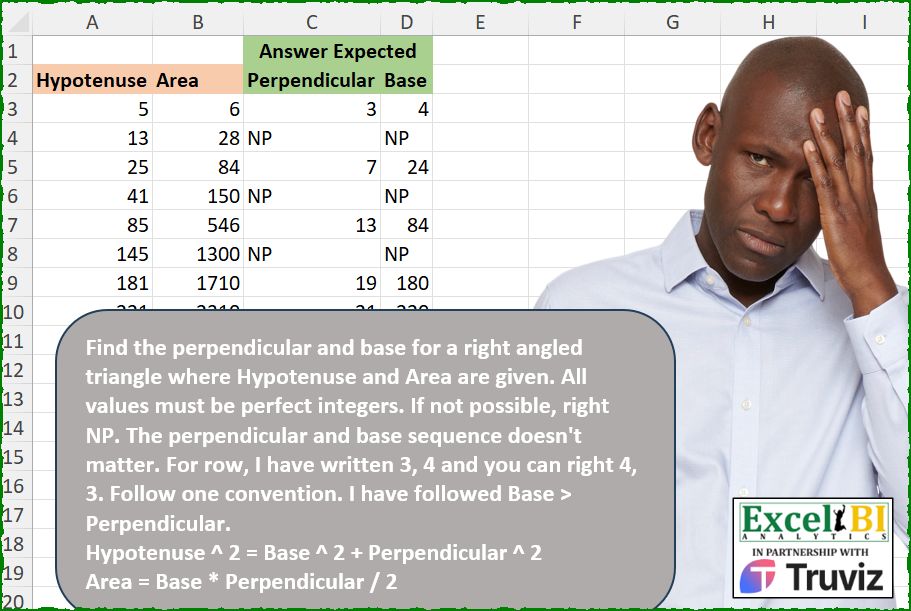
Find the perpendicular and base for a right angled triangle where Hypotenuse and Area are given. All values must be perfect integers. If not possible, right NP. The perpendicular and base sequence doesn’t matter. For row, I have written 3, 4 and you can right 4, 3. Follow one convention. I have followed Base > Perpendicular. Hypotenuse ^ 2 = Base ^ 2 + Perpendicular ^ 2 Area = Base * Perpendicular / 2
📌 Challenge Details and Links
ExcelBI Excel Challenge Number: 540
Challenge Difficulty: ⭐️
📥Download Sample File
📥Link to the solutions on LinkedIn
Solving the challenge of Find Triangle with Given Area with Power Query
Power Query solution 1 for Find Triangle with Given Area, proposed by Kris Jaganah:
let
  Source = Excel.CurrentWorkbook(){[Name = "Table1"]}[Content],
  Bas = Table.AddColumn(
    Source,
    "Base",
    each [
      a = [Hypotenuse],
      b = [Area],
      c = Number.Sqrt(
        (Number.Sqrt((Number.Power(a, 4) - (Number.Power(b, 2) * 16))) + Number.Power(a, 2)) / 2
      ),
      d = if Number.Mod(c, 1) > 0 then "NP" else c
    ][d]
  ),
  Perp = Table.AddColumn(Bas, "Perpendicular", each try [Area] * 2 / [Base] otherwise "NP")[
    [Perpendicular],
    [Base]
  ]
in
  Perp
Power Query solution 2 for Find Triangle with Given Area, proposed by Alejandro Simón 🇵🇦 🇪🇸:
let
  Source = Excel.CurrentWorkbook(){[Name = "Table1"]}[Content],
  Sol = Table.Combine(
    Table.AddColumn(
      Source,
      "A",
      (z) =>
        let
          a = {1 .. z[Hypotenuse] - 1},
          b = List.TransformMany(a, (x) => a, (x, y) => {{x, y}, x * x + y * y}),
          c = List.Select(b, each _{1} = Number.Power(z[Hypotenuse], 2)),
          d = List.Distinct(List.Transform(c, each List.Sort(_{0}))),
          e = List.Distinct(
            List.Transform(d, each if List.Product(_) / 2 = z[Area] then _ else {"NP", "NP"})
          ),
          f = if List.Count(e) > 1 then List.Select(e, each not List.Contains(_, "NP")) else e,
          g = Table.FromRows(f, {"Perpendicular", "Base"})
        in
          g
    )[A]
  )
in
  Sol
Solving the challenge of Find Triangle with Given Area with Excel
Excel solution 1 for Find Triangle with Given Area, proposed by Bo Rydobon 🇹🇭:
=LET(h,
    A3:A10,
    p,
    SQRT((h^2+SQRT(
        h^4-16*B3:B10^2
    )*{-1,
    1})/2),
    IF(
        MOD(
            p,
            1
        ),
        "NP",
        p
    ))
Excel solution 2 for Find Triangle with Given Area, proposed by Rick Rothstein:
=IFERROR(0+SUBSTITUTE(SQRT((A3:A10^2+{-1,
    1}*SQRT(
        A3:A10^4-16*B3:B10^2
    ))/2),
    ".",
    "-"),
    "NP")
Excel solution 3 for Find Triangle with Given Area, proposed by John V.:
=LET(h,
    A3:A10,
    p,
    (h^2/2+(h^4-16*B3:B10^2)^0.5/{-2,
    2})^0.5,
    IF(
        MOD(
            p,
            1
        ),
        "NP",
        p
    ))
Excel solution 4 for Find Triangle with Given Area, proposed by محمد حلمي:
=LET(h,A3:A10^2,a,B3:B10,b,SQRT((h+SQRT(h^2-16*a^2))/2),IF(b=INT(b),HSTACK(a/b*2,b),"NP"))Excel solution 5 for Find Triangle with Given Area, proposed by محمد حلمي:
=LET(
    r,
    B3:B10,
    S,
    SEQUENCE(
        30
    )^2,
    p,
    MAP(
        A3:A10,
        r,
        LAMBDA(
            h,
            a,
            XMATCH(
                h^2,
                S+4*a^2/S
            )
        )
    ),
    IFNA(
        HSTACK(
            p,
            r/p*2
        ),
        "NP"
    )
)
Excel solution 6 for Find Triangle with Given Area, proposed by Kris Jaganah:
=LET(a,
    A3:A10,
    b,
    B3:B10,
    c,
    (((((a^4)-(16*(b^2)))^0.5)+(a^2))/2)^0.5,
    d,
    (2*b)/c,
    IF(
        MOD(
            c,
            1
        ),
        "NP",
        HSTACK(
            d,
            c
        )
    ))
Excel solution 7 for Find Triangle with Given Area, proposed by Julian Poeltl:
=IFERROR(--TEXTSPLIT(TEXTJOIN("|",
    ,
    MAP(A3:A10,
    B3:B10,
    LAMBDA(H,
    A,
    LET(R,
    SEQUENCE(
        H
    ),
    C,
    SEQUENCE(
        ,
        H
    ),
    XLOOKUP(1,
    TOCOL((H^2=R^2+C^2)*(A=R*C/2)),
    TOCOL(
        R&","&C
    ),
    ","))))),
    ",",
    "|"),
    "NP")
Excel solution 8 for Find Triangle with Given Area, proposed by Timothée BLIOT:
=LET(A,
    MAKEARRAY(
        999,
        999,
        LAMBDA(
            x,
            y,
            x*y/2
        )
    ),
    B,
    MAKEARRAY(999,
    999,
    LAMBDA(x,
    y,
    (x^2+y^2)^0.5)),
     DROP(REDUCE(0,
    SEQUENCE(
        8
    ),
    LAMBDA(w,
    v,
     VSTACK(w,
    IFERROR(TOROW(IF((A=INDEX(
        B3:B10,
        v,

    ))*(B=INDEX(
        A3:A10,
        v,

    )),
     SEQUENCE(
         999
     ),
    NA()),
    3),
    {"NP",
    "NP"})))),
    1))
Excel solution 9 for Find Triangle with Given Area, proposed by Hussein SATOUR:
=LET(a,SQRT((A3:A10^2+{-1,1}*SQRT(A3:A10^4-16*(B3:B10^2)))/2),IF(a=ROUND(a,0),a,"NP"))Excel solution 10 for Find Triangle with Given Area, proposed by Sunny Baggu:
=LET(
 _a, 0.5 * DEGREES(ASIN(4 * B3:B10 / A3:A10 ^ 2)),
 _p, A3:A10 * SIN(RADIANS(_a)),
 _b, A3:A10 * COS(RADIANS(_a)),
 IF(_p = INT(_p), HSTACK(_p, _b), "NP")
)
Excel solution 11 for Find Triangle with Given Area, proposed by Sunny Baggu:
=LET(
 _H, A3:A10,
 _A, B3:B10,
 _e1, LAMBDA(a, b, i,
 0.5 * (SQRT(a ^ 2 + 4 * b) + i * SQRT(a ^ 2 - 4 * b))
 ),
 x, _e1(_H, _A, -1),
 y, _e1(_H, _A, 1),
 IF(x = INT(x), HSTACK(x, y), "NP")
)
Excel solution 12 for Find Triangle with Given Area, proposed by Sunny Baggu:
=LET(

     _b,
     A3:A10 - 1,

     _a,
     MAP(
         _b,
          A3:A10,
          LAMBDA(
              a,
               b,
               SQRT(
                   b ^ 2 - a ^ 2
               )
          )
     ),

     _c,
     0.5 * _a * _b,

     IF(
         _c = B3:B10,
          HSTACK(
              _a,
               _b
          ),
          "NP"
     )

)
Excel solution 13 for Find Triangle with Given Area, proposed by LEONARD OCHEA 🇷🇴:
=LET(h,
    A3:A10,
    A,
    B3:B10,
    p,
    1/2,
    r,
    ((h^2+{-1,
    1}*(h^4-16*A^2)^p)/2)^p,
    IF(
        r=INT(
            r
        ),
        r,
        "NP"
    ))
Excel solution 14 for Find Triangle with Given Area, proposed by Md. Zohurul Islam:
=LET(
c,
    A3:A10,

a,
    B3:B10,

x,
    (SQRT(
        c^2+4*a
    )+SQRT(
        c^2-4*a
    ))/2,

y,
    SQRT(
        c^2-x^2
    ),

result,
    HSTACK(
        x,
        y
    ),

report,
    IF(
        MOD(
            result,
            1
        ),
        "NP",
        result
    ),

header,
    {"Perpendicular",
    "Base"},

FinalReport,
    VSTACK(
        header,
        report
    ),

FinalReport)
Excel solution 15 for Find Triangle with Given Area, proposed by ferhat CK:
=LET(a,
    MAP(A3:A10,
    B3:B10,
    LAMBDA(x,
    y,
    LET(ilk,
    SEQUENCE(
        x-1
    )&"-",
    son,
    SEQUENCE(
        ,
        x-1
    ),
    v,
    TOCOL(
        ilk&son
    ),
    dz,
    MAP(v,
    LAMBDA(r,
    SQRT((--TEXTBEFORE(
        r,
        "-"
    ))^2+((--TEXTAFTER(
        r,
        "-"
    ))^2)))),
    z,
    XLOOKUP(
        x,
        dz,
        v
    ),
    IF(
        PRODUCT(
            --TEXTSPLIT(
                z,
                "-"
            )
        )/2=y,
        TEXTJOIN(
            "-",
            ,
            TEXTSPLIT(
                z,
                "-"
            )
        ),
        "NP"&"-"&"NP"
    )))),
    DROP(
        REDUCE(
            0,
            a,
            LAMBDA(
                w,
                q,
                VSTACK(
                    w,
                    TEXTSPLIT(
                        q,
                        "-"
                    )
                )
            )
        ),
        1
    ))
Excel solution 16 for Find Triangle with Given Area, proposed by Bilal Mahmoud kh.:
=LET(res,
    MAP(A3:A10,
    B3:B10,
    LAMBDA(n,
    m,
    LET(a,
    MAP(SEQUENCE(
        m
    ),
    LAMBDA(x,
    TEXTJOIN("-",
    ,
    MAP(SEQUENCE(
        m
    ),
    LAMBDA(y,
    IF(AND((x*y)/2=m,
    (x^2+y^2=n^2)),
    x&","&y,
    "")))))),
    TAKE(
        FILTER(
            a,
            a<>"",
            "NP,NP"
        ),
        1
    )))),
    TEXTSPLIT(
        TEXTJOIN(
            ":",
            ,
            res
        ),
        ",",
        ":"
    ))
Excel solution 17 for Find Triangle with Given Area, proposed by Eddy Wijaya:
=LET(
hyp_,
    A3:A10,

a_,
    B3:B10,

qf,
    LAMBDA(h,
    a,
    (h^2+({-1,
    1}*SQRT((-h^2)^2-4*1*(a*2)^2)))/2),

calc,
    SQRT(
        qf(
            hyp_,
            a_
        )
    ),

IF(
    MOD(
        calc,
        1
    ),
    "NP",
    calc
))
Excel solution 18 for Find Triangle with Given Area, proposed by Eddy Wijaya:
=LET(
hyp_,
    A3:A10,

a_,
    B3:B10,

qf,
    LAMBDA(h,
    a,
    SQRT((-h^2)^2-4*1*(a*2)^2)),

b_,
    SQRT((hyp_^2+qf(
        hyp_,
        a_
    ))/2),

p_,
    SQRT((hyp_^2-qf(
        hyp_,
        a_
    ))/2),

calc,
    HSTACK(
        p_,
        b_
    ),

IF(
    MOD(
        calc,
        1
    )=0,
    calc,
    "NP"
))
Excel solution 19 for Find Triangle with Given Area, proposed by Mey Tithveasna:
=LET(a,
    A3:A10,
    b,
    B3:B10,
    c,
    MAP(
        a-1,
        a,
        LAMBDA(
            x,
            y,
            SQRT(
                y^2-x^2
            )
        )
    ),
    z,
    (c*(a-1))/2,
    IF(
        z=b,
        HSTACK(
            c,
            a-1
        ),
        "NP"
    ))
Excel solution 20 for Find Triangle with Given Area, proposed by Murat Bayraktar:
=LET(A,A3:A10^2,b,B3:B10*4,c,SQRT(A+b),d,SQRT(A-b),z,(c+{-1,1}*d)/2,IF(MOD(z,1),"NP",z))Solving the challenge of Find Triangle with Given Area with Python
Python solution 1 for Find Triangle with Given Area, proposed by Konrad Gryczan, PhD:
import numpy as np
import pandas as pd
from itertools import product
path = "540 Right Angled Triangles.xlsx"
input = pd.read_excel(path, skiprows=1, usecols="A:B")
test = pd.read_excel(path, skiprows=1, usecols="C:D")
def process_triangle(area, hypotenuse):
 ab_divisors = [d for d in range(1, 2 * area + 1) if (2 * area) % d == 0]
 result = [(a, b) for a, b in product(ab_divisors, ab_divisors) if a * b == 2 * area and hypotenuse**2 == a**2 + b**2 and a < b]
 return pd.DataFrame(result, columns=['Perpendicular', 'Base']) if result else pd.DataFrame({'Perpendicular': ['NP'], 'Base': ['NP']})
output = pd.concat([process_triangle(row['Area'], row['Hypotenuse']) for _, row in input.iterrows()], ignore_index=True)
output.fillna('NP', inplace=True)
print(output.equals(test)) # True
Solving the challenge of Find Triangle with Given Area with Python in Excel
Python in Excel solution 1 for Find Triangle with Given Area, proposed by Alejandro Campos:
import math
df = xl("A2:B10", headers=True)
def find_base_perpendicular(h, A):
 h2 = h ** 2
 bp = 2 * A
 for b in range(1, int(math.sqrt(h2)) + 1):
 p = bp / b
 if p.is_integer() and b ** 2 + int(p) ** 2 == h2:
 return int(p), b
 return "NP", "NP"
df[['Base', 'Perpendicular']] = df.apply(lambda row: find_base_perpendicular(row['Hypotenuse'], row['Area']), axis=1, result_type='expand')
df[['Perpendicular', 'Base']]
Python in Excel solution 2 for Find Triangle with Given Area, proposed by Abdallah Ally:
from itertools import combinations
def get_perp_base(row):
 items = row.values
 for comb in combinations(range(1, items[0]), 2):
 cond1 = 0.5 * comb[0] * comb[1] == items[1]
 cond2 = comb[0] ** 2 + comb[1] ** 2 == items[0] ** 2
 if cond1 and cond2:
 return comb
 return 'NP', 'NP'
df = xl("A2:B10", headers=True)
# Perform data manipulation
df[['Perpendicular', 'Base']] = df.apply(get_perp_base, axis=1).tolist()
df
Python in Excel solution 3 for Find Triangle with Given Area, proposed by Ümit Barış Köse, MSc:
def find_base_perpendicular(hypotenuse, area):
 twice_area = 2 * area
 for base in range(1, hypotenuse):
 if twice_area % base != 0:
 continue
 perpendicular = twice_area // base
 if math.isclose(hypotenuse**2, base**2 + perpendicular**2):
 return base, perpendicular
 return 'NP', 'NP'
pd=xl("A2:B10", headers=True)
df[['Base', 'Perpendicular']] = df.apply(lambda row: find_base_perpendicular(row['Hypotenuse'], row['Area']), axis=1, result_type='expand')
df

    &
Solving the challenge of Find Triangle with Given Area with R
R solution 1 for Find Triangle with Given Area, proposed by Konrad Gryczan, PhD:
library(tidyverse)
library(readxl)
library(numbers)
path = "Excel/540 Right Angled Triangles.xlsx"
input = read_excel(path, range = "A2:B10")
test = read_excel(path, range = "C2:D10")
process_triangle <- function(area, hypotenuse) {
 ab_divisors <- divisors(2 * area)
 expand_grid(a = ab_divisors, b = ab_divisors) %>%
 filter(a * b == 2 * area, hypotenuse^2 == a^2 + b^2, a < b) %>%
 transmute(base = a, perpendicular = b)
}
result = input %>%
 mutate(res = map2(Area, Hypotenuse, process_triangle)) %>%
 unnest_wider(res) %>%
 select(-Area, -Hypotenuse) %>%
 mutate(across(everything(), as.character),
 across(everything(), ~replace_na(., "NP")))
all.equal(result, test, check.attributes = FALSE)
# [1] TRUE
Solving the challenge of Find Triangle with Given Area with DAX
DAX solution 1 for Find Triangle with Given Area, proposed by Ümit Barış Köse, MSc:
Base_Perpendicular =
VAR Twice_Area = 2 * [Area]
VAR Hypotenuse = [Hypotenuse]
VAR PossibleBase =
 GENERATESERIES(1, Hypotenuse - 1)
VAR Base =
 CALCULATE(
 MAXX(
 FILTER(
 PossibleBase,
 MOD(Twice_Area, [Value]) = 0
 ),
 [Value]
 )
 )
VAR Perpendicular = IF(Base > 0, Twice_Area / Base, BLANK())
VAR IsValid = IF(ROUND(Hypotenuse^2, 10) = ROUND(Base^2 + Perpendicular^2, 10), TRUE(), FALSE())
RETURN
 IF(
 IsValid,
 FORMAT(Base, "0") & ", " & FORMAT(Perpendicular, "0"),
 "NP"
 )
&&