
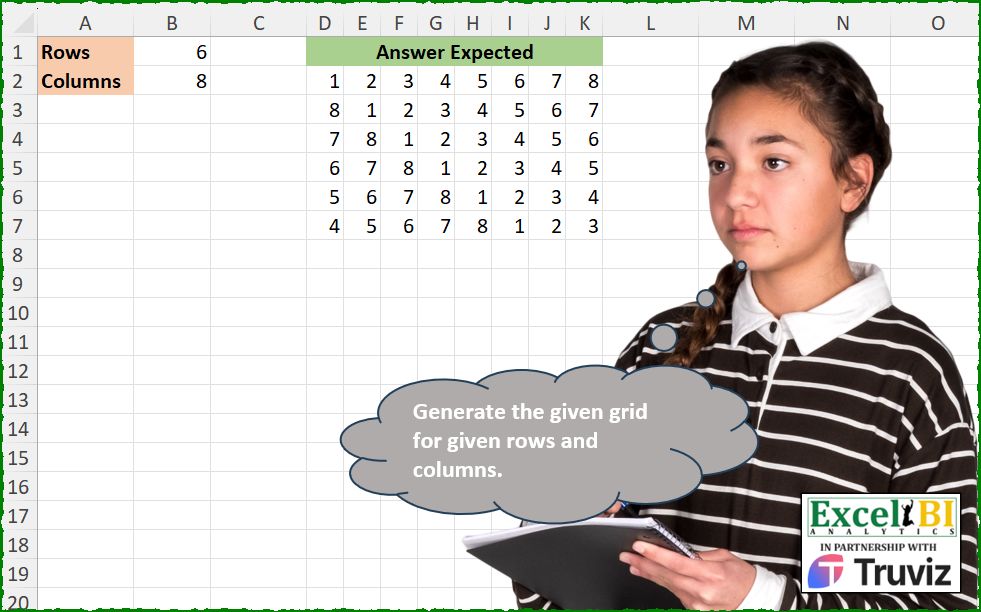
This problem was contributed by Mehmet Çiçek. Generate the given grid for given rows and columns.
📌 Challenge Details and Links
ExcelBI Excel Challenge Number: 535
Challenge Difficulty: ⭐️
📥Download Sample File
📥Link to the solutions on LinkedIn
Solving the challenge of Draw Grid by Rows/Columns with Power Query
Power Query solution 1 for Draw Grid by Rows/Columns, proposed by John V.:
let
 c = 8, r = 6,
 R = List.TransformMany({0..r - 1}, each {1..c},
 (x, y) => c * Number.From(y <= x) + y - x)
in
 Table.FromRows(List.Split(R, c))
Blessings!
Power Query solution 2 for Draw Grid by Rows/Columns, proposed by Aditya Kumar Darak 🇮🇳:
let
  Rows     = 6,
  Columns  = 8,
  List     = {1 .. Columns, 1 .. Columns},
  Generate = List.Transform({1 .. Rows}, each List.Range(List, Columns - _ + 1, Columns)),
  Return   = Table.FromRows(Generate)
in
  Return
Power Query solution 3 for Draw Grid by Rows/Columns, proposed by Alejandro Simón 🇵🇦 🇪🇸:
let
  Source = Excel.CurrentWorkbook(){[Name = "Table1"]}[Content],
  Col = {1 .. Source[Column2]{1}},
  Rows = List.Transform(
    {0 .. Source[Column2]{0} - 1},
    each List.LastN(Col, _) & List.RemoveLastN(Col, _)
  ),
  Sol = Table.FromRows(Rows)
in
  Sol
Power Query solution 4 for Draw Grid by Rows/Columns, proposed by Abdallah Ally:
let
  f = (x, y) =>
    Table.FromRows(
      List.Transform({0 .. x - 1}, each List.LastN({1 .. y}, _) & List.FirstN({1 .. y}, y - _))
    ),
  Result = f(6, 8)
in
  Result
Power Query solution 5 for Draw Grid by Rows/Columns, proposed by Ramiro Ayala Chávez:
let
  Rows = 6,
  Columns = 8,
  a = {1 .. Columns},
  b = List.Generate(
    () => [i = 0],
    each [i] <= List.Count(a),
    each [i = [i] + 1],
    each List.LastN(a, [i]) & List.RemoveLastN(a, [i])
  ),
  Sol = Table.FromRows(List.FirstN(b, Rows))
in
  Sol
Power Query solution 6 for Draw Grid by Rows/Columns, proposed by Rafael González B.:
let
C = 8,
R = 6,
L = {1..C},
LA = List.Accumulate(
L,
{L},
(x,y) => let
a = List.LastN(L, y),
b = List.RemoveLastN(L, y),
c = {a & b}
in
x & c),
LF = Table.FromRows(List.FirstN(LA, R))
in
LF
🧙🏻♂️🧙🏻♂️🧙🏻♂️
Solving the challenge of Draw Grid by Rows/Columns with Excel
Excel solution 1 for Draw Grid by Rows/Columns, proposed by Bo Rydobon 🇹🇭:
=MAKEARRAY(
    B1,
    B2,
    LAMBDA(
        r,
        c,
        MOD(
            c-r,
            B2
        )+1
    )
)
Excel solution 2 for Draw Grid by Rows/Columns, proposed by Bo Rydobon 🇹🇭:
=MOD(SEQUENCE(,B2)-SEQUENCE(B1),B2)Excel solution 3 for Draw Grid by Rows/Columns, proposed by Rick Rothstein:
=DROP(
    REDUCE(
        "",
        SEQUENCE(
            B1
        ),
        LAMBDA(
            a,
            x,
            VSTACK(
                a,
                INDEX(
                    MOD(
                        SEQUENCE(
                            ,
                            2*B2,
                            0
                        ),
                        B2
                    )+1,
                    ,
                    SEQUENCE(
                        ,
                        B2,
                        B2+2-x
                    )
                )
            )
        )
    ),
    1
)
Excel solution 4 for Draw Grid by Rows/Columns, proposed by Rick Rothstein:
=TAKE(
    MOD(
        SEQUENCE(
            ,
            B2,
            B2+1
        )-SEQUENCE(
            B1,
            ,
            B2+1
        )+B2,
        B2
    )+1,
    B1
)
Excel solution 5 for Draw Grid by Rows/Columns, proposed by John V.:
=1+MOD(SEQUENCE(B1,B2)-SEQUENCE(B1),B2)Excel solution 6 for Draw Grid by Rows/Columns, proposed by محمد حلمي:
=MOD(SEQUENCE(,B2)+SEQUENCE(B1,,,B2-1)-2,B2)Excel solution 7 for Draw Grid by Rows/Columns, proposed by Kris Jaganah:
=MAKEARRAY(B1,B2,LAMBDA(x,y,IF(y-x+1<1,B2+y-x+1,y-x+1)))Excel solution 8 for Draw Grid by Rows/Columns, proposed by Julian Poeltl:
=MAKEARRAY(
    B1,
    B2,
    LAMBDA(
        A,
        B,
        IFS(
            A=B,
            1,
            AB,
            B2+1+B-A
        )
    )
)
Excel solution 9 for Draw Grid by Rows/Columns, proposed by Aditya Kumar Darak 🇮🇳:
=MAKEARRAY(B1, B2, LAMBDA(r, c, MOD(c - r, B2) + 1))Excel solution 10 for Draw Grid by Rows/Columns, proposed by Timothée BLIOT:
=LET(A,SEQUENCE(B2),B,B2-A+1,TAKE(WRAPROWS(DROP(REDUCE("",B, LAMBDA(w,v,VSTACK(w,SORT(VSTACK(A,v))))),1),B2),B1))Excel solution 11 for Draw Grid by Rows/Columns, proposed by Hussein SATOUR:
=LET(
    a,
    MAKEARRAY(
        B1,
        B2,
        LAMBDA(
            x,
            y,
            y
        )
    )-SEQUENCE(
        B1,
        ,
        0
    ),
    IF(
        a<=0,
        B2+a,
        a
    )
)
Excel solution 12 for Draw Grid by Rows/Columns, proposed by Sunny Baggu:
=LET(

     v,
     SEQUENCE(
         ,
          B2
     ) -
     SEQUENCE(
         B1
     ) + 1,

     IF(
         v <= 0,
          8 + v,
          v
     )

)
Excel solution 13 for Draw Grid by Rows/Columns, proposed by Abdallah Ally:
=LET(
    a,
    B2,
    b,
    SEQUENCE(
        ,
        a
    ),
    REDUCE(
        b,
        SEQUENCE(
            B1-1
        ),
        LAMBDA(
            x,
            y,
            VSTACK(
                x,
                HSTACK(
                    DROP(
                        b,
                        ,
                        a-y
                    ),
                    TAKE(
                        b,
                        ,
                        a-y
                    )
                )
            )
        )
    )
)
Excel solution 14 for Draw Grid by Rows/Columns, proposed by Pieter de B.:
=MOD(SEQUENCE(,B2,0)-SEQUENCE(B1,,0),MAX(B1:B2))Excel solution 15 for Draw Grid by Rows/Columns, proposed by ferhat CK:
=LET(
    a,
    DROP(
        REDUCE(
            0,
            SEQUENCE(
                B2
            ),
            LAMBDA(
                x,
                y,
                VSTACK(
                    x,
                    MOD(
                        SEQUENCE(
                            ,
                            B1,
                            y,
                            -1
                        ),
                        B2
                    )
                )
            )
        ),
        1
    ),
    b,
    TRANSPOSE(
        a
    ),
    IF(
        b=0,
        8,
        b
    )
)
Excel solution 16 for Draw Grid by Rows/Columns, proposed by Jaroslaw Kujawa:
=REDUCE(SEQUENCE(; B2); SEQUENCE(B1-1);
LAMBDA(a; b; LET(c;SEQUENCE(;B2);VSTACK(a;HSTACK(FILTER(c;c>MAX(c)-b); FILTER(c;c<=MAX(c)-b))))))
Excel solution 17 for Draw Grid by Rows/Columns, proposed by Bilal Mahmoud kh.:
=LET(
    r,
    6,
    c,
    8,
    ser,
    SEQUENCE(
        ,
        c
    ),
    REDUCE(
        ser,
        SEQUENCE(
            r
        ),
        LAMBDA(
            x,
            y,
            VSTACK(
                x,
                HSTACK(
                    INDEX(
                        ser,
                        1,
                        SEQUENCE(
                            ,
                            y,
                            c-y+1
                        )
                    ),
                    INDEX(
                        ser,
                        1,
                        SEQUENCE(
                            ,
                            c-y
                        )
                    )
                )
            )
        )
    )
)
Excel solution 18 for Draw Grid by Rows/Columns, proposed by Eddy Wijaya:
=LET(
    r_o,
    B1,

    c_o,
    B2,

    MAKEARRAY(
        r_o,
        c_o,
        LAMBDA(
            r,
            c,

            LET(

                diff,
                c-r+1,

                IF(
                    diff<=0,
                    c_o+diff,
                    diff
                )
            )
        )
    )
)
Excel solution 19 for Draw Grid by Rows/Columns, proposed by Mey Tithveasna:
=MOD(SEQUENCE(1,B2)-SEQUENCE(B1),B2)Excel solution 20 for Draw Grid by Rows/Columns, proposed by Ricardo Alexis Domínguez Hernández:
=MAKEARRAY(
    B1,
    B2,
    LAMBDA(
        r,
        c,
        IF(
            c
Excel solution 21 for Draw Grid by Rows/Columns, proposed by Damir Vajdić:
=LET(
    r,
    B1,
    c,
    B2,

     rs,
    SEQUENCE(
        r
    ),

     cs,
    SEQUENCE(
        ,
        c
    ),

     t,
    IF(
        rs,
        cs
    )-rs+1,

     IF(
         t>0,
         t,
         t+c
     )
)
Solving the challenge of Draw Grid by Rows/Columns with Python
Python solution 1 for Draw Grid by Rows/Columns, proposed by Konrad Gryczan, PhD:
import pandas as pd
import numpy as np
path = "535 Generate Number Grid.xlsx"
height = pd.read_excel(path, usecols = "B", nrows = 1, header = None).values[0][0]
width = pd.read_excel(path, usecols = "B", nrows = 1, skiprows = 1, header = None).values[0][0]
test = pd.read_excel(path, usecols = "D:K", skiprows = 1, header = None).values
matrix = np.array([np.roll(np.arange(1, width + 1), i - 1) for i in range(1, height + 1)])
print(np.array_equal(matrix, test)) # True
Python solution 2 for Draw Grid by Rows/Columns, proposed by Konrad Gryczan, PhD:
import pandas as pd
import numpy as np
path = "535 Generate Number Grid.xlsx"
height = pd.read_excel(path, usecols = "B", nrows = 1, header = None).values[0][0]
width = pd.read_excel(path, usecols = "B", nrows = 1, skiprows = 1, header = None).values[0][0]
test = pd.read_excel(path, usecols = "D:K", skiprows = 1, header = None).values
matrix = np.zeros((height, width), dtype=int)
for i in range(1, height + 1):
 matrix[i - 1, :] = np.roll(np.arange(1, width + 1), i - 1)
print(np.array_equal(matrix, test)) # True
Solving the challenge of Draw Grid by Rows/Columns with Python in Excel
Python in Excel solution 1 for Draw Grid by Rows/Columns, proposed by Alejandro Campos:
rows = xl("B1")
columns = xl("B2")
first_row = list(range(1, columns + 1))
grid = []
for i in range(rows):
 grid.append(first_row[-i:] + first_row[:-i])
df = pd.DataFrame(grid)
df
Python in Excel solution 2 for Draw Grid by Rows/Columns, proposed by Anshu Bantra:
row=xl("B1", headers=False)
col=xl("B2", headers=False)
lst = [*range(1,col+1)]
ln = len(lst)
lst2=[]
for _ in range(row):
 lst1=[]
 lst1.extend(lst[_*-1:])
 if _ != 0: lst1.extend(lst[0:ln-_])
 lst2.append(lst1)
lst2
Solving the challenge of Draw Grid by Rows/Columns with R
R solution 1 for Draw Grid by Rows/Columns, proposed by Konrad Gryczan, PhD:
library(tidyverse)
library(readxl)
path = "Excel/535 Generate Number Grid.xlsx"
height = read_excel(path, range = "B1", col_names = F) %>% pull()
width = read_excel(path, range = "B2", col_names = F) %>% pull()
test = read_excel(path, range = "D2:K7", col_names = F) %>% as.matrix()
matrix = matrix(0, nrow = height, ncol = width)
for (i in 1:height) {
 matrix[i, ] <- c(tail(1:width, i - 1), head(1:width, width - (i - 1)))
}
all.equal(matrix, test, check.attributes = F)
# [1] TRUE
&&