
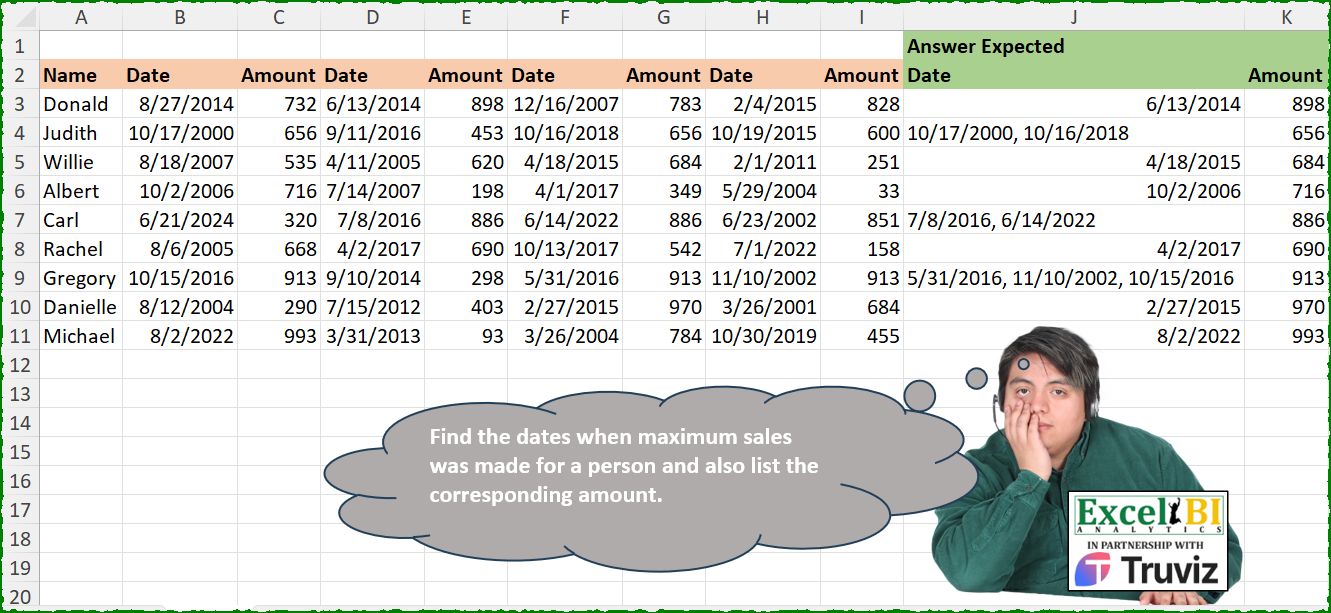
Find the dates when maximum sales was made for a person and also list the corresponding amount.
📌 Challenge Details and Links
ExcelBI Excel Challenge Number: 530
Challenge Difficulty: ⭐️
📥Download Sample File
📥Link to the solutions on LinkedIn
Solving the challenge of Max Sale Date and Amount with Power Query
Power Query solution 1 for Max Sale Date and Amount, proposed by John V.:
let
 S = Excel.CurrentWorkbook(){0}[Content],
 A = List.Alternate,
 R = Table.AddColumn(S, "R", each
 let
 t = List.Skip(Record.ToList(_)),
 v = A(t, 1, 1), d = List.Transform(A(t, 1, 1, 1), each Text.From(Date.From(_))),
 m = List.Max(v),
 r = {Text.Combine(List.Select(d, each v{List.PositionOf(d, _)} = m), ", "), m}
 in
 r
 )[R],
 Z = Table.FromRows(R, {"Date", "Amount"})
in
 Z

Blessings!
Power Query solution 2 for Max Sale Date and Amount, proposed by Kris Jaganah:
let
  Source = Excel.CurrentWorkbook(){[Name = "Table1"]}[Content],
  Unpivot = Table.UnpivotOtherColumns(Source, {"Name"}, "A", "V"),
  Idx = Table.AddColumn(
    Unpivot,
    "Idx",
    each Number.RoundDown((try Number.From(Text.End([A], 1)) otherwise 1) / 2)
  ),
  Titl = Table.TransformColumns(
    Idx,
    {"A", each if Text.StartsWith(_, "D") then "Date" else "Amount"}
  ),
  Piv = Table.Pivot(Titl, List.Distinct(Titl[A]), "A", "V"),
  Group = Table.Group(
    Piv,
    {"Name"},
    {
      {
        "Date",
        each [
          a = Table.SelectRows(_, (x) => x[Amount] = List.Max([Amount]))[Date],
          b = Text.Combine(
            List.Transform(a, (y) => Date.ToText(Date.From(y), [Format = "MM/dd/yyyy"])),
            ", "
          )
        ][b]
      },
      {"Max", each List.Max([Amount])}
    }
  ),
  Sort = Table.Sort(Group, {each List.PositionOf(Source[Name], [Name]), 0})
in
  Sort
Power Query solution 3 for Max Sale Date and Amount, proposed by Aditya Kumar Darak 🇮🇳:
let
  Source = Excel.CurrentWorkbook(){[Name = "data"]}[Content],
  Transform = Table.TransformRows(
    Source,
    each [
      L      = Record.ToList(_),
      S      = List.Skip(L),
      Name   = [Name],
      Amount = List.Max(S),
      P      = List.PositionOf(S, Amount, Occurrence.All),
      D      = List.Transform(P, (f) => DateTime.ToText(S{f - 1}, "d")),
      Date   = Text.Combine(D, ", ")
    ][[Name], [Date], [Amount]]
  ),
  Return = Table.FromRecords(Transform)
in
  Return
Power Query solution 4 for Max Sale Date and Amount, proposed by Alejandro Simón 🇵🇦 🇪🇸:
let
  Source = Excel.CurrentWorkbook(){[Name = "Table1"]}[Content],
  Sol = Table.Combine(
    Table.AddColumn(
      Source,
      "A",
      each
        let
          a = List.Split(List.Skip(Record.ToList(_)), 2),
          b = List.Max(List.Transform(a, each _{1})),
          c = List.Transform(List.Select(a, each _{1} = b), each Text.From(Date.From(_{0}))),
          d = {if List.Count(c) > 1 then Text.Combine(c, ", ") else Date.From(c{0}), b}
        in
          Table.FromRows({d}, {"Date", "Amount"})
    )[A]
  )
in
  Sol
Power Query solution 5 for Max Sale Date and Amount, proposed by Abdallah Ally:
let
  Source = Excel.CurrentWorkbook(){[Name = "Table1"]}[Content],
  Transform = Table.TransformRows(
    Source,
    each [
      a = Record.FieldValues(_),
      b = List.Select(a, each _ is number),
      c = List.RemoveItems(a, b & {a{0}}),
      d = List.Select(List.Zip({b, c}), each _{0} = List.Max(b)),
      e = List.Transform(d, each Text.From(DateTime.Date(_{1}))),
      f = {Text.Combine(e, ", "), List.Max(b)}
    ][f]
  ),
  Result = Table.FromRows(Transform, type table [Date = text, Amount = number])
in
  Result
Power Query solution 6 for Max Sale Date and Amount, proposed by 🇮🇷 Navid Esmaeilzadeh اسماعیل زاده:
let
  S = Excel.CurrentWorkbook(){[Name = "Table1"]}[Content],
  A = Table.AddColumn(
    S,
    "Tbl",
    each
      let
        A = List.Alternate(List.Skip(Record.ToList(_), 1), 1, 1, 1),
        B = List.Skip(List.Alternate(List.Skip(Record.ToList(_), 1), 1, 1, 2), 1),
        C = Table.FromColumns({A, B}, {"Date", "Amount"})
      in
        C
  ),
  B = Table.SelectColumns(A, {"Name", "Tbl"}),
  C = (x) =>
    let
      a = Table.TransformColumnTypes(x, {{"Date", type date}, {"Amount", Int64.Type}}),
      b = Table.AddColumn(
        a,
        "R",
        each List.PositionOf(List.Sort(a[Amount], Order.Descending), [Amount])
      ),
      c = Table.TransformColumnTypes(b, {{"Date", type text}}),
      d = Table.Group(
        c,
        {"R"},
        {
          {"Amount", each List.Max([Amount]), type nullable number},
          {"Date", each Text.Combine([Date], ","), type nullable datetime}
        }
      ),
      e = Table.SelectRows(d, each ([R] = 0)),
      f = Table.SelectColumns(e, {"Date", "Amount"})
    in
      f,
  D = Table.AddColumn(B, "T2", each C([Tbl])),
  E = Table.SelectColumns(D, {"Name", "T2"}),
  F = Table.ExpandTableColumn(E, "T2", {"Date", "Amount"}, {"Date", "Amount"})
in
  F
Power Query solution 7 for Max Sale Date and Amount, proposed by Rafael González B.:
let
Source = Table,
Result = Table.Combine(Table.AddColumn(Source, "All", each
let
R = Record.RemoveFields(_, "Name"),
TL = List.Split(Record.ToList(R),2),
MX = List.Max(List.Transform(TL, each _{1})),
LS = List.Select(TL, each _{1} = MX),
LZ = {{Text.Combine(List.Transform(List.Zip(LS){0}, each Text.From(_)), ", ")}} & {{MX}},
Tbl = Table.FromColumns(LZ, {"Dates", "Amount"})
in
Tbl)[All])
in
Result
🧙🏻♂️🧙🏻♂️🧙🏻♂️
Power Query solution 8 for Max Sale Date and Amount, proposed by Rafael González B.:
let
Source = Table,
Unp = Table.UnpivotOtherColumns(Source, {"Name"}, "Dates", "Values"),
Rep = Table.TransformColumns(Unp, {"Dates", each Text.Remove(_, {"0".."9"})}),
Ind = Table.AddIndexColumn(Rep, "Index", 1, 1, Int64.Type),
Piv = Table.Pivot(Ind, List.Distinct(Ind[Dates]), "Dates", "Values"),
FillUp = Table.FillUp(Piv,{"Amount"}),
RemN = Table.SelectRows(FillUp, each ([Date] <> null)),
RemI = Table.RemoveColumns(RemN,{"Index"}),
GB = Table.Group(RemI, {"Name"}, {{"All", each
let
SMax = Table.SelectRows(_, (y) => y[Amount] = List.Max(_[Amount])),
LD = {{Text.Combine(List.Transform(SMax[Date], (x) => Text.From(x)), ", ")}} & {{SMax[Amount]{0}}},
TF = Table.FromColumns(LD, {"Dates", "Amount"})
in
TF
}}),
RN = Table.RenameColumns(Source[[Name]], {"Name", "Names"}),
Ind2 = Table.AddIndexColumn(RN, "Índice", 1, 1, Int64.Type),
Join = Table.Join(Ind2, "Names", GB, "Name"),
Sort = Table.Sort(Join,{{"Índice", Order.Ascending}})[[Name], [All]],
Result = Table.ExpandTableColumn(Sort, "All", {"Dates", "Amount"}, {"Dates", "Amount"})
in
Result
🧙🏻♂️🧙🏻♂️🧙🏻♂️
Power Query solution 9 for Max Sale Date and Amount, proposed by Ahmed Ariem:
let

 f= (w)=> Table.TransformRows(w, each
[ LstA = List.Select(Record.ToList(_), (x)=> x is number),
 LstD=(List.Select(Record.ToList(_), (x)=> x is date)),
 b = List.Max(LstA),
 c = List.PositionOf(LstA,b,2),
 d = Text.Combine( List.Sort( List.Transform(c, (x)=>Text.From(LstD{x})),1),","),
 e = Table.FromRows({{d,b}},{"Date","Amount"})
][e]),
 Source = Excel.CurrentWorkbook(){[Name="tbl"]}[Content],
 from= Table.TransformColumnTypes(Source,{{"Name", type text},
 {"Date", type date}, {"Amount", Int64.Type},
 {"Date2", type date}, {"Amount3", Int64.Type},
 {"Date4", type date}, {"Amount5", Int64.Type},
 {"Date6", type date}, {"Amount7", Int64.Type}})
in
 Table.Combine( f(from))
----
file attached
https://1drv.ms/x/s!AiUZ0Ws7G26RkDH24mzf9msKOcLs?e=bckzZQ
Power Query solution 10 for Max Sale Date and Amount, proposed by Ahmed Ariem:
let

 f= (w)=> Table.TransformRows(w, each
[ LstA = List.Select(Record.ToList(_), (x)=> x is number),
 LstD=(List.Select(Record.ToList(_), (x)=> x is date)),
 b = List.Max(LstA),
 c = List.PositionOf(LstA,b,2),
 d = Text.Combine( List.Sort( List.Transform(c, (x)=>Text.From(LstD{x})),1),","),
 e = Table.FromRows({{d,b}},{"Date","Amount"})
][e]),
 Source = Excel.CurrentWorkbook(){[Name="tbl"]}[Content],
 from= Table.TransformColumnTypes(Source,{{"Name", type text},
 {"Date", type date}, {"Amount", Int64.Type},
 {"Date2", type date}, {"Amount3", Int64.Type},
 {"Date4", type date}, {"Amount5", Int64.Type},
 {"Date6", type date}, {"Amount7", Int64.Type}})
in
 Table.Combine( f(from))
----
file attached
https://1drv.ms/x/s!AiUZ0Ws7G26RkDH24mzf9msKOcLs?e=bckzZQ
Power Query solution 11 for Max Sale Date and Amount, proposed by Luke Jarych:
let
  Source = Excel.CurrentWorkbook(){[Name = "Table1"]}[Content],
  Unpivoted = Table.UnpivotOtherColumns(Source, {"Name"}, "Attribute", "Value"),
  Tranform = Table.TransformColumns(
    Unpivoted,
    {"Attribute", each if Text.StartsWith(_, "D") then "Date" else "Amount"}
  ),
  IndexCol = Table.AddIndexColumn(Tranform, "Index", 0, 1, Int64.Type),
  IntDivided = Table.TransformColumns(IndexCol, {{"Index", each Number.IntegerDivide(_, 2)}}),
  Pivot = Table.Pivot(IntDivided, List.Distinct(IntDivided[Attribute]), "Attribute", "Value"),
  Grouped = Table.Group(
    Pivot,
    {"Name"},
    {
      {
        "Date",
        each
          let
            a = List.Max(_[Amount]),
            b = Table.SelectRows(_, each _[Amount] = a),
            c = Text.Combine(
              List.Transform(
                b[Date],
                each Date.ToText(Date.From(_), [Format = "MM/dd/yyyy", Culture = "en-US"])
              ),
              ", "
            )
          in
            c
      },
      {"Max", each List.Max([Amount])}
    }
  )
in
  Table.Sort(Grouped, each List.PositionOf(Source[Name], [Name]))
Power Query solution 12 for Max Sale Date and Amount, proposed by Mihai Radu O:
let
  Source = Excel.CurrentWorkbook(){[Name = "Table1"]}[Content],
  s = Table.Combine(
    Table.AddColumn(
      tip,
      "r",
      each [
        a = Record.FieldValues(_),
        b = List.Skip(a, 1),
        dt = List.Alternate(b, 1, 1, 1),
        amt = List.Alternate(b, 1, 1, 0),
        c = List.Max(amt),
        d = Text.Combine(
          List.Transform(List.Zip({dt, amt}), (x) => if x{1} = c then Text.From(x{0}) else null),
          ", "
        ),
        e = Table.FromColumns({{d}, {c}}, {"Date", "Amount"})
      ][e]
    )[r]
  )
in
  s
Solving the challenge of Max Sale Date and Amount with Excel
Excel solution 1 for Max Sale Date and Amount, proposed by Bo Rydobon 🇹🇭:
=REDUCE(B2:C2,B3:B11,LAMBDA(a,v,LET(w,WRAPROWS(TAKE(v:I3,-1),2),d,DROP(w,,1),m,MAX(d),VSTACK(a,HSTACK(ARRAYTOTEXT(TEXT(FILTER(TAKE(w,,1),d=m),"m/d/e")),m)))))Excel solution 2 for Max Sale Date and Amount, proposed by John V.:
=REDUCE(
    J2:K2,
    I3:I11,
    LAMBDA(
        b,
        v,
        LET(
            i,
            WRAPROWS(
                TAKE(
                    B11:v,
                    1
                ),
                2
            ),
            a,
            DROP(
                i,
                ,
                1
            ),
            m,
            MAX(
                a
            ),
            VSTACK(
                b,
                HSTACK(
                    TEXTJOIN(
                        ", ",
                        ,
                        REPT(
                            TEXT(
                                TAKE(
                i,
                ,
                1
            ),
                                "m/d/e"
                            ),
                            a=m
                        )
                    ),
                    m
                )
            )
        )
    )
)
Excel solution 3 for Max Sale Date and Amount, proposed by محمد حلمي:
=LET(r,
    LAMBDA(x,
    BYROW(B3:I11,
    LAMBDA(a,
    LET(
m,
    MAX((a<9000)*a),
    IF(
        x,
        ARRAYTOTEXT(
            TEXT(
                TOCOL(

                    a/DROP(
                        m=a,
                        ,
                        1
                    ),
                    2
                ),
                "m/d/e"
            )
        ),
        m
    ))))),
    HSTACK(
        r(
            1
        ),
        r(
            0
        )
    ))
Excel solution 4 for Max Sale Date and Amount, proposed by محمد حلمي:
=REDUCE(J2:K2,
    A3:A11,
    LAMBDA(a,
    v,
    LET(
j,
    OFFSET(
        v,
        ,
        ,
        ,
        9
    ),

i,
    INDEX(
        j,
        {3,
        5,
        7,
        9}
    ),

m,
    MAX(
        i
    ),

VSTACK(a,
    HSTACK(ARRAYTOTEXT(
TEXT(TOCOL(HSTACK(
    0,
    j
)/(m=j),
    2),
    "m/d/e")),
    m)))))
Excel solution 5 for Max Sale Date and Amount, proposed by Kris Jaganah:
=LET(a,
    A3:I11,
    HSTACK(BYROW(
        a,
        LAMBDA(
            y,
            ARRAYTOTEXT(
                TEXT(
                    INDEX(
                        y,
                        ,
                        FILTER(
                            SEQUENCE(
                                ,
                                COLUMNS(
                                    a
                                )
                            ),
                            y=MAX(
                                FILTER(
                                    y,
                                    y<30000
                                )
                            )
                        )-1
                    ),
                    "mm/d/yyyy"
                )
            )
        )
    ),
    BYROW(DROP((a<30000)*a,
    ,
    1),
    MAX)))
Excel solution 6 for Max Sale Date and Amount, proposed by Julian Poeltl:
=HSTACK(BYROW(B3:I11,LAMBDA(A,--TEXTJOIN(", ",,INDEX(A,FILTER(SEQUENCE(,8),A=MAXIFS(A,A,"<1000"))-1)))),BYROW(B3:I11,LAMBDA(A,MAXIFS(A,A,"<1000"))))Excel solution 7 for Max Sale Date and Amount, proposed by Timothée BLIOT:
=LET(
    A,
    B3:I11,
    B,
    {1,
    3,
    5,
    7},
    C,
    LAMBDA(
        n,
        m,
        TOCOL(
            CHOOSECOLS(
                m,
                n
            )
        )
    ),
    D,
    C(
        B,
        A
    ),
     E,
    C(
        B+1,
        A
    ),
    F,
    A3:A11,
    G,
    C(
        B,
        IF(
            F=A,
            ,
            F
        )
    ),
    DROP(
        REDUCE(
            "",
            F,
            LAMBDA(
                w,
                v,
                LET(
                    H,
                    FILTER(
                  &      D,
                        G=v
                    ),
                    I,
                    FILTER(
                        E,
                        G=v
                    ),
                    J,
                    MAX(
                        I
                    ),
                     VSTACK(
                         w,
                         HSTACK(
                             ARRAYTOTEXT(
                                  TEXT(
                                      FILTER(
                                          H,
                                          I=J
                                      ),
                                      "m/d/yyyy"
                                  )
                             ),
                             J
                         )
                     )
                )
            )
        ),
        1
    )
)
Excel solution 8 for Max Sale Date and Amount, proposed by Hussein SATOUR:
=TEXTSPLIT(
    CONCAT(
        BYROW(
            B3:I11,
            LAMBDA(
                x,
                LET(
                    a,
                    WRAPROWS(
                        x,
                        2
                    ),
                    b,
                    INDEX(
                        a,
                        ,
                        2
                    ),
                    c,
                    MAX(
                        b
                    ),
                    ARRAYTOTEXT(
                        TEXT(
                            FILTER(
                                INDEX(
                                    a,
                                    ,
                                    1
                                ),
                                b=c
                            ),
                            "dd/mm/e"
                        )
                    )&"|"&c
                )
            )
        )&";"
    ),
    "|",
    ";",
    1
)
Excel solution 9 for Max Sale Date and Amount, proposed by Oscar Mendez Roca Farell:
=REDUCE(B2:C2,
    B3:B11,
    LAMBDA(i,
    x,
    LET(r,
    TAKE(
        x:I11,
        1
    ),
    m,
    MAX(r*(B2:I2<"B")),
    VSTACK(
        i,
        HSTACK(
            TEXTJOIN(
                ", ",
                ,
                TEXT(
                    REPT(
                        DROP(
                            r,
                            ,
                            -1
                        ),
                        DROP(
                            r,
                            ,
                            1
                        )=m
                    ),
                    "m/d/e"
                )
            ),
            m
        )
    ))))
Excel solution 10 for Max Sale Date and Amount, proposed by Duy Tùng:
=REDUCE(B2:C2,I3:I11,LAMBDA(x,y,LET(b,WRAPROWS(TOCOL(TAKE(B11:y,1)),2),c,TAKE(b,,-1),VSTACK(x,HSTACK(TEXTJOIN(", ",,TEXT(FILTER(TAKE(b,,1),c=MAX(c)),"dd/mm/e")),MAX(c))))))Excel solution 11 for Max Sale Date and Amount, proposed by Sunny Baggu:
=REDUCE(

     J2:K2,

     SEQUENCE(
         ROWS(
             A3:A11
         )
     ),

     LAMBDA(
         a,
          v,

          VSTACK(

               a,

               LET(

                    l,
                    LAMBDA(
                        x,
                         INDEX(
                             A3:I11,
                              v,
                              x
                         )
                    ),

                    _m,
                    MAX(
                        l(
                            3
                        ),
                         l(
                             5
                         ),
                         l(
                             7
                         ),
                         l(
                             9
                         )
                    ),

                    _a,
                    VSTACK(
                        l(
                            3
                        ),
                         l(
                             5
                         ),
                         l(
                             7
                         ),
                         l(
                             9
                         )
                    ),

                    _b,
                    VSTACK(
                        l(
                            2
                        ),
                         l(
                             4
                         ),
                         l(
                             6
                         ),
                         l(
                             8
                         )
                    ),

                    _c,
                    ARRAYTOTEXT(
                        TEXT(
                            FILTER(
                                _b,
                                 _a = _m
                            ),
                             "mm/dd/yyyy"
                        )
                    ),

                    HSTACK(
                        _c,
                         _m
                    )

               )

          )

     )

)
Excel solution 12 for Max Sale Date and Amount, proposed by Sunny Baggu:
=LET(

     v,
     {3,
     5,
     7,
     9},

     _a,
     CHOOSECOLS(
         A3:I11,
          v
     ),

     _m,
     BYROW(
         _a,
          LAMBDA(
              a,
               MAX(
                   a
               )
          )
     ),

     _b,
     BYROW(

          IF(
              _a = _m,
               CHOOSECOLS(
                   A3:I11,
                    v - 1
               ),
               x
          ),

          LAMBDA(
              b,
               ARRAYTOTEXT(
                   TEXT(
                       TOROW(
                           b,
                            3
                       ),
                        "mm/dd/yyy"
                   )
               )
          )

     ),

     HSTACK(
         _b,
          _m
     )

)
Excel solution 13 for Max Sale Date and Amount, proposed by LEONARD OCHEA 🇷🇴:
=REDUCE(
    J2:K2,
    SEQUENCE(
        9
    ),
    LAMBDA(
        a,
        b,
        LET(
            c,
            INDEX(
                C3:I11,
                b,

            ),
            d,
            INDEX(
                B3:H11,
                b,

            ),
            m,
            MAX(
                IF(
                    ISODD(
                        SEQUENCE(
                            ,
                            7
                        )
                    ),
                    c
                )
            ),
            VSTACK(
                a,
                HSTACK(
                    TEXTJOIN(
                        ", ",
                        ,
                        TEXT(
                            IF(
                                c=m,
                                d,
                                ""
                            ),
                            "m/d/e"
                        ),

                    ),
                    m
                )
            )
        )
    )
)
Excel solution 14 for Max Sale Date and Amount, proposed by Asheesh Pahwa:
=DROP(REDUCE("",SEQUENCE(ROWS(A3:A11)),LAMBDA(x,y,
VSTACK(x,LET(i,INDEX(B3:I11,y,),m,MAX(CHOOSECOLS(i,{2,4,6,8})),w,WRAPROWS(i,2),f,FILTER(TAKE(w,,1),TAKE(w,,-1)=m),
HSTACK(ARRAYTOTEXT(f),m))))),1)
Excel solution 15 for Max Sale Date and Amount, proposed by Jaroslaw Kujawa:
=LET(r ; BYROW(B3:I11 ;
LAMBDA(v ; LET(maks ; MAX(IF(ISODD(COLUMN(v)-COLUMN(INDEX(v ;1 ;1 ))) ; v)) ; dates ; CONCAT(IF(v=maks ; TEXT(OFFSET(v ; ;-1) ;"m/d/e")&", ";"")) ; dates&":"&maks))) ; HSTACK(LEFT(r ; FIND(":" ; r)-3) ; 1*RIGHT(r ; LEN(r)-FIND(":" ; r ))))
Excel solution 16 for Max Sale Date and Amount, proposed by Bilal Mahmoud kh.:
=TEXTSPLIT(TEXTJOIN("|",,BYROW(B3:I11,LAMBDA(x,LET(a,WRAPROWS(x,2),fc,TEXT(CHOOSECOLS(a,1),"dd/mm/yyyy"),sc,CHOOSECOLS(a,2),fr,FILTER(fc,sc=MAX(sc)),sr,MAX(sc),TEXTJOIN("-",,TEXTJOIN(",",,fr),sr))))),"-","|")Excel solution 17 for Max Sale Date and Amount, proposed by Tolga Demirci, PMP, PMI-ACP, MOS-Expert:
=HSTACK(
    BYROW(
        A3:I11,
        LAMBDA(
            z,
            TEXTJOIN(
                ", ",
                ,
                TEXT(
                    INDEX(
                        z,
                        LET(
                            y,
                            IF(
                                ISNUMBER(
                                    BYCOL(
                                        z,
                                        LAMBDA(
                                            x,
                                            MATCH(
                                                MAX(
                                                    FILTER(
                                                        z,
                                                        "Amount"=A2:I2
                                                    )
                                                ),
                                                x,
                                                0
                                            )
                                        )
                                    )
                                ),
                                COLUMN(
                                    z
                                ),
                                ""
                            ),
                            FILTER(
                                y,
                                y<>""
                            )
                        )-1
                    ),
                    "mm/dd/yyyy"
                )
            )
        )
    ),
    BYROW(
        B3:I11,
        LAMBDA(
            A,
            MAX(
                FILTER(
                    A,
                    "Amount"=B2:I2
                )
            )
        )
    )
)
Excel solution 18 for Max Sale Date and Amount, proposed by Imam Hambali:
=LET(
d, B3:I11,
a, BYROW(d, LAMBDA(x, MAX(IF(ISEVEN(SEQUENCE(,COLUMNS(x))),x,0)))),
dt, IF(HSTACK(DROP(d=a,,1), SEQUENCE(ROWS(d),,0,0)),d,""),
dts, BYROW(dt, LAMBDA(x, TEXTJOIN(", ",1,TEXT(x,"mm/dd/yyyy")))),
HSTACK(dts,a)
)
Excel solution 19 for Max Sale Date and Amount, proposed by Eddy Wijaya:
=REDUCE(
    J2:K2,

    BYROW(
        B3:I11,
        LAMBDA(
            r,

            LET(

                w,
                WRAPROWS(
                    r,
                    2
                ),

                val,
                CHOOSECOLS(
                    w,
                    -1
                ),

                m_val,
                MAX(
                    val
                ),

                TEXTJOIN(
                    "|",
                    ,
                    TEXTJOIN(
                        ", ",
                        ,
                        TEXT(
                            FILTER(
                                CHOOSECOLS(
                                    w,
                                    1
                                ),
                                val=m_val
                            ),
                            "m/d/yyyy"
                        )
                    ),
                    m_val
                )
            )
        )
    ),
    LAMBDA(
        a,
        v,
        VSTACK(
            a,
            TEXTSPLIT(
                v,
                "|"
            )
        )
    )
)
Excel solution 20 for Max Sale Date and Amount, proposed by Milan Shrimali:
=1),{1,1,0}),hstack(join(",",unique(choosecols(fltr,1))),unique(CHOOSECOLS(fltr,2))))))Excel solution 21 for Max Sale Date and Amount, proposed by Peter Bartholomew:
= LET(
 TEXTJOINλ, LAMBDA(d, TEXTJOIN(", ",,d)),
 recordCount, ROWS(name),
 wrapped, WRAPCOLS(TOCOL(sales, , TRUE), 2*recordCount),
 dates,  TAKE(wrapped, recordCount),
 amounts, TAKE(wrapped,-recordCount),
 maximum, BYROW(amounts, MAX),
 maxDate, TEXT(IF(amounts=maximum, dates, ""), "dd/mm/yyyy"),
 concatDate, BYROW(maxDate, TEXTJOINλ),
 HSTACK(concatDate, maximum)
 )
Excel solution 22 for Max Sale Date and Amount, proposed by Edwin Tisnado:
=DROP(TEXTSPLIT(LET(s,SEQUENCE(4,2),CONCAT(BYROW(B3:I11,LAMBDA(x,LET(d,INDEX(x,s),a,TAKE(d,,1),b,TAKE(d,,-1),i,MAX(b),TEXTJOIN(", ",,TEXT(FILTER(a,b=i),"m/d/e"))&-i&"|"))))),"-","|"),-1)Solving the challenge of Max Sale Date and Amount with Python
Python solution 1 for Max Sale Date and Amount, proposed by Konrad Gryczan, PhD:
import pandas as pd
path = "530 Dates for Max Sales.xlsx"
input = pd.read_excel(path, usecols = "A:I", skiprows = 1)
test  = pd.read_excel(path, usecols = "J:K", skiprows = 1)

r1 = input.melt(id_vars=['Name'], value_vars=[col for col in input.columns if 'Date' in col],
 var_name='Date_Col', value_name='Date_val')
r2 = input.melt(id_vars=['Name'], value_vars=[col for col in input.columns if 'Amount' in col],
 var_name='Sales_Col', value_name='Amount_val')
result = pd.concat([r1[["Name", "Date_val"]], r2[["Amount_val"]]], axis=1)
result = result[result.groupby('Name')['Amount_val'].transform(max) == result['Amount_val']]
result['Date_val'] = result['Date_val'].astype(str)
result = result.groupby('Name').agg({'Date_val': lambda x: ', '.join(x), 'Amount_val': 'first'}).reset_index(drop=True)
print(result)
Python solution 2 for Max Sale Date and Amount, proposed by Abdallah Ally:
import pandas as pd
def get_values(row):
 values = row.values
 dates = [values[i] for i in range(1, len(values), 2)]
 nums = [values[i] for i in range(2, len(values), 2)]
 items = zip(nums, dates)
 max_dates = [
 x[1].strftime('%d-%m-%Y') for x in items if x[0] == max(nums)
 ]
 return ', '.join(max_dates), max(nums)
file_path = 'Excel_Challenge_530 - Dates for Max Sales.xlsx'
df = pd.read_excel(file_path, usecols='A:I', skiprows=1)
# Perform data munging
df[['Date', 'Amount']] = df.apply(get_values, axis=1).tolist()
df = df.loc[:, ['Date', 'Amount']]
df
Solving the challenge of Max Sale Date and Amount with Python in Excel
Python in Excel solution 1 for Max Sale Date and Amount, proposed by Alejandro Campos:
df = xl("A1:I10", headers=True)
df['Date1'] = pd.to_datetime(df['Date1'], format='%d/%m/%Y')
df['Date2'] = pd.to_datetime(df['Date2'], format='%d/%m/%Y')
df['Date3'] = pd.to_datetime(df['Date3'], format='%d/%m/%Y')
df['Date4'] = pd.to_datetime(df['Date4'], format='%d/%m/%Y')
df['MaxAmount'] = df[['Amount1', 'Amount2', 'Amount3', 'Amount4']].max(axis=1)
def get_da&tes(row):
 dates = []
 for i in range(1, 5):
 if row[f'Amount{i}'] == row['MaxAmount']:
 dates.append(row[f'Date{i}'].strftime('%d/%m/%Y'))
 return ', '.join(dates)
df['MaxDate'] = df.apply(get_dates, axis=1)
result = pd.DataFrame({
 'Date': df['MaxDate'],
 'Amount': df['MaxAmount']
})
result
Solving the challenge of Max Sale Date and Amount with R
R solution 1 for Max Sale Date and Amount, proposed by Konrad Gryczan, PhD:
library(tidyverse)
library(readxl)
path = "Excel/530 Dates for Max Sales.xlsx"
input = read_excel(path, range = "A2:I11")
test = read_excel(path, range = "J2:K11")
result <- input %>%
 pivot_longer(cols = -Name, names_to = c(".value", ".type"), names_pattern = "(Date|Amount)(.*)") %>%
 fill(Date, .direction = "down") %>%
 fill(Amount, .direction = "up") %>%
 select(-c(2)) %>%
 distinct() %>%
 group_by(Name) %>%
 filter(Amount == max(Amount)) %>%
 summarise(Date = paste(Date, collapse = ", "), Amount = first(Amount)) %>%
 ungroup()
print(result) # Eye-only validation
&