
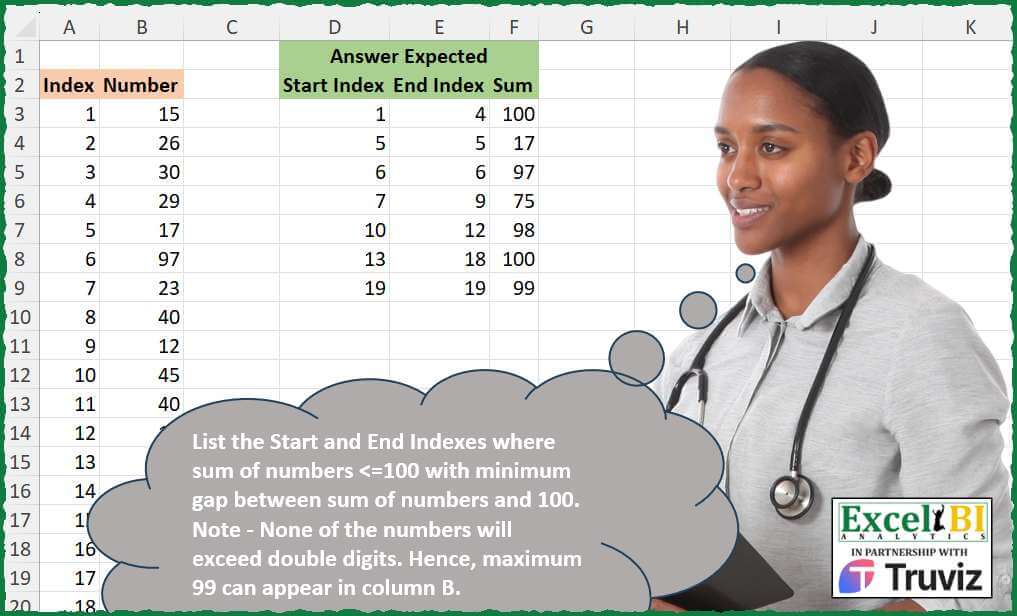
List the Start and End Indexes where sum of numbers <=100 with minimum gap between sum of numbers and 100. Note – None of the numbers will exceed double digits. Hence, maximum 99 can appear in column B.
📌 Challenge Details and Links
ExcelBI Excel Challenge Number: 493
Challenge Difficulty: ⭐️⭐️
📥Download Sample File
📥Link to the solutions on LinkedIn
Solving the challenge of Index Range Closest to 100 with Power Query
Power Query solution 1 for Index Range Closest to 100, proposed by Zoran Milokanović:
let
  Source = Excel.CurrentWorkbook(){[Name = "Input"]}[Content],
  S = Table.FromRows(
    List.Accumulate(
      Table.ToRows(Source),
      {},
      (b, n) =>
        let
          l = List.Last(b, {1, 1, 0}),
          f = Byte.From(l{2} + n{1} > 100)
        in
          List.RemoveLastN(b, 1 - f) & {{{l{f}, n{f}, l{f + 2} + n{f + 1}}}, {{l{f} + f} & n}}{f}
    ),
    {"Start Index", "End Index", "Sum"}
  )
in
  S
Power Query solution 2 for Index Range Closest to 100, proposed by Alejandro Simón 🇵🇦 🇪🇸:
let
  Source = Excel.CurrentWorkbook(){[Name = "Table1"]}[Content],
  LG = List.Generate(
    () => [x = 0, s = {Source[Number]{0}}, t = {Source[Index]{0}}, u = {null}],
    each [x] < List.Last(Source[Index]),
    each [
      x = [x] + 1,
      s =
        if List.Sum([s] & {Source[Number]{x}}) > 100 then
          {Source[Number]{x}}
        else
          [s] & {Source[Number]{x}},
      t =
        if List.Sum([s] & {Source[Number]{x}}) > 100 then
          {Source[Index]{x}}
        else
          [t] & {Source[Index]{x}}
    ],
    each Record.ToList([[t], [s]])
  ),
  Tbl = Table.FromRows(
    List.Transform(LG, each {_{0}{0}, List.Last(_{0}), List.Sum(_{1})}),
    {"Start Index", "End Index", "Sum"}
  ),
  Sol = Table.Combine(
    Table.Group(
      Tbl,
      {"Start Index", "End Index"},
      {{"All", each Table.FromRows({List.Last(Table.ToRows(_))}, Table.ColumnNames(Tbl))}},
      0,
      (a, b) => Number.From(a[Start Index] <> b[Start Index])
    )[All]
  )
in
  Sol
Power Query solution 3 for Index Range Closest to 100, proposed by Alejandro Simón 🇵🇦 🇪🇸:
let
Source = Excel.CurrentWorkbook(){[Name="Table1"]}[Content],
Sol = Table.Combine(Table.Group(Source, {"Index"}, {{"All", each
 Table.FromRows({{[Index]{0}, List.Last([Index]), List.Sum([Number])}}, {"Start Index", "End Index", "Sum"})}},
 0, (a,b)=> Number.From(List.Sum(List.Range(Source[Number], a[Index]-1, b[Index]-a[Index]+1))>100))[All])
in
Sol


          Mastering Power Query: Tips for Grouping
          Tips for Grouping in Power Query Grouping are powerful features in Power Query that allow you to combine and summarize data. When merging, ensure the key columns match correctly across tables. For grouping, you can aggregate data by summarizing values...


        Show translation


        Show translation of this comment
Solving the challenge of Index Range Closest to 100 with Excel
Excel solution 1 for Index Range Closest to 100, proposed by Bo Rydobon 🇹🇭:
=LET(i,
    A3:A21,
    n,
    B3:B21,
    DROP(GROUPBY(SCAN(0,
    n=SCAN(,
    n,
    LAMBDA(a,
    v,
    a*(a+v<101)+v)),
    SUM),
    HSTACK(
        i,
        i,
        n
    ),
    HSTACK(
        MIN,
        MAX,
        SUM
    ),
    ,
    0),
    1,
    1))
Excel solution 2 for Index Range Closest to 100, proposed by Bo Rydobon 🇹🇭:
=LET(i,
    A3:A21,
    n,
    B3:B21,
    t,
    SCAN(,
    n,
    LAMBDA(a,
    v,
    a*(a+v<101)+v)),
    y,
    n=t,
    HSTACK(
        FILTER(
            i,
            y
        ),
        FILTER(
            HSTACK(
                i,
                t
            ),
            VSTACK(
                DROP(
                    y,
                    1
                ),
                1
            )
        )
    ))
Excel solution 3 for Index Range Closest to 100, proposed by John V.:
=LET(a,
    A3:A21,
    b,
    B3:B21,
    h,
    HSTACK,
    DROP(GROUPBY(SCAN(0,
    b=SCAN(,
    b,
    LAMBDA(a,
    v,
    v+a*(a+v<101))),
    SUM),
    h(
        a,
        a,
        b
    ),
    h(
        MIN,
        MAX,
        SUM
    ),
    ,
    0),
    1,
    1))
Excel solution 4 for Index Range Closest to 100, proposed by محمد حلمي:
=LET(
    a,
    A3:A21,
    b,
    B3:B21,
    s,
    SCAN(
        0,
        b,
        LAMBDA(
            a,
            v,
            v+IF(
                a+v>100,
                ,
                a
            )
        )
    ),
    HSTACK(
        FILTER(
            a,
            s=b
        ),
        FILTER(
            HSTACK(
                a,
                s
            ),
            DROP(
                VSTACK(
                    s=b,
                    1
                ),
                1
            )
        )
    )
)
Excel solution 5 for Index Range Closest to 100, proposed by محمد حلمي:
=LET(a,A3:A21,b,B3:B21,v,SCAN(0,b,LAMBDA(a,v,v+IF(a+v>100,,a))),e,LAMBDA(q,w,TOCOL(XLOOKUP(a,SCAN(0,v=b,LAMBDA(a,v,a+v)),q,,,w),2)),HSTACK(e(a,1),e(a,-1),e(v,-1)))Excel solution 6 for Index Range Closest to 100, proposed by Kris Jaganah:
=LET(a,
    A3:A21,
    b,
    B3:B21,
    c,
    ROUNDUP((VSTACK(
        DROP(
            b,
            1
        ),
        0
    )+b)/99.99,
    0),
    d,
    INT(
        SCAN(
            ,
            b,
            SUM
        )/101
    ),
    e,
    d&c,
    f,
    VSTACK(
        DROP(
            e,
            1
        ),
        0
    )-e,
    g,
    TOCOL(IF((f>1)+(f<0),
    a,
    xx),
    3),
    h,
    VSTACK(
        0,
        DROP(
            g,
            -1
        )
    )+1,
    i,
    MAP(g,
    h,
    LAMBDA(x,
    y,
    SUM(b*((a>=y)*(a<=x))))),
    VSTACK(
        {"Start Index",
        "End Index",
        "Sum"},
        HSTACK(
            h,
            g,
            i
        )
    ))
Excel solution 7 for Index Range Closest to 100, proposed by Hussein SATOUR:
=LET(
    I,
    A3:A21,
    n,
    B3:B21,
    a,
    SCAN(
        ,
        n,
        LAMBDA(
            x,
            y,
            IF(
                x+y>100,
                y,
                x+y
            )
        )
    ),
    b,
    TEXTSPLIT(
        SUBSTITUTE(
            REDUCE(
                ,
                IF(
                    n=a,
                    I,
                    IF(
                        DROP(
                            a,
                            1
                        )-DROP(
                            a,
                            -1
                        )<0,
                        I
                    )
                ),
                LAMBDA(
                    v,
                    w,
                    IF(
                        AND(
                            NOT(
                                w
                            )
                        ),
                        v&"-",
                        v&w&"/"
                    )
                )
            ),
            "/-",
            "-"
        ),
        "-",
        "/",
        1
    ),
    c,
    INDEX(
        b,
        ,
        1
    ),
    d,
    IFNA(
        INDEX(
            b,
            ,
            2
        ),
        c
    ),
    HSTACK(
        c,
        d,
        XLOOKUP(
            --d,
            I,
            a
        )
    )
)
Excel solution 8 for Index Range Closest to 100, proposed by Oscar Mendez Roca Farell:
=LET(n, B3:B21, s, SCAN( ,n, LAMBDA(i, x, (i+x<101)*i+x)), t, TOCOL(IFS(n=s, A3:A21), 2), e, VSTACK(DROP(t, 1)-1, MAX(t)), HSTACK(t, e, INDEX(s, e)))Excel solution 9 for Index Range Closest to 100, proposed by Duy Tùng:
=LET(a,A3:A21,b,B3:B21,DROP(GROUPBY(SCAN(0,SCAN(,b,LAMBDA(x,y,IF(x+y>100,y,x+y)))=b,SUM),HSTACK(a,a,b),HSTACK(MIN,MAX,SUM),,0),1,1))Excel solution 10 for Index Range Closest to 100, proposed by Sunny Baggu:
=LET(
 i, A3:A21,
 n, B3:B21,
 _rs, SCAN(0, n, LAMBDA(a, v, IF(a + v <= 100, a + v, v))),
 _st, TOCOL(IF(_rs = n, i, x), 3),
 _e, DROP(VSTACK(_st - 1, TAKE(i, -1)), 1),
 HSTACK(_st, _e, XLOOKUP(_e, i, _rs))
)
Excel solution 11 for Index Range Closest to 100, proposed by Mey Tithveasna:
=LET(a,A3:A21,b,B3:B21,s,SCAN(0,b, LAMBDA(x,y,x*(x+y>100)+y)),c,s=b, HSTACK(FILTER(a,c),FILTER(a,s),VSTACK(DROP(c,1),1))))Excel solution 12 for Index Range Closest to 100, proposed by Mihai Radu O:
=LET(i,A3:A21,nr,B3:B21,
a,SCAN(0,nr,LAMBDA(x,y,IF(x+y>100,y,x+y))),
b,FILTER(i,a=nr),
c,TOCOL(XMATCH(nr,a),2)-1,
d, FILTER(c,c<>0),
e, IFERROR(HSTACK(b,d),b),
HSTACK(e, FILTER(a,ISNUMBER(XMATCH(i,TAKE(e,,-1)))))
)
Excel solution 13 for Index Range Closest to 100, proposed by El Badlis Mohd Marzudin:
=LET(q,A3:A21,w,B3:B21,a,SCAN(0,w,LAMBDA(x,y,IF(x+y>100,y,x+y))),b,FILTER(q,a=w),c,VSTACK(DROP(b,1)-1,TAKE(b,-1)),HSTACK(b,c,INDEX(a,c)))Solving the challenge of Index Range Closest to 100 with Python
Python solution 1 for Index Range Closest to 100, proposed by Konrad Gryczan, PhD:
import pandas as pd
path = "493 Start End Indexes for a Particular Sum.xlsx"
input = pd.read_excel(path, skiprows=1, usecols="A:B")
test = pd.read_excel(path, skiprows=1, usecols="D:F", nrows = 7)
def group_accumulate(numbers, max_sum=100):
 total = 0
 group = 0
 groups = []
 for number in numbers:
 if total + number > max_sum:
 group += 1
 total = number
 else:
 total += number
 groups.append(group)
 return groups
input['group'] = group_accumulate(input['Number'])
result = input.groupby('group').agg(
 Start_Index=('Index', 'min'),
 End_Index=('Index', 'max'),
 Sum=('Number', 'sum')
).reset_index(drop=True)
result = result[['Start_Index', 'End_Index', 'Sum']]
print(result.equals(test)) # True
Solving the challenge of Index Range Closest to 100 with Python in Excel
Python in Excel solution 1 for Index Range Closest to 100, proposed by Abdallah Ally:
import pandas as pd
file_path = 'Excel_Challenge_493 - Start End Indexes for a Particular Sum.xlsx'
df = pd.read_excel(file_path, skiprows=1, usecols='A:B')
# Perform data wrangling
start = 0
end = 1
values = []
for i in df.index:
 curr_sum = sum(df.iloc[start : end, 1])
 next_sum = sum(df.iloc[start : end + 1, 1])
 if start == max(df.index) or next_sum > 100:
 values.append([df.iat[start, 0], df.iat[end - 1, 0], curr_sum])
 start = end
 end += 1
df = pd.DataFrame(data=values, columns=['Start Index', 'End Index', 'Sum'])
df
Solving the challenge of Index Range Closest to 100 with R
R solution 1 for Index Range Closest to 100, proposed by Konrad Gryczan, PhD:
Beginning like at Anil's solution, but finished another way :D
library(tidyverse)
library(readxl)
path = "Excel/493 Start End Indexes for a Particular Sum.xlsx"
input = read_excel(path, range ="A2:B21")
test = read_excel(path, range ="D2:F9")
result = input %>%
 mutate(group = accumulate(Number, ~{if(.x + .y > 100) .y else .x + .y}),
 group = cumsum(group == Number))%>%
 summarise(`Start Index` = min(Index), `End Index` = max(Index), Sum = sum(Number), .by = group) %>%
 select(`Start Index` , `End Index`, Sum)
identical(result, test)
# [1] TRUE
&&&