
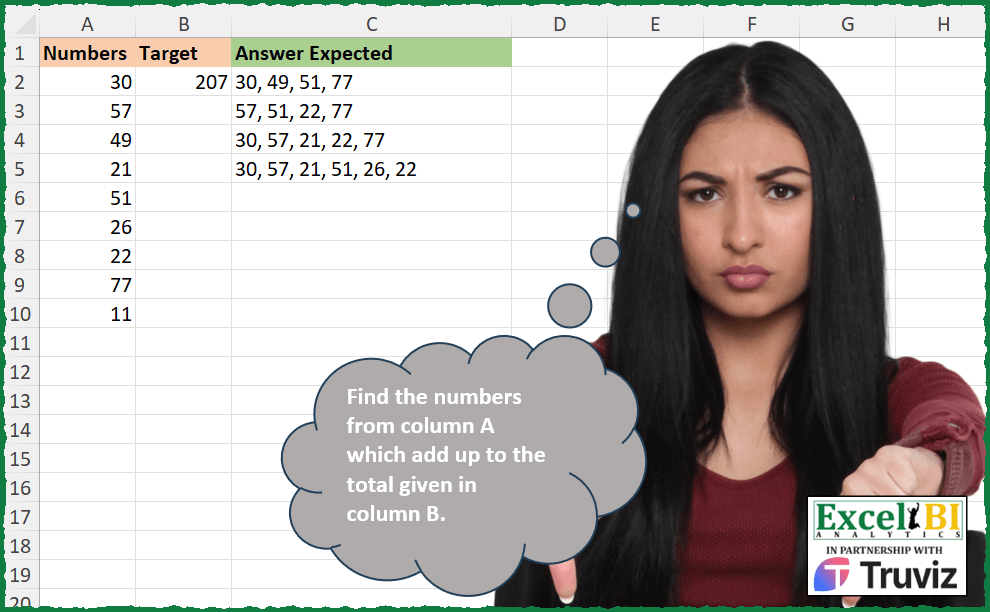
This problem is contributed by Mehmet Çiçek Find the numbers from column A which add up to the total given in column B.
📌 Challenge Details and Links
ExcelBI Excel Challenge Number: 488
Challenge Difficulty: ⭐️⭐️
📥Download Sample File
📥Link to the solutions on LinkedIn
Solving the challenge of Subset Sum to Target with Power Query
Power Query solution 1 for Subset Sum to Target, proposed by Alejandro Simón 🇵🇦 🇪🇸:
let
  Tbl1 = Excel.CurrentWorkbook(){[Name = "Table1"]}[Content],
  Tbl2 = Excel.CurrentWorkbook(){[Name = "Table2"]}[Content]{0}[Target],
  Lista = Tbl1[Numbers],
  Num = List.Transform(
    {1 .. Number.Power(2, List.Count(Lista))},
    (x) =>
      List.Transform(
        List.Reverse({0 .. Number.RoundDown(Number.Log(x, 2))}),
        (y) => Number.RoundDown(Number.Mod(x / Number.Power(2, y), 2))
      )
  ),
  Bin = List.Transform(
    Num,
    each Text.PadStart(
      Text.Combine(List.Transform(_, (x) => Text.From(x)), ""),
      List.Count(Lista),
      "0"
    )
  ),
  Comb = List.Transform(Bin, each Text.PositionOf(_, "1", 2)),
  Sol = List.Transform(
    List.Select(Comb, each List.Sum(List.Transform(_, (y) => Lista{y})) = Tbl2),
    each Text.Combine(List.Transform(_, (x) => Text.From(Lista{x})), ", ")
  )
in
  Sol
Power Query solution 2 for Subset Sum to Target, proposed by Alejandro Simón 🇵🇦 🇪🇸:
let
  Source = Excel.CurrentWorkbook(){[Name = "Table1"]}[Content],
  Lista = List.Transform({1 .. Table.RowCount(Source) - 1}, each List.Skip(Source[Numbers], _)),
  LG = List.Accumulate(
    {0 .. List.Count(Lista) - 2},
    Source,
    (s, c) =>
      let
        a = Table.ExpandListColumn(
          Table.AddColumn(s, Text.From(c), each {null} & Lista{c}),
          Text.From(c)
        ),
        b = Table.SelectRows(
          a,
          each not List.AnyTrue(
            List.Transform(
              Source[Numbers],
              (y) => List.Count(List.PositionOf(List.RemoveNulls(Record.ToList(_)), y, 2)) > 1
            )
          )
        )
      in
        b
  ),
  Sel = Table.AddColumn(
    LG,
    "A",
    each Text.Combine(List.Transform(List.Sort(List.RemoveNulls(Record.ToList(_))), Text.From))
  ),
  Sol = Table.AddColumn(
    Table.SelectRows(
      Table.Distinct(Sel, {"A"}),
      each List.Sum(List.RemoveLastN(Record.ToList(_))) = 207
    ),
    "Answer",
    each Text.Combine(List.Transform(List.RemoveLastN(Record.ToList(_)), Text.From), ", ")
  )[[Answer]]
in
  Sol
Power Query solution 3 for Subset Sum to Target, proposed by Ramiro Ayala Chávez:
let
  S = Excel.CurrentWorkbook(){[Name = "Table1"]}[Content],
  L = List.Transform,
  a = L(
    {0 .. Number.Power(2, List.Count(S[Numbers])) - 1},
    (i) =>
      L(
        {0 .. List.Count(S[Numbers]) - 1},
        (j) =>
          if Number.Mod(Number.IntegerDivide(i, Number.Power(2, j)), 2) = 1 then
            S[Numbers]{j}
          else
            null
      )
  ),
  b = List.Skip(L(a, each List.RemoveNulls(_))),
  c = List.Select(b, each List.Count(_) <> 1),
  d = List.Select(c, each List.Sum(_) = S[Target]{0}),
  e = L(d, each L(_, Text.From)),
  f = L(e, each Text.Combine(_, ", ")),
  Sol = Table.FromColumns({{f{1}} & {f{3}} & {f{2}} & {f{0}}}, {"Answer Expected"})
in
  Sol
Power Query solution 4 for Subset Sum to Target, proposed by Meganathan Elumalai:
let
  Source = Excel.CurrentWorkbook(){[Name = "Table1"]}[Content],
  List = Source[Numbers],
  Target = 207,
  Combin = List.Skip(
    List.Accumulate(
      List,
      {""},
      (s, c) => s & List.Transform(s, (f) => Text.From(f) & "+" & Text.From(c))
    )
  ),
  Result = List.Transform(
    List.Select(Combin, (f) => Expression.Evaluate(f) = Target),
    (f) => Text.Combine(List.Skip(Text.Split(f, "+")), ", ")
  )
in
  Result
Solving the challenge of Subset Sum to Target with Excel
Excel solution 1 for Subset Sum to Target, proposed by Bo Rydobon 🇹🇭:
=LET(
    z,
    A2:A10,
    x,
    TOCOL(
        z*{1,
        2,
        3}
    ),
    ROWS(
        x
    )
)  = 27 rows
=LET(z,
    A2:A10,
    x,
    TOCOL(
        z*{1,
        2,
        3}
    ),
    r,
    ROWS(
        x
    ),

REDUCE(-B2,
    SEQUENCE(
        r
    ),
    LAMBDA(a,
    i,
    LET(m,
    TEXTBEFORE(
        a,
        "-"
    ),
    n,
    --TEXTAFTER(
        a,
        "-"
    ),
    v,
    LARGE(
        x,
        i
    ),
    t,
    n-v,

IF(i=0,
                    m&", "&v&"-"&t
                ),
                3
            )
        ),
        a
    ),
    MID(SUBSTITUTE(SUBSTITUTE(FILTER(a,
    (n=0)+(n=MIN(
        x
    ))),
    "-0",
    ),
    "-",
    ", "),
    3,
    999))))))
Excel solution 2 for Subset Sum to Target, proposed by Bo Rydobon 🇹🇭:
=LET(
    n,
    A2:A10,
    i,
    ROWS(
        n
    ),
    x,
    --MID(
        BASE(
            SEQUENCE(
                2^i-1
            ),
            2,
            i
        ),
        SEQUENCE(
            ,
            i
        ),
        1
    ),

    BYROW(
        REPT(
            TOROW(
        n
    ),
            FILTER(
                x,
                MMULT(
                    x,
                    n
                )=B2
            )
        ),
        LAMBDA(
            x,
            TEXTJOIN(
                ", ",
                ,
                x
            )
        )
    )
)
Excel solution 3 for Subset Sum to Target, proposed by Bo Rydobon 🇹🇭:
=LET(
    n,
    A2:A10,
    MID(
        FILTER(
            REDUCE(
                "",
                n,
                LAMBDA(
                    a,
                    v,
                    VSTACK(
                        a,
                        a&", "&v
                    )
                )
            ),
            REDUCE(
                0,
                n,
                LAMBDA(
                    a,
                    v,
                    VSTACK(
                        a,
                        a+v
                    )
                )
            )=B2
        ),
        3,
        99
    )
)
Excel solution 4 for Subset Sum to Target, proposed by John V.:
=LET(n,A2:A10,c,ROWS(n),i,MID(BASE(SEQUENCE(2^c-1),2,c),SEQUENCE(,c),1)*TOROW(n),BYROW(FILTER(i,BYROW(i,SUM)=B2),LAMBDA(r,TEXTJOIN(", ",,IF(r,r,"")))))Excel solution 5 for Subset Sum to Target, proposed by محمد حلمي:
= Rows of Data

=LET(d,IF(-MID(BASE(SEQUENCE(,2^9),2,9),SEQUENCE(9),1),A2:A10,""),TOCOL(BYCOL(
FILTER(d,BYCOL(d,LAMBDA(a,SUM(a)))=B2),LAMBDA(a,TEXTJOIN(", ",,a)))))
Excel solution 6 for Subset Sum to Target, proposed by Kris Jaganah:
=LET(a,DROP(REDUCE("",A2:A10,LAMBDA(x,y,VSTACK(x,x&", "&y))),1),b,FILTER(TEXTAFTER(a,", "),MAP(a,LAMBDA(z,SUM(--REGEXEXTRACT(z,"[0-9]+",1))))=B2),SORTBY(b,LEN(b)))Excel solution 7 for Subset Sum to Target, proposed by Julian Poeltl:
=LET(
    S,
    BASE(
        SEQUENCE(
            2^9
        )-1,
        2,
        9
    ),
    R,
    MAP(
        S,
        LAMBDA(
            A,
            LET(
                P,
                A2:A10*MID(
                    A,
                    SEQUENCE(
                        9
                    ),
                    1
                ),
                IF(
                    SUM(
                        P
                    )=B2,
                    TEXTJOIN(
                        ", ",
                        ,
                        IF(
                            P>0,
                            P,
                            ""
                        )
                    ),
                    ""
                )
            )
        )
    ),
    FILTER(
        R,
        R<>""
    )
)
Excel solution 8 for Subset Sum to Target, proposed by Timothée BLIOT:
=LET(A,A2:A10,B,ROWS(A),C,A&CHAR(SEQUENCE(B)),D,REDUCE(C,SEQUENCE(B-1),LAMBDA(w,v,LET(D,FILTER(w,LEN(w)=v*3), VSTACK(w,TOCOL( IF(ISERR(FIND(TOROW(C),D)),D&TOROW(C),1/0),3))))),UNIQUE(FILTER(MAP(D,LAMBDA(x, ARRAYTOTEXT(SORT(--TOCOL(REGEXEXTRACT(x,"d+",1)))))), MAP(D,LAMBDA(x, SUM(--REGEXEXTRACT(x,"d+",1))))=B2)))Excel solution 9 for Subset Sum to Target, proposed by Oscar Mendez Roca Farell:
=LET(d, A2:A10, n, COUNT(d), m, --MID(BASE(SEQUENCE(2^n-1), 2, n), SEQUENCE(, n), 1), BYROW(REPT(TOROW(d), FILTER(m, MMULT(m, d)=B2)), LAMBDA(r, TEXTJOIN(", " , ,r))))Excel solution 10 for Subset Sum to Target, proposed by Sunny Baggu:
=LET(

     _n,
     A2:A10,

     _m,
     --MID(
         DEC2BIN(
             SEQUENCE(
                 2000
             ),
              9
         ),
          SEQUENCE(
              ,
               9
          ),
          1
     ),

     _c,
     IF(
         _m,
          TOROW(
              _n
          ),
          x
     ),

     _t,
     BYROW(
         _c,
          LAMBDA(
              a,
               ARRAYTOTEXT(
                   TOROW(
                       a,
                        3
                   )
               )
          )
     ),

     _s,
     BYROW(
         _c,
          LAMBDA(
              a,
               SUM(
                   TOROW(
                       a,
                        3
                   )
               )
          )
     ),

     TOCOL(
         IF(
             _s = B2,
              _t,
              x
         ),
          3
     )

)
Excel solution 11 for Subset Sum to Target, proposed by LEONARD OCHEA 🇷🇴:
=LET(
    i,
    A2:A10,
    t,
    B2,
    n,
    ROWS(
        i
    ),
    m,
    IF(
        --MID(
            BASE(
                SEQUENCE(
                    2^n,
                    ,
                    0
                ),
                2,
                n
            ),
             SEQUENCE(
                 ,
                 n
             ),
            1
        ),
        TOROW(
        i
    ),
        ""
    ),
    BYROW(
        FILTER(
            m,
            BYROW(
                m,
                SUM
            )=t
        ),
        LAMBDA(
            x,
            TEXTJOIN(
                ", ",
                ,
                x
            )
        )
    )
)

2️⃣ ⚫
=LET(
    i,
    A2:A12,
    t,
    B2,
    F,
    LAMBDA(
        x,
        REDUCE(
            0,
            i,
            LAMBDA(
                a,
                b,
                VSTACK(
                    a,
                    IF(
                        x,
                        a+b,
                        a&"; "&b
                    )
                )
            )
        )
    ),
    g,
    FILTER(
        F(
            0
        ),
        F(
            1
        )=t
    ),
    RIGHT(
        g,
        LEN(
            g
        )-2
    )
)
Excel solution 12 for Subset Sum to Target, proposed by Abdallah Ally:
range(
    1,
     len(
         numbers
     ) + 1
) instead of range(
    2,
     len(
         numbers
     ) + 1
)
Excel solution 13 for Subset Sum to Target, proposed by Meganathan Elumalai:
=LET(R,$A$2:$A$10,S,SEQUENCE(2^ROWS(R)),T,$B$2,Rng,MOD(INT(S/(2^(SEQUENCE(,ROWS(R))-1))),2),TEXTJOIN(", ",,FILTER(TRANSPOSE(R),INDEX(Rng,LARGE((MMULT(Rng,R)=T)*S,ROWS($E$2:E2))))))Excel solution 14 for Subset Sum to Target, proposed by El Badlis Mohd Marzudin:
=LET(

    data,
     A2:A10,

    n,
     COUNT(
         data
     ),

    a,
     BASE(
         SEQUENCE(
             SUM(
                 COMBIN(
                     n,
                     SEQUENCE(
                         n
                     )
                 )
             )
         ),
         2,
         n
     ),

    b,
     MID(
         a,
         SEQUENCE(
             ,
             n
         ),
         1
     )+0,

    c,
     IF(
          b,
          TOROW(
               data
          ),
         ""
     ),

    d,
     BYROW(
         c,
          LAMBDA(
              x,
               SUM(
                   x
               )
          )
     ),

    FILTER(
        BYROW(
             c,
             LAMBDA(
                 y,
                  TEXTJOIN(
                      ", ",
                      ,
                      y
                  )
             )
        ),
        d=B2
    )
)

The only thing I know about BASE function is to generate 0-9 and A-Z simultaneously,
     =BASE( SEQUENCE (36,
    ,
    0),
     36)
Excel solution 15 for Subset Sum to Target, proposed by Mehmet Çiçek:
=LET(
    o,
    B2,
    r,
    A2:A13,
    c,
    LET(
        i,
        LAMBDA(
            x,
            DROP(
                TEXTAFTER(
                    REDUCE(
                        "",
                        x,
                        LAMBDA(
                            t,
                            b,
                            VSTACK(
                                t,
                                t&", "&b
                            )
                        )
                    ),
                    ", "
                ),
                1
            )
        ),
        i(
            FILTER(
                r,
                r<=o
            )
        )
    ),
    sc,
    DROP(
        REDUCE(
            0,
            c,
            LAMBDA(
                st,
                cr,
                VSTACK(
                    st,
                    SUM(
                        --TEXTSPLIT(
                            cr,
                            ", "
                        )
                    )
                )
            )
        ),
        1
    ),
    FILTER(
        c,
        sc=o,
        "no values equal the sum "&o
    )
)
Solving the challenge of Subset Sum to Target with Python
Python solution 1 for Subset Sum to Target, proposed by Konrad Gryczan, PhD:
Longer than Abdallah's
import pandas as pd
from itertools import combinations
import pandas as pd
path = "488 Numbers to Meet Target Sum.xlsx"
input = pd.read_excel(path, usecols="A")
target = pd.read_excel(path, usecols="B", nrows = 1).iloc[0,0]
test  = pd.read_excel(path, usecols="C", nrows = 4)
def find_combinations(numbers, target):
 combs = []
 for i in range(1, len(numbers) + 1):&
 combs.extend(combinations(numbers, i))

 valid_combs = []
 for comb in combs:
 if sum(comb) == target:
 valid_combs.append(comb)

 return pd.DataFrame(valid_combs)
results = find_combinations(input["Numbers"], target)
results = results.apply(lambda x: ", ".join([str(int(i)) for i in x if pd.notnull(i)]), axis=1)
def sort_numbers(x):
 if isinstance(x, str):
 return ", ".join(sorted([str(i) for i in x.split(", ")]))
 else:
 return x
results = results.apply(sort_numbers)
test = test.applymap(sort_numbers)
print(results.equals(test["Answer Expected"])) # True
Python solution 2 for Subset Sum to Target, proposed by Anshu Bantra:
lst=[30, 57, 49, 21, 51, 26, 22, 77, 11]
import itertools as itt
result = []
for i in range(2, len(lst)+1):
 for _ in itt.combinations(lst,i):
 if sum(_)==207:
 result.append(_)
print(result)
Solving the challenge of Subset Sum to Target with Python in Excel
Python in Excel solution 1 for Subset Sum to Target, proposed by Alejandro Campos:
from itertools import combinations
numbers = xl("_Numbers[Numbers]")[0]
target_sum = xl("B2")
def find_combinations(numbers, target_sum):
 result = [combo for r in range(1, len(numbers) + 1) for combo
 in combinations(numbers, r) if sum(combo) == target_sum]
 return result
combinations_result = find_combinations(numbers, target_sum)
df_combinations = pd.DataFrame({'Combinations': [', '.join(map(str, combo))
 for combo in combinations_result]})
df_numbers_target = pd.DataFrame({'Numbers': numbers})
df_numbers_target.loc[0, 'Target'] = target_sum
df_final = pd.concat([df_numbers_target, df_combinations], axis=1).fillna(' ')
df_final
Python in Excel solution 2 for Subset Sum to Target, proposed by Abdallah Ally:
import pandas as pd
from itertools import combinations
def pairs(numbers, total):
 result = []
 for i in range(2, len(numbers) + 1):
 for c in combinations(numbers, i):
 if sum(c) == total:
 result.append(', '.join([str(x) for x in c]))
 return result
file_path = 'Excel_Challenge_488 - Numbers to Meet Target Sum.xlsx'
df = pd.read_excel(file_path, usecols='C', nrows=4)
df1 = pd.read_excel(file_path, usecols='A')
total = pd.read_excel(file_path, usecols='B', nrows=1).iat[0, 0]
# Perform data wrangling
df['My Answer'] = pairs(df1['Numbers'], total)
df['Check'] = df['My Answer'] == df['Answer Expected']
df
Python in Excel solution 3 for Subset Sum to Target, proposed by ferhat CK:
from itertools import combinations
liste=[int(i) for i in xl("A2:A10")[0]]
def toplam(val):
 return sum(val) == xl("B2")
son=[]
for n in range(4,7):
 for comb in combinations(liste, n):
 if toplam(comb):
 son.append(str(comb))
pd.DataFrame({"Answer Expected": son})
Solving the challenge of Subset Sum to Target with R
R solution 1 for Subset Sum to Target, proposed by Konrad Gryczan, PhD:
library(gtools)
library(tidyverse)
library(readxl)
path = "Excel/488 Numbers to Meet Target Sum.xlsx"
input = read_excel(path, range = "A1:A10")
target = read_excel(path, range = "B1:B2") %>% pull()
test = read_excel(path, range = "C1:C5")
find_combinations <- function(numbers, target) {
 combs <- map(1:length(numbers), ~combinations(length(numbers), ., v = numbers))
 valid_combs <- combs %>%
 map(as_tibble) %>%
 bind_rows() %>%
 mutate(sum = rowSums(., na.rm = TRUE)) %>%
 filter(sum == target)

 return(valid_combs)
}
combinations <- find_combinations(input$Numbers, target) %>%
 unite("Combination", - sum, sep = ", ", remove = T, na.rm = T)
sort_numbers <- function(numbers) {
 paste(sort(as.numeric(strsplit(numbers, ",")[[1]])), collapse = ", ")
}
test <- test %>%
 mutate(Combination = map_chr(`Answer Expected`, sort_numbers))
identical(sort(combinations$Combination), sort(test$Combination))
# [1] TRUE
Made additional function to sort Test for comparison
&&