
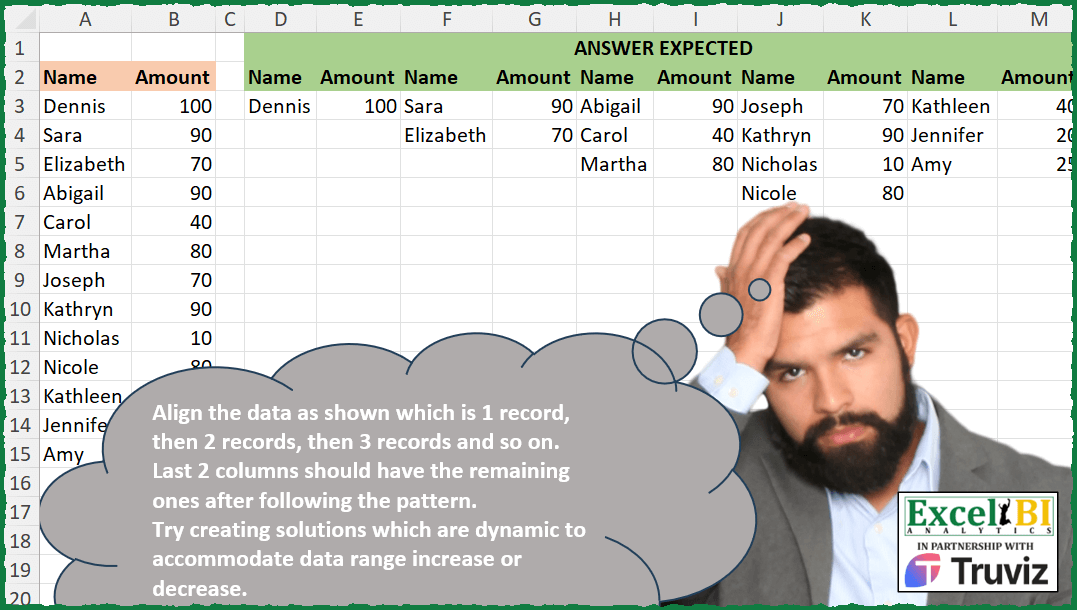
Align the data as shown which is 1 record, then 2 records, then 3 records and so on. Last 2 columns should have the remaining ones after following the pattern. Try creating solutions which are dynamic to accommodate data range increase or decrease.
📌 Challenge Details and Links
ExcelBI Excel Challenge Number: 477
Challenge Difficulty: ⭐️
📥Download Sample File
📥Link to the solutions on LinkedIn
Solving the challenge of Triangular Record Grouping with Power Query
Power Query solution 1 for Triangular Record Grouping, proposed by Aditya Kumar Darak 🇮🇳:
let
  Source = Excel.CurrentWorkbook(){[Name = "data"]}[Content],
  Count = Table.RowCount(Source),
  Splits = Number.IntegerDivide(Number.Power(Count * 2, 0.5), 1),
  Transform = List.Transform(
    {1 .. Splits},
    (n) =>
      [S = Table.Skip(Source, n * (n + 1) / 2 - n), F = Table.FirstN(S, n), R = Table.ToRows(F)][R]
  ),
  Zip = List.Zip(Transform),
  Combine = List.Transform(
    Zip,
    each Table.FromRows({List.Combine(List.Transform(_, (f) => f ?? {null, null}))})
  ),
  Return = Table.Combine(Combine)
in
  Return
Power Query solution 2 for Triangular Record Grouping, proposed by Alejandro Simón 🇵🇦 🇪🇸:
let
  Source = Excel.CurrentWorkbook(){[Name = "Table1"]}[Content],
  LG = List.Skip(
    List.Generate(
      () => [x = 0, z = 0],
      each [z] <= List.Count(Source[Name]),
      each [
        a = Table.ToRows(Source),
        b = List.FirstN(List.RemoveFirstN(a, z), [x] + 1),
        x = [x] + 1,
        z = List.Sum({0 .. [x]})
      ],
      each [b]
    )
  ),
  Sol = Table.FromRows(
    List.Transform(
      List.Zip(LG),
      each List.Combine(List.Transform(_, (x) => if x = null then {null, null} else x))
    )
  )
in
  Sol
Solving the challenge of Triangular Record Grouping with Excel
Excel solution 1 for Triangular Record Grouping, proposed by Bo Rydobon 🇹🇭:
=LET(a,
    A3:B15,
    DROP(REDUCE(0,
    SEQUENCE(EVEN((1+8*ROWS(
        a
    ))^0.5-1)/2),
    LAMBDA(c,
    i,
    IFNA(HSTACK(c,
    TAKE(DROP(a,
    i*(i-1)/2),
    i)),
    ""))),
    ,
    1))
Excel solution 2 for Triangular Record Grouping, proposed by Bo Rydobon 🇹🇭:
=LET(
    R,
    LAMBDA(
        r,
        a,
        [b],
        LET(
            c,
            IFNA(
                IF(
                    @b=0,
                    TAKE(
                        a,
                        1
                    ),
                    HSTACK(
                        b,
                        TAKE(
                            a,
                            ROWS(
                                b
                            )+1
                        )
                    )
                ),
                ""
            ),
            d,
            DROP(
                +a,
                ROWS(
                    c
                )
            ),
            IF(
                ISERR(
                    @d
                ),
                c,
                r(
                    r,
                    d,
                    c
                )
            )
        )
    ),

    R(
        R,
        A3:B15
    )
)
Excel solution 3 for Triangular Record Grouping, proposed by Bo Rydobon 🇹🇭:
=LET(s,
    SEQUENCE(
        100
    ),
    quad,
    EVEN((1+8*s)^0.5-1)/2,
    Ned,
    ROUND((2*s)^0.5,
    ),
    HSTACK(
        quad,
        Ned,
        quad=Ned
    ))
Excel solution 4 for Triangular Record Grouping, proposed by Rick Rothstein:
=IFNA(DROP(REDUCE(0,
    SEQUENCE(EVEN((1+8*ROWS(
        A3:B15
    ))^0.5-1)/2),
    LAMBDA(a,
    x,
    HSTACK(a,
    TAKE(DROP(A3:B15,
    x*(x-1)/2),
    x)))),
    ,
    1),
    "")
Excel solution 5 for Triangular Record Grouping, proposed by John V.:
=IFNA(DROP(REDUCE(0,
    SEQUENCE(-INT((1-(1+8*ROWS(
        A3:B15
    ))^0.5)/2)),
    LAMBDA(a,
    v,
    HSTACK(a,
    DROP(TAKE(A3:B15,
    v*(v+1)/2),
    v*(v-1)/2)))),
    ,
    1),
    "")
Excel solution 6 for Triangular Record Grouping, proposed by محمد حلمي:
=DROP(
    REDUCE(
        0,
        SEQUENCE(
            5
        ),
        LAMBDA(
            A,
            V,
            IFERROR(

                HSTACK(
                    A,
                    INDEX(
                        A3:B15,
                        SEQUENCE(
                            V,
                            ,
                            COUNT(
                                A
                            )
                        ),
                        {1,
                        2}
                    )
                ),
                ""
            )
        )
    ),
    -1,
    1
)
Excel solution 7 for Triangular Record Grouping, proposed by Kris Jaganah:
=LET(
    a,
    A3:B15,
    b,
    ROWS(
        a
    ),
    c,
    TAKE(
        SORT(
            TOCOL(
                SEQUENCE(
                    b
                )+SEQUENCE(
                    ,
                    b,
                    0
                )
            )
        ),
        b
    ),
    VSTACK(
        TEXTSPLIT(
            REPT(
                "Name-Amount-",
                MAX(
                    c
                )
            ),
            "-",
            ,
            1
        ),
        IFNA(
            DROP(
                REDUCE(
                    "",
                    UNIQUE(
                    c
                ),
                    LAMBDA(
                        x,
                        y,
                        HSTACK(
                            x,
                            FILTER(
                                a,
                                c=y
                            )
                        )
                    )
                ),
                ,
                1
            ),
            ""
        )
    )
)
Excel solution 8 for Triangular Record Grouping, proposed by Julian Poeltl:
=LET(T,
    A2:B15,
    TT,
    DROP(
        T,
        1
    ),
    C,
    COUNT(
        TT
    ),
    CN,
    XMATCH(
        1,
        SCAN(
            ,
            SEQUENCE(
                100
            ),
            LAMBDA(
                A,
                B,
                A+B
            )
        )/C,
        1
    ),
    R,
    MAKEARRAY(CN,
    CN*2,
    LAMBDA(A,
    B,
    IF(B+1>=A*2,
    ROUNDUP(
        B/2+A-1,
        0
    )+IF(B>4,
    (ROUNDUP((B-4)/2,
    0)*(ROUNDUP((B-4)/2,
    0)+1)))/2,
    0))),
    RR,
    IF(
        R=0,
        NA(),
        R
    ),
    CC,
    MAKEARRAY(
        CN,
        CN*2,
        LAMBDA(
            A,
            B,
            IF(
                ISODD(
                    B
                ),
                1,
                2
            )
        )
    ),
    H,
    TAKE(
        INDEX(
            TAKE(
        T,
        1
    ),
            1,
            CC
        ),
        1
    ),
    VSTACK(
        H,
        IFERROR(
            INDEX(
                TT,
                RR,
                CC
            ),
            ""
        )
    ))
Excel solution 9 for Triangular Record Grouping, proposed by Timothée BLIOT:
=LET(R,
    A:B,
    D,
    DROP(
        TAKE(
            R,
            COUNTA(
                R
            )/2+1
        ),
        2
    ),
    S,
    ROW(
        1:9998
    )*ROW(
        2:9999
    )/2,
    IFNA(DROP(REDUCE("",
    SEQUENCE(
        XMATCH(
            XLOOKUP(
                ROWS(
                    D
                ),
                S,
                S,
                ,
                1
            ),
            S
        )
    ),
    LAMBDA(a,
    v,
    HSTACK(a,
    DROP(TAKE(D,
    v*(v+1)/2),
    (v-1)*v/2)))),
    ,
    1),
    ""))
Excel solution 10 for Triangular Record Grouping, proposed by Hussein SATOUR:
=LET(
    a,
    SEQUENCE(
        13
    ),
    b,
    TAKE(
        TEXTSPLIT(
            CONCAT(
                MAP(
                    a,
                    LAMBDA(
                        x,
                        CONCAT(
                            SEQUENCE(
                                x
                            )&"/"
                        )
                    )
                )
            ),
            ,
            "/"
        ),
        13
    ),
    DROP(
        PIVOTBY(
            b,
            TAKE(
                TEXTSPLIT(
                    CONCAT(
                        REPT(
                            a&"/",
                            a
                        )
                    ),
                    ,
                    "/"
                ),
                13
            ),
            A3:B15,
            CONCAT,
            ,
            0,
            ,
            0
        ),
        1,
        1
    )
)
Excel solution 11 for Triangular Record Grouping, proposed by Oscar Mendez Roca Farell:
=LET(
    s,
     SCAN(
         ,
          ROW(
              1:6
          )-1,
          LAMBDA(
              i,
               x,
               i+x
          )
     ),
     F,
     LAMBDA(
         a,
          MAX(
              TAKE(
                  s,
                   a
              )
          )
     ),
     DROP(
         IFNA(
             REDUCE(
                 "",
                  ROW(
                      1:5
                  ),
                  LAMBDA(
                      j,
                       y,
                       HSTACK(
                           j,
                            DROP(
                                TAKE(
                                    A3:B15,
                                     F(
                                         y+1
                                     )
                                ),
                                 F(
                                     y
                                 )
                            )
                       )
                  )
             ),
              ""
         ),
          ,
          1
     )
)
Excel solution 12 for Triangular Record Grouping, proposed by LEONARD OCHEA 🇷🇴:
=LET(i,
    A3:B15,
    f,
    ROWS(
        i
    ),
    n,
    ROUNDUP((-1+(8*f+1)^0.5)/2,
    0),
     a,
    SEQUENCE(
        n
    ),
    b,
    SEQUENCE(
        ,
        2*n
    ),
    c,
    INT((b+1)/2),
    d,
    a+c*(c-1)/2,
    IF((a<=c)*(d<=f),
    INDEX(
        i,
        d,
        MOD(
            b-1,
            2
        )+1
    ),
    ""))
Excel solution 13 for Triangular Record Grouping, proposed by LEONARD OCHEA 🇷🇴:
=IFNA(DROP(REDUCE("",
    SEQUENCE(ROUNDUP((-1+(8*ROWS(
        A3:B15
    ))^0.5)/2,
    0)),
    LAMBDA(a,
    b,
    HSTACK(a,
    DROP(TAKE(A3:B15,
    (b^2+b)/2),
    (b^2-b)/2)))),
    ,
    1),
    "")
Excel solution 14 for Triangular Record Grouping, proposed by Abdallah Ally:
=LET(a,
    A3:B15,
    b,
    ROWS(
        a
    ),
    c,
    IFNA(REDUCE("",
    SEQUENCE(
        b
    ),
    LAMBDA( x,
    y,
    HSTACK(x,
    IF(y=1,
    TAKE(
        a,
        y
    ),
    IFERROR(TAKE(DROP(a,
    (y^2-y+2)/2-1),
    y),
    ""))))),
    ""),
    d,
    FILTER(
        c,
        BYCOL(
            c,
            LAMBDA(
                x,
                NOT(
                    AND(
                        x=""
                    )
                )
            )
        )
    ),
    VSTACK(
        TOROW(
            HSTACK(
                EXPAND(
                    "Name",
                    COLUMNS(
                        d
                    )/2,
                    ,
                    "Name"
                ),
                EXPAND(
                    "Amount",
                    COLUMNS(
                        d
                    )/2,
                    ,
                    "Amount"
                )
            )
        ),
        d
    ))
Excel solution 15 for Triangular Record Grouping, proposed by 🇵🇪 Ned Navarrete C.:
=ROWS(
    a
)
y*(y+1)<=2*ROWS(
    a
),

Y cuando tengo la multiplicación de dos números consecutivos,
     por lo general solo calculo la raíz cuadrada del resultado,
     osea (2*ROWS(
    a
))^0.5 y uso ROUND para redondear.
ROUND((2*ROWS(
    a
))^0.5,
    )
Excel solution 16 for Triangular Record Grouping, proposed by 🇵🇪 Ned Navarrete C.:
=IFNA(DROP(REDUCE("",
    SEQUENCE( ROUND((2*ROWS(
        A3:B15
    ))^0.5,
    )),
    LAMBDA(c,
    v,
    HSTACK(c,
    TAKE(DROP(A3:B15,
    v*(v-1)/2),
    v)))),
    ,
    1),
    "")
Excel solution 17 for Triangular Record Grouping, proposed by Asheesh Pahwa:
=LET(
    n,
    A3:A15,
    am,
    B3:B15,
    sq,
    SEQUENCE(
        ROWS(
            n
        )
    ),

    sc,
    SCAN(
        0,
        sq,
        LAMBDA(
            x,
            y,
            x+y
        )
    ),
    xm,
    --XMATCH(
        MAX(
            sq
        ),
        sc,
        1
    ),

    sx,
    SEQUENCE(
        ,
        xm
    ),
    t,
    TAKE(
        sc,
        xm
    ),
    v,
    VSTACK(
        0,
        DROP(
            t,
            -1
        )
    ),

    IFNA(
        DROP(
            REDUCE(
                "",
                SEQUENCE(
                    ROWS(
                        v
                    )
                ),
                LAMBDA(
                    y,
                    z,
                    HSTACK(
                        y,
                        LET(
                            s,
                            SEQUENCE(
                                @INDEX(
                                    sx,
                                    ,
                                    z
                                ),
                                ,
                                1+@INDEX(
                                    v,
                                    z,

                                )
                            ),
                            I,
                            IFERROR(
                                INDEX(
                                    n,
                                    s,

                                ),
                                ""
                            ),
                            xl,
                            XLOOKUP(
                                I,
                                n,
                                am,
                                ""
                            ),
                            HSTACK(
                                I,
                                xl
                            )
                        )
                    )
                )
            ),
            ,
            1
       & ),
        ""
    )
)
Excel solution 18 for Triangular Record Grouping, proposed by Peter Tholstrup:
= LAMBDA(
    source,
     [previous],
     [count],

     LET(

          count,
          IF(
              ISOMITTED(
                  count
              ),
               1,
               count
          ),

          new,
          VSTACK(
              {"Name",
              "Amount"},
               TAKE(
                   source,
                    count
               )
          ),

          current,
          IF(
              ISOMITTED(
                  previous
              ),
               new,
               IFERROR(
                   HSTACK(
                       previous,
                        new
                   ),
                    ""
               )
          ),

          remaining,
          ROWS(
              source
          ) - count,

          result,
          IF(

               remaining > 0,

               solution(
                   TAKE(
                       source,
                        -remaining
                   ),
                    current,
                    count + 1
               ),

               current

          ),

          result

     )

)
Excel solution 19 for Triangular Record Grouping, proposed by Ziad A.:
=IFNA(REDUCE(TOROW(
    ,
    1
),
    SEQUENCE(
        5
    ),
    LAMBDA(a,
    i,
    HSTACK(a,
    OFFSET(A3:B3,
    (i*i-i)/2,
    ,
    i)))))
Excel solution 20 for Triangular Record Grouping, proposed by Sandeep Marwal:
=DROP(IFERROR(LET(a,
    A3:B15,

b,
    ROWS(
        a
    ),

c,
    SEQUENCE(
        b
    ),

xm,
    c*(c+1)/2,

col,
    SEQUENCE(
        XMATCH(
            b,
            xm,
            1
        )
    ),

result,
    REDUCE(col,
    col,
    LAMBDA(x,
    y,
    HSTACK(x,
    VSTACK(A2:B2,
    OFFSET(a,
    y*(y-1)/2,
    ,
    MIN(y,
    b-y*(y-1)/2)))))),

result),
    ""),
    ,
    1)
Excel solution 21 for Triangular Record Grouping, proposed by Md Ismail Hosen:
=LAMBDA(name,
     LET(_TotalRowCount,
     ROWS(
         name
     ),
     _TotalTerm,
     INT((-1 + SQRT(
         1 + 8 * _TotalRowCount
     )) / 2),
     _TermSeq,
     SEQUENCE(
         _TotalTerm
     ),
     _CumSumSeq,
     VSTACK(
         {0;1},
          SCAN(
              1,
               DROP(
                   _TermSeq,
                    1
               ),
               LAMBDA(
                   a,
                   c,
                    a + c
               )
          )
     ),
     _Result,
     IFNA(
         DROP(
             REDUCE(
                 "",
                  SEQUENCE(
                      _TotalTerm + 1
                  ),
                  LAMBDA(
                      a,
                      c,
                       HSTACK(
                           a,
                            TAKE(
                                DROP(
                                    name,
                                     INDEX(
                                         _CumSumSeq,
                                          c,
                                          1
                                     )
                                ),
                                 c
                            )
                       )
                  )
             ),
              ,
              1
         ),
          ""
     ),
     _Result))(A3:B15)
Excel solution 22 for Triangular Record Grouping, proposed by Burhan Cesur:
=DROP(IFNA(REDUCE("",
    SEQUENCE(
        5
    ),
    LAMBDA(s,
    v,
    HSTACK(s,
    OFFSET(A3,
    v*(v-1)/2,
    ,
    IF(
        v>4,
        v-ROUNDDOWN(
            v/2,

        ),
        v
    ),
    2)))),
    ""),
    ,
    1)
Excel solution 23 for Triangular Record Grouping, proposed by Tyler Cameron:
=LET(a,
    DROP(
        FILTER(
            A:B,
            A:A<>""
        ),
        1
    ),
    IFERROR(DROP(REDUCE("",
    SEQUENCE(
        ,
        ROUND(
            COUNTA(
                a
            )^0.5,
            0
        )
    ),
    LAMBDA(x,
    y,
    LET(b,
    y*(y-1)/2+1,
    HSTACK(
        x,
        VSTACK(
            A2:B2,
            INDEX(
                DROP(
                    a,
                    b-1
                ),
                SEQUENCE(
                    y
                ),
                {1,
                2}
            )
        )
    )))),
    ,
    1),
    ""))
Excel solution 24 for Triangular Record Grouping, proposed by Erik Oehm:
=LET(

     _Inputs,
     $A$3:$B$15,

     _Count,
     ROWS(
         _Inputs
     ),

     _MaxColumns,
     ROUNDUP(
         SQRT(
             2 * _Count + 0.25
         ) - 0.5,
          0
     ),

     _Seq,
     SEQUENCE(
         _MaxColumns
     ),

     _Ones,
     N(
         TRANSPOSE(
             _Seq
         ) >= _Seq
     ),

     _RunningTotal,
     WRAPCOLS(

          SCAN(
              0,
               TOCOL(
                   _Ones,
                    ,
                    TRUE
               ),
               LAMBDA(
                   s,
                   a,
                    s + a
               )
          ),

          _MaxColumns

     ),

     _Positions,
     IF(
         _RunningTotal > _Count,
          0,
          _RunningTotal * _Ones
     ),

     _Result,
     TILE(

          _Positions,

          LAMBDA(
              x,
               IF(
                   x = 0,
                    {"",
                   ""},
                    CHOOSEROWS(
                        _Inputs,
                         x
                    )
               )
          )

     ),

     _Result

)
Excel solution 25 for Triangular Record Grouping, proposed by Caroline Blake:
=LET(
    a,
    DROP(
        FILTER(
            A:B,
            B:B>0
        ),
        1
    ),
    b,
    LAMBDA(
        x,
        VSTACK(
            CHOOSEROWS(
                a,
                x
            ),
            SUBSTITUTE(
                CHOOSEROWS(
                    W:X,
                    SEQUENCE(
                        ROWS(
                            a
                        )-x
                    )
                ),
                0,
                ""
            )
        )
    ),
    d,
    LAMBDA(
        x,
        y,
        SEQUENCE(
            ,
            x,
            y
        )
    ),
    IFERROR(
        HSTACK(
            b(
                1
            ),
            b(
                d(
                    2,
                    2
                )
            ),
            b(
                d(
                    3,
                    4
                )
            ),
            b(
                d(
                    4,
                    7
                )
            ),
            DROP(
                a,
                10
            )
        ),
        ""
    )
)
Solving the challenge of Triangular Record Grouping with Python
Python solution 1 for Triangular Record Grouping, proposed by Konrad Gryczan, PhD:
import pandas as pd
import numpy as np
input = pd.read_excel("477 Records Split and Alignment.xlsx", skiprows=1, usecols="A:B", nrows=14)
test = pd.read_excel("477 Records Split and Alignment.xlsx", skiprows=1, usecols="D:M", nrows=4)
test.columns = test.columns.str.replace("\.+\d+", "", regex=True)
nr = input.shape[0]
seq = []
i = 1
while sum(seq) <= nr:
 seq.append(i)
 i += 1
dfs = []
for i in range(len(seq)):
 if i == 0:
 dfs.append(input.iloc[:seq[i], :])
 else:
 dfs.append(input.iloc[sum(seq[:i]):sum(seq[:i+1]), :])
for i in range(len(dfs)):
 dfs[i].reset_index(drop=True, inplace=True)
df = pd.concat(dfs, axis=1)
print(df.equals(test)) # True
Solving the challenge of Triangular Record Grouping with Python in Excel
Python in Excel solution 1 for Triangular Record Grouping, proposed by Abdallah Ally:
import pandas as pd
file_path = 'Excel_Challenge_477 - Records Split and Alignment.xlsx'
df = pd.read_excel(file_path, usecols='A:B', skiprows=1)
# Perform data wrangling
starts = [y for x in df.index + 1 if (y:=(x ** 2 - x) // 2) < len(df.index)]
lengths = [x + 1 for x in range(len(lengths))]
dfs = [df.iloc[x : x + y].reset_index(drop=True) for x, y in zip(starts, lengths)]
df = pd.concat(dfs, axis=1)
df['Amount'] = df['Amount'].fillna(0).astype(int).astype(str).replace('0', '')
df['Name'] = df['Name'].replace(float('nan'), '')
df
Solving the challenge of Triangular Record Grouping with R
R solution 1 for Triangular Record Grouping, proposed by Konrad Gryczan, PhD:
library(readxl)
library(tidyverse)
input = read_excel("Excel/477 Records Split and Alignment.xlsx", range = "A2:B15")
test = read_excel("Excel/477 Records Split and Alignment.xlsx", range = "D2:M6")
names(test) = gsub("\.+\d+", "", names(test))
nr = nrow(input)
seq = 1
i = 1
while(sum(seq) <= nr){
 seq = c(seq, i)
 i = i + 1
}
seq = seq[-1]
slice_dataframe <- function(df, seq) {
 indices <- map2(c(0, cumsum(seq)[-length(seq)]), cumsum(seq), ~(.x + 1):.y)
 map(indices, ~df[.x, ])
}
indexed_input = slice_dataframe(input, seq)
pad_and_bind_dataframes <- function(dfs) {
 max_length <- max(map_int(dfs, nrow))
 pad_df <- function(df, length) {
 if (nrow(df) < length) {
 additional_rows <- tibble(x = rep(NA, length - nrow(df)))
 df <- bind_rows(df, additional_rows)
 }
 df
 }
 padded_dfs <- map(dfs, pad_df, length = max_length)
 bound_df <- bind_cols(padded_dfs) %>%
 select(-starts_with("x"))
 bound_df <- bound_df %>% filter_all(any_vars(!is.na(.)))

 bound_df
}
result = pad_and_bind_dataframes(indexed_input)
names(result) = gsub("\.+\d+", "", names(result))
all.equal(result, test)
R solution 2 for Triangular Record Grouping, proposed by Anil Kumar Goyal:
library(readxl)
library(tidyverse)
df <- read_excel("Excel/Excel_Challenge_477 - Records Split and Alignment.xlsx", range = cell_cols("A:B"))
# approximate max number of rows in result
n <- floor(sqrt(2*nrow(df)))
df %>%
 mutate(idx = map(seq(n), seq) %>% unlist %>% head(nrow(df))) %>%
 group_split(gr = map(seq(n), ~rep(., .)) %>% unlist %>% head(nrow(df)), .keep = FALSE) %>%
 reduce(~ suppressWarnings(merge(.x, .y, by = "idx", all = TRUE, suffixes = c("", ""))))
&&